1
Taurus S2
User Guide
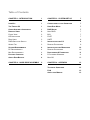
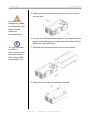
5. Install the second hard drive and mount it with two screws
on each side.
Be careful not to
damage any cables
or components, and
make sure the
cables are
connected firmly.
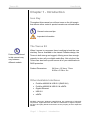
6. Connect the SATA and power cables to your hard drives. Be
careful not to damage any components and confirm that the
cables are connected firmly.
The LED indication
for HDD1 is
referring to the hard
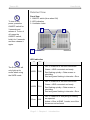
7. Slide the inner enclosure back into the outer chassis.
drive connected to
CN2, where HDD2
is referring to CN1.
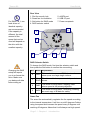
8. Fasten the four screws to finish the assembly.
Page 6 / Chapter 2 - HDD Assembly