1
User Interface
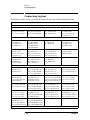
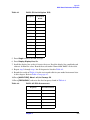
Flatness Compensation Table
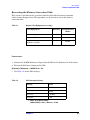
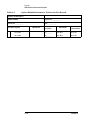
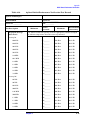
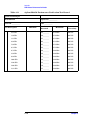
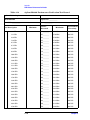
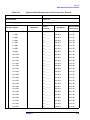
Table 3-4
A Sample Frequency Amplitude Sheet
Point
Frequency
(GHz)
Delta
Amplitude (dB)
Correction
(dBm1)
1
2.8492
0 dB
0 dB
2
2.85
___ dB
– (___ dB)
…
___ GHz
___ dB
– (___ dB)
200
___ GHz3
___ dB
– (___ dB)
1. The correction field will contain the negative, or opposite of the Amplitude field. The correction value is what the instrument uses rather
than the Amplitude (or error) value.
2. This point is needed so that the corrections are not applied to Band 0.
3. This should be the upper limit of the PSA.
Entering the Flatness Correction Data
To manually enter these recorded values into the PSA instrument, perform the following
sequence for each point.
• [AMPLITUDE] > More 1 of 3 > Corrections > Other > Edit
• Select [FREQUENCY] 2.849 GHz
• Select [AMPLITUDE] 0 dB
After each entry, the Point counter automatically increments for entry of the next point.
• Select [FREQUENCY] 2.85 GHz
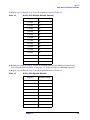
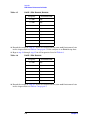
• Select [AMPLITUDE] ___ dB (Refer to Table 3-4)
• Continue entering data for each point in the table.
Press [RETURN], when finished.
To use the new correction table, insure that the corrections are turned on.
CAUTION
It is recommended that the correction set entered be saved on the
internal drive or a floppy disk for future references. See the PSA User’s
and Programming Reference Guide for information on saving correction
values.
Chapter 3
3-9