1
4.9 Ethernet connection
The fixtures on a data link are connected to the Ethernet with Art-Net communication protocol.The controlling
software from PC (or lighting console) has to support Art-Net protocol.
Art-Net communication protocol is a 10 Base T Ethernet protocol based on the TCP/IP.Its purpose is to allow
transfer of large amounts of DMX 512 data over a wide area using standard network technology.
IP address is the Internet protocol address.The IP uniquely identifies any node (fixture) on a network.
The Universe is a single DMX 512 frame of 512 channels.
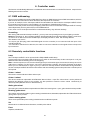
The ColorSpot 575E AT is equipped with 8-pin RJ- 45 socket for Ethernet input.Use a network cable category 5
(with four "twisted" wire pairs) and standard RJ-45 plugs in order to connect the fixture to the network.
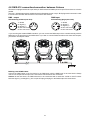
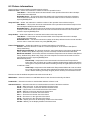
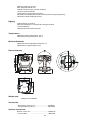
RJ-45 socket (front view):
RJ-45 plug (front view):
1- TD+
2- TD3- RX+
4- Not connected
5- Not connected
6- RX7- Not connected
8- Not connected
Patch cables that connect fixtures to the hubs or LAN sockets are wired 1:1,that is,pins with the same numbers
are connected together:
1-1
2-2
3-3
4-4
5-5
6-6
7-7
8-8
If only the fixture and the computer are to be interconnected,no hubs or other active components are needed.A
cross-cable has to be used:
1-3
2-6
3-1
4-8
5-7
6-2
7-5
8-4
Ethernet connection
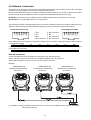
Connect the Ethernet-inputs of all fixtures in the fixture chain with the network.
Option " Ethernet" has to be selected from "Set Ethernet Mode" menu on the fixture.
Set IP address (002.xxx.xxx.xxx / 010.xxx.xxx.xxx) and the Universe.
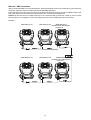
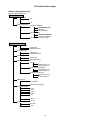
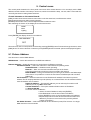
Example:
(DMX address=49)
IP addres=002.168.002.004
Universe=1
(DMX address=25)
IP addres=002.168.002.003
Universe=1
(DMX address=1)
IP addres=002.168.002.002
Universe=1
An advised PC setting: IP address: 002.xxx.xxx.xxx / 010.xxx.xxx.xxx (Different from fixture IP addresses)
NET mask: 255.0.0.0
13