1
Telephone Operation
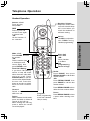
Base Operation
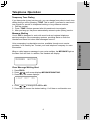
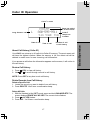
Message Waiting Indicator
Basic Operation
If you subscribe to telephone
company voicemail with a visual
message waiting signal, this
light flashes, and MESSAGES
WAITING displays on the
Handset screen, when you have
voicemail waiting.
Page/Handset Locator
Press to page the Handset. Press
again, press OFF on Handset, or
place Handset in it’s Base to
cancel the page.
In Use/Charging Indicator
• Flashes in unison with the ring
of an incoming call.
• Flashes slowly when the Handset
is in use.
• Flashes rapidly when a call is
on hold.
• Glows steadily when the Handset
is charging.
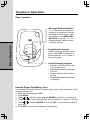
Handset Ringer Style/Battery Save
You can select from four different Handset ringer styles, or turn the ringer off and
extend the battery life.
1. Make sure the Handset is OFF.
2. Press PROG.
3. Press or until the screen displays RINGER: and the current selection.
4. Press SEL. The current setting blinks, and you will hear a sample of the ring.
5. Press or to select RINGER: 1, 2, 3, 4 or OFF. You will hear a sample of
each ring.
6. Press SEL to choose the displayed ringer setting.
8