1
ACCESSORIES
Performing an Electronic
Calibration Using the Optional
N.I.S.T. Calibration Module
If you purchased the optional N.I.S.T. calibration module
(Catalog No. E896X5) you can perform a calibration of
the Nanopure purity sensing electronics traceable to
N.I.S.T. standards.
1.
Disconnect power cord from the unit.
2.
Unlatch and open the right door. Remove the 2
screws and remove the cover plate over the PC
boards.
3.
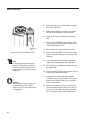
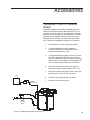
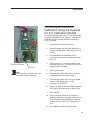
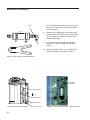
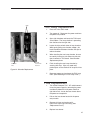
Locate the outlet cell connection on the
circuit board and remove the outlet cell connection at J2.
4.
Connect the N.I.S.T. calibration module to the
connection point (J2), “To Outlet Cell” on the calibration board (PC1190X2).
5.
Close and latch door.
6.
Reconnect the power cord and turn the unit on
by depressing the main power switch.
7.
From the (Idle) mode, Press the UP or DOWN
arrow until the display reads, “N.I.S.T.
Calibrate?” Press ENTER.
8.
Display will show “Calibration Module Installed?”
Press the UP or DOWN arrow to select (YES).
9.
Press ENTER.
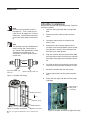
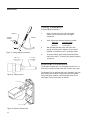
Figure 16: PC Board
J2
Connection
Note
The calibration (in progress) may take
up to two minutes to complete.
10. Display will read “Calibration (In Progress).”
When the calibration is complete the display will
read “Calibration (passed/failed) for 4 seconds
and then return to the”N.I.S.T. Calibrate?” display.
11. Press BACK to return to the (Idle) mode.
35