1
Contents
For Your Records ....................................................................................... 1
Projector features....................................................................................... 2
Package Contents ...................................................................................... 2
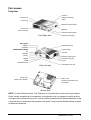
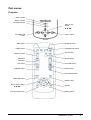
Part names .................................................................................................. 3
Projector ................................................................................................................4
Controls .................................................................................................................4
Setting up .................................................................................................... 5
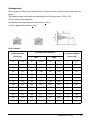
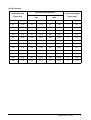
Arrangement ..........................................................................................................6
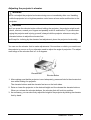
Adjusting the projector's elevator ......................................... 8
About the filter cover for a unit installed bottom side up ........................................9
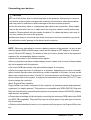
Connecting your devices .....................................................................................10
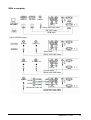
With a computer...................................................................................................11
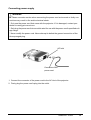
Connecting power supply ....................................................................................12
Remote control ......................................................................................... 13
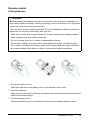
Putting Batteries ..................................................................................................13
Operating the remote control ...............................................................................14
Power on/off.........................................................................................................15
Turning on the power...........................................................................................15
Turning off the power...........................................................................................15
Operating................................................................................................... 16
Adjusting the volume ...........................................................................................16
Temporarily muting the sound .............................................................................16
Selecting an input signal......................................................................................16
Searching an input signal ....................................................................................17
Selecting an aspect ratio .....................................................................................17
Adjusting the zoom and focus..............................................................................17
Using the automatic adjustment feature ..............................................................17
Adjusting the position...........................................................................................18
Correcting the keystone distortions .....................................................................18
Using the magnify feature....................................................................................18
Freezing the screen .............................................................................................19
Temporarily blanking the screen..........................................................................19
Multifunctional setting ............................................................................. 20
Using the menu function ......................................................................................20
EASY MENU........................................................................................................21
ASPECT, KEYSTONE, MODE,BRIGHT, CONTRAST, COLOR , TINT, SHRPNESS, WHISPER , MIRROR, RESET , FILTER TIME, LANGUAGE, Go To Advanced Menu
05/12/04 A
ViewSonic PJ502
i