1
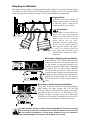
Storing Unused Modules
Power Processing modules contain static-sensitive devices; therefore
unused modules must be stored in a static-safe environment, preferably at
normal room temperature!
Network Module Information
The CC-BLK (blank panel) comes standard with all amplifiers.
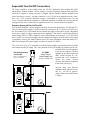
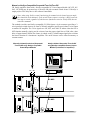
When a Network module (NC-NXS) is installed in this bay, network connection is made via a pair
of three-pin Phoenix-type connectors. They are wired in parallel, and form a loop-through connection. (Mates for these connectors are shipped with the Network module.) Network bus addressing is
accomplished through use of the Hi and Lo Address dials. See the NexSys Software manual for more
information on NexSys bus connection and configuration.
Power/Output Module Speaker Connections
Speakers are connected using the Output Barrier Strip connectors. Spade lugs, ring tongues or bare
wire may be connected to the output barrier strip elements. Spade Lug measurements for Output
barrier strip are as follows: .44" (11mm) screw spacing, .32" (8mm) lug space. For output spade
lugs, Panduit Part No. PNF 14-8LF-C (or equivalent) is recommended. Make sure the amplifier is
turned off before you change any output connections or jumpers. Also ensure that the load impedance being connected is not less than the amplifier's ability to drive it. See the CK family Power
Processing Amplifier Manual for more information on speaker connection.
Service Information
For service, contact your nearest Crest Audio Service Center, Distributor, Dealer, or Crest Audio Inc.
Customer Service directly at: Tel. 201.909.8700 (USA) Fax. 201.909.8744 (USA). For technical
inquiries only, the Crest Audio Technical Services Dept. can be faxed at 201.587.0550 (USA). Crest
Audio may also be contacted on the World Wide Web at: http://www.crestaudio.com.