1
12
Small Business
User’s Guide
High Speed Internet
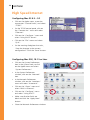
Configuring Mac OS 8.5 – 9.2
• Click on the Apple menu, move the
mouse over “Control Panel”, and select
“TCP/IP”
• On the TCP/IP control panel, click on
the “Connect via:” menu and select
“Ethernet”.
• Click on the “Configure:” menu and
select “Using DHCP Server”.
• Click on the “File” menu and select
“Quit”.
• On the warning dialog box that asks,
“Save the changes to the current
configuration?” click the “Save” button.
Configuring Mac OSX, 10.1.5 or later
• Click on the System Preferences
icon in the System Dock, or click
on the Apple menu and select
“System Preferences”.
• In the System Preferences
window, click on the “Network”
icon.
• In the Network Preferences
window, click on the “Locations”
menu and select “Automatic”.
• Click on the “Show” menu and
select “Built-in Ethernet”.
• Click on the “Configure” menu
and select “Using DHCP”.
• Make sure all other fields are
black and click the “Apply Now”
button.
• Close the Network Preferences window.
12