1
16
Small Business
User’s Guide
Audio/Video Cables
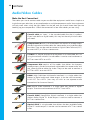
Make the Best Connection!
The cables you use to connect cable to your audio/video equipment could be as simple as a
single line to your television, or as complicated as a multiple component audio. Your equipment
will only work when using the right cables for the job, and you should know how you are
hooking up your components. Check the connectors to see what cables you are using:
Coaxial cable, or “coax,” is the standard cable line that is installed.
If you have basic or digital cable, this may be the only kind of cable
you need.
Composite RCA consists of three cables that deliver an analog output
divided into red and white cables for stereo audio, and a yellow cable
for video. They can be used to connect a Digital Cable Terminal (DCT)
to a non-HDTV, a VCR or a stereo tuner.
S-Video is a sharper alternative to the yellow RCA video cable, but still
using the red and white RCA audio cables. It can be used to connect a
DCT to a non-HDTV or a VCR.
Component RCA consists of five cables that deliver the sharpest
analog output, divided into red and white cables for stereo audio, and
red, green and blue cables for video. They can be used to connect a
DCT to a HDTV or a non-HDTV.
HDMI (High Definition Multimedia Interface) is a single cable that
delivers a digital audio and video output. It can be used to connect
a HD DCT to a HDTV. (You may still wish to use separate audio
connections for Surround Sound.)
DVI (Digital Video Interface) is a single cable that delivers a digital
output. It can be used to connect a HD DCT to a HDTV.
Coaxial SPDIF (Sony/Philips Digital InterFace) is a single cable that
delivers Dolby Digital 5.1 audio output. It can be used to connect a
DCT to a stereo tuner.
Optical SPDIF is a single cable that delivers the best available Dolby
Digital 5.1 audio output. It can be used to connect a DCT to a stereo
tuner.
16