1
Reference
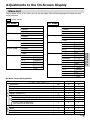
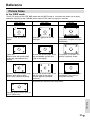
In the OPTION mode
Depending on the WIDE VIEW setting, the display of the wide mode changes. The display also changes
depending on the input video signal.
WIDE VIEW
Input signal
9:00
STRETCH
9:00
9:00
Subtitles
FULL
Subtitles
Subtitles
Regular video (broadcast)
signal
Picture is stretched horizontally
while black bands appear to
make the vertical-horizontal
ratio 16:9.
Picture is stretched over the
entire screen.
Letter Box
Wide screen with black bands
at the top and bottom of the
display
Full picture is visible but black
bands appear at the top and
bottom. (Maximum stretching in
the horizontal direction)
Picture is stretched over the
entire screen.
Squeeze (left-right compression)
Picture when playing back
DVD's with squeeze recording
Full picture is visible. Picture
becomes perfectly round. Black
bands appear at the top and
bottom.
Full picture is visible. Picture is
slightly stretched vertically.
For high-grade pictures such as
HDTV (Wide size)
US
38