1
Remote Control Operation
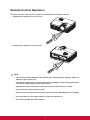
Point the remote control at the infrared remote sensor and press a button.
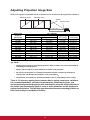
• Operating the projector from the front
15
15
5m
5m m
9
m
7m 5
MI1
HD
HD
eo
Vid
MI2
o
mp
Co
PC
to
Au
ter
En
Sw
ap
lt
fau
De
• Operating the projector from the rear
15
15
5m
5m
9m
MI1
HD
MI2
HD
eo
Vid
o
mp
Co
PC
to
Au
ter
En
Sw
ap
lt
fau
De
Note
• Do not point the laser directly to the people's eyes (especially small children). There is a
danger of injury to the eyes.
• The remote control may not operate when there is sunlight or other strong light such as
a fluorescent lamp shining on the remote sensor.
• Operate the remote control from a position where the remote sensor is visible.
• Do not drop the remote control or jolt it.
• Keep the remote control out of locations with excessively high temperature or humidity.
• Do not get water on the remote control or place wet objects on it.
• Do not disassemble the remote control.
11