1
A bout programming the L-10D ELF
H How do I select a TV service level?
Programming is the process of selecting options from the special features of the
L-10D ELF TV. Programming includes selecting entertainment channels, as well
as educational and information channels and assigning these to different service
levels. TV's are programmed before they are installed in a hospital; however,
when TV's are replaced or the channel numbers change, reprogramming is
needed. Make these programming changes with the infrared hand unit .
Note: This section of the manual assumes that the SETUP MENU is entered from
a TV channel and not Video or PC Channel.
Pressing the SETUP button while on Video or PC channels is explained in
another section. This manual only describes the functions in English but the
equivalent functions are available in the same relative position in either French or
Spanish as selected by the Language function on the first SETUP MENU.
How do I program the L-10D ELF?
1. Turn the TV on.
To do this, point the infrared (IR) hand unit at the lower right corner of the
television and press the POWER button. A small light emitting diode beside
the POWER button on the TV "lights up" when the TV is on. You can also turn
the TV on by pressing the POWER button on the TV control panel.
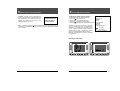
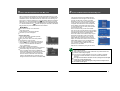
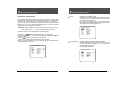
2. Press SETUP. The main SETUP MENU
appears on the TV screen.
) button on the
3. Press the CHANNEL (CH
SETUP MENU Ver : x.x.x
infrared hand unit until your menu selection
is highlighted.
Rental: Free
4. Press the ENT button to accept the
Picture
selection press the VOLUME (VOL )
Sound
button to change the option.
Channel Setup
When you have completed a selection, press
SETUP on the infrared hand held unit to return
to the previous menu selection. Continue to
Press SETUP until the TV program appears.
Features
Blocking
Language: English
+-
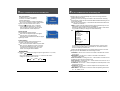
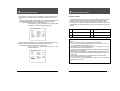
1. Press SETUP on the infrared hand unit.
to select Rental: service level
2. Press CH
3. Press VOL to change the Rental: service
level.
Basic Unpaid - The TV automatically goes
to this service level when the TV is "self
rented".
When the rental fee is paid, simply press the
PAID button on the infrared hand unit.
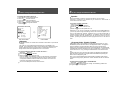
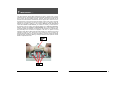
SETUP MENU Ver : x.x.x
Rental: Free
Picture
Sound
Channel Setup
Features
Blocking
Language: English
+-
To Select
To Change
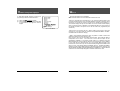
The Ver: X.X.X on the top line of the main or first
Main SETUP MENU
SETUP MENU indicates that the TV will display the
Version number of the firmware installed in the TV. The TV version number is only
displayed if the selected language is English (due to width restrictions).
The internal Digital Tuning System also has a version number which can be
displayed in the DTV Menu section of the SETUP MENU.
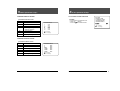
Basic Paid - Choose VOL
Basic Paid or simply press the PAID button on
the infrared hand unit when the patient pays the rental fee for the basic rental
service level.
Confirms that the rental fee is paid and the Basic Paid Service Level is
activated.
Premium 1 - Choose VOL
Premium 1, to rent this service level to patients
also renting the Basic Paid Service Level. The channels programmed in the
Premium 1 Service Level would normally include the same channels (channel
map) that is programmed in the Basic Paid Service Level.
Premium 2 - Choose VOL
Premium 2 to rent this service level. The
channels programmed in the Premium 2 Service Level would normally include
the same channels (channel map) that are programmed in the Premium 1
Service Level.
To Select
To Change
Main SETUP MENU
Owner's Manual
15
Owner's Manual
16