1
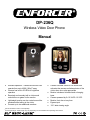
ENFORCER Wireless Video Door Phone
Operating the Wireless Video Door Phone:
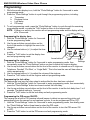
Request entry:
1. Press the doorbell button on the camera.
2. Wait for someone to press the “ON/OFF” button on the monitor to unlock the door.
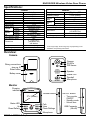
ON/OFF:
• Turn monitor
ON/OFF
• Standby
mode
• Unlock door
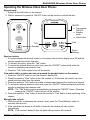
Talk
Doorbell
View
Photo/
Settings
Receive a visitor:
1. If a visitor presses the doorbell button on the camera, the monitor’s display turns ON and the
monitor sounds the chosen ring tone.
2. To talk with the visitor, press the “Talk” button.
3. To unlock the optional electronic door lock, press the “ON/OFF” button briefly while the
monitor is displaying the camera’s view.
4. Press the “Talk” button again to turn off the monitor.
View and/or talk to a visitor who has not pressed the doorbell button on the camera:
1. Press the “ON/OFF” button to turn the monitor’s display ON.
2. Press the monitor’s “View” button to turn the camera on. At this time, the monitor can hear
sound and view video from the camera.
3. Press the monitor’s “Talk” button to enable communication between the monitor and camera.
4. To unlock the optional electronic door lock, press the “ON/OFF” button momentarily while the
monitor is displaying the camera’s view.
NOTE: The “Talk” button must be pressed before pressing the “ON/OFF” button. Otherwise
pressing the “ON/OFF” button will turn off the monitor.
5. Press the monitor’s “View” button to mute the monitor or “Talk” button to end monitoring of the
camera.
Manually take a photo:
1. While the monitor is displaying the camera’s view, press the “Photo/Settings” button to
manually take a photo.
2. If the user does not answer a call within 5 seconds, the camera will take a photo
automatically.
NOTE: If the monitor’s battery is low, the photo-taking function will not work.
SECO-LARM U.S.A., Inc.
9