1
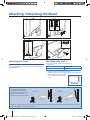
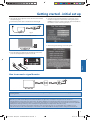
Attaching / Detaching the Stand
4xB
M (4x12)
/(4x14)
2xA
ST (4x16)
/(4x14)
B
B
B
B A
A
1
2
6 x ST(4x16)
/(4x14)
/(4x12)
1
1/2
4
3
Attaching the stand
Wall mounting the TV
For the assembly you will need a screwdriver. Place TV
body on flat surface with the panel facing downwards
to avoid damage
This television requires a VESA 400 wall mount,
or equivalent.
TV
VESA Standard
42“ TV
400 x 200
1. Remove the four screws highlighted below.
2. The wall mount can now be easily attached to the mounting
holes on the rear of the TV. These
holes are indicated in the picture
below.
For optimum viewing, if wall
mounting the TV higher than
eye level, the TV should be tilted
downwards so that the TV’s
screen is ‘face on’. See fig 1 and 2
TV
TV
INCORRECT
CORRECT
fig 1
fig 2
Viewing angle
Viewing angle
Important - If you mount this television on the wall, use only the screws holes for wall mounting. Using other screws can cause
irreparable damage to internal components.
8
User Guide - Blaupunkt - 42-63G-3B-F3TCU-UK.indd 8
19-Jun-12 3:44:19 PM