1
Welcome
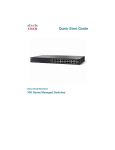
Thank you for choosing the Cisco 500 Series Stackable Managed Switch,
a Cisco network communications device. This device is designed to be
operational right out of the box as a standard layer 2 and 3 switch. In the
factory default configuration, it will forward packets between connecting
devices after power up.
Before you begin installing the switch, make sure you have all of the
package contents available, access to the Cisco 500 Series Stackable
Managed Switch Administration Guide, and a PC with a web browser for
using web-based system management tools.
Package Contents
• Cisco 500 Series Switch
• Rackmount Kit
• Power Cord
• This Quick Start Guide
• Product CD
• Serial Cable
• Rubber Feet
This guide will familiarize you with the layout of the switch and describe
how to deploy the device in your network. For additional information, see
www.cisco.com/smb.
1
Mounting the Cisco Stackable Managed
Switch
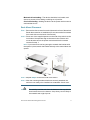
There are two ways to physically install the switch:
• Set the switch on a flat surface.
• Mount the switch in a standard rack (1 rack unit).
Do not deploy the device in a location where any of the following
conditions exist:
High Ambient Temperature—The ambient temperature must not
exceed 104 degrees Fahrenheit (40 degrees Centigrade).
Reduced Air Flow—Both side panels must be unobstructed to prevent
overheating.
2
500 Series Stackable Managed Switches