1
1.5.7 Make SkypeOut call
1.6.2 Answer a PSTN call via handset
Press "00" + "country number" + "phone number", then press
When a PSTN call comes in, the device will ring. Pick up the
.
Example: call someone in Beijing, China, please press
handset to answer the call, or press
00861012345678, and then press
0086
10
------------------------country code
city code
Note:
1.6.3 Answer a call via base
(1) When a call comes in, the device will ring. Press Handfree
.
key to answer the call.
12345678
-------------------destination number
(2) Press Handfree key again to end the call.
1.6.4 Double-channel calls function
(1) You can input “+” instead of “00”.
(1) During one call, when a new call comes in, you will hear the
(2) If you want to use this function, you should buy
prompt tone, the LCD will display the quantity of on-going
SkypeOut Credit from www.skype.com first.
calls.
1.5.8 Activate Handfree while making a call
(1) Enter the number on the handset’s keypad and press
to call out.
(2) Press the Handfree key, the speaker light will flash.
(3) Place the handset on the base.
(2) When a Skype call comes in, press
to answer the call.
(3) When a PSTN call comes in, press
to answer the call.
(4) Press PC to switch to Skype call when in PSTN call.
(5) Press PSTN to switch to PSTN call when in Skype call.
PC again to release the call.
(5) Press the Handfree key to end talking.
1.7 Contacts
1.6 Answer a call
(1) Right click the icon
1.6.1 Answer a Skype call via handset
When a Skype call comes in, the device will ring. Pick up
14
or
(6) When in Skype call, press PC to hold the current call, press
(4) The speaker light will be on.
handset to answer the call, or press
to refuse it.
to refuse it.
on the taskbar and select
“Contacts”
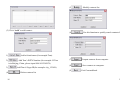
(2) The window will show as below:
15