1
Chapter4 – Linux Installation
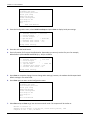
8. Press CTRL-A Z for help on special keys.
9. Query the modem with the model number by sending Ati or ATi3. The modem will respond as follows:
ati
Agere OCM V.92 MT9234ZPX-UPCI Internal Data/Fax/Voice Modem Version 1.02b
OK
This verifies that the modem is present and operational in the system.
10. Press CTRL +A Z X to exit minicom.
After verifying that the modem is operating, you can use any communication software to access the modem.
Linux provides documentation for configuring the communication software included with the operating system.
MultiModem ZPX UPCI/PCIe User Guide
15