1
Traqmate basic and classic User Manual V3.40
March 27, 2013
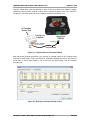
Copy the firmware file, XD1080fw.bin, to the top level directory in the microSD card.
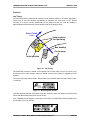
Place the microSD card into the camera and hold the MODE button (P) while pressing and
holding the power button (A). Eventually the red LED (A) should flash while updating the
firmware.
Step 2. Reformat the microSD card (Traqmate customers will not have to perform this step)
Stand the camera on a table, lens down.
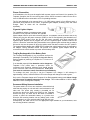
Press and hold buttons (K) and (P) simultaneously until red LED (J) is displayed solid. This will
reformat the microSD card.
Wait until the camera powers off.
Step 3. Change the camera settings (Traqmate customers will not have to perform this step)
Remove the microSD card from the camera, place it into the SD card adapter, and then into a
PC.
Open the XD1080.txt file using the Notepad program on a PC. Change the following items to put
the camera into OneTouch mode.
UPDATE: N
OT: 0
-> change to ->
-> change to ->
UPDATE: Y
OT: 1
Save the file.
Put the microSD card back into the camera and power up again. It should flash LEDS (E) and (F)
briefly and power off.
Test the camara by pressing and holding the power button (A) until the camera powers up. LEDs
(E) and (F) should remain lit to indicate recording.
Power down the camera by pressing and holding the power button (A). The camera is now ready
to use.
Step 4. Update the Traqmate Display Unit and/or Sensor Unit firmware to V3.40
See Traqmate support forum for firmware and update instructions.
Step 5. Update Traqview / TraqStudio and program the Traqmate for the Replay camera
See Traqmate support forum for Traqview / TraqStudio software update. Install on your PC.
Connect to the Display Unit (Traqmate Complete) or to the Sensor Unit (Traqmate Basic). Go to
the IO Data tab and choose Camera and Replay XD. Save the Data into the Traqmate.
Step 6. Install hardware
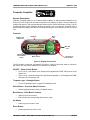
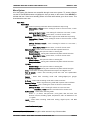
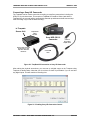
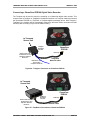
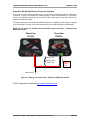
Plug the Traqdata HD2 or TraqSync cable into the Sensor Unit AUX connector.
Plug the ReplayXD interface cable into the Traqdata HD2 or TraqSync cable.
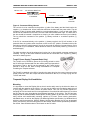
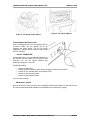
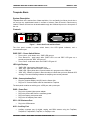
Carefully plug the ReplayXD interface cable into the camera. First line up and insert the two shiny
connectors and push the cable into the slots. Then screw down the threaded cap.
Step 7. Power up and Test
Power up the Traqmate system. On a Basic system, press the red button to record.
Copyright © 2005 - 2013 Track Systems Technologies, LLC
Page 37