1
YOUR UNOFFICIAL KINDLE FIRE MANUAL
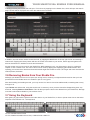
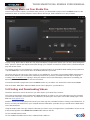
Finally, the menu button found in the center of the toolbar on the lower edge of your Kindle Fire screen offers various additional features. First of all there is the Add bookmark button, a faster way of setting the currently-viewed
webpage as one of your favourites. Share page, meanwhile, enables sharing of the URL with others via email, chat,
Facebook – whatever suitable apps you have installed. Find in page is a search tool designed to aid in finding text on
a particular web page, while History displays a list of all websites visited for the past month. The Clear All button at
the top of this page will delete your history.
The Downloads button displays a list of files that are currently downloading through your browser, while Settings
opens a new screen where a range of advanced configuration options can be found…
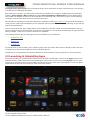
6.2 Configuring the Silk Browser
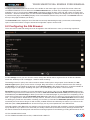
There are various advanced settings that can be applied to the Silk Browser to ease your browsing experience.
Via the Settings screen you can clear the cache, change the default search engine and even enable and disable
Flash and JavaScript code in webpages – ideal for faster browsing!
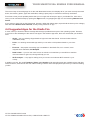
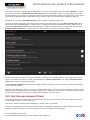
The Settings screen is split up into various sections where similar options are grouped. Under General, the Set
search engine option gives you the choice of Google, Bing and Yahoo!, for instance, while there are also settings
for Text size, zoom and whether the browser should Auto-fit pages to the display dimensions, as well as whether to
display images on web pages. Disabling this option can speed up page load times in some scenarios.
Saved Data concerns everything you have downloaded to your device. Here you can Accept cookies (pretty important when using an Amazon-focused device!) as well as Clear all cookie data, Clear cache (discards temporary files
and databases) and Clear history to delete your archive of visited web pages. If you expect to be completing a lot of
forms which browsing the web the Remember form data setting will save you having to type the same things in each
time – you might prefer to disable this for security reasons, however, which is where Clear form data comes in handy
for deleting any saved form information. Similarly you can have your Kindle Fire Remember passwords, but this isn’t
necessarily the most secure thing to do with a small, portable device that could easily be stolen. If you choose to disable that option, Clear passwords can be used to empty out any stored passwords in the Silk Browser.
Grouped together under Behaviour are settings concerning security. Problems with a website’s security will be flagged
up by default but if you prefer not to see these (not usually a wise choice) the Show security warnings checkbox can
be cleared. Flash and JavaScript both enhance the browsing experience considerably, providing the framework for evHTTP://MAKEUSEOF.COM
HTTP://WWW.CMCAWLEY.CO.UK, CHRISTIAN CAWLEY
22
share: