1
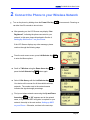
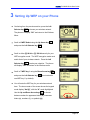
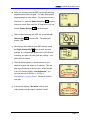
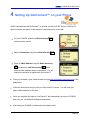
ZyXEL P-2000W Quick Start Guide 4 Setting Up GloConnect™ on your Phone ZyXEL has partnered with GloConnect™ to provide you with VoIP SIP Service, which you’ll need to connect your phone to the Internet to send and receive voice calls. On your P-2000W, press the Left Selector key to enter the menu options. Select 1.Information using the Left Selector key Scroll to 3.MAC Address using the Down Arrow key and press the Left Selector key . . Write down the MAC address shown on the phone. You will need this information to register with GloConnect™. From your computer, open a web browser and type http://officedepot.gloconnect.com in the address bar. Follow the instructions to sign up for your GloConnect™ account. You will need your phone’s MAC address for this step. Once you complete your sign-up, GloConnect™ will automatically set up your P-2000W phone for you. No additional settings are necessary. Start using your P-2000W to make and receive phone calls! Page 12