1
Appendix C – Advanced Configuration: Modifying Virtual Matrices
Appendix C – Advanced Configuration:
Modifying Virtual Matrices
Applicability Notice: This appendix applies to XNConnect version 2.10.0. XNConnect’s version
information is found under its Help menu. Version 2.10.0 supports full Device Discovery through
AMX’s AutoPatch Duet module (firmware v1.4.0 or higher is required).
Overview
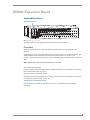
Your AMX AutoPatch Distribution Matrix is pre-engineered at the factory. It is ready to switch once the
source and destination devices are attached. The configuration file does not need any advanced
modification unless you change the hardware or want to change or add virtual matrices. Any new
equipment for upgrading an existing system will be shipped from the factory along with a new
configuration file to be loaded onto the system. We strongly recommend using the new file instead of
attempting to modify the existing configuration file to accommodate the new equipment.
Important: If any modifications are made to the configuration file other than customizing channel
names, creating local presets, or changing control panel passwords, provide technical support with
a copy of the modified .xcl file for future support.
If your configuration file needs any type of additional advanced modification, we strongly recommend
contacting technical support, (see page 38) to request a modified .xcl file or ask for assistance.
Caution: Virtual matrix modifications are an advanced feature of XNConnect that should not be
attempted unless you are extremely familiar with XNConnect and the AMX AutoPatch Distribution
Matrix being configured.
This appendix covers three advanced virtual matrix related tasks:
Joining (combining) virtual matrices
Creating breakaway virtual matrices
Creating a new virtual matrix
Important: Save a back up copy of the existing configuration file if you find it necessary to modify
the file for any reason.
Virtual Channels and Virtual Matrices
A system’s configuration allows groups of incoming signals from source devices to be routed through
the system and out to destination devices. The signals are grouped into virtual input and output channels
in which the channels’ component signals (such as R, G, B, H, and V) can be grouped into a single
channel to permit the simultaneous switching of them as an aggregate signal (RGBHV). The resulting
virtual channel uses a single input or output number for control purposes.
A virtual channel is assigned to a physical connector or group of physical connectors. The signals in the
virtual channels will be switched in unison (e.g., a Y signal and a c signal on a Y/c board are each
assigned to a different connector but are switched in unison). A virtual channel can also be a subset of a
signal on a single connector (e.g., the left channel of a stereo audio connector).
The virtual input and output channels are then grouped into virtual matrices (VMs) that define where the
virtual channels can be routed. A virtual channel on one VM cannot be routed to a virtual channel on
another VM. However, a VM can be created that includes multiple VMs. Normally the virtual channels
are assigned to a VM in a pattern (see page 147), but they can be assigned individually (see the
XNConnect Help file).
Optima Instruction Manual
139