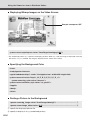
1
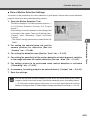
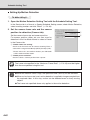
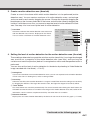
Using the Motion Detection Function with a Predetermined Schedule
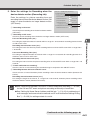
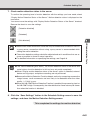
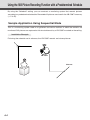
By running the motion detection function according to a schedule, you can construct a monitoring
system that records pictures in accordance with a preset schedule and that operates in response
to variations in the video image from the area covered by the camera. The recorded pictures are
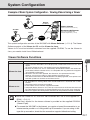
stored in the VB-C50Fi’s memory (→ P.3-25).
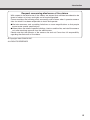
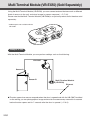
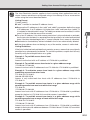
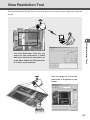
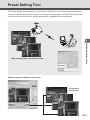
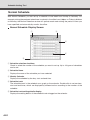
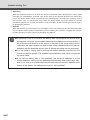
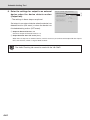
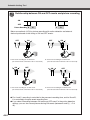
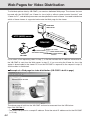
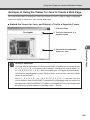
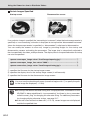
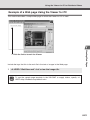
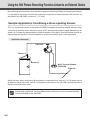
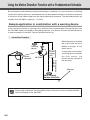
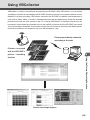
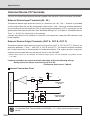
Sample application in combination with a warning device
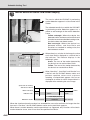
In this monitoring system, a warning tone is emitted when someone enters through the door and
the VB-C50Fi camera mounted on the ceiling captures a still picture. Connect the devices below
to each connector of the Multi-Terminal Module and set up.
○○○○○○
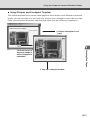
Installation Example
When the camera shooting
the area inside the door
detects a change, an ON
event occurs.
Warning
device
Motion
detected
Power
supply
unit
VB-C50Fi
Warning device
ON/OFF
In response to that event,
a warning tone is issued by
the Out1 control, the
camera shoots a picture of
the entrance.
Ethernet
Multi-Terminal
Module (VB-EX50)
Tip
6-6
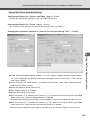
Please refer to the Multi-Terminal Module User’s Manual for how to connect the MultiTerminal Module to the VB-C50Fi.