1
Safety........................................................................................................................................................................ 4
National Conventions ......................................................................................................................................... 4
Power ................................................................................................................................................................ 5
Installation.......................................................................................................................................................... 6
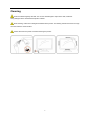
Cleaning............................................................................................................................................................. 7
Other .................................................................................................................................................................. 8
Setup ........................................................................................................................................................................ 9
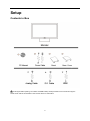
Contents in Box ................................................................................................................................................. 9
Setup Base & Stand Cover .............................................................................................................................. 10
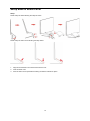
Remove Base & Stand Cover .......................................................................................................................... 11
Adjusting Viewing Angle................................................................................................................................... 12
Connecting the Monitor .................................................................................................................................... 13
Adjusting ................................................................................................................................................................. 14
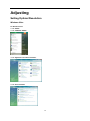
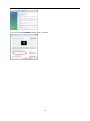
Setting Optimal Resolution .............................................................................................................................. 14
Windows Vista .......................................................................................................................................... 14
Windows XP ............................................................................................................................................. 16
Windows ME/2000 .................................................................................................................................... 17
Hotkeys ............................................................................................................................................................ 18
OSD Setting ..................................................................................................................................................... 20
Luminance ................................................................................................................................................ 21
Image Setup ............................................................................................................................................. 22
Color Setup............................................................................................................................................... 23
Picture Boost ............................................................................................................................................ 24
OSD Setup ............................................................................................................................................... 25
Extra ......................................................................................................................................................... 26
Exit............................................................................................................................................................ 27
LED Indicator ................................................................................................................................................... 28
Driver ...................................................................................................................................................................... 29
Monitor Driver .................................................................................................................................................. 29
Windows 7 ................................................................................................................................................ 29
Windows Vista .......................................................................................................................................... 33
Windows XP ............................................................................................................................................. 35
Windows 2000 .......................................................................................................................................... 38
Windows ME ............................................................................................................................................. 38
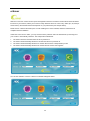
i-Menu .............................................................................................................................................................. 39
e-Saver ............................................................................................................................................................ 40
Screen+ ........................................................................................................................................................... 41
Troubleshoot ........................................................................................................................................................... 42
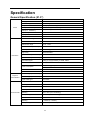
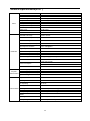
Specification............................................................................................................................................................ 44
General Specification (21.5”) ........................................................................................................................... 44
General Specification(23.6”) ............................................................................................................................ 45
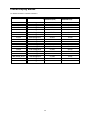
Preset Display Modes ...................................................................................................................................... 46
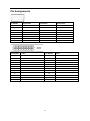
Pin Assignments .............................................................................................................................................. 47
Plug and Play................................................................................................................................................... 49
Regulation ............................................................................................................................................................... 50
FCC Notice ...................................................................................................................................................... 50