1
Changing the settings
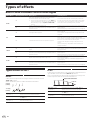
1 Press the [SETUP (WAKE UP)] button for over 1
second.
About the auto standby function
The [USER SETUP] screen is displayed.
! To display the [CLUB SETUP] screen, first turn this unit’s power
off, then press the [POWER] button while pressing the [SETUP
(WAKE UP)] button.
2 Press the [BEAT c, d] button.
Select the setting item.
3 Press the [TAP] button.
The screen switches to the setting item’s setting value change screen.
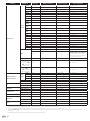
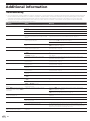
When [Auto Standby] is set to [ON], the standby mode is set automatically if 4 hours pass with all of the conditions shown below met.
— That none of this unit’s buttons or controls are operated.
— That no audio signals of –10 dB or greater are input to this unit’s
input terminals.
! When the [SETUP (WAKE UP)] button is pressed, the standby mode
is canceled.
! This unit is shipped with the auto standby function turned on. If you
do not want to use the auto standby function, set [Auto Standby] to
[OFF].
Change the setting value.
About the talk over function
5 Press the [TAP] button.
Enter the setting value.
The previous screen reappears.
! To return to the previous screen without changing the settings, press
the [AUTO/TAP] button.
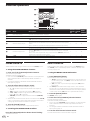
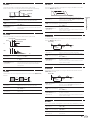
The talk over function has the two modes described below.
—[ADV] (advanced talk over): The mid-range only of the sound of channels other than the [MIC] channel is attenuated according to the
[Talk Over LEVEL] setting value and output.
dB
6 Press the [SETUP (WAKE UP)] button.
Close the [USER SETUP] screen.
! To close the [CLUB SETUP] screen, press the [POWER] button to turn
this unit’s power off.
Changing the settings
4 Press the [BEAT c, d] button.
Frequency
—[NOR] (normal talk over): The sound of channels other than the [MIC]
channel is attenuated according to the [Talk Over LEVEL] setting
value and output.
dB
Frequency
Setting preferences
*: Setting upon purchase
Mode
USER SETUP
CLUB SETUP
Options settings
Screen display
Setting value
Descriptions
MIDI CH
MIDI CH
1* to 16
Sets the MIDI channel.
MIDI Button Type
MIDI BT
TGL*, TRG
Selects the MIDI signal transmission mode, [TGL (TOGGLE)] or [TRG
(TRIGGER)].
Talk Over Mode
TLK MOD
ADV*, NOR
Selects the talk over function’s mode, [ADV(ADVANCED)] or
[NOR(NORMAL)].
Talk Over LEVEL
TLK LVL
–6 dB, –12 dB,
–18 dB*, –24 dB
Sets the talk over function’s sound attenuation level.
Digital Master Out
Level
DOUT LV
–19 dB*, –15 dB,
–10 dB, –5 dB
Sets the maximum level of the sound output from the [DIGITAL MASTER
1
OUT] terminals.
Digital Master Out
Sampling Rate
DOUT FS
48 kHz, 96 kHz*
Sets the digital signal’s sampling rate.
Sets the attenuation level of the sound output from the [MASTER1] and
[MASTER2] terminals.
MASTER ATT.
MST ATT
–6 dB, –3 dB, 0 dB*
Auto Standby
AUTOSTB
ON*, OFF
Turns the auto standby function on and off.
Sets whether or not to output the microphone’s audio signals from [BOOTH]
terminals.
Mic Output To Booth
Monitor
MIC BTH
ON*, OFF
Peak Limiter
PKLIMIT
ON*, OFF
Lessens sudden, unpleasant digital clipping of the master output.
PC UTILITY
PC UTLY
ON*, OFF
Sets whether or not to launch the computer’s setting utility software automatically when a USB cable is connected.
Factory Reset
INITIAL
YES, NO*
Restores all the settings to their factory defaults.
1 Note that the output sound may be distorted even if the master level indicator does not light up to the very top.
En
21