1
Effect Types and Parameters
Effect Types and Parameters
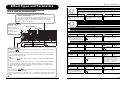
COMP
COMP (Compressor) module
Attenuates high-level signal components and boosts low-level signal components,
thereby keeping the overall signal level within a certain range.
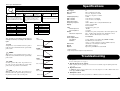
How to read the parameter table
SENSE
Effect parameters 1 – 3
These are the parameters that can be adjusted with Parameter knobs 1 – 3 when
the effect type is selected. The setting range for each parameter is shown.
Three-digit setting values are shown with a dot between the two numerals.
Example: 1 – 98, 1.0 = 1 – 98, 100
0 – 10
Adjusts the compressor sensitivity.
Higher setting values result in higher
sensitivity.
ATTACK
FS, SL
Selects compressor attack speed in two
levels. Available settings are "FS" (fast)
and "SL" (slow).
LEVEL
2 – 98, 1.0
Adjusts the signal level after passing the
module.
WAH/EFX
WAH/EFX (Wah/Effects) module
Module selector
The Module selector
symbol shows the
position of the knob at
which this
module/parameter is
called up.
Comprises wah and filter effects as well as VCA type effects.
AW
Effect module
AUTO WAH
This effect varies wah in accordance with playing intensity.
Effect type
AUTO RESONANCE
AR Ar
This effect varies the frequency band of the resonance filter according to the picking intensity.
DELAY
DELAY module
DL
dL
This is a delay module which allows long delay times and use of the hold function.
DELAY
HOLD This is a ping-pong type delay where the delay sound alternates between left and right.
EC
EC
ECHO
HOLD This effect simulates a tape echo with a long delay time of up to 5000 ms.
These three effect types have the same parameters.
1 – 99,
1.0 – 5.0
FEEDBACK
0 – 98, 1.0
MIX
0 – 98, 1.0
TAP Adjusts the delay time. In the
range from 10 – 990 ms, the
adjustment is made in 10-ms
steps (1 – 99). For 1 second and
above, the adjustment is made in
100-ms steps (1.0 – 2.0).
Adjusts the feedback amount.
The two effect types above have the same parameters.
POSITION
HOLD This is a delay with a maximum setting of 5000 ms.
PD
Pd
PINGPONG DELAY
TIME
AW
Adjusts the mixing ratio of
original sound and effect sound.
bF, AF
Selects the connection position of the
WAH/EFX module. Available settings
are "bF" (before DRIVE module) and
"AF" (after EQ/EXTRA EQ module).
1–5
Selects the frequency band that is
boosted.
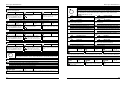
A pedal icon (
) in the listing indicates a parameter that can be controlled with the expression
pedal (FP01/FP02).
Specify the respective module as modulation target for the expression pedal (→ p. 19), and then
select the respective effect type of the module. The parameter can then be controlled in real time
with a connected expression pedal.
-10 – -1, 1 – 10
Adjusts the effect sensitivity.
TONE
0 – 10
Adjusts the sound quality.
TAP
DEPTH
0 – 98, 1.0
HOLD
A foot switch icon (
) in the listing indicates an effect type for which hold can be turned
on and off with the foot switch (FS01).
Set the foot switch function to "dH" (delay hold) (→ p. 18) for the respective patch. When this patch
is then selected in play mode, the hold function can be switched on and off by pressing the foot
switch.
22
Adjusts the modulation depth.
ZOOM G2
LEVEL
2 – 98, 1.0
Adjusts the signal level after
passing the module.
RATE
0 – 50
TAP Adjusts the effect rate.
u0 – u9, d0 –
d9, t0 – t9
Allows selection of the modulation
waveform. Available settings are "u"
(rising sawtooth), "d" (falling sawtooth),
and "t" (triangular). Higher setting
values result in more clipping of wave
peaks, which reinforces the effect.
WAVE
PHASER
PH PH
This effect produces sound with a pulsating character.
POSITION
Hold
Adjusts the resonance of the sound.
TREMOLO
TR tr
This effect periodically varies the volume.
Tap
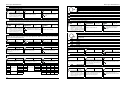
A [TAP] key icon (
) in the listing indicates a parameter that can be set by hitting the [TAP]
key.
In edit mode, when the respective module/effect type is selected, repeatedly hitting the [TAP] key
will set the parameter according to the key press interval (modulation cycle, delay time, etc.).
In play mode, if the DELAY module is ON for the currently selected patch, repeatedly hitting the
[TAP] key will temporarily change the parameter.
RESONANCE 0 – 10
BOOSTER
BS bS
Raises signal gain and creates a dynamic sound.
RANGE
Expression pedal
SENSE
bF, AF
Selects the connection position of the
WAH/EFX module. Available settings
are "bF" (before DRIVE module) and
"AF" (after EQ/EXTRA EQ module).
ZOOM G2
RATE
0 – 50
TAP Adjusts the modulation rate.
COLOR
1–4
Adjusts the type of sound.
23