1
Features
Terms Used in This Manual
Thank you for selecting the ZOOM G2 (hereafter simply called the "G2"). The G2 is a multi effect
processor with the following features and functions.
This section explains some important terms that are used throughout the G2 documentation.
IN
● Latest processing technology for outstanding performance
96 kHz / 24 bit sampling (with 32 bit internal processing) assures excellent sound quality. Frequency
response remains flat up to 40 kHz, and input-converted signal-to-noise ratio is an amazing 120 dB,
demonstrating the high level of performance achieved by the G2.
● Versatile palette of effects including new creations
Out of a total of 54 effects, up to nine (including ZNR) can be used simultaneously. The high-quality
choices provided by the G2 include distortion effects that simulate the tones of famous amps and effects
pedals, 6-band guitar EQ and delay effects with "hold" controloperated by foot switch.
● Great for live performances and direct recording
The distortion effect module provides two different algorithms for each of its 17 effect types, one for live
performance and one for direct recording. Depending on the on/off setting of the CABINET & MIC
effect which simulates amp cabinet sound and mic characteristics, the most suitable algorithm is
automatically selected, giving you the best sound for any application.
● Integrated rhythm functions and auto-chromatic tuner
A number of rhythm patterns using realistic PCM drum sounds are provided. This is convenient for use
as a metronome during individual practice or to provide a simple rhythm part for a quick session. An
auto-chromatic tuner for guitar is also built right into the unit, allowing you to easily tune your
instrument also at home or on stage.
● Sophisticated user interface
The combination of a rotary type selector and three parameter knobs make the effect editing process
intuitive and quick. The mute interval when switching patches has been reduced to less than 5
milliseconds. Seamless patch changing is now a reality.
● Dual power supply principle allows use anywhere
The G2 can be powered from four IEC R6 (size AA) batteries or an AC adapter. Continuous operating
time on batteries is approximately 7.5 hours with alkaline batteries.
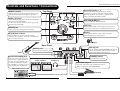
COMP WAH/EFX ZNR DRIVE EQ EXTRA EQ/CABI&MIC MOD/SFX
■ Effect module
As shown in the illustration above, the G2 can be
thought of as a combination of several single effects.
Each such effect is referred to as an effect module. In
addition to modules comprising compressor effects
(COMP), amp simulator/distortion effects (DRIVE),
and modulation/special effects (MOD/SFX), the G2
also provides a module for ZNR (ZOOM Noise
Reduction). Parameters such as effect intensity can
be adjusted for each module individually, and
modules can be switched on and off as desired.
■ Effect type
Within some effect modules, there are several
different effects which are referred to as effect types.
For example, the modulation/SFX effect module
(MOD/SFX) comprises chorus, flanger, pitch shifter,
delay, and other effect types. Only one of these can
be selected at a time.
■ Effect parameter
All effect modules have various parameters that can
be adjusted. These are called effect parameters.
In the G2, effect parameters are adjusted with the
parameter knobs 1 – 3. Similar to the knobs on a
compact effect, these change aspects such as tonal
character and effect intensity. Which parameter is
assigned to each knob depends on the currently
selected effect module and effect type.
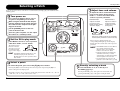
Operating the G2 on batteries
1. Turn the G2 over and open the cover
● Easy operation with foot switch and expression pedal
G2
bottom view
An optional foot switch (FS01) or expression pedal (FP01/FP02) can be connected to the CONTROL IN
jack. The foot switch is convenient for quickly switching effect programs, setting the tempo for the
rhythm function, or switching delay hold on and off. The expression pedal can be used to adjust the
volume or the tonal quality of an effect in real time.
Please take the time to read this manual carefully so as to get the most out of the unit and to ensure
optimum performance and reliability.
4
ZOOM G2
■ Patch
In the G2, effect module combinations are stored and
called up in units referred to as patches. A patch
comprises information about the on/off status of each
effect module, about the effect type used in each
module, and about effect parameter settings. The
internal memory of the G2 holds up to 80 patches
(including 40 patches which allow read/write).
■ Bank and area
A group of ten patches is called a bank. The memory
of the G2 comprises a total of eight banks, labelled A
to d and 0 to 3. Banks A – d form the user area
which allows read/write. Banks 0 to 3 are the preset
area containing read-only patches.
The patches within each bank are numbered 0
through 9. To specify a patch of the G2, you use the
format "A1" (patch number 1 from bank A), "06"
(patch number 6 from bank 0), etc.
■ Play mode/edit mode
The internal status of the G2 is referred to as the
operation mode. The two major modes are "play
mode" in which you can select patches and use them
for playing your instrument, and "edit mode" in
which you can modify the effects. The module
selector serves for switching between the play mode
and edit mode.
2. Insert four fresh IEC R6
of the battery compartment on the bottom.
DELAY REVERB OUT
(size AA) batteries.
Four IEC R6
(size AA) batteries
3. Close the cover of
the battery compartment.
Push the cover in until the
latch audibly snaps into
place.
Latch
Insert batteries facing
in alternate directions.
Cover
ZOOM G2
Latch
Use four IEC R6 (size AA) batteries.
Press the latch to release
it and then raise the cover.
When the batteries are getting low, the
indication "bt" appears on the display.
5