1
FAQ
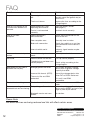
Problem
Cause
Solution
No power.
The car ignition is switched
off.
If the power supply is properly connected, switch the ignition key to
ON or ACC.
The fuse is blown.
Replace the fuse according to the
wiring diagram.
Error on LCD display or no
function when buttons are
pressed.
Inbuilt processor is not
operating due to noise.
Press the RESET button.
(See page 6.)
Fascia is not mounted
correctly.
Reattach fascia correctly.
Poor or no radio
reception.
Loose connection /
Not connected.
Check aerial connection on the
back of the unit.
Poor reception area.
Manually tune in station.
Bad earth connection.
Check the cradle has a rust free,
tight connection to the vehicle’s
chassis.
Internal vehicle aerial.
3rd party signal booster maybe
required.
Auto scan does not stop at a
station.
Transmission signal are too
weak.
Manually tune in station.
No sound.
Volume control set too low.
Turn up volume properly.
The device has not been connected properly.
Check wiring according to the
wiring diagram.
MP3/WMA files on USB or
SD/MMC do not play.
Storage greater than 8Gb.
Use a USB, SD/MMC storage
device with no greater storage
capasity than 8Gb
Incorrect file format. (NTFS)
Format the storage device into
either FAT or FAT32 file format.
The music files are DRM
protected.
Bluetooth not working.
Bluetooth module locked up.
Device connecting via
Bad pairing profile on device.
bluetooth but not functioning.
Bluetooth version not compatible
This unit is not DRM
compatible.
Disconnect and reconnect ISO
cable.
Delete the pairing profile off of your
device, press RESET on fascia (see
page 6.) and re-pair device.
No solution.
Please Note:
AM band services are being reduced and this will affect certain areas.
After Sales Support
12
UK/N.IRELAND HELPLINE NO: 01270 508538
REP.IRELAND HELPLINE NO:
1800 995 036
WEBSITE:
www.quesh.co.uk
EMAIL:
[email protected]