1
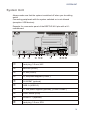
CABLING OF THE BEETLE /M-II PLUS Cabling Of the BEETLE /M-II plus Follow the steps below in the order given when installing devices: n The cable cover must be removed, if present. n Plug one end of the power cable into the socket of the BEETLE /M-II plus. n Plug in and secure the data cable. n Plug the other end of the power cable into the main power supply. Always make sure that all power plugs from the grounded-contact power sockets are unplugged. BEETLE / M-II plus 12V 12V 12V 24V PLINK TFT DC 24V CASHDR ONLY TFT COM3* MIC KYBD COM1 COM2* USB COM4* LAN SPK Connector panel of the BEETLE /M- II plus with H1- motherboard 13