1
FAQ Lists for Pfaff VIP Software
Contents
The Web Site.................................................................................................................... 6
Demos and Documentation........................................................................................... 6
Downloading Files......................................................................................................... 6
Miscellaneous ............................................................................................................... 6
Dongle and Hardware ..................................................................................................... 7
Dongle........................................................................................................................... 7
Error Messages............................................................................................................. 7
General ......................................................................................................................... 8
Customizing..................................................................................................................... 9
ColorSorting ................................................................................................................ 10
Combining and Saving Designs .................................................................................. 10
Connecting to Machines.............................................................................................. 11
Creating and Editing Designs...................................................................................... 12
Dongle.........................................................................................................................12
Error Messages........................................................................................................... 13
General ....................................................................................................................... 17
Icons and Toolbars...................................................................................................... 17
Installation and CD...................................................................................................... 19
Lettering ......................................................................................................................23
Miscellaneous ............................................................................................................. 25
Opening and Browsing Designs.................................................................................. 29
Printing ........................................................................................................................ 30
Product Information..................................................................................................... 30
Quick 3DStitch View.................................................................................................... 32
Saving Designs ........................................................................................................... 33
Screen Appearance .................................................................................................... 33
Stitch Files................................................................................................................... 34
Writing to a Card ......................................................................................................... 34
File Assistant.................................................................................................................34
Connecting to Machines.............................................................................................. 35
creative Smart Card Station ........................................................................................ 35
Design Appearance..................................................................................................... 36
Dongle.........................................................................................................................36
Error Messages........................................................................................................... 37
Installation and CD...................................................................................................... 39
Managing Files............................................................................................................ 39
Miscellaneous ............................................................................................................. 40
Quick 3DStitch View.................................................................................................... 41
FAQ Lists for Pfaff VIP Software
Page 1
Saving Designs ........................................................................................................... 41
Sending Designs to a Machine ................................................................................... 42
Stitch Files................................................................................................................... 42
Transferring Files ........................................................................................................ 42
Digitizing ........................................................................................................................ 46
3D Create Stitches ...................................................................................................... 46
Background Image ...................................................................................................... 48
Creating and Editing Designs...................................................................................... 50
Creating Stitches......................................................................................................... 52
Dongle.........................................................................................................................52
Error Messages........................................................................................................... 53
General ....................................................................................................................... 59
Icons and Toolbars...................................................................................................... 59
Installation and CD...................................................................................................... 61
Miscellaneous ............................................................................................................. 64
Opening and Acquiring Images................................................................................... 69
Opening and Browsing Designs.................................................................................. 70
Preparing and Editing Images..................................................................................... 71
Product Information..................................................................................................... 73
QuickStitch and FreeHand Borders ............................................................................ 75
QuickStitch and FreeHand Fill Areas .......................................................................... 76
QuickTrace.................................................................................................................. 77
Saving Designs ........................................................................................................... 78
Screen Appearance .................................................................................................... 79
Stitch Files................................................................................................................... 80
Stitch Editor................................................................................................................... 80
Creating and Editing Designs...................................................................................... 80
Dongle.........................................................................................................................81
Editing Designs ........................................................................................................... 82
Error Messages........................................................................................................... 83
General ....................................................................................................................... 86
Icons and Toolbars...................................................................................................... 86
Installation and CD...................................................................................................... 88
Miscellaneous ............................................................................................................. 91
Opening and Browsing Designs.................................................................................. 95
Printing ........................................................................................................................ 95
Product Information..................................................................................................... 96
Quick 3DStitch View.................................................................................................... 97
Saving Designs ........................................................................................................... 98
Screen Appearance .................................................................................................... 99
Splitting Designs ....................................................................................................... 100
Stitch Files................................................................................................................. 100
Design Splitter............................................................................................................. 101
Dongle....................................................................................................................... 101
Error Messages......................................................................................................... 102
General ..................................................................................................................... 104
Icons and Toolbars.................................................................................................... 105
Installation and CD.................................................................................................... 105
Miscellaneous ........................................................................................................... 109
FAQ Lists for Pfaff VIP Software
Page 2
Opening and Browsing Designs................................................................................ 112
Product Information................................................................................................... 113
Quick 3DStitch View.................................................................................................. 114
Saving Designs ......................................................................................................... 115
Screen Appearance .................................................................................................. 116
Splitting Designs ....................................................................................................... 116
Stitch Files................................................................................................................. 116
Cross Stitch ................................................................................................................. 117
Creating and Editing Designs.................................................................................... 117
Creating Stitches....................................................................................................... 117
Design Appearance................................................................................................... 118
Error Messages......................................................................................................... 118
Icons and Toolbars.................................................................................................... 118
Installation and CD.................................................................................................... 118
Miscellaneous ........................................................................................................... 120
Opening Designs....................................................................................................... 122
Printing ...................................................................................................................... 123
Product Information................................................................................................... 123
Screen Appearance .................................................................................................. 124
Stitch Files................................................................................................................. 124
Stitching Out.............................................................................................................. 124
Miscellaneous.............................................................................................................. 125
Demos and Documentation....................................................................................... 125
Installation and CD.................................................................................................... 125
Product Information................................................................................................... 127
Quick 3DStitch View.................................................................................................. 129
Stitch Files................................................................................................................. 130
QuickFont .................................................................................................................... 130
Dongle....................................................................................................................... 130
Error Messages......................................................................................................... 131
Font Disks ................................................................................................................. 132
Fonts ......................................................................................................................... 133
Installation and CD.................................................................................................... 134
Miscellaneous ........................................................................................................... 134
Quick 3DStitch View.................................................................................................. 135
Saving Designs ......................................................................................................... 135
Screen Appearance .................................................................................................. 135
Stitch Files................................................................................................................. 135
creative PictureStitch ................................................................................................. 135
Creating Stitches....................................................................................................... 136
Dongle....................................................................................................................... 136
Error Messages......................................................................................................... 137
Icons and Toolbars.................................................................................................... 140
Installation and CD.................................................................................................... 141
Miscellaneous ........................................................................................................... 144
Opening and Acquiring Images................................................................................. 149
Preparing and Editing Images................................................................................... 150
Product Information................................................................................................... 152
Saving Designs ......................................................................................................... 154
FAQ Lists for Pfaff VIP Software
Page 3
Screen Appearance .................................................................................................. 154
Stitch Files................................................................................................................. 155
Stitching Out.............................................................................................................. 155
creative ReSize............................................................................................................ 156
3D Create Stitches .................................................................................................... 156
Creating Stitches....................................................................................................... 158
Design Appearance................................................................................................... 159
Dongle....................................................................................................................... 160
Editing Designs ......................................................................................................... 161
Error Messages......................................................................................................... 162
Icons and Toolbars.................................................................................................... 165
Installation and CD.................................................................................................... 166
Miscellaneous ........................................................................................................... 168
Opening and Browsing Designs................................................................................ 172
Product Information................................................................................................... 174
Saving Designs ......................................................................................................... 176
Screen Appearance .................................................................................................. 176
Stitch Files................................................................................................................. 177
Stitching Out.............................................................................................................. 177
Stitch Artist..................................................................................................................177
Connecting to Machines............................................................................................ 178
Creating and Editing Designs.................................................................................... 178
Design Appearance................................................................................................... 178
Editing Designs ......................................................................................................... 179
Error Messages......................................................................................................... 179
Icons and Toolbars.................................................................................................... 182
Installation and CD.................................................................................................... 183
Miscellaneous ........................................................................................................... 185
Opening and Acquiring Images................................................................................. 187
Opening and Browsing Designs................................................................................ 188
Opening Designs....................................................................................................... 189
Printing ...................................................................................................................... 189
Product Information................................................................................................... 190
Quick 3DStitch View.................................................................................................. 191
QuickTrace................................................................................................................ 192
Saving Designs ......................................................................................................... 193
Screen Appearance .................................................................................................. 193
Sending Designs to a Machine ................................................................................. 194
Stitch Files................................................................................................................. 194
Transferring Files ...................................................................................................... 194
3D Organizer................................................................................................................ 195
Browsing Files........................................................................................................... 195
Converting Files ........................................................................................................ 197
Desktop Background................................................................................................. 198
Dongle....................................................................................................................... 198
Editing ....................................................................................................................... 199
Error Messages......................................................................................................... 199
HTML Wizard ............................................................................................................ 202
Installation and CD.................................................................................................... 203
FAQ Lists for Pfaff VIP Software
Page 4
Managing Files.......................................................................................................... 204
Miscellaneous ........................................................................................................... 205
Printing ...................................................................................................................... 206
Screen Appearance .................................................................................................. 206
Searching .................................................................................................................. 207
Tutorials .................................................................................................................... 208
creative 2140/2144....................................................................................................... 208
Update....................................................................................................................... 208
FAQ Lists for Pfaff VIP Software
Page 5
The Web Site
Listed versions: Not Applicable
Demos and Documentation
L01
I get an error message when I try to open documents in Acrobat Reader,
either from CD or when I download from this web site.
Errors such as 'Unable to open document' or 'Could not find ColorSpace named Cs8' appear
because you are trying to use an old version of Acrobat Reader. Make sure you are using
the latest version of Acrobat (version 4 or above).
You can install the current version from your creative Customizing, creative Digitizing or
creative Stitch Editor CD. Simply insert the CD and select the option from the menu that
appears. Alternatively go to the Acrobat Page at Adobe's web site [http://www.adobe.com]
where you can download the latest copy and also check for any conflicting software you may
have on your machine.
Downloading Files
L05
Is there a way to copy large files downloaded from the site onto floppy
disks?
Most Zip programs (such as PkZip and WinZip [http://www.winzip.com/]) will zip a large file to
several disks. So if you wish to store a large downloaded file onto floppy, then open this file
into one of these programs. Get several blank floppy disks ready. Choose to create a ZIP file
onto your A: drive and insert the first disk. The program will automatically split up your large
file onto these individual disks. Now you can store them as a backup, or unzip this file onto
another computer.
L16
I have downloaded a ZIP file. What do I do with it?
ZIP files contain files that have been compressed in size for faster download. ZIP files
require a program such as WinZip [http://www.winzip.com/] to extract the file(s) onto your
computer. If you have WinZip installed then take the following steps: (otherwise consult the
guide for your unzipping program)
1. Download and save the ZIP file into a temporary location on your hard drive.
2. Either open WinZip, click "Open" and find the file you downloaded; or double-click on the
file in Windows® Explorer.
3. The contents of the file are displayed. Click "Extract".
4. Select the folder you wish the files to unzip to in the "Extract to" box, such as
"C:\VipEmbroidery\MyDesigns".
5. Click "Extract" and the files will be placed in your folder.
6. Close WinZip.
Miscellaneous
L15
When I try to print a page on your web site I get the error message "There
are no pages to print"
There is a bug in Netscape Navigator versions 4.5 and previous which prevents some pages
with complex programming from printing.
FAQ Lists for Pfaff VIP Software
Page 6
Dongle and Hardware
Listed versions: VIP USB Dongle; VIP Parallel Dongle
Dongle
A36
Error “No dongle attached. Cannot open program" after my computer goes
into “hibernate” mode
At present, this is only a known issue with the Dell 8100.
This happens because the power to the USB dongle is dropped when the computer
hibernates, causing the dongle to stop functioning correctly until the computer fully reboots.
On computers which have a parallel port, this can be solved as follows:
1. Restart the computer.
2. When the computer restarts, enter the BIOS.
3. Find the settings for the parallel port (LPT1) and change it to Bi Directional.
4. Save the BIOS settings and exit.
This should prevent the loss of power to the dongle during hibernation, even though the
dongle is on a USB port rather than the parallel port.
A40
My computer crashed on startup with a “blue screen” when the dongle is
attached
This is caused by a conflict between the dongle driver supplied with your VIP software and
any game port drivers you may have on your computer. This can be resolved by obtaining
the latest dongle driver Dongle Device Driver
[http://www.pfaffsoftware.com/support/index.htm?page=updates.htm#dongledevicedriver]
AND the latest game port driver. You will need to consult the game port manufacturer’s web
site for the latest game port driver. For instance, if the game port is integrated in the
motherboard, go to the web site relating to the motherboard and check for driver updates.
Alternatively, you can temporarily disable the game port to allow the dongle to function
correctly.
F55
After attempting to start VIP Digitizing with no dongle attached I have lost
some of my Preferences
If you attempt to start VIP Digitizing with no dongle attached then you will get the error “No
dongle attached. Cannot open program". When this happens, the VIPDigitizing.ini file in your
windows folder (usually C:\Windows) is re-created with settings that are not the same as the
installation defaults. Download VIPDigitizing.ini
[http://www.pfaffsoftware.com/support/index.htm?page=updates.htm#vipdigini] from the Pfaff
Software web site and save it in the Windows folder.
Error Messages
F55
After attempting to start VIP Digitizing with no dongle attached I have lost
some of my Preferences
If you attempt to start VIP Digitizing with no dongle attached then you will get the error “No
dongle attached. Cannot open program". When this happens, the VIPDigitizing.ini file in your
windows folder (usually C:\Windows) is re-created with settings that are not the same as the
FAQ Lists for Pfaff VIP Software
Page 7
installation defaults. Download VIPDigitizing.ini
[http://www.pfaffsoftware.com/support/index.htm?page=updates.htm#vipdigini] from the Pfaff
Software web site and save it in the Windows folder.
General
A10
General difficulties with hardware and software
If you are suffering from some odd difficulties with your embroidery system, it is always a
good idea to shut down your computer, and restart it. If this doesn't fix the problem then you
can try to determine the cause of the problem by rebooting the computer in safe mode. If it is
then solved, you know that some clash of hardware and/or software such as device drivers is
to blame. You can then obtain more help from your computer dealer to analyse the cause
and reconfigure your computer if necessary.
To reboot your computer in Safe Mode:
1. Close down windows and restart your computer.
2. As the computer reboots and goes through the system check, hold down the F8 key.
3. At the end of the system check, a menu will be displayed.
4. Choose 'Safe Mode' by entering the option number.
Windows will now restart in Safe Mode. No device drivers, such as graphics or printers will
be loaded, allowing you to test your system.
A24
General USB Problems
Some USB ports do not have enough power to drive the dongle. By using a USB hub, which
uses a power supply, this can be overcome.
Some later Windows 95 computers have USB ports fitted to the Motherboard but are not
available for use. You will need to upgrade to a later version of Windows.
A28
The program will not start and the message "No dongle attached. Cannot
open program" is displayed.
This message will appear when trying to open your VIP software if the program cannot 'see'
the dongle (data protection device).
If you are using a USB port dongle (Purple):
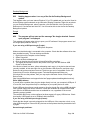
USB System Properties
Make sure that the dongle is connected to the computer. Check that the software driver has
been installed correctly. This can be done as follows:
1. Right click on My Computer on the Desktop.
2. Select Properties.
3. Select the Device Manager tab.
4. Click on the plus sign next to the Universal Serial Bus controllers.
5. The display should look similar to the picture to the right, with the Rainbow USB
SuperPro device listed.
If the device is listed, but has a yellow exclamation mark next to it, the device has not been
correctly installed. In this case right click on the Rainbow USB SuperPro, and then select
Delete, the driver has now been removed. The driver can now be reinstalled. On the VIP
Customizing CD run the following program \Technical\Dongle\setup2\Setup.exe
FAQ Lists for Pfaff VIP Software
Page 8
If this does not cure the problem, then you may require the latest version of the Dongle
Device Driver
[http://www.pfaffsoftware.com/support/index.htm?page=updates.htm#dongledevicedriver].
Other USB problems:
If you still have a problem then plug the dongle directly into into your computer's USB port. If
it is now OK, then the problem may be a damaged or poor quality device or cable.
Some USB ports do not have enough power to drive the dongle. By using a USB hub which
uses a power supply this can be overcome. Some later windows 95 computers have USB
ports fitted to the Motherboard but are not available for use, regardless of the current
operating system installed.
The computer BIOS may not be configured to allow support of Legacy USB devices. Check
that Legacy USB Support is set to 'Enabled' within the BIOS.
If you are using a Parallel port dongle (Cream):
Check that the dongle is securely plugged into the USB port of the computer or hub, or any
other USB through port. Disconnect any devices such as printers that may be attached and
try again.
General dongle problems:
For more information use the FAQ Search Wizard for your dongle type.
A32
What could cause the "No dongle attached" error message?
•
Make sure that the dongle is connected to the computer, disconnect any devices such as
printers that may be attached.
•
Check that the dongle is plugged into the parallel port marked LPT1, LPT2 or PRINTER
of the computer.
• If you are using a switch box check that the switch is in the correct position.
If you still have a problem then place the dongle directly on the Printer port.
A33
An error message "The software you are installing for this hardware:
Universal Serial Bus controllers, has not passed Windows Logo testing"
appears when installing the software.
Because this software was released before Windows XP, it was not possible to have the
driver passed by Microsoft for the Windows XP operating system. The driver, however, is
compatible; select "Continue Anyway".
A38
The Dongle is not recognized under Windows XP
If you are running Windows XP with Customizing version 6.1, you will need to download the
latest version of the Dongle Device Driver
[http://www.pfaffsoftware.com/support/index.htm?page=updates.htm#dongledevicedriver].
Customizing
Listed versions: VIP, version 6.0; VIP, version 6.1; VIP, version 6.2
FAQ Lists for Pfaff VIP Software
Page 9
ColorSorting
B23
ColorSort does not work for the two-color monogram that I created
When creating Two-color lettering, ensure that the Jump Stitch Connection is selected. If
Running Stitch Connection is selected, you will not be able to ColorSort the lettering.
B30
When I ColorSort a Customized embroidery the number of color blocks
produced varies
The ColorSort process does not just put the same color blocks together. It checks for overlap
between areas, therefore depending on the overlaps created during Customizing the final
number of color blocks may vary, even if you are Combining a similar number of Shapes or
monograms.
Combining and Saving Designs
B04
What causes the message "Design is too large, or will not fit in hoop"?
If a design has been Scaled too large or is positioned partly outside the Stitch Area, this
message will appear when you try to combine or save it. Reduce the scaling or move the
design so that all designs are within the hoop boundaries.
B26
My lettering turns black when merged with a design
There is a limit of 99 color changes in any Customized file (60 color blocks can be displayed
in the Color Worksheet). If the number of color changes goes over 99 when you Combine
designs, shapes or monograms, the remainder of the colors will appear black.
This may occur in a two-color monogram, as each letter contains two color changes. When
creating monograms using a two-color font, do not exceed 49 letters.
If you find your design is using too many colors we recommend using the colorsort function
to reduce them automatically.
B48
Why do I get the message "Combining designs. Continue?"
This message appears when you select Combine asking if you wish to continue. You cannot
use the Undo Command to reverse the Combine action, so after Combining you will not be
able to move the designs you have Customized individually. If you are sure you are ready to
Combine, select Yes.
B49
Error: "Design is too large or will not fit in hoop"
This message appears if a Stitch File you are trying to Combine or Save is outside the
selected hoop or larger than will fit in it. For example, with the 100mm x 100mm hoop
selected, a design smaller than 100mm x 100mm might be placed partially outside the Stitch
Area when you click Combine. This message would then appear. Move the design
completely within the four blue corners of the Stitch Area and try again.
B50
Error: "Design too large for export format"
Certain formats are limited to the number of stitches they can save or the size of hoop used
on their specific embroidery machine, for example .sew. If you attempt to save a file in this
FAQ Lists for Pfaff VIP Software
Page 10
format that is bigger than the largest available hoop size or has more stitches than are
allowed, this message would appear.
B51
Error: "No stitch data to save"
This message appears if you try to use the Save function when there are no Stitch Files
loaded on the VIP Customizing screen.
B52
Error: "No designs available to print. Only designs that have been
Combined and are inside the hoop can be printed"
This message appears if the Stitch File(s) on screen have not been Combined. To print more
than one design, they must be Combined and fit in the selected hoop. If Stitch File(s) have
not been Combined, and the design that was loaded first has not been moved from the
center of the Stitch Area, it will be printed.
L23
Error: "Unrecognized file extension" when saving a file
This message appears if you type an incorrect extension that does not belong to any Stitch
File types in the File Name box when trying to save a file.
L24
Error "Not enough memory to perform operation."
This message will appear when trying to save files if system resources are low. Close other
programs and try again. If this does not work, try restarting your computer.
Connecting to Machines
B35
VIP Customizing is not communicating with my Toyota AD800 series
embroidery machine and I have Windows ME or Windows XP
You need to download and install the Toyota AD800 series driver
[http://www.pfaffsoftware.com/support/index.htm?page=updates.htm#toyad800].
U36
My new computer does not have any serial COM ports, so how does it
communicate with my Pfaff 2144/2140 or 7570?
You will need to obtain a USB Serial Adapter, which adds a serial port to your computer by
plugging it into a USB port. Suitable adapters can be obtained from Belkin
[http://www.belkin.com] and Keyspan [http://www.keyspan.com], as shown below.
The following USB Serial Adapters are known to work with the Pfaff creative 2144/2140:
•
Belkin F5U103
•
Belkin F5U109
• Keyspan USA-19QW
The following USB Serial Adapters are known to work with the Pfaff creative 7570:
•
Belkin F5U103
• Keyspan USA-19QW
Please note that the Belkin F5U109 will not work the Pfaff creative 7570.
FAQ Lists for Pfaff VIP Software
Page 11
Creating and Editing Designs
B04
What causes the message "Design is too large, or will not fit in hoop"?
If a design has been Scaled too large or is positioned partly outside the Stitch Area, this
message will appear when you try to combine or save it. Reduce the scaling or move the
design so that all designs are within the hoop boundaries.
B05
How do I change the selection of designs if I've selected the wrong design
to move or manipulate?
You can switch to another item on your display by clicking on the design you wish to select.
If, however, the design you require is covered by another then hold down the Shift key while
clicking on the required design.
B27
Certain functions don't seem to work all the time
When creating Lettering, when you click on the circular rotation handle, the letters are
automatically turned into a design. The lettering can then no longer be resized with
proportional changes in stitch density.
B33
I do not have the controls to change colors or add lettering
The Control Panel holds all the controls for editing colors, lettering and shapes. By default it
is on the right-hand side, but this can be moved or hidden from view. If you cannot see it
then go to the 'View' menu and select 'Control Panel'. If this has not returned your controls
then you will have to restore your program settings:
1. Close Customizing.
2. Open Windows® Explorer and open the 'Windows' folder on your C: drive.
3. Find the file 'customiz.ini'.
4. Delete this file by right-clicking on it and selecting 'Delete'.
5. Now find the file of the same name in the root directory of your program CD. (If your VIP
software was installed from a multi-language CD, you will find the .ini file in the relevant
language folder. For instance, if you installed the English version of the software, you will
find the .ini file in the "English" folder.)
6. Paste it into the \Windows folder of your computer's hard drive.
7. Right-click the pasted customiz.ini file and select the Properties option from the popup
menu.
8. In the Properties dialog, un-check the Read Only check box and click OK.
9. You can now restart the program and all the toolbars will be in their original positions.
Dongle
A28
The program will not start and the message "No dongle attached. Cannot
open program" is displayed.
This message will appear when trying to open your VIP software if the program cannot 'see'
the dongle (data protection device).
If you are using a USB port dongle (Purple):
USB System Properties
FAQ Lists for Pfaff VIP Software
Page 12
Make sure that the dongle is connected to the computer. Check that the software driver has
been installed correctly. This can be done as follows:
1. Right click on My Computer on the Desktop.
2. Select Properties.
3. Select the Device Manager tab.
4. Click on the plus sign next to the Universal Serial Bus controllers.
5. The display should look similar to the picture to the right, with the Rainbow USB
SuperPro device listed.
If the device is listed, but has a yellow exclamation mark next to it, the device has not been
correctly installed. In this case right click on the Rainbow USB SuperPro, and then select
Delete, the driver has now been removed. The driver can now be reinstalled. On the VIP
Customizing CD run the following program \Technical\Dongle\setup2\Setup.exe
If this does not cure the problem, then you may require the latest version of the Dongle
Device Driver
[http://www.pfaffsoftware.com/support/index.htm?page=updates.htm#dongledevicedriver].
Other USB problems:
If you still have a problem then plug the dongle directly into into your computer's USB port. If
it is now OK, then the problem may be a damaged or poor quality device or cable.
Some USB ports do not have enough power to drive the dongle. By using a USB hub which
uses a power supply this can be overcome. Some later windows 95 computers have USB
ports fitted to the Motherboard but are not available for use, regardless of the current
operating system installed.
The computer BIOS may not be configured to allow support of Legacy USB devices. Check
that Legacy USB Support is set to 'Enabled' within the BIOS.
If you are using a Parallel port dongle (Cream):
Check that the dongle is securely plugged into the USB port of the computer or hub, or any
other USB through port. Disconnect any devices such as printers that may be attached and
try again.
General dongle problems:
For more information use the FAQ Search Wizard for your dongle type.
Error Messages
A28
The program will not start and the message "No dongle attached. Cannot
open program" is displayed.
This message will appear when trying to open your VIP software if the program cannot 'see'
the dongle (data protection device).
If you are using a USB port dongle (Purple):
USB System Properties
Make sure that the dongle is connected to the computer. Check that the software driver has
been installed correctly. This can be done as follows:
1. Right click on My Computer on the Desktop.
2. Select Properties.
3. Select the Device Manager tab.
4. Click on the plus sign next to the Universal Serial Bus controllers.
5. The display should look similar to the picture to the right, with the Rainbow USB
SuperPro device listed.
FAQ Lists for Pfaff VIP Software
Page 13
If the device is listed, but has a yellow exclamation mark next to it, the device has not been
correctly installed. In this case right click on the Rainbow USB SuperPro, and then select
Delete, the driver has now been removed. The driver can now be reinstalled. On the VIP
Customizing CD run the following program \Technical\Dongle\setup2\Setup.exe
If this does not cure the problem, then you may require the latest version of the Dongle
Device Driver
[http://www.pfaffsoftware.com/support/index.htm?page=updates.htm#dongledevicedriver].
Other USB problems:
If you still have a problem then plug the dongle directly into into your computer's USB port. If
it is now OK, then the problem may be a damaged or poor quality device or cable.
Some USB ports do not have enough power to drive the dongle. By using a USB hub which
uses a power supply this can be overcome. Some later windows 95 computers have USB
ports fitted to the Motherboard but are not available for use, regardless of the current
operating system installed.
The computer BIOS may not be configured to allow support of Legacy USB devices. Check
that Legacy USB Support is set to 'Enabled' within the BIOS.
If you are using a Parallel port dongle (Cream):
Check that the dongle is securely plugged into the USB port of the computer or hub, or any
other USB through port. Disconnect any devices such as printers that may be attached and
try again.
General dongle problems:
For more information use the FAQ Search Wizard for your dongle type.
B04
What causes the message "Design is too large, or will not fit in hoop"?
If a design has been Scaled too large or is positioned partly outside the Stitch Area, this
message will appear when you try to combine or save it. Reduce the scaling or move the
design so that all designs are within the hoop boundaries.
B18
I am trying to load a file and the message "Can't open design file" appears.
This message appears if the design file is corrupt or if it has the extension '.vip' but is not a
true VIP Embroidery System file (for example if it is another type of file that has been
renamed by mistake).
B20
Error: "No designs available for 3D view. Only designs that have been
combined and are inside the hoop can be shown"
You are attempting to view designs with the Plus Hoop or Mega Multi-Part hoop selected,
and they may not be aligned correctly for that hoop. Select the correct hoop for your machine
and try again.
B29
When installing VIP Customizing I get a message saying 'Fatal Error
extracting ISScript.Msi from the binary table'
This is caused when there is not enough room on the C drive to create the temporary folder
used for the install. There needs to be approximately 10mb free.
B31
Error: "Plus or Multi-part Hoop is not selected"
FAQ Lists for Pfaff VIP Software
Page 14
This message appears if the Open Plus/Mega Designs is selected under the File menu. Use
Open instead.
B41
Error: "You have created letters that are outside the recommended size for
this font"
Each font is designed for the size range specified in its name. If the Size setting for the
selected font is outside the recommended range, this message will appear. You can create
Lettering outside the recommended size, however it may not produce optimum results. Click
OK to create the Lettering or Cancel, then select a more appropriate font. If you do wish to
create Lettering larger than the recommended size it may be effective to use a Fill Pattern;
however the Underlay in the font should also be appropriate.
B42
Error: "Please enter an integer between 3 and 80"
This message appears if the size entered in the Size Box on the Letters Page is below 3mm
or above 80mm. The Size setting refers to the height in millimeters of a capital "A" in the
selected Font. If you wish to increase lettering slightly above this you could click and drag
one of the corner boxes or alter the Height or Width Proportions.
B43
Error: "Cannot open Font"
This message appears if the font file that you have selected from the Font Box is not
available. This could happen if you opened the VIP Customizing program, then accidentally
moved or deleted that font file from the C:\VipEmbroidery\System folder. Close VIP
Customizing, make sure the file is in the folder, then try again. Alternatively, you may need to
Uninstall and Reinstall the program.
B44
Error: "Cannot open Shapes"
This message appears if the shapes file that you have selected from the Shapes Box is not
available. This could happen if you opened the VIP Customizing program, then accidentally
moved or deleted that shapes file or the .bmp file of the same name from the
C:\VipEmbroidery\System folder. Close VIP Customizing, make sure the file is in the folder,
then try again. Alternatively, you may need to Uninstall and Reinstall the program.
B45
Error: "Font file is corrupted; use backup"
This message appears when trying to select a lettering style if the file has corrupted.
Reinstall the file or Uninstall and Reinstall the program.
B48
Why do I get the message "Combining designs. Continue?"
This message appears when you select Combine asking if you wish to continue. You cannot
use the Undo Command to reverse the Combine action, so after Combining you will not be
able to move the designs you have Customized individually. If you are sure you are ready to
Combine, select Yes.
B49
Error: "Design is too large or will not fit in hoop"
This message appears if a Stitch File you are trying to Combine or Save is outside the
selected hoop or larger than will fit in it. For example, with the 100mm x 100mm hoop
selected, a design smaller than 100mm x 100mm might be placed partially outside the Stitch
FAQ Lists for Pfaff VIP Software
Page 15
Area when you click Combine. This message would then appear. Move the design
completely within the four blue corners of the Stitch Area and try again.
B50
Error: "Design too large for export format"
Certain formats are limited to the number of stitches they can save or the size of hoop used
on their specific embroidery machine, for example .sew. If you attempt to save a file in this
format that is bigger than the largest available hoop size or has more stitches than are
allowed, this message would appear.
B51
Error: "No stitch data to save"
This message appears if you try to use the Save function when there are no Stitch Files
loaded on the VIP Customizing screen.
B52
Error: "No designs available to print. Only designs that have been
Combined and are inside the hoop can be printed"
This message appears if the Stitch File(s) on screen have not been Combined. To print more
than one design, they must be Combined and fit in the selected hoop. If Stitch File(s) have
not been Combined, and the design that was loaded first has not been moved from the
center of the Stitch Area, it will be printed.
L18
Error "Cannot open stitch file."
This message appears if the desired Stitch File is not where the program expects it to be, for
example if a Stitch File was loaded into the program from a floppy disk, then closed and the
floppy disk removed. The message would appear if you tried to load the design from the
Recent Files list on the File Menu.
L19
Error "Unrecognized file format."
This message appears if the file you are attempting to load is corrupt. For example, it might
have the extension .vip, yet not be a proper Husqvarna Viking / Pfaff stitch file.
L20
Error: "Stitch file is corrupt"
The stitch file is corrupt and cannot be loaded. Refer to source of this file for a solution.
L21
Error "Stitch file XY coordinates incorrect"
The stitch file is corrupt and cannot be loaded. Refer to source of this file for a solution.
L22
Error: "Unrecognized file extension" when opening a file
This message appears if you attempt to load a file with an extension that does not belong to
any Stitch File types. For example, it would appear if you tried to Drag and Drop a .doc file
onto the VIP Customizing screen.
L23
Error: "Unrecognized file extension" when saving a file
This message appears if you type an incorrect extension that does not belong to any Stitch
File types in the File Name box when trying to save a file.
FAQ Lists for Pfaff VIP Software
Page 16
L24
Error "Not enough memory to perform operation."
This message will appear when trying to save files if system resources are low. Close other
programs and try again. If this does not work, try restarting your computer.
L29
Error: "Design too large for export format" when saving a file in .pes format
The Pes5 format allows for any design size up to 260mm x 160mm. Download MulCType.dll
[http://www.pfaffsoftware.com/support/index.htm?page=updates.htm#pes5] version 1.0.3.3,
or later, to allow designs up to this size to be saved in .pes format.
General
L06
My creative software starts with the wrong company logo on Windows XP
This will happen when ordinary users do not have the correct registry permissions. In order
for non-administrative users to use VIP software correctly, users must be granted permission
by an administrative user.
When carrying out this procedure, you must carry out the instructions exactly as described.
Editing the registry can seriously damage the operating system if not done correctly.
1. Log on to Windows XP using an account that has administrator rights.
2. Click Start and then click Run. The Run dialog box will be shown.
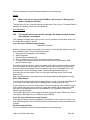
Run Regedt32 on Windows XP
3. Type in regedt32, as shown, then click OK. The Registry Editor will be shown.
4. On the left-hand side, where the folder names are shown, click the + sign next to
HKEY_LOCAL_MACHINE.
5. From the list of sub-folders that is shown, click the + sign next to SOFTWARE.
6. You should now see a VikingEmnet folder (you may need to scroll down the list to see it).
Click VikingEmnet to highlight it.
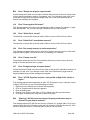
Registry Edit for VikingEmnet perms
7. Click the Edit menu and select the Permissions option.
8. The Permissions dialog has two sections: the upper section shows the user and group
names and the lower section shows the permissions for the selected user. Click the
Users entry in the list. This will be shown as Users (machine\Users), where machineis
the name you have given your computer.
9. In the lower section of the Permissions dialog, click the Allow check box for Full Control.
This will let any user logged on to the computer use the creative software.
Full Control perms for all Users
10. Click OK to save the changes to Permissions, then click the File menu and Exit.
Icons and Toolbars
B21
Some of the icons in the Toolbar are 'grayed out' when I open the VIP
Customizing Program
FAQ Lists for Pfaff VIP Software
Page 17
Certain icons (for example Combine, Save As and Print on the Main Toolbar and all Edit
Toolbar icons apart from Preferences) are only highlighted once a stitch file is shown on the
VIP Customizing screen.
B27
Certain functions don't seem to work all the time
When creating Lettering, when you click on the circular rotation handle, the letters are
automatically turned into a design. The lettering can then no longer be resized with
proportional changes in stitch density.
B33
I do not have the controls to change colors or add lettering
The Control Panel holds all the controls for editing colors, lettering and shapes. By default it
is on the right-hand side, but this can be moved or hidden from view. If you cannot see it
then go to the 'View' menu and select 'Control Panel'. If this has not returned your controls
then you will have to restore your program settings:
1. Close Customizing.
2. Open Windows® Explorer and open the 'Windows' folder on your C: drive.
3. Find the file 'customiz.ini'.
4. Delete this file by right-clicking on it and selecting 'Delete'.
5. Now find the file of the same name in the root directory of your program CD. (If your VIP
software was installed from a multi-language CD, you will find the .ini file in the relevant
language folder. For instance, if you installed the English version of the software, you will
find the .ini file in the "English" folder.)
6. Paste it into the \Windows folder of your computer's hard drive.
7. Right-click the pasted customiz.ini file and select the Properties option from the popup
menu.
8. In the Properties dialog, un-check the Read Only check box and click OK.
9. You can now restart the program and all the toolbars will be in their original positions.
B56
I can't see some of the floating toolbars or icons when I open the program
First, check the View Menu to see whether the view function has been turned off. If all the
View Toolbar functions are turned on and you still cannot locate a toolbar, it may have been
moved to the edge of the screen so it is hard to see. If you move icons around it is possible
to delete them.
To reset the icons:
1. Close the program.
2. Copy the customiz.ini file from the root folder of your CD. (If your VIP software was
installed from a multi-language CD, you will find the .ini file in the relevant language
folder. For instance, if you installed the English version of the software, you will find the
.ini file in the "English" folder.)
3. Paste it into the \Windows folder of your computer's hard drive.
4. Right-click the pasted customiz.ini file and select the Properties option from the popup
menu.
5. In the Properties dialog, un-check the Read Only check box and click OK.
6. You can now restart the program and all the toolbars will be in their original positions.
L33
I keep changing the Preferences but they don’t stay changed when I restart
the program
FAQ Lists for Pfaff VIP Software
Page 18
This happens if the “.ini” file is Read Only, such as when the “.ini” is copied from the CD
using Windows® Explorer. This also affects the Toolbars if you use the Customize Toolbars
and Commands features. You can change the Read Only attribute as follows:
1. Use Windows® Explorer to go to the C:\Windows directory (or the directory where you
installed Windows on your computer).
2. Right-click on the “.ini” file for the program and choose the Properties option from the
popup menu.
3. Un-check the Read Only option and click OK. You will now be able to change your
Preferences without them being reset.
Installation and CD
A10
General difficulties with hardware and software
If you are suffering from some odd difficulties with your embroidery system, it is always a
good idea to shut down your computer, and restart it. If this doesn't fix the problem then you
can try to determine the cause of the problem by rebooting the computer in safe mode. If it is
then solved, you know that some clash of hardware and/or software such as device drivers is
to blame. You can then obtain more help from your computer dealer to analyse the cause
and reconfigure your computer if necessary.
To reboot your computer in Safe Mode:
1. Close down windows and restart your computer.
2. As the computer reboots and goes through the system check, hold down the F8 key.
3. At the end of the system check, a menu will be displayed.
4. Choose 'Safe Mode' by entering the option number.
Windows will now restart in Safe Mode. No device drivers, such as graphics or printers will
be loaded, allowing you to test your system.
A28
The program will not start and the message "No dongle attached. Cannot
open program" is displayed.
This message will appear when trying to open your VIP software if the program cannot 'see'
the dongle (data protection device).
If you are using a USB port dongle (Purple):
USB System Properties
Make sure that the dongle is connected to the computer. Check that the software driver has
been installed correctly. This can be done as follows:
1. Right click on My Computer on the Desktop.
2. Select Properties.
3. Select the Device Manager tab.
4. Click on the plus sign next to the Universal Serial Bus controllers.
5. The display should look similar to the picture to the right, with the Rainbow USB
SuperPro device listed.
If the device is listed, but has a yellow exclamation mark next to it, the device has not been
correctly installed. In this case right click on the Rainbow USB SuperPro, and then select
Delete, the driver has now been removed. The driver can now be reinstalled. On the VIP
Customizing CD run the following program \Technical\Dongle\setup2\Setup.exe
If this does not cure the problem, then you may require the latest version of the Dongle
Device Driver
[http://www.pfaffsoftware.com/support/index.htm?page=updates.htm#dongledevicedriver].
FAQ Lists for Pfaff VIP Software
Page 19
Other USB problems:
If you still have a problem then plug the dongle directly into into your computer's USB port. If
it is now OK, then the problem may be a damaged or poor quality device or cable.
Some USB ports do not have enough power to drive the dongle. By using a USB hub which
uses a power supply this can be overcome. Some later windows 95 computers have USB
ports fitted to the Motherboard but are not available for use, regardless of the current
operating system installed.
The computer BIOS may not be configured to allow support of Legacy USB devices. Check
that Legacy USB Support is set to 'Enabled' within the BIOS.
If you are using a Parallel port dongle (Cream):
Check that the dongle is securely plugged into the USB port of the computer or hub, or any
other USB through port. Disconnect any devices such as printers that may be attached and
try again.
General dongle problems:
For more information use the FAQ Search Wizard for your dongle type.
B28
I only have 17 fonts and 4 shapes styles. How do I add the extra fonts and
shapes shown on this website to my VIP Customizing program?
You need to download the font upgrade
[http://www.pfaffsoftware.com/support/index.htm?page=updates.htm#fonts] files that will give
you the most up-to-date versions of the 29 fonts and 7 shapes styles available for your VIP
Customizing program. To see the characters available, a key for the Greek and Hebrew fonts
and sample monograms, download the updated Font Guide
[http://www.pfaffsoftware.com/downloads/index.htm?page=features.htm] and Shape Guide
[http://www.pfaffsoftware.com/downloads/index.htm?page=features.htm] pdf files.
B29
When installing VIP Customizing I get a message saying 'Fatal Error
extracting ISScript.Msi from the binary table'
This is caused when there is not enough room on the C drive to create the temporary folder
used for the install. There needs to be approximately 10mb free.
B37
I have installed VIP Customizing but I have no Application Bar
The Application Bar is part of creative Suite. It is only available when creative Suite is
installed.
L04
Can I run the software on a Macintosh computer?
Pfaff creative Software is made to run on a PC with Windows®95/98/ME/NT/2000/XP and
we can not guarantee that our software will work on a Macintosh computer. There are ways
of running PC software on MAC computers by use of emulators such as Virtual PC and Soft
Windows.
However, Pfaff can not support, by way of phone help or warranty, the use of our software on
Macintosh computers and recommends that you purchase a standard Windows® based PC
to use our embroidery systems.
If you still wish to use our software on a Macintosh computer, the following information may
be of help. Please note that this DOES NOT constitute support and no support will be offered
or provided for using Pfaff creative Software in the manner described below.
FAQ Lists for Pfaff VIP Software
Page 20
PLEASE NOTE: Pfaff creative Software has not been tested with any Windows® emulation
software on Mac OS X.
The Pfaff creative Suite has been tested and shown to run on a Macintosh G4 using the
following configuration:
•
Mac OS 9.0.4
•
Memory: 786Mb
•
Virtual PC 4.0 running Windows® ME
• Belkin F5U103-MAC USB Serial Adapter with driver version 1.1.1
The Belkin F5U103-MAC USB Serial Adapter was used because a Macintosh computer
does not have a COM type serial port that is needed for communications with a Pfaff creative
card station and/or creative 2140 embroidery machine.
Virtual PC 4.0 was configured as follows:
•
Processor: “Enable MMX compatibility” checked
•
PC Memory: 460MB
•
COM1 Port: “Mac Serial Port” selected; “Belkin USB Serial Adapter” selected from the
list, and “Non-modem device” checked.
•
COM2 Port: “None” checked
•
USB:“Enable USB” checked, “USB-232 Adapter” unchecked and “USB Token” (dongle)
checked
In Windows ME, the settings for COM1 were set as follows in the Control Panel:
•
Bits per second: 9600
•
Data Bits: 8
•
Parity: None
•
Stop Bits: 1
• Flow Control: XON/XOFF
To use the Pfaff creative Software with Pfaff creative embroidery machines, the following
settings were used in VIP Configure:
•
‘Pfaff 2140’ setting: COM1
• ‘Pfaff creative card station’ setting: COM1
The Pfaff creative Suite ran normally as on any other Windows platform. However, the
following was found in regard to hardware and communications:
•
The Belkin USB-Serial Adapter is not recognized when the Mac is booted up from cold,
so COM1 is initially not available to Virtual PC. After booting for the first time, unplug and
reconnect the adapter, then reboot the Mac. The adapter will then be recognized
correctly by OS 9 and Virtual PC.
•
All communication aspects worked correctly between VIP File Assistant and the Pfaff
creative 2140 embroidery machine.
•
It was not possible to update the Pfaff creative 2140 with new firmware (this is a program
that is run directly from Windows Explorer).
•
All communication worked correctly between creative Customizing and the creative card
station.
•
It was not possible to establish communications with a Pfaff creative 7570 embroidery
machine. Use a creative card station to read from and write to cards for use in the 7570.
•
The “USB Token” option is only be available in the USB section of Virtual PC when the
dongle is inserted into the MAC.
FAQ Lists for Pfaff VIP Software
Page 21
•
Restarting the Mac with the dongle inserted gives a message that 'The software cannot
be found for USB Token'. This message is generated by OS 9, which does not use the
dongle. Click OK to close the message and carry on as normal.
L06
My creative software starts with the wrong company logo on Windows XP
This will happen when ordinary users do not have the correct registry permissions. In order
for non-administrative users to use VIP software correctly, users must be granted permission
by an administrative user.
When carrying out this procedure, you must carry out the instructions exactly as described.
Editing the registry can seriously damage the operating system if not done correctly.
1. Log on to Windows XP using an account that has administrator rights.
2. Click Start and then click Run. The Run dialog box will be shown.
Run Regedt32 on Windows XP
3. Type in regedt32, as shown, then click OK. The Registry Editor will be shown.
4. On the left-hand side, where the folder names are shown, click the + sign next to
HKEY_LOCAL_MACHINE.
5. From the list of sub-folders that is shown, click the + sign next to SOFTWARE.
6. You should now see a VikingEmnet folder (you may need to scroll down the list to see it).
Click VikingEmnet to highlight it.
Registry Edit for VikingEmnet perms
7. Click the Edit menu and select the Permissions option.
8. The Permissions dialog has two sections: the upper section shows the user and group
names and the lower section shows the permissions for the selected user. Click the
Users entry in the list. This will be shown as Users (machine\Users), where machineis
the name you have given your computer.
9. In the lower section of the Permissions dialog, click the Allow check box for Full Control.
This will let any user logged on to the computer use the creative software.
Full Control perms for all Users
10. Click OK to save the changes to Permissions, then click the File menu and Exit.
L25
Whenever I insert my CD it asks if I want to uninstall my software
All VIP Embroidery System Software has an automatic installation whenever the CD is
inserted. The CD detected your software was already installed so only gives you the option
to uninstall it. Simply click 'Cancel', and then 'Yes' to confirm it. Then click 'Finish' to close
the installation window. Whenever using the CD again you may hold down the Shift Key for
30 seconds upon insertion to prevent the installation menu appearing.
L30
The programs are not being installed to the correct directory
The installation program will by default put the embroidery system onto the fixed disk or
partition with the most amount of free space.
The drive letter that the embroidery system will install to is shown during the install and can
be changed by the user.
FAQ Lists for Pfaff VIP Software
Page 22
The drive or partition that the embroidery system is installed to will make no difference to its
operation.
L31
I do not have the VIP logos beside each file in Windows Explorer
Your icon association is set up during installation. You will have to re-install.
M09
What hardware do I need for my machine?
To be able to send designs to your machine you will need:
creative 7560, 7562 or 7570
• creative Cable Kit; if you don't already have a cable Com Port on your computer
creative 2140
•
Com Port on your computer
Lettering
B25
I've typed in some Lettering, but not all of it has appeared
If you are using an upper case only Font (with UC at the end of its name, such as
BASEBALL UC), only capital letters are available. Check the Font and try again.
B26
My lettering turns black when merged with a design
There is a limit of 99 color changes in any Customized file (60 color blocks can be displayed
in the Color Worksheet). If the number of color changes goes over 99 when you Combine
designs, shapes or monograms, the remainder of the colors will appear black.
This may occur in a two-color monogram, as each letter contains two color changes. When
creating monograms using a two-color font, do not exceed 49 letters.
If you find your design is using too many colors we recommend using the colorsort function
to reduce them automatically.
B28
I only have 17 fonts and 4 shapes styles. How do I add the extra fonts and
shapes shown on this website to my VIP Customizing program?
You need to download the font upgrade
[http://www.pfaffsoftware.com/support/index.htm?page=updates.htm#fonts] files that will give
you the most up-to-date versions of the 29 fonts and 7 shapes styles available for your VIP
Customizing program. To see the characters available, a key for the Greek and Hebrew fonts
and sample monograms, download the updated Font Guide
[http://www.pfaffsoftware.com/downloads/index.htm?page=features.htm] and Shape Guide
[http://www.pfaffsoftware.com/downloads/index.htm?page=features.htm] pdf files.
B33
I do not have the controls to change colors or add lettering
The Control Panel holds all the controls for editing colors, lettering and shapes. By default it
is on the right-hand side, but this can be moved or hidden from view. If you cannot see it
then go to the 'View' menu and select 'Control Panel'. If this has not returned your controls
then you will have to restore your program settings:
1. Close Customizing.
2. Open Windows® Explorer and open the 'Windows' folder on your C: drive.
FAQ Lists for Pfaff VIP Software
Page 23
3. Find the file 'customiz.ini'.
4. Delete this file by right-clicking on it and selecting 'Delete'.
5. Now find the file of the same name in the root directory of your program CD. (If your VIP
software was installed from a multi-language CD, you will find the .ini file in the relevant
language folder. For instance, if you installed the English version of the software, you will
find the .ini file in the "English" folder.)
6. Paste it into the \Windows folder of your computer's hard drive.
7. Right-click the pasted customiz.ini file and select the Properties option from the popup
menu.
8. In the Properties dialog, un-check the Read Only check box and click OK.
9. You can now restart the program and all the toolbars will be in their original positions.
B41
Error: "You have created letters that are outside the recommended size for
this font"
Each font is designed for the size range specified in its name. If the Size setting for the
selected font is outside the recommended range, this message will appear. You can create
Lettering outside the recommended size, however it may not produce optimum results. Click
OK to create the Lettering or Cancel, then select a more appropriate font. If you do wish to
create Lettering larger than the recommended size it may be effective to use a Fill Pattern;
however the Underlay in the font should also be appropriate.
B42
Error: "Please enter an integer between 3 and 80"
This message appears if the size entered in the Size Box on the Letters Page is below 3mm
or above 80mm. The Size setting refers to the height in millimeters of a capital "A" in the
selected Font. If you wish to increase lettering slightly above this you could click and drag
one of the corner boxes or alter the Height or Width Proportions.
B43
Error: "Cannot open Font"
This message appears if the font file that you have selected from the Font Box is not
available. This could happen if you opened the VIP Customizing program, then accidentally
moved or deleted that font file from the C:\VipEmbroidery\System folder. Close VIP
Customizing, make sure the file is in the folder, then try again. Alternatively, you may need to
Uninstall and Reinstall the program.
B44
Error: "Cannot open Shapes"
This message appears if the shapes file that you have selected from the Shapes Box is not
available. This could happen if you opened the VIP Customizing program, then accidentally
moved or deleted that shapes file or the .bmp file of the same name from the
C:\VipEmbroidery\System folder. Close VIP Customizing, make sure the file is in the folder,
then try again. Alternatively, you may need to Uninstall and Reinstall the program.
B45
Error: "Font file is corrupted; use backup"
This message appears when trying to select a lettering style if the file has corrupted.
Reinstall the file or Uninstall and Reinstall the program.
FAQ Lists for Pfaff VIP Software
Page 24
Miscellaneous
A10
General difficulties with hardware and software
If you are suffering from some odd difficulties with your embroidery system, it is always a
good idea to shut down your computer, and restart it. If this doesn't fix the problem then you
can try to determine the cause of the problem by rebooting the computer in safe mode. If it is
then solved, you know that some clash of hardware and/or software such as device drivers is
to blame. You can then obtain more help from your computer dealer to analyse the cause
and reconfigure your computer if necessary.
To reboot your computer in Safe Mode:
1. Close down windows and restart your computer.
2. As the computer reboots and goes through the system check, hold down the F8 key.
3. At the end of the system check, a menu will be displayed.
4. Choose 'Safe Mode' by entering the option number.
Windows will now restart in Safe Mode. No device drivers, such as graphics or printers will
be loaded, allowing you to test your system.
A28
The program will not start and the message "No dongle attached. Cannot
open program" is displayed.
This message will appear when trying to open your VIP software if the program cannot 'see'
the dongle (data protection device).
If you are using a USB port dongle (Purple):
USB System Properties
Make sure that the dongle is connected to the computer. Check that the software driver has
been installed correctly. This can be done as follows:
1. Right click on My Computer on the Desktop.
2. Select Properties.
3. Select the Device Manager tab.
4. Click on the plus sign next to the Universal Serial Bus controllers.
5. The display should look similar to the picture to the right, with the Rainbow USB
SuperPro device listed.
If the device is listed, but has a yellow exclamation mark next to it, the device has not been
correctly installed. In this case right click on the Rainbow USB SuperPro, and then select
Delete, the driver has now been removed. The driver can now be reinstalled. On the VIP
Customizing CD run the following program \Technical\Dongle\setup2\Setup.exe
If this does not cure the problem, then you may require the latest version of the Dongle
Device Driver
[http://www.pfaffsoftware.com/support/index.htm?page=updates.htm#dongledevicedriver].
Other USB problems:
If you still have a problem then plug the dongle directly into into your computer's USB port. If
it is now OK, then the problem may be a damaged or poor quality device or cable.
Some USB ports do not have enough power to drive the dongle. By using a USB hub which
uses a power supply this can be overcome. Some later windows 95 computers have USB
ports fitted to the Motherboard but are not available for use, regardless of the current
operating system installed.
The computer BIOS may not be configured to allow support of Legacy USB devices. Check
that Legacy USB Support is set to 'Enabled' within the BIOS.
FAQ Lists for Pfaff VIP Software
Page 25
If you are using a Parallel port dongle (Cream):
Check that the dongle is securely plugged into the USB port of the computer or hub, or any
other USB through port. Disconnect any devices such as printers that may be attached and
try again.
General dongle problems:
For more information use the FAQ Search Wizard for your dongle type.
B14
When I use the View function (Camera icon) the program crashes
There is a corrupt file in the directory you are trying to view. If the program crashes before
you are able to select a file then this corrupt file is in the last directory you browsed.
To find the corrupt file use File > Open to individually open each file in this directory. When a
file is reported to be corrupt use Windows® Explorer to delete it.
B35
VIP Customizing is not communicating with my Toyota AD800 series
embroidery machine and I have Windows ME or Windows XP
You need to download and install the Toyota AD800 series driver
[http://www.pfaffsoftware.com/support/index.htm?page=updates.htm#toyad800].
B43
Error: "Cannot open Font"
This message appears if the font file that you have selected from the Font Box is not
available. This could happen if you opened the VIP Customizing program, then accidentally
moved or deleted that font file from the C:\VipEmbroidery\System folder. Close VIP
Customizing, make sure the file is in the folder, then try again. Alternatively, you may need to
Uninstall and Reinstall the program.
B44
Error: "Cannot open Shapes"
This message appears if the shapes file that you have selected from the Shapes Box is not
available. This could happen if you opened the VIP Customizing program, then accidentally
moved or deleted that shapes file or the .bmp file of the same name from the
C:\VipEmbroidery\System folder. Close VIP Customizing, make sure the file is in the folder,
then try again. Alternatively, you may need to Uninstall and Reinstall the program.
B45
Error: "Font file is corrupted; use backup"
This message appears when trying to select a lettering style if the file has corrupted.
Reinstall the file or Uninstall and Reinstall the program.
L04
Can I run the software on a Macintosh computer?
Pfaff creative Software is made to run on a PC with Windows®95/98/ME/NT/2000/XP and
we can not guarantee that our software will work on a Macintosh computer. There are ways
of running PC software on MAC computers by use of emulators such as Virtual PC and Soft
Windows.
However, Pfaff can not support, by way of phone help or warranty, the use of our software on
Macintosh computers and recommends that you purchase a standard Windows® based PC
to use our embroidery systems.
FAQ Lists for Pfaff VIP Software
Page 26
If you still wish to use our software on a Macintosh computer, the following information may
be of help. Please note that this DOES NOT constitute support and no support will be offered
or provided for using Pfaff creative Software in the manner described below.
PLEASE NOTE: Pfaff creative Software has not been tested with any Windows® emulation
software on Mac OS X.
The Pfaff creative Suite has been tested and shown to run on a Macintosh G4 using the
following configuration:
•
Mac OS 9.0.4
•
Memory: 786Mb
•
Virtual PC 4.0 running Windows® ME
• Belkin F5U103-MAC USB Serial Adapter with driver version 1.1.1
The Belkin F5U103-MAC USB Serial Adapter was used because a Macintosh computer
does not have a COM type serial port that is needed for communications with a Pfaff creative
card station and/or creative 2140 embroidery machine.
Virtual PC 4.0 was configured as follows:
•
Processor: “Enable MMX compatibility” checked
•
PC Memory: 460MB
•
COM1 Port: “Mac Serial Port” selected; “Belkin USB Serial Adapter” selected from the
list, and “Non-modem device” checked.
•
COM2 Port: “None” checked
•
USB:“Enable USB” checked, “USB-232 Adapter” unchecked and “USB Token” (dongle)
checked
In Windows ME, the settings for COM1 were set as follows in the Control Panel:
•
Bits per second: 9600
•
Data Bits: 8
•
Parity: None
•
Stop Bits: 1
• Flow Control: XON/XOFF
To use the Pfaff creative Software with Pfaff creative embroidery machines, the following
settings were used in VIP Configure:
•
‘Pfaff 2140’ setting: COM1
• ‘Pfaff creative card station’ setting: COM1
The Pfaff creative Suite ran normally as on any other Windows platform. However, the
following was found in regard to hardware and communications:
•
The Belkin USB-Serial Adapter is not recognized when the Mac is booted up from cold,
so COM1 is initially not available to Virtual PC. After booting for the first time, unplug and
reconnect the adapter, then reboot the Mac. The adapter will then be recognized
correctly by OS 9 and Virtual PC.
•
All communication aspects worked correctly between VIP File Assistant and the Pfaff
creative 2140 embroidery machine.
•
It was not possible to update the Pfaff creative 2140 with new firmware (this is a program
that is run directly from Windows Explorer).
•
All communication worked correctly between creative Customizing and the creative card
station.
FAQ Lists for Pfaff VIP Software
Page 27
•
It was not possible to establish communications with a Pfaff creative 7570 embroidery
machine. Use a creative card station to read from and write to cards for use in the 7570.
•
The “USB Token” option is only be available in the USB section of Virtual PC when the
dongle is inserted into the MAC.
•
Restarting the Mac with the dongle inserted gives a message that 'The software cannot
be found for USB Token'. This message is generated by OS 9, which does not use the
dongle. Click OK to close the message and carry on as normal.
L24
Error "Not enough memory to perform operation."
This message will appear when trying to save files if system resources are low. Close other
programs and try again. If this does not work, try restarting your computer.
L25
Whenever I insert my CD it asks if I want to uninstall my software
All VIP Embroidery System Software has an automatic installation whenever the CD is
inserted. The CD detected your software was already installed so only gives you the option
to uninstall it. Simply click 'Cancel', and then 'Yes' to confirm it. Then click 'Finish' to close
the installation window. Whenever using the CD again you may hold down the Shift Key for
30 seconds upon insertion to prevent the installation menu appearing.
L31
I do not have the VIP logos beside each file in Windows Explorer
Your icon association is set up during installation. You will have to re-install.
L32
My VIP programs are very slow to close
This can happen on Windows® NT/2000/XP when virus protection software is installed. This
will affect many applications, not just the VIP programs.
To solve this, your virus protection software must allow you to choose the file types that it
checks. You can then improve performance by preventing the virus protection software from
checking files with the extension “.ini”. This will have a negligible effect on security. To find
out how to do this, you may find it helpful to look at the documentation or consult the
software support for your virus protection software.
For example, in McAfee VirusScan V4.5 onwards:
1. Double-click the VShield icon in the System Tray and the System Scan Status dialog
appears.
2. Click the Properties button in the dialog box that appears.
3. On the Detection tab, select the User specified files option.
4. Click the Extensions... button and you will see a list of file type extensions.
5. Scroll down the list until you see “IN?” and click this entry (the “?” means any file
extension starting with “IN” followed by any letter or number).
6. Click the Delete button and the “IN?” entry is removed from the list.
7. Click OK to close the list, click OK to close the Properties dialog, then Close the System
Scan Status dialog. The effect is immediate, even if you already have a VIP program
open.
L33
I keep changing the Preferences but they don’t stay changed when I restart
the program
FAQ Lists for Pfaff VIP Software
Page 28
This happens if the “.ini” file is Read Only, such as when the “.ini” is copied from the CD
using Windows® Explorer. This also affects the Toolbars if you use the Customize Toolbars
and Commands features. You can change the Read Only attribute as follows:
1. Use Windows® Explorer to go to the C:\Windows directory (or the directory where you
installed Windows on your computer).
2. Right-click on the “.ini” file for the program and choose the Properties option from the
popup menu.
3. Un-check the Read Only option and click OK. You will now be able to change your
Preferences without them being reset.
M09
What hardware do I need for my machine?
To be able to send designs to your machine you will need:
creative 7560, 7562 or 7570
• creative Cable Kit; if you don't already have a cable Com Port on your computer
creative 2140
•
Com Port on your computer
Opening and Browsing Designs
B02
I can't drag and drop designs from the Open or View dialog boxes
To drag and drop designs onto the Display Area, use Windows Explorer.
B14
When I use the View function (Camera icon) the program crashes
There is a corrupt file in the directory you are trying to view. If the program crashes before
you are able to select a file then this corrupt file is in the last directory you browsed.
To find the corrupt file use File > Open to individually open each file in this directory. When a
file is reported to be corrupt use Windows® Explorer to delete it.
B18
I am trying to load a file and the message "Can't open design file" appears.
This message appears if the design file is corrupt or if it has the extension '.vip' but is not a
true VIP Embroidery System file (for example if it is another type of file that has been
renamed by mistake).
B31
Error: "Plus or Multi-part Hoop is not selected"
This message appears if the Open Plus/Mega Designs is selected under the File menu. Use
Open instead.
L18
Error "Cannot open stitch file."
This message appears if the desired Stitch File is not where the program expects it to be, for
example if a Stitch File was loaded into the program from a floppy disk, then closed and the
floppy disk removed. The message would appear if you tried to load the design from the
Recent Files list on the File Menu.
L19
Error "Unrecognized file format."
FAQ Lists for Pfaff VIP Software
Page 29
This message appears if the file you are attempting to load is corrupt. For example, it might
have the extension .vip, yet not be a proper Husqvarna Viking / Pfaff stitch file.
L20
Error: "Stitch file is corrupt"
The stitch file is corrupt and cannot be loaded. Refer to source of this file for a solution.
L21
Error "Stitch file XY coordinates incorrect"
The stitch file is corrupt and cannot be loaded. Refer to source of this file for a solution.
L22
Error: "Unrecognized file extension" when opening a file
This message appears if you attempt to load a file with an extension that does not belong to
any Stitch File types. For example, it would appear if you tried to Drag and Drop a .doc file
onto the VIP Customizing screen.
Printing
B39
I tried to print a number of files, but only one appeared on the printout
Only the first Stitch File loaded on the VIP Customizing screen is printed, unless all Stitch
Files have been Combined or Saved.
B52
Error: "No designs available to print. Only designs that have been
Combined and are inside the hoop can be printed"
This message appears if the Stitch File(s) on screen have not been Combined. To print more
than one design, they must be Combined and fit in the selected hoop. If Stitch File(s) have
not been Combined, and the design that was loaded first has not been moved from the
center of the Stitch Area, it will be printed.
Product Information
L03
What is the price of the software, and where can I get it?
Please contact your local dealer for prices and availability on all the Pfaff creative Software.
To find your local dealer see the Pfaff Dealer Locator
[http://www.pfaffsoftware.com/misc/dealers.htm]. You can always find this on the bottom bar
of the Pfaff Software web site.
L04
Can I run the software on a Macintosh computer?
Pfaff creative Software is made to run on a PC with Windows®95/98/ME/NT/2000/XP and
we can not guarantee that our software will work on a Macintosh computer. There are ways
of running PC software on MAC computers by use of emulators such as Virtual PC and Soft
Windows.
However, Pfaff can not support, by way of phone help or warranty, the use of our software on
Macintosh computers and recommends that you purchase a standard Windows® based PC
to use our embroidery systems.
FAQ Lists for Pfaff VIP Software
Page 30
If you still wish to use our software on a Macintosh computer, the following information may
be of help. Please note that this DOES NOT constitute support and no support will be offered
or provided for using Pfaff creative Software in the manner described below.
PLEASE NOTE: Pfaff creative Software has not been tested with any Windows® emulation
software on Mac OS X.
The Pfaff creative Suite has been tested and shown to run on a Macintosh G4 using the
following configuration:
•
Mac OS 9.0.4
•
Memory: 786Mb
•
Virtual PC 4.0 running Windows® ME
• Belkin F5U103-MAC USB Serial Adapter with driver version 1.1.1
The Belkin F5U103-MAC USB Serial Adapter was used because a Macintosh computer
does not have a COM type serial port that is needed for communications with a Pfaff creative
card station and/or creative 2140 embroidery machine.
Virtual PC 4.0 was configured as follows:
•
Processor: “Enable MMX compatibility” checked
•
PC Memory: 460MB
•
COM1 Port: “Mac Serial Port” selected; “Belkin USB Serial Adapter” selected from the
list, and “Non-modem device” checked.
•
COM2 Port: “None” checked
•
USB:“Enable USB” checked, “USB-232 Adapter” unchecked and “USB Token” (dongle)
checked
In Windows ME, the settings for COM1 were set as follows in the Control Panel:
•
Bits per second: 9600
•
Data Bits: 8
•
Parity: None
•
Stop Bits: 1
• Flow Control: XON/XOFF
To use the Pfaff creative Software with Pfaff creative embroidery machines, the following
settings were used in VIP Configure:
•
‘Pfaff 2140’ setting: COM1
• ‘Pfaff creative card station’ setting: COM1
The Pfaff creative Suite ran normally as on any other Windows platform. However, the
following was found in regard to hardware and communications:
•
The Belkin USB-Serial Adapter is not recognized when the Mac is booted up from cold,
so COM1 is initially not available to Virtual PC. After booting for the first time, unplug and
reconnect the adapter, then reboot the Mac. The adapter will then be recognized
correctly by OS 9 and Virtual PC.
•
All communication aspects worked correctly between VIP File Assistant and the Pfaff
creative 2140 embroidery machine.
•
It was not possible to update the Pfaff creative 2140 with new firmware (this is a program
that is run directly from Windows Explorer).
•
All communication worked correctly between creative Customizing and the creative card
station.
FAQ Lists for Pfaff VIP Software
Page 31
•
It was not possible to establish communications with a Pfaff creative 7570 embroidery
machine. Use a creative card station to read from and write to cards for use in the 7570.
•
The “USB Token” option is only be available in the USB section of Virtual PC when the
dongle is inserted into the MAC.
•
Restarting the Mac with the dongle inserted gives a message that 'The software cannot
be found for USB Token'. This message is generated by OS 9, which does not use the
dongle. Click OK to close the message and carry on as normal.
M09
What hardware do I need for my machine?
To be able to send designs to your machine you will need:
creative 7560, 7562 or 7570
• creative Cable Kit; if you don't already have a cable Com Port on your computer
creative 2140
•
Com Port on your computer
Quick 3DStitch View
B20
Error: "No designs available for 3D view. Only designs that have been
combined and are inside the hoop can be shown"
You are attempting to view designs with the Plus Hoop or Mega Multi-Part hoop selected,
and they may not be aligned correctly for that hoop. Select the correct hoop for your machine
and try again.
M05
I wish to change the background color for Quick 3DStitch™ View
Use VIP Configure to alter the background color for Quick 3DStitch™ View. This program
may also be used to turn the texture on or off.
M06
Error "QuickView requires a color palette of High Color (16 bit) or higher."
This message appears when attempting to display a design using the Quick 3DStitch™ View
if your computer is set to a display of 256 colors or less. You must have your screen colors
set to High Color (16 bit) or greater (True Color, 24-bit)). Reset the display as follows:
1. First close any programs you are using.
2. Right-click the mouse on the desktop and a pop-up menu will appear.
3. Left-click on Properties and the Display Properties dialog box will appear.
4. Click the Settings tab.
5. Use the drop-down arrow in the box titled Color Palette to select High Color (16-bit) or
greater.
6. Click Apply. The screen will be adjusted, then another message will appear asking if you
wish to keep these settings. Click OK to continue (let the computer restart if required).
If you are unable to alter your display, consult your computer retailer.
M13
My program crashes whenever I try to view my Design in 3D
Check that you have downloaded and installed the latest drivers for your graphics card, this
may clear the problem.
FAQ Lists for Pfaff VIP Software
Page 32
Anti-virus software can prevent correct installation of graphics drivers. Disable your anti-virus
software while installing new graphics drivers.
If the latest driver is still causing the program to crash then download the relevant language
version of the 3D Viewer DLL Version 2.0
[http://www.pfaffsoftware.com/support/index.htm?page=updates.htm#3ddll] from the Pfaff
Software web site. When the download is complete, double-click on the downloaded file to
install the new DLL to your VIP Embroidery system.
M14
The background does not appear in the Quick 3DStitch™ View window
even though it is switched on in VIP Configure or the Quick 3DStitch™
View window does not display designs correctly, for example there is a
'hole' in the design
Your graphics card driver is misinterpreting the 3D calculations from the program. Check that
you have downloaded and installed the latest drivers for your graphics card. This may clear
the problem instantly.
Anti-virus software can prevent correct installation of graphics drivers. Disable your anti-virus
software while installing new graphics drivers.
If the program functions incorrectly even with the latest driver, then download the relevant
language version of the 3D Viewer DLL Version 2.0
[http://www.pfaffsoftware.com/support/index.htm?page=updates.htm#3ddll] from the Pfaff
Software web site. When the download is complete, double-click on the downloaded file to
install the new DLL to your VIP Embroidery system.
Saving Designs
L29
Error: "Design too large for export format" when saving a file in .pes format
The Pes5 format allows for any design size up to 260mm x 160mm. Download MulCType.dll
[http://www.pfaffsoftware.com/support/index.htm?page=updates.htm#pes5] version 1.0.3.3,
or later, to allow designs up to this size to be saved in .pes format.
Screen Appearance
B21
Some of the icons in the Toolbar are 'grayed out' when I open the VIP
Customizing Program
Certain icons (for example Combine, Save As and Print on the Main Toolbar and all Edit
Toolbar icons apart from Preferences) are only highlighted once a stitch file is shown on the
VIP Customizing screen.
B22
I have changed the screen background color and now I wish to return to
the original light blue
Use the Screen Preferences to change the background color. Follow the instructions in
Screen Preferences and select the RGB values 200, 232, 247 in the Color Window.
B56
I can't see some of the floating toolbars or icons when I open the program
First, check the View Menu to see whether the view function has been turned off. If all the
View Toolbar functions are turned on and you still cannot locate a toolbar, it may have been
FAQ Lists for Pfaff VIP Software
Page 33
moved to the edge of the screen so it is hard to see. If you move icons around it is possible
to delete them.
To reset the icons:
1. Close the program.
2. Copy the customiz.ini file from the root folder of your CD. (If your VIP software was
installed from a multi-language CD, you will find the .ini file in the relevant language
folder. For instance, if you installed the English version of the software, you will find the
.ini file in the "English" folder.)
3. Paste it into the \Windows folder of your computer's hard drive.
4. Right-click the pasted customiz.ini file and select the Properties option from the popup
menu.
5. In the Properties dialog, un-check the Read Only check box and click OK.
6. You can now restart the program and all the toolbars will be in their original positions.
M05
I wish to change the background color for Quick 3DStitch™ View
Use VIP Configure to alter the background color for Quick 3DStitch™ View. This program
may also be used to turn the texture on or off.
Stitch Files
L29
Error: "Design too large for export format" when saving a file in .pes format
The Pes5 format allows for any design size up to 260mm x 160mm. Download MulCType.dll
[http://www.pfaffsoftware.com/support/index.htm?page=updates.htm#pes5] version 1.0.3.3,
or later, to allow designs up to this size to be saved in .pes format.
L31
I do not have the VIP logos beside each file in Windows Explorer
Your icon association is set up during installation. You will have to re-install.
Writing to a Card
B17
I cannot send a file to an embroidery machine
Open the VIP Configure setup utility. This will allow you to set the COM port for Pfaff 7500
series or Pfaff 2140, Toyota and Huskygram/POEM machines. To send design(s) to the Pfaff
2140 machine, use VIP File Assistant.
M09
What hardware do I need for my machine?
To be able to send designs to your machine you will need:
creative 7560, 7562 or 7570
• creative Cable Kit; if you don't already have a cable Com Port on your computer
creative 2140
•
Com Port on your computer
File Assistant
Listed versions: VIP, version 6.0; VIP, version 6.1; VIP, version 6.3
FAQ Lists for Pfaff VIP Software
Page 34
Connecting to Machines
U29
Error "Communication has not been established with the machine. Ensure
that the machine is switched on, and the cable is connected between the
computer and machine, then click OK."
This message appears if you open VIP File Assistant without being connected to a Pfaff
creative 2140. VIP File Assistant will try to connect with the machine for 2 seconds, then the
above error message will appear. Plug in or turn on the Pfaff creative 2140, then click OK.
U30
Error "Communication with the machine has failed. Ensure that the
machine is switched on, and the cable is connected between the computer
and machine, then click OK."
This message will appear if the connection fails while you are using the program, for
example if the cable is disconnected or the sewing machine power supply is pulled out.
U35
I cannot establish communication between my Pfaff 7570 and VIP File
Assistant
VIP File Assistant is only used to communicate with the Pfaff 2140.
Use VIP Customizing to communicate with the Pfaff 7570. Use the Open 7500 - Card option
on the File Menu to read from the Pfaff 7570. Use the Send menu options to write to the Pfaff
7570.
U36
My new computer does not have any serial COM ports, so how does it
communicate with my Pfaff 2144/2140 or 7570?
You will need to obtain a USB Serial Adapter, which adds a serial port to your computer by
plugging it into a USB port. Suitable adapters can be obtained from Belkin
[http://www.belkin.com] and Keyspan [http://www.keyspan.com], as shown below.
The following USB Serial Adapters are known to work with the Pfaff creative 2144/2140:
•
Belkin F5U103
•
Belkin F5U109
• Keyspan USA-19QW
The following USB Serial Adapters are known to work with the Pfaff creative 7570:
•
Belkin F5U103
• Keyspan USA-19QW
Please note that the Belkin F5U109 will not work the Pfaff creative 7570.
creative Smart Card Station
U37
I get the "Unable to make connection" error when attempting to send a
design via the creative Smart Card Station.
This message appears when VIP File Assistant cannot locate the creative Card Smart
Station.
Please ensure the following:
FAQ Lists for Pfaff VIP Software
Page 35
•
You are using VIP File Assistant 6.3 or higher (check in Help, About VIP File Assistant).
If not, please install VIP File Assistant 6.3 from the CD supplied with your creative Smart
Card Station.
•
The creative Smart Card Station is connected to the computer's USB port using the
supplied USB cable.
Reinstall creative Smart Card Station Driver
If the Pfaff creative Smart Card Station is still not working, then it may be that you need to
reinstall the drivers for this device. Follow the steps in the InstallationFileAssistant.pdf
document in the appropriate language folder found within the \Technical folder of the CD to
reinstall the creative Smart Card Station drivers.
Additional Information
In some situations, the built-in USB ports in a computer may not supply enough power for
some USB devices, which may result in them not being recognized correctly. If your creative
Smart Card Station cannot be installed successfully, then you may require USB ports with
better power-handling.
The main options are the installation of an internal USB PCI card or connecting an external
powered USB hub to an existing USB port on your computer.
Examples:
•
Internal USB PCI card – Belkin F5U005
•
Powered USB Hub – Belkin F5U221
•
Laptop PCMCIA connector – Belkin BusPort Mobile F5U022
Design Appearance
U33
My Stitch Design (9mm or Maxi) looks different in VIP File Assistant to how
it looks in VIP Stitch Artist.
VIP File Assistant shows the Stitch Designs the same way round as they will be sewn on
your creative 2140, both in the thumbnail view and in Quick 3DStitch™ View. This is rotated
90 degrees from the view shown in VIP Stitch Artist, where the Stitch Designs are shown
horizontally so they are easier to work with.
Dongle
A28
The program will not start and the message "No dongle attached. Cannot
open program" is displayed.
This message will appear when trying to open your VIP software if the program cannot 'see'
the dongle (data protection device).
If you are using a USB port dongle (Purple):
USB System Properties
Make sure that the dongle is connected to the computer. Check that the software driver has
been installed correctly. This can be done as follows:
1. Right click on My Computer on the Desktop.
2. Select Properties.
3. Select the Device Manager tab.
4. Click on the plus sign next to the Universal Serial Bus controllers.
FAQ Lists for Pfaff VIP Software
Page 36
5. The display should look similar to the picture to the right, with the Rainbow USB
SuperPro device listed.
If the device is listed, but has a yellow exclamation mark next to it, the device has not been
correctly installed. In this case right click on the Rainbow USB SuperPro, and then select
Delete, the driver has now been removed. The driver can now be reinstalled. On the VIP
Customizing CD run the following program \Technical\Dongle\setup2\Setup.exe
If this does not cure the problem, then you may require the latest version of the Dongle
Device Driver
[http://www.pfaffsoftware.com/support/index.htm?page=updates.htm#dongledevicedriver].
Other USB problems:
If you still have a problem then plug the dongle directly into into your computer's USB port. If
it is now OK, then the problem may be a damaged or poor quality device or cable.
Some USB ports do not have enough power to drive the dongle. By using a USB hub which
uses a power supply this can be overcome. Some later windows 95 computers have USB
ports fitted to the Motherboard but are not available for use, regardless of the current
operating system installed.
The computer BIOS may not be configured to allow support of Legacy USB devices. Check
that Legacy USB Support is set to 'Enabled' within the BIOS.
If you are using a Parallel port dongle (Cream):
Check that the dongle is securely plugged into the USB port of the computer or hub, or any
other USB through port. Disconnect any devices such as printers that may be attached and
try again.
General dongle problems:
For more information use the FAQ Search Wizard for your dongle type.
A32
What could cause the "No dongle attached" error message?
•
Make sure that the dongle is connected to the computer, disconnect any devices such as
printers that may be attached.
•
Check that the dongle is plugged into the parallel port marked LPT1, LPT2 or PRINTER
of the computer.
• If you are using a switch box check that the switch is in the correct position.
If you still have a problem then place the dongle directly on the Printer port.
Error Messages
A28
The program will not start and the message "No dongle attached. Cannot
open program" is displayed.
This message will appear when trying to open your VIP software if the program cannot 'see'
the dongle (data protection device).
If you are using a USB port dongle (Purple):
USB System Properties
Make sure that the dongle is connected to the computer. Check that the software driver has
been installed correctly. This can be done as follows:
1. Right click on My Computer on the Desktop.
FAQ Lists for Pfaff VIP Software
Page 37
2.
3.
4.
5.
Select Properties.
Select the Device Manager tab.
Click on the plus sign next to the Universal Serial Bus controllers.
The display should look similar to the picture to the right, with the Rainbow USB
SuperPro device listed.
If the device is listed, but has a yellow exclamation mark next to it, the device has not been
correctly installed. In this case right click on the Rainbow USB SuperPro, and then select
Delete, the driver has now been removed. The driver can now be reinstalled. On the VIP
Customizing CD run the following program \Technical\Dongle\setup2\Setup.exe
If this does not cure the problem, then you may require the latest version of the Dongle
Device Driver
[http://www.pfaffsoftware.com/support/index.htm?page=updates.htm#dongledevicedriver].
Other USB problems:
If you still have a problem then plug the dongle directly into into your computer's USB port. If
it is now OK, then the problem may be a damaged or poor quality device or cable.
Some USB ports do not have enough power to drive the dongle. By using a USB hub which
uses a power supply this can be overcome. Some later windows 95 computers have USB
ports fitted to the Motherboard but are not available for use, regardless of the current
operating system installed.
The computer BIOS may not be configured to allow support of Legacy USB devices. Check
that Legacy USB Support is set to 'Enabled' within the BIOS.
If you are using a Parallel port dongle (Cream):
Check that the dongle is securely plugged into the USB port of the computer or hub, or any
other USB through port. Disconnect any devices such as printers that may be attached and
try again.
General dongle problems:
For more information use the FAQ Search Wizard for your dongle type.
A32
What could cause the "No dongle attached" error message?
•
Make sure that the dongle is connected to the computer, disconnect any devices such as
printers that may be attached.
•
Check that the dongle is plugged into the parallel port marked LPT1, LPT2 or PRINTER
of the computer.
• If you are using a switch box check that the switch is in the correct position.
If you still have a problem then place the dongle directly on the Printer port.
L29
Error: "Design too large for export format" when saving a file in .pes format
The Pes5 format allows for any design size up to 260mm x 160mm. Download MulCType.dll
[http://www.pfaffsoftware.com/support/index.htm?page=updates.htm#pes5] version 1.0.3.3,
or later, to allow designs up to this size to be saved in .pes format.
U34
"Error in conversion" when transferring 9mm or Maxi stitches to my
computer
File Assistant allows you to transfer built-in stitches to your computer. These are found in the
folders under the MUSTER folder.
FAQ Lists for Pfaff VIP Software
Page 38
However, some built-in stitches have special features. These are buttonholes, or stitches
with elongation or density control. Stitches with these features will not transfer to your
computer and will give the “Error in conversion” message.
The stitches that cannot be transferred to your computer are:
47 48 49 50 51 52 53 54 56 57 58 59 64 65 69 70 72 73 74 75 76 77 78 79 80 82 83 84 85
86 87 88 89 91 92 93 94 95 96 97 98 99 150 151 156 183 184 189 232 234
Installation and CD
A10
General difficulties with hardware and software
If you are suffering from some odd difficulties with your embroidery system, it is always a
good idea to shut down your computer, and restart it. If this doesn't fix the problem then you
can try to determine the cause of the problem by rebooting the computer in safe mode. If it is
then solved, you know that some clash of hardware and/or software such as device drivers is
to blame. You can then obtain more help from your computer dealer to analyse the cause
and reconfigure your computer if necessary.
To reboot your computer in Safe Mode:
1. Close down windows and restart your computer.
2. As the computer reboots and goes through the system check, hold down the F8 key.
3. At the end of the system check, a menu will be displayed.
4. Choose 'Safe Mode' by entering the option number.
Windows will now restart in Safe Mode. No device drivers, such as graphics or printers will
be loaded, allowing you to test your system.
Managing Files
U03
Error "Unable to create folder."
This message will appear if you try to create a new folder in the Computer Pane and it would
be a duplicate folder name, if there is not enough room on the chosen drive or if the drive is
write-protected, for example a CD or floppy disk.
U04
Error "A filename on the Machine must be in 8.3 character format. Please
type in the new filename in the correct format."
This message will appear if you rename a file that is not in 8.3 character format, i.e. 8
characters for the file name and 3 characters for the extension, .emb.
U05
Error "Could not rename file on Machine."
This message will appear if you have more than 8 characters for the filename and 3
characters for the extension, or if any of the following characters are used \ / : * ? "" < > |".
Rename the file using 8 characters or less.
U06
Error "Could not create new Machine folder."
This message will appear if you try to create a new folder in the Machine Pane and its name
has more than 8 characters, or if any of the following characters are used \ / : * ? "" < > |".
Rename the folder using 8 characters or less.
FAQ Lists for Pfaff VIP Software
Page 39
U07
Error "When pasting files on the Machine, you cannot paste into the folder
that the files were originally copied from. Please select another Machine
folder before pasting."
This message will appear if you try to paste a file back into the folder that it was copied from.
U08
Error "No Machine folder is selected. Please select a Machine folder before
using this command."
This message will appear if you were looking through the folders on a creative fantasy Card,
the card is ejected (therefore no drive is selected) and then you try to send Stitch File(s) from
the Computer to the Machine.
U09
Error "Some error(s) occurred while deleting files or folders from the
Machine."
This message will appear if the file you wish to delete, or which is in a folder you wish to
delete, is being embroidered. Finish the embroidery, then try again.
U10
Error "The selected machine folder is read-only. Please choose another
folder."
This message will appear if you try to paste files into a Machine folder that is Read Only.
Return to the top level by double clicking on the back folder, then select a different folder. It
could also occur if you try to create a new folder in a Machine folder that is Read Only.
Return to the top level by double clicking on the back folder, then Create a New Folder.
U11
Error "An error occurred while getting a folder listing from the machine.
Please try again."
This message will appear if the Pfaff creative 2140 has been disconnected, or can be
occasionally caused by electrical interference. After re-connecting, click the desired Mode
icon to try again.
U12
Error "Unable to create new machine folder."
This message will appear if there is not enough space in the Machine Memory or on a
creative Card to create a new folder, or a folder by that name already exists.
U13
Error "No deletable files have been selected."
This message will appear if you are trying to delete Read-Only files.
U14
Error "No deletable folder has been selected."
This message will appear if you are trying to delete a Read-Only folder.
Miscellaneous
A10
General difficulties with hardware and software
If you are suffering from some odd difficulties with your embroidery system, it is always a
good idea to shut down your computer, and restart it. If this doesn't fix the problem then you
FAQ Lists for Pfaff VIP Software
Page 40
can try to determine the cause of the problem by rebooting the computer in safe mode. If it is
then solved, you know that some clash of hardware and/or software such as device drivers is
to blame. You can then obtain more help from your computer dealer to analyse the cause
and reconfigure your computer if necessary.
To reboot your computer in Safe Mode:
1. Close down windows and restart your computer.
2. As the computer reboots and goes through the system check, hold down the F8 key.
3. At the end of the system check, a menu will be displayed.
4. Choose 'Safe Mode' by entering the option number.
Windows will now restart in Safe Mode. No device drivers, such as graphics or printers will
be loaded, allowing you to test your system.
L24
Error "Not enough memory to perform operation."
This message will appear when trying to save files if system resources are low. Close other
programs and try again. If this does not work, try restarting your computer.
U27
Error "The creative Card is not formatted. Do you wish to format it now?"
This message will appear if the creative Card inserted is not formatted. Select Format
creative Card from the Machine Menu.
U28
Error "Unable to format creative Card."
This message will appear if there is an error on the Pfaff creative 2140, there is a problem
with the creative Card or the creative Card has been ejected from the machine.
Quick 3DStitch View
M06
Error "QuickView requires a color palette of High Color (16 bit) or higher."
This message appears when attempting to display a design using the Quick 3DStitch™ View
if your computer is set to a display of 256 colors or less. You must have your screen colors
set to High Color (16 bit) or greater (True Color, 24-bit)). Reset the display as follows:
1. First close any programs you are using.
2. Right-click the mouse on the desktop and a pop-up menu will appear.
3. Left-click on Properties and the Display Properties dialog box will appear.
4. Click the Settings tab.
5. Use the drop-down arrow in the box titled Color Palette to select High Color (16-bit) or
greater.
6. Click Apply. The screen will be adjusted, then another message will appear asking if you
wish to keep these settings. Click OK to continue (let the computer restart if required).
If you are unable to alter your display, consult your computer retailer.
Saving Designs
L29
Error: "Design too large for export format" when saving a file in .pes format
The Pes5 format allows for any design size up to 260mm x 160mm. Download MulCType.dll
[http://www.pfaffsoftware.com/support/index.htm?page=updates.htm#pes5] version 1.0.3.3,
or later, to allow designs up to this size to be saved in .pes format.
FAQ Lists for Pfaff VIP Software
Page 41
Sending Designs to a Machine
U01
I can’t use File Assistant because I have a USB Serial adaptor that installs
as COM3 or COM4 but I can only select COM1 or COM2 for connecting to
my 2140
Download and install the correct language version of VIP Configure 6.21
[http://www.pfaffsoftware.com/support/index.htm?page=updates.htm#vipconfigure]. Run the
new version of VIP Configure, click the Machines 1 tab, select COM3 or COM4 as
appropriate in the 2140 section and click OK. You will now be able to connect to the 2140
and transfer files with File Assistant.
Please note that you may need to check the communications settings for COM3 or COM4 to
ensure that Xon/Xoff flow control is selected.
U02
File Assistant transfers stitch files very slowly to my 2140
This can happen when a USB Serial adaptor is used. Download and install File Assistant
6.03 [http://www.pfaffsoftware.com/support/index.htm?page=updates.htm#fileassistant].
Stitch Files
L29
Error: "Design too large for export format" when saving a file in .pes format
The Pes5 format allows for any design size up to 260mm x 160mm. Download MulCType.dll
[http://www.pfaffsoftware.com/support/index.htm?page=updates.htm#pes5] version 1.0.3.3,
or later, to allow designs up to this size to be saved in .pes format.
Transferring Files
L19
Error "Unrecognized file format."
This message appears if the file you are attempting to load is corrupt. For example, it might
have the extension .vip, yet not be a proper Husqvarna Viking / Pfaff stitch file.
L20
Error: "Stitch file is corrupt"
The stitch file is corrupt and cannot be loaded. Refer to source of this file for a solution.
L21
Error "Stitch file XY coordinates incorrect"
The stitch file is corrupt and cannot be loaded. Refer to source of this file for a solution.
U15
Error "No stitch files were selected to be transferred."
This message will appear if no Stitch Files were selected to be transferred to the Machine
Pane, but the Send icon was pressed.
U16
Error "Files you are sending to the Machine cause short name duplicates.
Please reselect files, or rename the duplicate files, and send to machine
again."
FAQ Lists for Pfaff VIP Software
Page 42
Filenames on the machine are limited to 8 characters, and longer names will be shortened. If
two designs that you have selected to send both have the same first eight letters, this
message will appear. Rename one of the files, then send again.
U17
Error "Some of the files selected to be transferred may overwrite existing
files. Do you want files that exist to be overwritten?"
This message will appear if a file you are sending to the Machine has the same name as one
that is already stored on the Machine. Because filenames on the machine are limited to 8
characters, and longer names will be shortened, it could also appear if one of the designs
that you have selected to send has the same first eight letters as one that is already stored
on the Machine. Rename one of the files, then send again. (It is quicker to rename designs in
the Computer Pane than in the Machine Pane.)
U18
Error "Cannot open stitch file."
This message appears if the desired Stitch File is not where the program expects it to be, for
example if you selected a Stitch File in the File Name List from a floppy disk, then removed
the floppy disk. The message would appear if you tried to Send the design to the 2140.
U19
Error "Unrecognized file extension."
This message appears if you attempt to transfer a file with an extension that does not belong
to any Stitch File types. For example, it would appear if one of the files selected was a .doc
file.
U20
Error "Machine memory is full. You must delete some designs or folders to
make room for designs."
This message appears if there is no room in the Machine Memory to transfer the designs you
have selected. Delete some designs, then try again.
U21
Error "Card is full. You must format the creative Card to make room for
designs."
This message appears if there is no room on the creative Card to transfer the designs you
have selected. Select Format creative Card from the Machine Menu, then try again.
U22
Error "Unable to send design for Express Transfer. Please send design to
the machine memory or creative Card instead."
This message appears if there is no room in the Machine Screen to transfer the design you
have selected. Delete the design on the screen, then try again. This message could also
appear if a design is being stitched out on the Pfaff creative 2140 embroidery machine when
you try to use the Express Transfer feature. In both cases, the alternative is to send the
design to the Machine Memory instead.
U23
Error "The selected machine folder is read-only. Please choose another
folder."
This message will appear if you try to send files from the File Name List into a Machine folder
that is Read Only. Return to the top level by double clicking on the back folder, then select a
different folder.
FAQ Lists for Pfaff VIP Software
Page 43
U24
Error "Error transferring filename.ext. Error 115 while loading from
machine. Please try again."
This error may occur occasionally, owing to electrical interference. Retry the transfer. If this
error occurs more than three times in a row, try the following procedure to clear the
connection:
1. Close the VIP File Assistant program.
2. Switch off your creative 2140.
3. Eject the creative Card from the second slot.
4. Eject the PC Card from the creative 2140 and unplug the other end of the cable from
your computer.
5. Wait 30 seconds.
6. Connect the cable to your computer and plug the PC Card back into the creative 2140.
7. If required, plug the desired creative Card into the second slot.
8. Switch on your creative 2140.
9. Re-start VIP File Assistant.
U25
Error "Error transferring filename.ext. Error 115 while saving to the
machine. Please try again."
This error may occur occasionally, owing to electrical interference. Retry the transfer. If this
error occurs more than three times in a row, try the following procedure to clear the
connection:
1. Close the VIP File Assistant program.
2. Switch off your creative 2140.
3. Eject the creative Card from the second slot.
4. Eject the PC Card from the creative 2140 and unplug the other end of the cable from
your computer.
5. Wait 30 seconds.
6. Connect the cable to your computer and plug the PC Card back into the creative 2140.
7. If required, plug the desired creative Card into the second slot.
8. Switch on your creative 2140.
9. Re-start VIP File Assistant.
U26
Error "Error while viewing selected design on the machine. Error 115 while
loading from machine. Please try again."
This error may occur occasionally, owing to electrical interference. Retry viewing the file. If
this error occurs more than three times in a row, try the following procedure to clear the
connection:
1. Close the VIP File Assistant program.
2. Switch off your creative 2140.
3. Eject the creative Card from the second slot.
4. Eject the PC Card from the creative 2140 and unplug the other end of the cable from
your computer.
5. Wait 30 seconds.
6. Connect the cable to your computer and plug the PC Card back into the creative 2140.
7. If required, plug the desired creative Card into the second slot.
8. Switch on your creative 2140.
9. Re-start VIP File Assistant.
U31
I am having problems sending files to my 2140.
FAQ Lists for Pfaff VIP Software
Page 44
Open the VIP Configure setup utility. On the Machines 1 tab, check that the COM port (serial
port) is set correctly for transfer to your creative 2140 machine. Attempt to communicate with
your 2140 again.
If you are still experiencing difficulties, try the following:
1. Open System Properties in the Control Panel, display the Device Manager and make
sure the view is set to Devices By Type. You should see a list of all the types of
hardware installed in your computer.
2. Click on the + symbol next to the Ports (COM & LPT) to show a list of parallel and serial
ports installed in your computer.
3. Double click the Communications Port that your 2140 is connected to (usually COM1)
and its Properties dialog box will be shown.
4. Click on the Port Settings tab.
5. Use the drop down lists for each setting to make sure they have the following values:
•
•
6. Bits per second: 115200
•
•
7. Data bits: 8
•
•
8. Parity: None
•
•
9. Stop bits: 1
•
•
10. Flow control: Xon / Xoff.
•
•
11.
•
12. Click OK to save the settings, then close all the dialogs until you return to the
Desktop.
•
13. Shut down your computer and switch of your 2140. Disconnect and reconnect the
leads between the computer and 2140. Restart you computer and switch on the 2140.
•
14. Try to establish communication again.
U32
I have sent a design to the machine, but it will not fit into any of the
machine hoops.
Check your 2140 machine User's Guide for information on how to adjust for different hoop
sizes.
U34
"Error in conversion" when transferring 9mm or Maxi stitches to my
computer
File Assistant allows you to transfer built-in stitches to your computer. These are found in the
folders under the MUSTER folder.
However, some built-in stitches have special features. These are buttonholes, or stitches
with elongation or density control. Stitches with these features will not transfer to your
computer and will give the “Error in conversion” message.
The stitches that cannot be transferred to your computer are:
FAQ Lists for Pfaff VIP Software
Page 45
47 48 49 50 51 52 53 54 56 57 58 59 64 65 69 70 72 73 74 75 76 77 78 79 80 82 83 84 85
86 87 88 89 91 92 93 94 95 96 97 98 99 150 151 156 183 184 189 232 234
Digitizing
Listed versions: VIP, version 6.0; VIP, version 6.1; VIP, version 6.2
3D Create Stitches
F18
When I Create Stitches I get the error 'Unable to find start point inside fill
object. Re-edit'
When a QuickStitch™ Fill is created it is given a start point inside the fill area. If the area is
very small or thin, the program may be unable to Create Stitches because it cannot find the
start point. Try clicking on the area and moving the first point.
F28
Nothing appears when I try to use 3D Create Stitches
Your screen colors must be set to High Color (16 bit) or greater (True Color, 24-bit).
1. First close any programs you are using.
2. Right-click the mouse on the desktop and a pop-up menu will appear.
3. Left-click on Properties and the Display Properties dialog box will appear
4. Click the Settings tab.
5. Use the drop-down arrow in the box titled Color Palette to select High Color (16-bit) or
greater.
6. Click Apply. The screen will be adjusted, then another message will appear asking if you
wish to keep these settings. Click OK to continue (let the computer restart if required).
If you are unable to alter your display, consult your computer retailer. If problems persist see
FAQ #M14.
If you are unable to save your stitch file using 3D Create Stitches then use the Create
Stitches option from the View menu.
F37
The size of my Design in the 3D Create Stitches dialog box is not the same
as the figure I entered
The size is set according to the distance between the two outermost control points of the
Design File. The Objects of the Design File may extend outside this line, so the size of the
actual stitch file may exceed the length that was inputted.
F38
When I Create Stitches one of my fill areas doesn't fill completely with
stitches
Try changing the angle of orientation. Even one degree can be enough to allow the artificial
intelligence of the program to fill the object. Another possibility is to move the start point
slightly.
F52
I wish to change the background color for 3D Create Stitches
Use VIP Configure to alter the background color for 3D Create Stitches. This program may
also be used to turn the texture on or off.
FAQ Lists for Pfaff VIP Software
Page 46
F61
Error "Cannot create stitches."
This error will occur if you attempt to use 3D Create Stitches or Create Stitches before you
have placed any objects in your design. The minimum requirement is one object of any type.
F62
Error "Fill object is too complicated."
Appears if a QuickStitch™ or FreeHand™ fill area is too complex for the stitch generation
functions. Try changing the angle by as little as one degree. This often lets the shape fill
correctly. Another option is to try moving the start point of the fill area.
F63
Error "No stitch data to save."
This message appears if you try to use the Save function when there is no stitch information
to save from 3D Create Stitches or Create Stitches (such as when there are only jump
stitches in the design).
F68
My computer takes a long time to draw the stitches when I do 3D Create
Stitches
There are two main reasons for this. The computer may relatively slow. In this case you can
use the Create Stitches option from the View menu to be able to save your design in stitch
format. Alternatively, the drivers for your graphics card are not up to date, for which you
should download the latest version and try again.
Anti-virus software can prevent correct installation of graphics drivers. Disable your anti-virus
software while installing new graphics drivers.
If problems persist see FAQ #M14.
F76
Error "VipDigitizing.e.exe has generated errors and will be closed by
Windows. You will need to restart the program. An error log is being
created."
This error message only appears when you attempt to save a design or view a design with
3D Create Stitches on a Windows 2000 computer.
This issue is fixed by applying the latest Windows 2000 Service Pack, followed by all
available Critical Updates. The latest Windows 2000 Service Pack and Critical Updates can
be found at the Microsoft Windows 2000 [http://www.microsoft.com/windows2000] web site.
M06
Error "QuickView requires a color palette of High Color (16 bit) or higher."
This message appears when attempting to display a design using the Quick 3DStitch™ View
if your computer is set to a display of 256 colors or less. You must have your screen colors
set to High Color (16 bit) or greater (True Color, 24-bit)). Reset the display as follows:
1. First close any programs you are using.
2. Right-click the mouse on the desktop and a pop-up menu will appear.
3. Left-click on Properties and the Display Properties dialog box will appear.
4. Click the Settings tab.
5. Use the drop-down arrow in the box titled Color Palette to select High Color (16-bit) or
greater.
6. Click Apply. The screen will be adjusted, then another message will appear asking if you
wish to keep these settings. Click OK to continue (let the computer restart if required).
If you are unable to alter your display, consult your computer retailer.
FAQ Lists for Pfaff VIP Software
Page 47
M13
My program crashes whenever I try to view my Design in 3D
Check that you have downloaded and installed the latest drivers for your graphics card, this
may clear the problem.
Anti-virus software can prevent correct installation of graphics drivers. Disable your anti-virus
software while installing new graphics drivers.
If the latest driver is still causing the program to crash then download the relevant language
version of the 3D Viewer DLL Version 2.0
[http://www.pfaffsoftware.com/support/index.htm?page=updates.htm#3ddll] from the Pfaff
Software web site. When the download is complete, double-click on the downloaded file to
install the new DLL to your VIP Embroidery system.
M14
The background does not appear in the Quick 3DStitch™ View window
even though it is switched on in VIP Configure or the Quick 3DStitch™
View window does not display designs correctly, for example there is a
'hole' in the design
Your graphics card driver is misinterpreting the 3D calculations from the program. Check that
you have downloaded and installed the latest drivers for your graphics card. This may clear
the problem instantly.
Anti-virus software can prevent correct installation of graphics drivers. Disable your anti-virus
software while installing new graphics drivers.
If the program functions incorrectly even with the latest driver, then download the relevant
language version of the 3D Viewer DLL Version 2.0
[http://www.pfaffsoftware.com/support/index.htm?page=updates.htm#3ddll] from the Pfaff
Software web site. When the download is complete, double-click on the downloaded file to
install the new DLL to your VIP Embroidery system.
Background Image
F03
What DPI setting should I use to scan a image for digitizing?
The correct DPI (dots per inch) setting will depend on the size of the image to be scanned.
The desired size for the digitizing is approximately 1000 X 1000 pixels. To achieve this take
the size of your artwork in inches e.g 8" x 7" and divide the longest side into 1000 e.g. 1000
divided by 8 = 125. The DPI setting of the scanner should then be 125 DPI to produce an
image that is 1000 x 875.
F33
I loaded a small picture, and it has too many jagged lines
Although the program automatically doubles the size of an image if its height and width are
less than 500 pixels, this may still produce jagged lines. For a smoother effect, rescan the
image
F34
The background image shows more of the picture than I want to digitize.
Use the Design Area command to select the part of the picture you wish to digitize.
Alternatively, in the Picture Window select the part of the Picture you want with Rectangle or
Freehand Select then Crop the Picture (you can only do this before you start Digitizing).
F35
The background image has a thick outline so that QuickStitch™ Fill leaves
gaps between color areas
FAQ Lists for Pfaff VIP Software
Page 48
Use the Outline Thinner to narrow the outline to one pixel. This will allow areas to join
together better.
F73
Creating MiniPics for the VIP Digititizing program
Before Starting
An appropriate image editing package, such as Jasc® Paint Shop Pro, is required that will
save .ras format, as well as a good knowledge of working with graphic files.
About MiniPics
Create Medium MiniPics at 400x400 pixels, and Small MiniPics at 250x250 pixels.
The color palette can be 256 colors or more.
White is treated as transparent when you load a MiniPic into VIP Digitizing, so anything
underneath the white part of a MiniPic will show through. If you want an area to be white in
your MiniPic, use a “false white” such as very pale yellow, then change it to white with the
Flood Fill tool in the Picture Window of VIP Digitizing.
It is recommended that you create a new folder for saving your own MinPics, for instance:
C:\VipEmbroidery\MyDesigns\MyMiniPics.
How To Make a MiniPic
1. Use an existing image:Open an existing image; Either crop around the required area or
resize the whole image to the size of a Medium or Small MiniPic.
2. Or, create a new MiniPic from scratch:Start a new image and set it to the size of either
a medium (400x400 pixels) or small (250x250 pixels) MiniPic; Use the drawing tools in
the graphic package to create the desired image for the MiniPic.
3. Ensure that the colors are solid color areas. See the existing MiniPics for examples.
4. Save the file in Sun Raster Image format with the “.ras” extension.
5. Start Windows® Explorer and browse to the folder where you saved the “.ras” file.
6. Click on the file to highlight it.
7. Right-click to bring up a popup menu, and select the Rename option from the menu.
8. Edit the file name to change the extension from “.ras” to “.axw” and press Enter.
9. You will be warned about changing the file extension and asked if you want to continue.
10. Click Yes and the change to the file extension will be saved.
11. Start VIP Digitizing and click the MiniPics icon so that the MiniPics Viewer appears.
12. Click the button with three dots at the end of the Directory Browser box so that the
Browse For Folder dialog appears.
13. Browse to the directory where you saved your new MiniPic and click OK.
14. The MiniPics View will show your new MiniPic, along with any MiniPics you have already
created.
15. Click the MiniPic and it will be used in the Picture.
F77
Tips on using the Outline Thinner tool
It is important where you click after selecting the Outline Thinner tool. The color you click on
is the color that will be thinned. So if you click on a black outline, this outline will be thinned.
Alternatively if you click on an area (such as white on a black and white drawing), this area
will be thinned and the outline around it will be thickened to compensate. This leaves the
drawing indistinguishable from the original.
The Outline Thinner tool may not work if your picture has dithering, such as a scanned image
or one that has been converted from a JPEG file. These pictures have additional colored
pixels that can affect the result.
FAQ Lists for Pfaff VIP Software
Page 49
R15
The picture does not redraw fully as I move around the image or work with
dialog boxes.
Check that you have downloaded and installed the latest drivers for your graphics card, this
may clear the problem instantly.
Anti-virus software can prevent correct installation of graphics drivers. Disable your anti-virus
software while installing new graphics drivers.
If the latest driver is still causing the program to not function correctly then you must lower
the graphics acceleration provided by the card:
For Windows® 95/98/ME users:
1. Close all programs.
2. Right-click on an empty spot on your desktop to get a menu and choose Properties.
3. The Display Properties window appears. Click on the settings tab at the top.
4. Click on the Advanced button.
5. Select the Performance tab at the top of the new window.
6. You should now see a box labeled 'Hardware acceleration' with a slider marked 'None' to
'Full'.
7. Most likely the pointer is set to 'Full'. Move the slider all the way to the left for 'None'.
8. Click 'OK' on both the windows to close them and try to view in Quick 3D View again.
9. If it now works you can try to place the slider into the optimum position. This is where the
slider is at the rightmost, but still allows the 3D View to work. This can only be down by
trial and error; change the slider setting and test to see if you can still view in Quick 3D
View.
For Windows® NT/2000 users, your options may vary depending on your Graphics Card:
1. Close all programs.
2. Right-click on an empty spot on your desktop to get a menu and choose Properties.
3. The Display Properties window appears. Click on the Settings tab at the top.
4. Click on the Advanced button.
5. Select the Performance tab at the top of the new window.
6. You should now see a box labeled '3D Settings (OpenGL)'.
7. Uncheck the option 'Use 3D acceleration'.
8. Click 'OK' on both the windows to close them and try to view using Quick 3DStitch View
again.
Creating and Editing Designs
F36
If I try to move the start point of my Design File, there seems to be an extra
point after the first Color command
When the initial Jump Stitch or Single Stitch was digitized, its start and end points were both
placed by clicking the mouse, rather than clicking and dragging. To solve, click on the extra
object and Delete it.
F44
I am starting a new Design and can't change the first color
The first color can only be changed in the Edit window. Go to the Edit Window and click the
first color in the color palette, then select the color you want to start with. Alternatively, simply
mark out your Design Area and add a Color Change command. Then when you come to
stitch out your design simply ignore the first color as it is entirely composed of jump stitches
and has no effect on the design.
FAQ Lists for Pfaff VIP Software
Page 50
F45
I have finished Inserting new objects, but I can't get back to the end of the
Design File
Click the Insert Object icon again to deselect it and complete the insertion. A Jump Stitch is
placed from where the new objects end to their insertion point.
F46
I am Inserting new objects but they have been added at the end of the
design
If you switch to the Edit or Picture Window while you are in Insert then Insert will be turned
off and a Jump Stitch will be inserted to jump back to the next point in the design. When you
return to the Create Window and create objects then you will Add them to the end of the
design. You must reselect your Insert point and select Insert Objects again. The Status Bar
in the Create Window shows whether you are using Add or Insert.
F47
I am Inserting new objects but they are using the last thread color I
selected, instead of the thread color that they should have, at the place
where I am inserting
This is a temporary effect that lasts only until you have finished inserting, that is when you
switch back to Add or go to the Edit or Picture Window. If you insert a Color Change then the
objects inserted after the Color Change will use the new color as usual. The objects before
the Color Change will revert back to the correct color when you switch back to Add.
F48
I can't see or edit a point under a Color Change or Stop Command
You can turn off the markers for Color Change and Stop Commands. If you turn the markers
off then you can see and select the point underneath. Turn off the markers by un-checking
the Color or Stop Markers option in Screen Preferences.
R15
The picture does not redraw fully as I move around the image or work with
dialog boxes.
Check that you have downloaded and installed the latest drivers for your graphics card, this
may clear the problem instantly.
Anti-virus software can prevent correct installation of graphics drivers. Disable your anti-virus
software while installing new graphics drivers.
If the latest driver is still causing the program to not function correctly then you must lower
the graphics acceleration provided by the card:
For Windows® 95/98/ME users:
1. Close all programs.
2. Right-click on an empty spot on your desktop to get a menu and choose Properties.
3. The Display Properties window appears. Click on the settings tab at the top.
4. Click on the Advanced button.
5. Select the Performance tab at the top of the new window.
6. You should now see a box labeled 'Hardware acceleration' with a slider marked 'None' to
'Full'.
7. Most likely the pointer is set to 'Full'. Move the slider all the way to the left for 'None'.
8. Click 'OK' on both the windows to close them and try to view in Quick 3D View again.
9. If it now works you can try to place the slider into the optimum position. This is where the
slider is at the rightmost, but still allows the 3D View to work. This can only be down by
FAQ Lists for Pfaff VIP Software
Page 51
trial and error; change the slider setting and test to see if you can still view in Quick 3D
View.
For Windows® NT/2000 users, your options may vary depending on your Graphics Card:
1. Close all programs.
2. Right-click on an empty spot on your desktop to get a menu and choose Properties.
3. The Display Properties window appears. Click on the Settings tab at the top.
4. Click on the Advanced button.
5. Select the Performance tab at the top of the new window.
6. You should now see a box labeled '3D Settings (OpenGL)'.
7. Uncheck the option 'Use 3D acceleration'.
8. Click 'OK' on both the windows to close them and try to view using Quick 3DStitch View
again.
Creating Stitches
F18
When I Create Stitches I get the error 'Unable to find start point inside fill
object. Re-edit'
When a QuickStitch™ Fill is created it is given a start point inside the fill area. If the area is
very small or thin, the program may be unable to Create Stitches because it cannot find the
start point. Try clicking on the area and moving the first point.
F37
The size of my Design in the 3D Create Stitches dialog box is not the same
as the figure I entered
The size is set according to the distance between the two outermost control points of the
Design File. The Objects of the Design File may extend outside this line, so the size of the
actual stitch file may exceed the length that was inputted.
F61
Error "Cannot create stitches."
This error will occur if you attempt to use 3D Create Stitches or Create Stitches before you
have placed any objects in your design. The minimum requirement is one object of any type.
F62
Error "Fill object is too complicated."
Appears if a QuickStitch™ or FreeHand™ fill area is too complex for the stitch generation
functions. Try changing the angle by as little as one degree. This often lets the shape fill
correctly. Another option is to try moving the start point of the fill area.
Dongle
A28
The program will not start and the message "No dongle attached. Cannot
open program" is displayed.
This message will appear when trying to open your VIP software if the program cannot 'see'
the dongle (data protection device).
If you are using a USB port dongle (Purple):
USB System Properties
Make sure that the dongle is connected to the computer. Check that the software driver has
been installed correctly. This can be done as follows:
FAQ Lists for Pfaff VIP Software
Page 52
1.
2.
3.
4.
5.
Right click on My Computer on the Desktop.
Select Properties.
Select the Device Manager tab.
Click on the plus sign next to the Universal Serial Bus controllers.
The display should look similar to the picture to the right, with the Rainbow USB
SuperPro device listed.
If the device is listed, but has a yellow exclamation mark next to it, the device has not been
correctly installed. In this case right click on the Rainbow USB SuperPro, and then select
Delete, the driver has now been removed. The driver can now be reinstalled. On the VIP
Customizing CD run the following program \Technical\Dongle\setup2\Setup.exe
If this does not cure the problem, then you may require the latest version of the Dongle
Device Driver
[http://www.pfaffsoftware.com/support/index.htm?page=updates.htm#dongledevicedriver].
Other USB problems:
If you still have a problem then plug the dongle directly into into your computer's USB port. If
it is now OK, then the problem may be a damaged or poor quality device or cable.
Some USB ports do not have enough power to drive the dongle. By using a USB hub which
uses a power supply this can be overcome. Some later windows 95 computers have USB
ports fitted to the Motherboard but are not available for use, regardless of the current
operating system installed.
The computer BIOS may not be configured to allow support of Legacy USB devices. Check
that Legacy USB Support is set to 'Enabled' within the BIOS.
If you are using a Parallel port dongle (Cream):
Check that the dongle is securely plugged into the USB port of the computer or hub, or any
other USB through port. Disconnect any devices such as printers that may be attached and
try again.
General dongle problems:
For more information use the FAQ Search Wizard for your dongle type.
F55
After attempting to start VIP Digitizing with no dongle attached I have lost
some of my Preferences
If you attempt to start VIP Digitizing with no dongle attached then you will get the error “No
dongle attached. Cannot open program". When this happens, the VIPDigitizing.ini file in your
windows folder (usually C:\Windows) is re-created with settings that are not the same as the
installation defaults. Download VIPDigitizing.ini
[http://www.pfaffsoftware.com/support/index.htm?page=updates.htm#vipdigini] from the Pfaff
Software web site and save it in the Windows folder.
Error Messages
A28
The program will not start and the message "No dongle attached. Cannot
open program" is displayed.
This message will appear when trying to open your VIP software if the program cannot 'see'
the dongle (data protection device).
If you are using a USB port dongle (Purple):
USB System Properties
FAQ Lists for Pfaff VIP Software
Page 53
Make sure that the dongle is connected to the computer. Check that the software driver has
been installed correctly. This can be done as follows:
1. Right click on My Computer on the Desktop.
2. Select Properties.
3. Select the Device Manager tab.
4. Click on the plus sign next to the Universal Serial Bus controllers.
5. The display should look similar to the picture to the right, with the Rainbow USB
SuperPro device listed.
If the device is listed, but has a yellow exclamation mark next to it, the device has not been
correctly installed. In this case right click on the Rainbow USB SuperPro, and then select
Delete, the driver has now been removed. The driver can now be reinstalled. On the VIP
Customizing CD run the following program \Technical\Dongle\setup2\Setup.exe
If this does not cure the problem, then you may require the latest version of the Dongle
Device Driver
[http://www.pfaffsoftware.com/support/index.htm?page=updates.htm#dongledevicedriver].
Other USB problems:
If you still have a problem then plug the dongle directly into into your computer's USB port. If
it is now OK, then the problem may be a damaged or poor quality device or cable.
Some USB ports do not have enough power to drive the dongle. By using a USB hub which
uses a power supply this can be overcome. Some later windows 95 computers have USB
ports fitted to the Motherboard but are not available for use, regardless of the current
operating system installed.
The computer BIOS may not be configured to allow support of Legacy USB devices. Check
that Legacy USB Support is set to 'Enabled' within the BIOS.
If you are using a Parallel port dongle (Cream):
Check that the dongle is securely plugged into the USB port of the computer or hub, or any
other USB through port. Disconnect any devices such as printers that may be attached and
try again.
General dongle problems:
For more information use the FAQ Search Wizard for your dongle type.
B18
I am trying to load a file and the message "Can't open design file" appears.
This message appears if the design file is corrupt or if it has the extension '.vip' but is not a
true VIP Embroidery System file (for example if it is another type of file that has been
renamed by mistake).
F18
When I Create Stitches I get the error 'Unable to find start point inside fill
object. Re-edit'
When a QuickStitch™ Fill is created it is given a start point inside the fill area. If the area is
very small or thin, the program may be unable to Create Stitches because it cannot find the
start point. Try clicking on the area and moving the first point.
F53
Error "Design File is read-only. Cannot continue."
This will happen if you attempt to open a design that has been set as read-only, or is readonly because it is stored on a CD-ROM. If the design file is on your hard disk as read-only
then you must change its properties in Windows® Explorer so that it is no longer read-only.
For designs on CD-ROMs, use Windows® Explorer to copy them to your hard disk, then
FAQ Lists for Pfaff VIP Software
Page 54
change the properties so that they are no longer read-only. (Windows® Explorer Help has
information on the read-only attribute.)
F55
After attempting to start VIP Digitizing with no dongle attached I have lost
some of my Preferences
If you attempt to start VIP Digitizing with no dongle attached then you will get the error “No
dongle attached. Cannot open program". When this happens, the VIPDigitizing.ini file in your
windows folder (usually C:\Windows) is re-created with settings that are not the same as the
installation defaults. Download VIPDigitizing.ini
[http://www.pfaffsoftware.com/support/index.htm?page=updates.htm#vipdigini] from the Pfaff
Software web site and save it in the Windows folder.
F57
Error "You must select an area first, before applying the crop tool."
Use the Box Select feature to select an area of the Picture around which you wish to crop the
background.
F58
Error "Cannot rotate - image will be bigger than 2000 x 2000 pixels if
rotated to this extent."
When rotating a picture, certain angles could make the picture larger than the maximum
allowed by the program. If this message appears, either rotate the picture to a different
angle, or reduce the size of the picture, then try again.
F59
Error "Unable to find start point. Retry using a different position."
When you create a QuickStitch™ Fill area, the area is assessed from the point where you
clicked. This error will occur when the fill area is complicated and the fill function might not fill
the area correctly. Click in a different part of the area to try again. If the error still occurs then
try simplifying or splitting up the area in the Picture Window.
F60
Error "This is not an appropriate use of this tool. Areas of the image may
be too wide."
This happens when you use QuickTrace to follow an outline in the picture and then
QuickTrace finds a part of the outline that is very thick. In this case, QuickTrace does not
know where to trace the outline as the problem part of the outline is more like a fill area. Use
the editing functions in the Picture Window to make the outline thinner or break up the outline
so that the wide parts are isolated from the rest of the outline.
F61
Error "Cannot create stitches."
This error will occur if you attempt to use 3D Create Stitches or Create Stitches before you
have placed any objects in your design. The minimum requirement is one object of any type.
F62
Error "Fill object is too complicated."
Appears if a QuickStitch™ or FreeHand™ fill area is too complex for the stitch generation
functions. Try changing the angle by as little as one degree. This often lets the shape fill
correctly. Another option is to try moving the start point of the fill area.
FAQ Lists for Pfaff VIP Software
Page 55
F63
Error "No stitch data to save."
This message appears if you try to use the Save function when there is no stitch information
to save from 3D Create Stitches or Create Stitches (such as when there are only jump
stitches in the design).
F64
Error "Scanner or camera is in use by another application"
This message will appear when trying to use your scanner or digital camera if another
graphics program is already open that uses the Twain-compliant device. Close VIP Digitizing
and the other graphics programs, then reopen VIP Digitizing and try again.
F72
An error appears in my language when starting VIP Digitizing Version 6.2
This happens if you have installed the English VIP Digitizing Version 6.2 update over the top
of a non-English version of VIP Digitizing. If you have done this, download the latest
installation for VIP Digitizing Version 6.2 from the Pfaff Software Updates page
[http://www.pfaffsoftware.com/support/index.htm?page=updates.htm]. This contains
language versions of VIP Digitizing Version 6.2. You will need to run the installation twice:
once to remove the English version and once to install the language you require.
F74
Error “The ordinal 66 could not be located in the dynamic link library
stitMan.dll”
This error only occurs in VIP Digitizing 6.2 on Windows 2000 and Windows XP. It appears
when starting the program and there is an incorrect version of the stitman.dll file is in your
C:\VipEmbroidery folder.
In order to resolve the error, you will need to uninstall and reinstall your VIP software. Before
you start, please read through the instructions and make sure you are comfortable with the
procedure.
Resolve the error as follows:
1. Backup any designs and embroidery files that you have saved in
C:\VipEmbroidery\MyDesigns, or any other folder within C:\VipEmbroidery.
2. Exit from all Windows programs.
3. Open the Control Panel window.
4. Using the Add/Remove tool, uninstall any VIP updates that you may have installed.
5. Uninstall VIP Digitizing.
6. Uninstall any other VIP software.
7. Uninstall VIP Customizing.
8. Delete the C:\VipEmbroidery folder.
9. Restart your computer.
10. Reinstall VIP Customizing.
11. Restart your computer.
12. Reinstall VIP Digitizing.
13. Reinstall any additional VIP software CDs.
14. Reinstall any VIP updates that were previously installed.
15. Restart your computer.
F75
Error "The CanFileViewer.dll file is linked to missing export StitMan.dll: 68"
This message appears after you see "C:\VipEmbroidery\VipDigitizing.exe. A device attached
to the system is not functioning" and click OK.
FAQ Lists for Pfaff VIP Software
Page 56
This error only occurs in VIP Digitizing 6.2 on Windows 95/98/ME. It appears when starting
the program and there is an incorrect version of the stitman.dll file is in your
C:\VipEmbroidery folder.
In order to resolve the error, you will need to uninstall and reinstall your VIP software. Before
you start, please read through the instructions and make sure you are comfortable with the
procedure.
Resolve the error as follows:
1. Backup any designs and embroidery files that you have saved in
C:\VipEmbroidery\MyDesigns, or any other folder within C:\VipEmbroidery.
2. Exit from all Windows programs.
3. Open the Control Panel window.
4. Using the Add/Remove tool, uninstall any VIP updates that you may have installed.
5. Uninstall VIP Digitizing.
6. Uninstall any other VIP software.
7. Uninstall VIP Customizing.
8. Delete the C:\VipEmbroidery folder.
9. Restart your computer.
10. Reinstall VIP Customizing.
11. Restart your computer.
12. Reinstall VIP Digitizing.
13. Reinstall any additional VIP software CDs.
14. Reinstall any VIP updates that were previously installed.
15. Restart your computer.
F76
Error "VipDigitizing.e.exe has generated errors and will be closed by
Windows. You will need to restart the program. An error log is being
created."
This error message only appears when you attempt to save a design or view a design with
3D Create Stitches on a Windows 2000 computer.
This issue is fixed by applying the latest Windows 2000 Service Pack, followed by all
available Critical Updates. The latest Windows 2000 Service Pack and Critical Updates can
be found at the Microsoft Windows 2000 [http://www.microsoft.com/windows2000] web site.
L22
Error: "Unrecognized file extension" when opening a file
This message appears if you attempt to load a file with an extension that does not belong to
any Stitch File types. For example, it would appear if you tried to Drag and Drop a .doc file
onto the VIP Customizing screen.
L23
Error: "Unrecognized file extension" when saving a file
This message appears if you type an incorrect extension that does not belong to any Stitch
File types in the File Name box when trying to save a file.
L24
Error "Not enough memory to perform operation."
This message will appear when trying to save files if system resources are low. Close other
programs and try again. If this does not work, try restarting your computer.
L25
Whenever I insert my CD it asks if I want to uninstall my software
FAQ Lists for Pfaff VIP Software
Page 57
All VIP Embroidery System Software has an automatic installation whenever the CD is
inserted. The CD detected your software was already installed so only gives you the option
to uninstall it. Simply click 'Cancel', and then 'Yes' to confirm it. Then click 'Finish' to close
the installation window. Whenever using the CD again you may hold down the Shift Key for
30 seconds upon insertion to prevent the installation menu appearing.
L26
Error "Cannot save file."
The program cannot save the file. Ensure that the disk where you are trying to save the
design is not write-protected, then try again.
L27
Error "Design too large for export format."
Certain formats are limited to the size of hoop used on their specific embroidery machine, for
example .pcs and .sew. If you attempt to save a file in this format that is bigger than the
largest available hoop size this message would appear.
L29
Error: "Design too large for export format" when saving a file in .pes format
The Pes5 format allows for any design size up to 260mm x 160mm. Download MulCType.dll
[http://www.pfaffsoftware.com/support/index.htm?page=updates.htm#pes5] version 1.0.3.3,
or later, to allow designs up to this size to be saved in .pes format.
M06
Error "QuickView requires a color palette of High Color (16 bit) or higher."
This message appears when attempting to display a design using the Quick 3DStitch™ View
if your computer is set to a display of 256 colors or less. You must have your screen colors
set to High Color (16 bit) or greater (True Color, 24-bit)). Reset the display as follows:
1. First close any programs you are using.
2. Right-click the mouse on the desktop and a pop-up menu will appear.
3. Left-click on Properties and the Display Properties dialog box will appear.
4. Click the Settings tab.
5. Use the drop-down arrow in the box titled Color Palette to select High Color (16-bit) or
greater.
6. Click Apply. The screen will be adjusted, then another message will appear asking if you
wish to keep these settings. Click OK to continue (let the computer restart if required).
If you are unable to alter your display, consult your computer retailer.
R07
Error "Failure to acquire image due to unknown causes."
This message will appear in certain circumstances when trying to use your scanner or digital
camera, for example if the cable is disconnected during the scan or download. Close your
program, check the connections to your scanner or digital camera, then reopen the program
and try again.
R08
Error "Not enough memory to perform operation."
This message will appear when trying to use your scanner or digital camera if system
resources are low. Close other programs and try again. If this does not work, try restarting
your computer.
R09
Error "Could not load picture file."
FAQ Lists for Pfaff VIP Software
Page 58
This message could appears if the desired Image File is not where the program expects it to
be, for example if it was loaded into the program from a floppy disk, then closed and the
floppy disk removed. The message would appear if you try to load the design from the
Recent Files list on the File Menu. It could also appear if the file you are attempting to load is
corrupt. For example, it might have an extension such as .BMP or .JPG, yet not be a proper
image file.
General
L06
My creative software starts with the wrong company logo on Windows XP
This will happen when ordinary users do not have the correct registry permissions. In order
for non-administrative users to use VIP software correctly, users must be granted permission
by an administrative user.
When carrying out this procedure, you must carry out the instructions exactly as described.
Editing the registry can seriously damage the operating system if not done correctly.
1. Log on to Windows XP using an account that has administrator rights.
2. Click Start and then click Run. The Run dialog box will be shown.
Run Regedt32 on Windows XP
3. Type in regedt32, as shown, then click OK. The Registry Editor will be shown.
4. On the left-hand side, where the folder names are shown, click the + sign next to
HKEY_LOCAL_MACHINE.
5. From the list of sub-folders that is shown, click the + sign next to SOFTWARE.
6. You should now see a VikingEmnet folder (you may need to scroll down the list to see it).
Click VikingEmnet to highlight it.
Registry Edit for VikingEmnet perms
7. Click the Edit menu and select the Permissions option.
8. The Permissions dialog has two sections: the upper section shows the user and group
names and the lower section shows the permissions for the selected user. Click the
Users entry in the list. This will be shown as Users (machine\Users), where machineis
the name you have given your computer.
9. In the lower section of the Permissions dialog, click the Allow check box for Full Control.
This will let any user logged on to the computer use the creative software.
Full Control perms for all Users
10. Click OK to save the changes to Permissions, then click the File menu and Exit.
Icons and Toolbars
A08
Hints on Customizing toolbars
It is possible to move and add icons to toolbars without entering the Customize Tools dialog
box using the Alt and AltGr buttons. If you click on an icon while holding down the Alt key,
the button can be dragged and dropped to another toolbar. If it is not dropped on a toolbar it
is removed from view.
FAQ Lists for Pfaff VIP Software
Page 59
If you click on a toolbar button while holding down the AltGr key, or the Ctrl and Alt keys
together, the button is duplicated. If it is dragged and dropped onto another toolbar, the
duplicate will be positioned there. If it is not placed on another toolbar, then a new one is
created with this button on. If a toolbar is dragged back to the sides or top of the program
window its name disappears and a separator is shown between this and other toolbars.
Lost buttons can be retrieved within the Customize dialog box, under Tools, Customize. If
you wish to reset the toolbars exactly as they were when the program was installed, use the
following instructions.
1. On the original CD find the ".ini" file corresponding to the program; it has the same name
as the executable file except it has the file extension ".ini" instead of ".exe". For example,
VIP Customizing requires the file "Customiz.ini".
2. Copy this file into C:\Windows (or wherever your main Windows folder is stored).
3. Now the program will start with the same configuration as when it was first installed.
F30
I can't see some of the floating toolbars or icons when I open the program
First, check the View Menu to see whether the view function has been turned off. If all the
View Toolbar functions are turned on and you still cannot locate a toolbar, it may have been
moved to the edge of the screen so it is hard to see. If you move icons around it is possible
to delete them.
The solution to this also resets all the Preference Property Sheet, so to retain current
settings, make a note of them.
To reset the icons
1. Close the VIP Digitizing.
2. Copy the VIPDigitizing.ini file from the root folder of your CD. (If your VIP software was
installed from a multi-language CD, you will find the .ini file in the relevant language
folder. For instance, if you installed the English version of the software, you will find the
.ini file in the "English" folder.)
3. Paste it into the \Windows folder of your computer's hard drive.
4. Right-click the pasted VIPDigitizing.ini file and select the Properties option from the
popup menu.
5. In the Properties dialog, un-check the Read Only check box and click OK.
6. You can now restart the program and all the toolbars will be in their original positions.
F32
I can't add new Toolbars
The ability to add new Toolbars is not available in VIP Digitizing. You can, however, change
the icons that appear on each Toolbar. This is useful if you want to extend the icons shown
on the QuickStitch™ Toolbar, for instance.
L33
I keep changing the Preferences but they don’t stay changed when I restart
the program
This happens if the “.ini” file is Read Only, such as when the “.ini” is copied from the CD
using Windows® Explorer. This also affects the Toolbars if you use the Customize Toolbars
and Commands features. You can change the Read Only attribute as follows:
1. Use Windows® Explorer to go to the C:\Windows directory (or the directory where you
installed Windows on your computer).
2. Right-click on the “.ini” file for the program and choose the Properties option from the
popup menu.
3. Un-check the Read Only option and click OK. You will now be able to change your
Preferences without them being reset.
FAQ Lists for Pfaff VIP Software
Page 60
Installation and CD
A10
General difficulties with hardware and software
If you are suffering from some odd difficulties with your embroidery system, it is always a
good idea to shut down your computer, and restart it. If this doesn't fix the problem then you
can try to determine the cause of the problem by rebooting the computer in safe mode. If it is
then solved, you know that some clash of hardware and/or software such as device drivers is
to blame. You can then obtain more help from your computer dealer to analyse the cause
and reconfigure your computer if necessary.
To reboot your computer in Safe Mode:
1. Close down windows and restart your computer.
2. As the computer reboots and goes through the system check, hold down the F8 key.
3. At the end of the system check, a menu will be displayed.
4. Choose 'Safe Mode' by entering the option number.
Windows will now restart in Safe Mode. No device drivers, such as graphics or printers will
be loaded, allowing you to test your system.
A28
The program will not start and the message "No dongle attached. Cannot
open program" is displayed.
This message will appear when trying to open your VIP software if the program cannot 'see'
the dongle (data protection device).
If you are using a USB port dongle (Purple):
USB System Properties
Make sure that the dongle is connected to the computer. Check that the software driver has
been installed correctly. This can be done as follows:
1. Right click on My Computer on the Desktop.
2. Select Properties.
3. Select the Device Manager tab.
4. Click on the plus sign next to the Universal Serial Bus controllers.
5. The display should look similar to the picture to the right, with the Rainbow USB
SuperPro device listed.
If the device is listed, but has a yellow exclamation mark next to it, the device has not been
correctly installed. In this case right click on the Rainbow USB SuperPro, and then select
Delete, the driver has now been removed. The driver can now be reinstalled. On the VIP
Customizing CD run the following program \Technical\Dongle\setup2\Setup.exe
If this does not cure the problem, then you may require the latest version of the Dongle
Device Driver
[http://www.pfaffsoftware.com/support/index.htm?page=updates.htm#dongledevicedriver].
Other USB problems:
If you still have a problem then plug the dongle directly into into your computer's USB port. If
it is now OK, then the problem may be a damaged or poor quality device or cable.
Some USB ports do not have enough power to drive the dongle. By using a USB hub which
uses a power supply this can be overcome. Some later windows 95 computers have USB
ports fitted to the Motherboard but are not available for use, regardless of the current
operating system installed.
The computer BIOS may not be configured to allow support of Legacy USB devices. Check
that Legacy USB Support is set to 'Enabled' within the BIOS.
FAQ Lists for Pfaff VIP Software
Page 61
If you are using a Parallel port dongle (Cream):
Check that the dongle is securely plugged into the USB port of the computer or hub, or any
other USB through port. Disconnect any devices such as printers that may be attached and
try again.
General dongle problems:
For more information use the FAQ Search Wizard for your dongle type.
A39
Error "This setup does not contain the Windows Installer engine
(instmsia.exe) to run this installation".
In order to reduce the size of the download, we do not include the Windows Installer engine
in the updates. This is normally placed on the system when the original VIP program is
installed. In some circumstances, the enigine is not installed. Download
[http://www.pfaffsoftware.com/support/index.htm?page=updates.htm#instmsia] and run the
Install Shield engine and then re-install.
L04
Can I run the software on a Macintosh computer?
Pfaff creative Software is made to run on a PC with Windows®95/98/ME/NT/2000/XP and
we can not guarantee that our software will work on a Macintosh computer. There are ways
of running PC software on MAC computers by use of emulators such as Virtual PC and Soft
Windows.
However, Pfaff can not support, by way of phone help or warranty, the use of our software on
Macintosh computers and recommends that you purchase a standard Windows® based PC
to use our embroidery systems.
If you still wish to use our software on a Macintosh computer, the following information may
be of help. Please note that this DOES NOT constitute support and no support will be offered
or provided for using Pfaff creative Software in the manner described below.
PLEASE NOTE: Pfaff creative Software has not been tested with any Windows® emulation
software on Mac OS X.
The Pfaff creative Suite has been tested and shown to run on a Macintosh G4 using the
following configuration:
•
Mac OS 9.0.4
•
Memory: 786Mb
•
Virtual PC 4.0 running Windows® ME
• Belkin F5U103-MAC USB Serial Adapter with driver version 1.1.1
The Belkin F5U103-MAC USB Serial Adapter was used because a Macintosh computer
does not have a COM type serial port that is needed for communications with a Pfaff creative
card station and/or creative 2140 embroidery machine.
Virtual PC 4.0 was configured as follows:
•
Processor: “Enable MMX compatibility” checked
•
PC Memory: 460MB
•
COM1 Port: “Mac Serial Port” selected; “Belkin USB Serial Adapter” selected from the
list, and “Non-modem device” checked.
•
COM2 Port: “None” checked
•
USB:“Enable USB” checked, “USB-232 Adapter” unchecked and “USB Token” (dongle)
checked
In Windows ME, the settings for COM1 were set as follows in the Control Panel:
FAQ Lists for Pfaff VIP Software
Page 62
•
Bits per second: 9600
•
Data Bits: 8
•
Parity: None
•
Stop Bits: 1
• Flow Control: XON/XOFF
To use the Pfaff creative Software with Pfaff creative embroidery machines, the following
settings were used in VIP Configure:
•
‘Pfaff 2140’ setting: COM1
• ‘Pfaff creative card station’ setting: COM1
The Pfaff creative Suite ran normally as on any other Windows platform. However, the
following was found in regard to hardware and communications:
•
The Belkin USB-Serial Adapter is not recognized when the Mac is booted up from cold,
so COM1 is initially not available to Virtual PC. After booting for the first time, unplug and
reconnect the adapter, then reboot the Mac. The adapter will then be recognized
correctly by OS 9 and Virtual PC.
•
All communication aspects worked correctly between VIP File Assistant and the Pfaff
creative 2140 embroidery machine.
•
It was not possible to update the Pfaff creative 2140 with new firmware (this is a program
that is run directly from Windows Explorer).
•
All communication worked correctly between creative Customizing and the creative card
station.
•
It was not possible to establish communications with a Pfaff creative 7570 embroidery
machine. Use a creative card station to read from and write to cards for use in the 7570.
•
The “USB Token” option is only be available in the USB section of Virtual PC when the
dongle is inserted into the MAC.
•
Restarting the Mac with the dongle inserted gives a message that 'The software cannot
be found for USB Token'. This message is generated by OS 9, which does not use the
dongle. Click OK to close the message and carry on as normal.
L06
My creative software starts with the wrong company logo on Windows XP
This will happen when ordinary users do not have the correct registry permissions. In order
for non-administrative users to use VIP software correctly, users must be granted permission
by an administrative user.
When carrying out this procedure, you must carry out the instructions exactly as described.
Editing the registry can seriously damage the operating system if not done correctly.
1. Log on to Windows XP using an account that has administrator rights.
2. Click Start and then click Run. The Run dialog box will be shown.
Run Regedt32 on Windows XP
3. Type in regedt32, as shown, then click OK. The Registry Editor will be shown.
4. On the left-hand side, where the folder names are shown, click the + sign next to
HKEY_LOCAL_MACHINE.
5. From the list of sub-folders that is shown, click the + sign next to SOFTWARE.
6. You should now see a VikingEmnet folder (you may need to scroll down the list to see it).
Click VikingEmnet to highlight it.
Registry Edit for VikingEmnet perms
FAQ Lists for Pfaff VIP Software
Page 63
7. Click the Edit menu and select the Permissions option.
8. The Permissions dialog has two sections: the upper section shows the user and group
names and the lower section shows the permissions for the selected user. Click the
Users entry in the list. This will be shown as Users (machine\Users), where machineis
the name you have given your computer.
9. In the lower section of the Permissions dialog, click the Allow check box for Full Control.
This will let any user logged on to the computer use the creative software.
Full Control perms for all Users
10. Click OK to save the changes to Permissions, then click the File menu and Exit.
L25
Whenever I insert my CD it asks if I want to uninstall my software
All VIP Embroidery System Software has an automatic installation whenever the CD is
inserted. The CD detected your software was already installed so only gives you the option
to uninstall it. Simply click 'Cancel', and then 'Yes' to confirm it. Then click 'Finish' to close
the installation window. Whenever using the CD again you may hold down the Shift Key for
30 seconds upon insertion to prevent the installation menu appearing.
L30
The programs are not being installed to the correct directory
The installation program will by default put the embroidery system onto the fixed disk or
partition with the most amount of free space.
The drive letter that the embroidery system will install to is shown during the install and can
be changed by the user.
The drive or partition that the embroidery system is installed to will make no difference to its
operation.
Miscellaneous
A08
Hints on Customizing toolbars
It is possible to move and add icons to toolbars without entering the Customize Tools dialog
box using the Alt and AltGr buttons. If you click on an icon while holding down the Alt key,
the button can be dragged and dropped to another toolbar. If it is not dropped on a toolbar it
is removed from view.
If you click on a toolbar button while holding down the AltGr key, or the Ctrl and Alt keys
together, the button is duplicated. If it is dragged and dropped onto another toolbar, the
duplicate will be positioned there. If it is not placed on another toolbar, then a new one is
created with this button on. If a toolbar is dragged back to the sides or top of the program
window its name disappears and a separator is shown between this and other toolbars.
Lost buttons can be retrieved within the Customize dialog box, under Tools, Customize. If
you wish to reset the toolbars exactly as they were when the program was installed, use the
following instructions.
1. On the original CD find the ".ini" file corresponding to the program; it has the same name
as the executable file except it has the file extension ".ini" instead of ".exe". For example,
VIP Customizing requires the file "Customiz.ini".
2. Copy this file into C:\Windows (or wherever your main Windows folder is stored).
3. Now the program will start with the same configuration as when it was first installed.
FAQ Lists for Pfaff VIP Software
Page 64
A10
General difficulties with hardware and software
If you are suffering from some odd difficulties with your embroidery system, it is always a
good idea to shut down your computer, and restart it. If this doesn't fix the problem then you
can try to determine the cause of the problem by rebooting the computer in safe mode. If it is
then solved, you know that some clash of hardware and/or software such as device drivers is
to blame. You can then obtain more help from your computer dealer to analyse the cause
and reconfigure your computer if necessary.
To reboot your computer in Safe Mode:
1. Close down windows and restart your computer.
2. As the computer reboots and goes through the system check, hold down the F8 key.
3. At the end of the system check, a menu will be displayed.
4. Choose 'Safe Mode' by entering the option number.
Windows will now restart in Safe Mode. No device drivers, such as graphics or printers will
be loaded, allowing you to test your system.
A28
The program will not start and the message "No dongle attached. Cannot
open program" is displayed.
This message will appear when trying to open your VIP software if the program cannot 'see'
the dongle (data protection device).
If you are using a USB port dongle (Purple):
USB System Properties
Make sure that the dongle is connected to the computer. Check that the software driver has
been installed correctly. This can be done as follows:
1. Right click on My Computer on the Desktop.
2. Select Properties.
3. Select the Device Manager tab.
4. Click on the plus sign next to the Universal Serial Bus controllers.
5. The display should look similar to the picture to the right, with the Rainbow USB
SuperPro device listed.
If the device is listed, but has a yellow exclamation mark next to it, the device has not been
correctly installed. In this case right click on the Rainbow USB SuperPro, and then select
Delete, the driver has now been removed. The driver can now be reinstalled. On the VIP
Customizing CD run the following program \Technical\Dongle\setup2\Setup.exe
If this does not cure the problem, then you may require the latest version of the Dongle
Device Driver
[http://www.pfaffsoftware.com/support/index.htm?page=updates.htm#dongledevicedriver].
Other USB problems:
If you still have a problem then plug the dongle directly into into your computer's USB port. If
it is now OK, then the problem may be a damaged or poor quality device or cable.
Some USB ports do not have enough power to drive the dongle. By using a USB hub which
uses a power supply this can be overcome. Some later windows 95 computers have USB
ports fitted to the Motherboard but are not available for use, regardless of the current
operating system installed.
The computer BIOS may not be configured to allow support of Legacy USB devices. Check
that Legacy USB Support is set to 'Enabled' within the BIOS.
If you are using a Parallel port dongle (Cream):
FAQ Lists for Pfaff VIP Software
Page 65
Check that the dongle is securely plugged into the USB port of the computer or hub, or any
other USB through port. Disconnect any devices such as printers that may be attached and
try again.
General dongle problems:
For more information use the FAQ Search Wizard for your dongle type.
F70
I am having problems running Digitizing on Windows 2000.
Make sure that you have the latest Windows 2000 Service Pack installed on your computer.
Go to the Microsoft web site and search for "Windows 2000 Service Pack". The site has
instructions on how to download and install the Service Pack.
F71
Digitizing crashes very quickly, before I can do any work, and I have a
Kodak DC3400 digital camera.
This is caused by a clash with the TWAIN drivers for the Kodak DC3400. First, check the
Kodak web site to ensure that you have the latest drivers for your DC3400. If problems
persist, you have two options that will allow Digitizing to work correctly:
•
Remove the Kodak DC3400 software from your system
•
This is the preferred option, especially if you have a second PC available that you can
use for downloading pictures from the camera. Use the Uninstall option provided with the
software.
•
Rename a part of the Kodak DC3400 TWAIN driver to disable the driver
•
This would allow you to re-enable the driver when you wanted to download images (but
not with the Acquire option in Digitizing). You would need to disable the driver again to
be able to use Digitizing. See the instructions below.
How to temporarily disable the Kodak DC3400 TWAIN driver
1. Start Windows Explorer and browse to your Windows folder (usually C:\Windows or
C:\WinNT). (In some cases you will be warned about viewing files in the Windows folder.
Use the option that allows you to continue.)
2. In the Windows folder, find the folder named "twain_32" and browse its contents.
3. Browse the folder named "DC3400" and you will see a file called "TwainDS.ds".
4. Right-click on "TwainDS.ds" and rename it as "TwainDS.xds". Putting this extra "x" in the
file name extension will cause the TWAIN system to ignore this device, which will allow
Digitizing to run correctly.
5. If you need to use the TWAIN driver for the Kodak DC3400 with other (not VIP) software,
simply change the file name back to "TwainDS.ds" until you are ready to use Digitizing
again.
L04
Can I run the software on a Macintosh computer?
Pfaff creative Software is made to run on a PC with Windows®95/98/ME/NT/2000/XP and
we can not guarantee that our software will work on a Macintosh computer. There are ways
of running PC software on MAC computers by use of emulators such as Virtual PC and Soft
Windows.
However, Pfaff can not support, by way of phone help or warranty, the use of our software on
Macintosh computers and recommends that you purchase a standard Windows® based PC
to use our embroidery systems.
FAQ Lists for Pfaff VIP Software
Page 66
If you still wish to use our software on a Macintosh computer, the following information may
be of help. Please note that this DOES NOT constitute support and no support will be offered
or provided for using Pfaff creative Software in the manner described below.
PLEASE NOTE: Pfaff creative Software has not been tested with any Windows® emulation
software on Mac OS X.
The Pfaff creative Suite has been tested and shown to run on a Macintosh G4 using the
following configuration:
•
Mac OS 9.0.4
•
Memory: 786Mb
•
Virtual PC 4.0 running Windows® ME
• Belkin F5U103-MAC USB Serial Adapter with driver version 1.1.1
The Belkin F5U103-MAC USB Serial Adapter was used because a Macintosh computer
does not have a COM type serial port that is needed for communications with a Pfaff creative
card station and/or creative 2140 embroidery machine.
Virtual PC 4.0 was configured as follows:
•
Processor: “Enable MMX compatibility” checked
•
PC Memory: 460MB
•
COM1 Port: “Mac Serial Port” selected; “Belkin USB Serial Adapter” selected from the
list, and “Non-modem device” checked.
•
COM2 Port: “None” checked
•
USB:“Enable USB” checked, “USB-232 Adapter” unchecked and “USB Token” (dongle)
checked
In Windows ME, the settings for COM1 were set as follows in the Control Panel:
•
Bits per second: 9600
•
Data Bits: 8
•
Parity: None
•
Stop Bits: 1
• Flow Control: XON/XOFF
To use the Pfaff creative Software with Pfaff creative embroidery machines, the following
settings were used in VIP Configure:
•
‘Pfaff 2140’ setting: COM1
• ‘Pfaff creative card station’ setting: COM1
The Pfaff creative Suite ran normally as on any other Windows platform. However, the
following was found in regard to hardware and communications:
•
The Belkin USB-Serial Adapter is not recognized when the Mac is booted up from cold,
so COM1 is initially not available to Virtual PC. After booting for the first time, unplug and
reconnect the adapter, then reboot the Mac. The adapter will then be recognized
correctly by OS 9 and Virtual PC.
•
All communication aspects worked correctly between VIP File Assistant and the Pfaff
creative 2140 embroidery machine.
•
It was not possible to update the Pfaff creative 2140 with new firmware (this is a program
that is run directly from Windows Explorer).
•
All communication worked correctly between creative Customizing and the creative card
station.
FAQ Lists for Pfaff VIP Software
Page 67
•
It was not possible to establish communications with a Pfaff creative 7570 embroidery
machine. Use a creative card station to read from and write to cards for use in the 7570.
•
The “USB Token” option is only be available in the USB section of Virtual PC when the
dongle is inserted into the MAC.
•
Restarting the Mac with the dongle inserted gives a message that 'The software cannot
be found for USB Token'. This message is generated by OS 9, which does not use the
dongle. Click OK to close the message and carry on as normal.
L24
Error "Not enough memory to perform operation."
This message will appear when trying to save files if system resources are low. Close other
programs and try again. If this does not work, try restarting your computer.
L25
Whenever I insert my CD it asks if I want to uninstall my software
All VIP Embroidery System Software has an automatic installation whenever the CD is
inserted. The CD detected your software was already installed so only gives you the option
to uninstall it. Simply click 'Cancel', and then 'Yes' to confirm it. Then click 'Finish' to close
the installation window. Whenever using the CD again you may hold down the Shift Key for
30 seconds upon insertion to prevent the installation menu appearing.
L32
My VIP programs are very slow to close
This can happen on Windows® NT/2000/XP when virus protection software is installed. This
will affect many applications, not just the VIP programs.
To solve this, your virus protection software must allow you to choose the file types that it
checks. You can then improve performance by preventing the virus protection software from
checking files with the extension “.ini”. This will have a negligible effect on security. To find
out how to do this, you may find it helpful to look at the documentation or consult the
software support for your virus protection software.
For example, in McAfee VirusScan V4.5 onwards:
1. Double-click the VShield icon in the System Tray and the System Scan Status dialog
appears.
2. Click the Properties button in the dialog box that appears.
3. On the Detection tab, select the User specified files option.
4. Click the Extensions... button and you will see a list of file type extensions.
5. Scroll down the list until you see “IN?” and click this entry (the “?” means any file
extension starting with “IN” followed by any letter or number).
6. Click the Delete button and the “IN?” entry is removed from the list.
7. Click OK to close the list, click OK to close the Properties dialog, then Close the System
Scan Status dialog. The effect is immediate, even if you already have a VIP program
open.
L33
I keep changing the Preferences but they don’t stay changed when I restart
the program
This happens if the “.ini” file is Read Only, such as when the “.ini” is copied from the CD
using Windows® Explorer. This also affects the Toolbars if you use the Customize Toolbars
and Commands features. You can change the Read Only attribute as follows:
1. Use Windows® Explorer to go to the C:\Windows directory (or the directory where you
installed Windows on your computer).
FAQ Lists for Pfaff VIP Software
Page 68
2. Right-click on the “.ini” file for the program and choose the Properties option from the
popup menu.
3. Un-check the Read Only option and click OK. You will now be able to change your
Preferences without them being reset.
Opening and Acquiring Images
F03
What DPI setting should I use to scan a image for digitizing?
The correct DPI (dots per inch) setting will depend on the size of the image to be scanned.
The desired size for the digitizing is approximately 1000 X 1000 pixels. To achieve this take
the size of your artwork in inches e.g 8" x 7" and divide the longest side into 1000 e.g. 1000
divided by 8 = 125. The DPI setting of the scanner should then be 125 DPI to produce an
image that is 1000 x 875.
F33
I loaded a small picture, and it has too many jagged lines
Although the program automatically doubles the size of an image if its height and width are
less than 500 pixels, this may still produce jagged lines. For a smoother effect, rescan the
image
F64
Error "Scanner or camera is in use by another application"
This message will appear when trying to use your scanner or digital camera if another
graphics program is already open that uses the Twain-compliant device. Close VIP Digitizing
and the other graphics programs, then reopen VIP Digitizing and try again.
F69
When I view some files before opening them in the preview Window of the
Open dialog box they appear blue
Files saved in Jpg format from Adobe® Photoshop® with non-image data may appear blue
in the preview window. This does not affect the way they appear on the main program screen
of VIP Digitizing. To avoid this, if you use Adobe® Photoshop® to save .jpg files, make sure
to check the Exclude non-image data box. If you do not have access to this program and
have received this type of file, open and re-save in another program such as Jasc® Paint
Shop Pro. This automatically removes the non-image data.
F71
Digitizing crashes very quickly, before I can do any work, and I have a
Kodak DC3400 digital camera.
This is caused by a clash with the TWAIN drivers for the Kodak DC3400. First, check the
Kodak web site to ensure that you have the latest drivers for your DC3400. If problems
persist, you have two options that will allow Digitizing to work correctly:
•
Remove the Kodak DC3400 software from your system
•
This is the preferred option, especially if you have a second PC available that you can
use for downloading pictures from the camera. Use the Uninstall option provided with the
software.
•
Rename a part of the Kodak DC3400 TWAIN driver to disable the driver
•
This would allow you to re-enable the driver when you wanted to download images (but
not with the Acquire option in Digitizing). You would need to disable the driver again to
be able to use Digitizing. See the instructions below.
FAQ Lists for Pfaff VIP Software
Page 69
How to temporarily disable the Kodak DC3400 TWAIN driver
1. Start Windows Explorer and browse to your Windows folder (usually C:\Windows or
C:\WinNT). (In some cases you will be warned about viewing files in the Windows folder.
Use the option that allows you to continue.)
2. In the Windows folder, find the folder named "twain_32" and browse its contents.
3. Browse the folder named "DC3400" and you will see a file called "TwainDS.ds".
4. Right-click on "TwainDS.ds" and rename it as "TwainDS.xds". Putting this extra "x" in the
file name extension will cause the TWAIN system to ignore this device, which will allow
Digitizing to run correctly.
5. If you need to use the TWAIN driver for the Kodak DC3400 with other (not VIP) software,
simply change the file name back to "TwainDS.ds" until you are ready to use Digitizing
again.
R07
Error "Failure to acquire image due to unknown causes."
This message will appear in certain circumstances when trying to use your scanner or digital
camera, for example if the cable is disconnected during the scan or download. Close your
program, check the connections to your scanner or digital camera, then reopen the program
and try again.
R08
Error "Not enough memory to perform operation."
This message will appear when trying to use your scanner or digital camera if system
resources are low. Close other programs and try again. If this does not work, try restarting
your computer.
R09
Error "Could not load picture file."
This message could appears if the desired Image File is not where the program expects it to
be, for example if it was loaded into the program from a floppy disk, then closed and the
floppy disk removed. The message would appear if you try to load the design from the
Recent Files list on the File Menu. It could also appear if the file you are attempting to load is
corrupt. For example, it might have an extension such as .BMP or .JPG, yet not be a proper
image file.
Opening and Browsing Designs
B18
I am trying to load a file and the message "Can't open design file" appears.
This message appears if the design file is corrupt or if it has the extension '.vip' but is not a
true VIP Embroidery System file (for example if it is another type of file that has been
renamed by mistake).
F53
Error "Design File is read-only. Cannot continue."
This will happen if you attempt to open a design that has been set as read-only, or is readonly because it is stored on a CD-ROM. If the design file is on your hard disk as read-only
then you must change its properties in Windows® Explorer so that it is no longer read-only.
For designs on CD-ROMs, use Windows® Explorer to copy them to your hard disk, then
change the properties so that they are no longer read-only. (Windows® Explorer Help has
information on the read-only attribute.)
FAQ Lists for Pfaff VIP Software
Page 70
L22
Error: "Unrecognized file extension" when opening a file
This message appears if you attempt to load a file with an extension that does not belong to
any Stitch File types. For example, it would appear if you tried to Drag and Drop a .doc file
onto the VIP Customizing screen.
Preparing and Editing Images
F31
The Delete key does not seem to do anything in the Picture Window
The Delete key is not used as a shortcut in the Picture Window, only in the Create and Edit
Windows.
F34
The background image shows more of the picture than I want to digitize.
Use the Design Area command to select the part of the picture you wish to digitize.
Alternatively, in the Picture Window select the part of the Picture you want with Rectangle or
Freehand Select then Crop the Picture (you can only do this before you start Digitizing).
F35
The background image has a thick outline so that QuickStitch™ Fill leaves
gaps between color areas
Use the Outline Thinner to narrow the outline to one pixel. This will allow areas to join
together better.
F57
Error "You must select an area first, before applying the crop tool."
Use the Box Select feature to select an area of the Picture around which you wish to crop the
background.
F58
Error "Cannot rotate - image will be bigger than 2000 x 2000 pixels if
rotated to this extent."
When rotating a picture, certain angles could make the picture larger than the maximum
allowed by the program. If this message appears, either rotate the picture to a different
angle, or reduce the size of the picture, then try again.
F69
When I view some files before opening them in the preview Window of the
Open dialog box they appear blue
Files saved in Jpg format from Adobe® Photoshop® with non-image data may appear blue
in the preview window. This does not affect the way they appear on the main program screen
of VIP Digitizing. To avoid this, if you use Adobe® Photoshop® to save .jpg files, make sure
to check the Exclude non-image data box. If you do not have access to this program and
have received this type of file, open and re-save in another program such as Jasc® Paint
Shop Pro. This automatically removes the non-image data.
F73
Creating MiniPics for the VIP Digititizing program
Before Starting
An appropriate image editing package, such as Jasc® Paint Shop Pro, is required that will
save .ras format, as well as a good knowledge of working with graphic files.
About MiniPics
FAQ Lists for Pfaff VIP Software
Page 71
Create Medium MiniPics at 400x400 pixels, and Small MiniPics at 250x250 pixels.
The color palette can be 256 colors or more.
White is treated as transparent when you load a MiniPic into VIP Digitizing, so anything
underneath the white part of a MiniPic will show through. If you want an area to be white in
your MiniPic, use a “false white” such as very pale yellow, then change it to white with the
Flood Fill tool in the Picture Window of VIP Digitizing.
It is recommended that you create a new folder for saving your own MinPics, for instance:
C:\VipEmbroidery\MyDesigns\MyMiniPics.
How To Make a MiniPic
1. Use an existing image:Open an existing image; Either crop around the required area or
resize the whole image to the size of a Medium or Small MiniPic.
2. Or, create a new MiniPic from scratch:Start a new image and set it to the size of either
a medium (400x400 pixels) or small (250x250 pixels) MiniPic; Use the drawing tools in
the graphic package to create the desired image for the MiniPic.
3. Ensure that the colors are solid color areas. See the existing MiniPics for examples.
4. Save the file in Sun Raster Image format with the “.ras” extension.
5. Start Windows® Explorer and browse to the folder where you saved the “.ras” file.
6. Click on the file to highlight it.
7. Right-click to bring up a popup menu, and select the Rename option from the menu.
8. Edit the file name to change the extension from “.ras” to “.axw” and press Enter.
9. You will be warned about changing the file extension and asked if you want to continue.
10. Click Yes and the change to the file extension will be saved.
11. Start VIP Digitizing and click the MiniPics icon so that the MiniPics Viewer appears.
12. Click the button with three dots at the end of the Directory Browser box so that the
Browse For Folder dialog appears.
13. Browse to the directory where you saved your new MiniPic and click OK.
14. The MiniPics View will show your new MiniPic, along with any MiniPics you have already
created.
15. Click the MiniPic and it will be used in the Picture.
F77
Tips on using the Outline Thinner tool
It is important where you click after selecting the Outline Thinner tool. The color you click on
is the color that will be thinned. So if you click on a black outline, this outline will be thinned.
Alternatively if you click on an area (such as white on a black and white drawing), this area
will be thinned and the outline around it will be thickened to compensate. This leaves the
drawing indistinguishable from the original.
The Outline Thinner tool may not work if your picture has dithering, such as a scanned image
or one that has been converted from a JPEG file. These pictures have additional colored
pixels that can affect the result.
R15
The picture does not redraw fully as I move around the image or work with
dialog boxes.
Check that you have downloaded and installed the latest drivers for your graphics card, this
may clear the problem instantly.
Anti-virus software can prevent correct installation of graphics drivers. Disable your anti-virus
software while installing new graphics drivers.
If the latest driver is still causing the program to not function correctly then you must lower
the graphics acceleration provided by the card:
For Windows® 95/98/ME users:
FAQ Lists for Pfaff VIP Software
Page 72
1.
2.
3.
4.
5.
6.
Close all programs.
Right-click on an empty spot on your desktop to get a menu and choose Properties.
The Display Properties window appears. Click on the settings tab at the top.
Click on the Advanced button.
Select the Performance tab at the top of the new window.
You should now see a box labeled 'Hardware acceleration' with a slider marked 'None' to
'Full'.
7. Most likely the pointer is set to 'Full'. Move the slider all the way to the left for 'None'.
8. Click 'OK' on both the windows to close them and try to view in Quick 3D View again.
9. If it now works you can try to place the slider into the optimum position. This is where the
slider is at the rightmost, but still allows the 3D View to work. This can only be down by
trial and error; change the slider setting and test to see if you can still view in Quick 3D
View.
For Windows® NT/2000 users, your options may vary depending on your Graphics Card:
1. Close all programs.
2. Right-click on an empty spot on your desktop to get a menu and choose Properties.
3. The Display Properties window appears. Click on the Settings tab at the top.
4. Click on the Advanced button.
5. Select the Performance tab at the top of the new window.
6. You should now see a box labeled '3D Settings (OpenGL)'.
7. Uncheck the option 'Use 3D acceleration'.
8. Click 'OK' on both the windows to close them and try to view using Quick 3DStitch View
again.
Product Information
L03
What is the price of the software, and where can I get it?
Please contact your local dealer for prices and availability on all the Pfaff creative Software.
To find your local dealer see the Pfaff Dealer Locator
[http://www.pfaffsoftware.com/misc/dealers.htm]. You can always find this on the bottom bar
of the Pfaff Software web site.
L04
Can I run the software on a Macintosh computer?
Pfaff creative Software is made to run on a PC with Windows®95/98/ME/NT/2000/XP and
we can not guarantee that our software will work on a Macintosh computer. There are ways
of running PC software on MAC computers by use of emulators such as Virtual PC and Soft
Windows.
However, Pfaff can not support, by way of phone help or warranty, the use of our software on
Macintosh computers and recommends that you purchase a standard Windows® based PC
to use our embroidery systems.
If you still wish to use our software on a Macintosh computer, the following information may
be of help. Please note that this DOES NOT constitute support and no support will be offered
or provided for using Pfaff creative Software in the manner described below.
PLEASE NOTE: Pfaff creative Software has not been tested with any Windows® emulation
software on Mac OS X.
The Pfaff creative Suite has been tested and shown to run on a Macintosh G4 using the
following configuration:
•
Mac OS 9.0.4
•
Memory: 786Mb
FAQ Lists for Pfaff VIP Software
Page 73
•
Virtual PC 4.0 running Windows® ME
• Belkin F5U103-MAC USB Serial Adapter with driver version 1.1.1
The Belkin F5U103-MAC USB Serial Adapter was used because a Macintosh computer
does not have a COM type serial port that is needed for communications with a Pfaff creative
card station and/or creative 2140 embroidery machine.
Virtual PC 4.0 was configured as follows:
•
Processor: “Enable MMX compatibility” checked
•
PC Memory: 460MB
•
COM1 Port: “Mac Serial Port” selected; “Belkin USB Serial Adapter” selected from the
list, and “Non-modem device” checked.
•
COM2 Port: “None” checked
•
USB:“Enable USB” checked, “USB-232 Adapter” unchecked and “USB Token” (dongle)
checked
In Windows ME, the settings for COM1 were set as follows in the Control Panel:
•
Bits per second: 9600
•
Data Bits: 8
•
Parity: None
•
Stop Bits: 1
• Flow Control: XON/XOFF
To use the Pfaff creative Software with Pfaff creative embroidery machines, the following
settings were used in VIP Configure:
•
‘Pfaff 2140’ setting: COM1
• ‘Pfaff creative card station’ setting: COM1
The Pfaff creative Suite ran normally as on any other Windows platform. However, the
following was found in regard to hardware and communications:
•
The Belkin USB-Serial Adapter is not recognized when the Mac is booted up from cold,
so COM1 is initially not available to Virtual PC. After booting for the first time, unplug and
reconnect the adapter, then reboot the Mac. The adapter will then be recognized
correctly by OS 9 and Virtual PC.
•
All communication aspects worked correctly between VIP File Assistant and the Pfaff
creative 2140 embroidery machine.
•
It was not possible to update the Pfaff creative 2140 with new firmware (this is a program
that is run directly from Windows Explorer).
•
All communication worked correctly between creative Customizing and the creative card
station.
•
It was not possible to establish communications with a Pfaff creative 7570 embroidery
machine. Use a creative card station to read from and write to cards for use in the 7570.
•
The “USB Token” option is only be available in the USB section of Virtual PC when the
dongle is inserted into the MAC.
•
Restarting the Mac with the dongle inserted gives a message that 'The software cannot
be found for USB Token'. This message is generated by OS 9, which does not use the
dongle. Click OK to close the message and carry on as normal.
FAQ Lists for Pfaff VIP Software
Page 74
QuickStitch and FreeHand Borders
F40
How do I change the color of the border of my FreeHand™ or QuickStitch™
fill area?
To change the color of the border, create the fill area using QuickStitch™ Fill + AutoHole +
Border, QuickStitch™ Fill + Border or FreeHand™ Fill + Border. Both the fill area and the
border will use the current thread color. Go to the Edit window and you will see the current
color three times in the color palette on the right, once for the fill, once for the border and
once in case you wish to change the following color. Click the second square on the palette
that sets the border color and choose the required thread color.
F41
I have only selected part of the Picture with the Design Area but
QuickStitch™ Fill or QuickStitch™ Border is going outside the Design Area
If you have an area of color that is both inside and outside the Design Area then
QuickStitch™ Fill will fill the whole color area with stitches. Either edit the Picture with the
Picture Window to reduce the size of the color area, use FreeHand™ Fill to fill only the parts
you want, or edit the QuickStitch™ Fill area on the Edit Window so that the fill area falls
inside the Design Area.
F42
The border shape created with QuickStitch™ Border/Running Stitch/Double
Stitch/Triple Stitch/Applique when I click inside the area is not the one I
want
The pictures used should have well differentiated color areas, which may be solid or stippled,
to create QuickStitch™ Borders easily. Clip-art is excellent for this purpose. If there is a gap
where the same color flows into another area, the border will not work. Alter the image in the
picture window, or another graphics package, or use the FreeHand™ Border functions.
F43
A QuickStitch™ Border has a double layer of stitching in one section
If border areas run into each other, two layers of stitching will be produced by the
QuickStitch™ border functions. To avoid this, split the colors on the picture in the picture
window, or another graphics package, e.g. put a visual 'end point' for each border area.
Alternatively, use the FreeHand™ Satin Border function.
F67
The border shape created with QuickStitch™ Border/Running Stitch/Double
Stitch/Triple Stitch/Applique when I click inside the area is not the one I
want
Use Color Tolerance to preview the area that will be used.
•
Solid Colors. A solid color area must have well defined edges, either by having an outline
of a different color or by being enclosed by other colors. Color Tolerance will show where
there are gaps in a border around an area. If the area is not sufficiently well defined, alter
the image in the Picture window, or another graphics package, so that the area is
enclosed.
•
Stippled Colors. Stippled colors (also called 'dithered' colors) are treated the same as
solid color areas.
•
Graduated Colors. If Color Tolerance is switched off then you will only be able to select a
small, single colored part of a graduated color. It is also easier to select a graduated
color area when it is enclosed by contrasting colors.
FAQ Lists for Pfaff VIP Software
Page 75
Color Tolerance is switched on with the Color Tolerance option in Screen Preferences.
Alternatively, use the relevant FreeHand™ function (FreeHand™ Border, FreeHand™
Running, FreeHand™ Double or FreeHand™ Triple).
QuickStitch and FreeHand Fill Areas
F18
When I Create Stitches I get the error 'Unable to find start point inside fill
object. Re-edit'
When a QuickStitch™ Fill is created it is given a start point inside the fill area. If the area is
very small or thin, the program may be unable to Create Stitches because it cannot find the
start point. Try clicking on the area and moving the first point.
F35
The background image has a thick outline so that QuickStitch™ Fill leaves
gaps between color areas
Use the Outline Thinner to narrow the outline to one pixel. This will allow areas to join
together better.
F38
When I Create Stitches one of my fill areas doesn't fill completely with
stitches
Try changing the angle of orientation. Even one degree can be enough to allow the artificial
intelligence of the program to fill the object. Another possibility is to move the start point
slightly.
F39
The fill shape created with QuickStitch™ Fill when I click inside the area is
not the one I want
The pictures used should have well differentiated color areas, which may be solid or stippled,
to fill easily. Clip-art is excellent for this purpose. If there is a gap where the same color flows
into another area, the fill will not work. Alter the image in the picture window, or another
graphics package, or use the FreeHand™ Fill functions.
F40
How do I change the color of the border of my FreeHand™ or QuickStitch™
fill area?
To change the color of the border, create the fill area using QuickStitch™ Fill + AutoHole +
Border, QuickStitch™ Fill + Border or FreeHand™ Fill + Border. Both the fill area and the
border will use the current thread color. Go to the Edit window and you will see the current
color three times in the color palette on the right, once for the fill, once for the border and
once in case you wish to change the following color. Click the second square on the palette
that sets the border color and choose the required thread color.
F41
I have only selected part of the Picture with the Design Area but
QuickStitch™ Fill or QuickStitch™ Border is going outside the Design Area
If you have an area of color that is both inside and outside the Design Area then
QuickStitch™ Fill will fill the whole color area with stitches. Either edit the Picture with the
Picture Window to reduce the size of the color area, use FreeHand™ Fill to fill only the parts
you want, or edit the QuickStitch™ Fill area on the Edit Window so that the fill area falls
inside the Design Area.
FAQ Lists for Pfaff VIP Software
Page 76
F49
Fill patterns don't display correctly in the Create Window
The Create Window shows an approximate representation of the stitches, but the stitches
are not created until you use 3D Create Stitches. Use 3D Create Stitches regularly to check
the progress of your design.
F51
When I use QuickStitch™ Fill + AutoHole or QuickStitch™ Fill + AutoHole +
Border in an area with a fine border, the fill crosses over the line
When using QuickStitch Fill + AutoHole or QuickStitch Fill + AutoHole + Border there are
sometimes problems in cutting out the holes when the fill shapes and holes in the Picture
have outlines that are only one pixel thick:
Thin lines allow fills to 'bleed'
This is because of the ability of QuickStitch™ Fill to identify areas of imported Pictures that
use stipple fill:
Close up of a stippled image
There are a number of solutions to this:
1. Use the Picture window to thicken any diagonal lines that are one pixel thick
2. Use the Flood Fill tool to change the colors inside the shapes that are causing problems:
Use solid fills instead
3. Immediately after using QuickStitch Fill on your shape, use QuickStitch Hole to cut out
any holes that were missed automatically
4. Immediately after using QuickStitch™ Fill on your shape, use FreeHand Hole to cut out
any holes that were missed by placing points
For more details see the program Help, page "QuickStitch Fill + AutoHole Thin Outline
Problem" under the Troubleshooting chapter.
F59
Error "Unable to find start point. Retry using a different position."
When you create a QuickStitch™ Fill area, the area is assessed from the point where you
clicked. This error will occur when the fill area is complicated and the fill function might not fill
the area correctly. Click in a different part of the area to try again. If the error still occurs then
try simplifying or splitting up the area in the Picture Window.
F62
Error "Fill object is too complicated."
Appears if a QuickStitch™ or FreeHand™ fill area is too complex for the stitch generation
functions. Try changing the angle by as little as one degree. This often lets the shape fill
correctly. Another option is to try moving the start point of the fill area.
QuickTrace
F60
Error "This is not an appropriate use of this tool. Areas of the image may
be too wide."
FAQ Lists for Pfaff VIP Software
Page 77
This happens when you use QuickTrace to follow an outline in the picture and then
QuickTrace finds a part of the outline that is very thick. In this case, QuickTrace does not
know where to trace the outline as the problem part of the outline is more like a fill area. Use
the editing functions in the Picture Window to make the outline thinner or break up the outline
so that the wide parts are isolated from the rest of the outline.
Saving Designs
F53
Error "Design File is read-only. Cannot continue."
This will happen if you attempt to open a design that has been set as read-only, or is readonly because it is stored on a CD-ROM. If the design file is on your hard disk as read-only
then you must change its properties in Windows® Explorer so that it is no longer read-only.
For designs on CD-ROMs, use Windows® Explorer to copy them to your hard disk, then
change the properties so that they are no longer read-only. (Windows® Explorer Help has
information on the read-only attribute.)
F63
Error "No stitch data to save."
This message appears if you try to use the Save function when there is no stitch information
to save from 3D Create Stitches or Create Stitches (such as when there are only jump
stitches in the design).
F76
Error "VipDigitizing.e.exe has generated errors and will be closed by
Windows. You will need to restart the program. An error log is being
created."
This error message only appears when you attempt to save a design or view a design with
3D Create Stitches on a Windows 2000 computer.
This issue is fixed by applying the latest Windows 2000 Service Pack, followed by all
available Critical Updates. The latest Windows 2000 Service Pack and Critical Updates can
be found at the Microsoft Windows 2000 [http://www.microsoft.com/windows2000] web site.
L23
Error: "Unrecognized file extension" when saving a file
This message appears if you type an incorrect extension that does not belong to any Stitch
File types in the File Name box when trying to save a file.
L26
Error "Cannot save file."
The program cannot save the file. Ensure that the disk where you are trying to save the
design is not write-protected, then try again.
L27
Error "Design too large for export format."
Certain formats are limited to the size of hoop used on their specific embroidery machine, for
example .pcs and .sew. If you attempt to save a file in this format that is bigger than the
largest available hoop size this message would appear.
L29
Error: "Design too large for export format" when saving a file in .pes format
FAQ Lists for Pfaff VIP Software
Page 78
The Pes5 format allows for any design size up to 260mm x 160mm. Download MulCType.dll
[http://www.pfaffsoftware.com/support/index.htm?page=updates.htm#pes5] version 1.0.3.3,
or later, to allow designs up to this size to be saved in .pes format.
Screen Appearance
F30
I can't see some of the floating toolbars or icons when I open the program
First, check the View Menu to see whether the view function has been turned off. If all the
View Toolbar functions are turned on and you still cannot locate a toolbar, it may have been
moved to the edge of the screen so it is hard to see. If you move icons around it is possible
to delete them.
The solution to this also resets all the Preference Property Sheet, so to retain current
settings, make a note of them.
To reset the icons
1. Close the VIP Digitizing.
2. Copy the VIPDigitizing.ini file from the root folder of your CD. (If your VIP software was
installed from a multi-language CD, you will find the .ini file in the relevant language
folder. For instance, if you installed the English version of the software, you will find the
.ini file in the "English" folder.)
3. Paste it into the \Windows folder of your computer's hard drive.
4. Right-click the pasted VIPDigitizing.ini file and select the Properties option from the
popup menu.
5. In the Properties dialog, un-check the Read Only check box and click OK.
6. You can now restart the program and all the toolbars will be in their original positions.
F32
I can't add new Toolbars
The ability to add new Toolbars is not available in VIP Digitizing. You can, however, change
the icons that appear on each Toolbar. This is useful if you want to extend the icons shown
on the QuickStitch™ Toolbar, for instance.
F33
I loaded a small picture, and it has too many jagged lines
Although the program automatically doubles the size of an image if its height and width are
less than 500 pixels, this may still produce jagged lines. For a smoother effect, rescan the
image
F34
The background image shows more of the picture than I want to digitize.
Use the Design Area command to select the part of the picture you wish to digitize.
Alternatively, in the Picture Window select the part of the Picture you want with Rectangle or
Freehand Select then Crop the Picture (you can only do this before you start Digitizing).
F49
Fill patterns don't display correctly in the Create Window
The Create Window shows an approximate representation of the stitches, but the stitches
are not created until you use 3D Create Stitches. Use 3D Create Stitches regularly to check
the progress of your design.
FAQ Lists for Pfaff VIP Software
Page 79
Stitch Files
L29
Error: "Design too large for export format" when saving a file in .pes format
The Pes5 format allows for any design size up to 260mm x 160mm. Download MulCType.dll
[http://www.pfaffsoftware.com/support/index.htm?page=updates.htm#pes5] version 1.0.3.3,
or later, to allow designs up to this size to be saved in .pes format.
Stitch Editor
Listed versions: VIP, version 6.0; VIP, version 6.1
Creating and Editing Designs
G03
The Stitch File I want to work with appears too small on the screen
Make sure the VIP Stitch Editor program window is maximized by clicking the Maximize icon
on the title bar, then maximize the window of the desired Stitch File by clicking the Maximize
icon on its title bar. Click Zoom To Fit to expand the Design so it fills the window or use
Zoom In together with the Overview Window to move around the Design. Check the Hoop
Size in Preferences to make sure the Hoop Size is not too large for the Design.
G04
I find it hard to select the part of the design I wish to edit
Many functions of the VIP Stitch Editor program can be used to help see sections of Stitch
Files more easily. They include the Zoom Commands and the Overview Window, as well as
Draw Next Color, Draw Previous Color, the slider bars and Ghost Mode. The Coordinates
can also be used to help run through designs to find the required stitch or command. The
different methods of selection (Block box, Color Block, Freehand Block, Polygon Block and
Make Block From Visible Area are also useful for different situations.
G05
I highlighted part of a Stitch File, then tried to Compensate the block. The
compensation has been applied to the whole design, not just the area
selected
Compensation works on the visible part of a Stitch File. Use the slider bars, Draw Next Color
or turn colors off by right-clicking in the Color Worksheet to isolate a specific area before
using this function.
G06
I highlighted part of a Stitch File, then tried to Break Up Stitches. Stitches
have been broken up in the whole design, not just the area selected
Break Up Stitches works on the visible part of a Stitch File. Use the slider bars, Draw Next
Color or turn colors off by right-clicking in the Color Worksheet to isolate a specific area
before using this function.
G08
I cannot select the desired color using the Color Block function, because
one color is on top of the other
Use Draw Next Color and Draw Previous Color or turn colors off by right-clicking in the Color
Worksheet to isolate the desired color area, then click Color Block to select those stitches.
FAQ Lists for Pfaff VIP Software
Page 80
G09
I opened a Block box around an area, but selected some stitches I didn't
want. Undo is grayed out so I can't click it
To cancel a stitch block selection made using Block Box, Color Block, Freehand Block,
Polygon Block or Make Block From Visible Area, click anywhere in the currently active Stitch
File, but outside the dotted box showing the selected stitches. The stitches will no longer be
selected.
G10
I have started to PatternMake™ a Stitch File using the Stamp Fill and
realize I have not isolated the part of the design I wish to pattern
Click the Esc button on the computer keyboard and the stamping process is cancelled.
Dongle
A28
The program will not start and the message "No dongle attached. Cannot
open program" is displayed.
This message will appear when trying to open your VIP software if the program cannot 'see'
the dongle (data protection device).
If you are using a USB port dongle (Purple):
USB System Properties
Make sure that the dongle is connected to the computer. Check that the software driver has
been installed correctly. This can be done as follows:
1. Right click on My Computer on the Desktop.
2. Select Properties.
3. Select the Device Manager tab.
4. Click on the plus sign next to the Universal Serial Bus controllers.
5. The display should look similar to the picture to the right, with the Rainbow USB
SuperPro device listed.
If the device is listed, but has a yellow exclamation mark next to it, the device has not been
correctly installed. In this case right click on the Rainbow USB SuperPro, and then select
Delete, the driver has now been removed. The driver can now be reinstalled. On the VIP
Customizing CD run the following program \Technical\Dongle\setup2\Setup.exe
If this does not cure the problem, then you may require the latest version of the Dongle
Device Driver
[http://www.pfaffsoftware.com/support/index.htm?page=updates.htm#dongledevicedriver].
Other USB problems:
If you still have a problem then plug the dongle directly into into your computer's USB port. If
it is now OK, then the problem may be a damaged or poor quality device or cable.
Some USB ports do not have enough power to drive the dongle. By using a USB hub which
uses a power supply this can be overcome. Some later windows 95 computers have USB
ports fitted to the Motherboard but are not available for use, regardless of the current
operating system installed.
The computer BIOS may not be configured to allow support of Legacy USB devices. Check
that Legacy USB Support is set to 'Enabled' within the BIOS.
If you are using a Parallel port dongle (Cream):
Check that the dongle is securely plugged into the USB port of the computer or hub, or any
other USB through port. Disconnect any devices such as printers that may be attached and
try again.
FAQ Lists for Pfaff VIP Software
Page 81
General dongle problems:
For more information use the FAQ Search Wizard for your dongle type.
Editing Designs
G03
The Stitch File I want to work with appears too small on the screen
Make sure the VIP Stitch Editor program window is maximized by clicking the Maximize icon
on the title bar, then maximize the window of the desired Stitch File by clicking the Maximize
icon on its title bar. Click Zoom To Fit to expand the Design so it fills the window or use
Zoom In together with the Overview Window to move around the Design. Check the Hoop
Size in Preferences to make sure the Hoop Size is not too large for the Design.
G04
I find it hard to select the part of the design I wish to edit
Many functions of the VIP Stitch Editor program can be used to help see sections of Stitch
Files more easily. They include the Zoom Commands and the Overview Window, as well as
Draw Next Color, Draw Previous Color, the slider bars and Ghost Mode. The Coordinates
can also be used to help run through designs to find the required stitch or command. The
different methods of selection (Block box, Color Block, Freehand Block, Polygon Block and
Make Block From Visible Area are also useful for different situations.
G05
I highlighted part of a Stitch File, then tried to Compensate the block. The
compensation has been applied to the whole design, not just the area
selected
Compensation works on the visible part of a Stitch File. Use the slider bars, Draw Next Color
or turn colors off by right-clicking in the Color Worksheet to isolate a specific area before
using this function.
G06
I highlighted part of a Stitch File, then tried to Break Up Stitches. Stitches
have been broken up in the whole design, not just the area selected
Break Up Stitches works on the visible part of a Stitch File. Use the slider bars, Draw Next
Color or turn colors off by right-clicking in the Color Worksheet to isolate a specific area
before using this function.
G08
I cannot select the desired color using the Color Block function, because
one color is on top of the other
Use Draw Next Color and Draw Previous Color or turn colors off by right-clicking in the Color
Worksheet to isolate the desired color area, then click Color Block to select those stitches.
G09
I opened a Block box around an area, but selected some stitches I didn't
want. Undo is grayed out so I can't click it
To cancel a stitch block selection made using Block Box, Color Block, Freehand Block,
Polygon Block or Make Block From Visible Area, click anywhere in the currently active Stitch
File, but outside the dotted box showing the selected stitches. The stitches will no longer be
selected.
FAQ Lists for Pfaff VIP Software
Page 82
G10
I have started to PatternMake™ a Stitch File using the Stamp Fill and
realize I have not isolated the part of the design I wish to pattern
Click the Esc button on the computer keyboard and the stamping process is cancelled.
G16
It seems to take a long time to redraw stitch files when I choose different
functions or switch to a new design.
The refresh rate of the screen is limited by the power of your computer's processor and RAM
as well as the video card and its memory. To get the best performance from your system,
keep the Visual Directory Dialog Box closed, as this must be redrawn every time the screen
changes. Also try turning the View Stitch Points option off if it is not critical to the function you
are using.
Error Messages
A28
The program will not start and the message "No dongle attached. Cannot
open program" is displayed.
This message will appear when trying to open your VIP software if the program cannot 'see'
the dongle (data protection device).
If you are using a USB port dongle (Purple):
USB System Properties
Make sure that the dongle is connected to the computer. Check that the software driver has
been installed correctly. This can be done as follows:
1. Right click on My Computer on the Desktop.
2. Select Properties.
3. Select the Device Manager tab.
4. Click on the plus sign next to the Universal Serial Bus controllers.
5. The display should look similar to the picture to the right, with the Rainbow USB
SuperPro device listed.
If the device is listed, but has a yellow exclamation mark next to it, the device has not been
correctly installed. In this case right click on the Rainbow USB SuperPro, and then select
Delete, the driver has now been removed. The driver can now be reinstalled. On the VIP
Customizing CD run the following program \Technical\Dongle\setup2\Setup.exe
If this does not cure the problem, then you may require the latest version of the Dongle
Device Driver
[http://www.pfaffsoftware.com/support/index.htm?page=updates.htm#dongledevicedriver].
Other USB problems:
If you still have a problem then plug the dongle directly into into your computer's USB port. If
it is now OK, then the problem may be a damaged or poor quality device or cable.
Some USB ports do not have enough power to drive the dongle. By using a USB hub which
uses a power supply this can be overcome. Some later windows 95 computers have USB
ports fitted to the Motherboard but are not available for use, regardless of the current
operating system installed.
The computer BIOS may not be configured to allow support of Legacy USB devices. Check
that Legacy USB Support is set to 'Enabled' within the BIOS.
If you are using a Parallel port dongle (Cream):
FAQ Lists for Pfaff VIP Software
Page 83
Check that the dongle is securely plugged into the USB port of the computer or hub, or any
other USB through port. Disconnect any devices such as printers that may be attached and
try again.
General dongle problems:
For more information use the FAQ Search Wizard for your dongle type.
B18
I am trying to load a file and the message "Can't open design file" appears.
This message appears if the design file is corrupt or if it has the extension '.vip' but is not a
true VIP Embroidery System file (for example if it is another type of file that has been
renamed by mistake).
G11
Error "Design is either too big to fit inside hoop, or the design lies outside
the hoop area. Please adjust the position of the design or change the
hoop."
This message appears if a Stitch File you are trying to Save is outside the selected hoop or
larger than will fit in it. For example, with the 100mm x 100mm hoop selected, a design
smaller than 100mm x 100mm might be placed partially outside the Stitch Area when you
click Save. This message would then appear. Move the design completely within the four
blue corners of the Stitch Area and try again. Alternatively, change the Hoop Use setting in
General Preferences to No.
G12
Error "No designs available to print. Only designs that are inside the hoop
can be printed."
This message appears if the Stitch File on screen is partially outside the selected hoop.
Move the design completely within the four blue corners of the Stitch Area and try again.
Alternatively, change the Hoop Use setting in General Preferences to No.
G13
Error "The cut line crosses over itself. Please define another cut line and
try again."
This message appears when you place a cut line that crosses itself at some point. If you
want to split the design then you must redo the cut line, without it crossing over itself.
G14
Error "The cut line finishes in the middle of the design. Please define
another cut line and try again."
This message appears when you right-click to end the cut line before the cut line goes all the
way through the design. If you want to split the design then you must redo the cut line.
G15
Error "The cut line does not enter the design. Please define another cut line
and try again."
This message appears when you right-click to end the cut line before the cut line has
crossed any stitches. If you want to split the design then you must redo the cut line.
L18
Error "Cannot open stitch file."
This message appears if the desired Stitch File is not where the program expects it to be, for
example if a Stitch File was loaded into the program from a floppy disk, then closed and the
FAQ Lists for Pfaff VIP Software
Page 84
floppy disk removed. The message would appear if you tried to load the design from the
Recent Files list on the File Menu.
L19
Error "Unrecognized file format."
This message appears if the file you are attempting to load is corrupt. For example, it might
have the extension .vip, yet not be a proper Husqvarna Viking / Pfaff stitch file.
L20
Error: "Stitch file is corrupt"
The stitch file is corrupt and cannot be loaded. Refer to source of this file for a solution.
L21
Error "Stitch file XY coordinates incorrect"
The stitch file is corrupt and cannot be loaded. Refer to source of this file for a solution.
L22
Error: "Unrecognized file extension" when opening a file
This message appears if you attempt to load a file with an extension that does not belong to
any Stitch File types. For example, it would appear if you tried to Drag and Drop a .doc file
onto the VIP Customizing screen.
L23
Error: "Unrecognized file extension" when saving a file
This message appears if you type an incorrect extension that does not belong to any Stitch
File types in the File Name box when trying to save a file.
L24
Error "Not enough memory to perform operation."
This message will appear when trying to save files if system resources are low. Close other
programs and try again. If this does not work, try restarting your computer.
L27
Error "Design too large for export format."
Certain formats are limited to the size of hoop used on their specific embroidery machine, for
example .pcs and .sew. If you attempt to save a file in this format that is bigger than the
largest available hoop size this message would appear.
L29
Error: "Design too large for export format" when saving a file in .pes format
The Pes5 format allows for any design size up to 260mm x 160mm. Download MulCType.dll
[http://www.pfaffsoftware.com/support/index.htm?page=updates.htm#pes5] version 1.0.3.3,
or later, to allow designs up to this size to be saved in .pes format.
M06
Error "QuickView requires a color palette of High Color (16 bit) or higher."
This message appears when attempting to display a design using the Quick 3DStitch™ View
if your computer is set to a display of 256 colors or less. You must have your screen colors
set to High Color (16 bit) or greater (True Color, 24-bit)). Reset the display as follows:
1. First close any programs you are using.
2. Right-click the mouse on the desktop and a pop-up menu will appear.
3. Left-click on Properties and the Display Properties dialog box will appear.
4. Click the Settings tab.
FAQ Lists for Pfaff VIP Software
Page 85
5. Use the drop-down arrow in the box titled Color Palette to select High Color (16-bit) or
greater.
6. Click Apply. The screen will be adjusted, then another message will appear asking if you
wish to keep these settings. Click OK to continue (let the computer restart if required).
If you are unable to alter your display, consult your computer retailer.
General
L06
My creative software starts with the wrong company logo on Windows XP
This will happen when ordinary users do not have the correct registry permissions. In order
for non-administrative users to use VIP software correctly, users must be granted permission
by an administrative user.
When carrying out this procedure, you must carry out the instructions exactly as described.
Editing the registry can seriously damage the operating system if not done correctly.
1. Log on to Windows XP using an account that has administrator rights.
2. Click Start and then click Run. The Run dialog box will be shown.
Run Regedt32 on Windows XP
3. Type in regedt32, as shown, then click OK. The Registry Editor will be shown.
4. On the left-hand side, where the folder names are shown, click the + sign next to
HKEY_LOCAL_MACHINE.
5. From the list of sub-folders that is shown, click the + sign next to SOFTWARE.
6. You should now see a VikingEmnet folder (you may need to scroll down the list to see it).
Click VikingEmnet to highlight it.
Registry Edit for VikingEmnet perms
7. Click the Edit menu and select the Permissions option.
8. The Permissions dialog has two sections: the upper section shows the user and group
names and the lower section shows the permissions for the selected user. Click the
Users entry in the list. This will be shown as Users (machine\Users), where machineis
the name you have given your computer.
9. In the lower section of the Permissions dialog, click the Allow check box for Full Control.
This will let any user logged on to the computer use the creative software.
Full Control perms for all Users
10. Click OK to save the changes to Permissions, then click the File menu and Exit.
Icons and Toolbars
A08
Hints on Customizing toolbars
It is possible to move and add icons to toolbars without entering the Customize Tools dialog
box using the Alt and AltGr buttons. If you click on an icon while holding down the Alt key,
the button can be dragged and dropped to another toolbar. If it is not dropped on a toolbar it
is removed from view.
If you click on a toolbar button while holding down the AltGr key, or the Ctrl and Alt keys
together, the button is duplicated. If it is dragged and dropped onto another toolbar, the
FAQ Lists for Pfaff VIP Software
Page 86
duplicate will be positioned there. If it is not placed on another toolbar, then a new one is
created with this button on. If a toolbar is dragged back to the sides or top of the program
window its name disappears and a separator is shown between this and other toolbars.
Lost buttons can be retrieved within the Customize dialog box, under Tools, Customize. If
you wish to reset the toolbars exactly as they were when the program was installed, use the
following instructions.
1. On the original CD find the ".ini" file corresponding to the program; it has the same name
as the executable file except it has the file extension ".ini" instead of ".exe". For example,
VIP Customizing requires the file "Customiz.ini".
2. Copy this file into C:\Windows (or wherever your main Windows folder is stored).
3. Now the program will start with the same configuration as when it was first installed.
G09
I opened a Block box around an area, but selected some stitches I didn't
want. Undo is grayed out so I can't click it
To cancel a stitch block selection made using Block Box, Color Block, Freehand Block,
Polygon Block or Make Block From Visible Area, click anywhere in the currently active Stitch
File, but outside the dotted box showing the selected stitches. The stitches will no longer be
selected.
G17
Some of the icons in the Toolbar are 'grayed out' when I open the VIP Stitch
Editor Program.
Certain icons (for example Combine, Save As and Print on the Main Toolbar and all Edit
Toolbar icons apart from Preferences) are only highlighted once a stitch file is shown on the
VIP Stitch Editor screen.
G18
I can't see some of the floating toolbars or icons when I open the program.
First, check the View Menu to see whether the view function has been turned off. If all the
View Toolbar functions are turned on and you still cannot locate a toolbar, it may have been
moved to the edge of the screen so it is hard to see. If you move icons around it is possible
to delete them.
To reset the icons
1. Close the program.
2. Copy the VIPStitchEditor.ini file from the root folder of your CD. (If your VIP software was
installed from a multi-language CD, you will find the .ini file in the relevant language
folder. For instance, if you installed the English version of the software, you will find the
.ini file in the "English" folder.)
3. Paste it into the \Windows folder of your computer's hard drive.
4. Right-click the pasted VIPStitchEditor.ini file and select the Properties option from the
popup menu.
5. In the Properties dialog, un-check the Read Only check box and click OK.
6. You can now restart the program and all the toolbars will be in their original positions.
L33
I keep changing the Preferences but they don’t stay changed when I restart
the program
This happens if the “.ini” file is Read Only, such as when the “.ini” is copied from the CD
using Windows® Explorer. This also affects the Toolbars if you use the Customize Toolbars
and Commands features. You can change the Read Only attribute as follows:
FAQ Lists for Pfaff VIP Software
Page 87
1. Use Windows® Explorer to go to the C:\Windows directory (or the directory where you
installed Windows on your computer).
2. Right-click on the “.ini” file for the program and choose the Properties option from the
popup menu.
3. Un-check the Read Only option and click OK. You will now be able to change your
Preferences without them being reset.
Installation and CD
A10
General difficulties with hardware and software
If you are suffering from some odd difficulties with your embroidery system, it is always a
good idea to shut down your computer, and restart it. If this doesn't fix the problem then you
can try to determine the cause of the problem by rebooting the computer in safe mode. If it is
then solved, you know that some clash of hardware and/or software such as device drivers is
to blame. You can then obtain more help from your computer dealer to analyse the cause
and reconfigure your computer if necessary.
To reboot your computer in Safe Mode:
1. Close down windows and restart your computer.
2. As the computer reboots and goes through the system check, hold down the F8 key.
3. At the end of the system check, a menu will be displayed.
4. Choose 'Safe Mode' by entering the option number.
Windows will now restart in Safe Mode. No device drivers, such as graphics or printers will
be loaded, allowing you to test your system.
A28
The program will not start and the message "No dongle attached. Cannot
open program" is displayed.
This message will appear when trying to open your VIP software if the program cannot 'see'
the dongle (data protection device).
If you are using a USB port dongle (Purple):
USB System Properties
Make sure that the dongle is connected to the computer. Check that the software driver has
been installed correctly. This can be done as follows:
1. Right click on My Computer on the Desktop.
2. Select Properties.
3. Select the Device Manager tab.
4. Click on the plus sign next to the Universal Serial Bus controllers.
5. The display should look similar to the picture to the right, with the Rainbow USB
SuperPro device listed.
If the device is listed, but has a yellow exclamation mark next to it, the device has not been
correctly installed. In this case right click on the Rainbow USB SuperPro, and then select
Delete, the driver has now been removed. The driver can now be reinstalled. On the VIP
Customizing CD run the following program \Technical\Dongle\setup2\Setup.exe
If this does not cure the problem, then you may require the latest version of the Dongle
Device Driver
[http://www.pfaffsoftware.com/support/index.htm?page=updates.htm#dongledevicedriver].
Other USB problems:
FAQ Lists for Pfaff VIP Software
Page 88
If you still have a problem then plug the dongle directly into into your computer's USB port. If
it is now OK, then the problem may be a damaged or poor quality device or cable.
Some USB ports do not have enough power to drive the dongle. By using a USB hub which
uses a power supply this can be overcome. Some later windows 95 computers have USB
ports fitted to the Motherboard but are not available for use, regardless of the current
operating system installed.
The computer BIOS may not be configured to allow support of Legacy USB devices. Check
that Legacy USB Support is set to 'Enabled' within the BIOS.
If you are using a Parallel port dongle (Cream):
Check that the dongle is securely plugged into the USB port of the computer or hub, or any
other USB through port. Disconnect any devices such as printers that may be attached and
try again.
General dongle problems:
For more information use the FAQ Search Wizard for your dongle type.
L04
Can I run the software on a Macintosh computer?
Pfaff creative Software is made to run on a PC with Windows®95/98/ME/NT/2000/XP and
we can not guarantee that our software will work on a Macintosh computer. There are ways
of running PC software on MAC computers by use of emulators such as Virtual PC and Soft
Windows.
However, Pfaff can not support, by way of phone help or warranty, the use of our software on
Macintosh computers and recommends that you purchase a standard Windows® based PC
to use our embroidery systems.
If you still wish to use our software on a Macintosh computer, the following information may
be of help. Please note that this DOES NOT constitute support and no support will be offered
or provided for using Pfaff creative Software in the manner described below.
PLEASE NOTE: Pfaff creative Software has not been tested with any Windows® emulation
software on Mac OS X.
The Pfaff creative Suite has been tested and shown to run on a Macintosh G4 using the
following configuration:
•
Mac OS 9.0.4
•
Memory: 786Mb
•
Virtual PC 4.0 running Windows® ME
• Belkin F5U103-MAC USB Serial Adapter with driver version 1.1.1
The Belkin F5U103-MAC USB Serial Adapter was used because a Macintosh computer
does not have a COM type serial port that is needed for communications with a Pfaff creative
card station and/or creative 2140 embroidery machine.
Virtual PC 4.0 was configured as follows:
•
Processor: “Enable MMX compatibility” checked
•
PC Memory: 460MB
•
COM1 Port: “Mac Serial Port” selected; “Belkin USB Serial Adapter” selected from the
list, and “Non-modem device” checked.
•
COM2 Port: “None” checked
•
USB:“Enable USB” checked, “USB-232 Adapter” unchecked and “USB Token” (dongle)
checked
In Windows ME, the settings for COM1 were set as follows in the Control Panel:
FAQ Lists for Pfaff VIP Software
Page 89
•
Bits per second: 9600
•
Data Bits: 8
•
Parity: None
•
Stop Bits: 1
• Flow Control: XON/XOFF
To use the Pfaff creative Software with Pfaff creative embroidery machines, the following
settings were used in VIP Configure:
•
‘Pfaff 2140’ setting: COM1
• ‘Pfaff creative card station’ setting: COM1
The Pfaff creative Suite ran normally as on any other Windows platform. However, the
following was found in regard to hardware and communications:
•
The Belkin USB-Serial Adapter is not recognized when the Mac is booted up from cold,
so COM1 is initially not available to Virtual PC. After booting for the first time, unplug and
reconnect the adapter, then reboot the Mac. The adapter will then be recognized
correctly by OS 9 and Virtual PC.
•
All communication aspects worked correctly between VIP File Assistant and the Pfaff
creative 2140 embroidery machine.
•
It was not possible to update the Pfaff creative 2140 with new firmware (this is a program
that is run directly from Windows Explorer).
•
All communication worked correctly between creative Customizing and the creative card
station.
•
It was not possible to establish communications with a Pfaff creative 7570 embroidery
machine. Use a creative card station to read from and write to cards for use in the 7570.
•
The “USB Token” option is only be available in the USB section of Virtual PC when the
dongle is inserted into the MAC.
•
Restarting the Mac with the dongle inserted gives a message that 'The software cannot
be found for USB Token'. This message is generated by OS 9, which does not use the
dongle. Click OK to close the message and carry on as normal.
L06
My creative software starts with the wrong company logo on Windows XP
This will happen when ordinary users do not have the correct registry permissions. In order
for non-administrative users to use VIP software correctly, users must be granted permission
by an administrative user.
When carrying out this procedure, you must carry out the instructions exactly as described.
Editing the registry can seriously damage the operating system if not done correctly.
1. Log on to Windows XP using an account that has administrator rights.
2. Click Start and then click Run. The Run dialog box will be shown.
Run Regedt32 on Windows XP
3. Type in regedt32, as shown, then click OK. The Registry Editor will be shown.
4. On the left-hand side, where the folder names are shown, click the + sign next to
HKEY_LOCAL_MACHINE.
5. From the list of sub-folders that is shown, click the + sign next to SOFTWARE.
6. You should now see a VikingEmnet folder (you may need to scroll down the list to see it).
Click VikingEmnet to highlight it.
Registry Edit for VikingEmnet perms
FAQ Lists for Pfaff VIP Software
Page 90
7. Click the Edit menu and select the Permissions option.
8. The Permissions dialog has two sections: the upper section shows the user and group
names and the lower section shows the permissions for the selected user. Click the
Users entry in the list. This will be shown as Users (machine\Users), where machineis
the name you have given your computer.
9. In the lower section of the Permissions dialog, click the Allow check box for Full Control.
This will let any user logged on to the computer use the creative software.
Full Control perms for all Users
10. Click OK to save the changes to Permissions, then click the File menu and Exit.
L25
Whenever I insert my CD it asks if I want to uninstall my software
All VIP Embroidery System Software has an automatic installation whenever the CD is
inserted. The CD detected your software was already installed so only gives you the option
to uninstall it. Simply click 'Cancel', and then 'Yes' to confirm it. Then click 'Finish' to close
the installation window. Whenever using the CD again you may hold down the Shift Key for
30 seconds upon insertion to prevent the installation menu appearing.
L30
The programs are not being installed to the correct directory
The installation program will by default put the embroidery system onto the fixed disk or
partition with the most amount of free space.
The drive letter that the embroidery system will install to is shown during the install and can
be changed by the user.
The drive or partition that the embroidery system is installed to will make no difference to its
operation.
L31
I do not have the VIP logos beside each file in Windows Explorer
Your icon association is set up during installation. You will have to re-install.
Miscellaneous
A10
General difficulties with hardware and software
If you are suffering from some odd difficulties with your embroidery system, it is always a
good idea to shut down your computer, and restart it. If this doesn't fix the problem then you
can try to determine the cause of the problem by rebooting the computer in safe mode. If it is
then solved, you know that some clash of hardware and/or software such as device drivers is
to blame. You can then obtain more help from your computer dealer to analyse the cause
and reconfigure your computer if necessary.
To reboot your computer in Safe Mode:
1. Close down windows and restart your computer.
2. As the computer reboots and goes through the system check, hold down the F8 key.
3. At the end of the system check, a menu will be displayed.
4. Choose 'Safe Mode' by entering the option number.
Windows will now restart in Safe Mode. No device drivers, such as graphics or printers will
be loaded, allowing you to test your system.
FAQ Lists for Pfaff VIP Software
Page 91
A28
The program will not start and the message "No dongle attached. Cannot
open program" is displayed.
This message will appear when trying to open your VIP software if the program cannot 'see'
the dongle (data protection device).
If you are using a USB port dongle (Purple):
USB System Properties
Make sure that the dongle is connected to the computer. Check that the software driver has
been installed correctly. This can be done as follows:
1. Right click on My Computer on the Desktop.
2. Select Properties.
3. Select the Device Manager tab.
4. Click on the plus sign next to the Universal Serial Bus controllers.
5. The display should look similar to the picture to the right, with the Rainbow USB
SuperPro device listed.
If the device is listed, but has a yellow exclamation mark next to it, the device has not been
correctly installed. In this case right click on the Rainbow USB SuperPro, and then select
Delete, the driver has now been removed. The driver can now be reinstalled. On the VIP
Customizing CD run the following program \Technical\Dongle\setup2\Setup.exe
If this does not cure the problem, then you may require the latest version of the Dongle
Device Driver
[http://www.pfaffsoftware.com/support/index.htm?page=updates.htm#dongledevicedriver].
Other USB problems:
If you still have a problem then plug the dongle directly into into your computer's USB port. If
it is now OK, then the problem may be a damaged or poor quality device or cable.
Some USB ports do not have enough power to drive the dongle. By using a USB hub which
uses a power supply this can be overcome. Some later windows 95 computers have USB
ports fitted to the Motherboard but are not available for use, regardless of the current
operating system installed.
The computer BIOS may not be configured to allow support of Legacy USB devices. Check
that Legacy USB Support is set to 'Enabled' within the BIOS.
If you are using a Parallel port dongle (Cream):
Check that the dongle is securely plugged into the USB port of the computer or hub, or any
other USB through port. Disconnect any devices such as printers that may be attached and
try again.
General dongle problems:
For more information use the FAQ Search Wizard for your dongle type.
G02
When I view Tajima files, the Trim and Stop stitches do not show
Unlike Husqvarna Viking/Pfaff (.vip) format files, Tajima (.dst) does not have stitches
specially designated as trims or stops. Instead these are replaced as three extra jump
stitches instead of a trim and a color change instead of a stop. When the machine is stitching
the design, it converts these back to the correct stitch types
L04
Can I run the software on a Macintosh computer?
Pfaff creative Software is made to run on a PC with Windows®95/98/ME/NT/2000/XP and
we can not guarantee that our software will work on a Macintosh computer. There are ways
FAQ Lists for Pfaff VIP Software
Page 92
of running PC software on MAC computers by use of emulators such as Virtual PC and Soft
Windows.
However, Pfaff can not support, by way of phone help or warranty, the use of our software on
Macintosh computers and recommends that you purchase a standard Windows® based PC
to use our embroidery systems.
If you still wish to use our software on a Macintosh computer, the following information may
be of help. Please note that this DOES NOT constitute support and no support will be offered
or provided for using Pfaff creative Software in the manner described below.
PLEASE NOTE: Pfaff creative Software has not been tested with any Windows® emulation
software on Mac OS X.
The Pfaff creative Suite has been tested and shown to run on a Macintosh G4 using the
following configuration:
•
Mac OS 9.0.4
•
Memory: 786Mb
•
Virtual PC 4.0 running Windows® ME
• Belkin F5U103-MAC USB Serial Adapter with driver version 1.1.1
The Belkin F5U103-MAC USB Serial Adapter was used because a Macintosh computer
does not have a COM type serial port that is needed for communications with a Pfaff creative
card station and/or creative 2140 embroidery machine.
Virtual PC 4.0 was configured as follows:
•
Processor: “Enable MMX compatibility” checked
•
PC Memory: 460MB
•
COM1 Port: “Mac Serial Port” selected; “Belkin USB Serial Adapter” selected from the
list, and “Non-modem device” checked.
•
COM2 Port: “None” checked
•
USB:“Enable USB” checked, “USB-232 Adapter” unchecked and “USB Token” (dongle)
checked
In Windows ME, the settings for COM1 were set as follows in the Control Panel:
•
Bits per second: 9600
•
Data Bits: 8
•
Parity: None
•
Stop Bits: 1
• Flow Control: XON/XOFF
To use the Pfaff creative Software with Pfaff creative embroidery machines, the following
settings were used in VIP Configure:
•
‘Pfaff 2140’ setting: COM1
• ‘Pfaff creative card station’ setting: COM1
The Pfaff creative Suite ran normally as on any other Windows platform. However, the
following was found in regard to hardware and communications:
•
The Belkin USB-Serial Adapter is not recognized when the Mac is booted up from cold,
so COM1 is initially not available to Virtual PC. After booting for the first time, unplug and
reconnect the adapter, then reboot the Mac. The adapter will then be recognized
correctly by OS 9 and Virtual PC.
•
All communication aspects worked correctly between VIP File Assistant and the Pfaff
creative 2140 embroidery machine.
FAQ Lists for Pfaff VIP Software
Page 93
•
It was not possible to update the Pfaff creative 2140 with new firmware (this is a program
that is run directly from Windows Explorer).
•
All communication worked correctly between creative Customizing and the creative card
station.
•
It was not possible to establish communications with a Pfaff creative 7570 embroidery
machine. Use a creative card station to read from and write to cards for use in the 7570.
•
The “USB Token” option is only be available in the USB section of Virtual PC when the
dongle is inserted into the MAC.
•
Restarting the Mac with the dongle inserted gives a message that 'The software cannot
be found for USB Token'. This message is generated by OS 9, which does not use the
dongle. Click OK to close the message and carry on as normal.
L24
Error "Not enough memory to perform operation."
This message will appear when trying to save files if system resources are low. Close other
programs and try again. If this does not work, try restarting your computer.
L31
I do not have the VIP logos beside each file in Windows Explorer
Your icon association is set up during installation. You will have to re-install.
L32
My VIP programs are very slow to close
This can happen on Windows® NT/2000/XP when virus protection software is installed. This
will affect many applications, not just the VIP programs.
To solve this, your virus protection software must allow you to choose the file types that it
checks. You can then improve performance by preventing the virus protection software from
checking files with the extension “.ini”. This will have a negligible effect on security. To find
out how to do this, you may find it helpful to look at the documentation or consult the
software support for your virus protection software.
For example, in McAfee VirusScan V4.5 onwards:
1. Double-click the VShield icon in the System Tray and the System Scan Status dialog
appears.
2. Click the Properties button in the dialog box that appears.
3. On the Detection tab, select the User specified files option.
4. Click the Extensions... button and you will see a list of file type extensions.
5. Scroll down the list until you see “IN?” and click this entry (the “?” means any file
extension starting with “IN” followed by any letter or number).
6. Click the Delete button and the “IN?” entry is removed from the list.
7. Click OK to close the list, click OK to close the Properties dialog, then Close the System
Scan Status dialog. The effect is immediate, even if you already have a VIP program
open.
L33
I keep changing the Preferences but they don’t stay changed when I restart
the program
This happens if the “.ini” file is Read Only, such as when the “.ini” is copied from the CD
using Windows® Explorer. This also affects the Toolbars if you use the Customize Toolbars
and Commands features. You can change the Read Only attribute as follows:
1. Use Windows® Explorer to go to the C:\Windows directory (or the directory where you
installed Windows on your computer).
FAQ Lists for Pfaff VIP Software
Page 94
2. Right-click on the “.ini” file for the program and choose the Properties option from the
popup menu.
3. Un-check the Read Only option and click OK. You will now be able to change your
Preferences without them being reset.
Opening and Browsing Designs
B02
I can't drag and drop designs from the Open or View dialog boxes
To drag and drop designs onto the Display Area, use Windows Explorer.
B18
I am trying to load a file and the message "Can't open design file" appears.
This message appears if the design file is corrupt or if it has the extension '.vip' but is not a
true VIP Embroidery System file (for example if it is another type of file that has been
renamed by mistake).
L18
Error "Cannot open stitch file."
This message appears if the desired Stitch File is not where the program expects it to be, for
example if a Stitch File was loaded into the program from a floppy disk, then closed and the
floppy disk removed. The message would appear if you tried to load the design from the
Recent Files list on the File Menu.
L19
Error "Unrecognized file format."
This message appears if the file you are attempting to load is corrupt. For example, it might
have the extension .vip, yet not be a proper Husqvarna Viking / Pfaff stitch file.
L20
Error: "Stitch file is corrupt"
The stitch file is corrupt and cannot be loaded. Refer to source of this file for a solution.
L21
Error "Stitch file XY coordinates incorrect"
The stitch file is corrupt and cannot be loaded. Refer to source of this file for a solution.
L22
Error: "Unrecognized file extension" when opening a file
This message appears if you attempt to load a file with an extension that does not belong to
any Stitch File types. For example, it would appear if you tried to Drag and Drop a .doc file
onto the VIP Customizing screen.
Printing
G12
Error "No designs available to print. Only designs that are inside the hoop
can be printed."
This message appears if the Stitch File on screen is partially outside the selected hoop.
Move the design completely within the four blue corners of the Stitch Area and try again.
Alternatively, change the Hoop Use setting in General Preferences to No.
FAQ Lists for Pfaff VIP Software
Page 95
Product Information
L03
What is the price of the software, and where can I get it?
Please contact your local dealer for prices and availability on all the Pfaff creative Software.
To find your local dealer see the Pfaff Dealer Locator
[http://www.pfaffsoftware.com/misc/dealers.htm]. You can always find this on the bottom bar
of the Pfaff Software web site.
L04
Can I run the software on a Macintosh computer?
Pfaff creative Software is made to run on a PC with Windows®95/98/ME/NT/2000/XP and
we can not guarantee that our software will work on a Macintosh computer. There are ways
of running PC software on MAC computers by use of emulators such as Virtual PC and Soft
Windows.
However, Pfaff can not support, by way of phone help or warranty, the use of our software on
Macintosh computers and recommends that you purchase a standard Windows® based PC
to use our embroidery systems.
If you still wish to use our software on a Macintosh computer, the following information may
be of help. Please note that this DOES NOT constitute support and no support will be offered
or provided for using Pfaff creative Software in the manner described below.
PLEASE NOTE: Pfaff creative Software has not been tested with any Windows® emulation
software on Mac OS X.
The Pfaff creative Suite has been tested and shown to run on a Macintosh G4 using the
following configuration:
•
Mac OS 9.0.4
•
Memory: 786Mb
•
Virtual PC 4.0 running Windows® ME
• Belkin F5U103-MAC USB Serial Adapter with driver version 1.1.1
The Belkin F5U103-MAC USB Serial Adapter was used because a Macintosh computer
does not have a COM type serial port that is needed for communications with a Pfaff creative
card station and/or creative 2140 embroidery machine.
Virtual PC 4.0 was configured as follows:
•
Processor: “Enable MMX compatibility” checked
•
PC Memory: 460MB
•
COM1 Port: “Mac Serial Port” selected; “Belkin USB Serial Adapter” selected from the
list, and “Non-modem device” checked.
•
COM2 Port: “None” checked
•
USB:“Enable USB” checked, “USB-232 Adapter” unchecked and “USB Token” (dongle)
checked
In Windows ME, the settings for COM1 were set as follows in the Control Panel:
•
Bits per second: 9600
•
Data Bits: 8
•
Parity: None
•
Stop Bits: 1
•
Flow Control: XON/XOFF
FAQ Lists for Pfaff VIP Software
Page 96
To use the Pfaff creative Software with Pfaff creative embroidery machines, the following
settings were used in VIP Configure:
•
‘Pfaff 2140’ setting: COM1
• ‘Pfaff creative card station’ setting: COM1
The Pfaff creative Suite ran normally as on any other Windows platform. However, the
following was found in regard to hardware and communications:
•
The Belkin USB-Serial Adapter is not recognized when the Mac is booted up from cold,
so COM1 is initially not available to Virtual PC. After booting for the first time, unplug and
reconnect the adapter, then reboot the Mac. The adapter will then be recognized
correctly by OS 9 and Virtual PC.
•
All communication aspects worked correctly between VIP File Assistant and the Pfaff
creative 2140 embroidery machine.
•
It was not possible to update the Pfaff creative 2140 with new firmware (this is a program
that is run directly from Windows Explorer).
•
All communication worked correctly between creative Customizing and the creative card
station.
•
It was not possible to establish communications with a Pfaff creative 7570 embroidery
machine. Use a creative card station to read from and write to cards for use in the 7570.
•
The “USB Token” option is only be available in the USB section of Virtual PC when the
dongle is inserted into the MAC.
•
Restarting the Mac with the dongle inserted gives a message that 'The software cannot
be found for USB Token'. This message is generated by OS 9, which does not use the
dongle. Click OK to close the message and carry on as normal.
Quick 3DStitch View
M05
I wish to change the background color for Quick 3DStitch™ View
Use VIP Configure to alter the background color for Quick 3DStitch™ View. This program
may also be used to turn the texture on or off.
M06
Error "QuickView requires a color palette of High Color (16 bit) or higher."
This message appears when attempting to display a design using the Quick 3DStitch™ View
if your computer is set to a display of 256 colors or less. You must have your screen colors
set to High Color (16 bit) or greater (True Color, 24-bit)). Reset the display as follows:
1. First close any programs you are using.
2. Right-click the mouse on the desktop and a pop-up menu will appear.
3. Left-click on Properties and the Display Properties dialog box will appear.
4. Click the Settings tab.
5. Use the drop-down arrow in the box titled Color Palette to select High Color (16-bit) or
greater.
6. Click Apply. The screen will be adjusted, then another message will appear asking if you
wish to keep these settings. Click OK to continue (let the computer restart if required).
If you are unable to alter your display, consult your computer retailer.
M13
My program crashes whenever I try to view my Design in 3D
Check that you have downloaded and installed the latest drivers for your graphics card, this
may clear the problem.
FAQ Lists for Pfaff VIP Software
Page 97
Anti-virus software can prevent correct installation of graphics drivers. Disable your anti-virus
software while installing new graphics drivers.
If the latest driver is still causing the program to crash then download the relevant language
version of the 3D Viewer DLL Version 2.0
[http://www.pfaffsoftware.com/support/index.htm?page=updates.htm#3ddll] from the Pfaff
Software web site. When the download is complete, double-click on the downloaded file to
install the new DLL to your VIP Embroidery system.
M14
The background does not appear in the Quick 3DStitch™ View window
even though it is switched on in VIP Configure or the Quick 3DStitch™
View window does not display designs correctly, for example there is a
'hole' in the design
Your graphics card driver is misinterpreting the 3D calculations from the program. Check that
you have downloaded and installed the latest drivers for your graphics card. This may clear
the problem instantly.
Anti-virus software can prevent correct installation of graphics drivers. Disable your anti-virus
software while installing new graphics drivers.
If the program functions incorrectly even with the latest driver, then download the relevant
language version of the 3D Viewer DLL Version 2.0
[http://www.pfaffsoftware.com/support/index.htm?page=updates.htm#3ddll] from the Pfaff
Software web site. When the download is complete, double-click on the downloaded file to
install the new DLL to your VIP Embroidery system.
Saving Designs
G11
Error "Design is either too big to fit inside hoop, or the design lies outside
the hoop area. Please adjust the position of the design or change the
hoop."
This message appears if a Stitch File you are trying to Save is outside the selected hoop or
larger than will fit in it. For example, with the 100mm x 100mm hoop selected, a design
smaller than 100mm x 100mm might be placed partially outside the Stitch Area when you
click Save. This message would then appear. Move the design completely within the four
blue corners of the Stitch Area and try again. Alternatively, change the Hoop Use setting in
General Preferences to No.
L23
Error: "Unrecognized file extension" when saving a file
This message appears if you type an incorrect extension that does not belong to any Stitch
File types in the File Name box when trying to save a file.
L27
Error "Design too large for export format."
Certain formats are limited to the size of hoop used on their specific embroidery machine, for
example .pcs and .sew. If you attempt to save a file in this format that is bigger than the
largest available hoop size this message would appear.
L29
Error: "Design too large for export format" when saving a file in .pes format
FAQ Lists for Pfaff VIP Software
Page 98
The Pes5 format allows for any design size up to 260mm x 160mm. Download MulCType.dll
[http://www.pfaffsoftware.com/support/index.htm?page=updates.htm#pes5] version 1.0.3.3,
or later, to allow designs up to this size to be saved in .pes format.
Screen Appearance
B22
I have changed the screen background color and now I wish to return to
the original light blue
Use the Screen Preferences to change the background color. Follow the instructions in
Screen Preferences and select the RGB values 200, 232, 247 in the Color Window.
G02
When I view Tajima files, the Trim and Stop stitches do not show
Unlike Husqvarna Viking/Pfaff (.vip) format files, Tajima (.dst) does not have stitches
specially designated as trims or stops. Instead these are replaced as three extra jump
stitches instead of a trim and a color change instead of a stop. When the machine is stitching
the design, it converts these back to the correct stitch types
G03
The Stitch File I want to work with appears too small on the screen
Make sure the VIP Stitch Editor program window is maximized by clicking the Maximize icon
on the title bar, then maximize the window of the desired Stitch File by clicking the Maximize
icon on its title bar. Click Zoom To Fit to expand the Design so it fills the window or use
Zoom In together with the Overview Window to move around the Design. Check the Hoop
Size in Preferences to make sure the Hoop Size is not too large for the Design.
G16
It seems to take a long time to redraw stitch files when I choose different
functions or switch to a new design.
The refresh rate of the screen is limited by the power of your computer's processor and RAM
as well as the video card and its memory. To get the best performance from your system,
keep the Visual Directory Dialog Box closed, as this must be redrawn every time the screen
changes. Also try turning the View Stitch Points option off if it is not critical to the function you
are using.
G17
Some of the icons in the Toolbar are 'grayed out' when I open the VIP Stitch
Editor Program.
Certain icons (for example Combine, Save As and Print on the Main Toolbar and all Edit
Toolbar icons apart from Preferences) are only highlighted once a stitch file is shown on the
VIP Stitch Editor screen.
G18
I can't see some of the floating toolbars or icons when I open the program.
First, check the View Menu to see whether the view function has been turned off. If all the
View Toolbar functions are turned on and you still cannot locate a toolbar, it may have been
moved to the edge of the screen so it is hard to see. If you move icons around it is possible
to delete them.
To reset the icons
1. Close the program.
FAQ Lists for Pfaff VIP Software
Page 99
2. Copy the VIPStitchEditor.ini file from the root folder of your CD. (If your VIP software was
installed from a multi-language CD, you will find the .ini file in the relevant language
folder. For instance, if you installed the English version of the software, you will find the
.ini file in the "English" folder.)
3. Paste it into the \Windows folder of your computer's hard drive.
4. Right-click the pasted VIPStitchEditor.ini file and select the Properties option from the
popup menu.
5. In the Properties dialog, un-check the Read Only check box and click OK.
6. You can now restart the program and all the toolbars will be in their original positions.
M05
I wish to change the background color for Quick 3DStitch™ View
Use VIP Configure to alter the background color for Quick 3DStitch™ View. This program
may also be used to turn the texture on or off.
Splitting Designs
G13
Error "The cut line crosses over itself. Please define another cut line and
try again."
This message appears when you place a cut line that crosses itself at some point. If you
want to split the design then you must redo the cut line, without it crossing over itself.
G14
Error "The cut line finishes in the middle of the design. Please define
another cut line and try again."
This message appears when you right-click to end the cut line before the cut line goes all the
way through the design. If you want to split the design then you must redo the cut line.
G15
Error "The cut line does not enter the design. Please define another cut line
and try again."
This message appears when you right-click to end the cut line before the cut line has
crossed any stitches. If you want to split the design then you must redo the cut line.
Stitch Files
G02
When I view Tajima files, the Trim and Stop stitches do not show
Unlike Husqvarna Viking/Pfaff (.vip) format files, Tajima (.dst) does not have stitches
specially designated as trims or stops. Instead these are replaced as three extra jump
stitches instead of a trim and a color change instead of a stop. When the machine is stitching
the design, it converts these back to the correct stitch types
L29
Error: "Design too large for export format" when saving a file in .pes format
The Pes5 format allows for any design size up to 260mm x 160mm. Download MulCType.dll
[http://www.pfaffsoftware.com/support/index.htm?page=updates.htm#pes5] version 1.0.3.3,
or later, to allow designs up to this size to be saved in .pes format.
L31
I do not have the VIP logos beside each file in Windows Explorer
Your icon association is set up during installation. You will have to re-install.
FAQ Lists for Pfaff VIP Software
Page 100
Design Splitter
Listed versions: VIP, version 6.0; VIP, version 6.1
Dongle
A28
The program will not start and the message "No dongle attached. Cannot
open program" is displayed.
This message will appear when trying to open your VIP software if the program cannot 'see'
the dongle (data protection device).
If you are using a USB port dongle (Purple):
USB System Properties
Make sure that the dongle is connected to the computer. Check that the software driver has
been installed correctly. This can be done as follows:
1. Right click on My Computer on the Desktop.
2. Select Properties.
3. Select the Device Manager tab.
4. Click on the plus sign next to the Universal Serial Bus controllers.
5. The display should look similar to the picture to the right, with the Rainbow USB
SuperPro device listed.
If the device is listed, but has a yellow exclamation mark next to it, the device has not been
correctly installed. In this case right click on the Rainbow USB SuperPro, and then select
Delete, the driver has now been removed. The driver can now be reinstalled. On the VIP
Customizing CD run the following program \Technical\Dongle\setup2\Setup.exe
If this does not cure the problem, then you may require the latest version of the Dongle
Device Driver
[http://www.pfaffsoftware.com/support/index.htm?page=updates.htm#dongledevicedriver].
Other USB problems:
If you still have a problem then plug the dongle directly into into your computer's USB port. If
it is now OK, then the problem may be a damaged or poor quality device or cable.
Some USB ports do not have enough power to drive the dongle. By using a USB hub which
uses a power supply this can be overcome. Some later windows 95 computers have USB
ports fitted to the Motherboard but are not available for use, regardless of the current
operating system installed.
The computer BIOS may not be configured to allow support of Legacy USB devices. Check
that Legacy USB Support is set to 'Enabled' within the BIOS.
If you are using a Parallel port dongle (Cream):
Check that the dongle is securely plugged into the USB port of the computer or hub, or any
other USB through port. Disconnect any devices such as printers that may be attached and
try again.
General dongle problems:
For more information use the FAQ Search Wizard for your dongle type.
FAQ Lists for Pfaff VIP Software
Page 101
Error Messages
A28
The program will not start and the message "No dongle attached. Cannot
open program" is displayed.
This message will appear when trying to open your VIP software if the program cannot 'see'
the dongle (data protection device).
If you are using a USB port dongle (Purple):
USB System Properties
Make sure that the dongle is connected to the computer. Check that the software driver has
been installed correctly. This can be done as follows:
1. Right click on My Computer on the Desktop.
2. Select Properties.
3. Select the Device Manager tab.
4. Click on the plus sign next to the Universal Serial Bus controllers.
5. The display should look similar to the picture to the right, with the Rainbow USB
SuperPro device listed.
If the device is listed, but has a yellow exclamation mark next to it, the device has not been
correctly installed. In this case right click on the Rainbow USB SuperPro, and then select
Delete, the driver has now been removed. The driver can now be reinstalled. On the VIP
Customizing CD run the following program \Technical\Dongle\setup2\Setup.exe
If this does not cure the problem, then you may require the latest version of the Dongle
Device Driver
[http://www.pfaffsoftware.com/support/index.htm?page=updates.htm#dongledevicedriver].
Other USB problems:
If you still have a problem then plug the dongle directly into into your computer's USB port. If
it is now OK, then the problem may be a damaged or poor quality device or cable.
Some USB ports do not have enough power to drive the dongle. By using a USB hub which
uses a power supply this can be overcome. Some later windows 95 computers have USB
ports fitted to the Motherboard but are not available for use, regardless of the current
operating system installed.
The computer BIOS may not be configured to allow support of Legacy USB devices. Check
that Legacy USB Support is set to 'Enabled' within the BIOS.
If you are using a Parallel port dongle (Cream):
Check that the dongle is securely plugged into the USB port of the computer or hub, or any
other USB through port. Disconnect any devices such as printers that may be attached and
try again.
General dongle problems:
For more information use the FAQ Search Wizard for your dongle type.
B18
I am trying to load a file and the message "Can't open design file" appears.
This message appears if the design file is corrupt or if it has the extension '.vip' but is not a
true VIP Embroidery System file (for example if it is another type of file that has been
renamed by mistake).
L18
Error "Cannot open stitch file."
FAQ Lists for Pfaff VIP Software
Page 102
This message appears if the desired Stitch File is not where the program expects it to be, for
example if a Stitch File was loaded into the program from a floppy disk, then closed and the
floppy disk removed. The message would appear if you tried to load the design from the
Recent Files list on the File Menu.
L19
Error "Unrecognized file format."
This message appears if the file you are attempting to load is corrupt. For example, it might
have the extension .vip, yet not be a proper Husqvarna Viking / Pfaff stitch file.
L20
Error: "Stitch file is corrupt"
The stitch file is corrupt and cannot be loaded. Refer to source of this file for a solution.
L21
Error "Stitch file XY coordinates incorrect"
The stitch file is corrupt and cannot be loaded. Refer to source of this file for a solution.
L22
Error: "Unrecognized file extension" when opening a file
This message appears if you attempt to load a file with an extension that does not belong to
any Stitch File types. For example, it would appear if you tried to Drag and Drop a .doc file
onto the VIP Customizing screen.
L23
Error: "Unrecognized file extension" when saving a file
This message appears if you type an incorrect extension that does not belong to any Stitch
File types in the File Name box when trying to save a file.
L24
Error "Not enough memory to perform operation."
This message will appear when trying to save files if system resources are low. Close other
programs and try again. If this does not work, try restarting your computer.
L26
Error "Cannot save file."
The program cannot save the file. Ensure that the disk where you are trying to save the
design is not write-protected, then try again.
L27
Error "Design too large for export format."
Certain formats are limited to the size of hoop used on their specific embroidery machine, for
example .pcs and .sew. If you attempt to save a file in this format that is bigger than the
largest available hoop size this message would appear.
L29
Error: "Design too large for export format" when saving a file in .pes format
The Pes5 format allows for any design size up to 260mm x 160mm. Download MulCType.dll
[http://www.pfaffsoftware.com/support/index.htm?page=updates.htm#pes5] version 1.0.3.3,
or later, to allow designs up to this size to be saved in .pes format.
M06
Error "QuickView requires a color palette of High Color (16 bit) or higher."
FAQ Lists for Pfaff VIP Software
Page 103
This message appears when attempting to display a design using the Quick 3DStitch™ View
if your computer is set to a display of 256 colors or less. You must have your screen colors
set to High Color (16 bit) or greater (True Color, 24-bit)). Reset the display as follows:
1. First close any programs you are using.
2. Right-click the mouse on the desktop and a pop-up menu will appear.
3. Left-click on Properties and the Display Properties dialog box will appear.
4. Click the Settings tab.
5. Use the drop-down arrow in the box titled Color Palette to select High Color (16-bit) or
greater.
6. Click Apply. The screen will be adjusted, then another message will appear asking if you
wish to keep these settings. Click OK to continue (let the computer restart if required).
If you are unable to alter your display, consult your computer retailer.
T01
Error "Stitch file too big for hoop."
This message appears if the Stitch File you are trying to load onto the VIP Design Splitter
screen is larger than the dimensions that will fit in either the Plus Hoop or creative Big Hoop.
T04
Error "Your cut line crosses back on itself."
This message appears when you place a cut line that crosses itself at some point. If you
want to split the design then you must redo the cut line, without it crossing over itself.
General
L06
My creative software starts with the wrong company logo on Windows XP
This will happen when ordinary users do not have the correct registry permissions. In order
for non-administrative users to use VIP software correctly, users must be granted permission
by an administrative user.
When carrying out this procedure, you must carry out the instructions exactly as described.
Editing the registry can seriously damage the operating system if not done correctly.
1. Log on to Windows XP using an account that has administrator rights.
2. Click Start and then click Run. The Run dialog box will be shown.
Run Regedt32 on Windows XP
3. Type in regedt32, as shown, then click OK. The Registry Editor will be shown.
4. On the left-hand side, where the folder names are shown, click the + sign next to
HKEY_LOCAL_MACHINE.
5. From the list of sub-folders that is shown, click the + sign next to SOFTWARE.
6. You should now see a VikingEmnet folder (you may need to scroll down the list to see it).
Click VikingEmnet to highlight it.
Registry Edit for VikingEmnet perms
7. Click the Edit menu and select the Permissions option.
8. The Permissions dialog has two sections: the upper section shows the user and group
names and the lower section shows the permissions for the selected user. Click the
Users entry in the list. This will be shown as Users (machine\Users), where machineis
the name you have given your computer.
FAQ Lists for Pfaff VIP Software
Page 104
9. In the lower section of the Permissions dialog, click the Allow check box for Full Control.
This will let any user logged on to the computer use the creative software.
Full Control perms for all Users
10. Click OK to save the changes to Permissions, then click the File menu and Exit.
Icons and Toolbars
L33
I keep changing the Preferences but they don’t stay changed when I restart
the program
This happens if the “.ini” file is Read Only, such as when the “.ini” is copied from the CD
using Windows® Explorer. This also affects the Toolbars if you use the Customize Toolbars
and Commands features. You can change the Read Only attribute as follows:
1. Use Windows® Explorer to go to the C:\Windows directory (or the directory where you
installed Windows on your computer).
2. Right-click on the “.ini” file for the program and choose the Properties option from the
popup menu.
3. Un-check the Read Only option and click OK. You will now be able to change your
Preferences without them being reset.
T02
Some of the icons in the Toolbar are 'grayed out' when I open the VIP
Design Splitter Program.
Certain Main Toolbar icons (such as Quick 3DStitch™ View) and all Edit Toolbar icons
except for Preferences are only highlighted once a stitch file is shown on the VIP Design
Splitter screen.
T03
I can't see some of the floating toolbars or icons when I open the program.
First, check the View Menu to see whether the view function has been turned off. If all the
View Toolbar functions are turned on and you still cannot locate a toolbar, it may have been
moved to the edge of the screen so it is hard to see. If you move icons around it is possible
to delete them.
To reset the icons
1. Close the program.
2. Copy the VIPDesignSplitter.ini file from the root folder of your CD. (If your VIP software
was installed from a multi-language CD, you will find the .ini file in the relevant language
folder. For instance, if you installed the English version of the software, you will find the
.ini file in the "English" folder.)
3. Paste it into the \Windows folder of your computer's hard drive.
4. Right-click the pasted VIPDesignSplitter.ini file and select the Properties option from the
popup menu.
5. In the Properties dialog, un-check the Read Only check box and click OK.
6. You can now restart the program and all the toolbars will be in their original positions.
Installation and CD
A10
General difficulties with hardware and software
FAQ Lists for Pfaff VIP Software
Page 105
If you are suffering from some odd difficulties with your embroidery system, it is always a
good idea to shut down your computer, and restart it. If this doesn't fix the problem then you
can try to determine the cause of the problem by rebooting the computer in safe mode. If it is
then solved, you know that some clash of hardware and/or software such as device drivers is
to blame. You can then obtain more help from your computer dealer to analyse the cause
and reconfigure your computer if necessary.
To reboot your computer in Safe Mode:
1. Close down windows and restart your computer.
2. As the computer reboots and goes through the system check, hold down the F8 key.
3. At the end of the system check, a menu will be displayed.
4. Choose 'Safe Mode' by entering the option number.
Windows will now restart in Safe Mode. No device drivers, such as graphics or printers will
be loaded, allowing you to test your system.
A28
The program will not start and the message "No dongle attached. Cannot
open program" is displayed.
This message will appear when trying to open your VIP software if the program cannot 'see'
the dongle (data protection device).
If you are using a USB port dongle (Purple):
USB System Properties
Make sure that the dongle is connected to the computer. Check that the software driver has
been installed correctly. This can be done as follows:
1. Right click on My Computer on the Desktop.
2. Select Properties.
3. Select the Device Manager tab.
4. Click on the plus sign next to the Universal Serial Bus controllers.
5. The display should look similar to the picture to the right, with the Rainbow USB
SuperPro device listed.
If the device is listed, but has a yellow exclamation mark next to it, the device has not been
correctly installed. In this case right click on the Rainbow USB SuperPro, and then select
Delete, the driver has now been removed. The driver can now be reinstalled. On the VIP
Customizing CD run the following program \Technical\Dongle\setup2\Setup.exe
If this does not cure the problem, then you may require the latest version of the Dongle
Device Driver
[http://www.pfaffsoftware.com/support/index.htm?page=updates.htm#dongledevicedriver].
Other USB problems:
If you still have a problem then plug the dongle directly into into your computer's USB port. If
it is now OK, then the problem may be a damaged or poor quality device or cable.
Some USB ports do not have enough power to drive the dongle. By using a USB hub which
uses a power supply this can be overcome. Some later windows 95 computers have USB
ports fitted to the Motherboard but are not available for use, regardless of the current
operating system installed.
The computer BIOS may not be configured to allow support of Legacy USB devices. Check
that Legacy USB Support is set to 'Enabled' within the BIOS.
If you are using a Parallel port dongle (Cream):
FAQ Lists for Pfaff VIP Software
Page 106
Check that the dongle is securely plugged into the USB port of the computer or hub, or any
other USB through port. Disconnect any devices such as printers that may be attached and
try again.
General dongle problems:
For more information use the FAQ Search Wizard for your dongle type.
L04
Can I run the software on a Macintosh computer?
Pfaff creative Software is made to run on a PC with Windows®95/98/ME/NT/2000/XP and
we can not guarantee that our software will work on a Macintosh computer. There are ways
of running PC software on MAC computers by use of emulators such as Virtual PC and Soft
Windows.
However, Pfaff can not support, by way of phone help or warranty, the use of our software on
Macintosh computers and recommends that you purchase a standard Windows® based PC
to use our embroidery systems.
If you still wish to use our software on a Macintosh computer, the following information may
be of help. Please note that this DOES NOT constitute support and no support will be offered
or provided for using Pfaff creative Software in the manner described below.
PLEASE NOTE: Pfaff creative Software has not been tested with any Windows® emulation
software on Mac OS X.
The Pfaff creative Suite has been tested and shown to run on a Macintosh G4 using the
following configuration:
•
Mac OS 9.0.4
•
Memory: 786Mb
•
Virtual PC 4.0 running Windows® ME
• Belkin F5U103-MAC USB Serial Adapter with driver version 1.1.1
The Belkin F5U103-MAC USB Serial Adapter was used because a Macintosh computer
does not have a COM type serial port that is needed for communications with a Pfaff creative
card station and/or creative 2140 embroidery machine.
Virtual PC 4.0 was configured as follows:
•
Processor: “Enable MMX compatibility” checked
•
PC Memory: 460MB
•
COM1 Port: “Mac Serial Port” selected; “Belkin USB Serial Adapter” selected from the
list, and “Non-modem device” checked.
•
COM2 Port: “None” checked
•
USB:“Enable USB” checked, “USB-232 Adapter” unchecked and “USB Token” (dongle)
checked
In Windows ME, the settings for COM1 were set as follows in the Control Panel:
•
Bits per second: 9600
•
Data Bits: 8
•
Parity: None
•
Stop Bits: 1
• Flow Control: XON/XOFF
To use the Pfaff creative Software with Pfaff creative embroidery machines, the following
settings were used in VIP Configure:
•
‘Pfaff 2140’ setting: COM1
FAQ Lists for Pfaff VIP Software
Page 107
• ‘Pfaff creative card station’ setting: COM1
The Pfaff creative Suite ran normally as on any other Windows platform. However, the
following was found in regard to hardware and communications:
•
The Belkin USB-Serial Adapter is not recognized when the Mac is booted up from cold,
so COM1 is initially not available to Virtual PC. After booting for the first time, unplug and
reconnect the adapter, then reboot the Mac. The adapter will then be recognized
correctly by OS 9 and Virtual PC.
•
All communication aspects worked correctly between VIP File Assistant and the Pfaff
creative 2140 embroidery machine.
•
It was not possible to update the Pfaff creative 2140 with new firmware (this is a program
that is run directly from Windows Explorer).
•
All communication worked correctly between creative Customizing and the creative card
station.
•
It was not possible to establish communications with a Pfaff creative 7570 embroidery
machine. Use a creative card station to read from and write to cards for use in the 7570.
•
The “USB Token” option is only be available in the USB section of Virtual PC when the
dongle is inserted into the MAC.
•
Restarting the Mac with the dongle inserted gives a message that 'The software cannot
be found for USB Token'. This message is generated by OS 9, which does not use the
dongle. Click OK to close the message and carry on as normal.
L06
My creative software starts with the wrong company logo on Windows XP
This will happen when ordinary users do not have the correct registry permissions. In order
for non-administrative users to use VIP software correctly, users must be granted permission
by an administrative user.
When carrying out this procedure, you must carry out the instructions exactly as described.
Editing the registry can seriously damage the operating system if not done correctly.
1. Log on to Windows XP using an account that has administrator rights.
2. Click Start and then click Run. The Run dialog box will be shown.
Run Regedt32 on Windows XP
3. Type in regedt32, as shown, then click OK. The Registry Editor will be shown.
4. On the left-hand side, where the folder names are shown, click the + sign next to
HKEY_LOCAL_MACHINE.
5. From the list of sub-folders that is shown, click the + sign next to SOFTWARE.
6. You should now see a VikingEmnet folder (you may need to scroll down the list to see it).
Click VikingEmnet to highlight it.
Registry Edit for VikingEmnet perms
7. Click the Edit menu and select the Permissions option.
8. The Permissions dialog has two sections: the upper section shows the user and group
names and the lower section shows the permissions for the selected user. Click the
Users entry in the list. This will be shown as Users (machine\Users), where machineis
the name you have given your computer.
9. In the lower section of the Permissions dialog, click the Allow check box for Full Control.
This will let any user logged on to the computer use the creative software.
Full Control perms for all Users
FAQ Lists for Pfaff VIP Software
Page 108
10. Click OK to save the changes to Permissions, then click the File menu and Exit.
Miscellaneous
A10
General difficulties with hardware and software
If you are suffering from some odd difficulties with your embroidery system, it is always a
good idea to shut down your computer, and restart it. If this doesn't fix the problem then you
can try to determine the cause of the problem by rebooting the computer in safe mode. If it is
then solved, you know that some clash of hardware and/or software such as device drivers is
to blame. You can then obtain more help from your computer dealer to analyse the cause
and reconfigure your computer if necessary.
To reboot your computer in Safe Mode:
1. Close down windows and restart your computer.
2. As the computer reboots and goes through the system check, hold down the F8 key.
3. At the end of the system check, a menu will be displayed.
4. Choose 'Safe Mode' by entering the option number.
Windows will now restart in Safe Mode. No device drivers, such as graphics or printers will
be loaded, allowing you to test your system.
A28
The program will not start and the message "No dongle attached. Cannot
open program" is displayed.
This message will appear when trying to open your VIP software if the program cannot 'see'
the dongle (data protection device).
If you are using a USB port dongle (Purple):
USB System Properties
Make sure that the dongle is connected to the computer. Check that the software driver has
been installed correctly. This can be done as follows:
1. Right click on My Computer on the Desktop.
2. Select Properties.
3. Select the Device Manager tab.
4. Click on the plus sign next to the Universal Serial Bus controllers.
5. The display should look similar to the picture to the right, with the Rainbow USB
SuperPro device listed.
If the device is listed, but has a yellow exclamation mark next to it, the device has not been
correctly installed. In this case right click on the Rainbow USB SuperPro, and then select
Delete, the driver has now been removed. The driver can now be reinstalled. On the VIP
Customizing CD run the following program \Technical\Dongle\setup2\Setup.exe
If this does not cure the problem, then you may require the latest version of the Dongle
Device Driver
[http://www.pfaffsoftware.com/support/index.htm?page=updates.htm#dongledevicedriver].
Other USB problems:
If you still have a problem then plug the dongle directly into into your computer's USB port. If
it is now OK, then the problem may be a damaged or poor quality device or cable.
Some USB ports do not have enough power to drive the dongle. By using a USB hub which
uses a power supply this can be overcome. Some later windows 95 computers have USB
FAQ Lists for Pfaff VIP Software
Page 109
ports fitted to the Motherboard but are not available for use, regardless of the current
operating system installed.
The computer BIOS may not be configured to allow support of Legacy USB devices. Check
that Legacy USB Support is set to 'Enabled' within the BIOS.
If you are using a Parallel port dongle (Cream):
Check that the dongle is securely plugged into the USB port of the computer or hub, or any
other USB through port. Disconnect any devices such as printers that may be attached and
try again.
General dongle problems:
For more information use the FAQ Search Wizard for your dongle type.
L04
Can I run the software on a Macintosh computer?
Pfaff creative Software is made to run on a PC with Windows®95/98/ME/NT/2000/XP and
we can not guarantee that our software will work on a Macintosh computer. There are ways
of running PC software on MAC computers by use of emulators such as Virtual PC and Soft
Windows.
However, Pfaff can not support, by way of phone help or warranty, the use of our software on
Macintosh computers and recommends that you purchase a standard Windows® based PC
to use our embroidery systems.
If you still wish to use our software on a Macintosh computer, the following information may
be of help. Please note that this DOES NOT constitute support and no support will be offered
or provided for using Pfaff creative Software in the manner described below.
PLEASE NOTE: Pfaff creative Software has not been tested with any Windows® emulation
software on Mac OS X.
The Pfaff creative Suite has been tested and shown to run on a Macintosh G4 using the
following configuration:
•
Mac OS 9.0.4
•
Memory: 786Mb
•
Virtual PC 4.0 running Windows® ME
• Belkin F5U103-MAC USB Serial Adapter with driver version 1.1.1
The Belkin F5U103-MAC USB Serial Adapter was used because a Macintosh computer
does not have a COM type serial port that is needed for communications with a Pfaff creative
card station and/or creative 2140 embroidery machine.
Virtual PC 4.0 was configured as follows:
•
Processor: “Enable MMX compatibility” checked
•
PC Memory: 460MB
•
COM1 Port: “Mac Serial Port” selected; “Belkin USB Serial Adapter” selected from the
list, and “Non-modem device” checked.
•
COM2 Port: “None” checked
•
USB:“Enable USB” checked, “USB-232 Adapter” unchecked and “USB Token” (dongle)
checked
In Windows ME, the settings for COM1 were set as follows in the Control Panel:
•
Bits per second: 9600
•
Data Bits: 8
•
Parity: None
FAQ Lists for Pfaff VIP Software
Page 110
•
Stop Bits: 1
• Flow Control: XON/XOFF
To use the Pfaff creative Software with Pfaff creative embroidery machines, the following
settings were used in VIP Configure:
•
‘Pfaff 2140’ setting: COM1
• ‘Pfaff creative card station’ setting: COM1
The Pfaff creative Suite ran normally as on any other Windows platform. However, the
following was found in regard to hardware and communications:
•
The Belkin USB-Serial Adapter is not recognized when the Mac is booted up from cold,
so COM1 is initially not available to Virtual PC. After booting for the first time, unplug and
reconnect the adapter, then reboot the Mac. The adapter will then be recognized
correctly by OS 9 and Virtual PC.
•
All communication aspects worked correctly between VIP File Assistant and the Pfaff
creative 2140 embroidery machine.
•
It was not possible to update the Pfaff creative 2140 with new firmware (this is a program
that is run directly from Windows Explorer).
•
All communication worked correctly between creative Customizing and the creative card
station.
•
It was not possible to establish communications with a Pfaff creative 7570 embroidery
machine. Use a creative card station to read from and write to cards for use in the 7570.
•
The “USB Token” option is only be available in the USB section of Virtual PC when the
dongle is inserted into the MAC.
•
Restarting the Mac with the dongle inserted gives a message that 'The software cannot
be found for USB Token'. This message is generated by OS 9, which does not use the
dongle. Click OK to close the message and carry on as normal.
L24
Error "Not enough memory to perform operation."
This message will appear when trying to save files if system resources are low. Close other
programs and try again. If this does not work, try restarting your computer.
L32
My VIP programs are very slow to close
This can happen on Windows® NT/2000/XP when virus protection software is installed. This
will affect many applications, not just the VIP programs.
To solve this, your virus protection software must allow you to choose the file types that it
checks. You can then improve performance by preventing the virus protection software from
checking files with the extension “.ini”. This will have a negligible effect on security. To find
out how to do this, you may find it helpful to look at the documentation or consult the
software support for your virus protection software.
For example, in McAfee VirusScan V4.5 onwards:
1. Double-click the VShield icon in the System Tray and the System Scan Status dialog
appears.
2. Click the Properties button in the dialog box that appears.
3. On the Detection tab, select the User specified files option.
4. Click the Extensions... button and you will see a list of file type extensions.
5. Scroll down the list until you see “IN?” and click this entry (the “?” means any file
extension starting with “IN” followed by any letter or number).
6. Click the Delete button and the “IN?” entry is removed from the list.
FAQ Lists for Pfaff VIP Software
Page 111
7. Click OK to close the list, click OK to close the Properties dialog, then Close the System
Scan Status dialog. The effect is immediate, even if you already have a VIP program
open.
L33
I keep changing the Preferences but they don’t stay changed when I restart
the program
This happens if the “.ini” file is Read Only, such as when the “.ini” is copied from the CD
using Windows® Explorer. This also affects the Toolbars if you use the Customize Toolbars
and Commands features. You can change the Read Only attribute as follows:
1. Use Windows® Explorer to go to the C:\Windows directory (or the directory where you
installed Windows on your computer).
2. Right-click on the “.ini” file for the program and choose the Properties option from the
popup menu.
3. Un-check the Read Only option and click OK. You will now be able to change your
Preferences without them being reset.
Opening and Browsing Designs
B02
I can't drag and drop designs from the Open or View dialog boxes
To drag and drop designs onto the Display Area, use Windows Explorer.
B18
I am trying to load a file and the message "Can't open design file" appears.
This message appears if the design file is corrupt or if it has the extension '.vip' but is not a
true VIP Embroidery System file (for example if it is another type of file that has been
renamed by mistake).
L18
Error "Cannot open stitch file."
This message appears if the desired Stitch File is not where the program expects it to be, for
example if a Stitch File was loaded into the program from a floppy disk, then closed and the
floppy disk removed. The message would appear if you tried to load the design from the
Recent Files list on the File Menu.
L19
Error "Unrecognized file format."
This message appears if the file you are attempting to load is corrupt. For example, it might
have the extension .vip, yet not be a proper Husqvarna Viking / Pfaff stitch file.
L20
Error: "Stitch file is corrupt"
The stitch file is corrupt and cannot be loaded. Refer to source of this file for a solution.
L21
Error "Stitch file XY coordinates incorrect"
The stitch file is corrupt and cannot be loaded. Refer to source of this file for a solution.
L22
Error: "Unrecognized file extension" when opening a file
FAQ Lists for Pfaff VIP Software
Page 112
This message appears if you attempt to load a file with an extension that does not belong to
any Stitch File types. For example, it would appear if you tried to Drag and Drop a .doc file
onto the VIP Customizing screen.
T01
Error "Stitch file too big for hoop."
This message appears if the Stitch File you are trying to load onto the VIP Design Splitter
screen is larger than the dimensions that will fit in either the Plus Hoop or creative Big Hoop.
Product Information
L03
What is the price of the software, and where can I get it?
Please contact your local dealer for prices and availability on all the Pfaff creative Software.
To find your local dealer see the Pfaff Dealer Locator
[http://www.pfaffsoftware.com/misc/dealers.htm]. You can always find this on the bottom bar
of the Pfaff Software web site.
L04
Can I run the software on a Macintosh computer?
Pfaff creative Software is made to run on a PC with Windows®95/98/ME/NT/2000/XP and
we can not guarantee that our software will work on a Macintosh computer. There are ways
of running PC software on MAC computers by use of emulators such as Virtual PC and Soft
Windows.
However, Pfaff can not support, by way of phone help or warranty, the use of our software on
Macintosh computers and recommends that you purchase a standard Windows® based PC
to use our embroidery systems.
If you still wish to use our software on a Macintosh computer, the following information may
be of help. Please note that this DOES NOT constitute support and no support will be offered
or provided for using Pfaff creative Software in the manner described below.
PLEASE NOTE: Pfaff creative Software has not been tested with any Windows® emulation
software on Mac OS X.
The Pfaff creative Suite has been tested and shown to run on a Macintosh G4 using the
following configuration:
•
Mac OS 9.0.4
•
Memory: 786Mb
•
Virtual PC 4.0 running Windows® ME
• Belkin F5U103-MAC USB Serial Adapter with driver version 1.1.1
The Belkin F5U103-MAC USB Serial Adapter was used because a Macintosh computer
does not have a COM type serial port that is needed for communications with a Pfaff creative
card station and/or creative 2140 embroidery machine.
Virtual PC 4.0 was configured as follows:
•
Processor: “Enable MMX compatibility” checked
•
PC Memory: 460MB
•
COM1 Port: “Mac Serial Port” selected; “Belkin USB Serial Adapter” selected from the
list, and “Non-modem device” checked.
•
COM2 Port: “None” checked
•
USB:“Enable USB” checked, “USB-232 Adapter” unchecked and “USB Token” (dongle)
checked
FAQ Lists for Pfaff VIP Software
Page 113
In Windows ME, the settings for COM1 were set as follows in the Control Panel:
•
Bits per second: 9600
•
Data Bits: 8
•
Parity: None
•
Stop Bits: 1
• Flow Control: XON/XOFF
To use the Pfaff creative Software with Pfaff creative embroidery machines, the following
settings were used in VIP Configure:
•
‘Pfaff 2140’ setting: COM1
• ‘Pfaff creative card station’ setting: COM1
The Pfaff creative Suite ran normally as on any other Windows platform. However, the
following was found in regard to hardware and communications:
•
The Belkin USB-Serial Adapter is not recognized when the Mac is booted up from cold,
so COM1 is initially not available to Virtual PC. After booting for the first time, unplug and
reconnect the adapter, then reboot the Mac. The adapter will then be recognized
correctly by OS 9 and Virtual PC.
•
All communication aspects worked correctly between VIP File Assistant and the Pfaff
creative 2140 embroidery machine.
•
It was not possible to update the Pfaff creative 2140 with new firmware (this is a program
that is run directly from Windows Explorer).
•
All communication worked correctly between creative Customizing and the creative card
station.
•
It was not possible to establish communications with a Pfaff creative 7570 embroidery
machine. Use a creative card station to read from and write to cards for use in the 7570.
•
The “USB Token” option is only be available in the USB section of Virtual PC when the
dongle is inserted into the MAC.
•
Restarting the Mac with the dongle inserted gives a message that 'The software cannot
be found for USB Token'. This message is generated by OS 9, which does not use the
dongle. Click OK to close the message and carry on as normal.
Quick 3DStitch View
M05
I wish to change the background color for Quick 3DStitch™ View
Use VIP Configure to alter the background color for Quick 3DStitch™ View. This program
may also be used to turn the texture on or off.
M06
Error "QuickView requires a color palette of High Color (16 bit) or higher."
This message appears when attempting to display a design using the Quick 3DStitch™ View
if your computer is set to a display of 256 colors or less. You must have your screen colors
set to High Color (16 bit) or greater (True Color, 24-bit)). Reset the display as follows:
1. First close any programs you are using.
2. Right-click the mouse on the desktop and a pop-up menu will appear.
3. Left-click on Properties and the Display Properties dialog box will appear.
4. Click the Settings tab.
5. Use the drop-down arrow in the box titled Color Palette to select High Color (16-bit) or
greater.
FAQ Lists for Pfaff VIP Software
Page 114
6. Click Apply. The screen will be adjusted, then another message will appear asking if you
wish to keep these settings. Click OK to continue (let the computer restart if required).
If you are unable to alter your display, consult your computer retailer.
M13
My program crashes whenever I try to view my Design in 3D
Check that you have downloaded and installed the latest drivers for your graphics card, this
may clear the problem.
Anti-virus software can prevent correct installation of graphics drivers. Disable your anti-virus
software while installing new graphics drivers.
If the latest driver is still causing the program to crash then download the relevant language
version of the 3D Viewer DLL Version 2.0
[http://www.pfaffsoftware.com/support/index.htm?page=updates.htm#3ddll] from the Pfaff
Software web site. When the download is complete, double-click on the downloaded file to
install the new DLL to your VIP Embroidery system.
M14
The background does not appear in the Quick 3DStitch™ View window
even though it is switched on in VIP Configure or the Quick 3DStitch™
View window does not display designs correctly, for example there is a
'hole' in the design
Your graphics card driver is misinterpreting the 3D calculations from the program. Check that
you have downloaded and installed the latest drivers for your graphics card. This may clear
the problem instantly.
Anti-virus software can prevent correct installation of graphics drivers. Disable your anti-virus
software while installing new graphics drivers.
If the program functions incorrectly even with the latest driver, then download the relevant
language version of the 3D Viewer DLL Version 2.0
[http://www.pfaffsoftware.com/support/index.htm?page=updates.htm#3ddll] from the Pfaff
Software web site. When the download is complete, double-click on the downloaded file to
install the new DLL to your VIP Embroidery system.
Saving Designs
L23
Error: "Unrecognized file extension" when saving a file
This message appears if you type an incorrect extension that does not belong to any Stitch
File types in the File Name box when trying to save a file.
L26
Error "Cannot save file."
The program cannot save the file. Ensure that the disk where you are trying to save the
design is not write-protected, then try again.
L27
Error "Design too large for export format."
Certain formats are limited to the size of hoop used on their specific embroidery machine, for
example .pcs and .sew. If you attempt to save a file in this format that is bigger than the
largest available hoop size this message would appear.
L29
Error: "Design too large for export format" when saving a file in .pes format
FAQ Lists for Pfaff VIP Software
Page 115
The Pes5 format allows for any design size up to 260mm x 160mm. Download MulCType.dll
[http://www.pfaffsoftware.com/support/index.htm?page=updates.htm#pes5] version 1.0.3.3,
or later, to allow designs up to this size to be saved in .pes format.
Screen Appearance
B22
I have changed the screen background color and now I wish to return to
the original light blue
Use the Screen Preferences to change the background color. Follow the instructions in
Screen Preferences and select the RGB values 200, 232, 247 in the Color Window.
M05
I wish to change the background color for Quick 3DStitch™ View
Use VIP Configure to alter the background color for Quick 3DStitch™ View. This program
may also be used to turn the texture on or off.
T02
Some of the icons in the Toolbar are 'grayed out' when I open the VIP
Design Splitter Program.
Certain Main Toolbar icons (such as Quick 3DStitch™ View) and all Edit Toolbar icons
except for Preferences are only highlighted once a stitch file is shown on the VIP Design
Splitter screen.
T03
I can't see some of the floating toolbars or icons when I open the program.
First, check the View Menu to see whether the view function has been turned off. If all the
View Toolbar functions are turned on and you still cannot locate a toolbar, it may have been
moved to the edge of the screen so it is hard to see. If you move icons around it is possible
to delete them.
To reset the icons
1. Close the program.
2. Copy the VIPDesignSplitter.ini file from the root folder of your CD. (If your VIP software
was installed from a multi-language CD, you will find the .ini file in the relevant language
folder. For instance, if you installed the English version of the software, you will find the
.ini file in the "English" folder.)
3. Paste it into the \Windows folder of your computer's hard drive.
4. Right-click the pasted VIPDesignSplitter.ini file and select the Properties option from the
popup menu.
5. In the Properties dialog, un-check the Read Only check box and click OK.
6. You can now restart the program and all the toolbars will be in their original positions.
Splitting Designs
T04
Error "Your cut line crosses back on itself."
This message appears when you place a cut line that crosses itself at some point. If you
want to split the design then you must redo the cut line, without it crossing over itself.
Stitch Files
L29
Error: "Design too large for export format" when saving a file in .pes format
FAQ Lists for Pfaff VIP Software
Page 116
The Pes5 format allows for any design size up to 260mm x 160mm. Download MulCType.dll
[http://www.pfaffsoftware.com/support/index.htm?page=updates.htm#pes5] version 1.0.3.3,
or later, to allow designs up to this size to be saved in .pes format.
Cross Stitch
Listed versions: Version 3.02
Creating and Editing Designs
N15
I have selected Triple thread in Stitch Generation Preferences, but the
thread doesn't appear thicker
The changes made to the number of threads cannot be viewed in the program or when
Creating Stitches, only as information in the Thread Colors box.
N16
Why can't I select the Pfaff color palette?
There is no fixed color palette for Pfaff machines; therefore it is not one of the available
machine manufacturer's palettes.
N17
I can't select my machine manufacturer's color palette in Wizard Screen 1
Only the eight thread databases, not machine manufacturers' palettes, are available for the
initial color mapping in the Wizard. This is because photographic images cannot easily be
reduced to such a small number of colors; a wider range of colors is desirable, as found in
the thread databases.
N19
I am trying to erase part of my design, but it doesn't all disappear
The eraser deletes the selected type of stitch from the squares of the grid. For example, it is
necessary to select Line Stitches separately to erase Outlines.
N23
The letters in my cross stitch monogram are running into each other
In general, cross stitch text looks better at larger sizes - the recommended size for Cross
Stitch Text is 12-14 pts or above. Font styles vary in their suitability for Cross Stitch - the best
way to see how the text looks is in the Preview box. Bold fonts are more likely to have
overlapping characters.
Creating Stitches
L17
I have exported a design in .sew format, and two files have been created
Janome software cannot load designs with more than 12 colors. If a file to be exported in
.sew format has more than 12 color changes, it will automatically be split into multiple files,
with the last character of the filename "1", "2", and so on.
N20
When I Create Stitches the design has a different number of stitches than
when I view it in other programs
FAQ Lists for Pfaff VIP Software
Page 117
The number of stitches shown in the Create Stitches window is an approximation and may
not match the number of stitches shown when the saved stitch file is loaded into other
embroidery programs.
Design Appearance
N15
I have selected Triple thread in Stitch Generation Preferences, but the
thread doesn't appear thicker
The changes made to the number of threads cannot be viewed in the program or when
Creating Stitches, only as information in the Thread Colors box.
Error Messages
L01
I get an error message when I try to open documents in Acrobat Reader,
either from CD or when I download from this web site.
Errors such as 'Unable to open document' or 'Could not find ColorSpace named Cs8' appear
because you are trying to use an old version of Acrobat Reader. Make sure you are using
the latest version of Acrobat (version 4 or above).
You can install the current version from your creative Customizing, creative Digitizing or
creative Stitch Editor CD. Simply insert the CD and select the option from the menu that
appears. Alternatively go to the Acrobat Page at Adobe's web site [http://www.adobe.com]
where you can download the latest copy and also check for any conflicting software you may
have on your machine.
Icons and Toolbars
N24
Some of the icons in the Toolbar are 'grayed out' when I open the Cross
Stitch Program
Certain icons are only highlighted once a Cross Stitch Design (.krz) File is shown on the
screen. Other icons are only highlighted if part or all of a Design is selected.
Installation and CD
A27
I have already installed my software but whenever I insert the CD it starts to
install again
All Pfaff creative Software has an automatic installation whenever the CD is inserted. You
may hold down the Shift Key for 30 seconds upon insertion to prevent the installation menu
appearing. There is no need to go though the installation procedure again. If the Welcome
window does appear, simply click ' Cancel' and then 'Exit Setup' to quit the installation,
allowing you access to the CD.
L01
I get an error message when I try to open documents in Acrobat Reader,
either from CD or when I download from this web site.
Errors such as 'Unable to open document' or 'Could not find ColorSpace named Cs8' appear
because you are trying to use an old version of Acrobat Reader. Make sure you are using
the latest version of Acrobat (version 4 or above).
FAQ Lists for Pfaff VIP Software
Page 118
You can install the current version from your creative Customizing, creative Digitizing or
creative Stitch Editor CD. Simply insert the CD and select the option from the menu that
appears. Alternatively go to the Acrobat Page at Adobe's web site [http://www.adobe.com]
where you can download the latest copy and also check for any conflicting software you may
have on your machine.
L04
Can I run the software on a Macintosh computer?
Pfaff creative Software is made to run on a PC with Windows®95/98/ME/NT/2000/XP and
we can not guarantee that our software will work on a Macintosh computer. There are ways
of running PC software on MAC computers by use of emulators such as Virtual PC and Soft
Windows.
However, Pfaff can not support, by way of phone help or warranty, the use of our software on
Macintosh computers and recommends that you purchase a standard Windows® based PC
to use our embroidery systems.
If you still wish to use our software on a Macintosh computer, the following information may
be of help. Please note that this DOES NOT constitute support and no support will be offered
or provided for using Pfaff creative Software in the manner described below.
PLEASE NOTE: Pfaff creative Software has not been tested with any Windows® emulation
software on Mac OS X.
The Pfaff creative Suite has been tested and shown to run on a Macintosh G4 using the
following configuration:
•
Mac OS 9.0.4
•
Memory: 786Mb
•
Virtual PC 4.0 running Windows® ME
• Belkin F5U103-MAC USB Serial Adapter with driver version 1.1.1
The Belkin F5U103-MAC USB Serial Adapter was used because a Macintosh computer
does not have a COM type serial port that is needed for communications with a Pfaff creative
card station and/or creative 2140 embroidery machine.
Virtual PC 4.0 was configured as follows:
•
Processor: “Enable MMX compatibility” checked
•
PC Memory: 460MB
•
COM1 Port: “Mac Serial Port” selected; “Belkin USB Serial Adapter” selected from the
list, and “Non-modem device” checked.
•
COM2 Port: “None” checked
•
USB:“Enable USB” checked, “USB-232 Adapter” unchecked and “USB Token” (dongle)
checked
In Windows ME, the settings for COM1 were set as follows in the Control Panel:
•
Bits per second: 9600
•
Data Bits: 8
•
Parity: None
•
Stop Bits: 1
• Flow Control: XON/XOFF
To use the Pfaff creative Software with Pfaff creative embroidery machines, the following
settings were used in VIP Configure:
•
‘Pfaff 2140’ setting: COM1
FAQ Lists for Pfaff VIP Software
Page 119
• ‘Pfaff creative card station’ setting: COM1
The Pfaff creative Suite ran normally as on any other Windows platform. However, the
following was found in regard to hardware and communications:
•
The Belkin USB-Serial Adapter is not recognized when the Mac is booted up from cold,
so COM1 is initially not available to Virtual PC. After booting for the first time, unplug and
reconnect the adapter, then reboot the Mac. The adapter will then be recognized
correctly by OS 9 and Virtual PC.
•
All communication aspects worked correctly between VIP File Assistant and the Pfaff
creative 2140 embroidery machine.
•
It was not possible to update the Pfaff creative 2140 with new firmware (this is a program
that is run directly from Windows Explorer).
•
All communication worked correctly between creative Customizing and the creative card
station.
•
It was not possible to establish communications with a Pfaff creative 7570 embroidery
machine. Use a creative card station to read from and write to cards for use in the 7570.
•
The “USB Token” option is only be available in the USB section of Virtual PC when the
dongle is inserted into the MAC.
•
Restarting the Mac with the dongle inserted gives a message that 'The software cannot
be found for USB Token'. This message is generated by OS 9, which does not use the
dongle. Click OK to close the message and carry on as normal.
N11
Why does the program sometimes ask for the CD when I run it?
To ensure you own the original program CD, a Copyright Verification Procedure will take
place at random intervals. When you are prompted to insert your program CD do so and then
you will be able to continue using your program. When you insert the CD, hold down the Shift
key for 30 seconds to prevent the Installation menu appearing.
N12
When I enter my CD for verification it is not recognized
This will happen if the drive letter of the CD has changed from when the program was
installed, such as when another drive is installed. To correct this you will need to either remap your drive letters or re-install the program.
Miscellaneous
A27
I have already installed my software but whenever I insert the CD it starts to
install again
All Pfaff creative Software has an automatic installation whenever the CD is inserted. You
may hold down the Shift Key for 30 seconds upon insertion to prevent the installation menu
appearing. There is no need to go though the installation procedure again. If the Welcome
window does appear, simply click ' Cancel' and then 'Exit Setup' to quit the installation,
allowing you access to the CD.
B02
I can't drag and drop designs from the Open or View dialog boxes
To drag and drop designs onto the Display Area, use Windows Explorer.
FAQ Lists for Pfaff VIP Software
Page 120
L01
I get an error message when I try to open documents in Acrobat Reader,
either from CD or when I download from this web site.
Errors such as 'Unable to open document' or 'Could not find ColorSpace named Cs8' appear
because you are trying to use an old version of Acrobat Reader. Make sure you are using
the latest version of Acrobat (version 4 or above).
You can install the current version from your creative Customizing, creative Digitizing or
creative Stitch Editor CD. Simply insert the CD and select the option from the menu that
appears. Alternatively go to the Acrobat Page at Adobe's web site [http://www.adobe.com]
where you can download the latest copy and also check for any conflicting software you may
have on your machine.
L04
Can I run the software on a Macintosh computer?
Pfaff creative Software is made to run on a PC with Windows®95/98/ME/NT/2000/XP and
we can not guarantee that our software will work on a Macintosh computer. There are ways
of running PC software on MAC computers by use of emulators such as Virtual PC and Soft
Windows.
However, Pfaff can not support, by way of phone help or warranty, the use of our software on
Macintosh computers and recommends that you purchase a standard Windows® based PC
to use our embroidery systems.
If you still wish to use our software on a Macintosh computer, the following information may
be of help. Please note that this DOES NOT constitute support and no support will be offered
or provided for using Pfaff creative Software in the manner described below.
PLEASE NOTE: Pfaff creative Software has not been tested with any Windows® emulation
software on Mac OS X.
The Pfaff creative Suite has been tested and shown to run on a Macintosh G4 using the
following configuration:
•
Mac OS 9.0.4
•
Memory: 786Mb
•
Virtual PC 4.0 running Windows® ME
• Belkin F5U103-MAC USB Serial Adapter with driver version 1.1.1
The Belkin F5U103-MAC USB Serial Adapter was used because a Macintosh computer
does not have a COM type serial port that is needed for communications with a Pfaff creative
card station and/or creative 2140 embroidery machine.
Virtual PC 4.0 was configured as follows:
•
Processor: “Enable MMX compatibility” checked
•
PC Memory: 460MB
•
COM1 Port: “Mac Serial Port” selected; “Belkin USB Serial Adapter” selected from the
list, and “Non-modem device” checked.
•
COM2 Port: “None” checked
•
USB:“Enable USB” checked, “USB-232 Adapter” unchecked and “USB Token” (dongle)
checked
In Windows ME, the settings for COM1 were set as follows in the Control Panel:
•
Bits per second: 9600
•
Data Bits: 8
•
Parity: None
•
Stop Bits: 1
FAQ Lists for Pfaff VIP Software
Page 121
• Flow Control: XON/XOFF
To use the Pfaff creative Software with Pfaff creative embroidery machines, the following
settings were used in VIP Configure:
•
‘Pfaff 2140’ setting: COM1
• ‘Pfaff creative card station’ setting: COM1
The Pfaff creative Suite ran normally as on any other Windows platform. However, the
following was found in regard to hardware and communications:
•
The Belkin USB-Serial Adapter is not recognized when the Mac is booted up from cold,
so COM1 is initially not available to Virtual PC. After booting for the first time, unplug and
reconnect the adapter, then reboot the Mac. The adapter will then be recognized
correctly by OS 9 and Virtual PC.
•
All communication aspects worked correctly between VIP File Assistant and the Pfaff
creative 2140 embroidery machine.
•
It was not possible to update the Pfaff creative 2140 with new firmware (this is a program
that is run directly from Windows Explorer).
•
All communication worked correctly between creative Customizing and the creative card
station.
•
It was not possible to establish communications with a Pfaff creative 7570 embroidery
machine. Use a creative card station to read from and write to cards for use in the 7570.
•
The “USB Token” option is only be available in the USB section of Virtual PC when the
dongle is inserted into the MAC.
•
Restarting the Mac with the dongle inserted gives a message that 'The software cannot
be found for USB Token'. This message is generated by OS 9, which does not use the
dongle. Click OK to close the message and carry on as normal.
N11
Why does the program sometimes ask for the CD when I run it?
To ensure you own the original program CD, a Copyright Verification Procedure will take
place at random intervals. When you are prompted to insert your program CD do so and then
you will be able to continue using your program. When you insert the CD, hold down the Shift
key for 30 seconds to prevent the Installation menu appearing.
N12
When I enter my CD for verification it is not recognized
This will happen if the drive letter of the CD has changed from when the program was
installed, such as when another drive is installed. To correct this you will need to either remap your drive letters or re-install the program.
Opening Designs
N14
I can't drag and drop Cross Stitch Design files from the Open dialog box
To drag and drop Cross Stitch Design Files onto the Work Area, right-click Start, then
Explore to start Windows® Explorer. Then follow the instructions under Drag and Drop in the
Loading Files chapter of the program Help.
FAQ Lists for Pfaff VIP Software
Page 122
Printing
N21
My printout shows a different number of stitches than when I view the
design in other programs
The number of stitches shown in the Print Preview window and on the printout is an
approximation and may not match the number of stitches shown when the saved stitch file is
loaded into other embroidery programs.
Product Information
L04
Can I run the software on a Macintosh computer?
Pfaff creative Software is made to run on a PC with Windows®95/98/ME/NT/2000/XP and
we can not guarantee that our software will work on a Macintosh computer. There are ways
of running PC software on MAC computers by use of emulators such as Virtual PC and Soft
Windows.
However, Pfaff can not support, by way of phone help or warranty, the use of our software on
Macintosh computers and recommends that you purchase a standard Windows® based PC
to use our embroidery systems.
If you still wish to use our software on a Macintosh computer, the following information may
be of help. Please note that this DOES NOT constitute support and no support will be offered
or provided for using Pfaff creative Software in the manner described below.
PLEASE NOTE: Pfaff creative Software has not been tested with any Windows® emulation
software on Mac OS X.
The Pfaff creative Suite has been tested and shown to run on a Macintosh G4 using the
following configuration:
•
Mac OS 9.0.4
•
Memory: 786Mb
•
Virtual PC 4.0 running Windows® ME
• Belkin F5U103-MAC USB Serial Adapter with driver version 1.1.1
The Belkin F5U103-MAC USB Serial Adapter was used because a Macintosh computer
does not have a COM type serial port that is needed for communications with a Pfaff creative
card station and/or creative 2140 embroidery machine.
Virtual PC 4.0 was configured as follows:
•
Processor: “Enable MMX compatibility” checked
•
PC Memory: 460MB
•
COM1 Port: “Mac Serial Port” selected; “Belkin USB Serial Adapter” selected from the
list, and “Non-modem device” checked.
•
COM2 Port: “None” checked
•
USB:“Enable USB” checked, “USB-232 Adapter” unchecked and “USB Token” (dongle)
checked
In Windows ME, the settings for COM1 were set as follows in the Control Panel:
•
Bits per second: 9600
•
Data Bits: 8
•
Parity: None
•
Stop Bits: 1
FAQ Lists for Pfaff VIP Software
Page 123
• Flow Control: XON/XOFF
To use the Pfaff creative Software with Pfaff creative embroidery machines, the following
settings were used in VIP Configure:
•
‘Pfaff 2140’ setting: COM1
• ‘Pfaff creative card station’ setting: COM1
The Pfaff creative Suite ran normally as on any other Windows platform. However, the
following was found in regard to hardware and communications:
•
The Belkin USB-Serial Adapter is not recognized when the Mac is booted up from cold,
so COM1 is initially not available to Virtual PC. After booting for the first time, unplug and
reconnect the adapter, then reboot the Mac. The adapter will then be recognized
correctly by OS 9 and Virtual PC.
•
All communication aspects worked correctly between VIP File Assistant and the Pfaff
creative 2140 embroidery machine.
•
It was not possible to update the Pfaff creative 2140 with new firmware (this is a program
that is run directly from Windows Explorer).
•
All communication worked correctly between creative Customizing and the creative card
station.
•
It was not possible to establish communications with a Pfaff creative 7570 embroidery
machine. Use a creative card station to read from and write to cards for use in the 7570.
•
The “USB Token” option is only be available in the USB section of Virtual PC when the
dongle is inserted into the MAC.
•
Restarting the Mac with the dongle inserted gives a message that 'The software cannot
be found for USB Token'. This message is generated by OS 9, which does not use the
dongle. Click OK to close the message and carry on as normal.
Screen Appearance
N22
I can't see the Background Grid, even though it is turned on in Grid and
Background Preferences
When you zoom out, the Background Grid may not be able to be viewed, depending on the
chosen cross size and the resolution of your screen. The large hoop size will not show the
grid at Zoom to Fit unless you are using a high screen resolution. A message will be shown
on the Status Bar: "Zoom in to see grid"; if the grid is turned off it says so.
Stitch Files
L17
I have exported a design in .sew format, and two files have been created
Janome software cannot load designs with more than 12 colors. If a file to be exported in
.sew format has more than 12 color changes, it will automatically be split into multiple files,
with the last character of the filename "1", "2", and so on.
Stitching Out
N25
The thread shades in my design don't match the colors of the picture in
Wizard Screen 2
When using the Cross Stitch Wizard to create designs automatically, the colors are mapped
to their nearest match in your chosen thread manufacturer's database. To change the color
FAQ Lists for Pfaff VIP Software
Page 124
mapping you can either use another manufacturer's threads, or try Starting From a higher
number of colors in Wizard Screen 1. R-A Rayon is especially suited to QuickCross creation
of designs from photos, as it has a particularly good range of pink and brown "flesh" tones.
Q04
My design stitches out of alignment
When stitching out a design from Cross Stitcher you are working on a grid of squares. Unlike
any other type of embroidery design you cannot add compensation, or overlap objects to
allow for pull of the fabric. If you fabric is not hooped up correctly then gaps can appear
between sections, sometimes appearing that stitches are missing altogether. Use extra
backing and ensure the fabric is tight in the hoop. Lowering the number of cross threads and
enlarging the cross size also helps.
Miscellaneous
Listed versions: Not Applicable
Demos and Documentation
L01
I get an error message when I try to open documents in Acrobat Reader,
either from CD or when I download from this web site.
Errors such as 'Unable to open document' or 'Could not find ColorSpace named Cs8' appear
because you are trying to use an old version of Acrobat Reader. Make sure you are using
the latest version of Acrobat (version 4 or above).
You can install the current version from your creative Customizing, creative Digitizing or
creative Stitch Editor CD. Simply insert the CD and select the option from the menu that
appears. Alternatively go to the Acrobat Page at Adobe's web site [http://www.adobe.com]
where you can download the latest copy and also check for any conflicting software you may
have on your machine.
Installation and CD
A10
General difficulties with hardware and software
If you are suffering from some odd difficulties with your embroidery system, it is always a
good idea to shut down your computer, and restart it. If this doesn't fix the problem then you
can try to determine the cause of the problem by rebooting the computer in safe mode. If it is
then solved, you know that some clash of hardware and/or software such as device drivers is
to blame. You can then obtain more help from your computer dealer to analyse the cause
and reconfigure your computer if necessary.
To reboot your computer in Safe Mode:
1. Close down windows and restart your computer.
2. As the computer reboots and goes through the system check, hold down the F8 key.
3. At the end of the system check, a menu will be displayed.
4. Choose 'Safe Mode' by entering the option number.
Windows will now restart in Safe Mode. No device drivers, such as graphics or printers will
be loaded, allowing you to test your system.
L04
Can I run the software on a Macintosh computer?
FAQ Lists for Pfaff VIP Software
Page 125
Pfaff creative Software is made to run on a PC with Windows®95/98/ME/NT/2000/XP and
we can not guarantee that our software will work on a Macintosh computer. There are ways
of running PC software on MAC computers by use of emulators such as Virtual PC and Soft
Windows.
However, Pfaff can not support, by way of phone help or warranty, the use of our software on
Macintosh computers and recommends that you purchase a standard Windows® based PC
to use our embroidery systems.
If you still wish to use our software on a Macintosh computer, the following information may
be of help. Please note that this DOES NOT constitute support and no support will be offered
or provided for using Pfaff creative Software in the manner described below.
PLEASE NOTE: Pfaff creative Software has not been tested with any Windows® emulation
software on Mac OS X.
The Pfaff creative Suite has been tested and shown to run on a Macintosh G4 using the
following configuration:
•
Mac OS 9.0.4
•
Memory: 786Mb
•
Virtual PC 4.0 running Windows® ME
• Belkin F5U103-MAC USB Serial Adapter with driver version 1.1.1
The Belkin F5U103-MAC USB Serial Adapter was used because a Macintosh computer
does not have a COM type serial port that is needed for communications with a Pfaff creative
card station and/or creative 2140 embroidery machine.
Virtual PC 4.0 was configured as follows:
•
Processor: “Enable MMX compatibility” checked
•
PC Memory: 460MB
•
COM1 Port: “Mac Serial Port” selected; “Belkin USB Serial Adapter” selected from the
list, and “Non-modem device” checked.
•
COM2 Port: “None” checked
•
USB:“Enable USB” checked, “USB-232 Adapter” unchecked and “USB Token” (dongle)
checked
In Windows ME, the settings for COM1 were set as follows in the Control Panel:
•
Bits per second: 9600
•
Data Bits: 8
•
Parity: None
•
Stop Bits: 1
• Flow Control: XON/XOFF
To use the Pfaff creative Software with Pfaff creative embroidery machines, the following
settings were used in VIP Configure:
•
‘Pfaff 2140’ setting: COM1
• ‘Pfaff creative card station’ setting: COM1
The Pfaff creative Suite ran normally as on any other Windows platform. However, the
following was found in regard to hardware and communications:
•
The Belkin USB-Serial Adapter is not recognized when the Mac is booted up from cold,
so COM1 is initially not available to Virtual PC. After booting for the first time, unplug and
reconnect the adapter, then reboot the Mac. The adapter will then be recognized
correctly by OS 9 and Virtual PC.
FAQ Lists for Pfaff VIP Software
Page 126
•
All communication aspects worked correctly between VIP File Assistant and the Pfaff
creative 2140 embroidery machine.
•
It was not possible to update the Pfaff creative 2140 with new firmware (this is a program
that is run directly from Windows Explorer).
•
All communication worked correctly between creative Customizing and the creative card
station.
•
It was not possible to establish communications with a Pfaff creative 7570 embroidery
machine. Use a creative card station to read from and write to cards for use in the 7570.
•
The “USB Token” option is only be available in the USB section of Virtual PC when the
dongle is inserted into the MAC.
•
Restarting the Mac with the dongle inserted gives a message that 'The software cannot
be found for USB Token'. This message is generated by OS 9, which does not use the
dongle. Click OK to close the message and carry on as normal.
Product Information
L03
What is the price of the software, and where can I get it?
Please contact your local dealer for prices and availability on all the Pfaff creative Software.
To find your local dealer see the Pfaff Dealer Locator
[http://www.pfaffsoftware.com/misc/dealers.htm]. You can always find this on the bottom bar
of the Pfaff Software web site.
L04
Can I run the software on a Macintosh computer?
Pfaff creative Software is made to run on a PC with Windows®95/98/ME/NT/2000/XP and
we can not guarantee that our software will work on a Macintosh computer. There are ways
of running PC software on MAC computers by use of emulators such as Virtual PC and Soft
Windows.
However, Pfaff can not support, by way of phone help or warranty, the use of our software on
Macintosh computers and recommends that you purchase a standard Windows® based PC
to use our embroidery systems.
If you still wish to use our software on a Macintosh computer, the following information may
be of help. Please note that this DOES NOT constitute support and no support will be offered
or provided for using Pfaff creative Software in the manner described below.
PLEASE NOTE: Pfaff creative Software has not been tested with any Windows® emulation
software on Mac OS X.
The Pfaff creative Suite has been tested and shown to run on a Macintosh G4 using the
following configuration:
•
Mac OS 9.0.4
•
Memory: 786Mb
•
Virtual PC 4.0 running Windows® ME
• Belkin F5U103-MAC USB Serial Adapter with driver version 1.1.1
The Belkin F5U103-MAC USB Serial Adapter was used because a Macintosh computer
does not have a COM type serial port that is needed for communications with a Pfaff creative
card station and/or creative 2140 embroidery machine.
Virtual PC 4.0 was configured as follows:
•
Processor: “Enable MMX compatibility” checked
FAQ Lists for Pfaff VIP Software
Page 127
•
PC Memory: 460MB
•
COM1 Port: “Mac Serial Port” selected; “Belkin USB Serial Adapter” selected from the
list, and “Non-modem device” checked.
•
COM2 Port: “None” checked
•
USB:“Enable USB” checked, “USB-232 Adapter” unchecked and “USB Token” (dongle)
checked
In Windows ME, the settings for COM1 were set as follows in the Control Panel:
•
Bits per second: 9600
•
Data Bits: 8
•
Parity: None
•
Stop Bits: 1
• Flow Control: XON/XOFF
To use the Pfaff creative Software with Pfaff creative embroidery machines, the following
settings were used in VIP Configure:
•
‘Pfaff 2140’ setting: COM1
• ‘Pfaff creative card station’ setting: COM1
The Pfaff creative Suite ran normally as on any other Windows platform. However, the
following was found in regard to hardware and communications:
•
The Belkin USB-Serial Adapter is not recognized when the Mac is booted up from cold,
so COM1 is initially not available to Virtual PC. After booting for the first time, unplug and
reconnect the adapter, then reboot the Mac. The adapter will then be recognized
correctly by OS 9 and Virtual PC.
•
All communication aspects worked correctly between VIP File Assistant and the Pfaff
creative 2140 embroidery machine.
•
It was not possible to update the Pfaff creative 2140 with new firmware (this is a program
that is run directly from Windows Explorer).
•
All communication worked correctly between creative Customizing and the creative card
station.
•
It was not possible to establish communications with a Pfaff creative 7570 embroidery
machine. Use a creative card station to read from and write to cards for use in the 7570.
•
The “USB Token” option is only be available in the USB section of Virtual PC when the
dongle is inserted into the MAC.
•
Restarting the Mac with the dongle inserted gives a message that 'The software cannot
be found for USB Token'. This message is generated by OS 9, which does not use the
dongle. Click OK to close the message and carry on as normal.
M09
What hardware do I need for my machine?
To be able to send designs to your machine you will need:
creative 7560, 7562 or 7570
• creative Cable Kit; if you don't already have a cable Com Port on your computer
creative 2140
•
Com Port on your computer
FAQ Lists for Pfaff VIP Software
Page 128
Quick 3DStitch View
M05
I wish to change the background color for Quick 3DStitch™ View
Use VIP Configure to alter the background color for Quick 3DStitch™ View. This program
may also be used to turn the texture on or off.
M06
Error "QuickView requires a color palette of High Color (16 bit) or higher."
This message appears when attempting to display a design using the Quick 3DStitch™ View
if your computer is set to a display of 256 colors or less. You must have your screen colors
set to High Color (16 bit) or greater (True Color, 24-bit)). Reset the display as follows:
1. First close any programs you are using.
2. Right-click the mouse on the desktop and a pop-up menu will appear.
3. Left-click on Properties and the Display Properties dialog box will appear.
4. Click the Settings tab.
5. Use the drop-down arrow in the box titled Color Palette to select High Color (16-bit) or
greater.
6. Click Apply. The screen will be adjusted, then another message will appear asking if you
wish to keep these settings. Click OK to continue (let the computer restart if required).
If you are unable to alter your display, consult your computer retailer.
M13
My program crashes whenever I try to view my Design in 3D
Check that you have downloaded and installed the latest drivers for your graphics card, this
may clear the problem.
Anti-virus software can prevent correct installation of graphics drivers. Disable your anti-virus
software while installing new graphics drivers.
If the latest driver is still causing the program to crash then download the relevant language
version of the 3D Viewer DLL Version 2.0
[http://www.pfaffsoftware.com/support/index.htm?page=updates.htm#3ddll] from the Pfaff
Software web site. When the download is complete, double-click on the downloaded file to
install the new DLL to your VIP Embroidery system.
M14
The background does not appear in the Quick 3DStitch™ View window
even though it is switched on in VIP Configure or the Quick 3DStitch™
View window does not display designs correctly, for example there is a
'hole' in the design
Your graphics card driver is misinterpreting the 3D calculations from the program. Check that
you have downloaded and installed the latest drivers for your graphics card. This may clear
the problem instantly.
Anti-virus software can prevent correct installation of graphics drivers. Disable your anti-virus
software while installing new graphics drivers.
If the program functions incorrectly even with the latest driver, then download the relevant
language version of the 3D Viewer DLL Version 2.0
[http://www.pfaffsoftware.com/support/index.htm?page=updates.htm#3ddll] from the Pfaff
Software web site. When the download is complete, double-click on the downloaded file to
install the new DLL to your VIP Embroidery system.
FAQ Lists for Pfaff VIP Software
Page 129
Stitch Files
L10
I have saved my design as Tajima format, but it now has more colors
If your original design had a stop command in it then this would be replaced by a color
change, thus adding a color for every stop you have in your design. As the Tajima file format
does not have a stop command in its format, it requires the machine operator to manually
enter stops into the machine. If you save or distribute files in Tajima format, then you must
also specify all colors and stops and where they occur in the design.
L31
I do not have the VIP logos beside each file in Windows Explorer
Your icon association is set up during installation. You will have to re-install.
QuickFont
Listed versions: VIP, version 6.1
Dongle
A28
The program will not start and the message "No dongle attached. Cannot
open program" is displayed.
This message will appear when trying to open your VIP software if the program cannot 'see'
the dongle (data protection device).
If you are using a USB port dongle (Purple):
USB System Properties
Make sure that the dongle is connected to the computer. Check that the software driver has
been installed correctly. This can be done as follows:
1. Right click on My Computer on the Desktop.
2. Select Properties.
3. Select the Device Manager tab.
4. Click on the plus sign next to the Universal Serial Bus controllers.
5. The display should look similar to the picture to the right, with the Rainbow USB
SuperPro device listed.
If the device is listed, but has a yellow exclamation mark next to it, the device has not been
correctly installed. In this case right click on the Rainbow USB SuperPro, and then select
Delete, the driver has now been removed. The driver can now be reinstalled. On the VIP
Customizing CD run the following program \Technical\Dongle\setup2\Setup.exe
If this does not cure the problem, then you may require the latest version of the Dongle
Device Driver
[http://www.pfaffsoftware.com/support/index.htm?page=updates.htm#dongledevicedriver].
Other USB problems:
If you still have a problem then plug the dongle directly into into your computer's USB port. If
it is now OK, then the problem may be a damaged or poor quality device or cable.
Some USB ports do not have enough power to drive the dongle. By using a USB hub which
uses a power supply this can be overcome. Some later windows 95 computers have USB
ports fitted to the Motherboard but are not available for use, regardless of the current
operating system installed.
FAQ Lists for Pfaff VIP Software
Page 130
The computer BIOS may not be configured to allow support of Legacy USB devices. Check
that Legacy USB Support is set to 'Enabled' within the BIOS.
If you are using a Parallel port dongle (Cream):
Check that the dongle is securely plugged into the USB port of the computer or hub, or any
other USB through port. Disconnect any devices such as printers that may be attached and
try again.
General dongle problems:
For more information use the FAQ Search Wizard for your dongle type.
A32
What could cause the "No dongle attached" error message?
•
Make sure that the dongle is connected to the computer, disconnect any devices such as
printers that may be attached.
•
Check that the dongle is plugged into the parallel port marked LPT1, LPT2 or PRINTER
of the computer.
• If you are using a switch box check that the switch is in the correct position.
If you still have a problem then place the dongle directly on the Printer port.
Error Messages
A28
The program will not start and the message "No dongle attached. Cannot
open program" is displayed.
This message will appear when trying to open your VIP software if the program cannot 'see'
the dongle (data protection device).
If you are using a USB port dongle (Purple):
USB System Properties
Make sure that the dongle is connected to the computer. Check that the software driver has
been installed correctly. This can be done as follows:
1. Right click on My Computer on the Desktop.
2. Select Properties.
3. Select the Device Manager tab.
4. Click on the plus sign next to the Universal Serial Bus controllers.
5. The display should look similar to the picture to the right, with the Rainbow USB
SuperPro device listed.
If the device is listed, but has a yellow exclamation mark next to it, the device has not been
correctly installed. In this case right click on the Rainbow USB SuperPro, and then select
Delete, the driver has now been removed. The driver can now be reinstalled. On the VIP
Customizing CD run the following program \Technical\Dongle\setup2\Setup.exe
If this does not cure the problem, then you may require the latest version of the Dongle
Device Driver
[http://www.pfaffsoftware.com/support/index.htm?page=updates.htm#dongledevicedriver].
Other USB problems:
If you still have a problem then plug the dongle directly into into your computer's USB port. If
it is now OK, then the problem may be a damaged or poor quality device or cable.
Some USB ports do not have enough power to drive the dongle. By using a USB hub which
uses a power supply this can be overcome. Some later windows 95 computers have USB
FAQ Lists for Pfaff VIP Software
Page 131
ports fitted to the Motherboard but are not available for use, regardless of the current
operating system installed.
The computer BIOS may not be configured to allow support of Legacy USB devices. Check
that Legacy USB Support is set to 'Enabled' within the BIOS.
If you are using a Parallel port dongle (Cream):
Check that the dongle is securely plugged into the USB port of the computer or hub, or any
other USB through port. Disconnect any devices such as printers that may be attached and
try again.
General dongle problems:
For more information use the FAQ Search Wizard for your dongle type.
A32
What could cause the "No dongle attached" error message?
•
Make sure that the dongle is connected to the computer, disconnect any devices such as
printers that may be attached.
•
Check that the dongle is plugged into the parallel port marked LPT1, LPT2 or PRINTER
of the computer.
• If you are using a switch box check that the switch is in the correct position.
If you still have a problem then place the dongle directly on the Printer port.
L29
Error: "Design too large for export format" when saving a file in .pes format
The Pes5 format allows for any design size up to 260mm x 160mm. Download MulCType.dll
[http://www.pfaffsoftware.com/support/index.htm?page=updates.htm#pes5] version 1.0.3.3,
or later, to allow designs up to this size to be saved in .pes format.
Font Disks
V03
Error "No disk in drive."
This message will appear when you have checked the Make Disk option, but have not put a
floppy disk in the drive before clicking Next on the Output Options page. Disk creation is
skipped, so if you wanted to create the disk, click Back on the Print Options page, insert a
floppy disk and click Next again.
V04
Error "Font is too large to fit onto one disk. Three font disks will be created,
one for each menu. Continue?"
As you increase the Output Size, the number of stitches required to build each character will
increase. If the characters are very large then the combined number of stitches for all the
characters may mean that the full character set will not fit on a single floppy disk. This
message will appear, allowing you to make a three-disk set.
V05
Error "This font is too big to fit onto one disk, or even onto three disks.
Continue?"
As you increase the Output Size, the number of stitches required to build each character will
increase. If the characters are very large then the combined number of stitches for all the
characters may mean that the character set will not fit onto floppy disks, even when divided
FAQ Lists for Pfaff VIP Software
Page 132
according to the three character menus. This message will appear to inform you of this
situation. If you click OK then any other font saving options will be used, but no floppy disks
will be made.
V10
I am having problems writing stitch files to a floppy disk.
First try another disk. If the problems are limited to one disk, try formatting it fully. If you still
experience problems, dispose of it.
V11
No disks have been written because the characters have so many stitches.
Occasionally the characters may be so large that they will not even fit on three disks. In this
case, no disks will be written. For a Designer I Disk, you should use VIP Disk Manager to
copy individual characters. For a Tajima disk, you can us VIP Customizing to copy individual
characters.
Fonts
V01
"Error processing character X. Continue generating font?"
This occurrs when a particular character, or part of a character, is very complex and the font
conversion routine is unable to make an appropriate shape from the character. You have the
option to Continue or Cancel. If you continue then the character will not be converted. The
other characters will be processed normally.
V02
Error "Font is too thin, wouldn't do fill"
This is specific to Fill and Fill + Satin Border. This error means that the font is so thin in
places that the fill stitches would be too short for embroidering and could potentially damage
your embroidery machine. In this case, font conversion is abandoned. You can work around
this by selecting the bold version of the font, or alternatively use Satin, Satin Border or
Appliqué.
V06
I can't select a font that is on my computer in VIP QuickFont.
VIP QuickFont is designed to work with Windows TrueType® and OpenType ® fonts. VIP
QuickFont does not support Postscript Type 1 fonts. To check Font Properties:
1. Click Start, Control Panel, Fonts.
2. Click the desired font to select it.
3. Right-click and select Properties from the menu that appears.
4. Check Type of file. If it is PostScript Metrics it will not work with VIP QuickFont.
V07
The letters appear larger in the preview boxes than when the font is
generated.
When characters are displayed a calculation is made so that the largest character can be
displayed within the box with all the characters at the same scale. For the preview, only the
characters ABab are calculated, but when the font is generated all the characters are used.
Often there are characters with sections higher or lower than the uppercase A, therefore the
scale used when the font is generated may be smaller.
FAQ Lists for Pfaff VIP Software
Page 133
V08
The letters appear to be different sizes when I browse them with the VIP
Customizing Design View dialog.
This happens because the characters are different widths, and the Design View dialog
zooms in on each character to make it fill its thumbnail box. Hence, the thumbnails of wider
characters, such as W and M, may make the characters look smaller than they really are.
Load the characters into VIP Customizing and you will see that they are the correct sizes.
V09
I am having trouble with converting a symbol font to the desired size.
The sizes of the shapes in a symbol font often vary in size within a single font. The size of
converted fonts is set by specifying the height of the uppercase letter A, or whichever symbol
or character occupies its position in the font (ASCII character 65). This may affect your
converted symbols if the symbol at ASCII 65 is a lot smaller or larger than other symbols in
the font. If your symbols convert to unexpectedly small or large sizes, compare the symbols
by selecting the font in a word processor and typing on your keyboard. Type in A and some
other letters to see how the corresponding shapes differ in size from the shape for A.
Alternatively, type in some letters in a normal font then select the letters and change them to
the required symbol font.
There is a free word processor called WordPad supplied with all versions of Windows® from
Windows® 95 onwards. Use WordPad to check a symbol font when you have no other word
processing facilities.
V13
Error "<i>stitch type</i> requires an output size of between "<i>xx</i> and
"<i>yy</i> mm"
This message will appear when you try to set the Output Size too low or too high for the
chosen Stitch Type. Change the Output Size accordingly.
Installation and CD
A10
General difficulties with hardware and software
If you are suffering from some odd difficulties with your embroidery system, it is always a
good idea to shut down your computer, and restart it. If this doesn't fix the problem then you
can try to determine the cause of the problem by rebooting the computer in safe mode. If it is
then solved, you know that some clash of hardware and/or software such as device drivers is
to blame. You can then obtain more help from your computer dealer to analyse the cause
and reconfigure your computer if necessary.
To reboot your computer in Safe Mode:
1. Close down windows and restart your computer.
2. As the computer reboots and goes through the system check, hold down the F8 key.
3. At the end of the system check, a menu will be displayed.
4. Choose 'Safe Mode' by entering the option number.
Windows will now restart in Safe Mode. No device drivers, such as graphics or printers will
be loaded, allowing you to test your system.
Miscellaneous
A10
General difficulties with hardware and software
FAQ Lists for Pfaff VIP Software
Page 134
If you are suffering from some odd difficulties with your embroidery system, it is always a
good idea to shut down your computer, and restart it. If this doesn't fix the problem then you
can try to determine the cause of the problem by rebooting the computer in safe mode. If it is
then solved, you know that some clash of hardware and/or software such as device drivers is
to blame. You can then obtain more help from your computer dealer to analyse the cause
and reconfigure your computer if necessary.
To reboot your computer in Safe Mode:
1. Close down windows and restart your computer.
2. As the computer reboots and goes through the system check, hold down the F8 key.
3. At the end of the system check, a menu will be displayed.
4. Choose 'Safe Mode' by entering the option number.
Windows will now restart in Safe Mode. No device drivers, such as graphics or printers will
be loaded, allowing you to test your system.
L24
Error "Not enough memory to perform operation."
This message will appear when trying to save files if system resources are low. Close other
programs and try again. If this does not work, try restarting your computer.
Quick 3DStitch View
M05
I wish to change the background color for Quick 3DStitch™ View
Use VIP Configure to alter the background color for Quick 3DStitch™ View. This program
may also be used to turn the texture on or off.
Saving Designs
L29
Error: "Design too large for export format" when saving a file in .pes format
The Pes5 format allows for any design size up to 260mm x 160mm. Download MulCType.dll
[http://www.pfaffsoftware.com/support/index.htm?page=updates.htm#pes5] version 1.0.3.3,
or later, to allow designs up to this size to be saved in .pes format.
Screen Appearance
M05
I wish to change the background color for Quick 3DStitch™ View
Use VIP Configure to alter the background color for Quick 3DStitch™ View. This program
may also be used to turn the texture on or off.
Stitch Files
L29
Error: "Design too large for export format" when saving a file in .pes format
The Pes5 format allows for any design size up to 260mm x 160mm. Download MulCType.dll
[http://www.pfaffsoftware.com/support/index.htm?page=updates.htm#pes5] version 1.0.3.3,
or later, to allow designs up to this size to be saved in .pes format.
creative PictureStitch
Listed versions: VIP, version 6.2
FAQ Lists for Pfaff VIP Software
Page 135
Creating Stitches
R19
The stitch files I create do not have the threads from my preferred thread
manufacturer.
In Color Mode, the four Sulky thread colors supplied in your sample spools are always used.
Therefore, when you open stitch files in other VIP Embroidery System programs they must
be changed manually if desired to shades in your preferred manufacturer’s thread range.
R21
After Creating Stitches the Copy button on the dialog box appears grayed
out as if it is unavailable.
In Monochrome Mode, 170mm x 100mm (Plus Hoop), two files are created. Therefore this
feature is not available.
R22
I would like to get rid of the lines created from the white background of my
Image File.
After Creating and Saving Stitches, open the file in VIP Stitch Editor and use the following
instructions.
Monochrome Mode
1. Use the Freehand Block Select feature to mark the stitches in the background.
2. Click Delete Stitches.
3. Save the adjusted Stitch File.
Color Mode
1. Select one of the three color changes (located in the top corners of the design and
shown as blue circles with a white C in the middle).
2. Click and drag it into the area of the design that you wish to keep.
3. Repeat the two previous steps for the other two color changes.
4. Use the Freehand Block Select feature to mark the stitches in the background.
5. Click Delete Stitches.
6. Save the adjusted Stitch File.
Dongle
A28
The program will not start and the message "No dongle attached. Cannot
open program" is displayed.
This message will appear when trying to open your VIP software if the program cannot 'see'
the dongle (data protection device).
If you are using a USB port dongle (Purple):
USB System Properties
Make sure that the dongle is connected to the computer. Check that the software driver has
been installed correctly. This can be done as follows:
1. Right click on My Computer on the Desktop.
2. Select Properties.
3. Select the Device Manager tab.
4. Click on the plus sign next to the Universal Serial Bus controllers.
5. The display should look similar to the picture to the right, with the Rainbow USB
SuperPro device listed.
FAQ Lists for Pfaff VIP Software
Page 136
If the device is listed, but has a yellow exclamation mark next to it, the device has not been
correctly installed. In this case right click on the Rainbow USB SuperPro, and then select
Delete, the driver has now been removed. The driver can now be reinstalled. On the VIP
Customizing CD run the following program \Technical\Dongle\setup2\Setup.exe
If this does not cure the problem, then you may require the latest version of the Dongle
Device Driver
[http://www.pfaffsoftware.com/support/index.htm?page=updates.htm#dongledevicedriver].
Other USB problems:
If you still have a problem then plug the dongle directly into into your computer's USB port. If
it is now OK, then the problem may be a damaged or poor quality device or cable.
Some USB ports do not have enough power to drive the dongle. By using a USB hub which
uses a power supply this can be overcome. Some later windows 95 computers have USB
ports fitted to the Motherboard but are not available for use, regardless of the current
operating system installed.
The computer BIOS may not be configured to allow support of Legacy USB devices. Check
that Legacy USB Support is set to 'Enabled' within the BIOS.
If you are using a Parallel port dongle (Cream):
Check that the dongle is securely plugged into the USB port of the computer or hub, or any
other USB through port. Disconnect any devices such as printers that may be attached and
try again.
General dongle problems:
For more information use the FAQ Search Wizard for your dongle type.
Error Messages
A28
The program will not start and the message "No dongle attached. Cannot
open program" is displayed.
This message will appear when trying to open your VIP software if the program cannot 'see'
the dongle (data protection device).
If you are using a USB port dongle (Purple):
USB System Properties
Make sure that the dongle is connected to the computer. Check that the software driver has
been installed correctly. This can be done as follows:
1. Right click on My Computer on the Desktop.
2. Select Properties.
3. Select the Device Manager tab.
4. Click on the plus sign next to the Universal Serial Bus controllers.
5. The display should look similar to the picture to the right, with the Rainbow USB
SuperPro device listed.
If the device is listed, but has a yellow exclamation mark next to it, the device has not been
correctly installed. In this case right click on the Rainbow USB SuperPro, and then select
Delete, the driver has now been removed. The driver can now be reinstalled. On the VIP
Customizing CD run the following program \Technical\Dongle\setup2\Setup.exe
If this does not cure the problem, then you may require the latest version of the Dongle
Device Driver
[http://www.pfaffsoftware.com/support/index.htm?page=updates.htm#dongledevicedriver].
Other USB problems:
FAQ Lists for Pfaff VIP Software
Page 137
If you still have a problem then plug the dongle directly into into your computer's USB port. If
it is now OK, then the problem may be a damaged or poor quality device or cable.
Some USB ports do not have enough power to drive the dongle. By using a USB hub which
uses a power supply this can be overcome. Some later windows 95 computers have USB
ports fitted to the Motherboard but are not available for use, regardless of the current
operating system installed.
The computer BIOS may not be configured to allow support of Legacy USB devices. Check
that Legacy USB Support is set to 'Enabled' within the BIOS.
If you are using a Parallel port dongle (Cream):
Check that the dongle is securely plugged into the USB port of the computer or hub, or any
other USB through port. Disconnect any devices such as printers that may be attached and
try again.
General dongle problems:
For more information use the FAQ Search Wizard for your dongle type.
F57
Error "You must select an area first, before applying the crop tool."
Use the Box Select feature to select an area of the Picture around which you wish to crop the
background.
F58
Error "Cannot rotate - image will be bigger than 2000 x 2000 pixels if
rotated to this extent."
When rotating a picture, certain angles could make the picture larger than the maximum
allowed by the program. If this message appears, either rotate the picture to a different
angle, or reduce the size of the picture, then try again.
L24
Error "Not enough memory to perform operation."
This message will appear when trying to save files if system resources are low. Close other
programs and try again. If this does not work, try restarting your computer.
L26
Error "Cannot save file."
The program cannot save the file. Ensure that the disk where you are trying to save the
design is not write-protected, then try again.
L27
Error "Design too large for export format."
Certain formats are limited to the size of hoop used on their specific embroidery machine, for
example .pcs and .sew. If you attempt to save a file in this format that is bigger than the
largest available hoop size this message would appear.
L29
Error: "Design too large for export format" when saving a file in .pes format
The Pes5 format allows for any design size up to 260mm x 160mm. Download MulCType.dll
[http://www.pfaffsoftware.com/support/index.htm?page=updates.htm#pes5] version 1.0.3.3,
or later, to allow designs up to this size to be saved in .pes format.
R04
Error "Please enter an integer between 16 and 2000."
FAQ Lists for Pfaff VIP Software
Page 138
When creating a new file, the largest size available is 2000 x 2000. If you enter dimensions
smaller than 16 or larger than 2000 pixels, this message will appear. Choose a different size
and try again.
R05
Error "Problem with scanner or camera software."
This message will appear when trying to use your scanner or digital camera if the device has
not been installed correctly. Close PictureStitch™, follow the manufacturer's instructions for
the Twain-compliant device, then reopen PictureStitch™ and try again.
R06
Error "Scanner or camera is in use by another application."
This message will appear when trying to use your scanner or digital camera if another
graphics program is already open that uses the Twain-compliant device. Close
PictureStitch™ and the other graphics programs, then reopen PictureStitch™ and try again.
R07
Error "Failure to acquire image due to unknown causes."
This message will appear in certain circumstances when trying to use your scanner or digital
camera, for example if the cable is disconnected during the scan or download. Close your
program, check the connections to your scanner or digital camera, then reopen the program
and try again.
R08
Error "Not enough memory to perform operation."
This message will appear when trying to use your scanner or digital camera if system
resources are low. Close other programs and try again. If this does not work, try restarting
your computer.
R09
Error "Could not load picture file."
This message could appears if the desired Image File is not where the program expects it to
be, for example if it was loaded into the program from a floppy disk, then closed and the
floppy disk removed. The message would appear if you try to load the design from the
Recent Files list on the File Menu. It could also appear if the file you are attempting to load is
corrupt. For example, it might have an extension such as .BMP or .JPG, yet not be a proper
image file.
R10
Error "You cannot select a region smaller than 5 x 5 pixels."
When using the Box Select or Freehand Select features, this message will appear if the area
you try to select is extremely small. Click and drag to select a larger area.
R11
Error "Could not save picture file."
When saving a picture file to a floppy disk, this message will appear if the Write-Protect tab is
activated. Take the floppy disk out of the drive, flip the tab the other way and try again. It
could also appear if the disk is full. This is most likely to occur when saving to a floppy disk;
use another disk. If the message appears when attempting to save to hard disk, delete some
files then try again.
FAQ Lists for Pfaff VIP Software
Page 139
Icons and Toolbars
A08
Hints on Customizing toolbars
It is possible to move and add icons to toolbars without entering the Customize Tools dialog
box using the Alt and AltGr buttons. If you click on an icon while holding down the Alt key,
the button can be dragged and dropped to another toolbar. If it is not dropped on a toolbar it
is removed from view.
If you click on a toolbar button while holding down the AltGr key, or the Ctrl and Alt keys
together, the button is duplicated. If it is dragged and dropped onto another toolbar, the
duplicate will be positioned there. If it is not placed on another toolbar, then a new one is
created with this button on. If a toolbar is dragged back to the sides or top of the program
window its name disappears and a separator is shown between this and other toolbars.
Lost buttons can be retrieved within the Customize dialog box, under Tools, Customize. If
you wish to reset the toolbars exactly as they were when the program was installed, use the
following instructions.
1. On the original CD find the ".ini" file corresponding to the program; it has the same name
as the executable file except it has the file extension ".ini" instead of ".exe". For example,
VIP Customizing requires the file "Customiz.ini".
2. Copy this file into C:\Windows (or wherever your main Windows folder is stored).
3. Now the program will start with the same configuration as when it was first installed.
L33
I keep changing the Preferences but they don’t stay changed when I restart
the program
This happens if the “.ini” file is Read Only, such as when the “.ini” is copied from the CD
using Windows® Explorer. This also affects the Toolbars if you use the Customize Toolbars
and Commands features. You can change the Read Only attribute as follows:
1. Use Windows® Explorer to go to the C:\Windows directory (or the directory where you
installed Windows on your computer).
2. Right-click on the “.ini” file for the program and choose the Properties option from the
popup menu.
3. Un-check the Read Only option and click OK. You will now be able to change your
Preferences without them being reset.
R12
I can't see some of the floating toolbars or icons when I open the program.
First, check the View Menu to see whether the view function has been turned off. If all the
View Toolbar functions are turned on and you still cannot locate a toolbar, it may have been
moved to the edge of the screen so it is hard to see. If you move icons around it is possible
to delete them.
To reset the icons
1. Close the program.
2. Copy the VIPColorPict.ini file from the root folder of your CD. (If your VIP software was
installed from a multi-language CD, you will find the .ini file in the relevant language
folder. For instance, if you installed the English version of the software, you will find the
.ini file in the "English" folder.)
3. Paste it into the \Windows folder of your computer's hard drive.
4. Right-click the pasted VIPColorPict.ini file and select the Properties option from the
popup menu.
5. In the Properties dialog, un-check the Read Only check box and click OK.
FAQ Lists for Pfaff VIP Software
Page 140
6. You can now restart the program and all the toolbars will be in their original positions.
R21
After Creating Stitches the Copy button on the dialog box appears grayed
out as if it is unavailable.
In Monochrome Mode, 170mm x 100mm (Plus Hoop), two files are created. Therefore this
feature is not available.
Installation and CD
A10
General difficulties with hardware and software
If you are suffering from some odd difficulties with your embroidery system, it is always a
good idea to shut down your computer, and restart it. If this doesn't fix the problem then you
can try to determine the cause of the problem by rebooting the computer in safe mode. If it is
then solved, you know that some clash of hardware and/or software such as device drivers is
to blame. You can then obtain more help from your computer dealer to analyse the cause
and reconfigure your computer if necessary.
To reboot your computer in Safe Mode:
1. Close down windows and restart your computer.
2. As the computer reboots and goes through the system check, hold down the F8 key.
3. At the end of the system check, a menu will be displayed.
4. Choose 'Safe Mode' by entering the option number.
Windows will now restart in Safe Mode. No device drivers, such as graphics or printers will
be loaded, allowing you to test your system.
A28
The program will not start and the message "No dongle attached. Cannot
open program" is displayed.
This message will appear when trying to open your VIP software if the program cannot 'see'
the dongle (data protection device).
If you are using a USB port dongle (Purple):
USB System Properties
Make sure that the dongle is connected to the computer. Check that the software driver has
been installed correctly. This can be done as follows:
1. Right click on My Computer on the Desktop.
2. Select Properties.
3. Select the Device Manager tab.
4. Click on the plus sign next to the Universal Serial Bus controllers.
5. The display should look similar to the picture to the right, with the Rainbow USB
SuperPro device listed.
If the device is listed, but has a yellow exclamation mark next to it, the device has not been
correctly installed. In this case right click on the Rainbow USB SuperPro, and then select
Delete, the driver has now been removed. The driver can now be reinstalled. On the VIP
Customizing CD run the following program \Technical\Dongle\setup2\Setup.exe
If this does not cure the problem, then you may require the latest version of the Dongle
Device Driver
[http://www.pfaffsoftware.com/support/index.htm?page=updates.htm#dongledevicedriver].
Other USB problems:
FAQ Lists for Pfaff VIP Software
Page 141
If you still have a problem then plug the dongle directly into into your computer's USB port. If
it is now OK, then the problem may be a damaged or poor quality device or cable.
Some USB ports do not have enough power to drive the dongle. By using a USB hub which
uses a power supply this can be overcome. Some later windows 95 computers have USB
ports fitted to the Motherboard but are not available for use, regardless of the current
operating system installed.
The computer BIOS may not be configured to allow support of Legacy USB devices. Check
that Legacy USB Support is set to 'Enabled' within the BIOS.
If you are using a Parallel port dongle (Cream):
Check that the dongle is securely plugged into the USB port of the computer or hub, or any
other USB through port. Disconnect any devices such as printers that may be attached and
try again.
General dongle problems:
For more information use the FAQ Search Wizard for your dongle type.
L04
Can I run the software on a Macintosh computer?
Pfaff creative Software is made to run on a PC with Windows®95/98/ME/NT/2000/XP and
we can not guarantee that our software will work on a Macintosh computer. There are ways
of running PC software on MAC computers by use of emulators such as Virtual PC and Soft
Windows.
However, Pfaff can not support, by way of phone help or warranty, the use of our software on
Macintosh computers and recommends that you purchase a standard Windows® based PC
to use our embroidery systems.
If you still wish to use our software on a Macintosh computer, the following information may
be of help. Please note that this DOES NOT constitute support and no support will be offered
or provided for using Pfaff creative Software in the manner described below.
PLEASE NOTE: Pfaff creative Software has not been tested with any Windows® emulation
software on Mac OS X.
The Pfaff creative Suite has been tested and shown to run on a Macintosh G4 using the
following configuration:
•
Mac OS 9.0.4
•
Memory: 786Mb
•
Virtual PC 4.0 running Windows® ME
• Belkin F5U103-MAC USB Serial Adapter with driver version 1.1.1
The Belkin F5U103-MAC USB Serial Adapter was used because a Macintosh computer
does not have a COM type serial port that is needed for communications with a Pfaff creative
card station and/or creative 2140 embroidery machine.
Virtual PC 4.0 was configured as follows:
•
Processor: “Enable MMX compatibility” checked
•
PC Memory: 460MB
•
COM1 Port: “Mac Serial Port” selected; “Belkin USB Serial Adapter” selected from the
list, and “Non-modem device” checked.
•
COM2 Port: “None” checked
•
USB:“Enable USB” checked, “USB-232 Adapter” unchecked and “USB Token” (dongle)
checked
In Windows ME, the settings for COM1 were set as follows in the Control Panel:
FAQ Lists for Pfaff VIP Software
Page 142
•
Bits per second: 9600
•
Data Bits: 8
•
Parity: None
•
Stop Bits: 1
• Flow Control: XON/XOFF
To use the Pfaff creative Software with Pfaff creative embroidery machines, the following
settings were used in VIP Configure:
•
‘Pfaff 2140’ setting: COM1
• ‘Pfaff creative card station’ setting: COM1
The Pfaff creative Suite ran normally as on any other Windows platform. However, the
following was found in regard to hardware and communications:
•
The Belkin USB-Serial Adapter is not recognized when the Mac is booted up from cold,
so COM1 is initially not available to Virtual PC. After booting for the first time, unplug and
reconnect the adapter, then reboot the Mac. The adapter will then be recognized
correctly by OS 9 and Virtual PC.
•
All communication aspects worked correctly between VIP File Assistant and the Pfaff
creative 2140 embroidery machine.
•
It was not possible to update the Pfaff creative 2140 with new firmware (this is a program
that is run directly from Windows Explorer).
•
All communication worked correctly between creative Customizing and the creative card
station.
•
It was not possible to establish communications with a Pfaff creative 7570 embroidery
machine. Use a creative card station to read from and write to cards for use in the 7570.
•
The “USB Token” option is only be available in the USB section of Virtual PC when the
dongle is inserted into the MAC.
•
Restarting the Mac with the dongle inserted gives a message that 'The software cannot
be found for USB Token'. This message is generated by OS 9, which does not use the
dongle. Click OK to close the message and carry on as normal.
L30
The programs are not being installed to the correct directory
The installation program will by default put the embroidery system onto the fixed disk or
partition with the most amount of free space.
The drive letter that the embroidery system will install to is shown during the install and can
be changed by the user.
The drive or partition that the embroidery system is installed to will make no difference to its
operation.
L31
I do not have the VIP logos beside each file in Windows Explorer
Your icon association is set up during installation. You will have to re-install.
R03
Embroidery System shortcuts on Desktop do not work after upgrading to
VIP Color PictureStitch
If you have installed the upgrade for Color PictureStitch on Windows 2000, and a shortcut
folder of "Embroidery System" is created on your Desktop which does not work, then in order
to fix this proceed as follows:
FAQ Lists for Pfaff VIP Software
Page 143
1.
2.
3.
4.
5.
6.
7.
8.
9.
Click on one of the "Embroidery System" shortcut folders on your Desktop.
Press the Delete button on your keyboard.
When asked to confirm that you want to delete the shortcut, click the YES button.
Double-click the remaining "Embroidery System" folder on your Desktop.
Right-Click on a blank area in the window.
Hover your mouse button over the "New" option in the list.
When a new column appears, click on the "Shortcut" option from this column.
A "Create Shortcut" window will appear, click on the "Browse" button.
Now use the box to locate VipColorPict.exe file - normally
C:VipEmbroidery\VipColorPict.exe.
10. Click on the file when you locate it, then click on the "Open" button.
11. The previous screen should now appear, now click on the "Next" button.
12. In the box that asks for a name for the shortcut, type VIP Color PictureStitch.
Miscellaneous
A08
Hints on Customizing toolbars
It is possible to move and add icons to toolbars without entering the Customize Tools dialog
box using the Alt and AltGr buttons. If you click on an icon while holding down the Alt key,
the button can be dragged and dropped to another toolbar. If it is not dropped on a toolbar it
is removed from view.
If you click on a toolbar button while holding down the AltGr key, or the Ctrl and Alt keys
together, the button is duplicated. If it is dragged and dropped onto another toolbar, the
duplicate will be positioned there. If it is not placed on another toolbar, then a new one is
created with this button on. If a toolbar is dragged back to the sides or top of the program
window its name disappears and a separator is shown between this and other toolbars.
Lost buttons can be retrieved within the Customize dialog box, under Tools, Customize. If
you wish to reset the toolbars exactly as they were when the program was installed, use the
following instructions.
1. On the original CD find the ".ini" file corresponding to the program; it has the same name
as the executable file except it has the file extension ".ini" instead of ".exe". For example,
VIP Customizing requires the file "Customiz.ini".
2. Copy this file into C:\Windows (or wherever your main Windows folder is stored).
3. Now the program will start with the same configuration as when it was first installed.
A10
General difficulties with hardware and software
If you are suffering from some odd difficulties with your embroidery system, it is always a
good idea to shut down your computer, and restart it. If this doesn't fix the problem then you
can try to determine the cause of the problem by rebooting the computer in safe mode. If it is
then solved, you know that some clash of hardware and/or software such as device drivers is
to blame. You can then obtain more help from your computer dealer to analyse the cause
and reconfigure your computer if necessary.
To reboot your computer in Safe Mode:
1. Close down windows and restart your computer.
2. As the computer reboots and goes through the system check, hold down the F8 key.
3. At the end of the system check, a menu will be displayed.
4. Choose 'Safe Mode' by entering the option number.
Windows will now restart in Safe Mode. No device drivers, such as graphics or printers will
be loaded, allowing you to test your system.
FAQ Lists for Pfaff VIP Software
Page 144
A28
The program will not start and the message "No dongle attached. Cannot
open program" is displayed.
This message will appear when trying to open your VIP software if the program cannot 'see'
the dongle (data protection device).
If you are using a USB port dongle (Purple):
USB System Properties
Make sure that the dongle is connected to the computer. Check that the software driver has
been installed correctly. This can be done as follows:
1. Right click on My Computer on the Desktop.
2. Select Properties.
3. Select the Device Manager tab.
4. Click on the plus sign next to the Universal Serial Bus controllers.
5. The display should look similar to the picture to the right, with the Rainbow USB
SuperPro device listed.
If the device is listed, but has a yellow exclamation mark next to it, the device has not been
correctly installed. In this case right click on the Rainbow USB SuperPro, and then select
Delete, the driver has now been removed. The driver can now be reinstalled. On the VIP
Customizing CD run the following program \Technical\Dongle\setup2\Setup.exe
If this does not cure the problem, then you may require the latest version of the Dongle
Device Driver
[http://www.pfaffsoftware.com/support/index.htm?page=updates.htm#dongledevicedriver].
Other USB problems:
If you still have a problem then plug the dongle directly into into your computer's USB port. If
it is now OK, then the problem may be a damaged or poor quality device or cable.
Some USB ports do not have enough power to drive the dongle. By using a USB hub which
uses a power supply this can be overcome. Some later windows 95 computers have USB
ports fitted to the Motherboard but are not available for use, regardless of the current
operating system installed.
The computer BIOS may not be configured to allow support of Legacy USB devices. Check
that Legacy USB Support is set to 'Enabled' within the BIOS.
If you are using a Parallel port dongle (Cream):
Check that the dongle is securely plugged into the USB port of the computer or hub, or any
other USB through port. Disconnect any devices such as printers that may be attached and
try again.
General dongle problems:
For more information use the FAQ Search Wizard for your dongle type.
L04
Can I run the software on a Macintosh computer?
Pfaff creative Software is made to run on a PC with Windows®95/98/ME/NT/2000/XP and
we can not guarantee that our software will work on a Macintosh computer. There are ways
of running PC software on MAC computers by use of emulators such as Virtual PC and Soft
Windows.
However, Pfaff can not support, by way of phone help or warranty, the use of our software on
Macintosh computers and recommends that you purchase a standard Windows® based PC
to use our embroidery systems.
FAQ Lists for Pfaff VIP Software
Page 145
If you still wish to use our software on a Macintosh computer, the following information may
be of help. Please note that this DOES NOT constitute support and no support will be offered
or provided for using Pfaff creative Software in the manner described below.
PLEASE NOTE: Pfaff creative Software has not been tested with any Windows® emulation
software on Mac OS X.
The Pfaff creative Suite has been tested and shown to run on a Macintosh G4 using the
following configuration:
•
Mac OS 9.0.4
•
Memory: 786Mb
•
Virtual PC 4.0 running Windows® ME
• Belkin F5U103-MAC USB Serial Adapter with driver version 1.1.1
The Belkin F5U103-MAC USB Serial Adapter was used because a Macintosh computer
does not have a COM type serial port that is needed for communications with a Pfaff creative
card station and/or creative 2140 embroidery machine.
Virtual PC 4.0 was configured as follows:
•
Processor: “Enable MMX compatibility” checked
•
PC Memory: 460MB
•
COM1 Port: “Mac Serial Port” selected; “Belkin USB Serial Adapter” selected from the
list, and “Non-modem device” checked.
•
COM2 Port: “None” checked
•
USB:“Enable USB” checked, “USB-232 Adapter” unchecked and “USB Token” (dongle)
checked
In Windows ME, the settings for COM1 were set as follows in the Control Panel:
•
Bits per second: 9600
•
Data Bits: 8
•
Parity: None
•
Stop Bits: 1
• Flow Control: XON/XOFF
To use the Pfaff creative Software with Pfaff creative embroidery machines, the following
settings were used in VIP Configure:
•
‘Pfaff 2140’ setting: COM1
• ‘Pfaff creative card station’ setting: COM1
The Pfaff creative Suite ran normally as on any other Windows platform. However, the
following was found in regard to hardware and communications:
•
The Belkin USB-Serial Adapter is not recognized when the Mac is booted up from cold,
so COM1 is initially not available to Virtual PC. After booting for the first time, unplug and
reconnect the adapter, then reboot the Mac. The adapter will then be recognized
correctly by OS 9 and Virtual PC.
•
All communication aspects worked correctly between VIP File Assistant and the Pfaff
creative 2140 embroidery machine.
•
It was not possible to update the Pfaff creative 2140 with new firmware (this is a program
that is run directly from Windows Explorer).
•
All communication worked correctly between creative Customizing and the creative card
station.
FAQ Lists for Pfaff VIP Software
Page 146
•
It was not possible to establish communications with a Pfaff creative 7570 embroidery
machine. Use a creative card station to read from and write to cards for use in the 7570.
•
The “USB Token” option is only be available in the USB section of Virtual PC when the
dongle is inserted into the MAC.
•
Restarting the Mac with the dongle inserted gives a message that 'The software cannot
be found for USB Token'. This message is generated by OS 9, which does not use the
dongle. Click OK to close the message and carry on as normal.
L24
Error "Not enough memory to perform operation."
This message will appear when trying to save files if system resources are low. Close other
programs and try again. If this does not work, try restarting your computer.
L31
I do not have the VIP logos beside each file in Windows Explorer
Your icon association is set up during installation. You will have to re-install.
L32
My VIP programs are very slow to close
This can happen on Windows® NT/2000/XP when virus protection software is installed. This
will affect many applications, not just the VIP programs.
To solve this, your virus protection software must allow you to choose the file types that it
checks. You can then improve performance by preventing the virus protection software from
checking files with the extension “.ini”. This will have a negligible effect on security. To find
out how to do this, you may find it helpful to look at the documentation or consult the
software support for your virus protection software.
For example, in McAfee VirusScan V4.5 onwards:
1. Double-click the VShield icon in the System Tray and the System Scan Status dialog
appears.
2. Click the Properties button in the dialog box that appears.
3. On the Detection tab, select the User specified files option.
4. Click the Extensions... button and you will see a list of file type extensions.
5. Scroll down the list until you see “IN?” and click this entry (the “?” means any file
extension starting with “IN” followed by any letter or number).
6. Click the Delete button and the “IN?” entry is removed from the list.
7. Click OK to close the list, click OK to close the Properties dialog, then Close the System
Scan Status dialog. The effect is immediate, even if you already have a VIP program
open.
L33
I keep changing the Preferences but they don’t stay changed when I restart
the program
This happens if the “.ini” file is Read Only, such as when the “.ini” is copied from the CD
using Windows® Explorer. This also affects the Toolbars if you use the Customize Toolbars
and Commands features. You can change the Read Only attribute as follows:
1. Use Windows® Explorer to go to the C:\Windows directory (or the directory where you
installed Windows on your computer).
2. Right-click on the “.ini” file for the program and choose the Properties option from the
popup menu.
3. Un-check the Read Only option and click OK. You will now be able to change your
Preferences without them being reset.
FAQ Lists for Pfaff VIP Software
Page 147
N36
I have clicked on the Tutor icon, but I cannot hear anything.
Unless multimedia is installed on your computer (soundcard and speakers) you will not be
able to hear the Personal Tutor messages. If you have multimedia installed, check that the
speakers are plugged in and that the volume has not been turned down.
R02
PictureStitch crashes very quickly, before I can do any work, and I have a
Kodak DC3400 digital camera.
This is caused by a clash with the TWAIN drivers for the Kodak DC3400. First, check the
Kodak web site to ensure that you have the latest drivers for your DC3400. If problems
persist, you have two options that will allow PictureStitch to work correctly:
•
Remove the Kodak DC3400 software from your system:This is the preferred option,
especially if you have a second PC available that you can use for downloading pictures
from the camera. Use the Uninstall option provided with the software.
•
Rename a part of the Kodak DC3400 TWAIN driver to disable the driver:This would
allow you to re-enable the driver when you wanted to download images (but not with the
Acquire option in PictureStitch ). You would need to disable the driver again to be able to
use PictureStitch. See the instructions below.
How to temporarily disable the Kodak DC3400 TWAIN driver
1. Start Windows Explorer and browse to your Windows folder (usually C:\Windows or
C:\WinNT). (In some cases you will be warned about viewing files in the Windows folder.
Use the option that allows you to continue.)
2. In the Windows folder, find the folder named "twain_32" and browse its contents.
3. Browse the folder named "DC3400" and you will see a file called "TwainDS.ds".
4. Right-click on "TwainDS.ds" and rename it as "TwainDS.xds". Putting this extra "x" in the
file name extension will cause the TWAIN system to ignore this device, which will allow
PictureStitch to run correctly.
5. If you need to use the TWAIN driver for the Kodak DC3400 with other (not VIP) software,
simply change the file name back to "TwainDS.ds" until you are ready to use
PictureStitch again.
R15
The picture does not redraw fully as I move around the image or work with
dialog boxes.
Check that you have downloaded and installed the latest drivers for your graphics card, this
may clear the problem instantly.
Anti-virus software can prevent correct installation of graphics drivers. Disable your anti-virus
software while installing new graphics drivers.
If the latest driver is still causing the program to not function correctly then you must lower
the graphics acceleration provided by the card:
For Windows® 95/98/ME users:
1. Close all programs.
2. Right-click on an empty spot on your desktop to get a menu and choose Properties.
3. The Display Properties window appears. Click on the settings tab at the top.
4. Click on the Advanced button.
5. Select the Performance tab at the top of the new window.
6. You should now see a box labeled 'Hardware acceleration' with a slider marked 'None' to
'Full'.
7. Most likely the pointer is set to 'Full'. Move the slider all the way to the left for 'None'.
8. Click 'OK' on both the windows to close them and try to view in Quick 3D View again.
FAQ Lists for Pfaff VIP Software
Page 148
9. If it now works you can try to place the slider into the optimum position. This is where the
slider is at the rightmost, but still allows the 3D View to work. This can only be down by
trial and error; change the slider setting and test to see if you can still view in Quick 3D
View.
For Windows® NT/2000 users, your options may vary depending on your Graphics Card:
1. Close all programs.
2. Right-click on an empty spot on your desktop to get a menu and choose Properties.
3. The Display Properties window appears. Click on the Settings tab at the top.
4. Click on the Advanced button.
5. Select the Performance tab at the top of the new window.
6. You should now see a box labeled '3D Settings (OpenGL)'.
7. Uncheck the option 'Use 3D acceleration'.
8. Click 'OK' on both the windows to close them and try to view using Quick 3DStitch View
again.
Opening and Acquiring Images
R02
PictureStitch crashes very quickly, before I can do any work, and I have a
Kodak DC3400 digital camera.
This is caused by a clash with the TWAIN drivers for the Kodak DC3400. First, check the
Kodak web site to ensure that you have the latest drivers for your DC3400. If problems
persist, you have two options that will allow PictureStitch to work correctly:
•
Remove the Kodak DC3400 software from your system:This is the preferred option,
especially if you have a second PC available that you can use for downloading pictures
from the camera. Use the Uninstall option provided with the software.
•
Rename a part of the Kodak DC3400 TWAIN driver to disable the driver:This would
allow you to re-enable the driver when you wanted to download images (but not with the
Acquire option in PictureStitch ). You would need to disable the driver again to be able to
use PictureStitch. See the instructions below.
How to temporarily disable the Kodak DC3400 TWAIN driver
1. Start Windows Explorer and browse to your Windows folder (usually C:\Windows or
C:\WinNT). (In some cases you will be warned about viewing files in the Windows folder.
Use the option that allows you to continue.)
2. In the Windows folder, find the folder named "twain_32" and browse its contents.
3. Browse the folder named "DC3400" and you will see a file called "TwainDS.ds".
4. Right-click on "TwainDS.ds" and rename it as "TwainDS.xds". Putting this extra "x" in the
file name extension will cause the TWAIN system to ignore this device, which will allow
PictureStitch to run correctly.
5. If you need to use the TWAIN driver for the Kodak DC3400 with other (not VIP) software,
simply change the file name back to "TwainDS.ds" until you are ready to use
PictureStitch again.
R05
Error "Problem with scanner or camera software."
This message will appear when trying to use your scanner or digital camera if the device has
not been installed correctly. Close PictureStitch™, follow the manufacturer's instructions for
the Twain-compliant device, then reopen PictureStitch™ and try again.
R06
Error "Scanner or camera is in use by another application."
FAQ Lists for Pfaff VIP Software
Page 149
This message will appear when trying to use your scanner or digital camera if another
graphics program is already open that uses the Twain-compliant device. Close
PictureStitch™ and the other graphics programs, then reopen PictureStitch™ and try again.
R07
Error "Failure to acquire image due to unknown causes."
This message will appear in certain circumstances when trying to use your scanner or digital
camera, for example if the cable is disconnected during the scan or download. Close your
program, check the connections to your scanner or digital camera, then reopen the program
and try again.
R08
Error "Not enough memory to perform operation."
This message will appear when trying to use your scanner or digital camera if system
resources are low. Close other programs and try again. If this does not work, try restarting
your computer.
R09
Error "Could not load picture file."
This message could appears if the desired Image File is not where the program expects it to
be, for example if it was loaded into the program from a floppy disk, then closed and the
floppy disk removed. The message would appear if you try to load the design from the
Recent Files list on the File Menu. It could also appear if the file you are attempting to load is
corrupt. For example, it might have an extension such as .BMP or .JPG, yet not be a proper
image file.
R13
When I view some files before opening them in the preview Window of the
Open dialog box they appear blue.
Files saved in Jpg format from Adobe® Photoshop® with non-image data may appear blue
in the preview window. This does not affect the way they appear on the main program screen
of PictureStitch™. To avoid this, if you use Adobe® Photoshop® to save .jpg files, make
sure to check the Exclude non-image data box. If you do not have access to this program
and have received this type of file, open and re-save in another program such as Jasc®
Paint Shop Pro. This automatically removes the non-image data.
Preparing and Editing Images
F57
Error "You must select an area first, before applying the crop tool."
Use the Box Select feature to select an area of the Picture around which you wish to crop the
background.
F58
Error "Cannot rotate - image will be bigger than 2000 x 2000 pixels if
rotated to this extent."
When rotating a picture, certain angles could make the picture larger than the maximum
allowed by the program. If this message appears, either rotate the picture to a different
angle, or reduce the size of the picture, then try again.
R04
Error "Please enter an integer between 16 and 2000."
FAQ Lists for Pfaff VIP Software
Page 150
When creating a new file, the largest size available is 2000 x 2000. If you enter dimensions
smaller than 16 or larger than 2000 pixels, this message will appear. Choose a different size
and try again.
R10
Error "You cannot select a region smaller than 5 x 5 pixels."
When using the Box Select or Freehand Select features, this message will appear if the area
you try to select is extremely small. Click and drag to select a larger area.
R11
Error "Could not save picture file."
When saving a picture file to a floppy disk, this message will appear if the Write-Protect tab is
activated. Take the floppy disk out of the drive, flip the tab the other way and try again. It
could also appear if the disk is full. This is most likely to occur when saving to a floppy disk;
use another disk. If the message appears when attempting to save to hard disk, delete some
files then try again.
R14
I am drawing thin outlined boxes but I can only see two sides of them.
When drawing single-pixel outlined boxes at Zoom to Fit, it is sometimes difficult to see the
whole of the box. Zoom in to see the lines clearly. If you are using PictureStitch™ simply to
prepare a drawing for another VIP Embroidery System program, change to draw-optimized
mode in Image Preferences.
R15
The picture does not redraw fully as I move around the image or work with
dialog boxes.
Check that you have downloaded and installed the latest drivers for your graphics card, this
may clear the problem instantly.
Anti-virus software can prevent correct installation of graphics drivers. Disable your anti-virus
software while installing new graphics drivers.
If the latest driver is still causing the program to not function correctly then you must lower
the graphics acceleration provided by the card:
For Windows® 95/98/ME users:
1. Close all programs.
2. Right-click on an empty spot on your desktop to get a menu and choose Properties.
3. The Display Properties window appears. Click on the settings tab at the top.
4. Click on the Advanced button.
5. Select the Performance tab at the top of the new window.
6. You should now see a box labeled 'Hardware acceleration' with a slider marked 'None' to
'Full'.
7. Most likely the pointer is set to 'Full'. Move the slider all the way to the left for 'None'.
8. Click 'OK' on both the windows to close them and try to view in Quick 3D View again.
9. If it now works you can try to place the slider into the optimum position. This is where the
slider is at the rightmost, but still allows the 3D View to work. This can only be down by
trial and error; change the slider setting and test to see if you can still view in Quick 3D
View.
For Windows® NT/2000 users, your options may vary depending on your Graphics Card:
1. Close all programs.
2. Right-click on an empty spot on your desktop to get a menu and choose Properties.
3. The Display Properties window appears. Click on the Settings tab at the top.
FAQ Lists for Pfaff VIP Software
Page 151
4.
5.
6.
7.
8.
Click on the Advanced button.
Select the Performance tab at the top of the new window.
You should now see a box labeled '3D Settings (OpenGL)'.
Uncheck the option 'Use 3D acceleration'.
Click 'OK' on both the windows to close them and try to view using Quick 3DStitch View
again.
R16
There is a black box under the line of lettering I have created.
If you press ENTER after typing letters in the Create Text dialog box, a new line is created
with no text. This appears as a black area under the text on the PictureStitch™ screen when
you click OK. To remove, click Undo, then click the Text icon again. Place the I-bar cursor at
the end of the line of lettering you wish to keep, then press Delete on the keyboard a couple
of times. Click OK again.
R17
I am trying to Resize an area, but nothing happens when I click the Resize
icon or select Resize from the Image Menu.
To Resize when part of a Picture is selected, simply click and drag any of the corner handles
of the selection box to Resize (out to increase, in to decrease). When the mouse is near a
corner of the selection box the cursor changes from an arrow to the Resize cursor.
R18
I am trying to Rotate an area, but nothing happens when I click the Rotate
icon or select Rotate from the Image Menu.
To Rotate when part of a Picture is selected, simply click and drag the round Rotation handle
on the middle right of the selection box. Click and drag down to rotate clockwise, up to rotate
counterclockwise.
Product Information
L03
What is the price of the software, and where can I get it?
Please contact your local dealer for prices and availability on all the Pfaff creative Software.
To find your local dealer see the Pfaff Dealer Locator
[http://www.pfaffsoftware.com/misc/dealers.htm]. You can always find this on the bottom bar
of the Pfaff Software web site.
L04
Can I run the software on a Macintosh computer?
Pfaff creative Software is made to run on a PC with Windows®95/98/ME/NT/2000/XP and
we can not guarantee that our software will work on a Macintosh computer. There are ways
of running PC software on MAC computers by use of emulators such as Virtual PC and Soft
Windows.
However, Pfaff can not support, by way of phone help or warranty, the use of our software on
Macintosh computers and recommends that you purchase a standard Windows® based PC
to use our embroidery systems.
If you still wish to use our software on a Macintosh computer, the following information may
be of help. Please note that this DOES NOT constitute support and no support will be offered
or provided for using Pfaff creative Software in the manner described below.
PLEASE NOTE: Pfaff creative Software has not been tested with any Windows® emulation
software on Mac OS X.
FAQ Lists for Pfaff VIP Software
Page 152
The Pfaff creative Suite has been tested and shown to run on a Macintosh G4 using the
following configuration:
•
Mac OS 9.0.4
•
Memory: 786Mb
•
Virtual PC 4.0 running Windows® ME
• Belkin F5U103-MAC USB Serial Adapter with driver version 1.1.1
The Belkin F5U103-MAC USB Serial Adapter was used because a Macintosh computer
does not have a COM type serial port that is needed for communications with a Pfaff creative
card station and/or creative 2140 embroidery machine.
Virtual PC 4.0 was configured as follows:
•
Processor: “Enable MMX compatibility” checked
•
PC Memory: 460MB
•
COM1 Port: “Mac Serial Port” selected; “Belkin USB Serial Adapter” selected from the
list, and “Non-modem device” checked.
•
COM2 Port: “None” checked
•
USB:“Enable USB” checked, “USB-232 Adapter” unchecked and “USB Token” (dongle)
checked
In Windows ME, the settings for COM1 were set as follows in the Control Panel:
•
Bits per second: 9600
•
Data Bits: 8
•
Parity: None
•
Stop Bits: 1
• Flow Control: XON/XOFF
To use the Pfaff creative Software with Pfaff creative embroidery machines, the following
settings were used in VIP Configure:
•
‘Pfaff 2140’ setting: COM1
• ‘Pfaff creative card station’ setting: COM1
The Pfaff creative Suite ran normally as on any other Windows platform. However, the
following was found in regard to hardware and communications:
•
The Belkin USB-Serial Adapter is not recognized when the Mac is booted up from cold,
so COM1 is initially not available to Virtual PC. After booting for the first time, unplug and
reconnect the adapter, then reboot the Mac. The adapter will then be recognized
correctly by OS 9 and Virtual PC.
•
All communication aspects worked correctly between VIP File Assistant and the Pfaff
creative 2140 embroidery machine.
•
It was not possible to update the Pfaff creative 2140 with new firmware (this is a program
that is run directly from Windows Explorer).
•
All communication worked correctly between creative Customizing and the creative card
station.
•
It was not possible to establish communications with a Pfaff creative 7570 embroidery
machine. Use a creative card station to read from and write to cards for use in the 7570.
•
The “USB Token” option is only be available in the USB section of Virtual PC when the
dongle is inserted into the MAC.
FAQ Lists for Pfaff VIP Software
Page 153
•
Restarting the Mac with the dongle inserted gives a message that 'The software cannot
be found for USB Token'. This message is generated by OS 9, which does not use the
dongle. Click OK to close the message and carry on as normal.
Saving Designs
L26
Error "Cannot save file."
The program cannot save the file. Ensure that the disk where you are trying to save the
design is not write-protected, then try again.
L27
Error "Design too large for export format."
Certain formats are limited to the size of hoop used on their specific embroidery machine, for
example .pcs and .sew. If you attempt to save a file in this format that is bigger than the
largest available hoop size this message would appear.
L29
Error: "Design too large for export format" when saving a file in .pes format
The Pes5 format allows for any design size up to 260mm x 160mm. Download MulCType.dll
[http://www.pfaffsoftware.com/support/index.htm?page=updates.htm#pes5] version 1.0.3.3,
or later, to allow designs up to this size to be saved in .pes format.
R11
Error "Could not save picture file."
When saving a picture file to a floppy disk, this message will appear if the Write-Protect tab is
activated. Take the floppy disk out of the drive, flip the tab the other way and try again. It
could also appear if the disk is full. This is most likely to occur when saving to a floppy disk;
use another disk. If the message appears when attempting to save to hard disk, delete some
files then try again.
R19
The stitch files I create do not have the threads from my preferred thread
manufacturer.
In Color Mode, the four Sulky thread colors supplied in your sample spools are always used.
Therefore, when you open stitch files in other VIP Embroidery System programs they must
be changed manually if desired to shades in your preferred manufacturer’s thread range.
Screen Appearance
A08
Hints on Customizing toolbars
It is possible to move and add icons to toolbars without entering the Customize Tools dialog
box using the Alt and AltGr buttons. If you click on an icon while holding down the Alt key,
the button can be dragged and dropped to another toolbar. If it is not dropped on a toolbar it
is removed from view.
If you click on a toolbar button while holding down the AltGr key, or the Ctrl and Alt keys
together, the button is duplicated. If it is dragged and dropped onto another toolbar, the
duplicate will be positioned there. If it is not placed on another toolbar, then a new one is
created with this button on. If a toolbar is dragged back to the sides or top of the program
window its name disappears and a separator is shown between this and other toolbars.
FAQ Lists for Pfaff VIP Software
Page 154
Lost buttons can be retrieved within the Customize dialog box, under Tools, Customize. If
you wish to reset the toolbars exactly as they were when the program was installed, use the
following instructions.
1. On the original CD find the ".ini" file corresponding to the program; it has the same name
as the executable file except it has the file extension ".ini" instead of ".exe". For example,
VIP Customizing requires the file "Customiz.ini".
2. Copy this file into C:\Windows (or wherever your main Windows folder is stored).
3. Now the program will start with the same configuration as when it was first installed.
B22
I have changed the screen background color and now I wish to return to
the original light blue
Use the Screen Preferences to change the background color. Follow the instructions in
Screen Preferences and select the RGB values 200, 232, 247 in the Color Window.
R12
I can't see some of the floating toolbars or icons when I open the program.
First, check the View Menu to see whether the view function has been turned off. If all the
View Toolbar functions are turned on and you still cannot locate a toolbar, it may have been
moved to the edge of the screen so it is hard to see. If you move icons around it is possible
to delete them.
To reset the icons
1. Close the program.
2. Copy the VIPColorPict.ini file from the root folder of your CD. (If your VIP software was
installed from a multi-language CD, you will find the .ini file in the relevant language
folder. For instance, if you installed the English version of the software, you will find the
.ini file in the "English" folder.)
3. Paste it into the \Windows folder of your computer's hard drive.
4. Right-click the pasted VIPColorPict.ini file and select the Properties option from the
popup menu.
5. In the Properties dialog, un-check the Read Only check box and click OK.
6. You can now restart the program and all the toolbars will be in their original positions.
Stitch Files
L29
Error: "Design too large for export format" when saving a file in .pes format
The Pes5 format allows for any design size up to 260mm x 160mm. Download MulCType.dll
[http://www.pfaffsoftware.com/support/index.htm?page=updates.htm#pes5] version 1.0.3.3,
or later, to allow designs up to this size to be saved in .pes format.
Stitching Out
R22
I would like to get rid of the lines created from the white background of my
Image File.
After Creating and Saving Stitches, open the file in VIP Stitch Editor and use the following
instructions.
Monochrome Mode
1. Use the Freehand Block Select feature to mark the stitches in the background.
2. Click Delete Stitches.
3. Save the adjusted Stitch File.
FAQ Lists for Pfaff VIP Software
Page 155
Color Mode
1. Select one of the three color changes (located in the top corners of the design and
shown as blue circles with a white C in the middle).
2. Click and drag it into the area of the design that you wish to keep.
3. Repeat the two previous steps for the other two color changes.
4. Use the Freehand Block Select feature to mark the stitches in the background.
5. Click Delete Stitches.
6. Save the adjusted Stitch File.
creative ReSize
Listed versions: VIP, version 6.2
3D Create Stitches
F52
I wish to change the background color for 3D Create Stitches
Use VIP Configure to alter the background color for 3D Create Stitches. This program may
also be used to turn the texture on or off.
M06
Error "QuickView requires a color palette of High Color (16 bit) or higher."
This message appears when attempting to display a design using the Quick 3DStitch™ View
if your computer is set to a display of 256 colors or less. You must have your screen colors
set to High Color (16 bit) or greater (True Color, 24-bit)). Reset the display as follows:
1. First close any programs you are using.
2. Right-click the mouse on the desktop and a pop-up menu will appear.
3. Left-click on Properties and the Display Properties dialog box will appear.
4. Click the Settings tab.
5. Use the drop-down arrow in the box titled Color Palette to select High Color (16-bit) or
greater.
6. Click Apply. The screen will be adjusted, then another message will appear asking if you
wish to keep these settings. Click OK to continue (let the computer restart if required).
If you are unable to alter your display, consult your computer retailer.
M13
My program crashes whenever I try to view my Design in 3D
Check that you have downloaded and installed the latest drivers for your graphics card, this
may clear the problem.
Anti-virus software can prevent correct installation of graphics drivers. Disable your anti-virus
software while installing new graphics drivers.
If the latest driver is still causing the program to crash then download the relevant language
version of the 3D Viewer DLL Version 2.0
[http://www.pfaffsoftware.com/support/index.htm?page=updates.htm#3ddll] from the Pfaff
Software web site. When the download is complete, double-click on the downloaded file to
install the new DLL to your VIP Embroidery system.
M14
The background does not appear in the Quick 3DStitch™ View window
even though it is switched on in VIP Configure or the Quick 3DStitch™
FAQ Lists for Pfaff VIP Software
Page 156
View window does not display designs correctly, for example there is a
'hole' in the design
Your graphics card driver is misinterpreting the 3D calculations from the program. Check that
you have downloaded and installed the latest drivers for your graphics card. This may clear
the problem instantly.
Anti-virus software can prevent correct installation of graphics drivers. Disable your anti-virus
software while installing new graphics drivers.
If the program functions incorrectly even with the latest driver, then download the relevant
language version of the 3D Viewer DLL Version 2.0
[http://www.pfaffsoftware.com/support/index.htm?page=updates.htm#3ddll] from the Pfaff
Software web site. When the download is complete, double-click on the downloaded file to
install the new DLL to your VIP Embroidery system.
N28
Error message "Fill object is too complicated."
Appears if a fill area is too complex for the stitch generation functions. Try changing the
angle by as little as one degree. This often lets the shape fill correctly. Another option is to try
moving the start point of the fill area. Occasionally, Fill Reconnection may produce a fill area
that is too complex for the program routines to fill with stitches. In such a case, click the
checkbox to deselect, then import the file again. Remember to click Preferences and reselect
the Fill Reconnection option before continuing.
N42
I have loaded a Stitch File and the areas do not look the way I expect them
to when I click 3D Create Stitches.
When a Stitch File is loaded by View or Import, Fill Reconnection links adjacent areas of fill
or step stitch together to make one Fill Area. Occasionally there may be areas that the
automatic routine does not link that it would be desirable to reconnect. This may be
attempted using the FreeHand Fill Reconnection option on the Edit Menu.
Click on the first Fill Area to select it, hold the Shift key down and click on the second Fill
Area, then click Edit, FreeHand Fill Reconnection. Occasionally an error message appear,
stating: "Areas cannot be reconnected. Try adjusting points." The end points of the adjacent
fill areas may not be exactly parallel. Move the points to make the lines where the two areas
meet parallel, then try FreeHand Fill Reconnection again.
N43
One of the fill areas on my design does not fill completely when I click 3D
Create Stitches
When a Stitch File is loaded by View or Import, Fill Reconnection links adjacent areas of fill
or step stitch together to make one Fill Area. Occasionally this routine may produce a fill area
that is too complex for the program to fill with stitches. In such a case, click the checkbox to
deselect, then import the file again. Remember to click Preferences and reselect the Fill
Reconnection option before continuing.
N44
There seem to be some stitches missing in my design when I click 3D
Create Stitches.
When a Stitch File is loaded by View or Import, Clean CAN File removes stitches adjacent to
a fill or satin area that do not seem to be part of the area. Occasionally this may result in a
lack of clarity on a particular shape compared to the original stitch file. In such a case, click
the checkbox to deselect, then import the file again. Remember to click Preferences and
reselect the Clean CAN File option before continuing.
FAQ Lists for Pfaff VIP Software
Page 157
N45
The shape of my design does not match the original Stitch File when I click
3D Create Stitches.
When a Stitch File is loaded by View or Import, Minimize Points reduces the number of
defining points generated for fill areas and produces as few satin columns as possible for an
area. Its purpose is to make editing easier by minimizing the number of points generated for
a Design Outline File. The checkbox is selected initially. Occasionally this may result in a
lack of clarity on a particular shape compared to the original stitch file. In such a case, click
the checkbox to deselect, then import the file again. Remember to click Preferences and
reselect the Minimize Points option before continuing.
N46
The size of my Design when I click 3D Create Stitches is not the same as
the figure I entered.
The size is set according to the distance between the two outermost control points of the
Design File. The Objects of the Design File may extend outside this line, so the size of the
actual stitch file may exceed the length that was inputted.
N47
The number of stitches in my design when I click 3D Create Stitches seems
to vary from previous results with that design.
Every time a Stitch File is loaded into VIP ReSize the stitch to outline file conversion process
occurs. If you save a Stitch File after opening it in VIP ReSize, and then open the saved file,
the conversion process will be acting on what is, in effect, a different file. Therefore areas
could be interpreted differently and densities may change slightly, producing different figures
when you use 3D Create Stitches. Whenever a file is edited, for example changing the shape
of an area or altering a fill pattern, the number of stitches is likely to alter.
Creating Stitches
N28
Error message "Fill object is too complicated."
Appears if a fill area is too complex for the stitch generation functions. Try changing the
angle by as little as one degree. This often lets the shape fill correctly. Another option is to try
moving the start point of the fill area. Occasionally, Fill Reconnection may produce a fill area
that is too complex for the program routines to fill with stitches. In such a case, click the
checkbox to deselect, then import the file again. Remember to click Preferences and reselect
the Fill Reconnection option before continuing.
N42
I have loaded a Stitch File and the areas do not look the way I expect them
to when I click 3D Create Stitches.
When a Stitch File is loaded by View or Import, Fill Reconnection links adjacent areas of fill
or step stitch together to make one Fill Area. Occasionally there may be areas that the
automatic routine does not link that it would be desirable to reconnect. This may be
attempted using the FreeHand Fill Reconnection option on the Edit Menu.
Click on the first Fill Area to select it, hold the Shift key down and click on the second Fill
Area, then click Edit, FreeHand Fill Reconnection. Occasionally an error message appear,
stating: "Areas cannot be reconnected. Try adjusting points." The end points of the adjacent
fill areas may not be exactly parallel. Move the points to make the lines where the two areas
meet parallel, then try FreeHand Fill Reconnection again.
FAQ Lists for Pfaff VIP Software
Page 158
N43
One of the fill areas on my design does not fill completely when I click 3D
Create Stitches
When a Stitch File is loaded by View or Import, Fill Reconnection links adjacent areas of fill
or step stitch together to make one Fill Area. Occasionally this routine may produce a fill area
that is too complex for the program to fill with stitches. In such a case, click the checkbox to
deselect, then import the file again. Remember to click Preferences and reselect the Fill
Reconnection option before continuing.
N44
There seem to be some stitches missing in my design when I click 3D
Create Stitches.
When a Stitch File is loaded by View or Import, Clean CAN File removes stitches adjacent to
a fill or satin area that do not seem to be part of the area. Occasionally this may result in a
lack of clarity on a particular shape compared to the original stitch file. In such a case, click
the checkbox to deselect, then import the file again. Remember to click Preferences and
reselect the Clean CAN File option before continuing.
N45
The shape of my design does not match the original Stitch File when I click
3D Create Stitches.
When a Stitch File is loaded by View or Import, Minimize Points reduces the number of
defining points generated for fill areas and produces as few satin columns as possible for an
area. Its purpose is to make editing easier by minimizing the number of points generated for
a Design Outline File. The checkbox is selected initially. Occasionally this may result in a
lack of clarity on a particular shape compared to the original stitch file. In such a case, click
the checkbox to deselect, then import the file again. Remember to click Preferences and
reselect the Minimize Points option before continuing.
N46
The size of my Design when I click 3D Create Stitches is not the same as
the figure I entered.
The size is set according to the distance between the two outermost control points of the
Design File. The Objects of the Design File may extend outside this line, so the size of the
actual stitch file may exceed the length that was inputted.
N47
The number of stitches in my design when I click 3D Create Stitches seems
to vary from previous results with that design.
Every time a Stitch File is loaded into VIP ReSize the stitch to outline file conversion process
occurs. If you save a Stitch File after opening it in VIP ReSize, and then open the saved file,
the conversion process will be acting on what is, in effect, a different file. Therefore areas
could be interpreted differently and densities may change slightly, producing different figures
when you use 3D Create Stitches. Whenever a file is edited, for example changing the shape
of an area or altering a fill pattern, the number of stitches is likely to alter.
Design Appearance
N01
I selected a different color for an area, but it did not change on the design
If you have imported a stitch file then a picture is created. This picture uses the original
colors from the file, and cannot be changed. When you change a color it will only affect the
object outline, not the background image. This at first seems not to have done anything, but
FAQ Lists for Pfaff VIP Software
Page 159
look closely and you will see that the outline color has changed. Create Stitches or use Quick
3DStitch View to see your new color clearly.
N03
I have resized a Stitch File and the outlining stitches are loose and pull
easily.
When single stitches are ReSized they are increased proportionally, eg a 2mm stitch will
become 4mm long when the file is doubled in Height or Width. If you wish these stitches to
remain at a small size, set the Maximum Stitch Length in Preferences to a lower value and
import the file again. This time when you Create Stitches the outline stitches should be
smaller. The maximum length is initially set to 8mm, as otherwise Single Stitches used for
hand stitching effects may be made smaller than desired.
N04
A Fill Area in my Stitch File has been split into two when I loaded it into
ReSize
When a Stitch File is loaded by View or Import, Fill Reconnection links adjacent areas of fill
or step stitch together to make one Fill Area. Occasionally there may be areas that the
automatic routine does not link that it would be desirable to reconnect. This may be
attempted using the FreeHand Fill Reconnection option on the Edit Menu. Click on the first
Fill Area to select it, hold the Shift key down and click on the second Fill Area, then click Edit,
FreeHand Fill Reconnection.
Occasionally an error message appear, stating: "Areas cannot be reconnected. Try adjusting
points." The end points of the adjacent fill areas may not be exactly parallel. Move the points
to make the lines where the two areas meet parallel, then try FreeHand Fill Reconnection
again.
N41
I created a design using Digitizing but when I open it in ReSize the objects
have changed
If a design is imported as a stitch file, the objects are recreated. Very likely different objects
are created. For better results, open up the CAN file of your design and use that to resize
instead.
Dongle
A28
The program will not start and the message "No dongle attached. Cannot
open program" is displayed.
This message will appear when trying to open your VIP software if the program cannot 'see'
the dongle (data protection device).
If you are using a USB port dongle (Purple):
USB System Properties
Make sure that the dongle is connected to the computer. Check that the software driver has
been installed correctly. This can be done as follows:
1. Right click on My Computer on the Desktop.
2. Select Properties.
3. Select the Device Manager tab.
4. Click on the plus sign next to the Universal Serial Bus controllers.
5. The display should look similar to the picture to the right, with the Rainbow USB
SuperPro device listed.
FAQ Lists for Pfaff VIP Software
Page 160
If the device is listed, but has a yellow exclamation mark next to it, the device has not been
correctly installed. In this case right click on the Rainbow USB SuperPro, and then select
Delete, the driver has now been removed. The driver can now be reinstalled. On the VIP
Customizing CD run the following program \Technical\Dongle\setup2\Setup.exe
If this does not cure the problem, then you may require the latest version of the Dongle
Device Driver
[http://www.pfaffsoftware.com/support/index.htm?page=updates.htm#dongledevicedriver].
Other USB problems:
If you still have a problem then plug the dongle directly into into your computer's USB port. If
it is now OK, then the problem may be a damaged or poor quality device or cable.
Some USB ports do not have enough power to drive the dongle. By using a USB hub which
uses a power supply this can be overcome. Some later windows 95 computers have USB
ports fitted to the Motherboard but are not available for use, regardless of the current
operating system installed.
The computer BIOS may not be configured to allow support of Legacy USB devices. Check
that Legacy USB Support is set to 'Enabled' within the BIOS.
If you are using a Parallel port dongle (Cream):
Check that the dongle is securely plugged into the USB port of the computer or hub, or any
other USB through port. Disconnect any devices such as printers that may be attached and
try again.
General dongle problems:
For more information use the FAQ Search Wizard for your dongle type.
Editing Designs
N01
I selected a different color for an area, but it did not change on the design
If you have imported a stitch file then a picture is created. This picture uses the original
colors from the file, and cannot be changed. When you change a color it will only affect the
object outline, not the background image. This at first seems not to have done anything, but
look closely and you will see that the outline color has changed. Create Stitches or use Quick
3DStitch View to see your new color clearly.
N29
Error "Areas cannot be reconnected. Try adjusting points."
This message appears, when using the FreeHand Fill Reconnection feature, if the end points
of the adjacent fill areas may not be exactly parallel. Move the points to make the lines where
the two areas meet parallel, then try FreeHand Fill Reconnection again.
N30
Error "You cannot connect two fills which are separated by a color
change."
This message appears when using FreeHand Fill Reconnection if the two areas you are
attempting to connect have a color change between them. Such sections cannot be
connected, as they were not originally part of the same Fill Area.
N31
Error "Areas are not suitable for reconnection."
This message appears when using FreeHand Fill Reconnection if the two areas you are
attempting to connect cannot be reconnected. Such sections cannot be connected, as they
were not originally part of the same Fill Area.
FAQ Lists for Pfaff VIP Software
Page 161
N34
I have added a border to a Fill Area and when I click 3D Create Stitches it is
not the color I want it to be.
If a border is added to a Fill Area it is given the next color in the palette. A color change is
inserted automatically before the border, and another one returning to the color of the fill
area after the border. This color is displayed in the Stitch File, but not in the Design Outline
File. If you wish to change the display color, Create Stitches and Copy or Save the
embroidery design, then Paste or Open it into VIP Customizing.
N35
When I click the help icon to see the fill patterns available I cannot see all
60 of them.
The screen resolution must be 1024 x 768 or above to see the whole of the picture of the fill
patterns. Reset the display as follows:
1. Right-click on the desktop and a shortcut menu appears.
2. Click on Properties and a dialog box appears.
3. Click the Settings tab.
4. Change the Desktop area to 1024 x 768 or greater using the slider bar.
5. Click Apply, and allow your computer to restart if required.
Error Messages
A28
The program will not start and the message "No dongle attached. Cannot
open program" is displayed.
This message will appear when trying to open your VIP software if the program cannot 'see'
the dongle (data protection device).
If you are using a USB port dongle (Purple):
USB System Properties
Make sure that the dongle is connected to the computer. Check that the software driver has
been installed correctly. This can be done as follows:
1. Right click on My Computer on the Desktop.
2. Select Properties.
3. Select the Device Manager tab.
4. Click on the plus sign next to the Universal Serial Bus controllers.
5. The display should look similar to the picture to the right, with the Rainbow USB
SuperPro device listed.
If the device is listed, but has a yellow exclamation mark next to it, the device has not been
correctly installed. In this case right click on the Rainbow USB SuperPro, and then select
Delete, the driver has now been removed. The driver can now be reinstalled. On the VIP
Customizing CD run the following program \Technical\Dongle\setup2\Setup.exe
If this does not cure the problem, then you may require the latest version of the Dongle
Device Driver
[http://www.pfaffsoftware.com/support/index.htm?page=updates.htm#dongledevicedriver].
Other USB problems:
If you still have a problem then plug the dongle directly into into your computer's USB port. If
it is now OK, then the problem may be a damaged or poor quality device or cable.
Some USB ports do not have enough power to drive the dongle. By using a USB hub which
uses a power supply this can be overcome. Some later windows 95 computers have USB
FAQ Lists for Pfaff VIP Software
Page 162
ports fitted to the Motherboard but are not available for use, regardless of the current
operating system installed.
The computer BIOS may not be configured to allow support of Legacy USB devices. Check
that Legacy USB Support is set to 'Enabled' within the BIOS.
If you are using a Parallel port dongle (Cream):
Check that the dongle is securely plugged into the USB port of the computer or hub, or any
other USB through port. Disconnect any devices such as printers that may be attached and
try again.
General dongle problems:
For more information use the FAQ Search Wizard for your dongle type.
B18
I am trying to load a file and the message "Can't open design file" appears.
This message appears if the design file is corrupt or if it has the extension '.vip' but is not a
true VIP Embroidery System file (for example if it is another type of file that has been
renamed by mistake).
L18
Error "Cannot open stitch file."
This message appears if the desired Stitch File is not where the program expects it to be, for
example if a Stitch File was loaded into the program from a floppy disk, then closed and the
floppy disk removed. The message would appear if you tried to load the design from the
Recent Files list on the File Menu.
L19
Error "Unrecognized file format."
This message appears if the file you are attempting to load is corrupt. For example, it might
have the extension .vip, yet not be a proper Husqvarna Viking / Pfaff stitch file.
L20
Error: "Stitch file is corrupt"
The stitch file is corrupt and cannot be loaded. Refer to source of this file for a solution.
L21
Error "Stitch file XY coordinates incorrect"
The stitch file is corrupt and cannot be loaded. Refer to source of this file for a solution.
L22
Error: "Unrecognized file extension" when opening a file
This message appears if you attempt to load a file with an extension that does not belong to
any Stitch File types. For example, it would appear if you tried to Drag and Drop a .doc file
onto the VIP Customizing screen.
L23
Error: "Unrecognized file extension" when saving a file
This message appears if you type an incorrect extension that does not belong to any Stitch
File types in the File Name box when trying to save a file.
L24
Error "Not enough memory to perform operation."
This message will appear when trying to save files if system resources are low. Close other
programs and try again. If this does not work, try restarting your computer.
FAQ Lists for Pfaff VIP Software
Page 163
L26
Error "Cannot save file."
The program cannot save the file. Ensure that the disk where you are trying to save the
design is not write-protected, then try again.
L27
Error "Design too large for export format."
Certain formats are limited to the size of hoop used on their specific embroidery machine, for
example .pcs and .sew. If you attempt to save a file in this format that is bigger than the
largest available hoop size this message would appear.
L29
Error: "Design too large for export format" when saving a file in .pes format
The Pes5 format allows for any design size up to 260mm x 160mm. Download MulCType.dll
[http://www.pfaffsoftware.com/support/index.htm?page=updates.htm#pes5] version 1.0.3.3,
or later, to allow designs up to this size to be saved in .pes format.
N28
Error message "Fill object is too complicated."
Appears if a fill area is too complex for the stitch generation functions. Try changing the
angle by as little as one degree. This often lets the shape fill correctly. Another option is to try
moving the start point of the fill area. Occasionally, Fill Reconnection may produce a fill area
that is too complex for the program routines to fill with stitches. In such a case, click the
checkbox to deselect, then import the file again. Remember to click Preferences and reselect
the Fill Reconnection option before continuing.
N29
Error "Areas cannot be reconnected. Try adjusting points."
This message appears, when using the FreeHand Fill Reconnection feature, if the end points
of the adjacent fill areas may not be exactly parallel. Move the points to make the lines where
the two areas meet parallel, then try FreeHand Fill Reconnection again.
N30
Error "You cannot connect two fills which are separated by a color
change."
This message appears when using FreeHand Fill Reconnection if the two areas you are
attempting to connect have a color change between them. Such sections cannot be
connected, as they were not originally part of the same Fill Area.
N31
Error "Areas are not suitable for reconnection."
This message appears when using FreeHand Fill Reconnection if the two areas you are
attempting to connect cannot be reconnected. Such sections cannot be connected, as they
were not originally part of the same Fill Area.
N48
Error message "?.bmp not found."
Design Outline (.can) Files can only load their Background Image if it is present and in the
same folder as it was when the file was created. When a Stitch File is imported then saved
as a .can file, the background image is stored in the same folder as the .can file. If the .can
file is then moved without the picture, this message will appear when the .can file is opened.
FAQ Lists for Pfaff VIP Software
Page 164
Icons and Toolbars
A08
Hints on Customizing toolbars
It is possible to move and add icons to toolbars without entering the Customize Tools dialog
box using the Alt and AltGr buttons. If you click on an icon while holding down the Alt key,
the button can be dragged and dropped to another toolbar. If it is not dropped on a toolbar it
is removed from view.
If you click on a toolbar button while holding down the AltGr key, or the Ctrl and Alt keys
together, the button is duplicated. If it is dragged and dropped onto another toolbar, the
duplicate will be positioned there. If it is not placed on another toolbar, then a new one is
created with this button on. If a toolbar is dragged back to the sides or top of the program
window its name disappears and a separator is shown between this and other toolbars.
Lost buttons can be retrieved within the Customize dialog box, under Tools, Customize. If
you wish to reset the toolbars exactly as they were when the program was installed, use the
following instructions.
1. On the original CD find the ".ini" file corresponding to the program; it has the same name
as the executable file except it has the file extension ".ini" instead of ".exe". For example,
VIP Customizing requires the file "Customiz.ini".
2. Copy this file into C:\Windows (or wherever your main Windows folder is stored).
3. Now the program will start with the same configuration as when it was first installed.
L33
I keep changing the Preferences but they don’t stay changed when I restart
the program
This happens if the “.ini” file is Read Only, such as when the “.ini” is copied from the CD
using Windows® Explorer. This also affects the Toolbars if you use the Customize Toolbars
and Commands features. You can change the Read Only attribute as follows:
1. Use Windows® Explorer to go to the C:\Windows directory (or the directory where you
installed Windows on your computer).
2. Right-click on the “.ini” file for the program and choose the Properties option from the
popup menu.
3. Un-check the Read Only option and click OK. You will now be able to change your
Preferences without them being reset.
N27
I can't see some of the floating toolbars or icons when I open the program.
First, check the View Menu to see whether the view function has been turned off. If all the
View Toolbar functions are turned on and you still cannot locate a toolbar, it may have been
moved to the edge of the screen so it is hard to see. If you move icons around it is possible
to delete them.
To reset the icons
1. Close the program.
2. Copy the VIPReSizePlus.ini file from the root folder of your CD. (If your VIP software was
installed from a multi-language CD, you will find the .ini file in the relevant language
folder. For instance, if you installed the English version of the software, you will find the
.ini file in the "English" folder.)
3. Paste it into the \Windows folder of your computer's hard drive.
4. Right-click the pasted VIPReSizePlus.ini file and select the Properties option from the
popup menu.
5. In the Properties dialog, un-check the Read Only check box and click OK.
FAQ Lists for Pfaff VIP Software
Page 165
6. You can now restart the program and all the toolbars will be in their original positions.
N33
A file I loaded previously does not appear on the Recent Files menu (1, 2, 3,
4 Command)
Only Design Outline (.can) Files appear on this menu. Stitch Files do not.
Installation and CD
A10
General difficulties with hardware and software
If you are suffering from some odd difficulties with your embroidery system, it is always a
good idea to shut down your computer, and restart it. If this doesn't fix the problem then you
can try to determine the cause of the problem by rebooting the computer in safe mode. If it is
then solved, you know that some clash of hardware and/or software such as device drivers is
to blame. You can then obtain more help from your computer dealer to analyse the cause
and reconfigure your computer if necessary.
To reboot your computer in Safe Mode:
1. Close down windows and restart your computer.
2. As the computer reboots and goes through the system check, hold down the F8 key.
3. At the end of the system check, a menu will be displayed.
4. Choose 'Safe Mode' by entering the option number.
Windows will now restart in Safe Mode. No device drivers, such as graphics or printers will
be loaded, allowing you to test your system.
A28
The program will not start and the message "No dongle attached. Cannot
open program" is displayed.
This message will appear when trying to open your VIP software if the program cannot 'see'
the dongle (data protection device).
If you are using a USB port dongle (Purple):
USB System Properties
Make sure that the dongle is connected to the computer. Check that the software driver has
been installed correctly. This can be done as follows:
1. Right click on My Computer on the Desktop.
2. Select Properties.
3. Select the Device Manager tab.
4. Click on the plus sign next to the Universal Serial Bus controllers.
5. The display should look similar to the picture to the right, with the Rainbow USB
SuperPro device listed.
If the device is listed, but has a yellow exclamation mark next to it, the device has not been
correctly installed. In this case right click on the Rainbow USB SuperPro, and then select
Delete, the driver has now been removed. The driver can now be reinstalled. On the VIP
Customizing CD run the following program \Technical\Dongle\setup2\Setup.exe
If this does not cure the problem, then you may require the latest version of the Dongle
Device Driver
[http://www.pfaffsoftware.com/support/index.htm?page=updates.htm#dongledevicedriver].
Other USB problems:
FAQ Lists for Pfaff VIP Software
Page 166
If you still have a problem then plug the dongle directly into into your computer's USB port. If
it is now OK, then the problem may be a damaged or poor quality device or cable.
Some USB ports do not have enough power to drive the dongle. By using a USB hub which
uses a power supply this can be overcome. Some later windows 95 computers have USB
ports fitted to the Motherboard but are not available for use, regardless of the current
operating system installed.
The computer BIOS may not be configured to allow support of Legacy USB devices. Check
that Legacy USB Support is set to 'Enabled' within the BIOS.
If you are using a Parallel port dongle (Cream):
Check that the dongle is securely plugged into the USB port of the computer or hub, or any
other USB through port. Disconnect any devices such as printers that may be attached and
try again.
General dongle problems:
For more information use the FAQ Search Wizard for your dongle type.
L04
Can I run the software on a Macintosh computer?
Pfaff creative Software is made to run on a PC with Windows®95/98/ME/NT/2000/XP and
we can not guarantee that our software will work on a Macintosh computer. There are ways
of running PC software on MAC computers by use of emulators such as Virtual PC and Soft
Windows.
However, Pfaff can not support, by way of phone help or warranty, the use of our software on
Macintosh computers and recommends that you purchase a standard Windows® based PC
to use our embroidery systems.
If you still wish to use our software on a Macintosh computer, the following information may
be of help. Please note that this DOES NOT constitute support and no support will be offered
or provided for using Pfaff creative Software in the manner described below.
PLEASE NOTE: Pfaff creative Software has not been tested with any Windows® emulation
software on Mac OS X.
The Pfaff creative Suite has been tested and shown to run on a Macintosh G4 using the
following configuration:
•
Mac OS 9.0.4
•
Memory: 786Mb
•
Virtual PC 4.0 running Windows® ME
• Belkin F5U103-MAC USB Serial Adapter with driver version 1.1.1
The Belkin F5U103-MAC USB Serial Adapter was used because a Macintosh computer
does not have a COM type serial port that is needed for communications with a Pfaff creative
card station and/or creative 2140 embroidery machine.
Virtual PC 4.0 was configured as follows:
•
Processor: “Enable MMX compatibility” checked
•
PC Memory: 460MB
•
COM1 Port: “Mac Serial Port” selected; “Belkin USB Serial Adapter” selected from the
list, and “Non-modem device” checked.
•
COM2 Port: “None” checked
•
USB:“Enable USB” checked, “USB-232 Adapter” unchecked and “USB Token” (dongle)
checked
In Windows ME, the settings for COM1 were set as follows in the Control Panel:
FAQ Lists for Pfaff VIP Software
Page 167
•
Bits per second: 9600
•
Data Bits: 8
•
Parity: None
•
Stop Bits: 1
• Flow Control: XON/XOFF
To use the Pfaff creative Software with Pfaff creative embroidery machines, the following
settings were used in VIP Configure:
•
‘Pfaff 2140’ setting: COM1
• ‘Pfaff creative card station’ setting: COM1
The Pfaff creative Suite ran normally as on any other Windows platform. However, the
following was found in regard to hardware and communications:
•
The Belkin USB-Serial Adapter is not recognized when the Mac is booted up from cold,
so COM1 is initially not available to Virtual PC. After booting for the first time, unplug and
reconnect the adapter, then reboot the Mac. The adapter will then be recognized
correctly by OS 9 and Virtual PC.
•
All communication aspects worked correctly between VIP File Assistant and the Pfaff
creative 2140 embroidery machine.
•
It was not possible to update the Pfaff creative 2140 with new firmware (this is a program
that is run directly from Windows Explorer).
•
All communication worked correctly between creative Customizing and the creative card
station.
•
It was not possible to establish communications with a Pfaff creative 7570 embroidery
machine. Use a creative card station to read from and write to cards for use in the 7570.
•
The “USB Token” option is only be available in the USB section of Virtual PC when the
dongle is inserted into the MAC.
•
Restarting the Mac with the dongle inserted gives a message that 'The software cannot
be found for USB Token'. This message is generated by OS 9, which does not use the
dongle. Click OK to close the message and carry on as normal.
L30
The programs are not being installed to the correct directory
The installation program will by default put the embroidery system onto the fixed disk or
partition with the most amount of free space.
The drive letter that the embroidery system will install to is shown during the install and can
be changed by the user.
The drive or partition that the embroidery system is installed to will make no difference to its
operation.
L31
I do not have the VIP logos beside each file in Windows Explorer
Your icon association is set up during installation. You will have to re-install.
Miscellaneous
A08
Hints on Customizing toolbars
It is possible to move and add icons to toolbars without entering the Customize Tools dialog
box using the Alt and AltGr buttons. If you click on an icon while holding down the Alt key,
FAQ Lists for Pfaff VIP Software
Page 168
the button can be dragged and dropped to another toolbar. If it is not dropped on a toolbar it
is removed from view.
If you click on a toolbar button while holding down the AltGr key, or the Ctrl and Alt keys
together, the button is duplicated. If it is dragged and dropped onto another toolbar, the
duplicate will be positioned there. If it is not placed on another toolbar, then a new one is
created with this button on. If a toolbar is dragged back to the sides or top of the program
window its name disappears and a separator is shown between this and other toolbars.
Lost buttons can be retrieved within the Customize dialog box, under Tools, Customize. If
you wish to reset the toolbars exactly as they were when the program was installed, use the
following instructions.
1. On the original CD find the ".ini" file corresponding to the program; it has the same name
as the executable file except it has the file extension ".ini" instead of ".exe". For example,
VIP Customizing requires the file "Customiz.ini".
2. Copy this file into C:\Windows (or wherever your main Windows folder is stored).
3. Now the program will start with the same configuration as when it was first installed.
A10
General difficulties with hardware and software
If you are suffering from some odd difficulties with your embroidery system, it is always a
good idea to shut down your computer, and restart it. If this doesn't fix the problem then you
can try to determine the cause of the problem by rebooting the computer in safe mode. If it is
then solved, you know that some clash of hardware and/or software such as device drivers is
to blame. You can then obtain more help from your computer dealer to analyse the cause
and reconfigure your computer if necessary.
To reboot your computer in Safe Mode:
1. Close down windows and restart your computer.
2. As the computer reboots and goes through the system check, hold down the F8 key.
3. At the end of the system check, a menu will be displayed.
4. Choose 'Safe Mode' by entering the option number.
Windows will now restart in Safe Mode. No device drivers, such as graphics or printers will
be loaded, allowing you to test your system.
A28
The program will not start and the message "No dongle attached. Cannot
open program" is displayed.
This message will appear when trying to open your VIP software if the program cannot 'see'
the dongle (data protection device).
If you are using a USB port dongle (Purple):
USB System Properties
Make sure that the dongle is connected to the computer. Check that the software driver has
been installed correctly. This can be done as follows:
1. Right click on My Computer on the Desktop.
2. Select Properties.
3. Select the Device Manager tab.
4. Click on the plus sign next to the Universal Serial Bus controllers.
5. The display should look similar to the picture to the right, with the Rainbow USB
SuperPro device listed.
If the device is listed, but has a yellow exclamation mark next to it, the device has not been
correctly installed. In this case right click on the Rainbow USB SuperPro, and then select
FAQ Lists for Pfaff VIP Software
Page 169
Delete, the driver has now been removed. The driver can now be reinstalled. On the VIP
Customizing CD run the following program \Technical\Dongle\setup2\Setup.exe
If this does not cure the problem, then you may require the latest version of the Dongle
Device Driver
[http://www.pfaffsoftware.com/support/index.htm?page=updates.htm#dongledevicedriver].
Other USB problems:
If you still have a problem then plug the dongle directly into into your computer's USB port. If
it is now OK, then the problem may be a damaged or poor quality device or cable.
Some USB ports do not have enough power to drive the dongle. By using a USB hub which
uses a power supply this can be overcome. Some later windows 95 computers have USB
ports fitted to the Motherboard but are not available for use, regardless of the current
operating system installed.
The computer BIOS may not be configured to allow support of Legacy USB devices. Check
that Legacy USB Support is set to 'Enabled' within the BIOS.
If you are using a Parallel port dongle (Cream):
Check that the dongle is securely plugged into the USB port of the computer or hub, or any
other USB through port. Disconnect any devices such as printers that may be attached and
try again.
General dongle problems:
For more information use the FAQ Search Wizard for your dongle type.
B14
When I use the View function (Camera icon) the program crashes
There is a corrupt file in the directory you are trying to view. If the program crashes before
you are able to select a file then this corrupt file is in the last directory you browsed.
To find the corrupt file use File > Open to individually open each file in this directory. When a
file is reported to be corrupt use Windows® Explorer to delete it.
L04
Can I run the software on a Macintosh computer?
Pfaff creative Software is made to run on a PC with Windows®95/98/ME/NT/2000/XP and
we can not guarantee that our software will work on a Macintosh computer. There are ways
of running PC software on MAC computers by use of emulators such as Virtual PC and Soft
Windows.
However, Pfaff can not support, by way of phone help or warranty, the use of our software on
Macintosh computers and recommends that you purchase a standard Windows® based PC
to use our embroidery systems.
If you still wish to use our software on a Macintosh computer, the following information may
be of help. Please note that this DOES NOT constitute support and no support will be offered
or provided for using Pfaff creative Software in the manner described below.
PLEASE NOTE: Pfaff creative Software has not been tested with any Windows® emulation
software on Mac OS X.
The Pfaff creative Suite has been tested and shown to run on a Macintosh G4 using the
following configuration:
•
Mac OS 9.0.4
•
Memory: 786Mb
•
Virtual PC 4.0 running Windows® ME
•
Belkin F5U103-MAC USB Serial Adapter with driver version 1.1.1
FAQ Lists for Pfaff VIP Software
Page 170
The Belkin F5U103-MAC USB Serial Adapter was used because a Macintosh computer
does not have a COM type serial port that is needed for communications with a Pfaff creative
card station and/or creative 2140 embroidery machine.
Virtual PC 4.0 was configured as follows:
•
Processor: “Enable MMX compatibility” checked
•
PC Memory: 460MB
•
COM1 Port: “Mac Serial Port” selected; “Belkin USB Serial Adapter” selected from the
list, and “Non-modem device” checked.
•
COM2 Port: “None” checked
•
USB:“Enable USB” checked, “USB-232 Adapter” unchecked and “USB Token” (dongle)
checked
In Windows ME, the settings for COM1 were set as follows in the Control Panel:
•
Bits per second: 9600
•
Data Bits: 8
•
Parity: None
•
Stop Bits: 1
• Flow Control: XON/XOFF
To use the Pfaff creative Software with Pfaff creative embroidery machines, the following
settings were used in VIP Configure:
•
‘Pfaff 2140’ setting: COM1
• ‘Pfaff creative card station’ setting: COM1
The Pfaff creative Suite ran normally as on any other Windows platform. However, the
following was found in regard to hardware and communications:
•
The Belkin USB-Serial Adapter is not recognized when the Mac is booted up from cold,
so COM1 is initially not available to Virtual PC. After booting for the first time, unplug and
reconnect the adapter, then reboot the Mac. The adapter will then be recognized
correctly by OS 9 and Virtual PC.
•
All communication aspects worked correctly between VIP File Assistant and the Pfaff
creative 2140 embroidery machine.
•
It was not possible to update the Pfaff creative 2140 with new firmware (this is a program
that is run directly from Windows Explorer).
•
All communication worked correctly between creative Customizing and the creative card
station.
•
It was not possible to establish communications with a Pfaff creative 7570 embroidery
machine. Use a creative card station to read from and write to cards for use in the 7570.
•
The “USB Token” option is only be available in the USB section of Virtual PC when the
dongle is inserted into the MAC.
•
Restarting the Mac with the dongle inserted gives a message that 'The software cannot
be found for USB Token'. This message is generated by OS 9, which does not use the
dongle. Click OK to close the message and carry on as normal.
L24
Error "Not enough memory to perform operation."
This message will appear when trying to save files if system resources are low. Close other
programs and try again. If this does not work, try restarting your computer.
FAQ Lists for Pfaff VIP Software
Page 171
L31
I do not have the VIP logos beside each file in Windows Explorer
Your icon association is set up during installation. You will have to re-install.
L32
My VIP programs are very slow to close
This can happen on Windows® NT/2000/XP when virus protection software is installed. This
will affect many applications, not just the VIP programs.
To solve this, your virus protection software must allow you to choose the file types that it
checks. You can then improve performance by preventing the virus protection software from
checking files with the extension “.ini”. This will have a negligible effect on security. To find
out how to do this, you may find it helpful to look at the documentation or consult the
software support for your virus protection software.
For example, in McAfee VirusScan V4.5 onwards:
1. Double-click the VShield icon in the System Tray and the System Scan Status dialog
appears.
2. Click the Properties button in the dialog box that appears.
3. On the Detection tab, select the User specified files option.
4. Click the Extensions... button and you will see a list of file type extensions.
5. Scroll down the list until you see “IN?” and click this entry (the “?” means any file
extension starting with “IN” followed by any letter or number).
6. Click the Delete button and the “IN?” entry is removed from the list.
7. Click OK to close the list, click OK to close the Properties dialog, then Close the System
Scan Status dialog. The effect is immediate, even if you already have a VIP program
open.
L33
I keep changing the Preferences but they don’t stay changed when I restart
the program
This happens if the “.ini” file is Read Only, such as when the “.ini” is copied from the CD
using Windows® Explorer. This also affects the Toolbars if you use the Customize Toolbars
and Commands features. You can change the Read Only attribute as follows:
1. Use Windows® Explorer to go to the C:\Windows directory (or the directory where you
installed Windows on your computer).
2. Right-click on the “.ini” file for the program and choose the Properties option from the
popup menu.
3. Un-check the Read Only option and click OK. You will now be able to change your
Preferences without them being reset.
N36
I have clicked on the Tutor icon, but I cannot hear anything.
Unless multimedia is installed on your computer (soundcard and speakers) you will not be
able to hear the Personal Tutor messages. If you have multimedia installed, check that the
speakers are plugged in and that the volume has not been turned down.
Opening and Browsing Designs
B02
I can't drag and drop designs from the Open or View dialog boxes
To drag and drop designs onto the Display Area, use Windows Explorer.
B14
When I use the View function (Camera icon) the program crashes
FAQ Lists for Pfaff VIP Software
Page 172
There is a corrupt file in the directory you are trying to view. If the program crashes before
you are able to select a file then this corrupt file is in the last directory you browsed.
To find the corrupt file use File > Open to individually open each file in this directory. When a
file is reported to be corrupt use Windows® Explorer to delete it.
B18
I am trying to load a file and the message "Can't open design file" appears.
This message appears if the design file is corrupt or if it has the extension '.vip' but is not a
true VIP Embroidery System file (for example if it is another type of file that has been
renamed by mistake).
L18
Error "Cannot open stitch file."
This message appears if the desired Stitch File is not where the program expects it to be, for
example if a Stitch File was loaded into the program from a floppy disk, then closed and the
floppy disk removed. The message would appear if you tried to load the design from the
Recent Files list on the File Menu.
L19
Error "Unrecognized file format."
This message appears if the file you are attempting to load is corrupt. For example, it might
have the extension .vip, yet not be a proper Husqvarna Viking / Pfaff stitch file.
L20
Error: "Stitch file is corrupt"
The stitch file is corrupt and cannot be loaded. Refer to source of this file for a solution.
L21
Error "Stitch file XY coordinates incorrect"
The stitch file is corrupt and cannot be loaded. Refer to source of this file for a solution.
L22
Error: "Unrecognized file extension" when opening a file
This message appears if you attempt to load a file with an extension that does not belong to
any Stitch File types. For example, it would appear if you tried to Drag and Drop a .doc file
onto the VIP Customizing screen.
N04
A Fill Area in my Stitch File has been split into two when I loaded it into
ReSize
When a Stitch File is loaded by View or Import, Fill Reconnection links adjacent areas of fill
or step stitch together to make one Fill Area. Occasionally there may be areas that the
automatic routine does not link that it would be desirable to reconnect. This may be
attempted using the FreeHand Fill Reconnection option on the Edit Menu. Click on the first
Fill Area to select it, hold the Shift key down and click on the second Fill Area, then click Edit,
FreeHand Fill Reconnection.
Occasionally an error message appear, stating: "Areas cannot be reconnected. Try adjusting
points." The end points of the adjacent fill areas may not be exactly parallel. Move the points
to make the lines where the two areas meet parallel, then try FreeHand Fill Reconnection
again.
FAQ Lists for Pfaff VIP Software
Page 173
N32
I can't drag and drop stitch files from Windows® Explorer onto the Work
Area
Only Design Outline (.can) Files may be opened using Drag and Drop. Stitch Files cannot.
N33
A file I loaded previously does not appear on the Recent Files menu (1, 2, 3,
4 Command)
Only Design Outline (.can) Files appear on this menu. Stitch Files do not.
N41
I created a design using Digitizing but when I open it in ReSize the objects
have changed
If a design is imported as a stitch file, the objects are recreated. Very likely different objects
are created. For better results, open up the CAN file of your design and use that to resize
instead.
N48
Error message "?.bmp not found."
Design Outline (.can) Files can only load their Background Image if it is present and in the
same folder as it was when the file was created. When a Stitch File is imported then saved
as a .can file, the background image is stored in the same folder as the .can file. If the .can
file is then moved without the picture, this message will appear when the .can file is opened.
N49
I tried to open a Design Outline (.can) File but nothing happens
You are attempting to open a .can file created in VIP Digitizing. ReSize can only open
Design Outline (.can) Files created in ReSize. Open the .can file with VIP Digitizing and
resize or edit it there. You can resize a design in VIP Digitizing by changing the Design Size
on the Output tab of Preferences.
Product Information
L03
What is the price of the software, and where can I get it?
Please contact your local dealer for prices and availability on all the Pfaff creative Software.
To find your local dealer see the Pfaff Dealer Locator
[http://www.pfaffsoftware.com/misc/dealers.htm]. You can always find this on the bottom bar
of the Pfaff Software web site.
L04
Can I run the software on a Macintosh computer?
Pfaff creative Software is made to run on a PC with Windows®95/98/ME/NT/2000/XP and
we can not guarantee that our software will work on a Macintosh computer. There are ways
of running PC software on MAC computers by use of emulators such as Virtual PC and Soft
Windows.
However, Pfaff can not support, by way of phone help or warranty, the use of our software on
Macintosh computers and recommends that you purchase a standard Windows® based PC
to use our embroidery systems.
If you still wish to use our software on a Macintosh computer, the following information may
be of help. Please note that this DOES NOT constitute support and no support will be offered
or provided for using Pfaff creative Software in the manner described below.
FAQ Lists for Pfaff VIP Software
Page 174
PLEASE NOTE: Pfaff creative Software has not been tested with any Windows® emulation
software on Mac OS X.
The Pfaff creative Suite has been tested and shown to run on a Macintosh G4 using the
following configuration:
•
Mac OS 9.0.4
•
Memory: 786Mb
•
Virtual PC 4.0 running Windows® ME
• Belkin F5U103-MAC USB Serial Adapter with driver version 1.1.1
The Belkin F5U103-MAC USB Serial Adapter was used because a Macintosh computer
does not have a COM type serial port that is needed for communications with a Pfaff creative
card station and/or creative 2140 embroidery machine.
Virtual PC 4.0 was configured as follows:
•
Processor: “Enable MMX compatibility” checked
•
PC Memory: 460MB
•
COM1 Port: “Mac Serial Port” selected; “Belkin USB Serial Adapter” selected from the
list, and “Non-modem device” checked.
•
COM2 Port: “None” checked
•
USB:“Enable USB” checked, “USB-232 Adapter” unchecked and “USB Token” (dongle)
checked
In Windows ME, the settings for COM1 were set as follows in the Control Panel:
•
Bits per second: 9600
•
Data Bits: 8
•
Parity: None
•
Stop Bits: 1
• Flow Control: XON/XOFF
To use the Pfaff creative Software with Pfaff creative embroidery machines, the following
settings were used in VIP Configure:
•
‘Pfaff 2140’ setting: COM1
• ‘Pfaff creative card station’ setting: COM1
The Pfaff creative Suite ran normally as on any other Windows platform. However, the
following was found in regard to hardware and communications:
•
The Belkin USB-Serial Adapter is not recognized when the Mac is booted up from cold,
so COM1 is initially not available to Virtual PC. After booting for the first time, unplug and
reconnect the adapter, then reboot the Mac. The adapter will then be recognized
correctly by OS 9 and Virtual PC.
•
All communication aspects worked correctly between VIP File Assistant and the Pfaff
creative 2140 embroidery machine.
•
It was not possible to update the Pfaff creative 2140 with new firmware (this is a program
that is run directly from Windows Explorer).
•
All communication worked correctly between creative Customizing and the creative card
station.
•
It was not possible to establish communications with a Pfaff creative 7570 embroidery
machine. Use a creative card station to read from and write to cards for use in the 7570.
•
The “USB Token” option is only be available in the USB section of Virtual PC when the
dongle is inserted into the MAC.
FAQ Lists for Pfaff VIP Software
Page 175
•
Restarting the Mac with the dongle inserted gives a message that 'The software cannot
be found for USB Token'. This message is generated by OS 9, which does not use the
dongle. Click OK to close the message and carry on as normal.
Saving Designs
L23
Error: "Unrecognized file extension" when saving a file
This message appears if you type an incorrect extension that does not belong to any Stitch
File types in the File Name box when trying to save a file.
L26
Error "Cannot save file."
The program cannot save the file. Ensure that the disk where you are trying to save the
design is not write-protected, then try again.
L27
Error "Design too large for export format."
Certain formats are limited to the size of hoop used on their specific embroidery machine, for
example .pcs and .sew. If you attempt to save a file in this format that is bigger than the
largest available hoop size this message would appear.
L29
Error: "Design too large for export format" when saving a file in .pes format
The Pes5 format allows for any design size up to 260mm x 160mm. Download MulCType.dll
[http://www.pfaffsoftware.com/support/index.htm?page=updates.htm#pes5] version 1.0.3.3,
or later, to allow designs up to this size to be saved in .pes format.
Screen Appearance
A08
Hints on Customizing toolbars
It is possible to move and add icons to toolbars without entering the Customize Tools dialog
box using the Alt and AltGr buttons. If you click on an icon while holding down the Alt key,
the button can be dragged and dropped to another toolbar. If it is not dropped on a toolbar it
is removed from view.
If you click on a toolbar button while holding down the AltGr key, or the Ctrl and Alt keys
together, the button is duplicated. If it is dragged and dropped onto another toolbar, the
duplicate will be positioned there. If it is not placed on another toolbar, then a new one is
created with this button on. If a toolbar is dragged back to the sides or top of the program
window its name disappears and a separator is shown between this and other toolbars.
Lost buttons can be retrieved within the Customize dialog box, under Tools, Customize. If
you wish to reset the toolbars exactly as they were when the program was installed, use the
following instructions.
1. On the original CD find the ".ini" file corresponding to the program; it has the same name
as the executable file except it has the file extension ".ini" instead of ".exe". For example,
VIP Customizing requires the file "Customiz.ini".
2. Copy this file into C:\Windows (or wherever your main Windows folder is stored).
3. Now the program will start with the same configuration as when it was first installed.
B22
I have changed the screen background color and now I wish to return to
the original light blue
FAQ Lists for Pfaff VIP Software
Page 176
Use the Screen Preferences to change the background color. Follow the instructions in
Screen Preferences and select the RGB values 200, 232, 247 in the Color Window.
F52
I wish to change the background color for 3D Create Stitches
Use VIP Configure to alter the background color for 3D Create Stitches. This program may
also be used to turn the texture on or off.
N27
I can't see some of the floating toolbars or icons when I open the program.
First, check the View Menu to see whether the view function has been turned off. If all the
View Toolbar functions are turned on and you still cannot locate a toolbar, it may have been
moved to the edge of the screen so it is hard to see. If you move icons around it is possible
to delete them.
To reset the icons
1. Close the program.
2. Copy the VIPReSizePlus.ini file from the root folder of your CD. (If your VIP software was
installed from a multi-language CD, you will find the .ini file in the relevant language
folder. For instance, if you installed the English version of the software, you will find the
.ini file in the "English" folder.)
3. Paste it into the \Windows folder of your computer's hard drive.
4. Right-click the pasted VIPReSizePlus.ini file and select the Properties option from the
popup menu.
5. In the Properties dialog, un-check the Read Only check box and click OK.
6. You can now restart the program and all the toolbars will be in their original positions.
Stitch Files
L29
Error: "Design too large for export format" when saving a file in .pes format
The Pes5 format allows for any design size up to 260mm x 160mm. Download MulCType.dll
[http://www.pfaffsoftware.com/support/index.htm?page=updates.htm#pes5] version 1.0.3.3,
or later, to allow designs up to this size to be saved in .pes format.
Stitching Out
N03
I have resized a Stitch File and the outlining stitches are loose and pull
easily.
When single stitches are ReSized they are increased proportionally, eg a 2mm stitch will
become 4mm long when the file is doubled in Height or Width. If you wish these stitches to
remain at a small size, set the Maximum Stitch Length in Preferences to a lower value and
import the file again. This time when you Create Stitches the outline stitches should be
smaller. The maximum length is initially set to 8mm, as otherwise Single Stitches used for
hand stitching effects may be made smaller than desired.
Stitch Artist
Listed versions: VIP, version 6.0
FAQ Lists for Pfaff VIP Software
Page 177
Connecting to Machines
U36
My new computer does not have any serial COM ports, so how does it
communicate with my Pfaff 2144/2140 or 7570?
You will need to obtain a USB Serial Adapter, which adds a serial port to your computer by
plugging it into a USB port. Suitable adapters can be obtained from Belkin
[http://www.belkin.com] and Keyspan [http://www.keyspan.com], as shown below.
The following USB Serial Adapters are known to work with the Pfaff creative 2144/2140:
•
Belkin F5U103
•
Belkin F5U109
• Keyspan USA-19QW
The following USB Serial Adapters are known to work with the Pfaff creative 7570:
•
Belkin F5U103
• Keyspan USA-19QW
Please note that the Belkin F5U109 will not work the Pfaff creative 7570.
Creating and Editing Designs
W15
I want to use a long image but it does not fit properly in the Scale and
Position page of the Design Wizard.
Initially, the Scale and Position page will fit the picture to the on-screen height of the design
area. Hence the image will be 9mm high for a 9mm stitch, and 60mm high for a Maxi stitch.
Also, the picture is positioned so that its left edge is at the left end of the design area. If the
image is very wide, there may not be enough room to fit the entire width of the picture in the
design area when it is at full height. Reducing the Height will proportionally reduce the width
of the picture, so this can be used to fit the full width of the picture in the design area.
Design Appearance
W16
Some stitch designs in the Design View are grayed out.
If you are working with a 9mm stitch design, you are not allowed to insert stitch designs that
will not fit in the 9mm design area. Therefore, stitch designs that are too big are grayed out
and you may not insert them.
W17
My stitches are not lined up when there is more than one in Quick
3DStitch™ View.
The first (+) and last (x) stitch points are not lined up. If you want your stitches to be placed
in a straight line, the first and last stitches must be lined up horizontally in the Design Area.
The easiest way to do this is to move them to the same horizontal Grid line. This will also
affect stitching out. If the first and last stitch points are not lined up then each stitch will be
offset sideways from the previous one when stitching out. VIP Stitch Artist does not
automatically force the first and last stitch points to line up because an offset may be
desirable for some designs.
FAQ Lists for Pfaff VIP Software
Page 178
Editing Designs
W06
Error "Some of the created stitches were outside the area - the stitches will
not be added to the design."
This will happen if you attempt to add stitches that would be outside the design area. This is
most likely to occur when you place Candlewicking close to the edge of the design, in which
case the Candlewick stitch will not be added. You can try again by selecting a center point
that is not as close to the edge of the design.
W07
Error "The stitches you tried to paste or insert into the design are too big
for the design area."
This will happen when you attempt to copy stitches from a Maxi design into a 9mm design
and the stitches do not fit into the 9mm design area. If you need to do this, scale down the
selection before copying it to ensure that it will fit inside a 9mm design.
W20
I have selected some stitches but there are no handles on the block so I
can only move it.
If you select a small block of stitches, less than 1.5mm high or wide, then the block will not
have handles. This is because there is not enough room around the edges of the block for
the Scale, Flip and Rotate handles so they do not appear.
W21
Some 9mm Stitches in the machine library are too long to fit the 9mm
design area.
This occurs with the following 9mm stitches:
102Satin 103Satin 104Satin 106Satin 107Satin 123Cross 126Cross 192Deco1 201Deco2
202Deco2 205Deco2 209Deco2 211Deco2 212Deco2 217Deco2 218Deco2 219Deco2
225Anim 227Anim 229Anim
If you want to work with any of these stitches, start a blank Maxi design and use Insert Stitch
Design to insert the desired stitch. The design area for a Maxi design is large enough for any
of these special stitches.
This limitation also existed in PC Designer. These 9mm stitches were specially designed to
be the size they are. It is possible to modify and save these stitches in a 9mm design area,
but you will not be able to work with the stitches that are outside the design area. Therefore,
you should only attempt to work on them in a Maxi design area.
Error Messages
L22
Error: "Unrecognized file extension" when opening a file
This message appears if you attempt to load a file with an extension that does not belong to
any Stitch File types. For example, it would appear if you tried to Drag and Drop a .doc file
onto the VIP Customizing screen.
L23
Error: "Unrecognized file extension" when saving a file
This message appears if you type an incorrect extension that does not belong to any Stitch
File types in the File Name box when trying to save a file.
FAQ Lists for Pfaff VIP Software
Page 179
L24
Error "Not enough memory to perform operation."
This message will appear when trying to save files if system resources are low. Close other
programs and try again. If this does not work, try restarting your computer.
L27
Error "Design too large for export format."
Certain formats are limited to the size of hoop used on their specific embroidery machine, for
example .pcs and .sew. If you attempt to save a file in this format that is bigger than the
largest available hoop size this message would appear.
L29
Error: "Design too large for export format" when saving a file in .pes format
The Pes5 format allows for any design size up to 260mm x 160mm. Download MulCType.dll
[http://www.pfaffsoftware.com/support/index.htm?page=updates.htm#pes5] version 1.0.3.3,
or later, to allow designs up to this size to be saved in .pes format.
R07
Error "Failure to acquire image due to unknown causes."
This message will appear in certain circumstances when trying to use your scanner or digital
camera, for example if the cable is disconnected during the scan or download. Close your
program, check the connections to your scanner or digital camera, then reopen the program
and try again.
R08
Error "Not enough memory to perform operation."
This message will appear when trying to use your scanner or digital camera if system
resources are low. Close other programs and try again. If this does not work, try restarting
your computer.
W01
Error "Scanner or camera is in use by another application."
This message will appear when trying to use your scanner or digital camera if another
graphics program is already open that uses the Twain-compliant device. Close VIP Stitch
Artist and the other graphics programs, then reopen VIP Stitch Artist and try again.
W02
Error "Operation was cancelled."
This message will appear if you cancel acquiring a picture from within the TWAIN application
for your scanner or digital camera.
W03
Error "Your scanner is no longer available for use. Close this program, plug
in and switch on your scanner, and run this program again."
This error appears if your scanner or digital camera was switched off or disconnected.
W04
Error "Could not load picture file."
This message could appear if the desired Image File is not where the program expects it to
be, for example if it was loaded into the program from a floppy disk, then closed and the
floppy disk removed. It could also appear if the file you are attempting to load is corrupt. For
example, it might have an extension such as .BMP or .JPG, yet not be a proper image file.
FAQ Lists for Pfaff VIP Software
Page 180
W05
Error "This is not an appropriate use of this tool. Areas of the image may
be too wide."
This happens when you use QuickTrace to follow an outline in the picture and then
QuickTrace finds a part of the outline that is very thick. This can be caused by excessively
broad outlines. In this case, QuickTrace does not know where to trace the outline as the
problem part of the outline is more like a fill area. Change your image and load it again to
make the outline narrower or isolate the wide section from the rest of the outline.
W06
Error "Some of the created stitches were outside the area - the stitches will
not be added to the design."
This will happen if you attempt to add stitches that would be outside the design area. This is
most likely to occur when you place Candlewicking close to the edge of the design, in which
case the Candlewick stitch will not be added. You can try again by selecting a center point
that is not as close to the edge of the design.
W07
Error "The stitches you tried to paste or insert into the design are too big
for the design area."
This will happen when you attempt to copy stitches from a Maxi design into a 9mm design
and the stitches do not fit into the 9mm design area. If you need to do this, scale down the
selection before copying it to ensure that it will fit inside a 9mm design.
W08
Error "Design from 75xx / creative Card Station / PC Designer is corrupt."
This message appears if there is any type of error when inserting files from a 7570 machine.
For instance, this would be caused by disconnecting the data cable in mid transfer. This error
will also occur if you attempt to insert a PCD or PCQ file that is corrupt.
W09
Error "Could not open pattern."
This message appears when attempting to open a 9mm or Maxi design that is corrupt. This
would also appear on attempting to open a file with a .9mm or .max extension that is not a
Stitch Design File, that has been saved by a different application, for instance.
W10
Error "No stitches to send to 75xx / creative Card Station."
This message appears on attempting to send a stitch design when the design has a start
stitch only.
W11
Error "There are too many stitches in this design to send to the 75xx /
creative Card Station."
This message appears if you attempt to send a stitch design with a lot of stitch points to your
7570 or creative Card Station. If you want to sew a stitch design with this many stitches on
your 7570, split it into two sections and send the sections separately. Then use sequencing
to sew out the sections one after another.
W12
Error "Design is too large or will not fit in hoop."
This happens if you attempt to save a design that has stitches outside the design area. For
instance, some of the 9mm machine stitches are longer than the design area but you can still
FAQ Lists for Pfaff VIP Software
Page 181
open them as 9mm designs. So if you open one of these designs and attempt to save it, this
message will appear.
W13
Error "No stitch data to save."
This message appears on attempting to save when the design has a start stitch only and
there is no background picture.
W14
Error "No stitches available to print."
This message appears if the design only has a start stitch. To be printed, a design must have
at least one more stitch than just the start stitch.
Icons and Toolbars
A08
Hints on Customizing toolbars
It is possible to move and add icons to toolbars without entering the Customize Tools dialog
box using the Alt and AltGr buttons. If you click on an icon while holding down the Alt key,
the button can be dragged and dropped to another toolbar. If it is not dropped on a toolbar it
is removed from view.
If you click on a toolbar button while holding down the AltGr key, or the Ctrl and Alt keys
together, the button is duplicated. If it is dragged and dropped onto another toolbar, the
duplicate will be positioned there. If it is not placed on another toolbar, then a new one is
created with this button on. If a toolbar is dragged back to the sides or top of the program
window its name disappears and a separator is shown between this and other toolbars.
Lost buttons can be retrieved within the Customize dialog box, under Tools, Customize. If
you wish to reset the toolbars exactly as they were when the program was installed, use the
following instructions.
1. On the original CD find the ".ini" file corresponding to the program; it has the same name
as the executable file except it has the file extension ".ini" instead of ".exe". For example,
VIP Customizing requires the file "Customiz.ini".
2. Copy this file into C:\Windows (or wherever your main Windows folder is stored).
3. Now the program will start with the same configuration as when it was first installed.
L33
I keep changing the Preferences but they don’t stay changed when I restart
the program
This happens if the “.ini” file is Read Only, such as when the “.ini” is copied from the CD
using Windows® Explorer. This also affects the Toolbars if you use the Customize Toolbars
and Commands features. You can change the Read Only attribute as follows:
1. Use Windows® Explorer to go to the C:\Windows directory (or the directory where you
installed Windows on your computer).
2. Right-click on the “.ini” file for the program and choose the Properties option from the
popup menu.
3. Un-check the Read Only option and click OK. You will now be able to change your
Preferences without them being reset.
W23
I can't see some of the floating toolbars or icons when I open the program.
First, check the View Menu to see whether the view function has been turned off. If all the
View Toolbar functions are turned on and you still cannot locate a toolbar, it may have been
FAQ Lists for Pfaff VIP Software
Page 182
moved to the edge of the screen so it is hard to see. If you move icons around it is possible
to delete them.
To reset the icons
1. Close the program.
2. Copy the VIPStitchArtist.ini file from the root folder of your CD. (If your VIP software was
installed from a multi-language CD, you will find the .ini file in the relevant language
folder. For instance, if you installed the English version of the software, you will find the
.ini file in the "English" folder.)
3. Paste it into the \Windows folder of your computer's hard drive.
4. Right-click the pasted VIPStitchArtist.ini file and select the Properties option from the
popup menu.
5. In the Properties dialog, un-check the Read Only check box and click OK.
6. You can now restart the program and all the toolbars will be in their original positions.
Installation and CD
A10
General difficulties with hardware and software
If you are suffering from some odd difficulties with your embroidery system, it is always a
good idea to shut down your computer, and restart it. If this doesn't fix the problem then you
can try to determine the cause of the problem by rebooting the computer in safe mode. If it is
then solved, you know that some clash of hardware and/or software such as device drivers is
to blame. You can then obtain more help from your computer dealer to analyse the cause
and reconfigure your computer if necessary.
To reboot your computer in Safe Mode:
1. Close down windows and restart your computer.
2. As the computer reboots and goes through the system check, hold down the F8 key.
3. At the end of the system check, a menu will be displayed.
4. Choose 'Safe Mode' by entering the option number.
Windows will now restart in Safe Mode. No device drivers, such as graphics or printers will
be loaded, allowing you to test your system.
L04
Can I run the software on a Macintosh computer?
Pfaff creative Software is made to run on a PC with Windows®95/98/ME/NT/2000/XP and
we can not guarantee that our software will work on a Macintosh computer. There are ways
of running PC software on MAC computers by use of emulators such as Virtual PC and Soft
Windows.
However, Pfaff can not support, by way of phone help or warranty, the use of our software on
Macintosh computers and recommends that you purchase a standard Windows® based PC
to use our embroidery systems.
If you still wish to use our software on a Macintosh computer, the following information may
be of help. Please note that this DOES NOT constitute support and no support will be offered
or provided for using Pfaff creative Software in the manner described below.
PLEASE NOTE: Pfaff creative Software has not been tested with any Windows® emulation
software on Mac OS X.
The Pfaff creative Suite has been tested and shown to run on a Macintosh G4 using the
following configuration:
•
Mac OS 9.0.4
•
Memory: 786Mb
FAQ Lists for Pfaff VIP Software
Page 183
•
Virtual PC 4.0 running Windows® ME
• Belkin F5U103-MAC USB Serial Adapter with driver version 1.1.1
The Belkin F5U103-MAC USB Serial Adapter was used because a Macintosh computer
does not have a COM type serial port that is needed for communications with a Pfaff creative
card station and/or creative 2140 embroidery machine.
Virtual PC 4.0 was configured as follows:
•
Processor: “Enable MMX compatibility” checked
•
PC Memory: 460MB
•
COM1 Port: “Mac Serial Port” selected; “Belkin USB Serial Adapter” selected from the
list, and “Non-modem device” checked.
•
COM2 Port: “None” checked
•
USB:“Enable USB” checked, “USB-232 Adapter” unchecked and “USB Token” (dongle)
checked
In Windows ME, the settings for COM1 were set as follows in the Control Panel:
•
Bits per second: 9600
•
Data Bits: 8
•
Parity: None
•
Stop Bits: 1
• Flow Control: XON/XOFF
To use the Pfaff creative Software with Pfaff creative embroidery machines, the following
settings were used in VIP Configure:
•
‘Pfaff 2140’ setting: COM1
• ‘Pfaff creative card station’ setting: COM1
The Pfaff creative Suite ran normally as on any other Windows platform. However, the
following was found in regard to hardware and communications:
•
The Belkin USB-Serial Adapter is not recognized when the Mac is booted up from cold,
so COM1 is initially not available to Virtual PC. After booting for the first time, unplug and
reconnect the adapter, then reboot the Mac. The adapter will then be recognized
correctly by OS 9 and Virtual PC.
•
All communication aspects worked correctly between VIP File Assistant and the Pfaff
creative 2140 embroidery machine.
•
It was not possible to update the Pfaff creative 2140 with new firmware (this is a program
that is run directly from Windows Explorer).
•
All communication worked correctly between creative Customizing and the creative card
station.
•
It was not possible to establish communications with a Pfaff creative 7570 embroidery
machine. Use a creative card station to read from and write to cards for use in the 7570.
•
The “USB Token” option is only be available in the USB section of Virtual PC when the
dongle is inserted into the MAC.
•
Restarting the Mac with the dongle inserted gives a message that 'The software cannot
be found for USB Token'. This message is generated by OS 9, which does not use the
dongle. Click OK to close the message and carry on as normal.
L25
Whenever I insert my CD it asks if I want to uninstall my software
FAQ Lists for Pfaff VIP Software
Page 184
All VIP Embroidery System Software has an automatic installation whenever the CD is
inserted. The CD detected your software was already installed so only gives you the option
to uninstall it. Simply click 'Cancel', and then 'Yes' to confirm it. Then click 'Finish' to close
the installation window. Whenever using the CD again you may hold down the Shift Key for
30 seconds upon insertion to prevent the installation menu appearing.
L30
The programs are not being installed to the correct directory
The installation program will by default put the embroidery system onto the fixed disk or
partition with the most amount of free space.
The drive letter that the embroidery system will install to is shown during the install and can
be changed by the user.
The drive or partition that the embroidery system is installed to will make no difference to its
operation.
L31
I do not have the VIP logos beside each file in Windows Explorer
Your icon association is set up during installation. You will have to re-install.
Miscellaneous
A10
General difficulties with hardware and software
If you are suffering from some odd difficulties with your embroidery system, it is always a
good idea to shut down your computer, and restart it. If this doesn't fix the problem then you
can try to determine the cause of the problem by rebooting the computer in safe mode. If it is
then solved, you know that some clash of hardware and/or software such as device drivers is
to blame. You can then obtain more help from your computer dealer to analyse the cause
and reconfigure your computer if necessary.
To reboot your computer in Safe Mode:
1. Close down windows and restart your computer.
2. As the computer reboots and goes through the system check, hold down the F8 key.
3. At the end of the system check, a menu will be displayed.
4. Choose 'Safe Mode' by entering the option number.
Windows will now restart in Safe Mode. No device drivers, such as graphics or printers will
be loaded, allowing you to test your system.
L04
Can I run the software on a Macintosh computer?
Pfaff creative Software is made to run on a PC with Windows®95/98/ME/NT/2000/XP and
we can not guarantee that our software will work on a Macintosh computer. There are ways
of running PC software on MAC computers by use of emulators such as Virtual PC and Soft
Windows.
However, Pfaff can not support, by way of phone help or warranty, the use of our software on
Macintosh computers and recommends that you purchase a standard Windows® based PC
to use our embroidery systems.
If you still wish to use our software on a Macintosh computer, the following information may
be of help. Please note that this DOES NOT constitute support and no support will be offered
or provided for using Pfaff creative Software in the manner described below.
PLEASE NOTE: Pfaff creative Software has not been tested with any Windows® emulation
software on Mac OS X.
FAQ Lists for Pfaff VIP Software
Page 185
The Pfaff creative Suite has been tested and shown to run on a Macintosh G4 using the
following configuration:
•
Mac OS 9.0.4
•
Memory: 786Mb
•
Virtual PC 4.0 running Windows® ME
• Belkin F5U103-MAC USB Serial Adapter with driver version 1.1.1
The Belkin F5U103-MAC USB Serial Adapter was used because a Macintosh computer
does not have a COM type serial port that is needed for communications with a Pfaff creative
card station and/or creative 2140 embroidery machine.
Virtual PC 4.0 was configured as follows:
•
Processor: “Enable MMX compatibility” checked
•
PC Memory: 460MB
•
COM1 Port: “Mac Serial Port” selected; “Belkin USB Serial Adapter” selected from the
list, and “Non-modem device” checked.
•
COM2 Port: “None” checked
•
USB:“Enable USB” checked, “USB-232 Adapter” unchecked and “USB Token” (dongle)
checked
In Windows ME, the settings for COM1 were set as follows in the Control Panel:
•
Bits per second: 9600
•
Data Bits: 8
•
Parity: None
•
Stop Bits: 1
• Flow Control: XON/XOFF
To use the Pfaff creative Software with Pfaff creative embroidery machines, the following
settings were used in VIP Configure:
•
‘Pfaff 2140’ setting: COM1
• ‘Pfaff creative card station’ setting: COM1
The Pfaff creative Suite ran normally as on any other Windows platform. However, the
following was found in regard to hardware and communications:
•
The Belkin USB-Serial Adapter is not recognized when the Mac is booted up from cold,
so COM1 is initially not available to Virtual PC. After booting for the first time, unplug and
reconnect the adapter, then reboot the Mac. The adapter will then be recognized
correctly by OS 9 and Virtual PC.
•
All communication aspects worked correctly between VIP File Assistant and the Pfaff
creative 2140 embroidery machine.
•
It was not possible to update the Pfaff creative 2140 with new firmware (this is a program
that is run directly from Windows Explorer).
•
All communication worked correctly between creative Customizing and the creative card
station.
•
It was not possible to establish communications with a Pfaff creative 7570 embroidery
machine. Use a creative card station to read from and write to cards for use in the 7570.
•
The “USB Token” option is only be available in the USB section of Virtual PC when the
dongle is inserted into the MAC.
FAQ Lists for Pfaff VIP Software
Page 186
•
Restarting the Mac with the dongle inserted gives a message that 'The software cannot
be found for USB Token'. This message is generated by OS 9, which does not use the
dongle. Click OK to close the message and carry on as normal.
L31
I do not have the VIP logos beside each file in Windows Explorer
Your icon association is set up during installation. You will have to re-install.
L32
My VIP programs are very slow to close
This can happen on Windows® NT/2000/XP when virus protection software is installed. This
will affect many applications, not just the VIP programs.
To solve this, your virus protection software must allow you to choose the file types that it
checks. You can then improve performance by preventing the virus protection software from
checking files with the extension “.ini”. This will have a negligible effect on security. To find
out how to do this, you may find it helpful to look at the documentation or consult the
software support for your virus protection software.
For example, in McAfee VirusScan V4.5 onwards:
1. Double-click the VShield icon in the System Tray and the System Scan Status dialog
appears.
2. Click the Properties button in the dialog box that appears.
3. On the Detection tab, select the User specified files option.
4. Click the Extensions... button and you will see a list of file type extensions.
5. Scroll down the list until you see “IN?” and click this entry (the “?” means any file
extension starting with “IN” followed by any letter or number).
6. Click the Delete button and the “IN?” entry is removed from the list.
7. Click OK to close the list, click OK to close the Properties dialog, then Close the System
Scan Status dialog. The effect is immediate, even if you already have a VIP program
open.
L33
I keep changing the Preferences but they don’t stay changed when I restart
the program
This happens if the “.ini” file is Read Only, such as when the “.ini” is copied from the CD
using Windows® Explorer. This also affects the Toolbars if you use the Customize Toolbars
and Commands features. You can change the Read Only attribute as follows:
1. Use Windows® Explorer to go to the C:\Windows directory (or the directory where you
installed Windows on your computer).
2. Right-click on the “.ini” file for the program and choose the Properties option from the
popup menu.
3. Un-check the Read Only option and click OK. You will now be able to change your
Preferences without them being reset.
Opening and Acquiring Images
R07
Error "Failure to acquire image due to unknown causes."
This message will appear in certain circumstances when trying to use your scanner or digital
camera, for example if the cable is disconnected during the scan or download. Close your
program, check the connections to your scanner or digital camera, then reopen the program
and try again.
FAQ Lists for Pfaff VIP Software
Page 187
R08
Error "Not enough memory to perform operation."
This message will appear when trying to use your scanner or digital camera if system
resources are low. Close other programs and try again. If this does not work, try restarting
your computer.
W01
Error "Scanner or camera is in use by another application."
This message will appear when trying to use your scanner or digital camera if another
graphics program is already open that uses the Twain-compliant device. Close VIP Stitch
Artist and the other graphics programs, then reopen VIP Stitch Artist and try again.
W02
Error "Operation was cancelled."
This message will appear if you cancel acquiring a picture from within the TWAIN application
for your scanner or digital camera.
W03
Error "Your scanner is no longer available for use. Close this program, plug
in and switch on your scanner, and run this program again."
This error appears if your scanner or digital camera was switched off or disconnected.
W04
Error "Could not load picture file."
This message could appear if the desired Image File is not where the program expects it to
be, for example if it was loaded into the program from a floppy disk, then closed and the
floppy disk removed. It could also appear if the file you are attempting to load is corrupt. For
example, it might have an extension such as .BMP or .JPG, yet not be a proper image file.
Opening and Browsing Designs
B02
I can't drag and drop designs from the Open or View dialog boxes
To drag and drop designs onto the Display Area, use Windows Explorer.
L22
Error: "Unrecognized file extension" when opening a file
This message appears if you attempt to load a file with an extension that does not belong to
any Stitch File types. For example, it would appear if you tried to Drag and Drop a .doc file
onto the VIP Customizing screen.
W08
Error "Design from 75xx / creative Card Station / PC Designer is corrupt."
This message appears if there is any type of error when inserting files from a 7570 machine.
For instance, this would be caused by disconnecting the data cable in mid transfer. This error
will also occur if you attempt to insert a PCD or PCQ file that is corrupt.
W09
Error "Could not open pattern."
This message appears when attempting to open a 9mm or Maxi design that is corrupt. This
would also appear on attempting to open a file with a .9mm or .max extension that is not a
Stitch Design File, that has been saved by a different application, for instance.
FAQ Lists for Pfaff VIP Software
Page 188
W21
Some 9mm Stitches in the machine library are too long to fit the 9mm
design area.
This occurs with the following 9mm stitches:
102Satin 103Satin 104Satin 106Satin 107Satin 123Cross 126Cross 192Deco1 201Deco2
202Deco2 205Deco2 209Deco2 211Deco2 212Deco2 217Deco2 218Deco2 219Deco2
225Anim 227Anim 229Anim
If you want to work with any of these stitches, start a blank Maxi design and use Insert Stitch
Design to insert the desired stitch. The design area for a Maxi design is large enough for any
of these special stitches.
This limitation also existed in PC Designer. These 9mm stitches were specially designed to
be the size they are. It is possible to modify and save these stitches in a 9mm design area,
but you will not be able to work with the stitches that are outside the design area. Therefore,
you should only attempt to work on them in a Maxi design area.
Opening Designs
W08
Error "Design from 75xx / creative Card Station / PC Designer is corrupt."
This message appears if there is any type of error when inserting files from a 7570 machine.
For instance, this would be caused by disconnecting the data cable in mid transfer. This error
will also occur if you attempt to insert a PCD or PCQ file that is corrupt.
W09
Error "Could not open pattern."
This message appears when attempting to open a 9mm or Maxi design that is corrupt. This
would also appear on attempting to open a file with a .9mm or .max extension that is not a
Stitch Design File, that has been saved by a different application, for instance.
W21
Some 9mm Stitches in the machine library are too long to fit the 9mm
design area.
This occurs with the following 9mm stitches:
102Satin 103Satin 104Satin 106Satin 107Satin 123Cross 126Cross 192Deco1 201Deco2
202Deco2 205Deco2 209Deco2 211Deco2 212Deco2 217Deco2 218Deco2 219Deco2
225Anim 227Anim 229Anim
If you want to work with any of these stitches, start a blank Maxi design and use Insert Stitch
Design to insert the desired stitch. The design area for a Maxi design is large enough for any
of these special stitches.
This limitation also existed in PC Designer. These 9mm stitches were specially designed to
be the size they are. It is possible to modify and save these stitches in a 9mm design area,
but you will not be able to work with the stitches that are outside the design area. Therefore,
you should only attempt to work on them in a Maxi design area.
Printing
W14
Error "No stitches available to print."
This message appears if the design only has a start stitch. To be printed, a design must have
at least one more stitch than just the start stitch.
FAQ Lists for Pfaff VIP Software
Page 189
Product Information
L03
What is the price of the software, and where can I get it?
Please contact your local dealer for prices and availability on all the Pfaff creative Software.
To find your local dealer see the Pfaff Dealer Locator
[http://www.pfaffsoftware.com/misc/dealers.htm]. You can always find this on the bottom bar
of the Pfaff Software web site.
L04
Can I run the software on a Macintosh computer?
Pfaff creative Software is made to run on a PC with Windows®95/98/ME/NT/2000/XP and
we can not guarantee that our software will work on a Macintosh computer. There are ways
of running PC software on MAC computers by use of emulators such as Virtual PC and Soft
Windows.
However, Pfaff can not support, by way of phone help or warranty, the use of our software on
Macintosh computers and recommends that you purchase a standard Windows® based PC
to use our embroidery systems.
If you still wish to use our software on a Macintosh computer, the following information may
be of help. Please note that this DOES NOT constitute support and no support will be offered
or provided for using Pfaff creative Software in the manner described below.
PLEASE NOTE: Pfaff creative Software has not been tested with any Windows® emulation
software on Mac OS X.
The Pfaff creative Suite has been tested and shown to run on a Macintosh G4 using the
following configuration:
•
Mac OS 9.0.4
•
Memory: 786Mb
•
Virtual PC 4.0 running Windows® ME
• Belkin F5U103-MAC USB Serial Adapter with driver version 1.1.1
The Belkin F5U103-MAC USB Serial Adapter was used because a Macintosh computer
does not have a COM type serial port that is needed for communications with a Pfaff creative
card station and/or creative 2140 embroidery machine.
Virtual PC 4.0 was configured as follows:
•
Processor: “Enable MMX compatibility” checked
•
PC Memory: 460MB
•
COM1 Port: “Mac Serial Port” selected; “Belkin USB Serial Adapter” selected from the
list, and “Non-modem device” checked.
•
COM2 Port: “None” checked
•
USB:“Enable USB” checked, “USB-232 Adapter” unchecked and “USB Token” (dongle)
checked
In Windows ME, the settings for COM1 were set as follows in the Control Panel:
•
Bits per second: 9600
•
Data Bits: 8
•
Parity: None
•
Stop Bits: 1
•
Flow Control: XON/XOFF
FAQ Lists for Pfaff VIP Software
Page 190
To use the Pfaff creative Software with Pfaff creative embroidery machines, the following
settings were used in VIP Configure:
•
‘Pfaff 2140’ setting: COM1
• ‘Pfaff creative card station’ setting: COM1
The Pfaff creative Suite ran normally as on any other Windows platform. However, the
following was found in regard to hardware and communications:
•
The Belkin USB-Serial Adapter is not recognized when the Mac is booted up from cold,
so COM1 is initially not available to Virtual PC. After booting for the first time, unplug and
reconnect the adapter, then reboot the Mac. The adapter will then be recognized
correctly by OS 9 and Virtual PC.
•
All communication aspects worked correctly between VIP File Assistant and the Pfaff
creative 2140 embroidery machine.
•
It was not possible to update the Pfaff creative 2140 with new firmware (this is a program
that is run directly from Windows Explorer).
•
All communication worked correctly between creative Customizing and the creative card
station.
•
It was not possible to establish communications with a Pfaff creative 7570 embroidery
machine. Use a creative card station to read from and write to cards for use in the 7570.
•
The “USB Token” option is only be available in the USB section of Virtual PC when the
dongle is inserted into the MAC.
•
Restarting the Mac with the dongle inserted gives a message that 'The software cannot
be found for USB Token'. This message is generated by OS 9, which does not use the
dongle. Click OK to close the message and carry on as normal.
Quick 3DStitch View
M05
I wish to change the background color for Quick 3DStitch™ View
Use VIP Configure to alter the background color for Quick 3DStitch™ View. This program
may also be used to turn the texture on or off.
M06
Error "QuickView requires a color palette of High Color (16 bit) or higher."
This message appears when attempting to display a design using the Quick 3DStitch™ View
if your computer is set to a display of 256 colors or less. You must have your screen colors
set to High Color (16 bit) or greater (True Color, 24-bit)). Reset the display as follows:
1. First close any programs you are using.
2. Right-click the mouse on the desktop and a pop-up menu will appear.
3. Left-click on Properties and the Display Properties dialog box will appear.
4. Click the Settings tab.
5. Use the drop-down arrow in the box titled Color Palette to select High Color (16-bit) or
greater.
6. Click Apply. The screen will be adjusted, then another message will appear asking if you
wish to keep these settings. Click OK to continue (let the computer restart if required).
If you are unable to alter your display, consult your computer retailer.
M13
My program crashes whenever I try to view my Design in 3D
Check that you have downloaded and installed the latest drivers for your graphics card, this
may clear the problem.
FAQ Lists for Pfaff VIP Software
Page 191
Anti-virus software can prevent correct installation of graphics drivers. Disable your anti-virus
software while installing new graphics drivers.
If the latest driver is still causing the program to crash then download the relevant language
version of the 3D Viewer DLL Version 2.0
[http://www.pfaffsoftware.com/support/index.htm?page=updates.htm#3ddll] from the Pfaff
Software web site. When the download is complete, double-click on the downloaded file to
install the new DLL to your VIP Embroidery system.
M14
The background does not appear in the Quick 3DStitch™ View window
even though it is switched on in VIP Configure or the Quick 3DStitch™
View window does not display designs correctly, for example there is a
'hole' in the design
Your graphics card driver is misinterpreting the 3D calculations from the program. Check that
you have downloaded and installed the latest drivers for your graphics card. This may clear
the problem instantly.
Anti-virus software can prevent correct installation of graphics drivers. Disable your anti-virus
software while installing new graphics drivers.
If the program functions incorrectly even with the latest driver, then download the relevant
language version of the 3D Viewer DLL Version 2.0
[http://www.pfaffsoftware.com/support/index.htm?page=updates.htm#3ddll] from the Pfaff
Software web site. When the download is complete, double-click on the downloaded file to
install the new DLL to your VIP Embroidery system.
QuickTrace
W05
Error "This is not an appropriate use of this tool. Areas of the image may
be too wide."
This happens when you use QuickTrace to follow an outline in the picture and then
QuickTrace finds a part of the outline that is very thick. This can be caused by excessively
broad outlines. In this case, QuickTrace does not know where to trace the outline as the
problem part of the outline is more like a fill area. Change your image and load it again to
make the outline narrower or isolate the wide section from the rest of the outline.
W18
QuickTrace did not trace all the parts of the picture that I wanted.
QuickTrace can only trace a connected section of the picture. If you disconnected sections in
your picture (e.g. letters separated by space) you will have to use QuickTrace separately on
each section of the picture.
W19
QuickTrace traced the space between two lines.
QuickTrace will trace any connected area on the picture, whether it is black or white. For
instance, if you have a set of enclosed outlines you have the choice of tracing the black
outlines, or the white spaces between the outlines, or both.
Stitch Artist traced star
This also allows you to use QuickTrace on the white lines in a picture that has white shapes
on a black background.
FAQ Lists for Pfaff VIP Software
Page 192
Saving Designs
L24
Error "Not enough memory to perform operation."
This message will appear when trying to save files if system resources are low. Close other
programs and try again. If this does not work, try restarting your computer.
L26
Error "Cannot save file."
The program cannot save the file. Ensure that the disk where you are trying to save the
design is not write-protected, then try again.
L27
Error "Design too large for export format."
Certain formats are limited to the size of hoop used on their specific embroidery machine, for
example .pcs and .sew. If you attempt to save a file in this format that is bigger than the
largest available hoop size this message would appear.
L29
Error: "Design too large for export format" when saving a file in .pes format
The Pes5 format allows for any design size up to 260mm x 160mm. Download MulCType.dll
[http://www.pfaffsoftware.com/support/index.htm?page=updates.htm#pes5] version 1.0.3.3,
or later, to allow designs up to this size to be saved in .pes format.
W12
Error "Design is too large or will not fit in hoop."
This happens if you attempt to save a design that has stitches outside the design area. For
instance, some of the 9mm machine stitches are longer than the design area but you can still
open them as 9mm designs. So if you open one of these designs and attempt to save it, this
message will appear.
W13
Error "No stitch data to save."
This message appears on attempting to save when the design has a start stitch only and
there is no background picture.
Screen Appearance
B22
I have changed the screen background color and now I wish to return to
the original light blue
Use the Screen Preferences to change the background color. Follow the instructions in
Screen Preferences and select the RGB values 200, 232, 247 in the Color Window.
M05
I wish to change the background color for Quick 3DStitch™ View
Use VIP Configure to alter the background color for Quick 3DStitch™ View. This program
may also be used to turn the texture on or off.
W23
I can't see some of the floating toolbars or icons when I open the program.
First, check the View Menu to see whether the view function has been turned off. If all the
View Toolbar functions are turned on and you still cannot locate a toolbar, it may have been
FAQ Lists for Pfaff VIP Software
Page 193
moved to the edge of the screen so it is hard to see. If you move icons around it is possible
to delete them.
To reset the icons
1. Close the program.
2. Copy the VIPStitchArtist.ini file from the root folder of your CD. (If your VIP software was
installed from a multi-language CD, you will find the .ini file in the relevant language
folder. For instance, if you installed the English version of the software, you will find the
.ini file in the "English" folder.)
3. Paste it into the \Windows folder of your computer's hard drive.
4. Right-click the pasted VIPStitchArtist.ini file and select the Properties option from the
popup menu.
5. In the Properties dialog, un-check the Read Only check box and click OK.
6. You can now restart the program and all the toolbars will be in their original positions.
Sending Designs to a Machine
W10
Error "No stitches to send to 75xx / creative Card Station."
This message appears on attempting to send a stitch design when the design has a start
stitch only.
W11
Error "There are too many stitches in this design to send to the 75xx /
creative Card Station."
This message appears if you attempt to send a stitch design with a lot of stitch points to your
7570 or creative Card Station. If you want to sew a stitch design with this many stitches on
your 7570, split it into two sections and send the sections separately. Then use sequencing
to sew out the sections one after another.
W22
I have sent a stitch design to a creative Card, but I can't insert it back in a
design.
VIP Stitch Artist allows you to send a stitch design to the P-memory or Card, but you can
only Insert (read it back) from the P-memory.
Stitch Files
L29
Error: "Design too large for export format" when saving a file in .pes format
The Pes5 format allows for any design size up to 260mm x 160mm. Download MulCType.dll
[http://www.pfaffsoftware.com/support/index.htm?page=updates.htm#pes5] version 1.0.3.3,
or later, to allow designs up to this size to be saved in .pes format.
Transferring Files
W22
I have sent a stitch design to a creative Card, but I can't insert it back in a
design.
VIP Stitch Artist allows you to send a stitch design to the P-memory or Card, but you can
only Insert (read it back) from the P-memory.
FAQ Lists for Pfaff VIP Software
Page 194
3D Organizer
Listed versions: VIP, version 6.0
Browsing Files
L19
Error "Unrecognized file format."
This message appears if the file you are attempting to load is corrupt. For example, it might
have the extension .vip, yet not be a proper Husqvarna Viking / Pfaff stitch file.
L20
Error: "Stitch file is corrupt"
The stitch file is corrupt and cannot be loaded. Refer to source of this file for a solution.
L21
Error "Stitch file XY coordinates incorrect"
The stitch file is corrupt and cannot be loaded. Refer to source of this file for a solution.
X04
"Warning. 5,000 files have been found. Program performance may be
affected. Do you wish to continue?"
This message appears if 5,000 files are found by a Search or in a single folder. Click Yes to
continue listing more files. Click No to stop and only show the 5,000 files found so far. Click
Cancel to stop and clear the Thumbnail Pane so that no files are shown.
X05
Error: "15,000 files have been found. No more files will be displayed. To see
other files, move to a different folder or change the search criteria."
This message appears if 15,000 files are found by a Search or in a single folder. VIP 3D
Organizer will stop displaying additional files. If you have been making a search, change the
Look in: folder or add more information to refine the search criteria. If you are browsing a
folder, copy some files to another location.
X20
Thumbnails are taking a long time to appear on my computer.
In VIP 3D Organizer, you can increase the speed for showing thumbnails by displaying 2D
thumbnails. Go to Thumbnail Preferences and make sure that 3D Thumbnails is not
checked. If desired, you may also turn off the textured background in VIP Configure for faster
browsing.
X21
I cannot select a Zip file to see its contents.
This happens in VIP 3D Organizer when a Zip file is stored within another Zip file. VIP 3D
Organizer will not browse the contents of a Zip file if it is stored within another Zip file. Use
Copy, Copy To Folder or Move To Folder to place the Zip file in a location where you will be
able to browse its contents.
X22
I can’t see some of my embroidery files in the Thumbnail Pane, even
though I can see them listed in the folder in Windows® Explorer.
FAQ Lists for Pfaff VIP Software
Page 195
Embroidery files that are corrupt or invalid will be ignored by VIP 3D Organizer. For instance,
a text file that has been renamed so it has a .vip extension is not a valid embroidery file so it
will be ignored.
Try using View, Refresh to see files that have been added to the current folder.
The file type may have been deselected from the File Types tab in Preferences. Try the
following:
1. Open VIP 3D Organizer.
2. Browse to the folder containing the files.
3. Click on the Preferences icon on the Edit toolbar.
4. Click on the File Types tab.
5. Click on the "Select All Embroidery" button.
6. Click OK to close the Preferences dialog. All valid embroidery files will be shown.
The embroidery file may not be included by the settings on your Filter tab of Preferences. Try
the following:
1. Open VIP 3D Organizer.
2. Browse to the folder containing the files.
3. Click on the Preferences icon on the Edit toolbar.
4. Click on the Filter tab.
5. Ensure that the Maximum Hoop size setting is set to None and that both checkboxes are
unticked.
6. Click OK. This will clear all filters on the showing of embroideries.
If the embroidery is still not shown, use the Search facility to try to find the embroidery file. It
may be possible that you may have unknowingly moved the embroidery file from its original
location.
If you are still not able to see the required embroidery, use Windows Explorer to ensure that
the files that you expected are still in this location. Also check the Recycle Bin.
X23
The other folders collapse when I click a folder to browse its contents.
In the Folder Pane in VIP 3D Organizer, you can use the + signs to expand the folders
without selecting them to browse their contents. However, when you click a folder to browse
it, all other expanded folders are collapsed automatically. If desired, you can use the + signs
to expand them again.
X26
I can’t see some of my picture files in the Thumbnail Pane, even though I
can see them listed in the folder in Windows® Explorer.
Picture files that are corrupt or invalid will be ignored by VIP 3D Organizer. For instance, a
text file that has been renamed so it has a .jpg extension is not a valid JPEG picture file so it
will be ignored.
Try using View, Refresh to see files that have been added to the current folder.
The file type may have been deselected from the File Types tab in Preferences. Try the
following:
1. Open VIP 3D Organizer.
2. Browse to the folder containing the files.
3. Click on the Preferences icon on the Edit toolbar.
4. Click on the File Types tab.
5. Click on the "Select All Pictures" button.
6. Click OK to close the Preferences dialog. All valid picture files will be shown.
FAQ Lists for Pfaff VIP Software
Page 196
If the picture is still not shown, use the Search facility to try to find the picture file. It may be
possible that you may have unknowingly moved the picture file from its original location.
If you are still not able to see the required picture, use Windows Explorer to ensure that the
files that you expected are still in this location. Also check the Recycle Bin.
Converting Files
B50
Error: "Design too large for export format"
Certain formats are limited to the number of stitches they can save or the size of hoop used
on their specific embroidery machine, for example .sew. If you attempt to save a file in this
format that is bigger than the largest available hoop size or has more stitches than are
allowed, this message would appear.
L26
Error "Cannot save file."
The program cannot save the file. Ensure that the disk where you are trying to save the
design is not write-protected, then try again.
L27
Error "Design too large for export format."
Certain formats are limited to the size of hoop used on their specific embroidery machine, for
example .pcs and .sew. If you attempt to save a file in this format that is bigger than the
largest available hoop size this message would appear.
X06
"Conversion is not possible for the selected file format."
This message appears if you attempt to convert a picture or Zip file to an embroidery file
format, or to convert a Zip file to a picture. Use only embroidery files for conversion to
embroidery file formats.
X07
Error: "Unable to open file."
This message appears when converting files if a file you are attempting to convert is no
longer available. For example, if the file was on a floppy disk and the floppy disk has been
removed. In this situation, replace the floppy disk.
X08
Error: "Unable to create file."
This message appears when converting files if there is a problem with the target location for
a file. For example, when saving converted files to removable media (such as a floppy disk
or CD) and the media is removed part way through the conversion process, or if a target file
is read-only so it may not be overwritten. Make sure the target location is accessible.
X09
Error: "Unable to create folder."
When converting files, you can type in a folder name to create one new folder and you will be
prompted to create the new folder. This message will then appear if the folder name contains
characters that may not be used for folder names (such as quotes, other punctuation marks,
etc.), more than one new folder would be created or you have attempted to create a folder in
a location that may not be used (such as an empty floppy drive). Ensure the folder name and
location are correct.
FAQ Lists for Pfaff VIP Software
Page 197
Desktop Background
X25
Nothing happens when I use any of the Set As Desktop Background
options.
This happens when you have Internet Explorer 5.0 or 5.5 installed and you have the View As
Active Desktop options selected on the Web tab of Display Properties. Right-click anywhere
on your Desktop Background, select Properties, click the Web tab, click View As Active
Desktop so it is unchecked and click OK. You will now be able to use the Set As Desktop
Background options.
Dongle
A28
The program will not start and the message "No dongle attached. Cannot
open program" is displayed.
This message will appear when trying to open your VIP software if the program cannot 'see'
the dongle (data protection device).
If you are using a USB port dongle (Purple):
USB System Properties
Make sure that the dongle is connected to the computer. Check that the software driver has
been installed correctly. This can be done as follows:
1. Right click on My Computer on the Desktop.
2. Select Properties.
3. Select the Device Manager tab.
4. Click on the plus sign next to the Universal Serial Bus controllers.
5. The display should look similar to the picture to the right, with the Rainbow USB
SuperPro device listed.
If the device is listed, but has a yellow exclamation mark next to it, the device has not been
correctly installed. In this case right click on the Rainbow USB SuperPro, and then select
Delete, the driver has now been removed. The driver can now be reinstalled. On the VIP
Customizing CD run the following program \Technical\Dongle\setup2\Setup.exe
If this does not cure the problem, then you may require the latest version of the Dongle
Device Driver
[http://www.pfaffsoftware.com/support/index.htm?page=updates.htm#dongledevicedriver].
Other USB problems:
If you still have a problem then plug the dongle directly into into your computer's USB port. If
it is now OK, then the problem may be a damaged or poor quality device or cable.
Some USB ports do not have enough power to drive the dongle. By using a USB hub which
uses a power supply this can be overcome. Some later windows 95 computers have USB
ports fitted to the Motherboard but are not available for use, regardless of the current
operating system installed.
The computer BIOS may not be configured to allow support of Legacy USB devices. Check
that Legacy USB Support is set to 'Enabled' within the BIOS.
If you are using a Parallel port dongle (Cream):
Check that the dongle is securely plugged into the USB port of the computer or hub, or any
other USB through port. Disconnect any devices such as printers that may be attached and
try again.
General dongle problems:
FAQ Lists for Pfaff VIP Software
Page 198
For more information use the FAQ Search Wizard for your dongle type.
Editing
X24
When I use Cut or Copy on the Edit Menu, I am not sure if I will copy the
folder or thumbnail selection.
The item that is Cut or Copied will depend on whether the Folder Pane or Thumbnail Pane is
selected, as indicated by which item is highlighted.
Error Messages
A28
The program will not start and the message "No dongle attached. Cannot
open program" is displayed.
This message will appear when trying to open your VIP software if the program cannot 'see'
the dongle (data protection device).
If you are using a USB port dongle (Purple):
USB System Properties
Make sure that the dongle is connected to the computer. Check that the software driver has
been installed correctly. This can be done as follows:
1. Right click on My Computer on the Desktop.
2. Select Properties.
3. Select the Device Manager tab.
4. Click on the plus sign next to the Universal Serial Bus controllers.
5. The display should look similar to the picture to the right, with the Rainbow USB
SuperPro device listed.
If the device is listed, but has a yellow exclamation mark next to it, the device has not been
correctly installed. In this case right click on the Rainbow USB SuperPro, and then select
Delete, the driver has now been removed. The driver can now be reinstalled. On the VIP
Customizing CD run the following program \Technical\Dongle\setup2\Setup.exe
If this does not cure the problem, then you may require the latest version of the Dongle
Device Driver
[http://www.pfaffsoftware.com/support/index.htm?page=updates.htm#dongledevicedriver].
Other USB problems:
If you still have a problem then plug the dongle directly into into your computer's USB port. If
it is now OK, then the problem may be a damaged or poor quality device or cable.
Some USB ports do not have enough power to drive the dongle. By using a USB hub which
uses a power supply this can be overcome. Some later windows 95 computers have USB
ports fitted to the Motherboard but are not available for use, regardless of the current
operating system installed.
The computer BIOS may not be configured to allow support of Legacy USB devices. Check
that Legacy USB Support is set to 'Enabled' within the BIOS.
If you are using a Parallel port dongle (Cream):
Check that the dongle is securely plugged into the USB port of the computer or hub, or any
other USB through port. Disconnect any devices such as printers that may be attached and
try again.
General dongle problems:
For more information use the FAQ Search Wizard for your dongle type.
FAQ Lists for Pfaff VIP Software
Page 199
B50
Error: "Design too large for export format"
Certain formats are limited to the number of stitches they can save or the size of hoop used
on their specific embroidery machine, for example .sew. If you attempt to save a file in this
format that is bigger than the largest available hoop size or has more stitches than are
allowed, this message would appear.
L19
Error "Unrecognized file format."
This message appears if the file you are attempting to load is corrupt. For example, it might
have the extension .vip, yet not be a proper Husqvarna Viking / Pfaff stitch file.
L20
Error: "Stitch file is corrupt"
The stitch file is corrupt and cannot be loaded. Refer to source of this file for a solution.
L21
Error "Stitch file XY coordinates incorrect"
The stitch file is corrupt and cannot be loaded. Refer to source of this file for a solution.
L24
Error "Not enough memory to perform operation."
This message will appear when trying to save files if system resources are low. Close other
programs and try again. If this does not work, try restarting your computer.
L26
Error "Cannot save file."
The program cannot save the file. Ensure that the disk where you are trying to save the
design is not write-protected, then try again.
L27
Error "Design too large for export format."
Certain formats are limited to the size of hoop used on their specific embroidery machine, for
example .pcs and .sew. If you attempt to save a file in this format that is bigger than the
largest available hoop size this message would appear.
X03
Error: "VIP 3D Organizer requires a color palette of High Color (16 bit) or
higher."
This message appears when attempting to open VIP 3D Organizer if your computer is set to
a display of 256 colors or less. Reset the display as follows.
1. Right-click on the desktop and a shortcut menu appears.
2. Click on Properties and a dialog box appears.
3. Click the Settings tab.
4. Change Color quality to High Color (16 bit) or higher using the drop-down menu.
5. Click Apply, and allow your computer to restart if required.
X04
"Warning. 5,000 files have been found. Program performance may be
affected. Do you wish to continue?"
This message appears if 5,000 files are found by a Search or in a single folder. Click Yes to
continue listing more files. Click No to stop and only show the 5,000 files found so far. Click
Cancel to stop and clear the Thumbnail Pane so that no files are shown.
FAQ Lists for Pfaff VIP Software
Page 200
X05
Error: "15,000 files have been found. No more files will be displayed. To see
other files, move to a different folder or change the search criteria."
This message appears if 15,000 files are found by a Search or in a single folder. VIP 3D
Organizer will stop displaying additional files. If you have been making a search, change the
Look in: folder or add more information to refine the search criteria. If you are browsing a
folder, copy some files to another location.
X06
"Conversion is not possible for the selected file format."
This message appears if you attempt to convert a picture or Zip file to an embroidery file
format, or to convert a Zip file to a picture. Use only embroidery files for conversion to
embroidery file formats.
X07
Error: "Unable to open file."
This message appears when converting files if a file you are attempting to convert is no
longer available. For example, if the file was on a floppy disk and the floppy disk has been
removed. In this situation, replace the floppy disk.
X08
Error: "Unable to create file."
This message appears when converting files if there is a problem with the target location for
a file. For example, when saving converted files to removable media (such as a floppy disk
or CD) and the media is removed part way through the conversion process, or if a target file
is read-only so it may not be overwritten. Make sure the target location is accessible.
X09
Error: "Unable to create folder."
When converting files, you can type in a folder name to create one new folder and you will be
prompted to create the new folder. This message will then appear if the folder name contains
characters that may not be used for folder names (such as quotes, other punctuation marks,
etc.), more than one new folder would be created or you have attempted to create a folder in
a location that may not be used (such as an empty floppy drive). Ensure the folder name and
location are correct.
X10
"The specified folder does not exist. Please adjust."
This message will appear when you try to Search if you entered a folder in the Look in box
that does not exist. Edit the folder name and try again.
X11
"Minimum Stitch Count is greater than Maximum Stitch Count. Please
adjust."
This message may appear if you are using Minimum and Maximum Stitch Counts in
Preferences or Search in VIP 3D Organizer. If the Minimum Stitch Count is greater than
Maximum Stitch Count then no files will be displayed or found. Change the Minimum Stitch
Count to be less than the Maximum Stitch Count. Alternatively, deselect one checkbox.
X12
"Date From is later than Date To. Please adjust."
FAQ Lists for Pfaff VIP Software
Page 201
This message may appear if you are using the date range in Search in VIP 3D Organizer. If
the Date From is later than Date To then no files will be found by the Search. You will not be
able to Search until you adjust the dates appropriately.
X13
"Folder not found. Search Results."
This message appears if you attempt to select and Go to the Search Results folder from the
Address Bar in VIP 3D Organizer. After a Search, the Search Results folder will be shown in
the drop-down list of previous Addresses. However, the Address Bar may not be used to
return to the Search Results. Click the Search Results folder at the bottom of the folder list in
the Folder Pane instead.
X14
Error: "Unable to create folder."
This message will appear if you try to create a new folder in VIP 3D Organizer and it would
be a duplicate folder name, if there is not enough room on the chosen drive or if the drive is
write-protected, for example a CD or floppy disk. Ensure the folder name and location are
correct.
X15
"No embroidery available to print."
This message will appear if you attempt to Print or Print Preview in VIP 3D Organizer when
you have no embroidery files selected. Select an embroidery file type, then try again.
X16
The HTML Wizard is busy. Please wait until processing is finished, then try
again.
If you have selected some embroidery files in VIP 3D Organizer, then started to Create
HTML, then selected more files and selected Create HTML again, this message will appear.
Once the first set of files have been processed, you will be able to continue.
HTML Wizard
X28
How do I publish the HTML pages I made with the HTML Wizard on the
home page for my personal website?
Before you can begin, you will need instructions from your Internet Service Provider (ISP) on
how you should upload files to your personal website. We are unable to provide instructions
on uploading because the procedure is not the same for all ISPs. Your ISP will also tell you
the home page address for your personal website. These instructions assume you are
making a standalone website using only the files generated by the HTML Wizard.
The term uploadrefers to copying files from your computer upto another computer. This is
the opposite of download, where you copy files from another computer downto your
computer.
If you already have a personal website, you may need to consider how to integrate the HTML
pages into your website. Such information is beyond the scope of this FAQ.
The files generated by the HTML Wizard are stored in C:\VipEmbroidery\Net\HTML (this
assumes that you are using the default installation folder C:\VipEmbroidery). Within the
HTML folder is a file called 'index.htm'. This is the entry point into the collections you have
created with the HTML Wizard. Each collection is stored in a sub-folder of the HTML folder,
named according to the collection names you have used.
FAQ Lists for Pfaff VIP Software
Page 202
When you upload the HTML pages, you should transfer the 'index.htm' file and all the subfolders. Upload them so that they stay organized the same way. Do not upload the HTML
folder itself.
Once the files are uploaded, you can test the result by entering your personal website
address into your browser. The file 'index.htm' is automatically detected and loaded by the
browser and you will see your collections are now online for your friends and family to see.
X29
Can I use the HTML Themes on my Windows® Desktop?
The HTML Themes are only for use with the VIP 3D Organizer HTML Wizard. They provide
a variety of different looks to the HTML pages you can create. They are not Windows®
Desktop Themes.
Installation and CD
A10
General difficulties with hardware and software
If you are suffering from some odd difficulties with your embroidery system, it is always a
good idea to shut down your computer, and restart it. If this doesn't fix the problem then you
can try to determine the cause of the problem by rebooting the computer in safe mode. If it is
then solved, you know that some clash of hardware and/or software such as device drivers is
to blame. You can then obtain more help from your computer dealer to analyse the cause
and reconfigure your computer if necessary.
To reboot your computer in Safe Mode:
1. Close down windows and restart your computer.
2. As the computer reboots and goes through the system check, hold down the F8 key.
3. At the end of the system check, a menu will be displayed.
4. Choose 'Safe Mode' by entering the option number.
Windows will now restart in Safe Mode. No device drivers, such as graphics or printers will
be loaded, allowing you to test your system.
A28
The program will not start and the message "No dongle attached. Cannot
open program" is displayed.
This message will appear when trying to open your VIP software if the program cannot 'see'
the dongle (data protection device).
If you are using a USB port dongle (Purple):
USB System Properties
Make sure that the dongle is connected to the computer. Check that the software driver has
been installed correctly. This can be done as follows:
1. Right click on My Computer on the Desktop.
2. Select Properties.
3. Select the Device Manager tab.
4. Click on the plus sign next to the Universal Serial Bus controllers.
5. The display should look similar to the picture to the right, with the Rainbow USB
SuperPro device listed.
If the device is listed, but has a yellow exclamation mark next to it, the device has not been
correctly installed. In this case right click on the Rainbow USB SuperPro, and then select
Delete, the driver has now been removed. The driver can now be reinstalled. On the VIP
Customizing CD run the following program \Technical\Dongle\setup2\Setup.exe
FAQ Lists for Pfaff VIP Software
Page 203
If this does not cure the problem, then you may require the latest version of the Dongle
Device Driver
[http://www.pfaffsoftware.com/support/index.htm?page=updates.htm#dongledevicedriver].
Other USB problems:
If you still have a problem then plug the dongle directly into into your computer's USB port. If
it is now OK, then the problem may be a damaged or poor quality device or cable.
Some USB ports do not have enough power to drive the dongle. By using a USB hub which
uses a power supply this can be overcome. Some later windows 95 computers have USB
ports fitted to the Motherboard but are not available for use, regardless of the current
operating system installed.
The computer BIOS may not be configured to allow support of Legacy USB devices. Check
that Legacy USB Support is set to 'Enabled' within the BIOS.
If you are using a Parallel port dongle (Cream):
Check that the dongle is securely plugged into the USB port of the computer or hub, or any
other USB through port. Disconnect any devices such as printers that may be attached and
try again.
General dongle problems:
For more information use the FAQ Search Wizard for your dongle type.
X02
I am unable to obtain a Validation Code
Firstly, you must fulfill the following criteria to be able to have a Validation Code:
•
You must have purchased the full Pfaff creative Suite on or after 1st August 2002.
•
You must have registered the software by sending in the registration card that is
provided in the Pfaff creative Suite box.
If you fulfill these criteria, click the Contact Internet Database button that appears when you
are prompted for the Validation Code during installation.
VIP 3D Org install validation code page
When the web page appears, enter your details as prompted and click Go. The details you
enter mustbe the same as the details you provided on your registration card.
If your details are not recognized as correct, you can click Try Againto try entering your
details again. If you have only recently returned your registration card, please contact
software support to determine if your registration has been recorded on the system.
Alternatively, it may be that you have not entered the same e-mail address that you supplied
on your registration card. Click Change E-mail Addressto amend your e-mail details and
then try again.
Managing Files
X14
Error: "Unable to create folder."
This message will appear if you try to create a new folder in VIP 3D Organizer and it would
be a duplicate folder name, if there is not enough room on the chosen drive or if the drive is
write-protected, for example a CD or floppy disk. Ensure the folder name and location are
correct.
FAQ Lists for Pfaff VIP Software
Page 204
Miscellaneous
A10
General difficulties with hardware and software
If you are suffering from some odd difficulties with your embroidery system, it is always a
good idea to shut down your computer, and restart it. If this doesn't fix the problem then you
can try to determine the cause of the problem by rebooting the computer in safe mode. If it is
then solved, you know that some clash of hardware and/or software such as device drivers is
to blame. You can then obtain more help from your computer dealer to analyse the cause
and reconfigure your computer if necessary.
To reboot your computer in Safe Mode:
1. Close down windows and restart your computer.
2. As the computer reboots and goes through the system check, hold down the F8 key.
3. At the end of the system check, a menu will be displayed.
4. Choose 'Safe Mode' by entering the option number.
Windows will now restart in Safe Mode. No device drivers, such as graphics or printers will
be loaded, allowing you to test your system.
A28
The program will not start and the message "No dongle attached. Cannot
open program" is displayed.
This message will appear when trying to open your VIP software if the program cannot 'see'
the dongle (data protection device).
If you are using a USB port dongle (Purple):
USB System Properties
Make sure that the dongle is connected to the computer. Check that the software driver has
been installed correctly. This can be done as follows:
1. Right click on My Computer on the Desktop.
2. Select Properties.
3. Select the Device Manager tab.
4. Click on the plus sign next to the Universal Serial Bus controllers.
5. The display should look similar to the picture to the right, with the Rainbow USB
SuperPro device listed.
If the device is listed, but has a yellow exclamation mark next to it, the device has not been
correctly installed. In this case right click on the Rainbow USB SuperPro, and then select
Delete, the driver has now been removed. The driver can now be reinstalled. On the VIP
Customizing CD run the following program \Technical\Dongle\setup2\Setup.exe
If this does not cure the problem, then you may require the latest version of the Dongle
Device Driver
[http://www.pfaffsoftware.com/support/index.htm?page=updates.htm#dongledevicedriver].
Other USB problems:
If you still have a problem then plug the dongle directly into into your computer's USB port. If
it is now OK, then the problem may be a damaged or poor quality device or cable.
Some USB ports do not have enough power to drive the dongle. By using a USB hub which
uses a power supply this can be overcome. Some later windows 95 computers have USB
ports fitted to the Motherboard but are not available for use, regardless of the current
operating system installed.
The computer BIOS may not be configured to allow support of Legacy USB devices. Check
that Legacy USB Support is set to 'Enabled' within the BIOS.
FAQ Lists for Pfaff VIP Software
Page 205
If you are using a Parallel port dongle (Cream):
Check that the dongle is securely plugged into the USB port of the computer or hub, or any
other USB through port. Disconnect any devices such as printers that may be attached and
try again.
General dongle problems:
For more information use the FAQ Search Wizard for your dongle type.
Printing
X15
"No embroidery available to print."
This message will appear if you attempt to Print or Print Preview in VIP 3D Organizer when
you have no embroidery files selected. Select an embroidery file type, then try again.
X27
When I print out my stitch files, the lettering for the design information
does not print correctly.
This may happen occasionally on Windows® 2000 and XP because of the way that
information is sent to your printer. Use these instructions to change the printer settings to a
standard method which is more reliable.
1. Close all programs.
2. Ensure you are logged in as a user with administrator rights. If necessary, log out and
then log in as an administrator.
3. In Windows XP, click Start then Printers and Faxes.
4. In Windows 2000, click Start, Settings, Printers.
5. In the Printers folder, right-click on the printer which gave the incorrect results and select
Properties.
6. In the Properties dialog, click the Advanced tab.
7. Click the Print Processor... button and a Print Processor dialog will appear.
8. Select WinPrintin the Print Processor: pane on the left.
9. Select RAWin the Default data type: pane on the right.
10. Click OK to close the Print Processor dialog, then click OK to close the Printer Properties
dialog.
11. Retry printing from the VIP 3D Organizer program.
Screen Appearance
X17
Some of the icons in the Toolbar are 'grayed out' when I open the program.
Certain icons (for example, Cut, Copy and Paste) are only highlighted once a folder or file is
selected on the VIP 3D Organizer screen.
X18
I wish to change the background color for the thumbnails and Real Size
(Quick 3DStitch™ View).
Use VIP Configure to alter the background color for the thumbnails and Quick 3DStitch™
View. This program may also be used to turn the texture on or off.
X19
I can't see some of the floating toolbars or icons when I open the program.
FAQ Lists for Pfaff VIP Software
Page 206
First, check the Toolbar function in the View Menu to see whether the view function has been
turned off. If all the View Toolbar functions are turned on and you still cannot locate a toolbar,
it may have had all the icons removed. If you move icons around it is possible to delete them.
To reset the icons
1. Click View, Toolbar and the Customize dialog will appear.
2. Click the Toolbars tab.
3. Click the name of the missing toolbar to highlight it.
4. Click Reset, and click Yes when prompted to return the toolbar to its original state. The
toolbar will have its icons restored to the installation default.
Searching
X04
"Warning. 5,000 files have been found. Program performance may be
affected. Do you wish to continue?"
This message appears if 5,000 files are found by a Search or in a single folder. Click Yes to
continue listing more files. Click No to stop and only show the 5,000 files found so far. Click
Cancel to stop and clear the Thumbnail Pane so that no files are shown.
X05
Error: "15,000 files have been found. No more files will be displayed. To see
other files, move to a different folder or change the search criteria."
This message appears if 15,000 files are found by a Search or in a single folder. VIP 3D
Organizer will stop displaying additional files. If you have been making a search, change the
Look in: folder or add more information to refine the search criteria. If you are browsing a
folder, copy some files to another location.
X10
"The specified folder does not exist. Please adjust."
This message will appear when you try to Search if you entered a folder in the Look in box
that does not exist. Edit the folder name and try again.
X11
"Minimum Stitch Count is greater than Maximum Stitch Count. Please
adjust."
This message may appear if you are using Minimum and Maximum Stitch Counts in
Preferences or Search in VIP 3D Organizer. If the Minimum Stitch Count is greater than
Maximum Stitch Count then no files will be displayed or found. Change the Minimum Stitch
Count to be less than the Maximum Stitch Count. Alternatively, deselect one checkbox.
X12
"Date From is later than Date To. Please adjust."
This message may appear if you are using the date range in Search in VIP 3D Organizer. If
the Date From is later than Date To then no files will be found by the Search. You will not be
able to Search until you adjust the dates appropriately.
X13
"Folder not found. Search Results."
This message appears if you attempt to select and Go to the Search Results folder from the
Address Bar in VIP 3D Organizer. After a Search, the Search Results folder will be shown in
the drop-down list of previous Addresses. However, the Address Bar may not be used to
FAQ Lists for Pfaff VIP Software
Page 207
return to the Search Results. Click the Search Results folder at the bottom of the folder list in
the Folder Pane instead.
Tutorials
L37
The window remains blank when I try to use the tutorials.
You need the Macromedia Flash Player to view some of the tutorials. Visit the Macromedia
[http://www.macromedia.com] website and download and install the latest version of the
Flash Player.
creative 2140/2144
Listed versions: All update versions
Update
Z01
I don't have a serial port on my PC, how do I connect my creative
2140/2144?
We recommend using a USB to serial converter. We have verified the Belkin
[http://www.belkin.com] F5U-103, Belkin F5U-109 and Keyspan [http://www.keyspan.com]
USA-19QW.
Z02
How do I know which COM port (serial port) to use?
The box in the update application shows available serial ports. Usually a built-in serial port is
COM1 or COM2.
There's no danger in testing different COM ports. If you select the wrong port, your computer
will show "Unable to initialize sewing machine monitor" or "Unable to open COM port."
Plug the USB connector into the same USB hole plug that you used when you installed the
adapter. If you have not installed the adapter, do so. Your computer won’t have to search for
the drivers each time that way.
Z03
What do I do if my computer still won’t recognize the com port?
If you have installed and all connections are secure, you may need to reboot your computer
with the cable and/or adapter connected to your computer so the computer will recognize the
hardware.
To see if an adapter is recognized, go to Device Manager from the Control Panel of your
computer (see your Windows help for instructions to get to the Device Manager for your
Operating System). In Device Manager, go to Ports and look to see if the device is available
and what com port it is on. If the device is not available try rebooting again.
After you have downloaded the update from the Internet on to your hard drive (remember
where you saved it), double click on the file and the creative 2140/2144 update tool will open.
Choose the correct com port, (whichever you saw in device manager). Follow the
instructions to update.
Z04
Do I need to set my creative 2140/2144 in firmware update mode?
FAQ Lists for Pfaff VIP Software
Page 208
If you have a creative 2140 with software version 00.04.03 or later, you don't have to set the
machine in firmware update mode.
If your computer shows the message "Unable to initialize the sewing machine monitor", it
could help by setting the machine in firmware update mode before starting the update.
Z05
How do I set the machine in firmware update mode?
Make sure that the creative 2140/2144 shows the main menu. Touch context menu, scroll
down and select the firmware update icon. Select "yes" in the caution message then touch
OK. The sewing machine should show the message "Please wait…". Then, it's possible to
start the update on the computer.
Z06
My laptop went into sleep mode while updating, and now my sewing
machine doesn't switch on.
Don't worry, the machine isn't broken. If an update fails, the machine can still be updated.
Switch the machine OFF and ON, the machine is now showing a black screen and is
initialized in the update mode automatically.
Start the update on your computer. Make sure to disable power save and have your laptop
connected to a power outlet before you start the update.
Z07
My screen doesn't light up when I switch on my sewing machine.
This happens after an update has failed. If the bulb above the needle is on, the machine is
working and is waiting for you to start an update on your computer.
Z08
My upgrade failed, does it help downloading from the web-site again?
The update is checked when starting, if the download from web is faulty you see will the
message "Zip file is damaged truncated, or has been changed since it was created. If you
downloaded this file, try downloading again."
Z09
What is the recommended baud rate?
The baud rate is preset to 57600 bps.
Z10
How do I change the baudrate?
If you have trouble updating your machine, you can try to lower the baud rate. To do this, go
back to the creative 2140/2144 Update tool. In the upper left corner on the title bar is a small
red sewing machine. Left click on the sewing machine and you will get a drop down menu. At
the bottom of the menu it says Set Baud Rate. Slow the baud rate down on increment at a
time and then try to re-update.
Z11
My update failed after 40%-90%, and the low bobbin warning turns on. What
should I do?
The serial connection is not stable. Make sure that the cable is attached properly. Also, make
sure that a verified USB to serial adapter is used.
Exit the update, turn both the computer and your creative 2140/2144 off and then on and
start again.
FAQ Lists for Pfaff VIP Software
Page 209
Make sure that you do not have any other programs running at the time you are updating.
Turn your screen saver off. If it fails again, try lowering the baud rate to 19200 or 9600 and
update again.
If it still fails, try updating using another computer or take your machine into your authorized
Pfaff dealer to update.
Z12
"Unable to open the COM-port"
The selected com port is either unavailable or in use by another application. Make sure that
all applications using com ports are shut down, for example VIP File Assistant or a printer or
scanner.
Z13
"Unable to initialize the sewing machine monitor"
The update software can't connect to your creative 2140/2144. Make sure that you have
selected the correct com port. This can also happen if a non-verified USB to serial adapter is
used. See the question "I don’t have a serial port on my PC, how do I connect my creative
2140/2144?".
Z14
"Unable to upload Primary Loader"
The serial connection is not stable. Be sure to check the connection. Is a verified USB to
serial adapter used? Is the cable attached correctly?
Z15
"Unable to upload the Secondary Loader"
The serial connection is not stable. Be sure to check the connection. Is a verified USB to
serial adapter used? Is the cable attached correctly?
Z16
"Unable to transfer packet via the serial port"
The serial connection is not stable. Be sure to check the connection. Is a verified USB to
serial adapter used? Is the cable attached correctly?
Z17
Helpful hints when updating your creative 2140/2144
•
If using a laptop, make sure the power source is plugged into the wall (do not use battery
power to updating).
•
Disable call-waiting prior to downloading.
•
If you have any power interruptions while downloading, you should restart your
download.
•
Do not do anything else on your computer while downloading, such as printing
documents.
•
Do use either a DSL, cable modem, or landline phone as your computer connection to
the internet. Wireless connections can cause a faulty download.
Z18
What is baudrate?
The baudrate is the communication speed between the computer and sewing machine.
FAQ Lists for Pfaff VIP Software
Page 210
Z19
What versions of Windows can I use to update the Pfaff creative
2140/2144?
All updates are tested and verified on:
•
Windows 98
•
Windows 98SE
•
Windows ME
•
Windows 2000
•
Windows XP
FAQ Lists for Pfaff VIP Software
Page 211