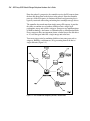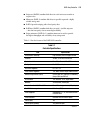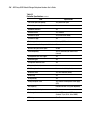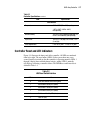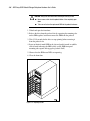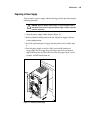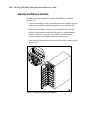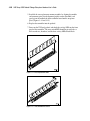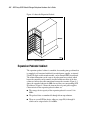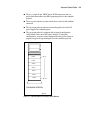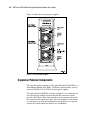
1
Compaq StorageWorks™ RAID Array 3000 Pedestal Storage Subsystem Hardware Users Guide Third Edition (January 2001) Part Number EK-SMCPO-UG. C01 Compaq Computer Corporation © 2001 Compaq Computer Corporation. COMPAQ, the Compaq logo and StorageWorks Registered with the U.S. Patent and Trademark Office. Microsoft, MS-DOS, Windows, and Windows NT are trademarks of Microsoft Corporation. All other product names mentioned herein may be trademarks of their respective companies. Confidential computer software. Valid license from Compaq required for possession, use or copying. Consistent with FAR 12.211 and 12.212, Commercial Computer Software, Computer Software Documentation, and Technical Data for Commercial Items are licensed to the U.S. Government under vendor's standard commercial license. Compaq shall not be liable for technical or editorial errors or omissions contained herein. The information in this document is subject to change without notice. THE INFORMATION IN THIS PUBLICATION IS PROVIDED “AS IS” WITHOUT WARRANTY OF ANY KIND. THE ENTIRE RISK ARISING OUT OF THE USE OF THIS INFORMATION REMAINS WITH RECIPIENT. IN NO EVENT SHALL COMPAQ BE LIABLE FOR ANY DIRECT, CONSEQUENTIAL, INCIDENTAL, SPECIAL, PUNITIVE OR OTHER DAMAGES WHATSOEVER (INCLUDING WITHOUT LIMITATION, DAMAGES FOR LOSS OF BUSINESS PROFITS, BUSINESS INTERRUPTION OR LOSS OF BUSINESS INFORMATION), EVEN IF COMPAQ HAS BEEN ADVISED OF THE POSSIBILITY OF SUCH DAMAGES AND WHETHER IN AN ACTION OF CONTRACT OR TORT, INCLUDING NEGLIGENCE. The limited warranties for Compaq products are exclusively set forth in the documentation accompanying such products. Nothing herein should be construed as constituting a further or additional warranty. RAID Array 3000 Pedestal Storage Subsystem Hardware User's Guide Third Edition (January 2001) Part Number EK-SMCPO-UG. C01 Contents About This Guide Purpose and Scope .......................................................................................................ix Intended Audience .......................................................................................................ix Document Structure .....................................................................................................ix Related Documents ......................................................................................................xi Text Conventions........................................................................................................xii Symbols in Text ........................................................................................................ xiii Symbols on Equipment............................................................................................. xiii Rack Stability..............................................................................................................xv Getting Help................................................................................................................xv Compaq Technical Support .................................................................................xv Compaq Website.................................................................................................xvi Compaq Authorized Reseller .............................................................................xvi Chapter 1 Product Overview Product Description .................................................................................................. 1-1 Pedestal Features....................................................................................................... 1-4 Pedestal Cabinet........................................................................................................ 1-5 Pedestal Components................................................................................................ 1-7 StorageWorks Building Blocks (SBBs) ............................................................ 1-7 RAID Array Controller...................................................................................... 1-7 Pedestal Power Supplies.................................................................................... 1-8 UPS .................................................................................................................... 1-8 Environmental Monitor Unit (EMU)................................................................. 1-9 UltraSCSI Buses .............................................................................................. 1-11 Connecting the Pedestal to a Host System ............................................................. 1-14 Specifications.......................................................................................................... 1-19 iv RAID Array 3000 Pedestal Storage Subsystem Hardware User's Guide Chapter 2 RAID Array Controller Controller Overview ..................................................................................................2-1 Controller Features ....................................................................................................2-3 Controller Reset and LED Indicators ........................................................................2-8 Flexible RAID Set Configuration..............................................................................2-9 Performance Enhancements ....................................................................................2-10 Custom Components ........................................................................................2-10 Efficient Write and Read Algorithms...............................................................2-11 RAID Levels Supported ..........................................................................................2-13 RAID 0 .............................................................................................................2-14 RAID 1 .............................................................................................................2-16 RAID 0+1 .........................................................................................................2-16 RAID 4 .............................................................................................................2-18 RAID 5 .............................................................................................................2-19 Just a Bunch of Drives (JBOD)........................................................................2-21 Redundant Operation ...............................................................................................2-21 Initialization......................................................................................................2-21 Message Passing...............................................................................................2-22 Failover.............................................................................................................2-22 Environmental..........................................................................................................2-22 Backup Power Management.............................................................................2-22 Voltage Monitoring ..........................................................................................2-24 Temperature Monitoring ..................................................................................2-26 Chapter 3 Maintenance Pedestal Status and Power LEDs...............................................................................3-2 SBB Status LEDs.......................................................................................................3-3 Controller LEDs.........................................................................................................3-4 EMU Error Reporting ................................................................................................3-5 EMU Error Conditions .......................................................................................3-6 Replacing Components (FRUs).................................................................................3-7 Removing the Pedestal Door..............................................................................3-8 Replacing an SBB ..............................................................................................3-9 Replacing a Power Supply ...............................................................................3-10 Replacing the RAID Array Controller .............................................................3-12 Replacing the EMU Board ...............................................................................3-13 Replacing the UPS............................................................................................3-15 Differential/Wide UltraSCSI Bus............................................................................3-15 Reconfiguring the SCSI Bus ............................................................................3-16 Replacing the Controller Memory Cache Modules.................................................3-20 Contents Chapter 4 Expansion Pedestal Option Product Description .................................................................................................. 4-1 Expansion Pedestal Cabinet...................................................................................... 4-2 Expansion Pedestal Components.............................................................................. 4-4 Reconfiguring Base Pedestal UltraSCSI Bus ........................................................... 4-6 Chapter 5 Second Controller Option Second Controller Option Kit................................................................................... 5-2 Installing the Upgrade............................................................................................... 5-3 Saving Existing Configuration .......................................................................... 5-3 Updating Firmware............................................................................................ 5-4 Shutting Down the RA3000 .............................................................................. 5-6 Installing Two SIMMs into Second Controller................................................. 5-7 Replacing Existing Controller ........................................................................... 5-8 Restoring the Configuration .............................................................................. 5-9 Updating Firmware on Second Controller ...................................................... 5-10 Installing Original Controller .......................................................................... 5-11 Configuring a Dual Controller Installation for a Single Serial Port....................... 5-11 Configuring the RA3000 for the Active Mode of Operation .......................... 5-12 Configuring the Dual Controllers.................................................................... 5-13 Connecting to Your Dual Controller Storage System ..................................... 5-14 Verifying the Controller Operating Parameters .............................................. 5-15 List of Figures Figure 1-1. RAID Array 3000 pedestal enclosure (drives optional) ....................... 1-2 Figure 1-2. Pedestal front panel major components ................................................ 1-6 Figure 1-3. Pedestal rear panel power supplies ....................................................... 1-6 Figure 1-4. EMU circuit board location ................................................................ 1-10 Figure 1-5. Pedestal rear panel components .......................................................... 1-11 Figure 1-6. UltraSCSI bus port and default SCSI ID assignments........................ 1-12 Figure 1-7. UltraSCSI bus configuration switch ................................................... 1-13 Figure 1-8. Slot locations and SCSI ID addresses................................................. 1-13 Figure 1-9. Single host, single adapter cabling diagram ....................................... 1-15 Figure 1-10. Single host, dual adapter/dual controller cabling diagram ............... 1-16 Figure 1-11. Single host, single adapter/dual controller (y-cable connection) cabling diagram ........................................................... 1-17 Figure 1-12. Dual host, single adapter/single controller cabling diagram ............ 1-18 Figure 2-1. Bridging the gap between the host and the pedestal............................. 2-3 Figure 2-2. Units created from storagesets, partitions, and disk drives .................. 2-4 Figure 2-3. Controller front panel............................................................................ 2-9 v vi RAID Array 3000 Pedestal Storage Subsystem Hardware User's Guide Figure 2-4. RAID 0 write .......................................................................................2-15 Figure 2-5. Diagram of a RAID 1 write .................................................................2-16 Figure 2-6. Diagram of RAID 0+1 write................................................................2-17 Figure 2-7. Diagram of a RAID 4 write .................................................................2-18 Figure 2-8. Diagram of a RAID 5 write .................................................................2-20 Figure 3-1. Pedestal status LEDs..............................................................................3-3 Figure 3-2. Disk drive status LEDs ..........................................................................3-4 Figure 3-3. Removing pedestal door ........................................................................3-8 Figure 3-4. Replacing an SBB................................................................................3-10 Figure 3-5. Replacing a power supply....................................................................3-11 Figure 3-6. Removing the controller from the pedestal .........................................3-12 Figure 3-7. Remove standoffs from UPS and external fault connectors................3-14 Figure 3-8. Remove screw and panel .....................................................................3-18 Figure 3-9. Location of SCSI bus configuration switch.........................................3-19 Figure 3-10. Configuration switch .........................................................................3-19 Figure 3-11. Remove controller..............................................................................3-20 Figure 3-12. Release locking clips .........................................................................3-21 Figure 13. Remove installed SIMM modules.........................................................3-21 Figure 3-14. Install replacement SIMM .................................................................3-22 Figure 3-15. Pivot SIMM down to secure ..............................................................3-23 Figure 4-1. Expansion pedestal ................................................................................4-2 Figure 4-2. Expansion pedestal slot locations and ID addresses..............................4-3 Figure 4-3. Rear panel power supplies .....................................................................4-4 Figure 4-4. EMU circuit board location ...................................................................4-5 Figure 4-5. Remove side cover from base pedestal..................................................4-7 Figure 4-6. Remove SCSI bus terminator ................................................................4-7 Figure 4-7. Disconnect SCSI cable ..........................................................................4-8 Figure 4-8. Connect SCSI jumper ............................................................................4-9 Figure 4-9. Remove connector knockout plate.......................................................4-10 Figure 4-10. Connect SCSI cable ...........................................................................4-11 Figure 4-11. Set configuration switch to 7 .............................................................4-12 Figure 4-12. Configuration switch .........................................................................4-12 Figure 4-13. Reconfigured SCSI bus addresses .....................................................4-13 Figure 4-14. Connect SCSI cable between pedestals .............................................4-14 Figure 4-15. Power cable connections....................................................................4-15 Figure 4-16. Transfer drives from base to expansion pedestal...............................4-16 Figure 5-1. Second controller pedestal slot location ................................................5-2 Figure 5-2. Saving the existing configuration ..........................................................5-3 Figure 5-3. Saved configuration ...............................................................................5-4 Figure 5-4. Update firmware command ...................................................................5-4 Figure 5-5. Firmware update dialog box ..................................................................5-5 Figure 5-6. Insert SIMM into connector...................................................................5-7 Figure 5-7. Pivot SIMM down to seat ......................................................................5-7 Figure 5-8 Remove controller from top slot.............................................................5-8 Figure 5-9. Restoring configuration to new controller.............................................5-9 Figure 5-10. Restored configuration example ........................................................5-10 Contents List of Tables Table 1 Related Documents.........................................................................................xi Table 1-1 RAID Array 3000 Pedestal Part Numbers and Model Descriptions .............................................................................................. 1-3 Table 1-2 Single Host, Single Adapter Cabling ..................................................... 1-15 Table 1-3 Single Host, Dual Adapter/Dual Controller Cabling ............................. 1-16 Table 1-4 Single Host, Single Adapter/Dual Controller (Y-cable connection cabling) ................................................................................................... 1-17 Table 1-5 Dual Host, Single Adapter/Single Controller Cabling........................... 1-18 Table 1-6 Pedestal Technical Specifications .......................................................... 1-19 Table 1-7 Pedestal Physical and Power Specification............................................ 1-20 Table 2-1 Controller Specifications.......................................................................... 2-5 Table 2-2 LED/Reset Switch Interface..................................................................... 2-8 Table 2-3 RAID Levels Supported ......................................................................... 2-13 Table 2-4 Pedestal RAID Set Restrictions ............................................................. 2-13 Table 2-5 RAID 0+1 Example................................................................................ 2-17 Table 2-6 Response to Various AC Power Conditions .......................................... 2-23 Table 2-7 Acceptable System Voltage Levels........................................................ 2-24 Table 2-8 Acceptable Termination Voltage Levels................................................ 2-25 Table 2-9 Acceptable 12 Volt Levels ..................................................................... 2-25 Table 2-10 Acceptable External Temperature Levels ............................................ 2-26 Table 2-11 Acceptable Board Temperature Levels................................................ 2-26 Table 3-1 Disk Drive SBB Status LEDs................................................................... 3-4 Table 3-2 SCSI Bus Length and External Cables................................................... 3-16 Table 3-3 Assigned Slot Device Addresses in the Pedestal ................................... 3-16 vii About This Guide Purpose and Scope This guide is designed to for installers and operators of Compaq TM StorageWorks RAID Array 3000 Pedestal Storage Subsystem Hardware User’s Guide. Intended Audience This document is written for installers and operators. Document Structure This guide contains the following information: Chapter 1: Product Overview n Product Description n Pedestal Features n Pedestal Cabinet n Pedestal Components n Connecting the Pedestal to a Host System n Specifications x RAID Array 3000 Pedestal Storage Subsystem Hardware User's Guide Chapter 2: RAID Array Controller n Controller Overview n Controller Features n Controller Reset and LED Indicators n Flexible RAID Set Configuration n Performance Enhancements n RAID Levels Supported n Redundant Operation n Environmental Chapter 3: Maintenance n Pedestal Status and Power LEDs n SBB Status LEDs n Controller LEDs n EMU Error Reporting n Replacing Components (FRUs) n Differential/Wide UltraSCSI Bus n Replacing the Controller Memory Cache Modules Chapter 4: RAID Array Controller n Product Description n Expansion Pedestal Cabinet n Expansion Pedestal Components n Reconfiguring Base Pedestal UltraSCSI Bus Chapter 5: Second Controller Option n Second Controller Option Kit n Installing the Upgrade n Configuring a Dual Controller Installation for a Single Serial Port Contents Related Documents In addition to this guide, the following documentation is useful to the reader: Table 1 Related Documents Document Title Part Number RAID Array 3000 Subsystem Second Controller Option Installation Guide EK-SM3KC-IG.E01 RAID Array 3000 Controller Shelf Hardware Users Guide EK-SMCPQ-UG.D01 Command Console V2.2 for the RAID Array 3000 (Pedestal and Rack Mount Models) Users Guide AA-RBF2C-TE xi xii RAID Array 3000 Pedestal Storage Subsystem Hardware User's Guide Text Conventions This document uses the following conventions to distinguish elements of text: Keys Keys appear in boldface. A plus sign (+) between two keys indicates that they should be pressed simultaneously. USER INPUT User input appears in a different typeface and in uppercase. FILENAMES File names appear in uppercase italics. Menu Options, Command Names, Dialog Box Names These elements appear in initial capital letters. COMMANDS, DIRECTORY NAMES, and DRIVE NAMES These elements appear in uppercase, unless case sensitive. Type When you are instructed to type information, type the information without pressing the Enter key. Enter When you are instructed to enter information, type the information and then press the Enter key. Contents Symbols in Text The following symbols are found in the text of this guide to indicate different types of information. WARNING: Text set off in this manner indicates that failure to follow directions in the warning could result in bodily harm or loss of life. CAUTION: Text set off in this manner indicates that failure to follow directions could result in damage to equipment or loss of information. IMPORTANT: Text set off in this manner presents clarifying information or specific instructions. NOTE: Text set off in this manner presents commentary, sidelights, or interesting points of information. Symbols on Equipment The following symbols are placed on equipment to indicate the presence of potentially hazardous conditions: This symbol in conjunction with any of the following symbols indicates the presence of a potential hazard. The potential for injury exists if warnings are not observed. Consult your documentation for specific details. This symbol indicates the presence of hazardous energy circuits or electric shock hazards. Refer all servicing to qualified personnel. WARNING: To reduce the risk of injury from electric shock hazards, do not open this enclosure. Refer all maintenance, upgrades, and servicing to qualified personnel. This symbol indicates the presence of electric shock hazards. The area contains no user or field serviceable parts. Do not open for any reason. WARNING: To reduce the risk of injury from electric shock hazards, do not open this enclosure. xiii xiv RAID Array 3000 Pedestal Storage Subsystem Hardware User's Guide This is a test This symbol on an RJ-45 receptacle indicates a Network Interface Connection. WARNING: To reduce the risk of electric shock, fire, or damage to the equipment, do not plug telephone or telecommunications connectors into this receptacle. This symbol indicates the presence of a hot surface or hot component. If this surface is contacted, the potential for injury exists. WARNING: To reduce the risk of injury from a hot component, allow the surface to cool before touching. These symbols on power supplies or systems indicate the equipment is supplied by multiple sources of power. WARNING: To reduce the risk of injury from electric shock, remove all power cords to completely disconnect power from the system. This symbol indicates that the component exceeds the recommended weight for one individual to handle safely. Weight in kg WARNING: To reduce the risk of personal injury or damage to the Weight in lb equipment, observe local occupational health and safety requirements and guidelines for manual material handling. Contents Rack Stability WARNING: To reduce the risk of personal injury or damage to the equipment, be sure that: n The leveling jacks are extended to the floor. n The full weight of the rack rests on the leveling jacks. n The stabilizing feet are attached to the rack if it is a single rack installation. n The racks are coupled together in multiple rack installations. n Only one component is extended at a time. A rack may become unstable if more than one component is extended for any reason. Getting Help If you have a problem and have exhausted the information in this guide, you can get further information and other help in the following locations. Compaq Technical Support In North America, call the Compaq Technical Phone Support Center at 1-800-OK-COMPAQ. This service is available 24 hours a day, 7 days a week. For continuous quality improvement, calls may be recorded or monitored. Outside North America, call the nearest Compaq Technical Support Phone Center. Telephone numbers for worldwide Technical Support Centers are listed on the Compaq website. Access the Compaq website: http://www.compaq.com xv xvi RAID Array 3000 Pedestal Storage Subsystem Hardware User's Guide Be sure to have the following information available before you call Compaq: n Technical support registration number (if applicable) n Product serial number n Product model name and number n Applicable error messages n Add-on boards or hardware n Third-party hardware or software n Operating system type and revision level Compaq Website The Compaq website has information on this product. Access the Compaq website: http://www.compaq.com/storage Compaq Authorized Reseller For the name of your nearest Compaq authorized reseller: n In the United States, call 1-800-345-1518. n In Canada, call 1-800-263-5868. n Elsewhere, see the Compaq website for locations and telephone numbers. Chapter 1 Product Overview This chapter provides an overall description of the RAID Array 3000 Storage System and its components. Examples of Host/Storage System connections and a list of technical and environmental specifications are included at the end of the chapter. NOTE: This guide is the Hardware User’s Guide. For configuration information, refer to the Getting Started RAID Array 3000 Installation Guide for your Host system and the Command Console V2.2 for the RAID Array 3000 (Pedestal and Rack Mount Models) User’s Guide. Product Description The RAID Array 3000 storage subsystem is a desk-side storage system (subsystem) offering the basic components required to create a user-designed storage array with two 16-bit, differential UltraSCSI bus host interfaces (Figure 1–1). The pedestal can accommodate up to seven 3½-in storage devices. The devices, referred to as StorageWorks Building Blocks or SBBs, are disk drives from the StorageWorks family of storage devices. The release note that accompanies the subsystem lists the software solutions and disk drives that are supported. A battery backup subsystem is included as part of the pedestal enclosure in the form of a freestanding Uninterruptable Power Supply (UPS). In case of a power failure, the UPS provide a temporary backup for cache while the subsystem flushes to disks. 1-2 RAID Array 3000 Pedestal Storage Subsystem Hardware User’s Guide The RAID Array 3000 offering also includes option kits designed to increase the storage capacity and enhance the performance of the subsystem. The first is an expansion pedestal (second enclosure) designed to increase the storage capacity of the subsystem to a maximum of 14 drives. The pedestal expansion kit option is described in detailed in Chapter 4 “Expansion Pedestal Option” of this guide. The second option kit allows the addition of a second RAID controller to the subsystem for redundancy. The second controller operates in conjunction with the installed controller to protect data during a malfunction. Chapter 5 “Second Controller Option” describes how to install the redundant controller option and how to reconfigure the subsystem to accommodate it. The RAID Array 3000 pedestal enclosure and its associated options are listed and described in Table 1–1. Figure 1–1 shows the pedestal with a full complement of drives (optional) for completeness. PEDESTAL UPS 3000-01A Figure 1-1. RAID Array 3000 pedestal enclosure (drives optional) Product Overview 1-3 The RAID Array 3000 pedestal is equipped with a dual-channel RAID controller that supports all of the UltraSCSI bus features. It also contains an Environmental Monitor Unit (EMU) board for environmental monitoring and error detection. Table 1-1 RAID Array 3000 Pedestal Part Numbers and Model Descriptions Compaq Part No. DS-SWXRA-GA Item Description RA3000 pedestal subsystem with one controller, 120 V. Includes: Seven-slot pedestal for wide UltraSCSI SBBs, one HSZ22 two-channel controller with 16 MB cache, Environmental Monitor Unit (EMU), two 204 watt power supplies with fans, five meter host SCSI cable (BN37A), BN38E-OB adapter, one 120-volt UPS, and North American power cords. Disks are not included. Requires: Solutions Software Kit for platform, host adapter, and disks. Options: Second HSZ22 controller, seven disk SBB expansion pedestal, and cache memory upgrade. DS-SWXRA-GC RA3000 pedestal subsystem with one controller, 230 V. Includes: Seven-slot pedestal for wide UltraSCSI SBBs, one HSZ22 two-channel controller with 16 MB cache, Environmental Monitor Unit (EMU), two 204 watt power supplies with fans, five meter host SCSI cable (BN37A), BN38E-OB adapter, one 230-volt Uninterruptable Power Supply (UPS), and North American power cords. Disks are not included. Requires: Solutions Software Kit for platform, host adapter, and disks. Options: Second HSZ22 controller, seven-disk SBB expansion pedestal, and cache memory upgrade. DS-HSZ22-AA RA3000 second controller option which includes: DS-HSZ22-AA SCSI controller, three 16-MB SIMM modules, 0.8 m adapter-to-SCSI-3 cable, 5 m SCSI cable, 9-pin serial cable, user documentation. DS-HSZ22-AB RA3000 second controller option which includes: DS-HSZ22-AB SCSI controller, four 32-MB SIMM modules, 0.8 m adapter-to-SCSI-3 cable, 5 m SCSI cable, 9-pin serial cable, user documentation. DS-SWXRA-GD Expansion Pedestal (120/240 V) with slot space for seven additional UltraSCSI disk drives. DS-SWXRA-GR Single 204-watt power supply for RA3000, 120/230 V for on-site spare. 1-4 RAID Array 3000 Pedestal Storage Subsystem Hardware User’s Guide Pedestal Features The major features of the pedestal are: ■ Two differential 16-bit UltraSCSI host buses ■ Seven 3½-in disk drive SBB slots ■ One dual-channel RAID array controller ■ Second controller option for redundancy ■ Expansion pedestal option allowing up to fourteen SBB slots in a dualpedestal subsystem configuration ■ Memory cache expansion option for the controller ■ Redundant power provided by two fan-cooled universal AC input power supplies (50/60 Hz, 100 to 240 VAC) ■ Cache backup provided by an external UPS ■ Environmental monitor unit (EMU) for error detection ■ The ability to hot plug SBBs without powering down the system Pedestal Cabinet The pedestal cabinet is a modular freestanding storage enclosure that is completely self-contained. It has two fan-cooled power supplies, an internal EMU circuit board, and a RAID array controller with front panel display and control. Figure 1–2 shows the major components in the pedestal enclosure. Figure 1–3 identifies the items on the rear panel power supplies. The characteristics of the pedestal cabinet are: ■ The disk drive storage capacity is seven 3½-in disk drive SBBs. ■ The subsystem slots are numbered 0 through 6 from top to bottom. ■ There are two 68-pin VHDCI female SCSI connectors on the rear panel, which interconnect the host system to the RAID controller in the pedestal. ■ The rear panel also contains an alarm switch, a UPS monitor connector, an external fault condition connector, and a serial port connector (for controller configuration). Product Overview 1-5 ■ The pedestal is equipped with an internal configuration switch, which sets the SCSI ID addresses of the controller and the storage devices. Figure 1-2. Pedestal front panel major components Figure 1-3. Pedestal rear panel power supplies 1-6 RAID Array 3000 Pedestal Storage Subsystem Hardware User’s Guide Pedestal Components The major components in the pedestal subsystem include: ■ Dual-channel RAID array controller ■ Two 16-bit single-ended split SCSI buses ■ Environmental Monitor Unit (EMU) ■ Two universal 50/60 Hz, 120 or 240 VAC power supplies ■ Separate free-standing backup power supply (UPS) StorageWorks Building Blocks (SBBs) The pedestal has seven 3½-in disk drive SBB slots. The number of drives that make up each configuration of the array is left to the end user with a maximum of seven storage devices. RAID Array Controller The controller contains two wide,UltraSCSI differential host channels and two wide, UltraSCSI single-ended disk channels. In dual-controller configurations, the controllers support fully automatic and smooth controller failover. The controller supports one or two standard 72-pin cache SIMMs of up to 32 MB. In a redundant controller setup, both controllers must have identical cache configurations and the total usable cache (per controller) will be half the amount installed. Thus, in a single controller setup, the maximum usable cache is 64 MB while a redundant setup has a maximum usable cache of 32 MB (per controller). The RAID Array controller contains the following features: ■ Single PCB form factor for inclusion in the enclosure ■ Support for dual hot-swap controller operation ■ Dual differential Ultra-Wide SCSI host channels ■ Dual single-ended Ultra-Wide SCSI disk channels ■ RAID level 0, 1, 0+1, 4, 5, and JBOD support ■ EMU support ■ Cluster support for Windows Product Overview 1-7 ■ 32 Logical Unit (LUNs) per host channel (some operating systems may be limited to 8) ■ Support for Hot and Warm spare disks ■ UPS-backed write caching ■ Per LUN write cache/write back selection ■ Configuration/Maintenance via RS-232 or host SCSI channel using StorageWorks Command Console (SWCC) ■ Update of firmware via host channel Pedestal Power Supplies The pedestal has two interchangeable, air-cooled, AC power supply modules located at the rear of the unit. The power supplies provide redundant power if one of the units should malfunction. Each supply provides +5 and +12 VDC to power the RAID controller, EMU, and the storage SBBs in the pedestal. In addition, each unit contains a high-speed fan for pedestal cooling. The upper power supply is designated as A and the lower as B. The unit contains an AC power receptacle, a power status LED, a fan, and a latching slider switch to secure the supply in the pedestal. UPS The UPS is separate and free-standing unit designed to protect the pedestal from problems associated with poor quality AC power or a complete loss of AC power. The UPS is connected between the AC outlet and the line input of the pedestal power supply B to provide battery backup power. The major features of the UPS include Cell Saver Technology (doubles battery life and speeds recharge time), hot-swap batteries, and network surge protection. The front panel display has user controls (LEDs and control buttons) and the rear panel contains a COMM port, which provides UPS status to the EMU in the pedestal. The rear panel also contains the network surge protector, a reset button, and four power receptacles. An audible alarm is activated when input power fails, as a Low Battery Warning, or whenever the UPS is in need of servicing. The UPS automatically recharges its battery when power is returned following a power failure. Recharge time is four to six hours depending on the energy requirements of your load and the length of the power outage. 1-8 RAID Array 3000 Pedestal Storage Subsystem Hardware User’s Guide The UPS has its own installation, operation, and service manual. The manual describes the UPS in detail and is part of the documentation set enclosed with your subsystem. Environmental Monitor Unit (EMU) The EMU is an internal circuit board that monitors the operation of the pedestal. The EMU monitors power supply voltages, fans, temperatures which are reported to the user, and controls (turns on and off) the audible alarm and status LED on the front panel. The EMU also reports the subsystem status to the controller that reports to the host, and has the capability of exchanging signals with auxiliary devices and controllers. The EMU is located internally in the top rear of the pedestal as shown in (Figure 1–4). It is connected to the SCSI bus and powered by an internal cable. The following external components on the rear panel of the pedestal are part of the EMU (Figure 1–5): ■ An alarm switch (S1) that enables (up) or disables (down) the audible alarm ■ A power monitor connector (UPS) allows the EMU to monitor and report the status of a battery backup power supply ■ An External Fault Condition connector allows the EMU to monitor the status of a user-selected device EMU 3000-37 Figure 1-4. EMU circuit board location Product Overview 1-9 Figure 1-5 shows the Pedestal rear panel components. Host #0 External Fault Host #1 UPS Controller (Top) Controller (Bottom) 3000-23A Figure 1-5. Pedestal rear panel components 1-10 RAID Array 3000 Pedestal Storage Subsystem Hardware User’s Guide UltraSCSI Buses The pedestal contains two, 16-bit, single-ended, wide UltraSCSI buses (factory-configured as a split bus) that connects the controllers to the disk drives. The split-bus arrangement is divided into two-bus paths designated device port 0 and device port 1 as shown in Figure 1–6. Port 0 connects the controller to the upper four devices in the pedestal (IDs 8 through 11) and port 1 connects the controller to lower three devices (IDs 8 through 10). The device addresses on the bus are set at the factory by an internal configuration switch (Figure 1–7). ID8 ID9 ID10 ID11 ID8 Device Port 0 ID9 Device Port 1 ID10 Top Controller ID=7 ID=7 Bottom Controller (Optional) ID=6 ID=6 3000-51 Figure 1-6. UltraSCSI bus port and default SCSI ID assignments When set to a specific position, the switch controls the addresses of each SBB slot. Figure 1–8 identifies the pedestal slot locations and their corresponding SCSI ID addresses for each device port. Product Overview 1-11 The subsystem can be reconfigured for through-bus operation by modifying the bus and resetting the internal configuration switch. The information needed to reconfigure the bus from split-bus to a through-bus configuration is described in Chapter 4 “Expansion Pedestal Option”. 6 3000-38 Figure 1-7. UltraSCSI bus configuration switch Controller SLOT 0 ID = 8 SLOT 1 Device Port 0 SLOT 2 SLOT 3 11 SLOT 4 8 Device Port 1 SLOT 5 SLOT 6 ID = 10 3000-52 Figure 1-8. Slot locations and SCSI ID addresses 1-12 RAID Array 3000 Pedestal Storage Subsystem Hardware User’s Guide Connecting the Pedestal to a Host System This section illustrates how to connect four possible RA3000/Host configurations. The configurations are: ■ Single host, single adapter configuration ■ Single host, dual adapter/dual controller configuration ■ Single host, single adapter/dual controller configuration (using a Y-cable) ■ Dual host, single adapter/single controller configuration NOTE: The following illustrations show the expansion pedestal option as part of the storage system installation. See Chapter 4 for a full description of the Expansion Pedestal. Product Overview 1-13 Figure 1-9 shows the Single host, Single Adapter Cabling diagram. Rear View of DS-SWXRA-GA Controller Pedestal Rear View of DS-SWXRA-GD Expansion Pedestal 1 2 3 Host System Host Adapter 6 4 5 shr-1311b Figure 1-9. Single host, single adapter cabling diagram Table 1-2 Single Host, Single Adapter Cabling Item å ê ñ Description Host #1 VHDCI connector Host #0 VHDCI connector SCSI device bus out connector D0 SCSI Cable BN37A-05 (host adapter connection made using Technology Adapter cable BN38E-0B, not shown) SCSI cable 17-04454-01 SCSI device bus In connector D0 1-14 RAID Array 3000 Pedestal Storage Subsystem Hardware User’s Guide Figure 1-10 shows the Single host, Dual Adapter/dual Controller Cabling diagram. Rear View Rear ViewofofDS-SWXRA-GA DS-SWXRA-GA Controller Pedestal Controller Pedestal 1 Rear View Rear View of of DS-SWXRA-GD DS-SWXRA-GD Expansion Pedestal Expansion Pedestal 2 3 Host System Host Adapter Host Adapter 5 6 4 shr-1312b Figure 1-10. Single host, dual adapter/dual controller cabling diagram Table 1-3 Single Host, Dual Adapter/Dual Controller Cabling Item å ê ñ Description Host #1 VHDCI connector Host #0 VHDCI connector SCSI device bus out connector D0 (2) SCSI Cables BN37A-05 (host adapter connection made using two Technology Adapter cables BN38E-0B, not shown) SCSI cable 17-04454-01 SCSI device bus in connector D0 Product Overview 1-15 Figure 1-11 shows the Single Host, Single Adapter/dual Controller (y-cable connection) Cabling diagram. Rear View of DS-SWXRA-GA Controller Pedestal Rear View of DS-SWXRA-GD Expansion Pedestal Host System Host Adapter shr-1313b Figure 1-11. Single host, single adapter/dual controller (y-cable connection) cabling diagram Table 1-4 Single Host, Single Adapter/Dual Controller (Y-cable connection cabling) Item å ê ñ ò Description Host #1 VHDCI connector Host #0 VHDCI connector SCSI device bus out connector D0 SCSI Y-cable BN-21W-OB (2) SCSI cables BN37A-05 (connections to Y-cable made using two Technology Adapter cables BN38E-0B, not shown) SCSI cable 17-04454-01 SCSI device bus In connector D0 1-16 RAID Array 3000 Pedestal Storage Subsystem Hardware User’s Guide Figure 1-12 shows the Dual host, Single Adapter/single Controller Cabling diagram. Rear View of DS-SWXRA-GA Rear View of DS-SWXRA-GA Controller Pedestal Controller Pedestal Rear of Rear ViewView of DS-SWXRA-GD DS-SWXRA-GD Expansion Pedestal Expansion Pedestal Host System Host Adapter Host System Host Adapter shr-1314b Figure 1-12. Dual host, single adapter/single controller cabling diagram Table 1-5 Dual Host, Single Adapter/Single Controller Cabling Item å ê ñ ò Description Host #1 VHDCI connector Host #0 VHDCI connector SCSI Cable BN37A-05 (host adapter connection made through Technology Adapter cable BN38E-0B, not shown) SCSI Cable BN37A-05 (host adapter connection made through Technology Adapter cable BN38E-0B, not shown) SCSI device bus out connector D0 SCSI cable 17-04454-01 SCSI device bus In connector D0 Product Overview 1-17 Specifications Table 1-6 Pedestal Technical Specifications Item Description Cabinet Pedestal with seven (7) disk SBB slots Expansion pedestal with an additional 7 slots Controller HSZ22 Controller cache 16 MB standard upgrades to 128 MB for a two controller pair Backup for cache Standard UPS Mirrored write-back cache Yes Device channels per controller 2 Maximum disks per device port 14 Dual active controllers Yes, order HSZ22-AA and second solutions software kit Host interface UltraSCSI wide differential Drive interface UltraSCSI wide single-ended RAID levels supported 0, 1, 0+1, 4, 5 Non-RAID disk support Yes (JBOD) Sustained I/O rate 4,400 I/O’s per second per controller pair RAID 5 sustained transfer rate 28 MB per second per controller pair Maximum transfer rate 40 MB per second per controller pair Redundant fans Yes Redundant power supplies Yes Global disk spares Yes EMU Yes, monitors power and temperature Setup/control lines One serial Serviceability Hot-swap components RAID manager GUI support SWCC 2.2 available for all platforms. Regulatory approvals UL, CSA, TUV, FCC, CE MARK, C TICK, BSMI (replaces BCIQ), VCCI 1-18 RAID Array 3000 Pedestal Storage Subsystem Hardware User’s Guide Table 1-7 Pedestal Physical and Power Specification Physical Specifications Item Dimension Height 564 mm Width 254 mm Depth 494 mm Rear clearance (air exhaust) 305 mm Front clearance (door opening) 305 mm Weight (no devices) 19.5 kg Power Specifications Item Rating Input power 110-240 VAC, 50/60 Hz, single phase, 12A/6A Heat dissipation 3070 Btu/hr Temperature (optimal, minimum required) 65°F to 75°F (18°C to 24°C), 50°F to 104°F (10 to 40°C) Altitude Up to 2,400 m Air quality Not to exceed 500,000 particles/ft3 for air at a size of 0.5 micron or larger Total power per power supply (Total of +12 VDC and +5 VDC outputs) 204 watts, maximum Nominal output voltages +5 VDC @ 15 amps, maximum +12 VDC @ 12 amps, maximum Device startup time 4 second internal, minimum Chapter 2 RAID Array Controller This chapter describes the major features and characteristics of the RAID array controller in the RAID Array 3000 subsystem. The number of devices supported by the controller may be limited by the enclosure. Controller Overview The RAID Array controller provides high performance, high-availability access to SCSI disk array subsystems along a UltraSCSI/Wide SCSI bus. With a modular hardware design and an intuitive configuration utility, the controller is designed to meet a wide range of storage needs. The controller consists of a single 5 ½ in (14.2 cm) x 8 in (20.3 cm) PCB mounted in a sheet metal subassembly. The package consists of the controller PCB, a 300-pin connector, mechanical insertion assists, and a LED/reset switch interface. All signals to the controller are routed through the backplane connector. The unit is configured with two Ultra Wide, differential SCSI host channels capable of transferring data to and from the host at rates up to 40 Mb/s. The host SCSI IDs are configurable via the host parameters and can support 32-deep tagged queuing. The controller is also configured with two Ultra Wide, single-ended SCSI disk channels capable of transferring data to and from the disk drives at rates up to 40 Mb/s. Each channel can support up to 15 drives (14 in redundant controller subsystems). 2-2 RAID Array 3000 Pedestal Storage Subsystem Hardware User’s Guide The controller has two Single Inline Memory Module (SIMM) connectors for up to 64 MB of cache memory. The SIMM connectors form a mirrored pair when the controllers are configured in a redundant controller configuration; otherwise they are fully accessible by the controller. In a redundant controller setup, both controllers must have identical cache configurations and the total usable cache (per controller) will be half the amount installed. Thus, in a single controller setup, the maximum usable cache is 64 MB while a redundant setup has a maximum usable cache of 32 MB (per controller). There are two configurations for redundant pairs of controllers: Active/Active Failover mode and Active/Passive Failover mode. In Active/Active Failover, each controller in the redundant pair has one active SCSI host port and one passive SCSI host port. Redundancy Groups (Virtual LUNs) can be mapped only to one active host port and are not accessible from the passive port or the other controller (that is partitioned model). In Active/Passive Failover, one controller in the redundant pair has both SCSI host ports active and the other controller is in a standby passive mode. Redundancy Groups (Virtual LUNs) can be mapped to either SCSI host port or to both as in the single controller model. In both cases, a single controller failure will not affect the subsystem because the surviving controller will take over. RAID Array Controller 2-3 Controller Features The controller is the intelligent bridge between the host and the devices in the pedestal. From the host’s perspective, the controller is simply another SCSI device connected to one of its I/O buses. Consequently, the host sends its I/O requests to the controller just as it would to any other SCSI device. Figure 2–1 shows the role of the controller between the host and the pedestal. Figure 2-1. Bridging the gap between the host and the pedestal 2-4 RAID Array 3000 Pedestal Storage Subsystem Hardware User’s Guide From the pedestal’s perspective, the controller receives the I/O requests from the host and directs them to the devices in the pedestal. Since the controller processes all the I/O requests, it eliminates the host-based processing that is typically associated with reading and writing data to multiple storage devices. The controller does much more than simply manage I/O requests: it provides the ability to combine several ordinary disk drives into a single, highperformance storage unit called a storageset. Storagesets are implementations of RAID technology, also known as a Redundant Array of Independent Disks. Every storageset shares one important feature: whether it uses two disk drives or 14, each storageset looks like a single storage unit to the host. You create storage units by combining disk drives into storagesets such as stripesets, RAIDsets, and mirrorsets, or by presenting them to the host as single-disk units (Figure 2–2). Figure 2-2. Units created from storagesets, partitions, and disk drives RAID Array Controller 2-5 ■ Stripesets (RAID 0) combine disk drives in serial to increase transfer or requests rates ■ Mirrorsets (RAID 1) combine disk drives in parallel to provide a highly reliable storage unit ■ RAID 4 provides striping with a fixed parity drive ■ RAIDsets (RAID 5) combine disk drives in serial— just like stripesets — but also store parity data to ensure high reliability ■ Stripe mirrorsets (RAID 0 + 1) combine mirrorsets in serial to provide the highest throughput and availability of any storage unit Table 2–1 lists the features of the RAID 3000 controller. Table 2-1 Controller Specifications Item Specifications Environmental monitoring High availability fault bus support via EMU Processor 40 MHz, 32 bit LR33310 RISC CPU System bus interface Two, Wide, differential UltraSCSI channels Configuration Two RS232 serial ports RAID levels supported 0, 1, 0+1, 4, 5 Drive channels supported Two, Wide, UltraSCSI single-ended channels Number of logical drives (LUN’s) Up to 30 RAID sets, and up to 16 redundancy groups (LUNs) per RAID set SCSI channels Two, UltraSCSI, 16-bit, single-ended Metadata 20 blocks/disk (10240 bytes) Largest allowable disk/RAID set/LUN Two, 32 blocks (approximately 2.2 petabytes) Non-RAID device support Disk drives (JBOD) Drives supported StorageWorks 2, 4, 18, and 36 GB SCSI and UltraSCSI drives. Drive reconstruct Automatic with hot or warm spares Disk hot plug Yes Disk hot spare (spinning) Yes, global hot spare continued 2-6 RAID Array 3000 Pedestal Storage Subsystem Hardware User’s Guide Table 2-1 Controller Specifications continued Item Specifications Disk warm spare (not spinning) Yes, global warm spare Redundant power supplies Yes Redundant controllers Yes Controller failover Yes, automatic Controller hot spare Yes (Active/Passive mode) Controller hot plug Yes Cluster support Yes, single (SCSI) bus cluster Maximum number of units presented to host 64 Maximum host port transfer speed 20 MHz Command queuing Yes, 64 commands (host and disk SCSI channels) Heterogeneous multi-host support Yes Mixed drive types Yes Configurable reconstruct time Yes Stripe size (chunk size) Variable Write through cache Yes, user selectable (optional) Write back cache Yes, user selectable (default) Write on top Yes Write gathering Yes Battery backup for cache Yes, Pedestal Uninterruptable Power Supply (UPS) Boot capability Bootable from RAID set (system-dependent) Number of controllers /system Two Cache support Up to 64 MB (using two 32 MB industry standard, 72-pin, 36-bit, 60 ns SIMMS) FCC rating Class B continued RAID Array Controller 2-7 Table 2-1 Controller Specifications continued Item Specifications Environmental Temperature 41ºF to 122ºF (5ºC to 50ºC) operating, -40ºF to 140ºF (-40ºC to +60ºC) non-operating Relative humidity 10% to 95% non-condensing (operating), 5% to 90%, non-condensing (non-operating) Physical size 8.55 in (21.7 cm) deep, 5.03 in wide, 1.6 in (4 cm) high Power requirements 5 VDC @ 3 A, peak; - 12 VDC @ 1 A, peak Controller Reset and LED Indicators Figure 2–3 illustrates the front panel of the controller. All LEDs are numbered from left to right. The reset button (LED 0) flashes green about once every second (heartbeat) to indicate that the controller is operating normally. LEDs 1 through 4-display host and disk channel activity (amber). LED 5 (normally off) displays red during a controller failure. The LED/Reset switch interface is defined in Table 2–2. Table 2-2 LED/Reset Switch Interface LED # Name 0 Heart beat controller reset switch (green) 1 Host channel 0 activity LED (amber) 2 Host channel 1 activity LED (amber) 3 Disk channel 0 activity LED (amber) 4 Disk channel 1 activity LED (amber) 5 Fault LED (red) 2-8 RAID Array 3000 Pedestal Storage Subsystem Hardware User’s Guide Figure 2-3 shows the front panel of the controller. Figure 2-3. Controller front panel Flexible RAID Set Configuration In addition to its flexible hardware design, the controller’s firmware offers the user the flexibility to configure RAID sets in several different ways: ■ RAID sets can comprise drives from any drive channel and SCSI ID. ■ A RAID set can contain all the drives connected to the controller, a single drive, or any number of drives in between. ■ The controller supports RAID Levels 0, 1, 0+1, 4, and 5. It also supports JBOD allowing you to connect standalone disk drives (such as a system disk) to the controller without making them members of a RAID set. RAID Array Controller 2-9 ■ Each RAID set can be partitioned into smaller redundancy groups. ■ The controller’s host LUN Mapping feature makes it possible to map RAID sets differently to each host port. You make the same redundancy group appear on different LUNs to different hosts, or make a redundancy group visible to one host but not to another. ■ Any drive may be designated as a hot or warm spare. Spares are global, meaning that in the event of a drive failure, the controller will search for the first available spare on any channel or SCSI ID and automatically begin rebuilding the failed drive’s data. Performance Enhancements The controller employs a number of techniques to achieve as much performance as possible from its design. Custom Components To increase performance and reliability, the controller’s core functions have been encapsulated in four custom Application Specific Integrated Circuits (ASIC) components as follows: ■ XOR ASIC: Used in the exclusive -or parity calculations employed by RAID levels 4 and 5. ■ DMA ASIC: Controls the data path hardware for the various I/O ports ■ CPU Interface ASIC: Supports the controller’s MIPS R3000 RISC central processing unit. ■ Memory Controller ASIC: Controls the memory system and supports data movement on the internal bus at a maximum burst rate of 80 Mb/s and a maximum sustainable rate of 60 Mb/s. 2-10 RAID Array 3000 Pedestal Storage Subsystem Hardware User’s Guide Efficient Write and Read Algorithms Standard RAID write operations that involve parity, such as those in RAID levels 4 and 5, require multiple, time-consuming steps: 1. Read data from the parity drive. 2. Read existing data from the target data drives. 3. Exclusive-or the old parity, old data, and new data to generate new parity data. 4. Write the new parity data to the parity drive. 5. Write the new data to the target data drives. The controller uses several techniques to streamline write operations and significantly improve performance. All the techniques use the controller’s onboard cache, which can contain up to 64 MB of memory in the form of standard 72-pin, 60 ns SIMMs. NOTE: The controller will not operate without at least one 4 MB SIMM installed in its cache. Also, it will not operate without either a backup or a UPS connected to the controller. Without a backup, data stored in the cache, but not yet written to the disk drives, would be lost in the event of a power interruption. Write-Back Caching When the host sends data to be written to a redundancy group, the controller stores the data in its cache and immediately reports to the host that it has completed the write. The controller eventually writes the data to the disk drives when the write can be done most efficiently, or when the controller must flush the cache to make room for other data or to prepare for a shutdown. Write-back caching makes the host more responsive to the user, since the host does not have to wait for a lengthy RAID write before proceeding to another task. RAID Array Controller 2-11 Write Gathering The controller will attempt to consolidate multiple writes destined for contiguous blocks and then write the entire data block in one operation. The controller stores the data in cache until it performs the write. Ideally, the controller will wait until it has gathered enough data to fill an entire stripe. This action enables the controller to avoid reading from the parity and data drives before making the write. All the controller has to do is calculate parity from the data it already has in its cache, then write the data and parity to the drives. Even if the controller cannot accumulate enough data to fill a stripe, the consolidation of small writes can reduce the number of read/write operations that must take place. Write On Top If the host commands that data be written to disk, and data for that address is pending in the controller’s cache, the controller writes the new data on top of the old in the cache. Only the new data is eventually written to the disk drives. 2-12 RAID Array 3000 Pedestal Storage Subsystem Hardware User’s Guide RAID Levels Supported The RAID Array 3000 controller supports the following RAID levels: Table 2-3 RAID Levels Supported RAID Level Description 0 Striping without parity 1 Mirroring 0+1 Striping and mirroring 4 Striping with fixed parity drive 5 Striping with floating parity drive JBOD Just a Bunch of Drives NOTE: The controller stripes data in multi-block chunk sizes. Also, the controller does not support RAID level 3 or 0 with a one-block chunk size. There are some restrictions you must adhere to when creating a RAID set on the RAID 3000 pedestal. The minimum and maximum number of drives required to support each RAID level are listed in Table 2–4. Table 2-4 Pedestal RAID Set Restrictions * * * RAID Level Min. No. of Drives Max. No. of Drives JBOD 1 1 0 2 14 1 2 14 0+1 4 14 4 3 14 5 3 14 Must be an even number. RAID Array Controller 2-13 RAID 0 RAID 0 breaks up data into smaller chunks and writes each chunk to a different drive in the array. The size of each chunk is determined by the controller’s chunk size parameter, which you set in the course of creating a RAID set. The advantage of RAID 0 is its high bandwidth. By breaking up a large block of data into smaller chunks, the controller can use multiple drive channels to write the chunks to the disk drives. Furthermore, RAID 0 involves no parity calculations to complicate the write operation. Likewise, a RAID 0 read operation employs multiple drives to assemble a single, large data block. This makes RAID 0 ideal for applications such as graphics, video, and imaging that involve the writing and reading of large, sequential blocks. CAUTION: The lack of parity means that a RAID 0-disk array offers absolutely no redundancy and thus cannot recover from a drive failure. 2-14 RAID Array 3000 Pedestal Storage Subsystem Hardware User’s Guide Figure 2–4 shows a diagram of a RAID 0 write. Figure 2-4. RAID 0 write RAID Array Controller 2-15 RAID 1 RAID 1 (also known as mirroring or shadowing) takes data sent by the host and duplicates it on all the drives in an array. The result is a high degree of data availability, since you can lose all but one drive in the array and still have full access to your data. This high degree of data availability comes at a price: a RAID 1 array requires multiple drives to achieve the storage capacity of a single drive. Figure 2–5 shows a RAID 1 write. Figure 2-5. Diagram of a RAID 1 write A RAID 1 array will show up on the monitor as degraded when at least one drive fails, even if two or more members of the redundancy group remain in good working order. As long as at least two working drives remain in the array, you may continue to run the array in degraded mode without putting data in jeopardy. RAID 0+1 RAID 0+1 combines RAID 0 (striping) with RAID 1 (mirroring). In RAID 0+1 write, the controller breaks up the data block from the host into smaller chunks, then writes the chunks to half the drives in the array, while writing duplicate chunks to the remaining drives. 2-16 RAID Array 3000 Pedestal Storage Subsystem Hardware User’s Guide Figure 2-6 shows a diagram of RAID 0+1 write. Figure 2-6. Diagram of RAID 0+1 write In the event of a drive failure, a RAID 0+1 array will enter degraded mode and continue to operate by substituting the failed drive with its mirror. When the controller creates a RAID 0+1 set, it first sorts the drives by channel number and SCSI ID. Then it stripes the data across every other drive and forms a mirrored pair with the first two drives, another mirrored pair with the second two drives, and so on. Table 2–5 lists how the controller uses the drives in a RAID 0+1 set. Table 2-5 RAID 0+1 Example Drives Selected Function Channel 1, ID 0 First member of stripe set Channel 1, ID 1 Mirror of channel 1, ID 0 Channel 1, ID 2 Second member of stripe set Channel 2, ID 0 Mirror of channel 1, ID 2 Channel 2, ID 1 Third member of stripe set Channel 2, ID 2 Mirror of channel 2, ID 1 RAID Array Controller 2-17 RAID 4 RAID 4 breaks up host data into chunks, calculates parity by performing an exclusive-or on the chunks, and then writes the chunks to all but one drive in the array and the parity data to the last drive. When the host requests data from the disk drives, the controller retrieves the chunks containing the addressed data, reconstitutes the data from the chunks, and passes the data to the host. Figure 2-7. Diagram of a RAID 4 write In the event of a single drive failure, a RAID 4 array will continue to operate in degraded mode. If the failed drive is a data drive, writes will continue as normal, except no data will be written to the failed drive. Reads will reconstruct the data on the failed drive by performing an exclusive-or operation on the remaining data in the stripe and the parity for that stripe. If the failed drive is a parity drive, writes will occur, as normal except no parity will be written. Reads will simply retrieve data from the data disks. There will be no deterioration in controller performance while a RAID set is in degraded mode. 2-18 RAID Array 3000 Pedestal Storage Subsystem Hardware User’s Guide In general, RAID 4 is best suited for applications such as graphics, imaging, or video that call for reading and writing large, sequential blocks of data. However, you may find that RAID 4 is preferable to RAID 5 even for applications characterized by many small I/O operations, such as transaction processing. This is due to the controller’s intelligent caching, which efficiently handles small I/O reads and writes, and to the relatively less complex algorithms needed to implement RAID 4. The benefits of RAID 4 disappear when you have many, small I/O operations scattered randomly and widely across the disks in the array. RAID 4’s fixed parity disk becomes a bottleneck in such applications, as the following example illustrates. Let’s say the host instructs the controller to make two small writes. The writes are widely scattered, involving two different stripes and different disk drives. Ideally, you would like both writes to take place at the same time, but RAID 4 makes this impossible, since the writes must take turns accessing the fixed parity drive. For this reason, RAID 5 is the better choice for widely scattered, small write operations. CAUTION: RAID 4 can withstand a single failure and handle I/O activity without interruption in degraded mode until the failed drive is rebuilt. If a second drive fails while the RAID set is in degraded mode, the entire RAID set will fail. RAID Array Controller 2-19 RAID 5 RAID 5 addresses the bottleneck issue for barrages of widely scattered, small I/O operations. Like RAID 4, RAID 5 breaks up data into chunks, calculates parity, and then writes the chunks in stripes to the disk drives; saving one drive one each stripe for the parity data. Unlike RAID 4, however, RAID 5 changes the parity drive on each stripe. This means, for instance, that a write operation involving drive 2 on stripe 1 can conceivably take place at the same time as a write involving drive 3 on stripe 2, since they would be addressing different parity drives. Figure 2-5 shows a diagram of a RAID 5 write. Figure 2-8. Diagram of a RAID 5 write RAID 5 handles drive failures in the same manner as RAID 4, except the parity is different for each stripe. The controller either uses the parity information on a stripe to reconstruct its data or simply reads the data as normal, depending on the location of the stripe’s parity drive. 2-20 RAID Array 3000 Pedestal Storage Subsystem Hardware User’s Guide While RAID 5 is ideally suited for applications with many, small I/O operations, there is no reason why it cannot function equally well for applications with large, sequential I/O operations. This makes RAID 5 an excellent all-purpose RAID level. CAUTION: RAID 5 can withstand a single failure and handle I/O activity without interruption in degraded mode until the failed drive is rebuilt. If a second drive fails while the RAID set is in degraded mode, the entire RAID set will fail. Just a Bunch of Drives (JBOD) JBOD makes it possible to connect one or standalone disk drives to the controller. A JBOD disk drive is not part of a redundancy group, even though the controller assigns a redundancy group number to the drive. This number becomes that logical unit number (LUN) that the host will use to address the drive. One use for JBOD is to connect a system disk drive to the controller. The drive does not become part of a RAID set, but it is made available to the host on the same SCSI bus as the other devices controlled by the controller. Redundant Operation When operating in a redundant configuration, the two controllers are linked such that, in case of a failure, the surviving controller can access the other controller’s cache memory and complete all operations that were in progress when the failure occurred. The controllers support two different configurations: ■ Active/Active: One host port is active on each controller. The other port on each controller is passive and only used if the peer controller fails. ■ Active/Passive: Both host ports on one controller are active. The other controller’s ports are both passive and only used if the primary controller fails. When one controller fails, the survivor will process all I/O requests until the failed controller is repaired and powered on. The subsystem will then return to its previous state (that is Active/Active or Active/Passive). RAID Array Controller 2-21 Initialization During initialization, the firmware in the RAID 3000 verifies that both controllers have consistent configurations including identical memory cache and system parameters. If the controller setups are incompatible, the set is not bound and each controller operates in stand-alone mode. Message Passing Information is shared between the two controllers by a collection of messages passed through the backplane connectors. The messages provide configuration data as well as a heartbeat which is transmitted by each controller every 500 ms. If a controller does not receive a heartbeat within one second, it assumes the peer controller has become inoperable and begins failing over. If the controllers cannot exchange messages due to communication problems over the backplane, they will break the connection and each controller will switch to a stand-alone mode. Failover Failover describes the process of transferring data from a failed controller to a survivor and completing any active tasks. When one controller begins the failover process, it sends a reset to the other controller, which prevents the failing unit from processing any more information and enables any host ports that are passive. It then downloads the failed controller’s cache to its unused portion of cache and begins acting upon that data. While downloading the data, the controller responds to I/O by disconnecting (if allowed) and waiting approximately three seconds before reconnecting and presenting a Busy status. The delay is to prevent host operating systems from seeing too many errors and fencing off the controller. Environmental The controller incorporates a set of on board sensors to detect abnormal operating conditions that may affect data safety. 2-22 RAID Array 3000 Pedestal Storage Subsystem Hardware User’s Guide Backup Power Management The controller must be connected to a backup battery and/or UPS to prevent the subsystem cache from being corrupted during unexpected losses of power. If no backup power supply is provided, the controller will remain off line and reject all I/O requests with a status of Check Condition/Hardware Error. If the backup power source indicates that power may be failing, the controller’s first step is to sound an alarm, enter write through mode and begin flushing cache. If the backup power source reaches a critical state, the alarm frequency increases and all host channels are disabled to prevent new requests from interfering with the cache flush. Table 2–6 lists how the controller reacts to the power supplies. Table 2-6 Response to Various AC Power Conditions Condition Response Low line voltage UPS compensation circuit automatically increases output voltage, without placing load on the UPS battery. No line voltage (AC loss) UPS switches to the battery, which supplies power to the controller maintaining full functionality. UPS signals controller of impending power down. Caching is disabled but the controller continues to service host requests and begins to flush cache to disk. UPS low-battery warning UPS signals controller of impending power down. Subsystem discontinues host services. Cache flush is completed. UPS power down UPS shuts itself off, preventing complete battery discharge. All data has been written to disk. RAID Array Controller 2-23 Voltage Monitoring System Voltage The controller monitors the incoming system voltage levels and ensures that they are satisfactory for controller operation. The acceptable voltage levels are listed in Table 2–7. Table 2-7 Acceptable System Voltage Levels State Range Action Normal 4.80 to 5.25 V Normal operation Low warning 4.75 to 4.80 V Alarm High warning 5.25 to 5.30 V Alarm Low severe Less than 4.75 V Off line High severe Greater than 5.30 V Off line Termination Voltage The controller monitors the incoming termination voltage levels and ensures that they are satisfactory for controller operation. The acceptable voltage levels are shown in Table 2–8. Table 2-8 Acceptable Termination Voltage Levels State Range Action Normal 4.20 to 5.40 V Normal operation Low warning 4.00 to 4.20 V Alarm High warning 5.40 to 5.55 V Alarm Low severe Less than 4.00 V Off line High severe Greater than 5.55 V Off line 2-24 RAID Array 3000 Pedestal Storage Subsystem Hardware User’s Guide 12 V Supply Voltage The controller monitors the incoming 12-volt levels and ensures that they are satisfactory for operation. The acceptable voltage levels are listed in Table 2–9. Table 2-9 Acceptable 12 Volt Levels State Range Action Normal 10.80 to 13.80 V Normal operation Low warning 10.20 to 10.80 V Alarm High warning 13.80 to 14.40 V Alarm Low severe Less than 10.20 V Off line High severe Greater than 14.40 V Off line Temperature Monitoring External Temperature The controller monitors the external operating temperature and ensures that they are satisfactory for controller operation. The acceptable temperature levels are listed in Table 2-10. Table 2-10 Acceptable External Temperature Levels State Temperature Action Normal < 106ºF (41ºC) Normal operation High warning < 106ºF to 126ºF Alarm (41ºC to 52ºC) High severe > 133ºF (52ºC) Off line RAID Array Controller 2-25 Board Temperature The controller monitors the on-board operating temperature and ensures that they are satisfactory for controller operation. The acceptable temperature levels are listed in Table 2-11. Table 2-11 Acceptable Board Temperature Levels State Temperature Action Normal < 126ºF (52ºC) Normal Operation High Warning 126ºF to 133ºF (52ºC to 56ºC) Alarm High Severe > 133ºF (56ºC) Off line Chapter 3 Maintenance This chapter describes how to interpret the status of the LEDs on the pedestal and use them as a troubleshooting aid during a pedestal malfunction. Both the pedestal LEDs and the LEDs on the major components are covered. The chapter also describes how to replace a Field Replaceable Unit (FRU) and how to reconfigure the SCSI bus. Troubleshooting the pedestal consists of monitoring the status of the external LEDs to determine if a major component is malfunctioning. The Field Replaceable Units (FRUs) in the pedestal are: ■ Disk drives (SBBs) ■ RAID array controller ■ Power supplies ■ Environmental Monitor Unit (EMU) circuit board ■ Uninterruptable Power Supply (UPS) 3-2 RAID Array 3000 Pedestal Storage Subsystem Hardware User’s Guide The information in this chapter is divided into the following major sections: ■ Pedestal status and power supply LEDs ■ SBB status LEDs ■ Controller LEDs ■ EMU error reporting ■ Replacing an FRU ■ Reconfiguring the UltraSCSI bus ■ Replacing the controller memory cache modules Pedestal Status and Power LEDs The pedestal is equipped with two front panel LEDs that monitor the following error conditions (Figure 3–1): ■ A power supply fan that is not operating ■ An over-temperature condition ■ A DC power problem ■ External fault conditions ■ Controller faults When the pedestal is operating properly, the green power LED is on and the amber pedestal fault LED is off. Also, the green power supply LED on the rear of each power supply is on. Maintenance 3-3 Figure 3-1 shows the Pedestal status LEDs. Figure 3-1. Pedestal status LEDs SBB Status LEDs Each disk drive SBB in the pedestal has two status LEDs— a green activity LED and an amber fault LED as shown in Figure 3–2. When the pedestal is operating properly, the activity LED is flashing indicating normal disk activity on the SCSI bus, and the fault LED is off. Table 3–1 lists the states of the SBB LEDs and recommends corrective actions when an LED indicates a fault condition. 3-4 RAID Array 3000 Pedestal Storage Subsystem Hardware User’s Guide Table 3-1 Disk Drive SBB Status LEDs Activity LED Fault LED Indication On Off Drive is operating properly. Off Off Drive is inactive and operating normally. There is no fault. On On Fault status: drive is defective. Recommend that you replace the device. Off On Fault status: drive is inactive and not spinning. Recommend that you replace the device. On Flashing Fault status: drive is active and slowing down due to the fault. Figure 3-2. Disk drive status LEDs Controller LEDs The LEDs on the front panel of the controller monitor host and disk channel activity and a controller fault condition. The reset button/LED flashes green approximately once every second (heartbeat) to indicate that the controller is operating normally. See Chapter 2 “Raid Array Controller” for more information. Maintenance 3-5 EMU Error Reporting The primary function of the EMU is to detect and report conditions that can cause the pedestal to malfunction and to report malfunctions. To accomplish this, the EMU constantly monitors the following pedestal signals: ■ +5 and +12 VDC ■ AC input ■ Power supply present ■ Total power ■ Power OK (P_OK) ■ Power disabled ■ Fan Speed (minimum and high speed) ■ Fan exhaust temperature ■ Shelf OK (S_OK) The EMU can exchange signals with auxiliary devices and controllers. EMU Error Conditions The EMU reports error conditions and malfunctions using an audible alarm and an LED. The user-enabled audible alarm and the amber fault LED on the front of the pedestal are the only error indicators. 3-6 RAID Array 3000 Pedestal Storage Subsystem Hardware User’s Guide Whenever any of the following error conditions occur, the amber fault LED on the front of the pedestal will turn on. When alarm switch S1 on the rear panel of the pedestal is in the up (enabled) position, the audible alarm will sound whenever one of the following conditions occurs: ■ Loss of AC power to one of the power supplies ■ Failure of either power supply fan ■ UPS not connected ■ UPS power failure ■ UPS output too low ■ Temperature exceeds 123ºF (50ºC) ■ One of the +12 VDC outputs is less than + 9.85 VDC ■ One of the +5 VDC outputs is less than + 3.95 VDC ■ Miscellaneous error condition ■ A controller error condition exists ■ External fault Replacing Components (FRUs) This section describes how to replace an FRU in the RAID Array 3000 pedestal. The information is divided into the following subsections: ■ Removing the pedestal door ■ Replacing an SBB ■ Replacing a power supply ■ Replacing the controller ■ Replacing the EMU board ■ Replacing the UPS ■ Replacing a controller memory cache module Maintenance 3-7 Removing the Pedestal Door Proceed as follows to remove the pedestal door (Figure 3–3): 1. Unlock and open the door to a 90º angle in relation to the closed position. 2. Carefully lift up on the door until the hinge pins are against the top of the mounting holes. 3. Pull the door straight out until the hinge pins clear the bezel. Figure 3-3. Removing pedestal door Replacing an SBB There are two methods for replacing a disk drive SBB with an identical SBB: ■ Hot plug – This method requires that the SCSI controller support removing and installing SBBs while the bus is active. Hot plug is supported by the RAID Array 3000 controller ■ Cold plug – Requires removing AC power from the pedestal and disabling the UPS to deactivate the bus Perform the following procedure to replace an SBB in the pedestal (Figure 3–4): 3-8 RAID Array 3000 Pedestal Storage Subsystem Hardware User’s Guide CAUTION: Always use both hands when removing or inserting an SBB. ■ Never remove a drive from the pedestal before it has completely spun down. ■ Take care not to slam the replacement SBB into the pedestal enclosure. 1. Unlock and open the front door. 2. Release the drive from the pedestal slot by squeezing the mounting tabs on the SBB together, but do not remove the SBB from the pedestal. 3. Wait 15-30 seconds for the drive to stop spinning before removing it from the pedestal slot. 4. Insert an identical model SBB in the slot and push it in until an audible click is heard indicating the SBB is fully seated (SBB front panel mounting tabs expand and engage the pedestal shelf). 5. Observe that the SBB status LEDs are operating. 6. Close the front door. Figure 3-4. Replacing an SBB Maintenance 3-9 Replacing a Power Supply You can replace a power supply without affecting pedestal operation using the following procedure: CAUTION: When you remove a power supply, the airflow through the SBBs is interrupted. Always install the replacement power supply as quickly as possible to prevent overheating. 1. Grasp the power supply handle shown in Figure 3–5. 2. Slide and hold the locking latch to the left and pull the supply out using a short jerking motion. 3. Insert the replacement power supply into the pedestal and carefully align it. 4. Push the power supply in until it is fully seated and the locking tab engages.Until the fan is operating at the proper speed, the green power supply LED remains off. When the fan reaches the proper speed (several seconds), the LED should come on. Figure 3-5. Replacing a power supply 3-10 RAID Array 3000 Pedestal Storage Subsystem Hardware User’s Guide Replacing the RAID Array Controller Perform the following procedure to replace the RAID array controller (Figure 3–6): 1. Grip the two locking latches on the front panel of the controller and pull them forward until the controller disengages from its mounting slot. 2. Remove the controller by sliding it forward and free of the pedestal. 3. Insert the replacement controller into the open slot, align the module into the card guides, and gently slide it into the pedestal until the connector engages the backplane connector in the pedestal. 4. Turn the two front panel latches inward to fully seat the controller in the pedestal slot. Figure 3-6. Removing the controller from the pedestal Maintenance 3-11 Replacing the EMU Board WARNING: Only qualified service personnel should replace the EMU. Dangerous voltages are exposed when the pedestal side panel is removed. Always power off the pedestal and remove the power cords before replacing the EMU. Tools required: ■ Flat-blade or 3/16 in(5 mm) hex-head screwdriver ■ # 10 TORX-head screwdriver Perform the following procedure to replace the EMU Board: 1. Quiesce the host bus by shutting down the host system. CAUTION: To allow the UPS to supply power while the cache is being flushed to disk, do not unplug the base pedestal from the UPS. 2. Unplug the base pedestal power cord from the wall outlet. 3. Unplug the UPS power cord from the wall outlet. The UPS will now signal the controller to flush the cache. 4. Wait until the UPS shuts down completely (this may take several minutes). 5. Power off the base pedestal and plug the UPS power cord into the wall outlet. 6. Remove the pedestal door. 7. Remove the left side cover from the pedestal (see “Reconfiguring the SCSI Bus”). 8. Record the orientation of the color traces on the two ribbon cables connected at the rear of the EMU board and disconnects the cables. 9. Remove the hex standoffs from the UPS and external fault connectors on the rear panel using a hex-head or a flat-blade screwdriver (Figure 3–7). 10. Remove the board from the pedestal. 3-12 RAID Array 3000 Pedestal Storage Subsystem Hardware User’s Guide Figure 3-7 shows how to remove standoffs from the UPS and external fault connectors. 3000-49 Figure 3-7. Remove standoffs from UPS and external fault connectors 11. Align the connectors on the replacement EMU with the connector holes on the rear panel and replace the mounting studs to secure the board (Do not over-tighten). 12. Reconnect the two ribbon cables to the rear connectors on the EMU board. 13. Replace the side cover on the pedestal and secure it with the TORXhead screw on the front bezel of the pedestal. 14. Replace the door on the pedestal. Maintenance 3-13 Replacing the UPS Proceed as follows to replace the UPS: 1. Ensure the UPS power switch is set to off. 2. Disconnect the pedestal power cord from the UPS. 3. Disconnect the UPS power cord from the wall outlet. 4. Disconnect the signal control cable from the UPS 5. Install the replacement UPS and reconnect the power cords and the signal control cable. 6. Set the UPS power switch to “on” and then power up the pedestal. Differential/Wide UltraSCSI Bus The reliability of data transfers on a SCSI bus depends on the following factors: ■ The bus transmission rate ■ The maximum SCSI bus length (a function of bus type, the transmission rate, and the use of SCSI bus converters) ■ The total length of the SCSI bus (as measured from the host bus terminator to the subsystem terminator) ■ MT/s (mega-transfers per second) is the repetitive rate at which words of data are transferred across a bus. The number of megabytes per second (Mb/s) is determined by the bus width (8 or 16-bit) and the number of bytes per word (1 or 2, respectively) Table 3–2 lists the maximum SCSI bus lengths and the longest SCSI cables recommended by Compaq. NOTE: Because the bus length includes the cable plus the backplane distance inside the enclosure, the recommended maximum cable lengths listed are not the same as the maximum bus length. 3-14 RAID Array 3000 Pedestal Storage Subsystem Hardware User’s Guide Table 3-2 SCSI Bus Length and External Cables Bus Rate Bus Length Longest COMPAQ Cable Speed MT/s Mb/s Meters Feet Number Meters Feet Fast 20 40 25 82 BN21K-23 BN21L-23 23 82 The SCSI bus in your pedestal is factory-configured as a split bus. One bus is designated bus D0 and the other as bus D1. An internal eight-position step switch in the cabinet controls the SCSI bus device address configuration of the SBB slots in the pedestal. For the RAID Array 3000, the switch is preset at the factory to configuration 6. This results in a device slot address assignment of 8 through 11 for bus D0 and 8 through 10 for bus D1. Table 3–3 lists the device addresses for each bus and their corresponding pedestal slot location. Table 3-3 Assigned Slot Device Addresses in the Pedestal Slot # 0 1 3 4 D0 Bus Device Address 2 8 9 5 6 D1 10 11 8 9 10 Reconfiguring the SCSI Bus WARNING: Only qualified service personnel should reconfigure the SCSI bus. Dangerous voltages are present within the subsystem. To prevent electrical shock, always turn the subsystem off and disconnect the power cords before removing the side panel. If you want to reconfigure the SCSI bus (to add the Expansion Pedestal Option to your subsystem installation for example), you must reconfigure the bus. This involves powering down the subsystem installation, removing the left side panel, and reconfiguring the bus by changing the setting of the configuration switch. Adding the Expansion Pedestal Option to your installation is described in Chapter 4. Maintenance 3-15 The SCSI bus configuration switch selects the eight (0 – 7) SCSI bus configurations in the pedestal. Each bus configuration determines the slot device addresses (0 – 6) for both 8-bit and 16-bit devices. The pedestal is configured at the factory for split-bus operation (configuration switch set to 6). To change the configuration of the bus, you must remove the left side panel to gain access to the backplane and the configuration switch. NOTE: SCSI device addresses 6 and 7 are reserved for the RAID Array controllers. The top controller slot in the pedestal is assigned device address 7 and the bottom slot (redundant controller) is device address 6. The controller allows a maximum of 14 disk devices on each of its device buses. To remove the side panel, proceed as follows: 1. Quiesce the host bus by shutting down the host system. CAUTION: To allow the UPS to supply power while the cache is being flushed to disk, do not unplug the base pedestal from the UPS. 2. Unplug the base pedestal power cord from the wall outlet. 3. Unplug the UPS power cord from the wall outlet. The UPS will now signal the controller to flush the cache. 4. Wait until the UPS shuts down completely (this may take several minutes). 5. Power off the base pedestal and plug the UPS power cord into the wall outlet. 6. Disconnect the SCSI cable from the host connector on the rear panel. 7. Remove the front door on the pedestal. 8. Remove the cover screw from the left side panel (Figure 3–8). 9. Grasp the handhold at the rear of the panel and pull the panel toward the rear and clear of the cabinet. 3-16 RAID Array 3000 Pedestal Storage Subsystem Hardware User’s Guide Figure 3-8 shows how to remove the screw and panel. Figure 3-8. Remove screw and panel Figure 3–9 shows the location of the switch. Figure 3–10 shows the separate step switches to set the subsystem to the desired SCSI bus configuration (refer to the label at bottom of pedestal to cross-reference slot SCSI ID addresses with switch settings). Maintenance 3-17 NOTE: To decrease the configuration number, Press the upper switch to step the address down one address at a time (decrement) until the desired configuration number is displayed. To increase the configuration number, press the lower switch to step the address up one address at a time (increment) until the desired configuration number is displayed. 10. Close the side panels and replace the cover screw. 6 3000-38 Figure 3-9. Location of SCSI bus configuration switch 6 Figure 3-10. Configuration switch NOTE: Reconfiguring the bus also involves cable and bus terminator changes. Chapter 4 “Expansion Pedestal Option” describes, in detail, how to reconfigure the bus. 3-18 RAID Array 3000 Pedestal Storage Subsystem Hardware User’s Guide Replacing the Controller Memory Cache Modules The two memory cache modules in the RAID controller are replaced by removing the controller from the pedestal to gain access to the modules. Then, place the controller on a flat working surface and proceed as follows: WARNING: To prevent an electrical discharge from damaging the SIMMs, always wear an ESD wrist strap connected to a suitable ground when handling the memory chips. 1. Power down the pedestal first and then the UPS. 2. Grasp the latches on the front of the controller and pull them forward until the controller disengages from the pedestal (Figure 3–11). 3. Remove the controller from the pedestal and place on a flat working surface. 4. Remove the two installed cache memory SIMM modules by releasing the locking clips at each end of the module until it disengages and snaps into an upright position as shown in Figures 3–12 and 3–13. Figure 3-11. Remove controller Maintenance 3-19 Figure 3-12 shows how to release the locking clips. Figure 3-12. Release locking clips Figure 3-13 shows how to remove the installed SIMM modules. Figure 13. Remove installed SIMM modules CAUTION: Ensure the “ side 1” side of the two replacement SIMMs is facing toward you when installing the modules in the following step. 3-20 RAID Array 3000 Pedestal Storage Subsystem Hardware User’s Guide 5. Installed the two replacement memory modules by aligning the module and connector pins (check alignment guide in center of module) and gently pivot the module the main controller board until it snaps into place (Figures 3–14 and 3–15). 6. Replace the controller into the pedestal. 7. Power on the UPS and pedestal and check the activity LEDs on the front panel of the controller. The reset switch/LED should begin to flash at a half-second rate (heartbeat) and the host activity LEDs should flash. Figure 3-14. Install replacement SIMM Figure 3-15. Pivot SIMM down to secure Chapter 4 Expansion Pedestal Option This chapter describes the major features of the expansion pedestal option and how to connect the option to your RAID Array 3000 storage subsystem. Product Description The StorageWorks pedestal expansion option is designed to expand the storage capacity of the RAID Array 3000 subsystem (Figure 4–1). When connected to the RAID Array 3000 base pedestal, the expansion option contains the basic components required to create a dual-pedestal storage array with a 16-bit, single-ended Ultra SCSI bus. The option enables a user to add up to seven 3½-in SBBs to create a 14-device storage array. The expanded array is controlled and operated in an identical fashion as the base RAID Array 3000 subsystem. 4-2 RAID Array 3000 Pedestal Storage Subsystem Hardware User’s Guide Figure 4-1 shows the Expansion Pedestal. Figure 4-1. Expansion pedestal Expansion Pedestal Cabinet The expansion pedestal cabinet is a modular, freestanding storage cabinet that is completely self contained with dual fan-cooled power supplies, an internal UltraSCSI single-ended extender module, and an internal EMU circuit board. The cabinet dimensions are the same as the subsystem base pedestal which houses the controller and is normally installed within one meter of the base cabinet to facilitate the cable connections between the two units. Figure 4–2 shows the expanded subsystem's SBB slots and they are corresponding SCSI ID addresses. Figure 4–3 shows the items on the rear panel power supplies. Characteristics of the expansion pedestal cabinet are: ■ The storage device capacity of the expansion pedestal is seven 3½-in. SBBs. ■ The pedestal slots are numbered 0 through 6 from top to bottom. ■ There are seven SCSI bus device addresses (target IDs) 8 through 14 which can be assigned to the 3½-in SBBs. Expansion Pedestal Option 4-3 ■ There is a single 68-pin, VHDC female SCSI connector on the rear panel which interconnects the SBB expansion pedestal to the controller pedestal. ■ The rear panel contains an alarm switch and an external fault condition connector. ■ The expansion pedestal contains two interchangeable fan-cooled AC power supplies for redundant power. ■ The expansion pedestal is equipped with an internal configuration switch which selects one of the eight (0 through 7) subsystem configurations (set to the correct configuration setting at the factory to properly integrate the expansion pedestal to the controller pedestal). SLOT 0 ID = 8 SLOT 1 SLOT 2 SLOT 3 SLOT 4 SLOT 5 SLOT 6 ID = 14 EXPANSION PEDESTAL 3000-19A Figure 4-2. Expansion pedestal slot locations and ID addresses 4-4 RAID Array 3000 Pedestal Storage Subsystem Hardware User’s Guide Figure 4-3 shows the rear panel power supplies. Figure 4-3. Rear panel power supplies Expansion Pedestal Components The expansion pedestal contains a 16-bit, wide/differential UltraSCSI bus, an Environmental Monitor Unit (EMU), a SCSI bus extender module, and two universal 50/60 Hz, 100–240 VAC fan-cooled power supplies. The single-ended UltraSCSI bus is factory-configured as one continuous bus that runs along the backplane between the disk drive connectors and the internal cables. These cables connect the drives to the connectors located on the rear panel of the expansion pedestal. The device addresses on the bus are set at the factory by an internal configuration switch. When set to a specific position, the switch controls the addresses of each SBB slot. Expansion Pedestal Option 4-5 The SCSI bus extender module extends the allowable electrical length of the bus to accommodate longer physical SCSI cable connections between the base and expansion pedestals. The EMU is an internal circuit board, which monitors the operation of the pedestal (Figure 4–4). The EMU monitors power supply voltages, fans, temperatures that are reported to the user, and controls (turns on and off) the audible alarm and status LED on the front panel of the pedestal. It is connected to the SCSI bus and powered by internal cabling. The following external components on the rear panel of the expansion pedestal are part of the EMU board: ■ The alarm switch (S1) that enables (up) or disables (down) the audible alarm ■ The External Fault Condition connector allows the EMU to monitor the status of a user-selected device EMU 3000-37 Figure 4-4. EMU circuit board location 4-6 RAID Array 3000 Pedestal Storage Subsystem Hardware User’s Guide Reconfiguring Base Pedestal UltraSCSI Bus WARNING: Only qualified service personnel should reconfigure the base pedestal. Dangerous voltages are present within the subsystem. To prevent electrical shock, always turn the subsystem off and disconnect the power cords before removing the side panel. The RAID Array 3000 base pedestal is factory-configured for split-bus operation. You must reconfigure the bus in the base subsystem from split-bus to a through-bus configuration prior to connecting the expansion cabinet to the base subsystem. The components needed to reconfigure the split-bus in the base subsystem are included with your pedestal expansion kit option. WARNING: To prevent electrostatic discharge (ESD) from damaging the controller, always wear an ESD wrist strap connected to a suitable ground whenever you handle any of the electronic components. Perform the following procedure to reconfigure the SCSI bus in the base pedestal from a split-bus to a through-bus configuration: 1. Perform an inventory of the bus conversion items supplied with the pedestal expansion kit option. The items should consist of: ■ SCSI bus jumper cable 17-04166-03 ■ SCSI cable 17-04454-01 2. Quiesce the host bus by shutting down the host system. CAUTION: To allow the UPS to supply power while the cache is being flushed to disk, do not unplug the base pedestal from the UPS. 3. Unplug the base power cord from the wall outlet. 4. Unplug the UPS power cord from the wall outlet. The UPS will now signal the controller to flush the cache. 5. Wait until the UPS shuts down completely (this may take several minutes). 6. Power off the base pedestal and plug the UPS into the wall outlet. Expansion Pedestal Option 4-7 7. Remove the side cover from the base pedestal (Figure 4–5). Figure 4-5. Remove side cover from base pedestal 8. Remove the bus terminator from backplane connector J11 (➊ Figure 4–6). 1 SHR-1495 Figure 4-6. Remove SCSI bus terminator 4-8 RAID Array 3000 Pedestal Storage Subsystem Hardware User’s Guide 9. Remove the SCSI cable from device # 1 connector and backplane connector J16 (➊ Figure 4–7). 1 SHR-1495 Figure 4-7. Disconnect SCSI cable Expansion Pedestal Option 4-9 10. Connect jumper cable 17-04166-03 between the backplane connector J11 and the backplane connector J16 (Figure 4–8). J11 J16 Connect Jumper Cable Figure 4-8. Connect SCSI jumper 3000-42 4-10 RAID Array 3000 Pedestal Storage Subsystem Hardware User’s Guide 11. Remove the knock-out plate located above the D1 OUT label on the rear panel of the base pedestal (Figure 4–9). Remove Knockout from D1 Out 3000-45 Figure 4-9. Remove connector knockout plate Expansion Pedestal Option 4-11 12. Connect cable assembly 17-04454-01 between the D1 OUT bulkhead opening and the device # 1 backplane connector (Figure 4–10). Secure the bulkhead connector by tightening the two 6-32 SEM screws. Connect SCSI Cable Figure 4-10. Connect SCSI cable 3000-43 4-12 RAID Array 3000 Pedestal Storage Subsystem Hardware User’s Guide Set the bus configuration switch to 7 (Figures 4–11 and 4–12). 7 3000-44 Figure 4-11. Set configuration switch to 7 Figure 4-12. Configuration switch Expansion Pedestal Option 4-13 Figure 4–13 shows the reconfigured SCSI bus addresses of the expanded subsystem Figure 4-13. Reconfigured SCSI bus addresses 4-14 RAID Array 3000 Pedestal Storage Subsystem Hardware User’s Guide 13. Reinstall the side panel on the base pedestal. 14. Connect the HD68-to-HD68 SCSI cable from the D1 OUT connector on the base pedestal to the D1 IN connector on the rear of the expansion pedestal as shown in Figure 4–14. Base Pedestal Expansion Pedestal Figure 4-14. Connect SCSI cable between pedestals 3000-47 Expansion Pedestal Option 4-15 15. Make the power cable connections between the expansion pedestal, the UPS, and the AC power source (Figure 4–15). UPS Connector Base Pedestal AC Power Expansion Pedestal AC Power AC Power UPS 3000-50 Figure 4-15. Power cable connections CAUTION: If you want to maintain the existing RAID level configuration, three drives must be relocated from the base pedestal to specific slots in the expansion pedestal as described in step 13. 4-16 RAID Array 3000 Pedestal Storage Subsystem Hardware User’s Guide 16. Transfer the bottom three disk drives (slots 4, 5, and 6) from the base pedestal to the top three slot locations (slots 0, 1, and 2) in the expansion pedestal as shown in Figure 4–16. ID = 8 ID = 8 ID = 9 ID = 9 ID = 10 ID = 10 ID = 11 ID = 11 ID = 8 ID = 12 ID = 9 ID = 13 ID = 10 ID = 14 Base Pedestal Expansion Pedestal 3000-46 Figure 4-16. Transfer drives from base to expansion pedestal 17. Install the new drives in the remaining slots of each pedestal to complete the installation. 18. Power up the UPS and the two pedestals and then proceed to the Compaq StorageWorks RAID 3000 Configuration and Maintenance Guide to configure the expanded subsystem. Chapter 5 Second Controller Option This chapter describes how to install a second RAID controller in the RAID Array 3000 pedestal. The second controller option adds a fail/safe feature to your storage subsystem. The chapter also contains a procedure describing how to configure the subsystem for dual-controller operation when only one serial port is available on the host. The controller option adds a second (redundant) controller unit to your subsystem to preserve the integrity of data should the first controller malfunction. The second controller is installed directly below the existing controller in the bottom controller slot of the RAID Array 3000 pedestal (see Figure 5-1). The installation procedure consists of adding two Single Inline Memory Modules (SIMM) to the redundant controller and, depending on the option kit you are installing (see “Second controller option kit in this chapter), one or two SIMM modules to the existing controller. Following the memory upgrade, you must upgrade the firmware in both controllers, seat the devices in their respective controller slots, and configure the subsystem to accommodate a redundant controller. 5-2 RAID Array 3000 Pedestal Storage Subsystem Hardware User’s Guide Second Controller Option Kit Perform an inventory of the items contained in the second controller kit option. The kit should contain the following: ■ RAID Array 3000 controller ■ For option kit DS-HSZ22-AA, 3 SIMMs ■ For option kit DS-HSZ22-AB, 4 SIMMs ■ CD with new firmware ■ Model label ■ Warranty card ■ This guide Second Controller Slot 3000-48 Figure 5-1. Second controller pedestal slot location Second Controller Option 5-3 Installing the Upgrade WARNING: To prevent an electrical discharge from damaging the SIMMs, always wear an ESD wrist or foot strap connected to a suitable ground when handling the memory modules. NOTE: You can upgrade your firmware using the SCSI or network connection methods. These methods provide the fastest way to upgrade your firmware. To update your controller’s firmware, proceed as follows. Saving Existing Configuration NOTE: You must save the subsystem configuration using the StorageWorks Command Console Client (SWCC) before performing the installation procedure. Otherwise, the RAID controller may lose your configuration. To save your current configuration: Select the Storage pull-down menu from the Toolbar. Click Controller, select Configuration, and then Save (Figure 5-2). Figure 5-2. Saving the existing configuration 5-4 RAID Array 3000 Pedestal Storage Subsystem Hardware User’s Guide A Save Configuration screen with a Save to File field appears as shown in Figure 5-3. The example in Figure 5-3 shows the file name as c:\config1. Enter your file name in the Save to File field and click Save. Figure 5-3. Saved configuration Updating Firmware CAUTION: If the systems disk is on the RA3000, firmware cannot be upgraded with SWCC. Establish a temporary system disk on a disk drive outside the RA3000 and proceed with these instructions or follow the alternative shown in Section Update Firmware Using Serial Interface. Updating Firmware Using SWCC Start SWCC and choose SCSI or Network Connection. From the Storage menu, select Controller, and then select Update Firmware (Figure 5-4), Figure 5-4. Update firmware command Second Controller Option 5-5 A window will appear asking you to specify the firmware file that you want to load (Figure 5-5). This file resides on the CD supplied with the controller kit option. You can easily identify Firmware software by its .FDI extension. Enter the .FDI file name (for example, D:\FIRMWARE\XXX.FDI), then click Start Update. Upon completion of the Firmware update, the system will automatically reboot and update the controller’s firmware. Figure 5-5. Firmware update dialog box Updating Firmware Using Serial Interface NOTE: Follow this procedure only when the host operating system is installed on the RA3000. 1. Properly shutdown your host system 2. Using either a laptop computer or a computer other than that attached to the RA3000, connect a serial cable between the COM port on that machine and the corresponding serial port (CTR1 or CTR2) for the controller on the RA3000. 3. Start a terminal emulator session. For Windows NT, we suggest the HyperTerminal emulator. Settings to be used are 9600 baud, 8 bits, No Parity, 1 stop bit, XON/XOFF. 4. To activate the controller, press Escape key then press the Shift+7 keys. The controller will respond with a banner stating DEC HSZ22 DEC Monitor Utility, followed by the firmware revision number. You will not actually be using this utility to upgrade the firmware, but having it operational makes the next step easier. 5. Reset the controller by power cycling the RA3000 subsystem. You will see a Flash Boot Utility Banner, followed by instructions to type Ctrl+C to abort. Press the Ctrl+C keys to abort the load sequence. A FLASH Boot Utility Options menu should appear. 5-6 RAID Array 3000 Pedestal Storage Subsystem Hardware User’s Guide 6. Choose menu item (2). “Change serial baud rate”. Select 38400. When presented with the “Please change your baud rate and press Return” message, do so from within HyperTerminal via the File\Properties menu, then choose Configure. If there is no response from the utility after changing the baud rate, proceed with step 7. 7. After changing the baud rate, you may have to close and reenter HyperTerminal. Press the Return key after HyperTerminal restarts. You will see the FLASH Boot Utility Option menu again. 8. Select menu item “1) Download new Firmware Image”. Using the Transfer menu in HyperTerminal, choose Send Text File and send the firmware. You will see a “Receiving code for System Version <ver>” message, followed by a series of \ | / - characters cycling at the end of the line. At 9600 baud, the download will take between 45-60 minutes. At 38400, it should take around 10-12 minutes. At completion, you will see the FLASH Programming complete message, followed by the FLASH Boot Utility Options menu again. 9. Select item 9, Restart Controller. You will be instructed to reset the baud rate back to 9600, which you will again do from the HyperTerminal File\Properties\Configure menu. As in step 7, you will probably have to exit and restart HyperTerminal to get any response. Press the Enter key when Hyperterminal restarts. Your firmware should now be upgraded. Shutting Down the RA3000 1. Ensure that both host ports are in a quiescent state (no I/O activity). 2. Shut down the host system. 3. Issue a shutdown command from the SWCC Console to the pedestal controller. 4. Power off the pedestal or controller shelf as applicable. Second Controller Option 5-7 Installing Two SIMMs into Second Controller 1. Install two of the SIMM modules into the second controller (make sure all SIMM modules are of the same type) by aligning the connector pins and inserting the modules into the SIMM module connectors as shown in Figure 5-6. Figure 5-6. Insert SIMM into connector 2. Ensure the SIMM is firmly seated and then gently pivot it toward the controller board until it snaps into place as shown in Figure 5-7. Figure 5-7. Pivot SIMM down to seat 5-8 RAID Array 3000 Pedestal Storage Subsystem Hardware User’s Guide Replacing Existing Controller 1. Replace the existing controller with the new controller (Figure 5-8 to remove). Figure 5-8 Remove controller from top slot NOTE: Ensure that you install the new controller in the same slot as the existing controller removed in step 1. Do not leave the existing controller in the pedestal while performing the following step. 2. Power up the system and then restore the configuration on the new controller as explained in the following section. Second Controller Option 5-9 Restoring the Configuration To restore your configuration to the new controller: 1. Restart SWCC in the Serial Mode (refer to the Getting Started RAID Array 3000 Installation Guide for your host system guide for instructions). 2. Select the Storage pull-down menu from the Toolbar, then choose Controller. 3. From the Controller pull-down menu, select Configuration, and then Restore (Figure 5-9). Figure 5-9. Restoring configuration to new controller 5-10 RAID Array 3000 Pedestal Storage Subsystem Hardware User’s Guide The saved configuration screen with a Restore from File field appears as shown in the example of Figure 5-10. Figure 5-10. Restored configuration example NOTE: Restoring the configuration in the following step may take up to 5 minutes. 4. Enter the file name that you saved in “Saving Existing Configuration” and click Restore. Updating Firmware on Second Controller 1. After configuration has been restored, update firmware on the second controller. Repeat the procedure in Section “Update Firmware Using SWCC” or “Update Firmware Using Serial Interface”. 2. After the configuration has been restored and firmware has been updated, power down the system. Second Controller Option 5-11 Installing Original Controller 1. If installing option kit DS-HSZ22-AA, add the second SIMM to the original controller. If installing option kit DS-HSZ22-AB, replace the existing SIMM with the two remaining SIMMs supplied with the kit. (see “Install Two SIMMs Into Second Controller” for instructions). 2. Install the second controller into the pedestal (or controller shelf) and power up the system. The system is now in the dual-redundant operating mode. 3. Locate the second serial cable that came in the second controller kit. Connect this cable to the second controller serial port on the RA3000 and to COM 2 port and restart SWCC in serial mode. You now have two serial connections. 4. To check that the controller pair is in redundant mode, click the Controller icon. Properties for both controllers will be visible. Firmware revision of both controllers must be identical. If either controller is shown in gray, refer to the Getting Started RAID Array 3000 Installation Guide for your host system for more detailed instructions. Configuring a Dual Controller Installation for a Single Serial Port This section describes how to configure your RA3000 storage system for dual controller operation when only one serial port is available on the host. If required, refer to the Getting Started RAID Array 3000 Installation Guide for your host system for SWCC installation instructions. The information in this section is divided as follows: ■ Configuring the RA3000 storage system for dual-controller operation ■ Connecting to your dual controller storage system using a serial connection ■ Verifying the controller operating parameters 5-12 RAID Array 3000 Pedestal Storage Subsystem Hardware User’s Guide Configuring the RA3000 for the Active Mode of Operation If you are upgrading from a single controller storage system, the installed controller will be in the active/passive mode of operation. To configure the storage system using a single serial connection, the dual controllers must be placed in Active/Active mode. Perform the procedure to change your storage system from “Active/Passive” to “Active/Active” mode of operation. 1. Shutdown the RA3000 storage system, install the second controller, and restart the system. 2. Connect the host serial port to the serial port connector on the top controller of the RA3000. 3. Open an HSZ22 monitor utility terminal session. The terminal settings should be 9600 BAUD, 8 bits, no parity, 1 stop bit, XON/XOFF. If prompted for a password, enter RAID. 4. When the terminal session is displayed, press the Escape key then press Shift+7 keys. The controller will respond with banner listing HSZ22 Monitor Utility followed by the Firmware revision number. 5. Select Setup Parameters from the main menu. 6. Select Rdnt Ctrlr Parameters and change the value of Host I/O Channel 1 to Passive. Press the Ctrl+Z keys to exit. 7. Transfer the serial cable to the serial port on the bottom controller and press the Ctrl+Z keys. When the Monitor Utility screen appears, press any key to continue. 8. Select Setup Parameters and then select Rdnt Ctrlr Parameters from the main menu. 9. Both channels should be displayed as “Passive”. Select the host I/O channel that was not reconfigured in step 5 and change its value to Active. Press the Ctrl+Z keys to exit. 10. Restart the controllers by power cycling the RA3000 storage system. 11. Recheck the Rdnt Ctrlr Parameters. The controller values should display (Active/Passive). 12. Transfer the serial cable to the serial port on the top controller on the RA3000 and press the Ctrl+Z keys. 13. Check the Rdnt Ctrlr Parameters. The controller values should display (Passive/Active). Second Controller Option 5-13 Your storage system is now properly configured for dual controller operation from a single serial host port. Proceed to the next section to configure the controllers. Configuring the Dual Controllers In order to create a virtual disk, a serial connection must be made to the controller. The serial connection provides a local connection to the RA3000 (HSZ22) controller. To configure the controller, perform the following steps: 1. Ensure the RA3000 Storage System is turned off. 2. Connect the serial cable between the host serial connector and the top controller’s serial port connector. 3. Power on the RA3000 storage system. 4. Open the StorageWorks management utility. 5. Select the Serial button in the HSZ22 Management window. 6. Select the serial port available on the host’s workstation and then click on the Connect button. 7. When the second connection window appears, select Cancel. Once the connection is established, a storage window will appear with the connected port identified at the top of the window. 8. From the Storage menu, select Add Virtual Disk. Select JBOD from the menu (you may select any RAID level you wish) and then select Next. 9. Select Drive from the window Devices Available to Create a New Virtual Disk and then select Next. 10. Select Add and then select Next. 11. A window is displayed prompting for selection of the host port that the JBOD should be created on. There is a single connection to the controller so only one host port will be available. Select Next. 12. Choose a LUN number and enable the write-back cache. 13. Select Next and then Finish. 14. You have now created one Virtual Device (JBOD) on the top controller. Disconnect the serial cable from the top controller and reconnect the cable to serial port connector on the bottom (redundant) controller. 15. Close and reopen the StorageWorks window and repeat steps 4 through 13. 5-14 RAID Array 3000 Pedestal Storage Subsystem Hardware User’s Guide NOTE: If the storage window connection is lost when the cable is moved, reopen the HSZ22 StorageWindow). 16. Once the second Virtual Disk has been created, close the StorageWorks window. 17. To complete dual-controller configuration, perform the following: ■ Ensure all cables and connections to your server are in place ■ Leave the RA3000 Rack Mount Storage System powered on ■ Reboot the server Refer to the Getting Started RAID Array 3000 Installation Guide for your host system to configure the virtual disks as communications LUNs. Connecting to Your Dual Controller Storage System 1. Open the StorageWorks management utility. 2. Refer to the Getting Started RAID Array 3000 Installation Guide for your host system for instructions describing how to connect the RA3000 to your host system. Second Controller Option 5-15 Verifying the Controller Operating Parameters For optimal dual-controller performance and load balancing, the host ports should be configured as listed below. Verify these parameters from the Controller Properties page: ■ Host I/O channel 0 for Controller 1 (top) to Active ■ Host I/O channel 1 for Controller 1 to Passive ■ Channel 0 Target ID for Controller 1 to 0 ■ Channel 1 Target ID for Controller 2 to 1 NOTE: It is allowable to configure the host I/O and target IDs as follows: Controller 1 (top) may be set to “ Passive” while host I/O channel 1 for Controller 1 is set to “ Active” . As long as each host channel value and channel target ID value is unique, the system is correctly configured for Active/Active mode. 1. Select the Environment tab from the Controller Properties window. 2. Ensure the cabinet and UPS settings are set to normal. 3. Select the Cache tab from the Controller Properties window. The SIMMs parameters must be identical between controllers. 4. Select OK. The system is now ready for dual-controller operation. Configuration of additional RAIDsets may now be performed as desired.