1
HD5112
Installation and Operation Manual
SELECT
MUTE
MONO
EQ
iPod
TUNE / CH
PS
DISP
SRC
SAT
FILE / FOLDER
HD5112
READY
BAND
>
AUX - IN
ENTER
1
2 SCN
3 RPT
4 SHF
5
CAT / DIR
>
A~Z
PRESS
0~9
6
SAT
READY
160
Watts Peak
40W x 4
HD5112
TABLE OF CONTENTS
Introduction ..............................................................................................1
Preparation ..............................................................................................2
Wiring .......................................................................................................3
Installation ................................................................................................4
Front Panel Release ................................................................................7
Operation .................................................................................................8
Tuner Operation .....................................................................................10
Satellite Radio Operation .......................................................................12
CD Player Operation ..............................................................................14
MP3/WMA Operation .............................................................................16
iPod Operation .......................................................................................20
Remote Control ......................................................................................22
Care and Maintenance ...........................................................................23
Troubleshooting .....................................................................................24
Specifications .........................................................................................25
i
HD5112
ii
HD5112
Introduction
Congratulations on your purchase of the Jensen HD5112 Mobile Receiver.
It’s a good idea to read all of the instructions before beginning the
installation. We recommend having your Jensen HD5112 installed by a
reputable installation shop.
Features
•
•
•
•
•
•
•
•
•
•
•
•
•
•
•
•
Built in HD Radio™ Tuner*
Made for iPod
XM and Sirius Satellite Radio Ready
Supports MP3/ WMA files via CD- R/RW, SD card, or USB
24 Station Presets (18 FM/ 6 AM)
Electronic Detachable Faceplate
Rear Pre-amp Line Output
2MB ESP
Last Position Memory
Random, Repeat, Intro
LCD Dimmer
Preset EQ- Rock, Pop, Classic
Loudness
Electronic Bass, Treble, Balance, Fader
jLink iPod Cable and 3.5mm Media Adapter Cables Included
Infrared remote control
*HD Radio™ Technology Manufactured Under License From iBiquity Digital
Corp. U.S. and Foreign Patents. HD Radio™ and the HD Radio logo are
proprietary trademarks of iBiquity Digital Corp.
1
HD5112
Preparation
Tools and Supplies
NOTE: If the HD5112 is to be installed in a car equipped with an onboard drive or navigation computer, do not disconnect the battery
cable. If the cable is disconnected, the computer memory may be lost.
Under these conditions, use extra caution during installation to avoid
causing a short circuit.
The following tools and supplies are needed to install the radio.
• Torx type, flathead and Philips screwdrivers
• Wire cutters and strippers
• Tools to remove existing radio (screwdriver, socket wrench set or other
tools)
• Electrical tape
• Crimping tool
• Volt meter/test light
• Crimp connections
• 18 gauge wire for power connections
• 16-18 gauge speaker wire
WARNING! Only connect the unit to a 12-volt power supply with
proper grounding.
WARNING! Never install this unit where operation and viewing could
interfere with safe driving conditions.
SPEAKER REQUIREMENTS: Only connect speakers rated in the load
impedance of 4 ohms. Speakers with a load impedance less than 4
ohms could damage the unit.
WARNING! Never disassemble or adjust the unit.
Disconnecting the Battery
WARNING! Avoid installing the unit where it will be subject to
excessive temperature, such as from direct sunlight or hot air from the
heater, or where it will be subject to dust, dirt or excessive vibration.
To prevent a short circuit, be sure to turn off the ignition and remove the
negative (-) battery cable prior to installation.
Removing the Transport Screws
WARNING! To prevent injury from shock or fire, never expose this unit
to moisture or water.
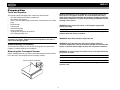
Before installing the radio, you must remove the transport screws from the
top of the radio. The transport screws are clearly marked.
WARNING! Never use irregular discs.
Remove before installation.
WARNING! Using an improper fuse may cause damage to the unit and
result in a fire.
2
HD5112
Wiring
15A
Antenna Connector
SIRIUS
XM
XM L
XM R
TERK XMDJEN100 cables sold separately.
TERK XMD1000 Direct Tuner and antenna sold separately.
SiriusConnect SC-C1 tuner sold separately.
Power Antenna (BLUE)
Connect to power antenna
or amplifier. If not used,
tape bare end of wire.
Amplifier Wiring (GRAY)
Connect line out for optional
external amplifiers. The RED
connector is for the right and
the WHITE connector is
for the left.
Satellite
Radio
Tuner
Ground (BLACK)
Connect to ground
terminal or clean,
unpainted part of chassis.
Memory/Battery (YELLOW)
Connect to battery or 12 volt
power source that is always live.
The radio will not work if this
wire is not connected.
+
Accessory/Ignition (RED)
Connect to existing radio
wire or radio fuse.
JLink iPod
Cable (Included)
White/Black (-)
Gray/Black (-)
LF/AVG
RF/AVD
White (+)
Green/Black (-)
iPod Gen5
iPod
iPod Mini
iPod Nano
Gray (+)
Violet/Black (-)
RR/ARD
LR/ARG
Green (+)
3
Violet (+)
HD5112
Installation
This unit is designed for installation in cars, trucks and vans with an existing
radio opening. In many cases, a special installation kit will be required to
mount the radio into the dashboard. These kits are available at electronics
supply stores and car stereo specialty shops. Always check the kit
application before purchasing to make sure the kit works with your vehicle.
If you have trouble locating a kit or need installation assistance, contact
Technical Support at 1-800-323-4815 from 9:00am to 6:00pm EST Monday
through Friday.
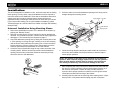
5. Place the radio in front of the dashboard opening so the wiring can be
brought through the mounting sleeve.
Spring Washer Hex Nut
4
5
Mounting Bolt
Plain Washer
Universal Installation Using Mounting Sleeve
1
1. Remove the detachable front panel, if it is attached to the chassis, by
pushing the “Release” button.
2. Slide the mounting sleeve off of the chassis if it has not already been
removed. If it is locked into position, use the removal keys (supplied) to
disengage it. The removal keys are depicted on page 6.
3. Check the dashboard opening size by sliding the mounting sleeve into
it. If the opening is not large enough, carefully cut or file as necessary
until the sleeve easily slides into the opening. Do not force the sleeve
into the opening or cause it to bend or bow. Check that there will be
sufficient space behind the dashboard for the radio chassis.
4. Locate the series of bend tabs along the top, bottom and sides of the
mounting sleeve. With the sleeve fully inserted into the dashboard
opening, bend as many of the tabs outward as necessary to firmly
secure the sleeve to the dashboard.
Tapping Screw
2
TUNE
/ CH
SELE
CT
MUT
iPod
E
HD5
ENTE
MON
112
O
EQ
A~
Z
PRES
0~ S
9
R
BAN
DISP
PS
D
FILE
1
AUX
/ FOLD
SRC
ER
- IN
2 SCN
3 RPT
4 SHF
/ DIR
>
CAT
5
6
SAT
READ
Y
3
6. Follow the wiring diagram carefully and make certain all connections
are secure and insulated with crimp connectors or electrical tape to
ensure proper operation.
NOTE: The amplifier in this radio is only designed for use with four
speakers. Never combine (bridge) outputs for use with two speakers.
Never ground negative speaker leads to chassis ground. Failure to
wire exactly as shown may cause electrical damage to the radio.
7. After completing the wiring connections, attach the front panel and turn
the unit on to confirm operation (vehicle ignition switch must be on). If
the unit does not operate, recheck all wiring until the problem is
corrected. Once proper operation is achieved, turn the ignition switch
off and proceed with final mounting of the chassis.
8. Carefully slide the radio into the mounting sleeve making sure it is rightside-up until it is fully seated and the spring clips lock it into place.
4
HD5112
9. Attach one end of the perforated support strap (supplied) to the screw
stud on the rear of the chassis using the hex nut provided. Fasten the
other end of the perforated strap to a secure part of the dashboard
either above or below the radio using the tapping screw and washer
provided. Bend the strap, as necessary, to position it. CAUTION: The
rear of the radio must be supported with the strap to prevent damage to
the dashboard from the weight of the radio or improper operation due to
vibration. The strap also ensures proper electrical grounding of the unit.
10. Re-attach the front panel to the chassis and test radio operation by
referring to the operating instructions for the unit.
ISO INSTALLATION
4
5
TUNE
/ CH
SELEC
T
MUTE
iPod
HD51
12
MONO
EQ
A~
Z
PRESS
0~
9
ENTER
DISP
PS
BAND
FILE
1
AUX
/ FOLDER
SRC
- IN
2 SCN
3 RPT
3
>
CAT
5
/ DIR
>
4 SHF
6
SAT
READY
2
NOTE: For proper operation of the CD player, the chassis must be
mounted within 20° of horizontal. Make sure the unit is mounted within
this limitation.
6
ISO Installation
Kit Installation
This unit has threaded holes in the chassis side panels which may be used
with the original factory mounting brackets of some vehicles to mount the
radio to the dashboard. Please consult with your local car stereo shop for
assistance on this type of installation.
1. Remove the existing factory radio from the dashboard or center console
mounting. Save all hardware and brackets as they will be used to mount
the new radio.
2. Carefully unsnap the plastic frame from the front of the new radio
chassis. Remove and discard the frame.
3. Remove the factory mounting brackets and hardware from the existing
radio and attach them to the new radio using the same screws. Do not
exceed M5 x 9 MM maximum screw size. Longer screws may damage
components inside the chassis.
4. Wire the new radio to the vehicle as outlined in the Universal Installation
instructions.
5. Slide radio chassis into dash opening and secure with factory radio
screws.
6. Reinstall dash panel
If your vehicle requires the use of an installation kit to mount this radio,
follow the instructions included with the installation kit to attach the radio to
the mounting plate supplied with the kit.
1. Wire and test the radio as outlined in the Universal Installation instructions.
2. Install the radio/mounting plate assembly to the sub-dashboard
according to the instructions in the installation kit.
3. Attach the support strap to the radio and dashboard as described in the
Universal Installation instructions.
4. Replace the dashboard trim panel.
Fuses
When replacing a fuse, make sure the new fuse is the correct type and
amperage. Using an incorrect fuse could damage the radio. The HD5112
uses one 15 amp fuse located below the wiring connector (15 amp fast blow
ATO).
Reconnecting the Battery
When wiring is complete, reconnect the battery negative terminal.
5
HD5112
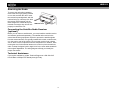
Removing the Radio
To remove the radio after installation,
remove the trim ring by pulling outward
on one side and then the other. Insert
the removal keys straight back, with the
notches facing up, until they lock. With
the removal keys engaged, pull the
radio straight out. If removal keys are
REMOVAL KEYS
inserted at an angle, they will not lock
properly to release the unit.
Connecting the Satellite Radio Receiver
(optional)
Before you can listen to satellite radio, you must install the satellite receiver
and antenna (purchased separately). The satellite radio receiver is the
central data receiving equipment required to process the satellite signals
from the external antenna. It is typically installed in the dash, under the seat,
or in the trunk or rear of the vehicle. Do not mount receiver near a heater
vent or where it can be exposed to extreme temperatures. In addition, when
running the wire for the external antenna do not kink or pinch the antenna
cable. A sharp 90 degree bend or slight "nick" to the outer cable sheath will
cause signal degradation. The wiring diagram will help you identify the
proper connections.
Technical Assistance
If you require assistance, contact Technical Support at 1-800-323-4815
from 9:00am to 6:00pm EST Monday through Friday.
6
HD5112
Front Panel Release
The (open) button (9) releases the mechanism that holds the front panel
to the chassis.
•
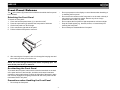
Detaching the Front Panel
•
To detach the front panel:
1. Press and hold the power button (1) to turn the unit off.
2. Press the open button (9) and allow the front panel to fold down.
3. Lift the front panel to a 30-45o angle.
4. Pull to release the right side of the panel.
5. Pull the left side of the panel to remove it.
•
•
•
6. After removing the front panel, store it in the supplied carrying case and
take it with you when you leave the car.
NOTE: You cannot remove the front panel with it completely open. You
must lift the panel 30-45o to remove it.
Re-attaching the Front Panel
To re-attach the front panel, make sure the electrical terminals on the back
of the panel are free of dust and dirt, as debris could cause intermittent
operation or other malfunctions. Position the right side of the panel in place
until correctly engaged, then lightly press the left side of the panel until the
mechanism locks it into place.
Precautions when Handling the Front Panel
•
Do not drop the front panel.
7
Do not put pressure on the display or control buttons when detaching or
re-installing the front panel.
Do not touch the contacts on the front panel or on the main unit body. It
may result in poor electrical contact. Remove any dirt or foreign
substances with a clean, dry cloth.
Do not expose the front panel to high temperatures or direct sunlight.
Keep all volatile agents (e.g. benzene, thinner, or insecticides) from
touching the front panel
Do not attempt to disassemble the front panel.
HD5112
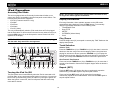
Operation
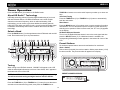
Power
9
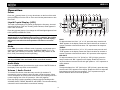
Press the (power) button (1) or any other button on the front of the radio
(except release) to turn the unit on. Press and hold the power button to turn
the unit off.
1
4
6
5
SELECT
Liquid Crystal Display (LCD)
8
MUTE
19
20
MONO
EQ
21
PS
DISP
iPod
TUNE / CH
7
2
SRC
SAT
FILE / FOLDER
HD5112
READY
10
The liquid crystal display (LCD) panel (8) displays the frequency, time and
activated functions of the unit, including a disc indicator, which appears lit
when a disc is inserted.
A~Z
PRESS
0~9
BAND
>
AUX - IN
ENTER
1
2 SCN
CAT / DIR
>
11
3 RPT
4 SHF
5
6
15
16
17
18
Press the (power) button (1) to change the LCD backlight brightness from
HIGH (default) to MIDDLE to LOW.
3
NOTE: LCD panels may take longer to respond when subjected to cold
temperatures for an extended period of time. In addition, the visibility
of the numbers on the LCD may decrease slightly. The LCD display
will return to normal when the temperature increases to a normal
range.
13
12 14
22
BASS
To adjust the bass level from “-10” to “10”, press the rotary encoder until
“BAS” appears on the display. Rotate the control clockwise to increase or
counter-clockwise to decrease the bass. “00” represents a flat response.
TREBLE
Mode
Press SRC (2) to select a different mode of operation, as indicated on the
display panel. Available modes include HD RADIO/TUNER (F1, F2, F3,
AM1, AM2), SAT RADIO (if connected), CDP PLAY (CD), USB PLAY, SD
PLAY, iPod (if connected) and AUX (auxiliary).
To adjust the treble level from “-10” to “10”, press the rotary encoder until
“TRB” appears on the display. Rotate the control clockwise to increase or
counter-clockwise to decrease the treble. “00” represents a flat response.
BALANCE
NOTE: CDP PLAY, USB PLAY, SD PLAY, satellite radio and iPod modes
are only available if the associated device or media is inserted.
To adjust the balance from “10L” (full left) to “10R” (full right), press the
rotary encoder until “BAL” appears on the display. Rotate the control to
adjust the balance between the left and right speakers. “L=R” represents a
center balance.
FADER
Audio Mute
Press the MUTE button (6) to silence the audio volume. “MUTE” flashes in
the display. Press any button to cancel MUTE.
To adjust the fader from “10F” (full front) to “10R” (full rear), press the rotary
encoder until “FAD” appears on the display. Rotate the control to adjust the
fader between the front and rear speakers. “F=R” represents an equal
balance between the front and rear speakers.
Volume / Audio Control
To increase the volume, rotate the rotary encoder (4) clockwise. To
decrease the volume, rotate the rotary encoder counter-clockwise. When
volume is adjusted, the volume level will be shown on the display panel as a
number ranging from “VOL 00” (lowest) to “VOL 100” (highest).
Press the rotary encoder repeatedly to step through the following audio:
VOLUME, BASS, TREBLE, BALANCE, and FADER. The unit automatically
exits audio control mode after five seconds of inactivity.
8
HD5112
Menu Operation
Setting the Clock
If not already showing, press the DISP button (7) to display the clock. With
the clock displayed, press and hold the DISP button and the time will flash
on the display. Press the TUNE/CH >> button (10) to adjust the hours or the
TUNE/CH << button (11) to adjust the minutes. When in “HOURS 12”
mode, “AM” or “PM” will appear on the display to indicate AM or PM. When
no adjustment is made for five seconds, the time will become set and
normal operation will resume.
Press and hold the rotary encoder (4) to access the system menu.
Repeatedly press the rotary encoder button to access menu options in the
following order:
• BEEP ON/OFF: The beep tone feature allows the selection of an
audible beep tone to be heard each time a button is pressed on the face
of the radio. “BEEP ON” is the default display. Rotate the rotary encoder
to select the “BEEP OFF” option.
• P--VOL: Turn the rotary encoder to select the default volume the radio
will assume when first turned on.
• PCLK ON/OFF: When “ON”, the clock and backlight will remain on
when the unit is turned off.
• PRI CLK/SRC: Select “CLK” to have the clock appear on the display
during playback. Select “SRC” to have the current source appear during
playback. Press the DISP button (7) to temporarily view the alternate
display (clock or source) temporarily.
• HOURS 12/24: This option allows selection of a 12 hour or 24 hour
clock format. “HOURS 12” is the default setting. Turn the rotary encoder
to change to the 24 hour clock format.
• S--MODE NORMAL/HD SEEK (adjustable only in RADIO mode):
Select “NORMAL” to allow the radio to search for both digital and
analog stations. Select “HD SEEK” to only search and broadcast digital
stations.
Reset Button
The RESET button is located behind the front panel and should be
activated for the following reasons:
• initial installation of the unit when all wiring is completed
• function buttons do not operate
• error symbol on the display
Use a ball point pen or thin metal object to press the RESET button. This
may be necessary should the unit display an error code.
Equalizer
Press the EQ button (20) to choose one of the following pre-defined bass
and treble curves: FLAT > CLASSICS > POP M > ROCK M > DSP OFF.
Loudness
Press and hold the BAND button (3) toggle loudness on/off. When listening
to music at low volumes, this feature will boost the bass and treble ranges
to compensate for the characteristics of human hearing.
Auxiliary Input
To access an auxiliary device:
1. Connect the portable audio player to the AUX IN jack on the front panel
(12).
2. Press the SRC button (2) to select AUX mode.
3. Press SRC again to cancel AUX mode and go to the next mode.
9
HD5112
Tuner Operation
Press the SRC button (2) to switch to HD RADIO mode.
TUNE/CH << buttons to move the radio frequency number up or down one
step.
Auto Seek Tuning
About HD Radio™ Technology
HD Radio technology allows CD-quality digital broadcasting of your local
AM and FM radio stations. HD Radio broadcasts can include multiple
channels on the same frequency, which is called multicasting. With
multicasting, you can receive up to three additional multicast channels:
HD2, HD3, HD4. With your HD5112 radio, you will receive HD Radio digital
broadcasts automatically when tuned to a station that offers HD Radio
technology.
Press the TUNE/CH >> (10) or TUNE/CH << (11) button to automatically
seek the next station.
Mono/Stereo
Press the MONO button (19) to select mono or stereo reception for analog
radio stations. You can sometimes improve reception of weak stations by
selecting mono operation. When in stereo mode, the “ST” icon (18) appears
on the display.
HD Radio Multicast Channels
Select a Band
Press the BAND button (3) to change between three FM bands and one AM
band. Each band stores up to six preset stations.
9
1
4
6
5
8
19
20
MONO
EQ
7
21
To tune to a HD Radio Multicast channel, tune to the main signal and then
press the SELECT button (5). If a Multicast channel is available, the
corresponding Multicasting number appears in the bottom left corner of the
LCD.
2
Preset Stations
SELECT
MUTE
iPod
TUNE / CH
PS
DISP
SAT
FILE / FOLDER
HD5112
Six numbered preset buttons store and recall stations for each band.
Store a Station
SRC
READY
10
Select a band (if needed), then select a station. Hold a preset button (13-18)
for three seconds. The preset number will appear in the display.
A~Z
PRESS
0~9
BAND
>
AUX - IN
ENTER
1
2 SCN
3 RPT
4 SHF
5
CAT / DIR
>
11
6
SELECT
3
13
12 14
15
16
17
18
MUTE
MONO
EQ
iPod
TUNE / CH
SRC
SAT
FILE / FOLDER
HD5112
22
PS
DISP
READY
AUX - IN
ENTER
BAND
When tuning to an HD Radio channel, “LINKING” will appear on the LCD
while the initial digital information is received. Once linked, “Hd1” appears in
the bottom left corner of the LCD.
>
Tuning
1
2 SCN
3 RPT
4 SHF
5
CAT / DIR
>
A~Z
PRESS
0~9
6
PRESS AND HOLD
PRESET NUMBER APPEARS
NOTE: Not all FM or AM stations offer HD Radio (digital) broadcasting.
You will receive both analog and digital stations with the HD5112.
Manual Tuning
Press the TUNE/CH >> (10) or TUNE/CH << (11) button for more than three
seconds to enter manual tuning mode, then press the TUNE/CH >> or
10
HD5112
NOTE: HD Radio multicast channels can be stored as preset stations.
Recall a Station
Select a band (if needed). Press a preset button (13-18) to select the
corresponding stored station.
Preset Scan
Scans stations stored in all FM or AM bands. Select a band (if needed), and
then press the PS button (21). The unit will pause for 5 seconds at each
preset station. Press the PS button again to stop scanning when the desired
station is reached.
Broadcast Information
During HD Radio broadcasting, available broadcast information will
automatically appear on the LCD. Press the DISP button (7) multiple times
to view broadcast information in the following order:
• Band/Frequency
• CH-NAME
• TITLE
• ARTIST
• CATEGORY
• Clock (only available when pressing DISP button)
The information will scroll across the screen if longer than 8 characters.
NOTE: The amount of information displayed when receiving an HD
Radio signal is dependent on what is being broadcast. Some stations
broadcast their call letters (name), the artist's name, song title, and
category of music.
11
HD5112
Satellite Radio Operation
Selecting a Station
Listeners can subscribe to XM® Radio on the Web by visiting
www.xmradio.com, or by calling (800) 967-2346. Customers should
have their Radio ID ready (see “Displaying the Identification (ID)
Code”). Customers can receive a limited number of free-to-air
channels without activation.
Press the TUNE/CH >> or TUNE/CH << button (10 and 11) to change to
another station. Press and hold the TUNE/CH >> or TUNE/CH << button for
more than one second to fast forward or fast reverse through the stations.
Preset Stations
Press the BAND button (3) to change between three user preset channel
groups. Each channel group stores up to six preset stations. You can store
and recall a total of 18 preset stations.
Store a Station
Listeners can subscribe to Sirius® Radio on the Web by visiting
www.sirius.com, or by calling (888) 539-SIRIUS. Customers should
have their Sirius ID ready (Sirius ID is located on the Satellite Radio
Tuner, sold separately). Customers can listen to music samples by
tuning to channel 184.
1. Select a channel group, then select a station.
2. Hold a preset button (13 – 18) for three seconds. The preset number
appears in the display.
Recall a Station
Accessing Satellite Radio Mode
To switch to satellite radio mode, press the SRC button (2) until “XM
RADIO” or “SIRIUS” appears on the display. This will not be displayed
unless the unit is connected an optional Sirius or XM receiver.
9
1
4
6
5
SELECT
8
MUTE
19
20
MONO
EQ
21
PS
DISP
iPod
TUNE / CH
7
Tuner Modes
2
Press the DISP button (7) to change the tuner mode to the following options
in the order listed.
• Channel Name
• Genre (News, Sports, Hits, Kids, etc.)
• Artist name
• Song Name
If the selected channel name, artist, or title exceeds eleven characters, the
display information will scroll twice upon selection.
Direct Tuning Mode
SRC
SAT
FILE / FOLDER
HD5112
1. Select a channel group.
2. Press a preset button (13 – 18) to select the corresponding stored
station.
READY
10
A~Z
PRESS
0~9
BAND
3
>
AUX - IN
ENTER
1
13
2 SCN
12 14
CAT / DIR
>
11
3 RPT
4 SHF
5
6
15
16
17
18
22
To enter a station directly, perform the following steps.
1. Press the SELECT button (5) to enter direct tuning mode.
2. Turn the rotary encoder to display “XM CH_ _ _” or “SR CH_ _ _”.
3. Turn the rotary encoder again to select the first digit of the desired
channel (0, 1, or 2).
4. Press the BAND/ENTER button (3) to enter the first number and move
to the second position.
5. Turn the rotary encoder again to select the second digit of the desired
channel (0 - 9).
Displaying the Identification (ID) Code
Before you listen to satellite radio, you must subscribe to the service using
your radio’s identification number. To display the radio ID, press the TUNE/
CH << button (11) to access channel 000. The screen displays the radio ID
where the channel name is usually displayed.
12
HD5112
6. Press the BAND/ENTER button to enter the second number and move
to the third position.
NOTE: Use the TUNE/CH >> or TUNE/CH << button (10 and 11) to move
between the first and third positions.
7. Turn the rotary encoder again to select the third digit of the channel you
want to tune to (0 - 9).
8. Press the BAND/ENTER button to enter the third number and access
the channel.
Category Mode
To select stations in a specific category, perform the following steps.
1. Press the SELECT button (5) twice to select “CATEGORY” mode.
2. Press the CAT/DIR /\ and \/ buttons (17, 18), labeled “5” and “6”, to
select the desired category.
3. Press the BAND/ENTER button (3) to confirm.
4. Once a category is selected, use the TUNE/CH >> or TUNE/CH <<
buttons to select stations in the current category.
To exit category mode, press SELECT.
13
HD5112
CD Player Operation
CDP mode can only be accessed when a disc is inserted. If a disc is
already in place, press the SRC button (2) to access CDP mode and begin
playback automatically.
will appear on the display. Press and hold the TUNE/CH >> (10) or TUNE/
CH << (11) button for more than one second to fast forward or fast reverse
through the disc. CD play starts when the button is released.
Insert CD
Intro Scan (SCN)
During disc play, press 2/SCN (14) to play the first 10 seconds of each track
on the disc. When the desired track is reached, press 2/SCN again to end
the scan and play the selected track.
9
SRC
PS
SAT
Y
AD
RE
DISP
FILE
EQ
/ FOL
DER
MONO
MUTE
T
Repeat (RPT)
12
HD 51
>
iPod
TUN
A~Z
SS
PRE 9
0~
E / CH
CAT
/ DIR
6
5
4 SHF
AUX
- IN
Press 3/RPT (15) during disc play to continuously repeat the track. Press 3/
RPT again to stop repeating.
3 RPT
2 SCN
1
ENT
ER
BAND
25
Random (SHF)
24
Press 4/SHF (16) during disc play to play all tracks on a CD in random,
shuffled order. Press 4/SHF again to stop random play.
Display ID3 Tag Information
Press the DISP button (7) to display any encoded text (song title, artist,
etc.).
Eject CD
To eject a disc, first press
the open button (9) and
allow the front panel to fold down to display the disc slot (24).
Press the eject button (25) located to the right of the disc slot to eject the
disc. If the disc is not removed from the unit within 15 seconds, the disc will
be reloaded to prevent accidental damage.
9
1
4
6
5
SELECT
8
MUTE
19
20
MONO
EQ
21
PS
DISP
iPod
TUNE / CH
7
2
SRC
SAT
FILE / FOLDER
HD5112
READY
10
A~Z
PRESS
0~9
NOTE: The unit is designed for play of standard 5” (12 cm.) compact
discs only. Do not attempt to use 3” (8 cm.) CD singles in this unit,
either with or without an adaptor, as damage to the player and/or the
disc may occur. Such damage will not be covered by the warranty on
this product.
11
BAND
3
Pause
Press the 1/>/|| button (13) to suspend disc play. Press the play/pause
button again to resume disc play.
>
AUX - IN
ENTER
1
13
2 SCN
12 14
CAT / DIR
>
SELEC
>
Press the open button (9)
and allow the front panel to
fold down to display the
disc slot. With the label
surface facing up, fully
insert a compact disc into
the slot until the
mechanism engages and
pulls the disc in. After
inserting a disc, lift the front
panel up to return it to the
closed position and begin
playing the disc.
3 RPT
4 SHF
5
6
15
16
17
18
22
CD Player Error Codes
If a problem should develop while operating the CD player, an error code
(Error 1, Error 2, etc.) may appear on the display panel. This can indicate a
number of problems with the unit, including a mechanical error or an error in
the microprocessor control of the player. If an error code should appear, try
Track Select
Press the TUNE/CH >> (10) or TUNE/CH << (11) button for less than one
second to advance to the next track on the CD. The selected track number
14
HD5112
ejecting and reloading the disc into the player. While the disc is out of the
unit, make sure it is clean and undamaged, and then load it correctly. If this
does not solve the problem, pressing the reset button may help, but will
erase the time and preset memory. If the suggested measures do not solve
the problem, contact an authorized warranty station near you or contact
customer service at 1-800-323-4815 for further assistance.
Electronic Shock Protection (ESP)
This unit is equipped with electronic shock protection as follows:
• 40 seconds for CDDA (CDA)
• 120 seconds for MP3 recorded at 44.1kHz, 128kbps
• 200 seconds for WMA recorded at 44.1kHz, 128kbps
15
HD5112
MP3/WMA Operation
MP3 and WMA (Windows Media Audio) music files are digital audio files
that are compressed to allow more files on a single CD. This unit can play
MP3/WMA directly from files contained on a CD-R/RW, SD card or USB
device using the buttons on the receiver (or optional remote control) as
described below. Many types of software are available for converting audio
files into MP3/WMA formats. Jensen recommends Nero or Roxio Easy CD
Creator. Depending on the media type and recording method, some CD-R/
RWs may be incompatible with this unit. This unit supports playback of
MP3/WMA and CDDA (CDA), Mixed-Mode CDs and CD-Extra (including
multi-session discs). Discs on which the session has not been closed
will not play.
MP3/WMA Encoder and CD Writer Settings
Notes on MP3/WMA Play
This unit supports ID3 tag versions 1.0
and 1.1. For the character codes, refer
to the table to the right.
Entering File and Folder Names
Use the following settings when compressing audio data in MP3 data with
the MP3 encoder.
• Transfer bit rate: 32 - 320 kbps
• Sampling frequency: 32, 44.1, 48kHz (WMA) and 16, 22.05, 24, 32,
44.1, 48kHz (MP3)
When using a CD writer to record MP3/WMA up to the maximum disc
capacity, disable additional writing. To record an empty disc up to the
maximum capacity at once, select the “disc at once” option.
Entering ID3 Tag
This unit can play MP3 (MPEG1, 2, 2.5 Audio Layer 3). However, the MP3
recording media and accepted formats are limited. When writing MP3/
WMA, pay attention to the following restrictions.
Acceptable Media
Names using the code list characters
are the only file names and folder
names that can be entered and
displayed. Using any other character
will cause the file and folder names to
be displayed incorrectly. The unit
recognizes and plays only files with the
MP3/WMA extension.
The MP3/WMA recording media acceptable to this unit are CD-ROM, CD-R
and CD-RW, SD cards and USB devices. When using CD-RW, use full
format rather than quick format to prevent malfunction.
Acceptable Medium Formats
The following formats are available for the media used in this unit. The
maximum number of characters used for file name including the delimiter
(".") and three-character extension are indicated in parentheses.
• ISO 9660 Level 1 (11 characters)
• ISO 9660 Level 2 (31 characters)
• Joliet (31 characters)
• Romeo (31 characters)
Up to 200 characters can be displayed in the long file name format. For a
list of available characters, see the instruction manual of the writing
software and the section “Entering File and Folder Names” below. The
media reproducible on this unit has the following limitations:
• Maximum number of nested folders: 8
• Maximum number of files per disc: 999
• Maximum number of folders per disc: 255
• Maximum number of files per media device: 2000
MP3/WMA written in formats other than those listed above will not play
successfully and their file names or folder names will not be displayed
properly.
NOTE: A file name entered with characters not on the code list may
not play correctly.
Writing Files into a Medium
When a medium containing MP3/WMA data is loaded, the unit checks all
data. If the medium contains many folders or non-MP3/WMA files, MP3/
WMA play will be delayed, it may take time for the unit to move to the next
file, and searches may not be performed smoothly or it may not play at all.
Loading such a medium may produce loud noise and cause damage to the
speakers. Do not attempt to play a medium containing a non-MP3/WMA
file with the MP3/WMA extension or a medium containing non MP3/
WMA files.
Bit Rates
The unit supports bit rates from 32 - 320 kbps.
16
HD5112
FIle Playing Order
Installing a USB Device
When selected for play, files and folders (Folder Search, File Search or
Folder Select) are accessed in the order they were written by the CD writer.
As a result, the order in which they are expected to be played may not
match the order in which they are actually played. You may be able to set
the order in which MP3/WMA are to be played by writing them onto a
medium such as a CD-R with their file names beginning with play sequence
numbers such as "01" to "99".
For example, a medium with the following folder/file hierarchy is subject to
Folder Search, File Search or Folder Select as shown below.
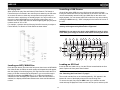
Gently lift the rubber USB slot cover (22) from the top and pull it down.
Insert your USB thumb drive into the USB slot on the front of the radio. The
unit will automatically search for MP3 and WMA files on the device and
begin playback. You can access USB PLAY mode from any other mode by
pressing the SRC button (2). “USb” is displayed in the bottom left corner of
the LCD.
NOTE: Not all USB devices are supported by this unit. Standard USB
memory sticks approved by Microsoft are supported.
WARNING: Do not remove the device when USB PLAY mode is active.
Press SRC (2) to change to another mode before removing the device.
9
1
4
6
5
SELECT
8
MUTE
19
20
MONO
EQ
21
PS
DISP
iPod
TUNE / CH
7
2
SRC
SAT
FILE / FOLDER
HD5112
READY
10
A~Z
PRESS
0~9
BAND
3
>
AUX - IN
ENTER
1
13
2 SCN
12 14
CAT / DIR
>
11
3 RPT
4 SHF
5
6
15
16
17
18
22
Loading an SD Card
Loading an MP3/WMA Disc
Insert the SD card, label side up, into the SD slot located behind the front
panel. Replace the front panel when finished.
Press the open button (9) to lower the front panel, then Insert an MP3/WMA
disc. After the disc is loaded, the track number and elapsed time will appear,
then the display will scroll through any ID3 Tag information while the file is
playing. If the disk contains ID3 tag information, you can scroll through it
manually by pressing the DISP button (7). If no ID3 tag information is
available, the unit will display the elapsed time. When ID3 information is
available, the display will alternate between track name and format/track
number.
NOTE: You must remove the front panel to access the SD card slot.
See “Detaching the Front Panel” on page 7.
The unit will read the files on the card automatically. “Sd” appears in the
bottom left corner of the display when an SD card is being read.
To remove the card, first press the SRC button (2) to switch to another
mode and stop SD playback. Press in on the card to eject it, and then pull it
17
HD5112
straight out. Most cards have a thin recess on the top of the card that helps
with removal.
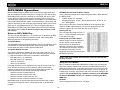
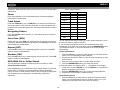
Table 1: Search Characters
Key
Number
Characters
1 >/||
1
A, B, C
2 SCN
2
D, E, F
3 RPT
3
G, H, I
4 SHF
4
J, K, L
5
5
M, N, O
6
6
P, Q, R
SRC
7
S, T, U
Navigating Folders
TUNE/CH <<
8
V, W, X
Press the CAT/DIR /\ and \/ buttons (17, 18) to select the next or previous
folder/directory.
TUNE/CH >>
9
Y, Z, blank
DISP
0
_, –, +
Pause
Press the 1/>/|| button (13) to suspend disc play. Press the play/pause
button again to resume play.
Track Select
Press the TUNE/CH >> (10) or TUNE/CH << (11) button for less than one
second to advance to the next track on the disc, or press and hold to fast
forward or fast reverse through the disc. Disc play starts when the button is
released.
Intro Scan (SCN)
You can also use the rotary encoder (4) to enter search characters. Press
the rotary encoder to confirm each entry.
If you enter a three-digit track number, the unit will search the track
immediately. If you enter one or two digits, press the BAND/ENTER button
(3) to begin the search, or wait a few seconds for the search to begin
automatically.
Directory/File Search
During disc play, press SCN (14) to play the first 10 seconds of each track
on the disc. When the desired track is reached, press SCN again to end the
scan and play the selected track.
Repeat (RPT)
Press the RPT button (15) to repeatedly play the current file. Press RPT
again to resume normal playback.
Random (SHF)
1. Press the PS button (21) twice to enter Directory or File Name Search
mode. The LCD will display a blinking asterisk.
2. Use the keys specified in Table 1 or turn the rotary encoder (4) to enter
a search string.
3. Press the rotary encoder button to confirm each character.
4. Press the BAND/ENTER button (3) to begin the search.
If the search results in a directory name, (‘ ‘ ) will appear on the display.
1. In this case, use the TUNE/CH >> (10) or TUNE/CH << (11) buttons to
select a song/folder in the directory.
2. Press the BAND/ENTER button (3) to confirm and begin playback.
3. Repeat if the search results in another directory.
Root Directory Search
Press the SHF button (16) to randomly play all files on the disc. Press SHF
again to resume normal playback.
MP3/WMA File or Folder Search
The unit offers four methods of searching for files or folders on a disc.
Direct File Number Search
Press the PS button (21) to enter Direct Track Search mode. The LCD will
display "MP3 T" followed by a blinking asterisk. Refer to the Number
column in Table 1 to enter a track number to play. Pressing the appropriate
key repeatedly will scroll through the corresponding number and
characters.
1. Press the PS button (21) three times to enter Root Directory Search
mode. The LCD will display a series of question marks (??????) followed by the first folder or file name in the root directory.
18
HD5112
2. Turn the rotary encoder (4) to browse all available folder or files in the
root directory.
3. Press the rotary encoder button to select a folder or file.
• If a folder is selected, two apostrophes (‘ ‘ ) appear on the LCD,
indicating that the selection is a folder. Repeat steps 2 and 3 to
select a file for playback.
• If a file is selected, playback begins automatically.
Current Directory Search
1. Press the PS button (21) four times to enter Current Directory Search
mode. The LCD will display the current directory name, followed by the
file currently playing.
2. Turn the rotary encoder (4) to browse all available folders or files in the
current directory.
3. Press the rotary encoder button to select a folder or file.
• If a folder is selected, two apostrophes (‘ ‘ ) appear on the LCD,
indicating that the selection is a folder. Repeat steps 2 and 3 to
select a file for playback.
• If a file is selected, playback begins automatically.
• Select (‘ ‘ ) to return to the previous file level and select a different
directory or file.
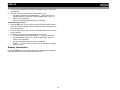
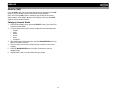
Display Information
Press the DISP button (7) to display the clock or available ID3 information,
as follows: song title, directory name, artist name, etc.
19
HD5112
iPod Operation
Accessing iPod Mode
NOTE: The iPod will continuously recharge when connected to unit,
as long as the vehicle ignition is turned on.
This unit is equipped with an iPod ready function that will allow you to
control your iPod (if compatible) using the front panel control buttons. The
following iPod versions are supported:
• iPod 3G (Firmware version 2.2 only)
• iPod Mini
• iPod Photo
• iPod Nano
• iPod 5G (Video)
The unit will automatically switch to iPod mode when an iPod is plugged
into the iPod cable. To return to the iPod menu from any other source menu,
press the SRC button (2) on the front panel or remote control until “IPO”
appears on the display.
Display Information
iPod song information, when available, appears on the LCD screen
automatically during playback. Press the DISP button (7) to manually
display iPod playback information in the following order:
• Track/Elapsed Time
• Song TITLE
• ARTIST
• CATEGORY (Album Name)
• Clock
Play/Pause
NOTE: The HD5112 will not select video files when the iPod is plugged
into the radio. Only music files are supported.
Press the 1/>/|| button (13) to suspend or resume play. “PAU” flashes on the
display when paused.
Track Selection
9
1
4
6
5
SELECT
8
MUTE
19
MONO
20
EQ
21
PS
DISP
iPod
TUNE / CH
7
Press the TUNE/CH >> (10) or TUNE/CH << (11) for less than 1 second to
advance to the next song in the current category. When a song has been
playing for at least one second, press the TUNE/CH << (11) to replay the
song from the beginning. When a song has been playing for more than one
second, you must press TUNE/CH << twice to move to the previous file.
Fast Forward / Fast Reverse
SRC
SAT
FILE / FOLDER
HD5112
Select a Track
2
READY
10
A~Z
PRESS
0~9
BAND
3
>
AUX - IN
ENTER
1
13
2 SCN
12 14
CAT / DIR
>
11
3 RPT
4 SHF
5
6
15
16
17
18
Press and hold the TUNE/CH >> (10) or TUNE/CH << (11) for more than 1
second to fast forward or fast reverse. Playback begins when the button is
released.
Repeat (RPT)
22
Press the RPT button (15) during disc play to continuously repeat the
selected song. Press RPT again to stop the repeat function.
Press and hold the RPT button (15) for more than 3 seconds to
continuously repeat the entire album/folder. Press and hold RPT again to
stop the repeat function.
Turning the iPod On/Off
The iPod power turns on automatically when the iPod is connected to 30pin iPod cable, as long as the automobile ignition is turned on. You can turn
the iPod off by disconnecting it from the cable or by turning the ignition off.
When the ignition is turned off, the iPod will pause and then enter sleep
mode after 2 minutes.
20
HD5112
Shuffle (SHF)
Press the SHF button (16) to randomly play the files in all folders Press SHF
again to stop the shuffle function and resume normal playback.
Press and hold the SHF button to randomly play the files in the current
album (folder). “SHF ALBM” appears on the display. Press and hold SHF
again to stop the shuffle function.
Category Search Mode
1. During iPod playback mode, press the SELECT button (5) to enter iPod
Category Search Mode.
2. Turn the rotary encoder (4) to access categories in the following order:
• Playlist
• Artist
• Album
• Genre
• Song
• Composer
3. After selecting the desired category, press the BAND/ENTER button (3)
within 5 seconds to confirm.
4. Turn the rotary encoder (4) to browse songs or folders in the current
category.
5. Press the BAND/ENTER button (3) within 5 seconds to select a
category/song.
6. Repeat steps 4 and 5 until the desired song is played.
21
HD5112
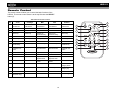
Remote Control
The remote control will allow you to control the basic functions of the
HD5112. The remote control sensor is at the top left below the SELECT
button (5).
Table 2: Remote Control Functions
Key
Tuner
CD Player
MP3
iPod
Satellite
4
A~Z / 0~9
1
Power On/Off
LCD Dimmer
Power On/Off
LCD Dimmer
Power On/Off
LCD Dimmer
Power On/Off
LCD Dimmer
Power On/Off
LCD Dimmer
1
2
Select Source
Select Source
Select Source
Select Source
Select Source
2
3
Audio Menu
Audio Menu
Audio Menu
Audio Menu
Audio Menu
7
4
Volume Up
Volume Up
Volume Up
Character Entry
Volume Up
Character Entry
Volume Up
5
Volume Down
Volume Down
Volume Down
Volume Down
Volume Down
6
Channel Up
Track Up
File Up
File Up
Channel Up
7
Channel Down
Track Down
File Down
File Down
Channel Down
8
Change Band/
Confirm Entry
Confirm Entry
Confirm Entry
Confirm Entry
Change Band/
Confirm Entry
9
Display/Set Clock
Broadcast Information
Display/Set Clock
Display/Set Clock
ID3 Information
Display/Set Clock
ID3 Information
Display/Set Clock
Broadcast Information
10
Preset Station 1
Play/Pause
Play/Pause
Play/Pause
Preset Station 1
11
Preset Station 2
Intro Scan
Intro Scan
Intro Scan
Preset Station 2
12
Preset Station 3
Repeat Track
Repeat File/
Repeat Folder
Repeat File/
Repeat Folder
Preset Station 3
13
Preset Station 4
Shuffle Tracks
Shuffle All/Shuffle
Folder
Shuffle All/Shuffle
Folder
Preset Station 4
14
Preset Station 5
Folder Down
Folder Down
Preset Station 5
Category Down
15
Preset Station 6
Folder Up
Folder Up
Preset Station 6
Category Up
16
Preset Scan
File/Folder Search
17
Access Multicast
(HD Radio only)
Search Files
Direct Tuning
22
AUD
3
6
5
8
Preset Scan
SRC
9
ENTER -
16
10
11
iPod
12
13
SEL
17
14
15
HD5112
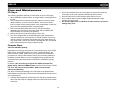
Care and Maintenance
CD Player
2. Never use chemicals such as record sprays or household cleaners to
clean CDs, as they can irreparably damage the disc’s surface.
3. Discs should be kept in their storage cases when not in use.
4. Do not expose discs to direct sunlight, high temperatures or high
humidity for long periods.
5. Do not stick paper, tape or CD labels on disc surfaces, as internal
damage may occur.
The following guidelines will help you extend the life of your CD player:
1. When cleaning the vehicle interior, do not get water or cleaning fluids on
the unit.
2. The CD player will not operate properly in extreme hot/cold or under
damp conditions. In case of such conditions, wait until the vehicle
interior reaches a normal temperature or any condensation on the disc
player lens has evaporated before using the player.
3. Never insert anything other than round 5” CDs into the player.
Attempting to insert CDs of other sizes (even with an adaptor) will
cause damage not covered by the warranty.
4. Always remove the CD when the player is not is use.
5. The unit is designed with a vibration dampening CD mechanism to
minimize interruption of disc play due to normal vibration in a moving
vehicle. However, occasional sound skips may occur when driving on
very rough roads. This will not scratch or damage the disc, and normal
play will resume when the rough conditions cease.
Compact Discs
CD-R and CD-RW Capability
Depending on media type and method of "recording/burning", some CD-R/
RWs may be incompatible with this unit. After "recording/burning", the
session must be closed. Please refer to your software's recommended
procedures for closing a disc/session. Review your recording software to
familiarize yourself with the correct "recording/burning" procedures. We
recommend using the latest versions of ROXIOTM or NEROTM burning
software.
In addition, this unit will only recognize the CDDA (Compact Disc
Digital Audio), .MP3 and .WMA formats "recorded / burned" onto a CD-R/
RW. This unit does not support .WAV, .OGG or other formats.
CD Care and Handling
Dirt, dust, scratches and warpage can cause skips in the playback and
deterioration of sound quality. Please follow these guidelines to take care of
your compact discs.
1. Carefully wipe fingerprints, dust and dirt from the disc’s playing surface
with a soft cloth. Wipe in a straight motion from the inside to the outside
of the disc.
23
HD5112
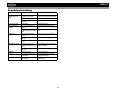
Troubleshooting
Problem
Does not operate
(display does not
light)
No power to unit
Not all speakers
operate
Blows fuses
CD skips too much
ERROR 1
No File
Disc error
Cause
Corrective Action
No power to yellow wire;
no power to red wire
Fuse blown
Front panel not installed
properly
Fuse blown
Incorrect splices or connections
Speaker wires shorting to
chassis ground or to each
other
Power wire shorting to
ground
Speaker wires shorting to
ground
Incorrect fuse/fuse too
small
Receiver mount is not
solid or backstrap is not
secure
Installation angle more
than 30%
Mechanism error
No supported files found
on disc/card
Disc dirty, scratched,
upside down
Check connection with test light;
check vehicle fuse with test light
Replace fuse
Reinstall front panel
Check/replace fuse
Check all splices and connections
Check splices, insulate all bare
wires
Make sure wire is not pinched
Make sure wire is not pinched
Install fuse of correct rating
Check mounting and backstrap,
tighten if needed
Adjust angle to less than 30%
Press reset button
Insert different disc card with
appropriate file type
Replace with clean, properly
installed disc
24
HD5112
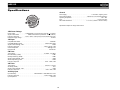
Specifications
General
Power Supply . . . . . . . . . . . . . . . . . . . . . . . . . . . . . . . . . . . . . 11 to 16VDC, negative ground
Power Antenna (Blue) . . . . . . . . . . . . . . . . . . . . . . . . . 500mA max, current limited protection
Operating Temperature . . . . . . . . . . . . . . . . . . . . . . . . . . . . . . . . . . . . . . . . . . . . . -20C ~ 65C
Fuse . . . . . . . . . . . . . . . . . . . . . . . . . . . . . . . . . . . . . . . . . . . . . . . . . . . . . 15-amp, ATO type
DIN chassis dimensions . . . . . . . . . . . . . . . . . . . . . 7" X 7" X 2" (178mm x 178mm x 50mm)
Specifications subject to change without notice.
CEA Power Ratings
Power Output . . . . . . . . . . . . . . . 13 Watts RMS x 4 channels into 4-Ohms @ < 1% THD+N
Signal to Noise Ratio. . . . . . . . . . . . . . 70dBA below reference (Reference: 1 Watt, 4-Ohms)
Frequency Response . . . . . . . . . 20 Hz - 20 kHz, -3dB. (Aux Input used as reference input)
Reference Supply Voltage. . . . . . . . . . . . . . . . . . . . . . . . . . . . . . . . . . . . . . . . . . . . . 14.4VDC
CD Player
Compatible Disc Media . . . . . . . . . . . . . . . . . . . . . . . . . . . . . . . . . . . . . . . . . . . . . . CD-R/RW
Compatible Media Formats . . . . . . . . . . . . . . . . . . . . . . . . . . . . . . . . . . . CD-DA, MP3, WMA
Signal to Noise Ratio @ 1 kHz . . . . . . . . . . . . . . . . . . . . . . . . . . . . . . . . . . . . . . . . . . >90dB
Frequency Response . . . . . . . . . . . . . . . . . . . . . . . . . . . . . . . . . . . . . . 20Hz to 20 kHz, -3dB
Channel Separation . . . . . . . . . . . . . . . . . . . . . . . . . . . . . . . . . . . . . . . . . . . > 60dB @ 1 kHz
D/A Converter . . . . . . . . . . . . . . . . . . . . . . . . . . . . . . . . . . . . . . . . . . . . . . . . . . . 1bit/channel
FM Tuner
Tuning Range . . . . . . . . . . . . . . . . . . . . . . . . . . . . . . . . . . . . . . . . . . . . 87.5MHz - 107.9MHz
Mono Sensitivity (-30dB) . . . . . . . . . . . . . . . . . . . . . . . . . . . . . . . . . . . . . . . . . . . . . . . . 11dBf
Quieting Sensitivity (-50dB). . . . . . . . . . . . . . . . . . . . . . . . . . . . . . . . . . . . . . . . . . . . . . 15dBf
Signal to Noise Ratio @ 1 kHz . . . . . . . . . . . . . . . . . . . . . . . . . . . . . . . . . . . . . . . . . . . . 58dB
Stereo Separation @ 1 kHz. . . . . . . . . . . . . . . . . . . . . . . . . . . . . . . . . . . . . . . . . . . . . . >30dB
Frequency Response . . . . . . . . . . . . . . . . . . . . . . . . . . . . . . . . . . . . . . . 30Hz - 12kHz, -3dB
AM Tuner
Tuning Range . . . . . . . . . . . . . . . . . . . . . . . . . . . . . . . . . . . . . . . . . . . . . 530 kHz - 1710 kHz
Sensitivity (-20dB) . . . . . . . . . . . . . . . . . . . . . . . . . . . . . . . . . . . . . . . . . . . . . . . . . . . . . . 15uV
Signal to Noise Ratio @ 1 kHz . . . . . . . . . . . . . . . . . . . . . . . . . . . . . . . . . . . . . . . . . . . . 50dB
Frequency Response . . . . . . . . . . . . . . . . . . . . . . . . . . . . . . . . . . . . . . . . 50Hz - 2kHz, -3dB
Auxiliary Input
Input Sensitivity . . . . . . . . . . . . . . . . . . . . . . . . . . . .400mV RMS for 1 watt RMS into 4-ohms
Frequency Response . . . . . . . . . . . . . . . . . . . . . . . . . . . . . . . . . . . . . . 20Hz to 20kHz, -3dB
Input Impedance . . . . . . . . . . . . . . . . . . . . . . . . . . . . . . . . . . . . . . . . . . . . . . . . . . . 10k ohms
25
HD5112
26
Limited Warranty
DO NOT RETURN THIS PRODUCT TO THE STORE
CD or Multimedia Radios/Headunits
Audiovox Electronics Corporation (“the Company”) is committed to
quality and customer service, and are pleased to offer you this
Warranty. Please read it thoroughly and contact the Company at 1-800323-4815 with any questions.
Who is covered?
The Company extends this warranty to the original retail purchaser of products
purchased through an authorized Audiovox retailer in the U.S.A., Puerto Rico or
Canada. This warranty is not transferable or assignable. Proof of purchase is
required in the form of an original sales receipt.
What is covered?
The Company warrants that should this product or any part thereof, under normal
use, be proven defective in material or workmanship within 12 months from the
date of original purchase, such defect(s) will be repaired or replaced with a new or
reconditioned product (at the Company's option) without charge for parts and
repair labor.
What is not covered?
This Warranty does not cover the following:
•
Damage incurred during shipping or transporting the product to the
Company or a service center
•
Elimination of car static or motor noise
•
Defects in cosmetic, decorative or non-operative structural parts
•
Correction of antenna problems
•
Costs incurred for installation, removal or reinstallation of the product
•
Consequential damage to compact discs, USB devices, digital media
cards, accessories or vehicle electrical systems
•
Damage caused by improper installation, mishandling, misuse, neglect,
accident, blown fuse, battery leakage, theft or improper storage
•
Products whose factory serial number/bar code label(s) or markings
have been removed or defaced
•
Damage resulting from moisture, humidity, excessive temperature,
extreme environmental conditions or external natural causes
Please review the “Care and Maintenance” section of your Installation
and Operation Manual for additional information regarding the proper
use of your product.
Limitations
THE EXTENT OF THE COMPANY'S LIABILITY UNDER THIS WARRANTY
IS LIMITED TO THE REPAIR OR REPLACEMENT PROVIDED ABOVE AND,
IN NO EVENT, SHALL THE COMPANY'S LIABILITY EXCEED THE
PURCHASE PRICE PAID BY PURCHASER FOR THE PRODUCT.
This Warranty is in lieu of all other express warranties or liabilities. ANY IMPLIED
WARRANTIES,
INCLUDING
ANY
IMPLIED
WARRANTY
OF
MERCHANTABILITY, SHALL BE LIMITED TO THE DURATION OF THIS
WRITTEN WARRANTY. ANY ACTION FOR BREACH OF ANY WARRANTY
HEREUNDER
INCLUDING
ANY
IMPLIED
WARRANTY
OF
MERCHANTABILITY MUST BE BROUGHT WITHIN A PERIOD OF 24
MONTHS FROM DATE OF ORIGINAL PURCHASE. IN NO CASE SHALL THE
COMPANY BE LIABLE FOR ANY CONSEQUENTIAL OR INCIDENTAL
DAMAGES FOR BREACH OF THIS OR ANY OTHER WARRANTY, EXPRESS
OR IMPLIED, WHATSOEVER. No person or representative is authorized to
assume for the Company any liability other than expressed herein in connection
with the sale of this product.
Some states do not allow limitations on how long an implied warranty lasts or the
exclusion or limitation of incidental or consequential damage so the above
limitations or exclusions may not apply to you. This Warranty gives you specific
legal rights and you may also have other rights which vary from state to state.
Obtaining Warranty Service
• To obtain repair or replacement within the terms of this Warranty,
call 1-800-323-4815 for the location of a warranty station serving
your area.
• You must prepay the initial shipping charges to the Company.
The Company will pay the return shipping charges for all
warranteed products returned to an address within the U.S.A.,
Puerto Rico or Canada.
• Please package the product securely to avoid shipping damage.
We recommend using a carrier that provides tracking service to
prevent lost packages. Lost or damaged packages are not
covered by this warranty.
• Provide a detailed description of the problem(s) for which you
require service.
Audiovox Electronics Corporation
Hauppauge, NY 11788
Technical Assistance: 1-800-323-4815
www.jensen.com
© 2007 Audiovox
Ver. 101207
Printed in China