1
GB
CONTENTS
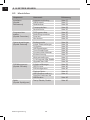
1. PANEL & REMOTE CONTROL DESCRIPTION ................................................ 4
1.1
1.2
1.3
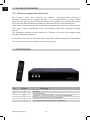
Front Panel Description ............................................................................................................. 4
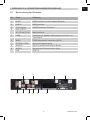
Rear Panel Description .............................................................................................................. 5
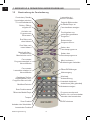
Remote Control Description .................................................................................................... 6
2. INTRODUCTION ............................................................................................................7
3. SAFETY WARNING
3.1
3.2
3.3
Basic safety instructions..................................................................................................... 8
Meaning of safety notices .......................................................................................................... 9
Intended use ..................................................................................................................................10
4. PACKAGE CONTENTS .............................................................................................. 10
5. DESCRIPTION .............................................................................................................. 11
6. .CONNECTING THE RECEIVER .............................................................................. 12
6.1
6.2
6.3
6.4
6.5
6.6
Installing the LNB cable ................................................................................................. 12/13
Connecting with a SCART cable ..........................................................................................14
Connecting with an HDMI cable ..........................................................................................15
Connecting with a Cinch (RCA) cable ................................................................................16
Connecting an audio digital receiver . ................................................................................17
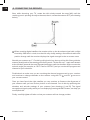
Connecting the antenna and performing basic alignment . ........................... 18-20
7. GETTING STARTED .................................................................................................... 21
7.1
7.2
Remote control ........................................................................................................................... 21
Receiver.................................................................................................................................. 21/22
8. USING THE RECEIVER ..............................................................................................22
8.1
8.2
8.3
8.4
8.5
8.6
8.7
8.8
8.9
8.10
On-screen info display when changing channels ..........................................................22
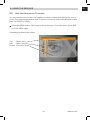
User interface on the TV screen..........................................................................................23
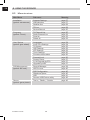
Menu structure ...........................................................................................................................24
Navigating in the menus............................................................................................................25
Installation (symbol: sat antenna) . .............................................................................. 25-28
Programs (symbol: TV set) ............................................................................................. 28-31
User options (symbol: gear wheel) ............................................................................. 32-34
Settings (symbol: tools) .................................................................................................... 34-36
External Memory (symbol: film reel)....................................................................................36
Games (symbol: game pieces)...............................................................................................39
Installation Guide
2