1
7
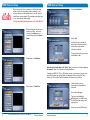
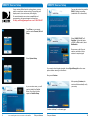
Errors may be displayed on the
Installation Status screen. This is
normal to see one or two boxes
with an X instead of a .
10
The receiver will run Data Feed
and Guide Feed Tests for a few
moments.
Select Continue.
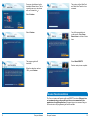
8
Select Continue.
11
You will be prompted to set
up the remote. Select Setup
Remote Later to do this at a later
time.
9
The program guide will
download.
12
Select Watch DIRECTV.
Receiver setup is now complete.
When the status bar reaches
100%, press Continue.
Receiver Recommendations
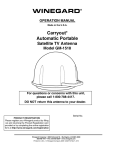
The Carryout antenna will operate with most DIRECTV receivers. Winegard does
not recommend using receivers with hard drives not recommended by the
manufacturer for mobile applications. Winegard does not recommend using an
HD receiver since HD programming will not be available.
11
Carryout Antenna
Carryout Antenna
12