1
Megaflo HE
Switch on the electrical supply to the Premier Plus SystemFit indirect controls and the
boiler. Programme the Premier Plus SystemFit controller as detailed in the Fitting and User
Instruction leaflet supplied with the controller. Set the controller for Hot Water operation
only (the +1HR ON Hot Water over-ride button can be used if the time is during a Hot Water OFF period). Check that the Heating 2-Port motorised valve is closed and that the Hot
Water 2-Port motorised valve opens. The pump should run and the boiler fire (tap symbol
appears in controller display). The primary flow to the Premier Plus SystemFit should
become hot, if it does not check for a wiring or piping error. Allow the Premier Plus unit
to heat up and check that the Hot Water thermostat and 2-Port motorised valve operate
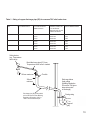
correctly. A storage temperature of approx. 60oC is recommended (approx. graduation 4
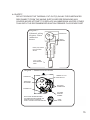
on the indirect thermostat). If necessary the temperature can be adjusted by inserting a flat
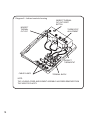
bladed screwdriver in the adjustment knob (located on the front of the thermostat mounting
bracket see Diagram 8) and rotating. The minimum thermostat setting is 10oC. The adjustment range 1 to 5 represents a temperature range of 30o to 70oC.
Select the Heating only function on the controller. NOTE: The room temperature is set at
the controller, no adjustment is possible at the Room Sensor unit. Check that the Heating
2-Port motorised valve opens and that the Hot Water 2-Port motorised valve is closed. The
pump should run and the boiler fire (a flame symbol appears in the controller display). The
primary flow to the Premier Plus SystemFit and the radiator circuit should become hot, if it
does not check for a wiring or piping error.
If a second CH zone is fitted adjust the programmable room thermostat so that it is calling
for heat. Check that the second CH zone valve opens. The pump should run and the boiler
fire. The primary flow to the second CH zone should become hot, if it does not check for a
wiring or piping error.
Select the Heating and Hot Water control function on the controller. Check that the Heating
2-Port motorised valve and the Hot Water 2-Port motorised valve open. NOTE: it may be
necessary to cool the Premier Plus SystemFit down to allow the indirect thermostat to call
for heat, it may also be necessary to increase the required room temperature setting if the
room temperature has already reached that programmed. The pump should run and the
boiler fire (both a tap symbol and a flame symbol should appear in the controller display).
The primary flow to the Premier Plus SystemFit and the radiator circuit should become hot,
if it does not check for a wiring or piping error.
When the Heating and Hot Water temperatures are reached the 2-Port motorised valves
should close, the pump stop running and the boiler stop firing. NOTE: if a pump over-run
boiler is fitted the pump may continue to run for a short time after the boiler has shut down.
Check that no water is discharged from either the Expansion Valve or Temperature and
Pressure Relief Valve during the heating cycle. (Cont. over page)
21