1
computer will play the first card and then display
Dummy’s hand, and if you are the player who will be
dummy, the computer will also show your partner’s
hand (declarer's hand) in the top part of the display,
so that you can play both hands. If your team is
defending, the computer will play the card for the
position before Dummy, or flash your position if that
is you, asking you to play the first card. Dummy’s
hand will then be revealed. Play progresses round
the table in the normal way. If you are the defending
team, you will play just your own hand, with the
computer playing the hands of the other three
positions. If you are on the contracted side, the
computer will play only for the defenders, and you
will play both Dummy’s hand and the declarer's
hand.
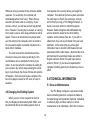
to study until you press ENTER to initiate the next
round. The rounds proceed in this manner until all
the cards have been played. The last round too will
remain displayed until you press ENTER, at which
point the tricks made, and the contract, will show
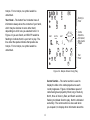
alternately until the Enter key is pressed. See Figure
3. A hand played without errors will result in the
Victory tune being played and cards flashing around
the LCD.
RECALL
CONTRACT
PRESS
ENTER
VULNER EW
SOUTH
NT
Playing a card is very similar to bidding. Press
the appropriate value key, followed by the suit key, or
vice versa. If your card is correct, the computer will
play the “correct” tune, and the round will progress.
However, if you attempt to play the incorrect card,
because, for example, you press the wrong key or
because it is not the most reliable way or common
way to win the contract, the computer will sound the
error tones and wait for you to play the correct card.
South as dealer, the contract is 3 NT
RECALL
PRESS
TRICKS
ENTER
VULNER EW
WEST
SOUTH
NORTH/SOUTH pair takes 9 tricks
EAST/WEST pair takes 4 tricks
The four played cards will remain visible for you
Figure 3
10