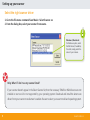
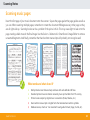
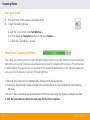
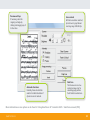
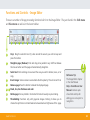
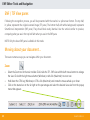
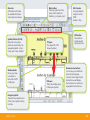
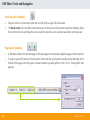
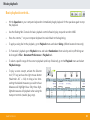
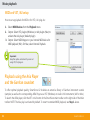
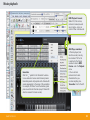
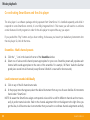
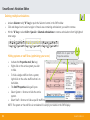
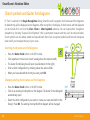
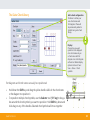
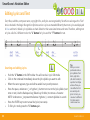
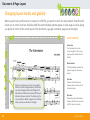
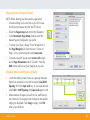
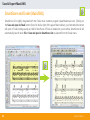
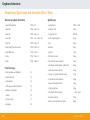
1
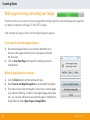
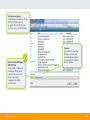
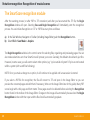
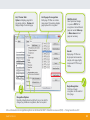
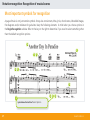
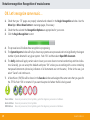
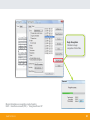
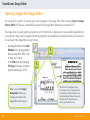
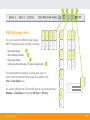
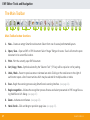
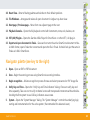
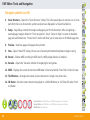
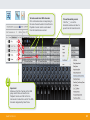
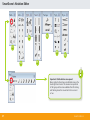
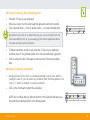
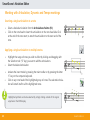
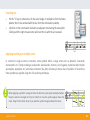
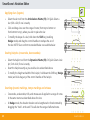
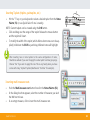
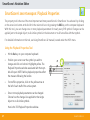
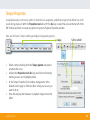
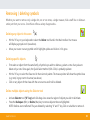
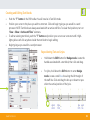
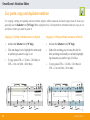
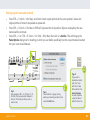
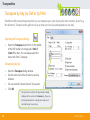
QUICK REFERENCE FOR WINDOWS® AND MACINTOSH® Precision music recognition and score writing. SmartScore X2 Quick Reference for Windows and Macintosh Registration and Contact Information 1 Notation Recognition 15 Phone, E-Mail, Support and FAX. . . . . . . . . . . . . . . . . . . . . . 1 SmartScore‘s recognition module. . . . . . . . . . . . . . . . . . . . 15 Using the SmartScore X2 Manual. . . . . . . . . . . . . . . . . . . . . 2 Most important symbols for recognition. . . . . . . . . . . . . . 17 Introduction2 OK. Let‘s recognize some music . . . . . . . . . . . . . . . . . . . . . 19 About the SmartScore Quick Reference Guide. . . . . . . . . . 2 SmartScore’s Image Editor Introduction and Tips . . . . . . . . . . . . . . . . . . . . . . . . . . . . . . . 3 Opening images in the Image Editor. . . . . . . . . . . . . . . . . 21 Edition symbols and what they mean . . . . . . . . . . . . . . . . . 3 Functions and controls: Image Editor. . . . . . . . . . . . . . . . . 22 Installing the correct edition of SmartScore. . . . . . . . . . . . 3 ENF Editor: Tools and Navigation Preparation4 TIF/ENF View panes. . . . . . . . . . . . . . . . . . . . . . . . . . . . . . . . 23 The Task Window. . . . . . . . . . . . . . . . . . . . . . . . . . . . . . . . . . . 4 Moving about your document . . . . . . . . . . . . . . . . . . . . . . 23 SmartScore Program Preferences. . . . . . . . . . . . . . . . . . . . . 5 Optional page views. . . . . . . . . . . . . . . . . . . . . . . . . . . . . . . 26 Setting up the scanner . . . . . . . . . . . . . . . . . . . . . . . . . . . . . . 6 The Main Toolbar. . . . . . . . . . . . . . . . . . . . . . . . . . . . . . . . . . 27 Scanning Notes Navigator Toolbar . . . . . . . . . . . . . . . . . . . . . . . . . . . . . . . . . 28 10 21 23 Scanning music pages. . . . . . . . . . . . . . . . . . . . . . . . . . . . . . 10 Music Playback Scanning music. . . . . . . . . . . . . . . . . . . . . . . . . . . . . . . . . . . . 11 Basic playback controls. . . . . . . . . . . . . . . . . . . . . . . . . . . . . 30 SmartScore‘s scanning interface. . . . . . . . . . . . . . . . . . . . . 11 MIDI and VST / AU Setup. . . . . . . . . . . . . . . . . . . . . . . . . . . 31 Multi-page scanning and saving the image. . . . . . . . . . . 13 Using the ARIA Player and Garritan soundset. . . . . . . . . . 31 TA B L E O F C O N T E N T S 30 SmartScore’s Notation Editor 35 General editing pointers. . . . . . . . . . . . . . . . . . . . . . . . . . . . 35 The Tools Palette . . . . . . . . . . . . . . . . . . . . . . . . . . . . . . . . . . 36 Editing notes. . . . . . . . . . . . . . . . . . . . . . . . . . . . . . . . . . . . . . 38 Transposition59 Document & Page Layout 61 Convert & Export Your Score 63 Inserting symbols. . . . . . . . . . . . . . . . . . . . . . . . . . . . . . . . . . 39 Print & Save PDF, audio and MIDI. . . . . . . . . . . . . . . . . . . . 63 Changing symbols. . . . . . . . . . . . . . . . . . . . . . . . . . . . . . . . . 39 SmartScore and Finale (MusicXML) . . . . . . . . . . . . . . . . . . 65 Changing note pitches . . . . . . . . . . . . . . . . . . . . . . . . . . . . . 40 Keyboard Shortcuts 67 Inserting polyphonic voices. . . . . . . . . . . . . . . . . . . . . . . . . 41 Inserting ties. . . . . . . . . . . . . . . . . . . . . . . . . . . . . . . . . . . . . . 44 Inserting tuplets. . . . . . . . . . . . . . . . . . . . . . . . . . . . . . . . . . . 46 Playback Properties . . . . . . . . . . . . . . . . . . . . . . . . . . . . . . . 47 List of Symbols with Properties. . . . . . . . . . . . . . . . . . . . . . 49 Removing/deleting symbols . . . . . . . . . . . . . . . . . . . . . . . . 50 Using Score Structure to isolate parts . . . . . . . . . . . . . . . . 52 Chord symbols and guitar fret diagrams. . . . . . . . . . . . . . 53 Editing text and lyrics . . . . . . . . . . . . . . . . . . . . . . . . . . . . . . 55 Copying, cutting and pasting. . . . . . . . . . . . . . . . . . . . . . . . 57 Musitek Corporation Tech Support: [email protected] 410 Bryant Circle, Suite K Ojai, CA 93023 www.musitek.com TA B L E O F C O N T E N T S Registration and contact information Musitek licenses its software to individuals, not to institutions or groups. Licenses are transferrable to other individuals only after a registered owner contacts Customer Service and authorizes the transfer. For multiple-seat site licenses and group discounts, contact Musitek Customer Service. For complete licensing details, please refer to the End-User License Agreement on the product packaging. EACH REGISTERED USER IS ALLOWED TO INSTALL SMARTCORE® X2 ON UP TO 5 COMPUTERS THEY OWN OR USE EXCLUSIVELY. * * DEPENDING ON AN OPERATING SYSTEM OR ON TWO DIFFERENT COMPUTERS ON TWO OPERATING SYSTEMS ON ONE COMPUTER ONLY. MULTIPLE LICENSES AND LAB PACKS ARE EXEMPT FROM THIS REQUIREMENT. Phone, E-Mail, Support & Fax Customer Service: 805-646-8051 / 800-676-8055 / [email protected] Tech support: 805-646-5841 / [email protected] (phone support 10AM-2PM Pacifc Time M-F) Web / Chat: www.musitek.com FAX: 805-646-8099 1 SMARTSCORE X2 “Using SmartScore X2” manual To access the complete user manual, look inside the HELP menu in any SmartScore edition. You will be able to open and/or download the PDF manual, “Using SmartScore X2” or click to go online and use the interactive version. “Using SmartScore X2” should be considered a reference document. We strongly recommend going to the INDEX first to find your topic. Click on the hotlink which will take you to that subject in the text. The manual is probably not very good bedtime reading, unless you’re using it to go to sleep. Introduction About the SmartScore X2 Quick Reference Guide This Quick Reference Guide is intended to provide you with the most important functions and capabilities of SmartScore X2. We recommend you print it out and keep it as an easy-to-use reference while working with the program. SmartScore X2 is a very powerful tool. Our designers and engineers have built in lots of useful functions, many of which are activated with a single button or Quick-key shortcut on your computer keyboard. Rather than immediately memorizing every button and shortcut, try locating just the tools you need first. Think of SmartScore as a musical tool box containing many, many useful gadgets. Not every tool is intended for every user. We hope you enjoy working with SmartScore X2 as much as we have enjoyed creating it. SMARTSCORE X2 2 Introduction & Tips Edition symbols and what they mean SmartScore X2 consists of a family of programs. You can choose which edition fits your needs: • SmartScore X2 Professional Edition (Serial number prefix = “D”) • SmartScore X2 Songbook Edition (Serial number prefix = “S”) • SmartScore X2 Piano Edition (Serial number prefix = “P”) • SmartScore X2 Guitar Edition (Serial number prefix = “G”) • SmartScore X2 MIDI Edition (Serial number prefix = “M”) SmartScore’s 5 edition symbols: The function being described in the text is not available in SmartScore Guitar Edition X2. This Quick Reference Guide applies to all SmartScore X2 editions. If a particular function being described is not applicable to all editions, its symbol will be greyed out as shown above. In this example, the Guitar Edition is excluded from the function being described. Installing the correct SmartScore X2 Edition During installation, you are asked which of the SmartScore X2 editions you have purchased (Professional, Songbook, Piano, Guitar or MIDI). Check your Customer ID and serial number against the prefixes for each edition above. If you select another edition than what you purchased, the serial number will not be accepted. In that case, the demo version of the edition you selected will be installed. In that case, you will not be able to print or save your SmartScore X2 files. 3 SMARTSCORE X2 Preparation: The Task Window The Task Window - Button functions Immediately after starting SmartScore X2, The Task Window will appear. From this window, you can call eight major functions. All functions within the startup window can be called at any time by selecting their corresponding commands in the File menu. The launch window can be opened at any time by using the keyboard shortcut CTRL + F (Windows) or CTRL + W (Mac) or via the menu command File > Task window. Key Features • • • • Scan music: Capture printed music notation with a scanner. Scan music Open image editor Begin Recognition File search (Open) Begin Recognition: Convert pre-scanned TIF or PDF files to ENF. More Task functions • • • • Open most recent file Creating a new ENF score Convert MIDI to notation Record MIDI (not in all SmartScore editions) SMARTSCORE X2 Browse files: Opens SmartScore .ENF, PDF and .TIF image files. Image Editor: Opens and edits PDF or pre-scanned music pages. 4 Preparation: SmartScore Program Preferences ! Default settings of SmartScore preferences will usually be sufficient for your inital tests. To access all prreferences, close the task window by clicking the box (X) in the upper right corner. Go to Edit > Document preferences or Edit > Program Preferences. If you are using a paper size other than standard 8.5” x 11” typing paper, you can select an alternative paper size as follows. Otherwise, skip this step. Page size and print options 1. From the Edit menu, Program Preferences 2. Find “Page Type and Printing” from the list on the left. 3. Change the your default page size (Letter) and the default page orientation (portrait) if necessary. Program options: Entries in this list affect any SmartScore document. Use “Document Preferences” for file-specific settings. 5 SMARTSCORE X2 Units and zoom To calibrate SmartScore zoom behavior, follow these steps, otherwise skip to the next section, “Scanning”. Instructions for calibrating SmartScore Zoom behavior Setting up the scanner Scanner Settings (SmartScore Scanning Interface) SmartScore X2 is capable of controlling your scanner so long as your operating system functions properly with 3rd party scanner drivers (WIA for Windows / TWAIN for Mac). The SmartScore interface will automatically select optimum DPI resolutions, multiple page scanning, greyscale imaging and TIF file format creation. Using the SmartScore scanning interface (e.g. the “Scan Music” button) is recommended whenever possible. SMARTSCORE X2 6 Setting up your scanner ? For SmartScore to properly communicate with your scanner, a special “3rd-party” driver needs to be installed into your operating system. WIA for Windows. TWAIN for Windows and Mac. Normally, these are loaded automatically when you installed your scanner CD or if you downloaded software from your scanner manufacturer’s website. NOTE: Be sure to select your exact model and operating system when downloading manufacturer’s software. TWAIN or WIA? TWAIN and WIA are device drivers that enable 3rd-party or “non-manufuacturer” scanning programs (such as SmartScore) to control your scanner. For Windows users: Select WIA driver. They work 95% of the time. If not, try the TWAIN driver if available. For Macintosh users: Since OS 10.6, Apple no longer allows users to install any scanner drivers. All drivers are now included in the Apple operating system. When you plug your scanner in for the first time, it should download functional TWAIN drivers. Our experience to date suggests this is not always the case. If your scanner fails to respond to SmartScore’s SCAN command, use either the scanning utility that came with your scanner or Apple’s Image Capture, which is located in the Applications folder. Scan at 300-400 dpi resolution, greyscale and save each page as an uncompressed TIF file. For more details, see http://www.musitek.com/HP_Mac_Scanning.html Ensure the following: 1. Is the scanner properly connected to the computer? Does it respond when you use its “native” software? 2. Is the proper 3rd-party software scanner driver (TWAIN / WIA) installed? 3. Are the TWAIN or WIA drivers up to date and compatible with your operating system? 7 SMARTSCORE X2 Scan from inside SmartScore or from your scanner’s software NOTE: The following steps need only be done once. All settings remain fixed unless they are changed later. 1. From the File menu, select Scan Music> Select Scanner. 2. Select “Choose Interface > SmartScore’s”. This is the default setting. Choose “Your Scanner’s” only if you are unable to properly scan from inside Smartscore’s scanning interface. Recommended! This selection tells SmartScore to automatically control your scanner, if it’s compatible. The alternative! If all else fails, select your scanner’s software to capture your music pages. SMARTSCORE X2 8 Setting up your scanner Select the right scanner driver 1. Go to the File menu command Scan Music> Select Scanner on. 2. From the dialog box, select your scanner from source. Windows / Macintosh: On Windows system, select the WIA driver (if available). On a Mac, simply select the name of your scanner. @ ! Help. What if I don’t see my scanner listed? If your scanner doesn’t appear in the Select Scanner list, then the necessary TWAIN or WIA drivers were not installed or are too old or not supported by your operating system. Download and install the latest scan drivers from your scanner manufacturer’s website. Be sure to select your exact model and operating system. 9 SMARTSCORE X2 Scanning Notes Scanning music pages Insert the first page of your music document onto the scanner. Square the page against the page guides as well as you can. When scanning multiple pages, remember to rotate the document 90 degrees every other page so they are all right-side up. Scanning books can be a problem if the spine is thick. This may cause light to leak onto the page creating a black mass in the final image. Use the Select + Delete tool in SmartScore’s Image Editor to remove unwanted fragments. And finally, remember that hand-written manuscripts will probably not recognize well. X T X X What works and what doesn’t? T T T X X SMARTSCORE X2 X Well-printed scores that are sharp and clear with well-defined staff lines. Standard printed musical notation. Generally music printed after the 17th century. Printed scores output by digital music scorewriters (Finale, Sibelius, etc.). Hand-written manuscripts or digital fonts that emulate hand-written symbols. Medieval scores, chants or “non-standard” avant garde formats (Cage, Crumb, etc.) 10 Scanning Notes Scan your music 1. Place your music in the scanner as described above. 2. To start the scanning process ... a) push the “Scan” button in the Task Window ... b) or from inside the Navigator palette or in the upper toolbar... ... c) or from File > Scan Music > Acquire. SmartScore’s Scanning Interface After calling the scanning process, the scan dialog box appears. When you are the SmartScore scanning interface that controls your scanner. Simultaneously and automatically SmartScore begins a first quick scan. This preview scan is used to display the page of music and launched for the automatic determination of the important parameters such as scan for the detection resolution (DPI) and brightness. 1. Wait until the preview scan is completed and is displayed in the Preview window. 2. If necessary, drag the black croping rectangle in the preview window so it encompasses the area containing the music. 3. Be sure to leave some white area around all sides of the music when using the cropping rectangle (see chart) 4. Click the Scan button to capture the note page for the final recognition. 11 SMARTSCORE X2 Preview and Crop: If necessary, resize the cropping rectangle by clicking and dragging any of its four sides. Scan controls: With Auto-resolution selected, dpi is shown in gray. Manual scanning range: 300-400 dpi. Automatic functions: Normally, these should all be selected. Uncheck Resolution if dpi errors are not resolved. Final Scan The Preview scan is a lowresolution image only for visualizing page position. Push Final Scan when done. More information on scan options can be found in “Using SmartScore X2” located in HELP > SmartScore manual (PDF)) SMARTSCORE X2 12 Scanning Notes Multi-page scanning and saving your image SmartScore allows you to scan more than one page before starting recognition. All scanned pages are merged into one highly-compressed, multi-page .TIF file (CCITT Group 4). After scanning each page of music, the following message box appears: If you want to scan more pages of music ... 1. Place the next page of music in your scanner. (Remember to rotate every other page of bound scores so all pages are oriented the same way). 2. Click on Scan Next Page and repeat the scanning process described above. When all pages have been scanned ... 1. Click the Finish button. Another window will open ... 2.Select Save As and Begin Recognition to proceed with recognition. 3. If you have concerns about the quality of any of your scanned pages (e.g. half-tone dithering, crooked or mis-aligned pages, light leaks, etc.), you can view, edit and re-save scanned pages in SmartScore’s Image Editor by clicking Open Pages in Image Editor. 13 SMARTSCORE X2 Saving scanned pages: Scanned pages are saved as .TIF files. NOTE: SmartScore can only recognize .TIF and .PDF files (not .jpg, .bmp, .png or .ps file formats). Select the default filetype TIFF CCITT G4: This is a highly compressed, multi-page .TIF file format. It will save all your scanned pages as one easilymanageable file. Highly recommended. SMARTSCORE X2 T Filename: Type a name for the image file. The same name will automatically be assigned to the SmartScore .ENF file after recognition. 14 Notation recognition: Recognition of musical scores The SmartScore recognition module After the scanning process (or after PDF to .TIF conversion) and after you have named the .TIF file, the Begin Recognition window will open. Selecting Save and Begin Recognition will immediately start the recognition process. You can initiate Recognition on .TIF or .PDF files at any time as follows: a) In the Task Window, Navigator or Toolbar (including Image Editor) push the Recognition button... b)Select FILE > Scan Music > Acquire. The Begin Recognition window is the control center for selecting files, organizing and previewing pages. You can also makes selections as to how SmartScore will process your score. Generally, the defaults should work just fine. However, in some cases, you will want to select other options (e.g. “Lyrics outside of system” if lyrics are not located within a system (with a staff line following). NOTE: Once you make a change to an option, it will continue to be applied until a new session is started. If you select a PDF file for recognition, the file will convert to .TIF and open in the Image Editor so you can preview the converted pages and edit them if necessary. (More on the Image Editor later in this guide). Many PDF scores begin with a title page and front matter. Those pages need to be deleted before selecting the Recognition button found in the toolbar of the Image Editor. Changes to the image will automatically be saved and the Begin Recognition window with then open and the files list will automatically populate. 15 SMARTSCORE X2 List / Preview Tabs: Option tab displays page list & processing options. . Preview tab displays image of selected page. List of pages for recognition: Multi-page .TIF files can contain many pages. This window displays pages queued for recognition Add Files to List: Select prescaned images or queue a PDF file for recognition. Add additional pages as needed. Move up or Move down selected pages as necessary. Save As: Single-page .TIF files can be grouped and resaved as a single, multi-page, highly compressed CCITT Group 4 .TIF file. ! Recognition Options: Normally, defaults should work fine. If your score calls for changes (e.g. tablature recognitions, select as required. T Begin Recognition: Click here to begin recognition on the selected list of page. More information on recognition options can be found in HELP > SmartScore manual (PDF) > “Using SmartScore X2”. SMARTSCORE X2 16 Notation recognition: Recognition of musical scores Most important symbols for recognition A page of music is not just notation symbols. It may also contain texts, titles, lyrics, chord names, imbedded images, fret diagrams and/or tablature for guitarists. Keep the following elements in mind when you choose options in the Begin Recognition window. Refer to the key on the right to determine if you need to select something other than the default recognition options. 1 1 3 7 1 4 6 ! 17 1 5 4 Lyrics below the last line? Select Option 5. SMARTSCORE X2 Possible recognition option alternatives and combinations Select these alternatives and/or combinations depending on your needs... 1 • • 1 4 6 » Everything on this page of music » Notation & Chord symbols (no lyrics) 1 3 • 2 » Notation & Lyrics (no chords) • 1 » Notation & Text (no lyrics, chord symbols) • 3 5 2 4 6 » Notation only ! If your music contains tablature, percussion staves or broken systems (coda accolades or head-to-head repeats), do not forget to mark 7 Recognize tablature, percussion and/or split systems (coda fragments). More information on recognition options can be found in HELP > SmartScore manual (PDF) > “Using SmartScore X2”. SMARTSCORE X2 18 Notation recognition: Recognition of musical scores OK. Let’s recognize some music ... 1. Check that your .TIF pages are properly selected and ordered in the Begin Recognition window. Use the Move Up or Move Down button to rearrange pages, if necessary. 2. Check that the selected the Recognition Options are appropriate for your score. 3. Click the Begin Recognition to start. 4. The process bar will indicate how recognition is progressing. 5.The System Report window will tell you how many systems were processed and not insignificantly, the largest number of parts detected in any given system. Push “OK” and then select Open ENF document. 6.The Unify window will apply certain rules to insure your score does not contain random key and time indicators. Generally, you can accept the defaults and press “OK” unless you are working with a score containing transposed instruments (where key indicators of all instruments are not the same). If that is the case, just select “Cancel” and continue on. 7. A SmartScore (.ENF) file will be shown in the Save As window and assigned the same name that you gave for the .TIF file. Push “OK” or rename it if you want. Keep track of where the file is being saved. ! Piano Edition: Does not process text, chord symbols, guitar fret diagrams, percussion or tablature. Guitar Edition: Does not process text, chord symbols. MIDI Edition: Does not process text, chord symbols, guitar fret diagrams, percussion or tablature. 19 SMARTSCORE X2 Begin Recognition: Click here to begin recognition of listed files. More information on recognition can be found in HELP > SmartScore manual (PDF) > “Using SmartScore X2”. SMARTSCORE X2 20 SmartScore’s Image Editor Opening images the Image Editor You are given the option of opening your scanned pages in the Image Editor after scanning (Open in Image Editor). NOTE: PDF files are automatically opened in the Image Editor after being converted to .TIF. The image editor is a basic graphics program. As part of SmartScore, it allows you to view and edit image files prior to recognition. Pages can be cropped, interferring fragments can be deleted and missing brackets can be restored. You can launch the Image Editor at any time by... • • selecting its button in the Task Window or by using keyboard shortcut keys (Win: STRG + W) or (Mac: ALT + W) or ... in the FILE menu by changing File Type to “Image” and browing then selecting a .TIF file. When you push the Begin Recognition button, any changes you made in the Image Editor will be saved. 21 These tools can straighten, rotate, draw, erase, crop, etc. Large areas can be deleted by using the Selector tool (dotted rectangle): Draw a box around the area and hit the Delete key to remove area within the box. SMARTSCORE X2 Functions and Controls - Image Editor There are a number of image processing functions built in to the Image Editor. They are found in the Edit menu and View menu as well as in the lower toolbar. 1 2 3 4 5 6 7 8 9 10 11 1 Crop: Drag the selection tool (3) a box around the area to you wish to keep and press this button. 2 Straighten page (Deskew): Click and drag a line parallel to any staff line. Release the mouse button and the page will automatically straighten. 3 Select tool: Click and drag a box around the area you wish to delete, move, cut or copy. 4 Invert image: Some scanners reverse black & white polarity. This will correct that. 5 Remove page Press this button to delete the displayed page. 6 - 9 Brush, line, line thickness and color 10 Rotate page: Scores printed in horizontal format will usually require rotating. 11 Thresholding: Functions only with grayscale images. Pushing it allows you to choose the optimimum contrast balance between dark and light areas of the page. SMARTSCORE X2 ! Reference Tip: The Image Editor chapter in the User Manual Help > SmartScore User Manual contains quite a few hints and tips for editing your score prior to recogntion. 22 ENF Editor: Tools and Navigation ENF / TIF View panes Following the recognition process, you will be presented with the results in a split-screen format. The top half, in yellow, represents the original scanned image (TIF pane). The bottom half, with white background, represents SmartScore’s interpretation (ENF pane). They should look nearly identical. Use the vertical scroller to preview, comparing what you see in the top half with what you see in the ENF pane. NOTE: Only the lower ENF pane is editable in this mode. Moving about your document ... There are numerous ways you can navigate within your document.. Zoom • • • 23 Select the Zoom tool in the main toolbar. Click inside the TIF - ENF view with the left mouse button to enlarge the view. Click with the right mouse button (Windows) or Alt-click (Macintosh) to zoom out. Hold down the CTRL key (Windows) or CTRL-click (Macintosh) and rotate the mouse wheel up or down. Click on the status bar on the far right on the percentage and select the desired view size from the popup menu that appears. SMARTSCORE X2 Menu bar: All SmartScore functions are available from these various pull-down menus. Symbols Palettes (F2-F8): Right-click on any open palette to view and select an appropriate palette. All are found under “View> Palettes”. Window shade: Move up or down to minimize or hide either the TIF or ENF pane. Main toolbar: These are system functions, many of them should be familiar (e.g. cut, paste, print). TIF pane: The original TIF / PDF image (in yellow). ENF pane: This is the editable region following recognition. Mini Console: For quick playback transport control. NOTE: Spcebar = Play ENF toolbar: These buttons activate specific editing functions Document view buttons: You can view your SmartScore document in book-page format or vertical-page format. Horizontal view will display the document in a continuous, unpaginated horizontal view. Navigator palette: These buttons represent some of the more important editing functions. SMARTSCORE X2 24 ENF Editor: Tools and Navigation Scrolling and scrubbing • Drag the vertical or horizontal scroller bar to scroll within a page of the document. •The Hand-scrub tool in the Main toolbar allows you to freely move the document around (scrubbing). Select the tool then left-click and drag the cursor around to reposition your view. Best used when zooming close. Paging and jumping • • 25 In the Main toolbar, click the Next page or Previous page to move between adjacent pages of the document. To jump to a specific location in the document, click inside the to the position readout in the Status Bar at the bottom of the page. Select the page or measure number you wish jump to in the “Go To...” dialog which then appears. SMARTSCORE X2 1 Optional page views You can choose from 4 different page displays. NOTE: These displays have no effect on printing. 1 TIF TIF TIF TIF TIF 2 3 TIF TIF 1 2 3 4 1 1 2 ENF ENF ENF ENF ENF ENF ENF 1 • Horizontal Display 2 • Vertical dispay (default) 3 • Book-page display • Continuous horizontal view (TIF pane is suppressed) 2 3 4 1 TIF 4 The easiest method of selecting an option page view is to select it from the Status Bar. But they are also available in the View > View mode menu, You can turn off either the TIF or the ENF pane at any time by selecting Window > View Panes and selecting ENF only or TIF only. 1 TIF 2 TIF 2 3 4 ENF ENF ENF 2 3 4 4 TIF 3 ENF 3 TIF TIF ENF 1-4 4 ENF 4 SMARTSCORE X2 26 ENF Editor: Tools and Navigation The Main Toolbar 1 2 3 4 5 6 7 8 9 10 11 12 13 14 15 Main Toolbar button functions 1. New – Creates an empty SmartScore document. Select from one of several preformatted layouts. 2. Open / Save – Open an ENF or PDF document. Select “Image” filetype for scans. “Save” will store the open document in its current file location. 3. Print– Print the currently open ENF document. 4. Cut / Copy / Paste – Symbols selected by the “Selector Tool” (“O” key) will be copied or cut for pasting. 5. Undo / Redo – Revert to previous state or reinstate last undo. Clicking on the small arrow to the right of each button opens a list of recent actions which may be selected for multiple undos or redos. 6.Scan – Begin the scanning process using SmartScore’s scanning interface. (see page 11). 7. Begin recognition – Initiates the recognition process. Browse and select prescanned or PDF image files using “Add files to list” dialog. (see page 15) 8.Zoom – Activates zoom feature. (see page 23). 9. Hand- Scrub – Click and drag to reposition page view. (see page 25). 27 SMARTSCORE X2 1 10. Reset View – Returns floating palettes and window to their default positions. 2 11. Tile Windows – Arranges and resizes all open document in single a top-down view. 3 12. Next page / Previous page – Move from one adjacent page to the next. 4 13. Playback Console – Opens the full playback control with instruments, mute, solo, balance, etc. 14. VST (AU) Plugins – Opens the Garritan-ARIA-Player for SmartScore or other VST / AU plug-in. 5 15. Export and open document in Finale – Saves and converts the active SmartScore document to Music XML format, opens Finale then converts and opens the file in Finale. It should look just the same in Finale as it did in SmartScore. 6 Navigator palette (see key to the right) 8 1. Open – Open an ENF or PDF document. 7 9 2. Scan – Begin the scanning process using SmartScore’s scanning interface. 10 3. Begin recognition – Initiates recognition process. Browse and select prescanned or PDF image file. 11 4. Unify Key and Time – Opens the “Unify Key and Time Indicators” dialog. Choose to unify key and time separately. Take care not to unify orchestral scores with transposed instruments without doublechecking the first system to see if all key indicators are accurate. 5.System – Opens the “System Manager” dialog. The “System Manager” controls the underlying logic, naming and instrumentation for the active system. (Recommended for advanced users) SMARTSCORE X2 12 13 14 28 ENF Editor: Tools and Navigation 1 Navigator palette (cont’d) 2 6. Score Structure – Opens the “Score Structure” dialog. This is the easiest place to remove one or more parts from the score. Documents, systems and parts are displayed in a hierarchical fashion. 3 7.Setup – Page Setup controls the margins and page layout for the document. After recognizing a scanned page, margins default to “From recognition”. Select “Center to Page” to center to standard page size and dimensions. “Format score” button will allow you to resize score to fit default page size. 5 8.Preview – View how pages will appear when printed. 6 9.New – Opens “New ENF” dialog. Choose one of several preformatted templates to begin scoring. 7 10.Record – Initiates MIDI recording in MIDI View if a MIDI playback device is installed. 8 11.Karaoke – Opens the “Karaoke” window for singalong fun and games. 12.MIDI – Displays the current document as MIDI data in Overview, familiar Piano Roll or Event list view. 14. CD Burner - Records current document playback to a .WAV (Windows) or .AIF (Mac) file when “Burn” is initiated. ! 9 10 13. Tile Windows – Arranges and resizes all open document in single a top-down view. 29 4 11 12 13 Piano Edition: No MIDI Editior, no MIDI Recording and no Karaoke. Guitar Edition: No MIDI Editior, no MIDI Recording and no Karaoke. MIDI Edition: No Karaoke. 14 SMARTSCORE X2 Music playback Basic playback controls... • Hit the Spacebar on your computer keyboard to immediately begin playback. Hit the spacebar again to stop the playback. • Use the floating Mini Console for basic playback controls: Rewind, play, stop and record to MIDI. • Press the comma “,” on your computer keyboard to rewind back to the beginning. • To apply a swing feel to the playback, go to Playback menu and select Swing. (Affects beamed notes only). • To “humanize” playback go to Playback menu and select Randomizer. Note velocity and on/off timing can be changed in File > Document Preferences > Playback tab. • To select a specific range of the score to playback (and loop if desired), go to the Playback menu and select Playback range. • To play a score excerpt, activate the Selector tool (“O” key) and use the right mouse button (Macintosh: ALT + click) to drag a box intersecting the desired measures you wish to hear. Measures will highlight blue. Only those highlighted measures will playback when using the transport controls (rewind, play, stop). SMARTSCORE X2 30 Music playback MIDI and VST /AU setup How to set up playback for MIDI or for VST / AU plug-ins: 1.Select MIDI Devices from the Playback menu. 2. Output: Select VST plugins (Windows) or AU plugins (Mac) to activate the Aria player (default plugin). 3. Output: Select MIDI Mapper or your internal MIDI device for MIDI playback (Win). On Mac, select Internal Playback. ! Important: Keep this option un-checked if you are not using VST / AU plug-ins. Playback using the Aria Player and the Garritan soundset To offer optimal playback quality, SmartScore X2 includes an extensive library of Garritan instrument sounds (samples) as well as the corresponding ARIA Player as a VST (Windows) or Audio Unit instruments (AU for Mac). To launch the ARIA player, click the VST or AU button in the SmartScore main toolbar on the right side of the Main toolbar. NOTE: The Aria play is activated by default. To revert to standard MIDI playback, see Step 1. above. 31 SMARTSCORE X2 Music playback MIDI Playback Console: When VST / AU is active, instrument names/sounds are not active... Aria is in control. Other controls work. ! Ensembles: Click the “__” symbol in the “Ensemble” window to view and select various multi-channel presets. Ensemble presets will populate each channel with sounds appropriate to the name of the ensemble. For example, “All Piano” loads the Garritan grand piano sound into all channels (except Channel 10 which is reserved for drum sounds). SMARTSCORE X2 ARIA Player reminders: 1. The Aria player (and Garritan sounds) can only be activated if VST or AU is selected in the Output window located in MIDI Devices under the Playback menu. 2. You must load instruments into Aria channels before you can hear anything. See “Ensembles’ hint to the left. 32 Music playback Co-ordinating SmartScore and the Aria player The Aria player is a software package entirely separate from SmartScore. It is installed separately and while it responds to some SmartScore controls, it is not fully integrated into it. This means you will need to co-ordinate certain features in both programs in order for the Aria player to respond the way you expect. If you pushed the “Play” button and you hear nothing, it’s because you haven’t yet loaded any instruments into the Aria player. So, let’s do that now... Ensembles - Multi-channel presets 1. Click the “__” icon in the lower-left corner of the Ensemble window. 2. Select one of various multi-channel presets appropriate for your score. Ensemble presets will populate each channel with sounds appropriate to the name of the ensemble. For example, “All Piano” loads the Garritan grand piano sound into all channels (except Channel 10 which is reserved for drum sounds). Load instrument sounds individually 1. Click on any of the 16 channel name tabs. 2. In the popup menu that appears, select the desired instrument from any one of seven families of instruments found under “SmartScore”. NOTE: Be aware that SmartScore assigns contrapuntal voices within a staff to different channels and not necessarily in perfect numerical order. Refer to the channel assignment hint on the diagram to the right. Once you get the idea, it will become clear. Just remember that you need to co-ordinate channel assignments carefully. 33 SMARTSCORE X2 To load sounds into ARIA channels: Click a channel number corresponding to the same channel number in SmartScore’s Playback Console. Select an instrument from the SmartScore sound set. ! To load Ensemble presets: Click the “__” icon in the Ensemble window and select a preset from the SmartScore list. Important: Make sure that the channels in the ARIA player match those in SmartScore’s Playback Console and that in that an instrument is loaded into each of the ARIA channels designated by SmartScore. SMARTSCORE X2 34 SmartScore’s Notation Editor General editing pointers... As good as SmartScore’s recognition is, it is rarely perfect. Generally, you will need to do a bit of clean up. Still, no one has ever proved that it’s faster to “enter notes one at a time rather than use SmartScore”.... we call that the “John Henry” test and the steam driver (we mean, SmartScore) wins every time. For cleaning up a recognized document, you will be using tools from these sources... 1. Keyboard shortcuts (see page 67) 2.The Main and ENF toolbars. 2.The Tools Palette. NOTE: Many of the symbol buttons are expandable (e.g. Notes). Click and hold the icon for a second or two and it will expand, revealing all possible symbols within that group. 35 Toolbars and Palettes: Toolbars on top (horizontal) and Tool ENF View (white pane): This is the working area for editing your notation. SMARTSCORE X2 All functions of the Main and ENF toolbars, Navigator and Tools Palette can also be accessed from one of the various pull-down menu choices in the menu bar at the top of your screen. Many functions respond to keyboard commands (see page 67). However, some keyboard commands are uniquely useful and are not duplicated elsewhere. For example: Quick-Select (Cntl + Click): When you click on ANY symbol with the Cntl button down, the cursor will inherit that symbol. You can then insert it anywhere with just another click. No need to go fishing for a symbol inside a tool palette if the symbol you want happens to be nearby. Just Quick-Select it. The Tools Palette The Tools Palette consists of seven different symbol groups (see the next page for details). Working with the Tools Palette • • • • • Click and drag on the title bar of any palette to reposition it anywhere on the screen. Right-click (Alt+click for Mac) on any open tool palette. A pop-up window will display all possible palettes. Open palettes are already checked. Select any other unopened palettes you wish to see. You can also select which tool palettes you wish to keep open or closed by going to View > Palettes. Function keys F2 through F8 will pop open a corresponding palette. To reset all Tool palette windows to the default state, push the F1 function key. SMARTSCORE X2 36 SmartScore’s Notation Editor F6 F4 F2 F7 F3 F8 F5 Important: Palette buttons can expand Many symbol buttons have a small black arrow in the lower right-hand corner. This means more sysmbols of that group will become available after left-clicking and holding down the mouse button for a second or two. 37 ! SMARTSCORE X2 Editing Notes To add or to change a symbol, an object must be selected and displayed on the mouse pointer (cursor). There are several methods of selecting notation symbols for editing... 1. From the Tools Palette – Select the desired notation symbol (notes, rests, dynamics, articulations, tempo marks, key indicators, etc.) from one of the main tool palettes or sub-palettes (see graph at left). ! 2. Quick-Select – With the Cntl button down, click on ANY symbol and the cursor will inherit that symbol. Click again to insert the symbol in the score. Cntl + Click (QuickSelect) 3. Keyboard shortcuts – Use keyboard commands to select objects for editing notation (e.g. Notes = number buttons 1-8; Rests = Shift + number keys). If you move the cursor over a palette icon, a tool tip that shows you the corresponding key command appears. (see page 67) SMARTSCORE X2 38 SmartScore’s Notation Editor Inserting symbols • • • Select a note, rest or other symbol from the Tools palette or by using the Quick-Select (Cntl+click) method. SmartScore’s Insert mode becomes automatically activated. Move your cursor over the active staff (see below for more) to where you want to insert. Position the note or rest over the location and left-click to insert the symbo. NOTE: You may, or may not, want to have “Auto-alignment” and/or “Auto-beaming” activated depending on how their behavior affects the your control. Changing symbols • • • ! 39 Select a symbol (from the same family) that will replace the one you want to change. Make sure you are in “Insert” mode. Insert mode is activated with the keyboard character “C”. Position your cursor over the symbol you wish to change. When it becomes highlighted in yellow, left-click. The new symbol will replace the old one. Almost any symbol can be changed from one value to another, but they can only be changed using symbols from the same family. i.e. Only notes can replace notes. Only clefs can replace clefs. SMARTSCORE X2 Changing note pitches • Hold down the Shift key on your computer keyboard. This activates the Nudge mode. Various control handles will become visible. These handles are used for re-positioning symbols. • To change a note’s pitch up or down, click and drag the square control handle found inside each notehead. Changing the pitch of multiple notes • • • • Activate the Select tool from the ENF toolbar or by hitting the “O” key. Click and drag a box around the notes whose pitch you want to change. Hold the Shift key down. Click and drag one of the highlighted noteheads. All selected notes will move up or down together. Release the mouse button once they’re repositioned. SMARTSCORE X2 40 SmartScore’s Notation Editor Editing notes Creating chord clusters • • Hit the “Z” key on your keyboard or select the Cluster tool from the Notes Palette (F2). Position your mouse above or below an existing note or chord cluster and click when it highlights yellow. A new notehead will attach itself to the cluster. Inserting polyphonic voices • • Select a new note or rest value. Make sure “Voice colors” is activated. Move the mouse above or below an existing note where you want to insert the note as a second polyphonic voice. Cursor position is critical. • • NOTE: Click only when the note above or below turns blue (not yellow). Notice the stem direction displayed on your cursor. Left-click (Alt+click for Mac) to insert the note with a stem direction as is shown by your cursor. Right-click will insert the note with its stem in the opposite direction. ! 41 The direction of an existing note’s stem can be changed by positioning the cursor (with a note value showing) over the note until it highlights yellow. Right-click (Alt + click for Mac) will flip the note’s stem direction. The direction of multiple note stems can be changed by using the Selector tool (“O” key) or Cntl+A (to select the entire page) then hitting the “S” key. All highlighted note stems will flip together. ! Note and rest colors represent polyphonic voice lines (up to 4 per staff.) SMARTSCORE X2 Adding and removing dots of prolongation • • ! • • Press the “D” key on your keyboard. Move your cursor over the note head that gets a dot and click to attach. Click a second, third, (...) time to double, triple, (...) to insert multiple dots. Quick-Select (Cntl+click) on a dotted note and your cursor will inherit both the note’s value AND the dot. Or, you can always go to the Notes palette and select a note value and then push the dot button. To delete a dot from a note or rest, press the “D” key on your keyboard and then press “X” key (Delete mode). Your cursor should show a grey dot. Click to remove the dot. Click again to remove more if there are multiple dots. Adding and removing accidentals •Use Quick-Select (Cntl+click) on a nearby accidental if one is close, which is usually the case. Or, you can select any accidental from the Notes palette. Click on the “( )” button to make it a courtesy accidental. • Click on the note head to attach the accidental. NOTE: Don’t confuse the Key indicator button in the Clefs and indicators palette with the accidentals button in the Notes palette. SMARTSCORE X2 42 SmartScore’s Notation Editor Working with Articulation, Dynamic and Tempo markings Inserting a single articulation to a note • • Select a desired articulation from the Articulations Palette (F3). Click on the note head to insert the articulation on the note head side. Click at the end of the note stem, to attach the articulation to the stem end of the note. Applying a single articulation to multiple notes • • • • ! 43 Highlight the range of notes you wish to affect by clicking and dragging with the Selection tool (“O” key) you want to add the articulations. Select the desired articulation. Activate the insert mode by pressing the main toolbar or by pressing the letter “C” key on the computer keyboard. Click on any note head of the highlighted group of notes. The selected articulation will attach itself to all the highlighted notes. Highlighted symbols can be de-selected by simply clicking outside of the region anywhere in the ENF display. SMARTSCORE X2 Inserting ties • • Hit the “V” key to activate ties. Or, the select single or multiple tie from the Notes palette. (Not to be confused with the slur from the Articulations palette). Left-click on the note head to be tied to an adjacent note having the same pitch. Clicking with the right mouse button will insert the tie with the arc reversed. Applying markings to multiple notes In contrast to single accents or staccatos, some symbols affect a range notes such as dynamics (crescendo, decrescendo, etc.) Tempo markings (accelerando, decelerando, ritenuto), slurs (legatos), tuplet brackets (triplets, quintuplets, septuplets, etc.) and ottava indicators (8va, 8vb) all belong to these class of symbols. In SmartScore, these symbols are applied using the click-and-drag technique. ! When applying a symbol to a range of notes, the direction you drag the rectangle matters. Drag the selector rectangle from top to bottom to have the symbol appear above the notes. Drag it from bottom to top if you want the symbol to appear below the notes. SMARTSCORE X2 44 SmartScore’s Notation Editor Applying slurs (legatos) • • • Select the slur tool from the Articulations Palette (F3). Or Quick-Select a slur (Cntl+click) if one is nearby. Click and drag a box over the range of notes (from top to bottom or from bottom to top), where you wish to place the slur. To modify the shape of a slur, hold down the Shift key (enabling Nudge mode) and drag the control handles to reshape the arc of the slur. NOTE: Slurs conform to standard Bezier-curve edit behavior. Inseting hairpins (crescendos, decrescendos) • • • Select the hairpin tool from the Dynamics Palette (F8). Or Quick-Select a hairpin (Cntl+click) if one is nearby. Insert the hairpin exactly as you would a slur as described above. To modify the height and width of the hairpin, hold down the Shift key (Nudge mode) and click-drag any of the control handles of the hairpin. Inserting dynamic markings, tempo markings and ottavas • Crescendos, accelerandos, trills, and ottavas are all applied to a range of notes in the same manner as described above for slurs. •In Nudge mode, the duration bracket can be lengthened or foreshortened by dragging the “hook” at the end. This will alter the range of affected notes. 45 SMARTSCORE X2 Inserting Tuplets (triplets, quintuplets, etc.) • Hit the “T” key on your keyboard or select a desired tuplet from the Notes Palette (F2) (or use Quick-Select if one is nearby). NOTE: Custom tuplets can be created using the D:B button. • Click and drag over the range of the tuplet. Release the mouse button and the tuplet will insert. • To modify the width of the tuplet (which affects what notes are to be applied), hold down the Shift key and drag. Affected notes will highlight. ! After inserting two or more tuplets to the same configuration of notes, SmartScore will ask if you want to apply the same tuplet to similar groupings. Choose “Yes” if you wish to apply this rule. This is very handy when you have scores with many “implied” tuplets (Beethoven’s “Fur Elise” for example.) Inserting multi-measure rests • • • Push the Multi-measure rest button found in the Notes Palette (F2). In the dialog box that appears, select the number of measures you wish the MM rest to have. In an empty measure, click to insert the multi-measure rest. SMARTSCORE X2 46 SmartScore’s Notation Editor SmartScore’s secret weapon: Playback Properties The property tool is the one of the most important and most powerful tool in SmartScore. You activate it by clicking on the arrow icon button at the far left in the main tool bar or by pressing the ESC key on the computer keyboard. With this tool, you can change one or more playback parameters for nearly every ENF symbol. Changes can be applied just to the single object, to all similar symbols in the document or to all future files with that symbol. For detailed information on this tool, see Using SmartScore X2 manual, located under the HELP menu. Using the Playback Properties Tool 47 • Hit the Esc key on your computer keyboard. • Position your cursor over the symbol you wish to change and click on it when it highlights yellow. The Playback Properties window associated with that symbol will open. NOTE: Barline playback properties affect the measure following the barline. • For staff line properties, click on the yellow arrow at the left of each staff of the active system. • One or more playback parameters can be changed. Choose how the change is be applied to that single object to or all similar symbols. Here is the Trill Playback Properties window... SMARTSCORE X2 Tempo Properties As explained earlier, most every symbol in SmartScore is assigned a predefined property that affects how it will sound during playback. With the Properties tool active (Hit the Esc key or select the arrow at the far left of the ENF toolbar) and click on nearly any symbol to open its Playback Properties window. Here, we will insert a Tempo marking and adjust its playback property... • • • • Select a tempo marking from the Tempo palette and paste it anywhere the score. Activate the Properties tool (Esc key) and click on the tempo marking as soon as it highlights yellow. In the Tempo Properties Tool window, change some of the defaults. Don’t apply to “All future files” unless you’re sure you want to do so. Press OK and play that measure or playback range to hear the effect. SMARTSCORE X2 48 SmartScore’s Editor ENF Editing: Notation Working with the notation editor List of symbols that can be edited with the Properties Tool Clicking on these symbols ... allows you to change these parameters • Staff lines (Yellow arrow) Staff Properties window (TAB, Visibility) • Dynamic markingsDynamic properties (Velocity) • HairpinsDynamic range (Velocities over time) • Tempo markings such as Allegro, Moderato etc. Tempo properties (Beats per minute) • Tempo markings such as accel., decel., rit. Accelerating / decelerating over time • TrillsNumber permutations • MetronomeTempo dialog window • ArpeggiosArpeggio properties (Durations) • Slurs (Legatos)Legato properties (Durations) • Multi-measure rests Multi-measure rest dialog window • Time Indicators Time indicator dialog window • Key IndicatorsKey indicator dialog window • Barlines and repeats “Play as written”, “Page breaks” • Chord symbols and guitar fret diagrams (*) Guitar chord dialog window • Tuplet bracketsTuplets dialog window 49 • Notes with / without articulation marks * Not included in SmartScore X2 MIDI or Piano Editions Global display properties SMARTSCORE X2 Removing / deleting symbols Whether you want to remove only a single dot, one or two notes, a single measure, hide a staff line or delete an entire part from your score - SmartScore offers a variety of approaches... Deleting any object in the score • • Hit the “X” key on your keyboard or select the Delete tool found in the Main toolbar. Your mouse will display a greyed-out X (see above). Move your cursor over any symbol until it highlights yellow and click on it. It’s gone. Deleting specific objects • • • First select an object from the same family of symbols you wish to delete e.g. select a note of any value to delete only a note. Once again, the Quick-Select method (Cntl+Click) is probably quickest. Hit the “X” key or select the Erase tool in the main tool palette. The mouse pointer will show the symbol class (e.g. note) in grey next to its arrow (see above). Click on any object of that class with the cursor arrow and it wil be deleted. Delete multiple objects using the Selector tool •Activate Selector tool (“O” key) and click-drag a box around a region of objects you wish to eliminate. • Press the Backspace (Win) or Delete (Mac) key to remove objects that are highlighted. NOTE: Barlines are not affected. They are deleted by selecting “X” and “I” key. Click on a barline to remove it. SMARTSCORE X2 50 SmartScore’s Notation Editor Deleting multiple articulations •Activate Selector tool (“O” key) or push the Selector button in the ENF toolbar. • Click and drag a box to select a region of music area containing articulations you wish to remove. • Hit the “G” key or select Edit > Special > Selected articulations to remove articulations from highlighted note range. Hiding systems or staff lines (optimizing your score) RIGHT-click to open Staff Properties window. ! • • Activate the Properties tool (Esc key). Right-click on the active system you wish to hide. • To hide a single staff line from a system, right-click on the active staff line that is to be hidden. •The Staff Properties dialog will open. • Select System > Remove to hide the entire system. • Select Staff > Remove to hide a specific staff line. NOTE: The system or the staff line is not deleted. It is simply not visible in the ENF display. 51 SMARTSCORE X2 Using Score Structure to isolate parts The Score Structure environment is designed to easily visualize your document in a heirarchical view. Extracting individual parts to a new document is accomplished most easily in Score Structure. You can use the System Manager to isolate parts, but we recommend that environment for advanced users. • • • • Push the Score Structure button in SmartScore’s Navigator bar. Locate the parts you wish to REMOVE from the score from the Part column. Click to highlight each part you don’t want to see in the new document. Select the “Remove” button. Push the “Apply to New” button. This will create and open a new document containing only the parts that were deselected. The original will not be affected. SMARTSCORE X2 52 SmartScore’s Notation Editor Chord symbols and Guitar fret diagrams ! If “Text” is selected in the Begin Recognition dialog, SmartScore will recognize chord names and fret diagrams. By default, they will be displayed as fret diagrams. After recognition, the display of chord names and fret diagrams can be turned off or on from the View >Show > Chord symbols submenu. You can supress their recognition altogether by checking “Supress Chord Symbols” (this is permanent however and they can’t be retrieved later). Chord symbols can be edited, added and repositioned. Best of all, recognized symbols and frets will transpose when and if you transpose the key of your score... Inserting chord names and fret diagrams • • • • • Scan Gmaj 7 Press the Guitar chord button in the ENF toolbar. Click anywhere in the score to insert (usually above the topmost staff). The Guitar Chord dialog box will open (see illustration to the right). Enter a chord configuration by entering values the various fields. When you have selected the chord you want, push OK. Changing existing chord names and fret diagrams • • • 53 Press the Guitar chord button in the ENF toolbar. Click on an existing chord symbol or fret diagram. The Guitar Chord dialog will automatically open. Select the chord configuration you want (or create your own and Add it to the library). Press OK. The existing chord symbol/fret diagram will be changed. ENF SMARTSCORE X2 The Guitar Chord Library Add a chord configuration: Click here to define your own chord names and fret diagrams. These will be permanently added to SmartScore’s guitar chord library. Display: Choose how you want symbol is to be displayed: As a chord name only, as a chord name with fret diagram or as a fret diagram without text. Global display options can be set here: View > Show > Chord symbols. ! Fret diagrams and chord names can easily be repositioned. • Hold down the Shift key and drag the yellow handle visible in the chord name or fret diagram to reposition it. • To reposition mulitple chord symbols, use the Selector tool (“O” key) to drag a box around the chord symbols you want to reposition. Hold Shift key down and click-drag on any of the handles. Selected chord symbols will move together. SMARTSCORE X2 54 SmartScore’s Notation Editor Editing Lyrics and Text ! Text, titles, subtitles, composer name, copyright info, and lyrics are recognized by SmartScore as long as the “Text” box is checked in the Begin Recognition Options section. Lyrics are treated differently than text. Lyrics are displayed in blue and text in black. Lyric syllables are hard-linked to their associated notes and rests. Therefore, editing text or lyrics calls for 2 different tools: the “L” button for lyrics and the “T” button for text. Inserting and editing Lyrics • • • • • • 55 Push the “L” button in the ENF toolbar. You will now be in Lyric Edit mode. Click on the notehead immediately above the lyric syllable you want to edit. When the cursor appears, type and edit as would in any word processor. Press the space, underscore (_) or hyphen (-) button to move to the lyric syllable (next note or rest). Use the Backspace key (Delete key for Mac) to remove a character. NOTE: Underscores (_) represent melissmas. Hyphens (-) connect syllables in a word. Press the ENTER key to start a new line lyrics (new verse). To Exit Lyric mode, press the “L” button again. Tip: With your cursor positioned inside a lyric syllable of text block, right-click (Alt-click for Mac) to open the Text Styles window. There you can define the font size and style for lyrics. For text, you can select a different font style and/or create a new one. SMARTSCORE X2 Creating and Editing Text blocks • • • • Push the “T” button in the ENF toolbar. You will now be in Text Edit mode. Position your cursor to the place you wish to enter text. Click and begin typing as you would in a word processor. NOTE: Text blocks are always associated with an active staff line. To visual their positions, turn on “View > Show > Active staff line” submenu. To edit an existing text block, push the “T” button and position your cursor over some text until it highlights yellow. Left-click anywhere inside the text block to begin editing. Begin typing as you would in a word processor. Repositioning Text and Lryics • Hold down the Shift button for Nudge mode. Locate the handle associated with a text block, then click and drag. •For lyrics, hold down the Shift button to enter Nudge mode. Locate a small blue box along the left margin of the staff line. Click and drag the box up or down to reposition the vertical position of the lyrics. SMARTSCORE X2 56 SmartScore’s Notation Editor Cut, paste, copy and duplicate notation For copying, cutting and pasting various notation objects, whole measures and even larger areas of music you generally use the Selector tool (“O” key). When using this tool, it is important to remember what you copy or cut and how or where you want to paste it. 57 Copying / Cutting individual note or objects Copying / Cutting multiple measures of music • Activate the Selector tool (“O” key). • Activate the Selector tool (“O” key). • Click and drag a box to highlight the notes and/ or symbols you want to copy or cut • • To copy, press CTRL + C (Cmd + C for Mac) or CTRL + X to cut (Cmd + X for Mac). Right-click and drag your mouse (Alt-click for Mac) and drag horizontally or vertically highlighting measures you wish to copy in in blue. • To copy, press CTRL + C (Cmd + C for Mac) or CTRL + X to cut (Cmd + X for Mac). SMARTSCORE X2 Pasting copied notes and symbols • • • Press CTRL + V (Cmd + V for Mac), and click to insert copied symbols at the cursor position. Values and original pitches of notes to be pasted are preserved. Press CTRL + R (Cmd + R for Mac) to REPLACE objects at the click position. Objects overlayed by the new material will be removed. Press CTRL + V or CTRL + R (Cmd + V or Cmd + R for Mac) then click on a barline. This will bring up the Paste Options dialog box for inserting, in which you can define specifically how the copied material inserted into your score should behave. Tip 1: After pressing CTRL + V / R (Cmd+ V / R for Mac), the mouse pointer changes to this icon. That tells you that you are in insert mode. SMARTSCORE X2 Tip 2: Commands for copying, cutting, pasting and inserting are also found under the Edit menu. ! Tipp 3: If you want to duplicate an entire part, don’t try it with the Cut and Paste method. Use ! Score Structure to easily duplicate a part and have it added to the score. 58 Transposition Transpose by Key, by Clef or by Pitch ! SmartScore offers several means by which you can transpose your score: by key (the most common), by clef (e.g. Bb clarinet to C Trumpet) and by pitch (move up or down an octive if you transposed to a new clef). Opening the Transpose dialog • Select the Transpose button from in the middle of the ENF toolbar. Or simply select Cntl+T (Cmd+T for Mac). You can always select the menu item: Edit> Transpose. Transposing by key • • Open the Transpose dialog window. Use the vertical scroll bar to select a new key indicator. • You can override “closest interval” if you want. •Click OK. It’s important to note that the key indicator initially displayed in the window is the Source key. If you are limiting transposition to a single part, make sure it matches the part’s source key. 59 SMARTSCORE X2 Transposing to another clef • • • Click on the Clef radio button. Use the vertical scroll bar to select a new clef indicator. If necessary, enter the number of octaves in order to be transposed (-2 to +2). •Click OK. Transposing by pitch • Click on the Pitch radio button. Remember, this is pitch transposition, not key transposition. • Enter the number of halftones you want the notes to move. Up to +12 or down to -12. You can repeat action for further movement of notes. •Click OK. Limiting what gets transposed • • Click on the Limits tab. Choose a range of the score to be transposed (by measure number). Choose which part (or voice) you want to tranpose. Only the selected part will undergo transposition. •Click OK. SMARTSCORE X2 60 Document & Page Layout Changing layout locally and globally ! When you print out your final score or output it to a PDF file, you want it to look nice and polished. SmartScore X2 allows you to control over how individual staff lines and individual systems appear on each page as well as giving you plenty of control of the overall layout of the document: e.g. page orientation, page size and margins. Local controls Green tabs: The tabs along to top ruler control margins for the current page as well as indents for Part Names. Black handles: The black handles represent the topmost region for the active system. When you position your cursor over a system, distance control tabs appear along the left and top rulers. Dragging these tabs changes staff line distances, distances between staff lines and distances between systems. The tabs along the top override the default margins set in the Page Setup window (see details on the right). 61 Red tabs: These control the distances between staves for each part of the active system. Blue tabs: These tabs control the distance between staff lines for each part (staff) in the active system. SMARTSCORE X2 Page Layout and Margins (Global) NOTE: Before altering your document’s page layout, consider editing your score first so you don’t loose synchronicity between the ENF and TIF panes. • Select the Page Setup button from the Navigator. • In the Document Page Setup window, select the desired layout configuration you prefer. • To center your music, change “From Recognition” in the Page Margins pull-down menu to “Center on Page” or to a centered layout under Loose Leaf. • To create a custom layout, select Loose Leaf margin and in Page Dimensions, select “Custom”. Push the Add button and lay out your margins as you wish. Changing line and staff spaces globally • • Locate the staff you want to use as a spacing template. Right-click anywhere in the staff and select Line/Staff Spacing. Or hit the Caps Lock key on you keyboard and select Edit > Staff Spacing. Hit Caps Lock again to edit. Make whatever changes you wish to line, staff and system distances. Then apply those changes to the specific target you designate. Push Copy to apply. Push OK when you’re finished. SMARTSCORE X2 62 Convert & Export your score Print & Save PDF, audio and MIDI ! Besides printing out your finished document, you can convert and export it to PDF, MIDI and audio files. In addition, you can export your score to the MusicXML file format which will open in Finale, PrintMusic, SongWriter, NotePad, Sibelius, Notion and many other notation programs looking exactly as it does in SmartScore X2. Printing • • Prior to printing, you may want to check to see how your document will print out. Select Preview from the Navigator palette. To print, go to the File menu and select Print and press OK. Exporting to PDF file • 63 From the File menu, select Save as PDF. Your default PDF print driver will create and save the PDF file to the location you select and with the name you give it. Press OK. SMARTSCORE X2 Saving as an audio file (WAV / AIFF) • • From the File menu, select Save as WAV (Windows) or Save as AIFF (Mac). Select a destination and filename for the audio file and press Save. SmartScore will process the ENF file and save the audio file to the location you selected and with the name you gave it. Create audio CDs with the CD burner SmartScore verfügt über einen sogenannten CD-Brenner. Hierbei handelt es sich um einen Programmfunktion, mit der Sie nicht nur gleich eine ganze Reihe von SmartScore-ENF-Dateien in ein Audio-Format konvertieren, sondern diese Zusammenstellung auch gleich als Audio-CD über Ihr CDR-Laufwerk brennen können. Weitere Informationen zum SmartScore-CD-Brenner finden Sie im PDF-Benutzerhandbuch (siehe Menü Hilfe). • Wählen Sie aus dem Menü Datei den Befehl CD-Brenner oder klicken Sie auf CD-Brenner-in der vertikalen Navigatorleiste des Programms, um die Funktion aufzurufen. Save to MIDI files • • • From the File menu, select Save As... In the “Filetype” pull-down menu (“Enable” for Mac), select MIDI Type 0 (multi-track, single channel) or MIDI Type 1 (multi-track, multi-channel). Browse to a location to save the MDI file and and give it a name. Press OK. SMARTSCORE X2 64 Save & Export MusicXML SmartScore and Finale (MusicXML) SmartScore X2 is tightly integrated with the Finale music notation program (www.finalemusic.com). Clicking on the Save and open in Finale button (found in the far right of the upper Main toolbar), your formatted document will open in Finale looking exactly as it did in SmartScore. If Finale is installed to your machine, SmartScore X2 will automatically launch when File > Scan and open in SmartScore Lite is selected from the Finale menu. 65 SMARTSCORE X2 Exporting SmartScore files to MusicXML The MusicXML format is supported by leading notation-based music software programs throughout the world. Finale, PrintMusic, Notepad, Sibelius, Logic Pro X, Notion and many other applications are capable of importing SmartScore MusicXML files. When opened, they should appear exactly as they did in SmartScore. NOTE: If the importing program defaults to fixed document page format, it may override SmartScore’s layout data. • From SmartScore’s File menu, select Save As and select MusicXML as a filetype. • Browse to a location to save the XML file and and give it a name. •Press OK. Integrating SmartScore with Finale • • From the Edit menu, choose Program Preferences > User Interface. Be sure the checkbox Integrate with Finale (Replaces SmartScore Lite) is selected. In Finale, when the menu item Edit > Scan and import with SmartScore Lite is selected, the full version of SmartScore will open, replacing SmartScore Lite. SMARTSCORE X2 ! Tip: The INDEX of the SmartScore’s user manual, “Using SmartScore X2”, itemizes all of SmartScore’s functions and shortcuts, many that are not covered in this Quick Reference Guide. To access the SmartScore X2 user manual, go the Help menu and select SmartScore Manual (PDF) or select Interactive Manual Online. 66 Keyboard shortcuts SmartScore Quick-keys and shortcuts (Win / Mac) General program functions • Open Task Window Quick-keys CTRL + W • Quick-Select • Open file CTRL / Cmd + O • Selection tool O key • Save file CTRL / Cmd + S • Properties tool ESC key • Close file CTRL + F4 / Cmd + W • Dots of prolongation D key • Print file CTRL / Cmd + P • Ties V key • New SmartScore document CTRL / Cmd + N • Barlines I key • New MIDI View CTRL / Cmd + I • Triplets T key • Undo CTRL / Cmd + Z • Edit note clusters Z key • Redo CTRL / Cmdl + Y • Flip selected stem direction S key • Left-beam, middle-beam, right-beam A key • Split selected note cluster H key • Group / Un-group selected voices Y key • Clear selected articulations G key • Swap notehead positions L key • Unify key & time U key Function keys 67 • Reset windows and palettes F1 • Notes and rests F2 • Articulations F3 • Clefs, key and time indicators F4 • Barlines and repeats F5 • Tempo F6 • Text and tools F7 • Dynamics F8 CTRL + Click • Crescendo-/Decrescendo < and > keys • Dynamics palette P key • Beam / un-beam selected notes B key SMARTSCORE X2 Navigation Notation • Selection tool O key • Whole note to 128th note Numbers 1…8 • Insert mode C key • Whole rest to 32nd rest SHIFT+Numbers 1…6 • Delete mode X key • Select note or rest value CTRL +1, 2, 3 • Properties tool ESC key • Quarter rest R key • Transpose score CTRL / Cmd + T • Braces and brackets CTRL / Cmd + B • Tuplets • Note cluster tool T key Z key Playback • Zoom CTRL / Alt + Q • Playback Console • Delete toggle D key • Start / Paus Spacebar • Go-to window CTRL / Cmd + G • Rewind Comma (,) • Page keys Page up / down CTRL / Cmd + 9 Select, copy, cut and paste Edit modes and functions SHIFT key (Held down) • Quick-Select • System Manager CTRL / Cmd + M • Open Instrument templates CTRL / Cmd + F • Select all on page (for “H” & “S” key functions) • Open Part linking window CTRL / Cmd + L • Beam / Un-beam selection CTRL / Cmd l + B • Open Tranposition window CTRL / Cmd + T • Nudge mode SMARTSCORE X2 • Cut CTRL / Cmd + Click CTRL / Cmd + A CTRL / Cmd + X • Copy CTRL / Cmd + C • Paste CTRL / Cmd + V • Paste - replace CTRL / Cmd + R 68 SmartScore® X2 and Musitek® are registered trademarks of Musitek Corporation © 2013 Musitek | 410 Bryant Circle, Suite K | Ojai, CA 93023 | www.musitek.com SMARTSCORE X2 69