1
SETUP INSTRUCTIONS
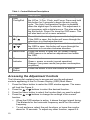
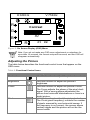
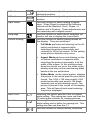
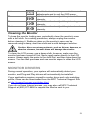
The following sections provide information about attaching the base to
your monitor and using the power cord and video cable.
Monitor Base
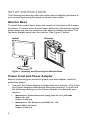
To install the monitor base, place the monitor in the base until it snaps
into place. To remove the monitor base, gently turn the monitor upside
down and press the four retention clips apart to release the base. Pull
the base straight away from the monitor. See Figure 1 below.
Install
Remove
Figure 1: Installing and Removing the Monitor Base
Power Cord and Power Adapter
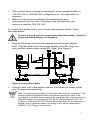
Before connecting your monitor’s power cord and adapter, read the
guidelines below:
•
Use only the Power Adapter included with your monitor. One of the
two Power Adapters listed below should be included. You will find
the following markings on the Power Adapter included with your
monitor:
•
•
6
Manufacturer: Polaris Electronics (Dong guan) Co; Ltd. (CHI SAM)
Model: CH -1205
Output: 12 VDC 5 A
Manufacturer: TPV Electronics (FUJIAN) CO., LTD
Model: ADPC-12V Series
Output: 12 VDC 5 A