1
DPV-5200X_manualcover_ENG
8/17/06
5:00 PM
Page 4
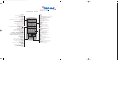
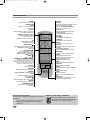
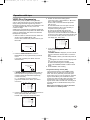
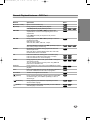
Remote control - Overview
POWER
Switch this unit ON or OFF.
OPEN/CLOSE
EJECT
Open or close the disc tray.
Tape Eject.
TV/VCR
Switch between your TV’s tuner and the VCR’s
internal tuner.
DVD/VCR selection switch
Selects operation mode of
the remote control.
Switches modes of the device.
AV
Select input source for
recording into tape.
PAUSE/STEP (
)
Pause playback temporarily / press repeatedly
for frame-by-frame
playback.
SKIP (. / >)
Go to next chapter or track.
Returns to beginning of current
chapter or track or go to previous
chapter or track.
STOP ( Á )
Stops playback.
BACKWARD / FORWARD (m / M)
DVD: Search backward or forward.
VCR: Rewinds the tape during the STOP mode,
for fast reverse picture search and Advances
the tape during the STOP mode, fast forward
picture search.
PLAY (G)
Starts playback.
MARKER
Mark any point during playback.
SEARCH
Display MARKER SEARCH menu.
TITLE
Display the title menu of the
disc if available.
REC/ITR (O)
Record your input sources into tape.
REPEAT
Repeat chapter, track, title, all.
RANDOM/CM SKIP
Play tracks in random order.
CM SKIP
DISPLAY
CLK/CNT
Access the On-Screen Display. Shows you the
current time or counter.
b / B / v / V(left/right/up/down)
Select an item in the menu.
PR/TRK (v / V)
Select channel programme of VCR.
To adjust tracking.
To control vertical tremble during
picture still.
DISC MENU
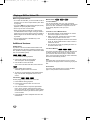
36 month warranty from
date of purchase
Ireland 1191515
Important warranty
information
Access menu of a DVD disc.
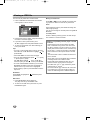
Dear Customer,
ENTER/OK
Thank you for purchasing a TARGA product.
Acknowledge menu selection.
SETUP/ i
Please carefully read through the enclosed documentation or online help before putting your
Access or remove setup menu.
Targa product into service. If you have a problem, which can’t be solved in this way, please
RETURN
contact our hotline.
Displays the menu of a video CD
with PBC.
If the problem cannot be solved over the phone, you will be given a reference number
0-9 numerical buttons
Select numbered items in a menu.
(RMA), which you should enclose together with a copy of the proof of purchase. After you
have packaged the unit safe for transport and in plain packaging, please send it for warranty
processing, with the RMA noted on the outside of the package, to the address given to you
PROGRAM
by our hotline employee. After receiving the unit we will correct the manufacturing and
Access or remove program menu.
material defect free of charge.
CLEAR
Clear a track number on the
program menu or a mark on the
MARKER SEARCH menu.
Reset tape counter to zero.
AUDIO
Select an audio language (DVD).
SUBTITLE
Select a subtitle language.
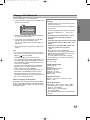
Up-to-date information and answers to the most frequently asked questions are available on
the internet from:
www.targa-online.com
This guarantee is valid in the Ireland.
Your statutory guarantees from the seller are in addition to this warranty and are not limited
by it.
ANGLE
Select DVD camera angle if available.
ZOOM
Enlarge video image.
Hotline number:
01-2421583
A-B/LP
Repeat sequence.
Select the recording speed of the tape.
(Please have your
serial number to hand!)
VIDEO Plus+
To display the programme menu for
VIDEO Plus+ programming.
Manufacturer:
TARGA GmbH, Postfach 2244,
D-59482 Soest
www.targa-online.com