1
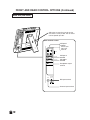
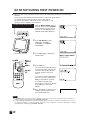
REMOTE CONTROL/BASIC OPERATION
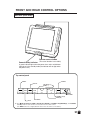
MENU
POWER
MENU
POWER
CH
TV/VIDEO
TV/VIDEO
VOL
VOL
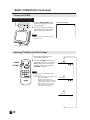
CH (])/([)
]Selects next higher channel
[Selects next lower channel
CH
FLASHBACK
1
2
3
DISPLAY
CHANNEL SELECT
4
5
6
7
8
9
0
100
MUTE
FLASHBACK
Returns to previous channel
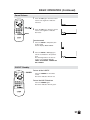
DISPLAY
Press....Displays receiving channel for 10 seconds.
Channel indication reduces in size after
about 10 seconds.
Press again....After the CH call is displayed in large
size, COLOR SYSTEM except N358
and is displayed for 10 seconds, and
then CH will be displayed in small
size only.
↓
Small CH display
↓
LCDTV
No display
↓
The above three displays can
be switched.
MUTE
Press....Stops sound.
BASIC OPERATION
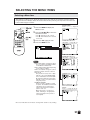
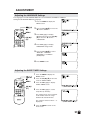
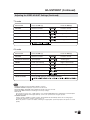
This product is factory set to comply with the TV broadcasting system in the United States. For Brazil,
Argentina and Uruguay, set the color system according to the country before using this product by
following the table below.
The VIDEO INPUT mode is compatible with color systems worldwide and is automatically set.
Country
TV broadcasting
system
Factory setting of color system
User setting
TV
Video
TV
U.S.A
Color: NTSC
TV ch: US ch
NTSC (N358)
US ch
World Multi
Auto System
Not required
or N/A
Canada, Mexico,
Latin America
Color: NTSC
TV ch: US ch
NTSC (N358)
US ch
World Multi
Auto System
Not required or N/A
Brazil
Color: PAL-M
TV ch: US ch
NTSC (N358)
US ch
World Multi
Auto System
Set color system to
PAL-M (see page 21)
Argentina,
Uruguay
Color: PAL-N
TV ch: US ch
NTSC (N358)
US ch
World Multi
Auto System
Set color system to
PAL-N (see page 21)
* The World Multi Auto System
is compatible with all color
systems indicated below.
1
2
3
4
5
PAL-STANDARD
PAL-M
PAL-N
NTSC
SECAM
13