1
ADJUSTMENT (Continued)
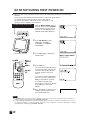
Adjusting the VIDEO ADJUST Settings
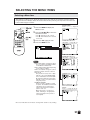
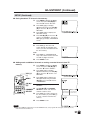
1
Press the MENU to display the
MENU screen.
MENU
POWER
MENU
CH
TV/VIDEO
(MAIN MENU screen)
CH
FLASHBACK
1
2
3
4
5
6
7
8
9
DISPLAY
CH (])/
([)
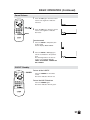
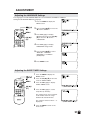
2
Press the CH (])/([) to move the
cursor to VIDEO ADJUST.
3
Press the VOL (+)/(–) to display
the VIDEO ADJUST Menu screen.
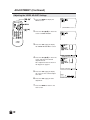
4
Press the CH (])/([) to move the
cursor and select the desired
adjustment item.
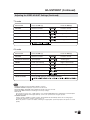
All of adjustment item is shown in
the diagram on page 21.
5
Press the VOL (+)/(–) to display
the screen for the selected adjustment item.
6
Press the VOL (+)/(–) to make
adjustment.
7
Press the MENU to return to the
main screen.
MUTE
0
LCDTV
(VIDEO ADJUST screen)
20