1
AXIS Q1614–E Network Camera
output will show as active (shown under System Options > Ports & Devices) if
the alarm device is activated.
Digital input – An alarm input for connecting devices that can toggle between
an open and closed circuit, for example: PIRs, door/window contacts, glass
break detectors, etc. When a signal is received the state changes and the input
becomes active (shown under System Options > Ports & Devices).
•
Note
The I/O connector is connected to the housing (fan/heater) on delivery, and will trigger an
input port event to indicate a fan or heater error when activated. See for information
about events.
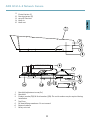
RS485/RS422 connector - Two 2-pin terminal blocks for RS485/RS422 serial interface used to
control auxiliary equipment, e.g. PTZ devices.
Specifications
Product
Temperature
Humidity
AXIS Q1614–E
–30 °C to 50 °C
(–22 °F to 122 °F)
with PoE; down to
–40 °C (– 40 °F with
High PoE
20-85% RH (non-condensing)
Connectors
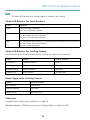
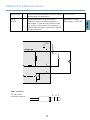
I/O terminal connector
4–pin terminal block for:
• Digital Input
• Digital Output
• Auxiliary power and ground
(GND)
Function
Pin
Notes
GND
1
Ground
12V DC
Power
2
Can be used to power auxiliary equipment.
Note: This pin can only be used as power out.
Specifications
16
Max load = 15 mA