1
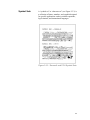
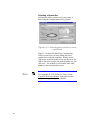
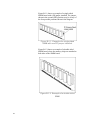
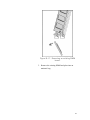
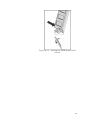
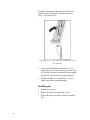
Rotate the board to the right until the board ‘clicks’
into the metal locking tabs, securing the board in
place - see Figure B-1.10.
Figure B-1.10. Securing the SIMM board in
the socket.
3. Gently rock the SIMM back and forth. If it is
seated correctly, it will not lift away from the slot.
If it lifts up, you have not pushed it firmly enough
into the slot, and you must try installing again.
4. If another SIMM is to be installed (i.e., slot 1),
simply repeat these installation steps.
Finishing up
1. Replace the top cover.
2. Replace the top cover hold down screws.
3. Plug in the power cord and switch the controller
ON.
54