1
At a glance
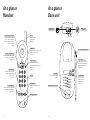
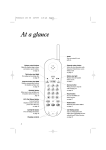
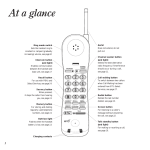
Handset
At a glance
Base unit
Telephone line
cord socket
In Use/Battery Low light
Comes on when the handset is
in use or, if the handset is on
standby, to indicate the battery
needs recharging.
see page 6
Talk button
Activates your Freestyle 70 ready
to make or receive a call.
see page 8
C
V
hann
el
e
olum
Recall button
Recall button for use with a
switchboard/PBX and BT
Select Services.
see page 11
Mains power
socket
Base unit telescopic aerial
Power light
Comes on when connected to
the power supply and flashes
when the handset is in use.
see page 5 & 8
Channel button
Selects an alternative radio
frequency if interference occurs
during a call.
see page 8
Page button
Press to page the handset.
see page 11
Keypad
Redial button
Redials the last number called.
see page 9
Battery charging contacts
l
ickdia
Qu
Charging contacts
1
POWER LINE
Aerial
Does not extend,
do not pull out.
see page 5
Volume control button
Adjusts the handset ringer volume
and earpiece speech volume.
see pages 8 & 9
Quickdial button
Allows you to store and dial up
to 10 numbers in the memory.
see pages 9 & 10
PHONE LINE
2
Charging light
Comes on when the
handset batteries are
being charged.
see page 5