1
Adjusting the Screen Image
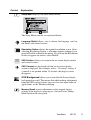
Use the buttons on the front control panel to display and adjust the OnView®
controls which display on the screen. The OnView controls are explained at the
top of the next page and are defined in “Main Menu Controls” on page 12.
Main Menu
with OnView controls
Front Control Panel
Displays, saves
changes to, and exits
the Main Menu.
Scroll through menu
options and adjust the
displayed control.
Power light
Power On/Off
Selects a highlighted control. Also,
displays the control screen for the
selected control and toggles
between control pairs.
ViewSonic
VE175
7