1
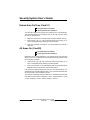
Security System
User Guide for the LED Command Center
National Security Systems Inc (800)457-1999
Security System User’s Guide
MY SECURITY COMPANY IS:
CALL BEFORE TEST: ____________________________
THIS SECURITY SYSTEM IS CONNECTED TO TELEPHONE NUMBER:
____________________________________
THE SECURITY CONTROL PANEL IS CONNECTED TO THE PHONE JACK LOCATED:
____________________________________
TRANSFORMER LOCATION: _________________________________
CIRCUIT BREAKER NUMBER: _______________________________
46840C
LED Command Center User’s Guide
Page 2
Copyright © 2002 Radionics
Security System User’s Guide
Contents
About This User’s Guide ........................................................................................... 5
Introduction ............................................................................................................... 5
Security System Basics ............................................................................................ 6
What is a Point? ........................................................................................................ 6
What is a Faulted Point? .......................................................................................... 6
Are All Points the Same ? ........................................................................................ 6
All On ......................................................................................................................... 7
Part On ...................................................................................................................... 7
Command Center Keys ............................................................................................ 8
Command Center Tones .......................................................................................... 9
Command Center LED Descriptions ..................................................................... 10
Commands .............................................................................................................. 10
System Events ........................................................................................................ 10
Fire Alarms .............................................................................................................. 11
Burglary Alarms ...................................................................................................... 11
Fire Trouble Events ................................................................................................. 11
Non-Fire Trouble Events ......................................................................................... 11
How Your System Reports Alarms ......................................................................... 12
Silence Alarms ........................................................................................................ 12
Keypad Adjust (Cmd 49) ........................................................................................ 12
Log Out of the System ............................................................................................ 13
Turn the System Off ................................................................................................ 13
Turn the System All On (All On or Cmd 1) ............................................................ 14
Turn the System Part On (Part On or Cmd 2) ....................................................... 15
Turn the System Part 2 On (Cmd 3) ...................................................................... 16
Set Part 2 Points (Cmd 65) .................................................................................... 17
Turn the System On with No Delay ........................................................................ 18
Turn the System On with No Exit Tone .................................................................. 19
Turn the System On with Points Faulted (Force Arm) .......................................... 20
Bypass Points ......................................................................................................... 21
Date and Time (Cmd 45) ........................................................................................ 22
Change a Passcode (Cmd 55) .............................................................................. 23
Change Others’ Passcodes (Cmd 56) ................................................................... 24
Change Others’ Passcode Level (Cmd 56) ........................................................... 25
Add a Passcode (Cmd 56) ..................................................................................... 26
Delete a Passcode (Cmd 58) ................................................................................. 27
Renew One-Time Passcodes (Cmd 53) ................................................................ 28
Check System Troubles (Cmd 4) ........................................................................... 29
View Alarm Memory (Cmd 40) ............................................................................... 30
View System Trouble (Cmd 42) .............................................................................. 31
View Point Trouble (Cmd 48) .................................................................................. 32
System Test (Cmd 41) ............................................................................................ 32
LED Command Center User’s Guide
Copyright © 2002 Radionics
Page 3
46840C
Security System User’s Guide
Walk Test (Cmd 44) ................................................................................................ 34
Reset the System (Cmd 47) ................................................................................... 35
Turn Watch On/Off (Cmd 61) ................................................................................. 36
Select Watch Tone (Cmd 62) ................................................................................. 37
Select Watch Points (Cmd 63) ............................................................................... 39
Extend Auto On Time (Cmd 51) ............................................................................. 40
All Areas On (Cmd 80) ........................................................................................... 40
All Areas Off (Cmd 81) ........................................................................................... 41
Auto-Forward On/Off (Cmd 82) .............................................................................. 41
Remote Arming with Telephone, Area 1 ................................................................ 42
Remote Program (Cmd 43) .................................................................................... 42
Security System Limitations ................................................................................... 43
Fire Safety and Evacuation .................................................................................... 44
Maintenance and Service ...................................................................................... 45
Power Failure .......................................................................................................... 45
How to Clean the Command Center ..................................................................... 45
Glossary .................................................................................................................. 46
Index ........................................................................................................................ 48
46840C
LED Command Center User’s Guide
Page 4
Copyright © 2002 Radionics
Security System User’s Guide
About This User’s Guide
This user’s guide shows you how to use and maintain your security system.
It covers basic functions, such as turning the system on and off.
The functions described in this guide are programmed by your security
company. Some of them may not be enabled in your system. Certain
functions covered may require you to enter your personal passcode.
Introduction
Your system helps to secure life, property, and investments against fire,
theft and bodily harm. It consists of one or more Command Centers, motion
sensors (for example, detectors or devices located on doors and windows)
and sensing devices designed to detect the presence of smoke or
combustion. Each of these devices is connected to a sophisticated control
panel with microprocessor, which processes all events registered by the
system.
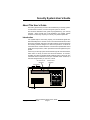
Control of your security system is achieved through the Command Center,
which offers a variety of basic and advanced features. Its function,
versatility, and ease of operation make it ideal for home or office use. The
Command Center is tailored to meet your individual needs. Moreover, it
has been designed with you, the user, in mind.
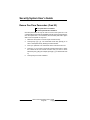
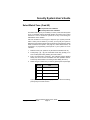
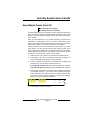
All On & Part On
Indicators
Status & Cmd
Indicators
Point Status
1
2
3
4
5
6
7
8
9 10 11 12 13 14 15 16
All
Status
Part
Cmd
Check
Change
Watch
Areas
Test System Weekly
A
B
C
Sounder
LED Command Center User’s Guide
Copyright © 2002 Radionics
Page 5
46840C
Security System User’s Guide
Security System Basics
What is a Point?
A Point is a detection device or group of devices connected to your security
system. Points are identified by the area they monitor, such as a front
door, bedroom window or hallway.
What is a Faulted Point?
When a point (such as a door or window) is closed, it is said to be normal.
When the door or window is open, the point is said to be faulted or not
normal. When you turn your system on, you will usually want all of the
points in your system to be normal. However, you can turn your system on
with faulted points by using the Bypass Points command.
If a point indicator on the Command Center is on, the point is said to be
faulted. When the faulted point has returned to normal, the point indicator
on the Command Center turns off.
Are All Points the Same ?
Not all points are the same. In fact, there are two basic types of points,
Controlled and 24-hour.
Controlled Points
Controlled points respond to alarm conditions depending upon whether
the system is turned on or off. They are programmed to either respond
instantly to alarm conditions or to provide a delay for you to reach the
Command Center and turn the system off. Various controlled points may
be located throughout your house.
When you turn your system on, you have the option of turning on all
controlled points (All On), or just some of the controlled points (Part On).
See page 7 for more information on “All On” and “Part On.”
24-hour Points
24-hour points are always on, even when the system is turned off. There
are two types of 24-hour points, fire points and non-fire points. See page
35, “Reset the System,” for more information.
• Fire Points: Fire points only monitor fire detection devices such as
smoke detectors. They are always on and cannot be turned off.
• Non-fire 24-hour Points: Non-fire 24-hour points are always on and
cannot be turned off.
46840C
LED Command Center User’s Guide
Page 6
Copyright © 2002 Radionics
Security System User’s Guide
All On
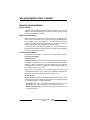
When you turn your system All On, you are turning on all controlled points,
both interior (motion detectors) and perimeter (doors and windows of the
building).
Controlled Points are All On
DINING
KITCHEN
LIVING
ROOM
BED
ROOM
BED
ROOM
BEDROOM
Part On
When you turn your system Part On, you are turning on only a portion of
the controlled points. The particular points included in this portion are
determined by your alarm company. Part points may include only the
perimeter (doors and windows) of your system, or the points on the first
floor of a two story house. Check with your security company to learn
which points are Part points.
Controlled Points are Part On
DINING
LIVING
ROOM
KITCHEN
BED
ROOM
BED
ROOM
BEDROOM
LED Command Center User’s Guide
Copyright © 2002 Radionics
Page 7
46840C
Security System User’s Guide
Command Center Keys
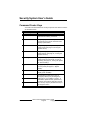
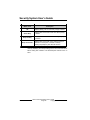
Your LED Command Center has 19 keys to perform the various functions
as described below:
Key
Function
1, 2, 3, 4, 5, 6, 7, 8, 9, 0
The numeric keys are used for entering
passcodes and issuing commands.
Cmd
The [Cmd] key is used in conjunction with
the numeric keys to enter commands. Also
displays system status.
All On
The [All On] key allows you to turn your
system All On (see page 14,"Turning the
System All On").
Part On
The [Part On] key allows you to turn your
system Part On (see page 15, "Turning the
System Part On").
No Delay
The [No Delay] key allows you to turn your
system All On or Part On with no entry or
exit delay (see page 18, "Turning the System
On with No Delay").
Bypass
The [Bypass] key allows you to bypass one
or more points (see page 21, "Bypass
Points").
*
Press the [*] key to advance to the next
display (when available).
A
An emergency function (Fire, Panic or
Emergency Alarms) may be assigned to
these keys by your installing company. To
activate the special function, press the key
two times consecutively within two seconds.
Your security company will label each key to
its assigned function.
B
C
46840C
LED Command Center User’s Guide
Page 8
Copyright © 2002 Radionics
Security System User’s Guide
Command Center Tones
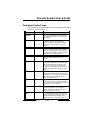
The Command Center emits several distinct tones and illuminates lights
to alert you to system events.
Tone
Tone Pattern
_ _ _
When a fire point activates, the Command Center
emits a repeated warble tone (on for two seconds,
then briefly off).
_____________
When a burglary point activates while your system
is turned on, your Command Center emits a
continuous warble tone. The sounder remains on
for the duration of the time set by your security
company.
Fire Alarm
Burglary Alarm
When a system component is not functioning
properly, your Command Center emits a repeated
warble tone. Press the [4] key to view the trouble. If
the problem is point-related, the Command Center
display indicates which point is faulted.
Trouble
_
Pressing any key on the Command Center sounds
a short pip, indicating that the key press is
accepted.
__ __
When you enter the premises through a point
programmed for Entry Delay, the Command Center
emits an intermittent beep to remind you to turn
your system off. If the system is not turned off
before the entry delay expires, an alarm condition
will occur and a report may be sent to your alarm
company.
_ __ _ __ _ __
After you turn your system on, the Command
Center emits an intermittent beep and counts down
the Exit Delay time. If you do not exit before the exit
delay time expires and an Exit Delay point is
faulted, an alarm event begins.
____
If you press an incorrect key, your Command
Center emits an error tone to indicate an invalid
entry. The error tone is the same warble tone as the
Trouble Tone, but it is not repeated.
____
This tone indicates that a Command Center entry is
accepted (for example, a correct passcode is
entered). The Command Center emits a single,
high-pitched beep for one second.
Key Press
Entry Delay
Exit Delay
Error
OK
Watch
Description
The Command Center emits a tone to alert you
when any watched point is faulted. The tone varies
in duration depending upon the Watch Tones
selected (see page 37, "Select Watch Tone").
LED Command Center User’s Guide
Copyright © 2002 Radionics
Page 9
46840C
Security System User’s Guide
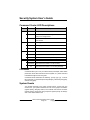
Command Center LED Descriptions
LED
State
Status
On
Description
No System Troubles.
Slow Flash
AC failure, system trouble or keypad has been moved
away from its assigned area.
Fast Flash
Command Center in Command Mode System test has
been initiated.
Cmd
Off
User logged off and no command is active.
Fast Flash
Waiting for passcode entry.
On
Exit Delay timer is active or a command is in progress.
Off
Panel disarmed or armed Part On.
Slow Flash
Panel armed All On with No Delay.
All
Part
On
Panel armed All On with Entry/Exit Delay.
Off
Panel disarmed or armed All On.
Slow Flash
Panel armed Part On/Part 2 On with No Delay.
Panel armed Part On/Part 2 On with Entry/Exit Delay.
On
Commands
Commands allow you to carry out various tasks (for example, add or delete
passcodes, set the date and time or test the system, etc.). Each command
is detailed throughout this user guide.
Commands will be written like the following: [Cmd] + [6] + [3]. To enter
this command, you would first press the [Cmd] key, followed by the [6] key
and then the [3] key.
System Events
Your system responds to four types of alarm events. If more than one
event occurs, your system sorts them into one of four groups: Fire Alarms
(highest priority), Burglary Alarms, Fire Troubles and Non-Fire Troubles
(lowest priority). Events that are grouped as highest priority are always
sent to the Central Station first.
46840C
LED Command Center User’s Guide
Page 10
Copyright © 2002 Radionics
Security System User’s Guide
Fire Alarms
Fire alarms are the highest priority events. When a fire point activates,
your Command Center emits a Fire Alarm tone (repeated warble tone - on
for two seconds, then briefly off). Evacuate all occupants and investigate
for smoke or fire. Make sure that all occupants know the difference between
the Burglary Alarm tone and the Fire Alarm tone.
Burglary Alarms
Burglary alarms are the second priority. When a burglary point activates,
your Command Center emits a Burglary Alarm tone. Ensure that all
occupants know the difference between the Burglary Alarm tone and the
Fire Alarm tone.
The Command Center display shows each burglary point that went into
alarm by flashing the point number (up to Point 16).
Fire Trouble Events
When a fire trouble (such as a loose wire) occurs, your Command Center
emits a Trouble tone.
The Command Center’s Status indicator is on steady. See page 29, “Check
System Troubles,” for more information on determining the nature of the
trouble.
Non-Fire Trouble Events
When a trouble event such as a low battery condition occurs, your
Command Center emits a Trouble tone.
The Command Center’s Status indicator is on steady. See page 29, “Check
System Troubles,” for information on determining the nature of the trouble.
LED Command Center User’s Guide
Copyright © 2002 Radionics
Page 11
46840C
Security System User’s Guide
How Your System Reports Alarms
Your security system may be programmed to automatically disconnect
your telephone when sending reports to your security company. Once the
report is complete, the system returns the telephone to normal operation
(verify with your installing company).
Your system makes repeated attempts to send reports to your security
company. If your system fails to report, the Command Center signals a
system trouble. See page 29, “Check System Troubles,” for more information
on determining the nature of the trouble.
If your telephone service is interrupted, your security system
cannot send reports to your security company unless it has an
alternate means of transmitting them.
Silence Alarms
When there is an alarm, the alarm tone sounds and the point(s) in alarm
illuminate on the display (up to Point 16). If you enter your passcode before
the system dials your security company, the alarm report is aborted.
1.
Enter your passcode to silence the alarm and turn the system off (if it
was turned on). An alarm report will be sent if it is not acknowledged
in time.
2.
Press and hold the [Cmd] key to remove the alarms (flashing point
numbers) from the Command Center display. See “View Alarm
Memory,” page 30, to see which points caused the alarm.
1
2
3
4
5
6
7
8
9 10 11 12 13 14 15 16
All
Status
Part
Cmd
Keypad Adjust (Cmd 49)
I can perform this command.
I cannot perform this command.
Use this command to adjust the Command Center’s sounder volume.
46840C
1.
Press [Cmd] + [4] + [9]. Enter your passcode if necessary.
2.
To adjust the Command Center’s sounder volume, press and hold
the [∗] key, and then press [1] to increase the volume or [4] to decrease
the volume.
3.
Press [Cmd] to exit this command function when all adjustments are
made.
LED Command Center User’s Guide
Page 12
Copyright © 2002 Radionics
Security System User’s Guide
Log Out of the System
The system remembers passcodes entered for approximately 10 seconds
after you have stopped pressing keys. To log out of the system, press the
[Cmd] key twice. The Cmd LED remains off, acknowledging that you have
successfully logged out.
Turn the System Off
Entry Delay Time (to be filled in by your security company):
You have __________ seconds to enter premises and turn system off.
Turn off the security system by entering your passcode. When the system
is on, you must enter through a designated entry door to prevent an alarm.
Opening a designated door starts the entry delay. During entry delay time,
the Command Center emits a double tone every second to remind you to
turn the system off. Enter your passcode before the entry delay time expires
to turn the system off.
If you enter through the wrong door or fail to turn the system off before the
entry delay time expires, you may cause an alarm. If an alarm occurs,
silence the alarm by entering your passcode and call your security company
to let them know that it is not an emergency situation.
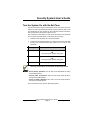
1.
1
When the system is All On, the Command Center illuminates the All
On indicator. If the system is Part On/Part 2 On, the Command Center
illuminates the Part On indicator.
2
3
4
5
6
7
8
9 10 11 12 13 14 15 16
1
2
3
4
5
6
7
8
9 10 11 12 13 14 15 16
2.
All
Status
Part
Cmd
All
Status
Part
Cmd
Enter your passcode to turn the system off. Once the system is off,
the Command Center turns the All On indicator or the Part On indicator
off.
LED Command Center User’s Guide
Copyright © 2002 Radionics
Page 13
46840C
Security System User’s Guide
Turn the System All On (All On or Cmd 1)
I can perform this command.
I cannot perform this command.
Exit Delay Time (to be filled in by your security company):
You have __________ seconds to exit premises before system turns on.
Use this command to turn on the entire system. Once you press the All
On key, the Exit Delay timer starts its countdown. Your security company
programs the length of exit delay to ensure you have adequate time to
exit.
You should leave the premises before the exit time expires. Leaving after
exit delay expires starts an alarm event.
1.
Make sure that all points are normal (not faulted). If your system has
a faulted point, you should return it to normal, or bypass the point
(see page 21, “Bypass Points”).
2.
Press [All On]. The Command Center may prompt you to enter a
valid passcode if necessary by flashing the Cmd indicator.
3.
Enter your passcode if necessary. Exit delay begins. The All On,
Status and Cmd indicators light. You should leave at this time.
1
2
3
4
5
6
7
8
9 10 11 12 13 14 15 16
All
Status
Part
Cmd
During the exit delay, you may stop the system from turning on by
entering your passcode.
If you wish to, you can turn the system All On with No Delay by pressing
[No Delay] or you may bypass points by pressing [Bypass]. See page
21, “Bypass Points,” for more information.
46840C
4.
During the last 10 seconds of Exit Delay, the Command Center emits
a double tone every second to warn you not to exit and to turn the
system off. The system then turns All On. The All On indicator remains
on steady.
5.
To turn the system off, enter your passcode.
LED Command Center User’s Guide
Page 14
Copyright © 2002 Radionics
Security System User’s Guide
Turn the System Part On (Part On or Cmd 2)
I can perform this command.
I cannot perform this command.
Exit Delay Time (to be filled in by your security company):
You have __________ seconds to exit premises before system turns on.
Part On turns on part of your system, leaving the rest of the system turned
off. Refer to the Point Identification section of your Command Center’s
Reference Card to identify Part points designated for Part On activation.
Once you press the Part On key, the exit delay timer begins. You should
leave the premises before the exit time expires. Leaving after exit delay
expires starts an alarm event.
1.
Make sure that Part points are normal (not faulted).
2.
Press [Part On]. The Command Center may prompt you to enter a
valid passcode by flashing the Cmd indicator.
3.
Enter your passcode, if necessary. The Part On, Status and Cmd
indicators light. If your system has a faulted point (door or window
open), you can either close it or bypass it (see page 21, “Bypass
Points”).
During the exit delay, you may stop the system from turning on by
entering your passcode.
4.
During the last 10 seconds of Exit Delay, the Command Center emits
a double tone every second to warn you not to exit and to turn the
system off. The system then turns All On. The All On indicator remains
on steady.
1
2
3
4
5
6
7
8
9 10 11 12 13 14 15 16
5.
All
Status
Part
Cmd
To turn the system off, enter your passcode.
LED Command Center User’s Guide
Copyright © 2002 Radionics
Page 15
46840C
Security System User’s Guide
Turn the System Part 2 On (Cmd 3)
I can perform this command.
I cannot perform this command.
Exit Delay Time (to be filled in by your security company):
You have __________ seconds to exit premises before system turns on.
Part 2 On turns on part of your system designated as Part 2, leaving the
rest of the system turned off. You can select the points that turn on for Part
2 On (see page 17, “Set Part 2 Points”).
1.
Make sure that Part 2 points are normal (not faulted). If your system
has a faulted point, you should return it to normal, or bypass the point
(see page 21, “Bypass Points”).
2.
Press [Cmd] + [3] to turn the system Part 2 On. The Command Center
may prompt you to enter a valid passcode by flashing the Cmd
indicator.
3.
Enter your passcode, if necessary. The Part On, Status and Cmd
indicators light and the exit delay time starts.
During exit delay, you may stop the system from turning on by entering
your passcode.
If you wish, you can turn the system Part 2 On with No Delay by
pressing [No Delay], or you may bypass points by pressing [Bypass].
4.
During the last 10 seconds of Exit Delay, the Command Center emits
a double tone every second to warn you not to exit and to turn the
system off. The system then turns All On. The All On indicator remains
on steady.
1
2
3
4
5
6
7
8
9 10 11 12 13 14 15 16
5.
46840C
All
Status
Part
Cmd
To turn the system off, enter your passcode.
LED Command Center User’s Guide
Page 16
Copyright © 2002 Radionics
Security System User’s Guide
Set Part 2 Points (Cmd 65)
I can perform this command.
I cannot perform this command.
Use this command to select which points are armed when you turn the
system Part 2 On. This allows you to turn part of the system on to detect
intrusion, while the remaining part of the system allows you to move freely
without sounding an alarm.
1.
Make sure that the system is turned off (All and Part indicators are
off).
2.
Press [Cmd] + [6] + [5]. The Command Center may prompt you to
enter a valid passcode by flashing the Cmd indicator.
3.
Enter your passcode if necessary. The Command Center indicates
which points are available for selections. Points that are on steady
are selected for Part 2, flashing points are available for selection.
4.
Enter the Point Number that you want to activate or deactivate for
Part 2 On followed by the [∗] key. Repeat this step until all points have
been designated Yes or No for Part 2 Mode (Yes = Active, ready to
detect intrusion; No = Non-Active, you can move freely without
sounding an alarm).
1
2
3
4
5
6
7
8
9 10 11 12 13 14 15 16
5.
All
Status
Part
Cmd
Press [Cmd] to exit this command.
LED Command Center User’s Guide
Copyright © 2002 Radionics
Page 17
46840C
Security System User’s Guide
Turn the System On with No Delay
Use this command to turn the system All On or Part On without entry or
exit delays. Remember that turning the system on with no delay allows no
exit or entry delay time through the designated delay point (for example,
Front Door).
46840C
1.
Make sure that all points are normal (not faulted).
2.
Press [All On] if you want to turn the system All On or press [Part On]
if you want to turn the system Part On. Press [Cmd] + [3] if you want
to turn the system Part 2 On. The Command Center may prompt you
to enter a valid passcode by flashing the Cmd indicator.
3.
Enter your passcode if necessary. The Command Center display lights
the Cmd indicator and either the All On or Part On indicator.
4.
Press [No Delay] to turn the system on with no delay. There will be a
10-second window before the panel arms as No Delay.
5.
To turn the system off, enter your passcode.
LED Command Center User’s Guide
Page 18
Copyright © 2002 Radionics
Security System User’s Guide
Turn the System On with No Exit Tone
Use this command to turn the entire system All On, Part On or Part 2 On
without any exit tones. Remember that turning the system on with no exit
tone eliminates the tone emitted by the Command Center intended to
alert occupants that the system is about to arm.
This command is useful when you wish to arm the system, but not disturb
the occupants while the system counts down prior to arming.
1.
Make sure that all points are normal (not faulted).
2.
Press and hold the appropriate key to silence the exit tone (see table
below). The Command Center may prompt you to enter a valid
passcode.
Arming With
To Silence Exit Tone
All On
Press & hold [All On] key
OR
Press [Cmd], then press & hold [1] key
Part On
Press & hold [Part On] key
OR
Press [Cmd], then press & hold [2] key
Part 2 On
Press [Cmd], then press & hold [3] key
Silencing the Exit Delay Tone doubles the Exit Delay period.
• All On (Cmd 1) Operation: The “All” and “Cmd” LEDs will be on during
the Exit Delay period.
• Part On (Cmd 2) Operation: The “Part” and “Cmd” LEDs will be on
during the Exit Delay period.
• Part 2 On (Cmd 3) Operation: The “Part” and “Cmd” LEDs will be on
during the Exit Delay period.
The Cmd indicator turns off when Exit Delay expires.
LED Command Center User’s Guide
Copyright © 2002 Radionics
Page 19
46840C
Security System User’s Guide
Turn the System On with Points Faulted (Force
Arm)
Force-arming is not permitted in UL applications.
I can perform this command.
I cannot perform this command.
1.
To force arm the system All On or Part On with the normal Exit Delay
time and tone, press [All On] or [Part On]. The faulted point’s LED
indicator remains on. The Cmd indicator turns on. Press [All On] or
[Part On] again. If the Cmd indicator flashes fast, enter your passcode.
The All or Part indicator turns on, indicating the system is turning All
On or Part On. The Exit Delay Time countdown begins with the exit
tone. The faulted point’s LED indicator flashes indicating that this point
is force-armed.
2.
To force arm the system All On or Part On with doubled Exit Delay
time and no exit tone, press and hold [All On] or [Part On] until the
Cmd LED lights (after one second approximately). The faulted point’s
LED indicator remains on. Press [All On] or [Part On] again. If the
Cmd indicator flashes, enter your passcode. The All or Part indicator
turns on, indicating the system is turning All On or Part On. The Exit
Delay Time countdown is doubled and begins without the exit tone.
The faulted point’s LED indicator flashes indicating that this point is
force-armed. Once the panel is armed, the Cmd indicator turns off.
The system ‘forces’ the faulted points on. As long as they remain
faulted they do not provide protection. If they return to normal before
the system is turned off they provide protection and are capable of
starting alarm events. If a point becomes faulted after the exit delay
begins, the Command Center displays the faulted point. If the point
remains faulted at the end of exit delay, it will start an alarm event.
46840C
LED Command Center User’s Guide
Page 20
Copyright © 2002 Radionics
Security System User’s Guide
Bypass Points
I can perform this command.
I cannot perform this command.
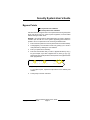
Use this command to bypass one or more points before turning the system
All On, Part On or Part 2 On. When a point is bypassed, it can be faulted
without starting an alarm event.
Example: Your kitchen has just been painted and you want to leave the
windows open but still turn on the system. Bypassing points allows the
system to be on but prevents it from monitoring undesired areas.
1.
Ensure that the system is turned off (All and Part are not illuminated).
2.
Press [Bypass]. The Command Center may prompt you to enter a
valid passcode by flashing the Cmd indicator.
3.
Enter your passcode if necessary.
4.
Enter the Point Number that you want to bypass followed by the [∗]
key (for example, if you want to bypass Point 10, enter [1] + [0] + [∗]).
Repeat this step until all points that are required to be bypassed have
been programmed.
1
2
3
4
5
6
7
8
9 10 11 12 13 14 15 16
All
Status
Part
Cmd
Bypassed points flash on the Command Center.
To un-bypass a point, repeat the steps above for the desired point
number.
5.
Press [Cmd] to exit this command.
LED Command Center User’s Guide
Copyright © 2002 Radionics
Page 21
46840C
Security System User’s Guide
Date and Time (Cmd 45)
I can perform this command.
I cannot perform this command.
Use this command to program the system’s date and time.
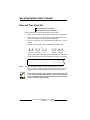
1.
Ensure that the system is turned off (All and Part are not illuminated).
2.
Press [Cmd] + [4] + [5]. The Command Center may prompt you to
enter a valid passcode by flashing the Cmd indicator.
3.
Enter your passcode. The Command Center lights Point 1 on the
display.
4.
Enter the date and time using the MM/DD/YY, HH:MM format.
___ ___ / ___ ___ / ___ ___
M M
D
D
Y
Y
Month of
Current
Day of
the year the month
Year
___ ___ : ___ ___
H
H
M M
Hour of Minute of
the hour
the day
The Command Center lights points 1 through 6 (each point represents
a digit to be entered) for the date and points 1 through 4 for the time.
1
2
3
4
5
6
7
8
9 10 11 12 13 14 15 16
Note:
All
Status
Part
Cmd
The time should be entered in 24-hour format (8:00 pm = 20:00).
5.
After you enter the date and time, the Command Center sounds a
long beep and automatically exits the Date and Time command.
In the event of a power cycle (power is lost to the system and
then restored), the panel takes the last event in the log and uses
that as a starting point for the time and date. It will then alert you
to enter the current time and date.
46840C
LED Command Center User’s Guide
Page 22
Copyright © 2002 Radionics
Security System User’s Guide
Change a Passcode (Cmd 55)
I can perform this command.
I cannot perform this command.
Use this command to change your passcode at any time. Only use this
feature under the direction of your security company. Write down
your old passcode and the new one before you begin.
1.
Make sure that your system is off (All and Part indicators are off).
2.
Press [Cmd] + [5] + [5]. The Command Center flashes the Cmd
indicator to prompt you to enter your passcode.
3.
Enter your current passcode. The Command Center lights your user
number (1-16).
4.
Enter a new passcode with the same number of digits as your old
passcode. If the error tone sounds, try a different new passcode.
5.
Enter your new passcode again.
6.
The Command Center sounds the OK tone and returns to the off
state. You successfully changed your passcode.
LED Command Center User’s Guide
Copyright © 2002 Radionics
Page 23
46840C
Security System User’s Guide
Change Others’ Passcodes (Cmd 56)
I can perform this command.
I cannot perform this command.
Use this command to change passcodes for each user in the system. This
command requires the appropriate authority level to change passcodes.
Only use this feature under the direction of your security company.
Cmd 56 is only for changing passcodes other than the one used
to access Cmd 56. For example, if User 1 performs Cmd 56, he/
she cannot modify his/her own passcode. Use Cmd 55 instead.
1.
Make sure that the system is turned off (All and Part indicators are
off).
2.
Press [Cmd] + [5] + [6]. The Command Center may prompt you to
enter a valid passcode by flashing the Cmd indicator.
3.
Enter your passcode. Point indicators 1, 2 and 3 flash.
1
2
3
4
5
6
7
8
9 10 11 12 13 14 15 16
All
Status
Part
Cmd
4.
Press [1] to change passcodes. The available user numbers now flash.
5.
Enter the user number that you want to change followed by the [∗]
key (for example, press [2] + [∗] to change the Passcode for User 2).
The point indicator for that particular user number now stays on steady.
If the user does not exist in the system, the Command Center
will emit an error tone.
46840C
6.
Enter a new passcode with the same number of digits as the old
passcode. If the error tone sounds, try a different new passcode. Enter
the new passcode again for verification.
7.
Press [Cmd]. The available user numbers now flash. Repeat Steps 5
and 6 to change another user passcode, or press [Cmd] twice to exit.
LED Command Center User’s Guide
Page 24
Copyright © 2002 Radionics
Security System User’s Guide
Change Others’ Passcode Level (Cmd 56)
I can perform this command.
I cannot perform this command.
Use this command to change passcode authority levels for each user in
the system. This command requires the appropriate authority level to
change passcodes. You cannot change your own passcode authority level.
Only use this feature under the direction of your security company.
The following should be filled in by your security company:
• Authority Level 1 includes these commands:
_________________________________________________________
• Authority Level 2 includes these commands:
___________________________________________________________
• Authority Level 3 includes these commands:
_________________________________________________________
• Authority Level 4 includes these commands:
_________________________________________________________
1.
Make sure the system is turned off (All and Part indicators are off).
2.
Press [Cmd] + [5] + [6]. The Command Center may prompt you to
enter a valid passcode by flashing the Cmd indicator.
3.
Enter your passcode. Point indicators 1, 2 and 3 flash.
1
2
9 10
3
4
5
6
7
8
11 12 13 14 15 16
All
Status
Part
Cmd
4.
Press [2] to change passcode authority levels. The available user
numbers now flash.
5.
Enter the user number that you want to change the authority level for,
followed by the [∗] key (for example, press [3] + [∗] to change the
authority level for User 3). The user number now turns on solid.
If the user does not exist in the system, the Command Center
will emit an error tone.
6.
Enter the new authority level (1-4) followed by [Cmd].
7.
The available user numbers flash. Select another user, or press [Cmd]
twice to exit.
LED Command Center User’s Guide
Copyright © 2002 Radionics
Page 25
46840C
Security System User’s Guide
Add a Passcode (Cmd 56)
I can perform this command.
I cannot perform this command.
Use this command to add new passcodes to the system. This command
requires the appropriate authority level to add passcodes. To add a new
passcode to the system, you must assign an area(s) to the new user in
addition to using the other Cmd 56 features (changing a passcode and
changing a passcode authority level) as outlined below. Only use this
feature under the direction of your security company.
1.
Make sure the system is turned off (All and Part indicators are off).
2.
Press [Cmd] + [5] + [6]. The Command Center may prompt you to
enter a valid passcode by flashing the Cmd indicator.
3.
Enter your passcode. Point indicators 1, 2 and 3 flash.
4.
Press [3] to assign an area(s) to the new user. The point indicators
flash to indicate available users.
5.
Enter the user number you want to add followed by the [∗] key (for
example, for User 4, press [4] + [∗]).
6.
Enter the area(s) you want to assign to the new user by pressing the
appropriate numeric key(s). For example, if the new user is to be
assigned to Areas 1 and 2, press the [1] and [2] keys. To remove a
currently assigned area(s), press the corresponding numeric key(s).
The appropriate point indicator will turn off (for example, if User 4 is
assigned to Areas 1 and 2, but should only be assigned to Area 1,
press [2] to remove Area 2 from User 4’s area assignment).
7.
Press [Cmd] twice. Point indicators 1-3 flash.
8.
Press [1] to assign a new passcode.
9.
Enter the user number followed by the [∗] key (for example, press [4]
+ [∗] to create the passcode for User 4).
10. Enter a new passcode. If the error tone sounds, try a different new
passcode.
11. Enter the new passcode again for verification. Press [Cmd] twice.
Point indicators 1-3 flash.
12. Press [2] to assign a passcode authority level to the new user.
13. Enter the user number followed by the [*] key (for example, press [4]
+ [∗] to assign an authority level for User 4).
14. Enter the authority level.
46840C
LED Command Center User’s Guide
Page 26
Copyright © 2002 Radionics
Security System User’s Guide
15. Press the [Cmd] key until the Command Center emits a single beep
tone, the Cmd indicator turns off and the Status indicator turns on.
This indicates that the Command Center has exited this command.
The new user passcode, area assignment and authority level
will automatically be logged into the system’s programming
memory. Make sure that your security company’s programming
records are properly updated.
Delete a Passcode (Cmd 58)
I can perform this command.
I cannot perform this command.
Use this command to delete passcodes. This command requires the
appropriate authority level to delete passcodes. You cannot delete your
own passcode using this command. Only use this feature under the
direction of your security company.
1.
Make sure the system is turned off (All and Part indicators are off).
2.
Press [Cmd] + [5] + [8]. The Command Center may prompt you to
enter a valid passcode by flashing the Cmd indicator.
3.
Enter your passcode. The available user numbers flash.
1
2
3
4
5
6
7
8
9 10 11 12 13 14 15 16
4.
All
Status
Part
Cmd
Enter the user number that you want to delete (for example, press [2]
+ [∗] to delete User 2). You cannot delete yourself as a user.
If the user does not exist in the system as set up by your security
company, the Command Center will emit an error tone.
5.
Press [Cmd] to exit this command.
LED Command Center User’s Guide
Copyright © 2002 Radionics
Page 27
46840C
Security System User’s Guide
Renew One-Time Passcodes (Cmd 53)
I can perform this command.
I cannot perform this command.
One-time passcodes can only be used once to turn the system off. This
command allows those with the applicable authority level to renew previous
One-Time passcodes. Once renewed, the One-Time passcode is again
able to turn the system off only once.
46840C
1.
Make sure the system is turned off (All and Part are off).
2.
Press [Cmd] + [5] + [3]. The Command Center may prompt you to
enter a valid passcode by flashing the Cmd indicator.
3.
Enter your passcode. The Command Center sounds the OK tone.
4.
Press [0] + [∗] if you wish to renew all one-time passcodes, or press
the number of the user whose one-time code you wish to renew
followed by the [∗] key (for example, press [5] + [∗] to renew Passcode
5).
5.
Press [Cmd] to exit this command.
LED Command Center User’s Guide
Page 28
Copyright © 2002 Radionics
Security System User’s Guide
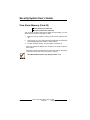
Check System Troubles (Cmd 4)
Your system emits a trouble tone to alert you to a system trouble event.
System troubles are caused by things such as low batteries. Use this
command to learn what is causing the trouble and what steps to take to
correct it.
1.
The system may be on or off when a system trouble occurs. If the
system is on, you must turn it off to check the trouble.
2.
Press [Cmd] + [4] to silence the trouble tone. The Command Center
displays all system troubles. Follow the Command Center point
indicators to determine the type of system trouble.
Point #
3.
Description
1
Weekly Test Due: This prompts you to conduct your
weekly system test (see page 33, "System Test").
2
System Trouble: Press [2] to determine the specific
trouble (see page 31, "View System Trouble").
3
Remote Program Session Active: Your security
company is currently connected to your system via the
telephone line.
5
Date and Time Lost: Press [5] to set the date and time.
6
Running on Battery Only: The power to your system
has been disconnected or has failed.
8
Point Trouble: Press [8] to determine which point
trouble is current (see page 32, "View Point Trouble").
10
Alarm Memory: Press [0] to view previous alarms that
occurred.
Press [Cmd] to exit this command.
The trouble tone for AC Failure events sounds at all command
centers in all areas. However, the trouble tone must be silenced
in each area (silencing it in one area does not silence it in the
other areas).
LED Command Center User’s Guide
Copyright © 2002 Radionics
Page 29
46840C
Security System User’s Guide
View Alarm Memory (Cmd 40)
I can perform this command.
I cannot perform this command.
After an alarm has been silenced and cleared from the display, you may
still review the points that had been in alarm.
1.
Make sure that the system is turned off (All and Part indicators are
off).
2.
Press [Cmd] + [4] + [0]. Enter passcode if prompted. The Command
Center displays all points that are in alarm memory.
3.
To clear the alarm memory, turn the system on and then off.
• If the point indicator is flashing fast, the alarm is currently in alarm or
was in alarm.
• If the point indicator is flashing slow, the alarm was aborted. No reports
for the alarm event were sent to the security company.
The LED Command Center only displays Points 1-16.
46840C
LED Command Center User’s Guide
Page 30
Copyright © 2002 Radionics
Security System User’s Guide
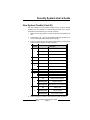
View System Trouble (Cmd 42)
Use this command to view system trouble events. A system trouble
condition may occur if there is a communications trouble, or it is time for
the system to be serviced by your security company.
1.
Make sure that the system is turned off (All and Part indicators are
off).
2.
Press [Cmd] + [4] + [2]. The Command Center may prompt you to
enter a valid passcode by flashing the Cmd light.
3.
Enter your passcode. The Command Center displays current system
trouble events by lighting the point indicators.
Point #
Description
On
Telephone Line Fail
Flashing Slow
Comm Fail, Destination 1
Flashing Fast
Comm Fail, Destination 2
2
On
Alternate Comm Trouble
3
On
Installer Switch Closed
On
Backup Battery Low
Flashing Slow
Backup Battery Missing
On
Bell Supervision Fail
On
RF Receiver Jammed
Flashing Slow
RF Receiver Trouble
On
Data Bus Device Missing
Flashing Slow
Data Bus Tamper
Flashing Fast
Data Bus Device Trouble/Reset
On
System Fault
Flashing Slow
Service Interval
Flashing Fast
Ground Fault Condition
1
4
5
6
7
8
4.
Press [Cmd] twice to exit the View System Trouble command.
LED Command Center User’s Guide
Copyright © 2002 Radionics
Page 31
46840C
Security System User’s Guide
View Point Trouble (Cmd 48)
I can perform this command.
I cannot perform this command.
Use this command to view which points (if any) are in trouble.
1.
Make sure that the system is turned off (All and Part indicators are
off).
2.
Press [Cmd] + [4] + [8]. The Command Center may prompt you to
enter a valid passcode by flashing the Cmd light.
3.
Enter your passcode. The Command Center displays all points that
are in trouble (if any).
The LED Command Center only displays Points 1-16.
4.
Point
Trouble Condition
Off
No Point Trouble
On
Wiring Fault
Flashing Slow
RF Sensor Low Battery
Flashing Fast
RF Sensor Missing
Press [Cmd] twice to exit the View Point Trouble command.
System Test (Cmd 41)
46840C
LED Command Center User’s Guide
Page 32
Copyright © 2002 Radionics
Security System User’s Guide
I can perform this command.
I cannot perform this command.
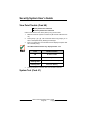
The System Test command allows you to ensure that your system is
operating correctly by testing the system’s bell, strobe, battery and phone
line. Only those programmed by your installing security company are tested
(your system may only be programmed to test the back-up battery and
the bell output).
I can test:
Battery
System Bell
System Strobe
Phone Line
If any of these components fails to test, contact your security company for
assistance. Be sure to contact your security company before you begin
the system test.
1.
Make sure the system is turned off (All and Part indicators are off).
2.
Press [Cmd] + [4] + [1]. The Command Center may prompt you to
enter a valid passcode by flashing the Cmd indicator.
3.
Enter your passcode if necessary. The system starts the test. As each
test is underway, the corresponding point indicator lights.
Point #
Testing
1
Bell
2
Strobe (may take up to 20 minutes)*
3
Backup Battery (may take 4 minutes)*
4
Communications (may take up to 10 minutes)*
* To skip to the next test, press the [∗] key.
When testing the bell and strobe, check for bell/strobe activation.
The LED testing status will not indicate bell/strobe test failure
(point indicator does not flash fast upon test failure).
As the system tests each bell, strobe, battery and the system’s
communication, the corresponding point indicator displays the stage of
LED Command Center User’s Guide
Copyright © 2002 Radionics
Page 33
46840C
Security System User’s Guide
each test.
4.
Point
Testing Status
Flash Slow
Testing Segment Underway
Flash Fast
Testing Segment Failed
On
Testing Segment Complete
When the test is complete, the Command Center automatically exits
this command.
To stop the test currently in progress and skip to the next test, press the
[∗] key. To abort all system tests and return to the normal display, press
the [Cmd] key.
Walk Test (Cmd 44)
I can perform this command.
I cannot perform this command.
Use this command to walk-test detection devices connected to your system.
Perform the Walk Test on a weekly basis. The types of devices that can be
walk-tested are configured by your security company.
1.
Make sure the system is turned off (All and Part indicators are off).
2.
Press [Cmd] + [4] + [4]. The Command Center may prompt you to
enter a valid passcode by flashing the Cmd indicator.
3.
Enter your passcode if necessary. The command center emits a single
tone.
4.
To test each point, trigger the corresponding detection device (open
a door, walk in front of a motion detector, etc.) until all points have
been tested. When a point is tested, the command center emits a
single one-second tone and the corresponding point indicator turns
on. When the tested point is restored, the command center emits a
second single one-second tone and the corresponding point indicator
turns off.
5.
To exit the walk test, press the [Cmd] key. The Status indicator flashes
rapidly. Walk Test is over when the Status indicator stops flashing.
Test fire detection devices (smoke/heat detectors) weekly as
instructed by your security company and in accordance with the
devices’ instructions.
46840C
LED Command Center User’s Guide
Page 34
Copyright © 2002 Radionics
Security System User’s Guide
Reset the System (Cmd 47)
I can perform this command.
I cannot perform this command.
Use this command to reset the system (including fire points) after an alarm.
Detection devices, such as smoke detectors and shock sensors, must be
reset after being activated. Resetting the system takes about 20 seconds.
If points do not reset, contact your alarm company for help.
1.
Ensure that your system is off (All and Part indicators are off).
2.
Press [Cmd] + [4] + [7]. The Command Center may prompt you to
enter a valid passcode by flashing the Cmd indicator.
3.
Enter your passcode if necessary. The system now resets. After the
system resets, the Command Center automatically exits this
command.
LED Command Center User’s Guide
Copyright © 2002 Radionics
Page 35
46840C
Security System User’s Guide
Turn Watch On/Off (Cmd 61)
I can perform this command.
I cannot perform this command.
Use the Watch feature to “watch” points when the system is off. For example,
parents with small children may want a tone to sound whenever a door or
window is opened as a way of monitoring the location of the children.
Use this command to turn the watch feature on and off.
Once you have programmed the system with points to watch (see page
39, “Select Watch Points”) and the responses (see page 37, “Select Watch
Tone”), you need to turn the watch function on and off.
1.
Make sure that your system is off (All and Part are off).
2.
Press [Cmd] + [6] + [1]. The Command Center may prompt you to
enter a valid passcode by flashing the Cmd indicator.
3.
Enter your passcode, if necessary. The Command Center beeps for
1 second to indicate that Watch is now on or off, depending on the
applied setting.
• If Watch Tone is ON, the LED indicator for Point 2 flashes (press [2] to
turn off).
• If Watch Tone is OFF, the LED indicator for Point 1 flashes (press [1] to
turn on).
46840C
LED Command Center User’s Guide
Page 36
Copyright © 2002 Radionics
Security System User’s Guide
Select Watch Tone (Cmd 62)
I can perform this command.
I cannot perform this command.
The Watch feature gives you the ability to “watch” points when the system
is off. For example, parents with small children may want a tone to sound
whenever a door or window is opened as a way of monitoring the
whereabouts of the children.
Use this command to set the type of response your system produces
when a watch point is faulted. If you wish, you may tell your system to
display the point’s LED indicator and sound a short tone whenever certain
doors or windows are opened. See page 39, “Select Watch Points,” for
information on programming which points in your system are to be
“watched”.
1.
Make sure that your system is off (All and Part indicators are off).
2.
Press [Cmd] + [6] + [2]. The Command Center may prompt you to
enter a valid passcode by flashing the Cmd indicator.
3.
Enter your passcode if necessary. The Command Center displays
steady the current choice and flashes the other possible choices.
The factory default watch tone setting is Short Beep (Choice 2).
4.
Select the type of watch tone you want by pressing the required digit.
Choice #
Tone
1
No Tone
2
Short Beep
3
Beep Until Key
4
Beep Until Closed
If you just want to review (not change) the current watch tone setting,
press [Cmd] to exit this function.
LED Command Center User’s Guide
Copyright © 2002 Radionics
Page 37
46840C
Security System User’s Guide
Watch Tone
Description
Off
Displays point(s), but no tone when point(s) is faulted.
Short Beep
Displays point and sounds a short tone when point(s)
is faulted.
Beep Till Key
Displays point and sounds a tone until the [Cmd] key
is pressed.
Beep Till Closed
Displays point and sounds a tone until the point(s) is
returned to normal (door or window is closed).
Pressing the [Cmd] key also silences the tone.
5.
46840C
After making your selection, the display confirms the choice you have
made by displaying the corresponding point on the Command Center
before exiting this command. The selected point indicator turns on
solid.
LED Command Center User’s Guide
Page 38
Copyright © 2002 Radionics
Security System User’s Guide
Select Watch Points (Cmd 63)
I can perform this command.
I cannot perform this command.
The Watch feature gives you the ability to “watch” points when the system
is off. For example, parents with small children may want a tone to sound
whenever a door or window is opened as a way of monitoring the location
of the children.
Once you have decided how your system responds to watched points
(see page 37, “Select Watch Tone”), you need to decide which of the
points in your system will be watched. Use this command to tell your system
which points to watch. You cannot watch 24-hour or fire points.
Choosing which points to watch depends upon your goals. If you have
small children, you may choose to watch points of entry and exit. Each
time a watch point is faulted (a door or window is opened), the Command
Center responds as programmed For example, you may tell your system
to produce a short beep when a watch point is faulted.
1.
Make sure that your system is off (All and Part indicators are off).
2.
Press [Cmd] + [6] + [3]. The Command Center may prompt you to
enter a valid passcode by flashing the Cmd indicator.
3.
Enter your passcode if necessary. The Command Center displays all
points that are currently being watched (Watch On).
• Point Indicator On Solid: indicates point(s) already being “watched.”
• Point Indicator Flashing: indicates point(s) available to be “watched.”
4.
1
Enter the point number that you want to watch followed by the [∗] key
(for example, press [5] + [∗] to watch Point 5). Repeat this step to
select all the points you want to watch. To turn Watch Mode off for a
point, enter the point number followed by the [∗] key (for example,
press [5] + [∗] to turn Watch off for Point 5).
2
9 10
5.
3
4
5
6
7
8
11 12 13 14 15 16
All
Status
Part
Cmd
Press [Cmd] to exit this command.
LED Command Center User’s Guide
Copyright © 2002 Radionics
Page 39
46840C
Security System User’s Guide
Extend Auto On Time (Cmd 51)
I can perform this command.
I cannot perform this command.
Your security company can program your system to turn on automatically.
This command allows you to delay the auto-on time by one hour during
the auto-on pre-alert time.
1.
Make sure the system is turned off (All and Part indicators are off).
2.
Press [Cmd] + [5] + [1]. The Command Center may prompt you to
enter a valid passcode by flashing the Cmd indicator.
3.
Enter your passcode if necessary. The Command Center sounds a
valid tone.
All Areas On (Cmd 80)
I can perform this command.
I cannot perform this command.
Depending on the areas assigned to your authority level, this command
allows you to turn on all areas at the same time when the system is split
into more than one area.
1.
Press [Cmd] + [8] + [0]. The Command Center may prompt you to
enter a valid passcode by flashing the Cmd indicator.
2.
Enter your passcode. If your passcode is valid, the Command Center
illuminates the All On indicator and exit delay starts.
If an area has a faulted point(s) when you try to turn all areas All On, the
appropriate Point LED illuminates (Points 1-16). Hold down the All On key
for two seconds to force all areas to All On.
The command center lights Point Indicators 1-4 to indicate the areas that
have been forced on (Point 1 Indicator = Area 1, Point 2 Indicator = Area
2, Point 3 Indicator = Area 3, Point 4 Indicator = Area 4).
46840C
LED Command Center User’s Guide
Page 40
Copyright © 2002 Radionics
Security System User’s Guide
All Areas Off (Cmd 81)
I can perform this command.
I cannot perform this command.
Depending on the areas assigned to your authority level, this command
allows you to turn off all areas at the same time when the system is split
into more than one area.
1.
Press [Cmd] + [8] + [1]. The Command Center may prompt you to
enter a valid passcode by flashing the Cmd indicator.
2.
Enter your passcode if necessary. The Command Center turns off all
areas at the same time.
Auto-Forward On/Off (Cmd 82)
I can perform this command.
I cannot perform this command.
This command allows you to turn on or off the auto-forward feature as
necessary.
1.
Press [Cmd] + [8] + [2]. The Command Center may prompt you to
enter a valid passcode by flashing the Cmd indicator.
2.
Enter your passcode if necessary. The Command Center sounds the
valid entry tone.
3.
Press [1] to turn auto-forward on, or press [2] to turn auto-forward off.
• Point Indicator 1 On Solid: Auto-Forward ON (Point Indicator 2
flashes)
• Point Indicator 2 On Solid: Auto-Forward OFF (Point Indicator 1
flashes)
4.
Press [Cmd] to exit this command.
LED Command Center User’s Guide
Copyright © 2002 Radionics
Page 41
46840C
Security System User’s Guide
Remote Arming with Telephone, Area 1
I can perform this command.
I cannot perform this command.
This function controls the built-in telephone arming feature for Area 1.
When enabled, the panel answers the phone on the programmed ring
count.
When the panel answers the phone:
• If the panel is All or Part On, it sounds three beeps and starts the
handshake tone for remote programming.
• If the panel is Off, it sounds one short beep, waits approximately
three seconds, and then sounds one long beep. Press and hold the
[5] key* for two seconds immediately after the first short arming beep
and before the long beep begins.
• The panel will arm if it detects a [5] key press from the telephone (All
On with Delay, faulted points are force-armed). The panel sounds
three beeps (new armed state) and then hangs up.
* If arming from a cell phone, quickly press the [5] key three times. If
pressing and holding the [5] key for two seconds from a house (land-line)
phone does not produce a tone long enough to arm Area 1, retry by quickly
pressing the [5] key three times.
Remotely disarming the panel cannot be done with a telephone.
Remote Program (Cmd 43)
I can perform this command.
I cannot perform this command.
This command forces the system to connect to your security company’s
remote PC computer for programming alterations via the telephone line.
Only use this feature under the direction of your security company.
46840C
1.
Ensure that the system is turned off (All and Part indicators are off).
2.
Press [Cmd] + [4] + [3]. The Command Center may prompt you to
enter a valid passcode by flashing the Cmd indicator.
3.
Enter your passcode. The Command Center will emit a single-beep
tone, indicating that the remote programming session has begun.
When the session is completed, the Command Center automatically
exits this command.
LED Command Center User’s Guide
Page 42
Copyright © 2002 Radionics
Security System User’s Guide
Security System Limitations
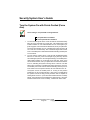
Not even the most advanced security system can guarantee protection
against burglary, fire, or environmental threats. All security systems are
subject to possible compromise or failure-to-warn for a variety of reasons
including, but not limited to, the following:
• If sirens or horns are placed outside the hearing range of people in
remote areas of the building or in areas which are frequently closed off,
they do not provide the intended protection.
• If intruders gain access through unprotected points of entry, the system
will not detect their entrance.
• If intruders have the technical means of bypassing, jamming, or
disconnecting all or part of the system, they will not be detected.
• If the AC power supply is OFF and the back up battery is either missing
or dead, sensors will not detect intrusion.
• Smoke detectors cannot detect smoke in chimneys, walls, or roofs, or
smoke blocked by a closed door. They may not detect smoke or fire on
a level of the building different from the one on which they are located.
Smoke detectors may not be able to warn in time about fires started by
explosions, improper storage of flammables, overloaded electrical
circuits, or other types of hazardous conditions.
• If phone lines are out of service, reports from the security system to the
security company cannot be sent. Telephone lines are vulnerable to
compromise by several means. Inadequate maintenance and failure to
test are the most common causes of alarm failure. It is strongly
recommended that you test your system once a week to be sure that all
system components are working properly. Although having a security
system may make you eligible for reduced insurance premiums, the
system is no substitute for insurance. Warning devices cannot
compensate you for loss of life or property.
LED Command Center User’s Guide
Copyright © 2002 Radionics
Page 43
46840C
Security System User’s Guide
Fire Safety and Evacuation
Residential fire is a leading cause of accidental death. Most fire related
deaths occur at night when occupants suffocate in their sleep from smoke
and toxic gases, rather than from burns. To help reduce this risk, the
following program should be implemented.
1.
Minimize fire hazards. Smoking in bed, cleaning with flammable liquids
such as gasoline, leaving children home alone, and using unsafe
holiday decorations are some of the common causes of household
fire.
2.
Install a fire alarm system. The primary purpose of this system is to
protect lives by giving the earliest possible warning of danger.
3.
A smoke detector should be provided to protect each sleeping area
in a home.
4.
Practice an escape plan. Because there may be very little time
between detection of a fire and the time it becomes deadly, it is
important that every member of the family understand how to quickly
evacuate according to the plan.
5.
Plan both primary and alternate escape routes. Since stairwells and
hallways may be blocked during a fire, exiting through a bedroom
window must be a part of the escape plan. If the sleeping area is
above the ground floor, install a means of safely descending outside
the building if one does not already exist.
6.
As a part of this plan, all family members should arrange to meet at a
location away from the house (such as a neighbor’s house) so you
will know that everyone is accounted for.
7.
If it is determined that the alarm was accidentally sounded, the bell
should be silenced, the detectors reset, and your security company
notified immediately that there is no emergency situation.
Rec Room
Dining
Room
**
Bedroom
46840C
Kitchen
Living Room
Bedroom
*
Bedroom
Bedroom
Living
Room
= Smoke Detector
Locate smoke detectors between
sleeping areas and family living
areas.
*
Basement
*
Hall
Bedroom
*
*
Dining
Room
= Smoke Detector
A smoke detector should be located on each
story including basements, but excluding crawl
spaces and unfinished attics.
LED Command Center User’s Guide
Page 44
Copyright © 2002 Radionics
Security System User’s Guide
Maintenance and Service
This security system requires very little maintenance, however, you should
test the system weekly to ensure it is working properly. A test schedule
and maintenance program can be arranged. If you notice a change in
operation during normal use or testing, call for service as soon as possible.
Do not attempt to repair the control panel, Command Centers, or detectors
yourself.
See the information box on page 2 for security company, contact and
installation information.
Power Failure
If the Command Center indicates a power failure, and you have power in
the rest of your premises, there may be a problem with the electrical
transformer or circuit breaker supplying power to your security control
panel. First, check to be sure that the transformer is securely plugged
into the electrical outlet. If it appears to be damaged in any way, do not
attempt to repair it. Call your security company for service.
See the information box on page 2 for transformer information.
If the transformer is plugged in, check the circuit breaker supplying power
to the outlet. If the breaker is tripped, check the appliances on the circuit
for signs of electrical problems. Make sure someone has not intentionally
turned the breaker off. When all is clear, reset the breaker.
See the information box on page 2 for the circuit breaker number.
How to Clean the Command Center
If your Command Center gets dirty, apply a household glass cleaner to a
clean cloth or paper towel and wipe the surface. Do not spray any liquid
directly onto the Command Center. It could run inside the case and damage
electrical circuits.
LED Command Center User’s Guide
Copyright © 2002 Radionics
Page 45
46840C
Security System User’s Guide
Glossary
24-hour Point
Points that are always on even when the system is
turned off. Two types: Fire Points and Non-Fire 24-hour
Points.
All On
To turn on all of the points in the system.
Burglary Alarm Tone
A constant warble tone.
Bypass
To selectively remove points temporarily from the
system.
Central Station
A facility where trained personnel monitor your security
system 24 hours a day. Your security system may be
programmed to contact the central station during alarm
conditions, enabling central station personnel to
dispatch the proper authorities.
Controlled Point
Point that reports alarm conditions only when the
system is turned on.
Entry Delay
A programmed delay of the system alarm responses
that allow you to enter the building through the entry
door to turn your system off. An alarm response will
begin if you do not turn the system off before the entry
delay expires. Entry delay is programmed by your
security company.
Error Tone
The same warble tone as the Trouble Tone, but not
repeated.
Exit Delay
A programmed delay of the system alarm responses
that allow you to exit after turning the system on. An
alarm response will begin if you do not exit the building
before the exit delay expires. Exit delay is programmed
by your security company.
Faulted Point
A point that is not normal (e.g. - an open door or
window).
Fire Alarm Tone
A warble tone that is on for one second, then briefly off
(repeatedly).
46840C
LED Command Center User’s Guide
Page 46
Copyright © 2002 Radionics
Security System User’s Guide
Fire Point
Point that only monitors a fire detection device(s) such
as a smoke detector. This type of point is always on
and cannot be turned off.
Hold
An instruction to press and hold a key to perform a
function.
No Delay
Turning the system on without entry or exit delay.
Non-Fire Point
Non-fire 24-hour point is always on and cannot be
turned off.
Off Display
The display that appears when the system is turned off
and no keys are pressed.
Part On
To turn on part of the points in the system. Part On
points are determined by your security company.
Part 2 On
To turn on part of the points in the system. Part 2 On
points are determined by you, the user.
Point
A detection device or group of devices connected to
your security system.
Press/Push
These are used interchangeably, instructing you to
push down and then release a key.
Trouble
A service condition that needs to be corrected, such as
a broken wire.
Trouble Tone
A warble tone that is on briefly, then followed by a
pause, followed by the warble tone (repeatedly).
Warble Tone
A tone that is on for one second, then briefly off.
LED Command Center User’s Guide
Copyright © 2002 Radionics
Page 47
46840C
Index
A
Alarm Memory 30
Alarms 12
Burglary 11
Fire 11
Silencing 12
All On 7, 14
Area 40, 41
Off 41
On 40
Auto On Time 40
Auto-Forward 41
On/Off 41
B
Burglary Alarms 11
Bypass Points 20, 21
C
Change Other
Passcodes 24
Cleaning 45
Commands 10
Controlled Points 6
D
Date 22
Delay Silent 19
Delete Passcodes 27
E
Evacuation 44
F
Faulted Point 6
Fire Alarms 11
Fire Points 6
Fire Safety 44
Fire Trouble Events 11
K
Keys 8
L
Logging Out of the
System 12
M
Maintenance 45
N
Non-fire 24-hour Points
6
Non-Fire Trouble Events
11
O
On with No Delay 18
On with Points Open 20
One-Time Passcodes
28
P
Part 2 On 16
Part 2 Points 17
Part On 7, 15
Passcode 23
Change Level 25
Change Other 24
Delete 27
One-Time 28
Passcode Level 25
Point 6
Controlled 6
Faulted 6
Non-fire 24-hour 6
Point Trouble 32
Power Failure 45
© 2002 Radionics, a division of Detection Systems, Inc.
R
Remote Arming 42
Reset the System 35
S
Silencing Alarms 12
System Events 10
System Limitations 43
System Test 33
System Trouble 29, 31
T
Testing
System 33
Walk 34
Time 22
Tones 9
Turn the System Off 13
Turning the System
On with No Delay 19
On with No Exit Tone
19
W
Walk Test 34
Watch 36
On/Off 36
Watch Points 39
Watch Tone 37
46840C
User’s Guide
6/02
D621
Page 48 of 48