1
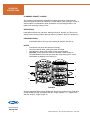
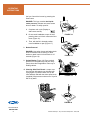
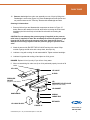
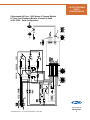
NOMENCLATURE
2
1
3
4
5
6
7
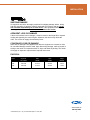
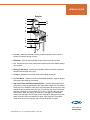
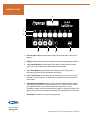
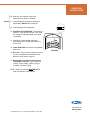
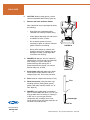
1. LED Program Lamps indicate which channel is selected when lit above that
channel.
2. Display readout indicates time or temperature by pressing appropriate buttons.
3. 1–8 Channel Buttons provide operator the ability to select desired cooking
cycles. Also starts desired cycle after cabinet has preheated.
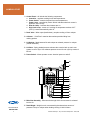
4. Cook Temp Buttons provide operator the ability to raise or lower the oil
temperature by pressing the appropriate arrow button.
5. Cook Time Buttons provide operator with the ability to increase cook time by
pressing the up arrow button, or decrease cooking time by pressing the down
arrow button.
6. Celsius/Fahrenheit Button allows operator to toggle display between Celsius
and Fahrenheit temperature scales. Hold down C˚/F˚ button for two seconds
until display indicates current temperature scale setting (celc or fahr),
immediately (within one second) tap the button again to change the setting. The
display will revert back to normal automatically after approximately five seconds.
7. Start Button activates the chosen cooking program.
www.winstonind.com
800-234-5286
10
Collectramatic® Fryers – Very Low Pressure/Temperature – LP46, LP56