1
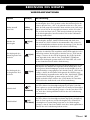
OPERATING THE APPLIANCE
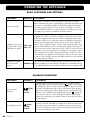
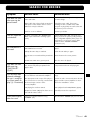
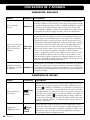
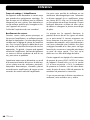
PLAYBACK FUNCTIONS
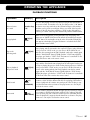
Operation
Button(s)
Description
Direct selection
of a track
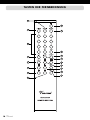
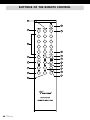
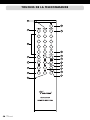
You can start playing a track at any time by keying in the track number on
the remote control. For numbers over 10, you must press the “+10” button
Number keys as often as necessary until it shows the relevant first figure of the number
and then you key in the second figure. If there is no track of the keyed-in
(16)
number on the CD, the player switches to “STOP” mode. If the player is
paused, you cannot select any other track directly with the number buttons.
(8)(22)
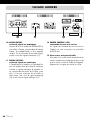
STOP
While a CD is being played, pressing this button stops the playing. If the
player was in “PAUSE” mode, this mode will also be ended by pressing the
“STOP” button. The total number of tracks on the CD and the total playing
time appear in the display (1) again. This button is on both the front of the
device and the remote control.
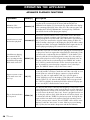
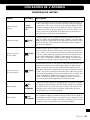
(6)(29)
NEXT
When this button is pressed while the CD is playing, the current track
stops playing and the next track in the sequence begins to play. If this button is pressed in “STOP” mode, you can choose all the CD tracks one
after the other starting from track 01. Playback can then be started again
with the “PLAY/PAUSE” button (7)(20), with the “STOP” button (8)(22)
the player goes back to “STOP” mode. This button is located both on the
front of the device and on the remote control.
Skip to playback
the previous track
(5)(28)
BACK
If this button is pressed once while the CD is playing, the current track
stops and the actual track starts playing from the start again. Further presses skip to playing the previous tracks in their playing sequence. If this button is pressed in the “STOP” mode, you can choose all the CD tracks in
reverse order starting with the last track. Playback can then be started
again with the “PLAY/PAUSE” button (7)(20). With the “STOP” button
(8)(22) the player goes back to “STOP” mode. The button is located both
on the front of the device and on the remote control.
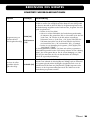
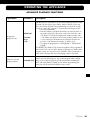
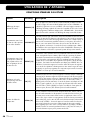
Fast forward
(21)
(FAST
FORWARD)
The track will be played at higher speed (fast forward) as long as you
continue to hold down this button while the CD is playing. If the button is
released, playback will continue at normal speed. If the CD play is stopped, then this button has no function. This play function too can only be
used via the remote control.
(23)
(FAST BACK)
The track will be played backwards at higher speed (“rewind”) as long as
you continue to hold down this button while the CD is playing. If the button is released, play will continue at normal speed in a forward direction.
If the CD playback is stopped, then this button has no function. This play
function too can only be used via the remote control.
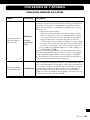
Stop playback
Skip to the
following track
Fast rewind
Vincent
37