1
Programming MDC
7. Default Cycle “dCyC”
This option allows the owner to set the default cycle
type.
NOTE: This option is available on software version
“S003” or higher only.
How to Program Default Cycle
7. Press the START (enter) keypad when the correct
code appears in the Four-Digit Display.
NOTE: To program other options, refer to the
appropriate section.
How to Exit Programming Feature
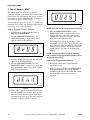
1. Be sure the control shows a programmable
option, not a value.
1. Control must be in Manual Mode. Refer to
Entering the Manual Mode.
2. Press the PERM PRESS/WARM (∧) or the
DELICATES/COLD (∨) keypad until “PrOg”
appears in the Four-Digit Display.
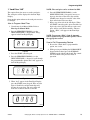
2. While pressing and holding the NORMAL/HOT
keypad with one hand, press the NORMAL/
WARM keypad with the other hand. The control
will revert back to the previous mode of
operation.
COM1R
Figure 21
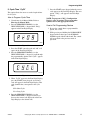
3. Press the START (enter) keypad and “AtS” will
appear in the Four-Digit Display.
4. Press the PERM PRESS/WARM (∧) or the
DELICATES/COLD (∨) keypad to scroll through
the programmable options until “dCyC” appears
in the Four-Digit Display.
TLW1944N
Figure 22
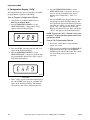
5. When “dCyC” appears in the Four-Digit Display,
press the START (enter) keypad. A letter code
will appear in the Four-Digit Display. This code
(found below) corresponds to the cycle type.
hEAy = NORMAL/HOT
nOrL = NORMAL/WARM
PP = PERM PRESS/WARM
dEL = DELICATES/COLD
6. Press the PERM PRESS/WARM (∧) or the
DELICATES/COLD (∨) keypad to increase or
decrease the current code displayed in the FourDigit Display to the desired code.
22
© Copyright, Alliance Laundry Systems LLC – DO NOT COPY or TRANSMIT
200944