1
Programming
MDC
Topload Washer
Refer to Page 4 for Model Numbers
TLW1R
Keep These Instructions for Future Reference.
(If this machine changes ownership, this manual must accompany machine.)
www.comlaundry.com
Part No. 200944R8
September 2008
WARNING
Failure to install, maintain, and/or operate
this machine according to the
manufacturer's instructions may result in
conditions which can produce bodily injury
and/or property damage.
NOTE: The WARNING and IMPORTANT
instructions appearing in this manual are not meant
to cover all possible conditions and situations that
may occur. It must be understood that common
sense, caution, and carefulness are factors which
cannot be built into these washers. These factors
MUST BE supplied by the person(s) installing,
maintaining, or operating the washer.
W030
Always contact the distributor, service agent, or the
manufacturer about any problems or conditions you do
not understand.
200944
© Copyright, Alliance Laundry Systems LLC – DO NOT COPY or TRANSMIT
1
Table of
Contents
Model Identification ...........................................................................
4
Preliminary Information....................................................................
About the Control .................................................................................
Glossary of Terms.................................................................................
Power Failure Recovery .......................................................................
Card Reader Communications..............................................................
5
5
5
5
5
MDC Identification.............................................................................
SELECT CYCLE Keypads...................................................................
START Keypad ....................................................................................
6
6
6
Display Identification .........................................................................
Light Emitting Diodes (LEDs) .............................................................
START LED ....................................................................................
WASH LED .....................................................................................
RINSE LED .....................................................................................
SPIN LED ........................................................................................
Four 7-Segment Digits .....................................................................
7
7
7
7
7
7
7
Washer Operation ..............................................................................
Start Up.................................................................................................
Ready Mode..........................................................................................
Opening the Washer Lid.......................................................................
Signals...................................................................................................
8
8
8
8
8
MDC Special Features........................................................................
Programming MDC ..............................................................................
Collecting Audit Information ...............................................................
Testing Machine and MDC Functions..................................................
Rapid Advance Feature.........................................................................
Coin Drop .............................................................................................
Start Pulse Operation ............................................................................
Service Door and Coin Vault Openings ...............................................
9
9
9
9
9
9
9
9
Opening the Service Door (Coin Models Only) ............................... 10
Washers Prepped for Card Reader........................................................ 10
Entering the Manual Mode................................................................ 11
How to Enter the Manual Mode ........................................................... 11
Programming MDC............................................................................
What Can Be Programmed? .................................................................
Programmable Options Available.........................................................
1. Vend Price “AtS” .........................................................................
2. Coin #1 Amount “dEn1”..............................................................
3. Coin #2 Amount “dEn2”..............................................................
4. Start Pulse Value “PLSE” ............................................................
5. Cycle Time “CyCL” ....................................................................
6. Configuration Display “CnFg” ....................................................
Configuration Programming ............................................................
7. Default Cycle “dCyC” .................................................................
12
12
12
13
14
15
16
17
18
19
22
Collecting Audit Information ............................................................ 23
© Copyright 2008, Alliance Laundry Systems LLC
All rights reserved. No part of the contents of this book may be reproduced or transmitted in any form or by any
means without the expressed written consent of the publisher.
2
© Copyright, Alliance Laundry Systems LLC – DO NOT COPY or TRANSMIT
200944
How to Enter Audit Feature.................................................................. 23
How to Read Audit Data....................................................................... 23
How to Exit Audit Feature When Using Manual Mode ....................... 23
Testing Machine and MDC Functions..............................................
How to Enter Testing Feature...............................................................
How to Start Tests ................................................................................
How to Exit Testing Feature.................................................................
Diagnostic Test Descriptions................................................................
Show Fill Time Test.........................................................................
Show Drain Time Test .....................................................................
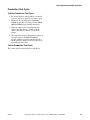
Production Test Cycle...........................................................................
To Enter Production Test Cycle.......................................................
To Exit Production Test Cycle.........................................................
24
24
24
24
24
24
24
25
25
25
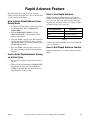
Rapid Advance Feature......................................................................
How to Enter Rapid Advance from Ready Mode.................................
How to Enter Rapid Advance During an Active Cycle ........................
How to Use Rapid Advance .................................................................
How to Exit Rapid Advance Feature ....................................................
27
27
27
27
27
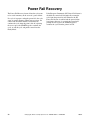
Power Fail Recovery........................................................................... 28
Default Washer Settings..................................................................... 29
Default Cycle ........................................................................................ 29
200944
© Copyright, Alliance Laundry Systems LLC – DO NOT COPY or TRANSMIT
3
Model Identification
Information in this manual is applicable to these washer
models:
4
BWTT20
SWLT21
HWLX21
SWLY20
HWTR21
SWLY21
HWTT20
SWNBC2
HWTT21
SWTT20
HWTX21
SWTT21
HWTY20
SWTX21
HWTY21
SWTY20
HWTZ20
SWTY21
HWTZ21
SWTZ20
SWLT20
SWTZ21
© Copyright, Alliance Laundry Systems LLC – DO NOT COPY or TRANSMIT
200944
Preliminary Information
About the Control
Power Failure Recovery
MDC on the commercial washer is a programmable
control that lets the owner control machine features by
pressing sequences of SELECT CYCLE keypads.
If power fails during an active cycle, the cycle status is
saved in memory. If the European Community (EC)
Power Recovery is disabled, control will automatically
resume the cycle (washer lid must be closed). If EC
Power Recovery is enabled and power is restored in
less than two seconds, the washer will automatically
resume the cycle (washer lid must be closed). If the
length of the power failure is greater than two seconds,
the user must press the START keypad to resume the
cycle.
MDC allows the owner to program cycle time, set
vend prices, retrieve audit information and run
diagnostic tests. Washers shipped from the factory
have a programmable default cycle (PERM PRESS/
WARM) built in.
IMPORTANT: In the event of a power failure,
MDC will not have to be reprogrammed. It is
designed with a memory system that will remember
how it was programmed (for up to ten years) until
the electrical power is restored.
IMPORTANT: It is extremely important that the
washer has a positive ground and that all
mechanical and electrical connections to MDC are
made before applying power to or operating the
washer.
Card Reader Communications
Card Models Only
The control will communicate with a third party card
reader, available at extra cost from various card reader
manufacturers. Contact the card reader manufacturer
of your choice for availability and additional
information.
Glossary of Terms
The following are a few terms and abbreviations to
learn. These are referred to throughout the manual:
Four-Digit Display – This term refers to the window
area of the control that displays values.
LED (Light Emitting Diode) – This term refers to the
lights on the keypads and status words of the control.
200944
© Copyright, Alliance Laundry Systems LLC – DO NOT COPY or TRANSMIT
5
MDC Identification
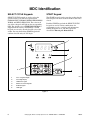
SELECT CYCLE Keypads
START Keypad
SELECT CYCLE keypads are used to select the
specific washer cycle. These keypads include
NORMAL/HOT, NORMAL/WARM, PERM PRESS/
WARM, and DELICATES/COLD. The selection of
one of these keypads will light up the corresponding
LED. The default cycle is PERM PRESS/WARM as
shipped from the factory. The SELECT CYCLE
keypads are not active after the first fill cycle of the
washer. Pressing the flashing START keypad will
confirm selection and cycle will begin.
The START keypad is used to start the washer after the
full vend price has been satisfied and the washer lid is
closed.
Both the START keypad and the SELECT CYCLE
keypads are used in various combinations for
programming cycles, retrieving audit information,
running diagnostic tests, and other operations
described in Entering the Manual Mode.
1
2
3
4
6
5
TLW1R
1
2
3
4
5
6
Four 7-Segment Digits
Four-Digit Display
LED Status Lights
SELECT CYCLE Keypads
START Keypad
LED Light
Figure 1
6
© Copyright, Alliance Laundry Systems LLC – DO NOT COPY or TRANSMIT
200944
Display Identification
Light Emitting Diodes (LEDs)
RINSE LED
LIGHT EMITTING DIODES (LEDs) are used to
indicate the chosen cycle status. Refer to LED
descriptions below.
The RINSE LED is lit at the beginning of the rinse
cycle and will remain lit until the cycle is complete.
START LED
The SPIN LED is lit for all spin cycles.
The START keypad LED flashes whenever the washer
is not in a cycle, the full vend price has been satisfied,
and the washer lid is closed. When the START keypad
is pressed, the cycle will begin or resume. The START
LED will shut off when the START keypad is pressed.
WASH LED
The WASH LED is lit at the beginning of a wash cycle
and will remain lit until the wash cycle is complete.
200944
SPIN LED
Four 7-Segment Digits
The 7-SEGMENT DIGITS are used to display the
time remaining in a cycle, vend price, error messages
and descriptive codes. When displaying the time
remaining, the time value is displayed on the right side
of the display. When displaying the vend price, the
value is displayed on the left side of the display.
During diagnostic testing or manual programming of
the control, these digits will display descriptive codes
and values (as described in Entering the Manual
Mode).
© Copyright, Alliance Laundry Systems LLC – DO NOT COPY or TRANSMIT
7
Washer Operation
Start Up
When power is applied to the washer, the control will
display its software version as “SXXX” (“XXX” is the
version number) for two seconds. If the control was
not powered down during a running cycle, it will enter
the Ready Mode.
Ready Mode
When the START keypad is pressed, the washer will
start. The START LED will stop flashing and the
WASH LED will be lit. The display will change to
show the remaining cycle time on the right side of the
display. The appropriate LEDs will light while the
machine passes through different cycle steps. Any coin
entered after the first fill cycle will be added to the
total coin counter, but the user will not be able to
change cycles.
When a cycle is complete, the Four-Digit Display will
show “00” until the lid is opened, a key is pressed, a
coin or card is entered, or a start pulse is received.
When one of these instances occurs, the Four-Digit
Display will revert back to the Ready Mode.
Opening the Washer Lid
Opening the washer lid in a running cycle will
automatically stop the cycle, the Four-Digit Display
will show “LId”, and the timer will stop. Once the lid
is closed, the cycle will resume from the point it was
interrupted. If the washer lid is opened in the last three
minutes of the cycle, the timer will continue to count
down to the end of the cycle. When the timer control
reaches 0 minutes, the control will return to the Ready
Mode.
TLW2R
Figure 2
In Ready Mode, the PERM PRESS/WARM (default
cycle) LED is lit, and the full vend price is displayed
as left justified. The user may select a different cycle,
if desired. (In card reader machines, if the current
cycle has a vend price which differs from the default
cycle, the display will be updated to show the new
price.) If another cycle is selected, the control will
flash the amount needed to satisfy the vend shown on
the display. If the vend price is not satisfied within one
minute, the washer control will stop flashing the vend
price and return to the default cycle. The display will
continue to show the remaining vend needed to start a
cycle and will credit any vend entered by the user.
Vends may be satisfied by a coin drop, start pulses, or
by a third party card reader. If a coin drop is used, the
remaining vend price will decrease with each coin
entry. If start pulses are used, the remaining vend price
will decrease with each received pulse. Once the vend
is satisfied, the START LED will begin to flash. If a
third party card reader is used, the START LED will
begin to flash when a valid cash card is entered into
the reader.
8
Signals
There are three instances when a signal may sound
during washer operation. The owner may program the
signal to be turned on or off (refer to Programming
MDC, option 6). These three instances are listed
below:
1. Keypad Depression Signal
The signal will sound for .25 seconds each time a
keypad is pressed.
2. Coin Input/Start Pulse Input/Card Insertion
Signal
The signal will sound for .25 seconds each time a
coin or start pulse is received or a card is entered.
3. Machine Error Signal
The signal will sound for 15 seconds if an error
occurs.
© Copyright, Alliance Laundry Systems LLC – DO NOT COPY or TRANSMIT
200944
MDC Special Features
Programming MDC
Rapid Advance Feature
MDC allows the washer owner to program special
features with the use of the keypads. Audit, diagnostic,
cycle and vend information may be programmed and
retrieved by pressing keypad combinations.
This feature allows the user to quickly advance
through an active cycle or advance into a cycle from
the Ready Mode. This feature is useful when tests
must be performed immediately on a washer in an
active cycle. In this case, the user can quickly advance
the cycle to the end, perform the required tests, and
return the washer to the active cycle.
For details on programming cycle and vend
information, refer to Programming MDC.
Collecting Audit Information
With MDC, the washer owner is able to access
valuable audit information by manual access or by a
third party card reader. Audit information recorded
and available to be displayed to the owner includes
total coins entered, total start pulses received, and total
cycles.
For detailed information on using the Rapid Advance
feature, refer to Rapid Advance Feature section.
Coin Drop
The control will accept pulses from a single or dual
coin drop to satisfy vend price. Each coin drop will
have the ability to start or run a cycle.
For detailed information on audit features, refer to
Collecting Audit Information.
Start Pulse Operation
Testing Machine and MDC
Functions
The control will accept pulses from a central card
reader system (available at extra cost). The machine
can be programmed for the value of each start pulse
received. Refer to Programming MDC, option 4.
Special programmable diagnostic features built into
MDC allow the owner to test specific information with
the washer in the Ready Mode. By opening and
closing the service door and then pressing various
sequences of keypads, the owner may perform the
following tests:
• Show Fill Time Test
• Show Drain Time Test
Service Door and Coin Vault
Openings
An open service door combined with various keypad
presses allows the control to enter manual modes of
operation. These modes include Manual
Programming, Audit Collection, and Diagnostics.
• Production Test
For detailed information on running diagnostic tests,
refer to Testing Machine and MDC Functions.
200944
© Copyright, Alliance Laundry Systems LLC – DO NOT COPY or TRANSMIT
9
Opening the Service Door
(Coin Models Only)
Manually programming MDC requires the user to
open and close the service door. Opening and closing
the service door trips a switch allowing access to
various programming options, diagnostics and audit
capabilities. The coin drawer switch must be closed to
enter the Manual Mode.
WARNING
Any disassembly requiring the use of tools
must be performed by a suitably qualified
service person.
W299
The service door is located on the top of the meter case.
Refer to Figure 3.
1
W521IE1A
1
Service Door
Figure 3
Washers Prepped for Card Reader
Manually programming MDC requires the user to
remove the control panel and unplug the bullet
connector located between the “white/black” and “red/
blue” wires. This will allow the user to access various
programming options, diagnostics, and audit
capabilities.
10
© Copyright, Alliance Laundry Systems LLC – DO NOT COPY or TRANSMIT
200944
Entering the Manual Mode
For programming, testing, and retrieving information
from MDC, it is often necessary to enter the Manual
Mode by following the six simple steps below.
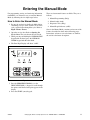
How to Enter the Manual Mode
There are four manual features available. They are as
follows:
1. Manual Programming (PrOg)
2. Manual Audit (Audt)
1. Be sure the washer is in the Ready Mode before
continuing to step 2. If the washer is in an active
cycle, rapid advance through the cycle. Refer to
Rapid Advance Feature.
2. Open the service door. Refer to Opening the
Service Door. The coin drawer must be closed.
3. While pressing and holding the NORMAL/HOT
keypad with one hand, press the NORMAL/
WARM keypad with the other hand.
3. Diagnostic Tests (dIAg)
4. Manual Rapid Advance (rAPd)
Once in the Manual Mode, continue on into one of the
features described in detail on the following pages.
Instructions on how to exit each feature are found at
the end of each feature description.
4. The Four-Digit Display will show “rAPd”.
TLW3R
Figure 4
5. Press the PERM PRESS/WARM (∧) or the
DELICATES/COLD (∨) keypad to scroll through
the options until the desired option appears in the
display.
6. Press the START (enter) keypad .
200944
© Copyright, Alliance Laundry Systems LLC – DO NOT COPY or TRANSMIT
11
Programming MDC
What Can Be Programmed?
This feature allows the owner to program cycle
parameters, standard vend pricing, and other features
by using the keypads.
Programmable Options Available
Option
Description
AtS
Vend Price
This section offers a detailed description of all seven
options available for programming.
dEn1
Coin # 1 Amount
dEn2
Coin #2 Amount
Each description includes instructions on when and
why the option might be used and, more importantly,
how to program the option.
PLSE
Start Pulse Value
CyCL
Cycle Time
CnFg
Configuration Display
dCyC
Default Cycle (software version “S003” and
higher only)
For more advanced users, a quick reference list of the
options available through the Programming Mode is
located on this page.
NOTE: The letters in the Option column of the
Programmable Options List are what will show in
the Four-Digit Display when that option is selected.
12
© Copyright, Alliance Laundry Systems LLC – DO NOT COPY or TRANSMIT
200944
Programming MDC
1. Vend Price “AtS”
NOTE: The vend price can be set from 0 to 9999.
This option allows the owner to set the vend price.
The vend price will be displayed in the Four-Digit
Display.
Program this option whenever the vend price needs to
be changed.
How to Program Vend Price
1. Control must be in Manual Mode. Refer to
Entering the Manual Mode.
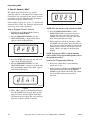
2. Press the PERM PRESS/WARM (∧) or the
DELICATES/COLD (∨) keypad until “PrOg”
appears in the Four-Digit Display.
6. Press the PERM PRESS/WARM (∧) or the
DELICATES/COLD (∨) keypad to increase or
decrease the value of the active digit and the
START (enter) keypad to enter the value of the
digit and advance to the next digit.
7. Repeat step 6 for each of the four digits. When
the START (enter) keypad is pressed and the last
digit is the active digit, the changes to the vend
price will be saved into the memory. The next
option, “dEn1”, will appear in the Four-Digit
Display.
NOTE: To program “dEn1” (Coin #1 Amount),
refer to option 2. To program other options, refer to
the appropriate section.
How to Exit Programming Feature
1. Be sure the control shows a programmable
option, not a value.
COM1R
Figure 5
3. Press the START (enter) keypad.
4. Press the PERM PRESS/WARM (∧) or the
DELICATES/COLD (∨) keypad to scroll through
the programmable options until “AtS” appears in
the Four-Digit Display.
2. While pressing and holding the NORMAL/HOT
keypad with one hand, press the NORMAL/
WARM keypad with the other hand. The control
will revert back to the previous mode of
operation.
DRY550R
Figure 6
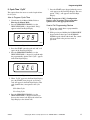
5. When “AtS” appears in the Four-Digit Display,
press the START (enter) keypad. There are four
digits in Vend Price and the fourth digit will
become the active digit. The active digit will
flash one second on and one second off.
COM4R
Figure 7
200944
© Copyright, Alliance Laundry Systems LLC – DO NOT COPY or TRANSMIT
13
Programming MDC
2. Coin #1 Amount “dEn1”
This option allows the owner to set a specific
numerical value for a coin entered. For example, in the
United States, the coin value for one quarter would be
measured in cents (25). Therefore, the coin amount
entered for one quarter would be 0025.
If the vend price (option 1) is set for “75”, and the coin
amount is set for “0025”, the vend price displayed will
decrease by 25 for each coin entered.
COM5R
Figure 10
NOTE: The coin amount can be set from 1 to 9999.
How to Program Coin #1 Amount
1. Control must be in Manual Mode. Refer to
Entering the Manual Mode.
2. Press the PERM PRESS/WARM (∧) or the
DELICATES/COLD (∨) keypad until “PrOg”
appears in the Four-Digit Display.
COM1R
Figure 8
3. Press the START (enter) keypad and “AtS” will
appear in the Four-Digit Display.
4. Press the PERM PRESS/WARM (∧) or the
DELICATES/COLD (∨) keypad to scroll through
the programmable options until “dEn1” appears
in the Four-Digit Display.
6. Press the PERM PRESS/WARM (∧) or the
DELICATES/COLD (∨) keypad to increase or
decrease the value of the active digit and the
START (enter) keypad to enter the value of the
digit and advance to the next digit.
7. Repeat step 6 for each of the four digits. When
the START (enter) keypad is pressed and the last
digit is the active digit, the changes to the coin #1
amount will be saved into the memory. The next
option, “dEn2”, will appear in the Four-Digit
Display.
NOTE: To program “dEn2” (Coin #2 Amount),
refer to option 3. To program other options, refer to
the appropriate section.
How to Exit Programming Feature
1. Be sure the control shows a programmable
option, not a value.
2. While pressing and holding the NORMAL/HOT
keypad with one hand, press the NORMAL/
WARM keypad with the other hand. The control
will revert back to the previous mode of
operation.
DRY552R
Figure 9
5. When “dEn1” appears in the Four-Digit Display,
press the START (enter) keypad. There are four
digits in Coin #1 Amount, and the fourth digit
will become the active digit. The active digit will
flash one second on and one second off.
14
© Copyright, Alliance Laundry Systems LLC – DO NOT COPY or TRANSMIT
200944
Programming MDC
3. Coin #2 Amount “dEn2”
This option allows the owner to set a specific
numerical value for a coin entered when using the dual
coin drop. For example, the coin value for a dollar coin
would be measured in cents (100). Therefore, the coin
amount entered for one dollar coin would be 0100.
If the vend price (option 1) is set for “200”, and the
coin amount is set for “0100”, the vend price displayed
will decrease by 100 for each coin entered.
COM4R
Figure 13
NOTE: The coin amount can be set from 1 to 9999.
How to Program Coin #2 Amount
1. Control must be in Manual Mode. Refer to
Entering the Manual Mode.
2. Press the PERM PRESS/WARM (∧) or the
DELICATES/COLD (∨) keypad until “PrOg”
appears in the Four-Digit Display.
COM1R
Figure 11
3. Press the START (enter) keypad and “AtS” will
appear in the Four-Digit Display.
4. Press the PERM PRESS/WARM (∧) or the
DELICATES/COLD (∨) keypad to scroll through
the programmable options until “dEn2” appears
in the Four-Digit Display.
6. Press the PERM PRESS/WARM (∧) or the
DELICATES/COLD (∨) keypad to increase or
decrease the value of the active digit and the
START (enter) keypad to enter the value of the
digit and advance to the next digit.
7. Repeat step 6 for each of the four digits. When
the START (enter) keypad is pressed and the last
digit is the active digit, the changes to the coin #2
amount will be saved into the memory. The next
option, “PLSE”, will appear in the Four-Digit
Display.
NOTE: To program “PLSE” (Start Pulse Value),
refer to option 4. To program other options, refer to
the appropriate section.
How to Exit Programming Feature
1. Be sure the control shows a programmable
option, not a value.
2. While pressing and holding the NORMAL/HOT
keypad with one hand, press the NORMAL/
WARM keypad with the other hand. The control
will revert back to the previous mode of
operation.
DRY553R
Figure 12
5. When “dEn2” appears in the Four-Digit Display,
press the START (enter) keypad. There are four
digits in Coin #2 Amount, and the fourth digit
will become the active digit. The active digit will
flash one second on and one second off.
200944
© Copyright, Alliance Laundry Systems LLC – DO NOT COPY or TRANSMIT
15
Programming MDC
4. Start Pulse Value “PLSE”
NOTE: The start pulse can be set from 1 to 9999.
This option allows the owner to program the value of
the start pulse with an aftermarket central card reader
or pay system.
How to Program Start Pulse Value
1. Control must be in Manual Mode. Refer to
Entering the Manual Mode.
2. Press the PERM PRESS/WARM (∧) or the
DELICATES/COLD (∨) keypad until “PrOg”
appears in the Four-Digit Display.
6. Press the PERM PRESS/WARM (∧) or the
DELICATES/COLD (∨) keypad to increase or
decrease the value of the active digit and the
START (enter) keypad to enter the value of the
digit and advance to the next digit.
7. Repeat step 6 for each of the four digits. When
the START (enter) keypad is pressed and the last
digit is the active digit, the changes to the start
pulse value will be saved into the memory. The
next option, “CyCL”, will appear in the FourDigit Display.
NOTE: To program “CyCL” (Cycle Time), refer to
option 5. To program other options, refer to the
appropriate section.
How to Exit Programming Feature
COM1R
Figure 14
3. Press the START (enter) keypad and “AtS” will
appear in the Four-Digit Display.
4. Press the PERM PRESS/WARM (∧) or the
DELICATES/COLD (∨) keypad to scroll through
the programmable options until “PLSE” appears
in the Four-Digit Display.
1. Be sure the control shows a programmable
option, not a value.
2. While pressing and holding the NORMAL/HOT
keypad with one hand, press the NORMAL/
WARM keypad with the other hand. The control
will revert back to the previous mode of
operation.
DRY554R
Figure 15
5. When “PLSE” appears in the Four-Digit Display,
press the START (enter) keypad. There are four
digits in Start Pulse Value, and the fourth digit
will become the active digit. The active digit will
flash one second on and one second off.
COM4R
Figure 16
16
© Copyright, Alliance Laundry Systems LLC – DO NOT COPY or TRANSMIT
200944
Programming MDC
5. Cycle Time “CyCL”
This option allows the owner to set the length of time
for all cycles.
How to Program Cycle Time
7. Press the START (enter) keypad when the correct
code appears in the Four-Digit Display. The next
option, “CnFg”, will appear in the Four-Digit
Display.
NOTE: To program “CnFg” (Configuration
Display), refer to option 6. To program other
options, refer to the appropriate section.
1. Control must be in Manual Mode. Refer to
Entering the Manual Mode.
2. Press the PERM PRESS/WARM (∧) or the
DELICATES/COLD (∨) keypad until “PrOg”
appears in the Four-Digit Display.
How to Exit Programming Feature
1. Be sure the control shows a programmable
option, not a value.
2. While pressing and holding the NORMAL/HOT
keypad with one hand, press the NORMAL/
WARM keypad with the other hand. The control
will revert back to the previous mode of
operation.
COM1R
Figure 17
3. Press the START (enter) keypad and “AtS” will
appear in the Four-Digit Display.
4. Press the PERM PRESS/WARM (∧) or the
DELICATES/COLD (∨) keypad to scroll through
the programmable options until “CyCL” appears
in the Four-Digit Display.
DRY555R
Figure 18
5. When “CyCL” appears in the Four-Digit Display,
press the START (enter) keypad. A two-letter
code will appear in the Four-Digit Display. This
code (found below) corresponds to the cycle
time.
SH = Short Cycle
LO = Long Cycle
6. Press the PERM PRESS/WARM (∧) or the
DELICATES/COLD (∨) keypad to increase or
decrease the current code displayed in the FourDigit Display to the desired code.
200944
© Copyright, Alliance Laundry Systems LLC – DO NOT COPY or TRANSMIT
17
Programming MDC
6. Configuration Display “CnFg”
This option allows the owner to turn ON or turn OFF
preprogrammed capabilities within MDC.
How to Program Configuration Display
1. Control must be in Manual Mode. Refer to
Entering the Manual Mode.
2. Press the PERM PRESS/WARM (∧) or the
DELICATES/COLD (∨) keypad until “PrOg”
appears in the Four-Digit Display.
6. Press the PERM PRESS/WARM (∧) or the
DELICATES/COLD (∨) keypad to increase or
decrease the current number to the desired
number selected from Table 1, Table 2 or
Table 3.
7. Press the START (enter) keypad when the correct
number appears in the Four-Digit Display. The
next option will appear in the Four-Digit Display.
(On software versions less than “S003”, the first
option, “AtS”, will appear in the Four-Digit
Display. On software version “S003” and higher,
“dCyC” will appear in the Four-Digit Display.)
NOTE: To program “dCyC” (Default Cycle), refer
to option 7. To program other options, refer to the
appropriate section.
How to Exit Programming Feature
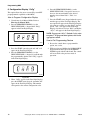
COM1R
Figure 19
3. Press the START (enter) keypad and “AtS” will
appear in the Four-Digit Display.
4. Press the PERM PRESS/WARM (∧) or the
DELICATES/COLD (∨) keypad to scroll through
the programmable options until “CnFg” appears
in the Four-Digit Display.
1. Be sure the control shows a programmable
option, not a value.
2. While pressing and holding the NORMAL/HOT
keypad with one hand, press the NORMAL/
WARM keypad with the other hand. The control
will revert back to the previous mode of
operation.
DRY563R
Figure 20
5. When “CnFg” appears in the Four-Digit Display,
press the START (enter) keypad. A number will
appear in the Four-Digit Display. This number
corresponds to the current configuration value.
18
© Copyright, Alliance Laundry Systems LLC – DO NOT COPY or TRANSMIT
200944
Programming MDC
Configuration Programming
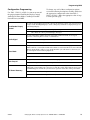
Use Table 1, Table 2 or Table 3 to turn on or turn off
the preprogrammed Card Reader Display Control,
Audio Signal, Error Mode, Coin Drop #1 and EC
Power Recovery in MDC.
Card Reader Display
Control
To change any or all of these configuration options,
review the following descriptions carefully and choose
the appropriate configuration value from Table 1,
Table 2 or Table 3. Enter the appropriate value in step
6 on the previous page.
This option, when enabled, prevents the control from displaying certain card operation-related
messages on the Four-Digit Display to allow a third party card reader to display messages on
the Four-Digit Display.
OFF = Turns on control generated display messages.
ON = Turns off control generated display messages.
This option determines whether the audio signal will sound for machine errors, keypad
depression, coins/start pulse received, or card insertion.
Audio Signal
OFF = Turns audio signal off.
ON = Turns audio signal on.
Error Mode
This option determines whether the Fill and Drain Error Modes occur. If programmed off, the
Fill Error will not occur and the machine will continue to wait for the fill level to be reached. In
addition, the Drain Error will not occur and the machine cycle will advance to the next cycle
step as though the water had been pumped out.
OFF = Turns off Error Mode.
ON = Turns on Error Mode.
This option determines whether the control will accept a pulse from Coin Drop #1.
Coin Drop #1
Coin Drop #1 = Turns on Coin Drop #1.
EC Power Recovery
This option determines if the European Community Power Recovery feature is enabled. If
enabled and a power failure lasts at least two seconds, the control will require the user to press
the START keypad to resume the cycle that was in operation at the time of the power failure.
OFF = Turns off the European Community Power Recovery feature.
ON = Turns on the European Community Power Recovery feature.
.
200944
© Copyright, Alliance Laundry Systems LLC – DO NOT COPY or TRANSMIT
19
Programming MDC
Use Table 1 for software versions “S006” and lower.
To determine the software version of the control, refer
to Start Up.
Value
Card Reader
Display Control
Audio Signal
Error Mode
Coin Drop #1
EC Power
Recovery
16
OFF
OFF
OFF
Coin Drop #1
OFF
17
OFF
OFF
OFF
Coin Drop #1
ON
20
OFF
OFF
ON
Coin Drop #1
OFF
21
OFF
OFF
ON
Coin Drop #1
ON
24
OFF
ON
OFF
Coin Drop #1
OFF
25
OFF
ON
OFF
Coin Drop #1
ON
28 (default)
OFF
ON
ON
Coin Drop #1
OFF
29
OFF
ON
ON
Coin Drop #1
ON
48
ON
OFF
OFF
Coin Drop #1
OFF
49
ON
OFF
OFF
Coin Drop #1
ON
52
ON
OFF
ON
Coin Drop #1
OFF
53
ON
OFF
ON
Coin Drop #1
ON
56
ON
ON
OFF
Coin Drop #1
OFF
57
ON
ON
OFF
Coin Drop #1
ON
60
ON
ON
ON
Coin Drop #1
OFF
61
ON
ON
ON
Coin Drop #1
ON
Table 1
Use Table 2 for software version “S007”. To determine
the software version of the control, refer to Start Up.
Value
Card Reader
Display Control
Audio Signal
Error Mode
Coin Drop #1
EC Power
Recovery
80
OFF
OFF
OFF
Coin Drop #1
OFF
81
OFF
OFF
OFF
Coin Drop #1
ON
84
OFF
OFF
ON
Coin Drop #1
OFF
85
OFF
OFF
ON
Coin Drop #1
ON
88
OFF
ON
OFF
Coin Drop #1
OFF
89
OFF
ON
OFF
Coin Drop #1
ON
92 (default)
OFF
ON
ON
Coin Drop #1
OFF
93
OFF
ON
ON
Coin Drop #1
ON
112
ON
OFF
OFF
Coin Drop #1
OFF
113
ON
OFF
OFF
Coin Drop #1
ON
116
ON
OFF
ON
Coin Drop #1
OFF
117
ON
OFF
ON
Coin Drop #1
ON
120
ON
ON
OFF
Coin Drop #1
OFF
121
ON
ON
OFF
Coin Drop #1
ON
124
ON
ON
ON
Coin Drop #1
OFF
125
ON
ON
ON
Coin Drop #1
ON
Table 2
20
© Copyright, Alliance Laundry Systems LLC – DO NOT COPY or TRANSMIT
200944
Programming MDC
Use Table 3 for software version “S008”. To determine
the software version of the control, refer to Start Up.
Value
Card Reader
Display Control
Audio Signal
Error Mode
Coin Drop #1
EC Power
Recovery
0
OFF
OFF
OFF
Coin Drop #1
OFF
1
OFF
OFF
OFF
Coin Drop #1
ON
4
OFF
OFF
ON
Coin Drop #1
OFF
5
OFF
OFF
ON
Coin Drop #1
ON
8
OFF
ON
OFF
Coin Drop #1
OFF
9
OFF
ON
OFF
Coin Drop #1
ON
12 (default)
OFF
ON
ON
Coin Drop #1
OFF
13
OFF
ON
ON
Coin Drop #1
ON
32
ON
OFF
OFF
Coin Drop #1
OFF
33
ON
OFF
OFF
Coin Drop #1
ON
36
ON
OFF
ON
Coin Drop #1
OFF
37
ON
OFF
ON
Coin Drop #1
ON
40
ON
ON
OFF
Coin Drop #1
OFF
41
ON
ON
OFF
Coin Drop #1
ON
44
ON
ON
ON
Coin Drop #1
OFF
45
ON
ON
ON
Coin Drop #1
ON
Table 3
200944
© Copyright, Alliance Laundry Systems LLC – DO NOT COPY or TRANSMIT
21
Programming MDC
7. Default Cycle “dCyC”
This option allows the owner to set the default cycle
type.
NOTE: This option is available on software version
“S003” or higher only.
How to Program Default Cycle
7. Press the START (enter) keypad when the correct
code appears in the Four-Digit Display.
NOTE: To program other options, refer to the
appropriate section.
How to Exit Programming Feature
1. Be sure the control shows a programmable
option, not a value.
1. Control must be in Manual Mode. Refer to
Entering the Manual Mode.
2. Press the PERM PRESS/WARM (∧) or the
DELICATES/COLD (∨) keypad until “PrOg”
appears in the Four-Digit Display.
2. While pressing and holding the NORMAL/HOT
keypad with one hand, press the NORMAL/
WARM keypad with the other hand. The control
will revert back to the previous mode of
operation.
COM1R
Figure 21
3. Press the START (enter) keypad and “AtS” will
appear in the Four-Digit Display.
4. Press the PERM PRESS/WARM (∧) or the
DELICATES/COLD (∨) keypad to scroll through
the programmable options until “dCyC” appears
in the Four-Digit Display.
TLW1944N
Figure 22
5. When “dCyC” appears in the Four-Digit Display,
press the START (enter) keypad. A letter code
will appear in the Four-Digit Display. This code
(found below) corresponds to the cycle type.
hEAy = NORMAL/HOT
nOrL = NORMAL/WARM
PP = PERM PRESS/WARM
dEL = DELICATES/COLD
6. Press the PERM PRESS/WARM (∧) or the
DELICATES/COLD (∨) keypad to increase or
decrease the current code displayed in the FourDigit Display to the desired code.
22
© Copyright, Alliance Laundry Systems LLC – DO NOT COPY or TRANSMIT
200944
Collecting Audit Information
This feature allows the owner to retrieve audit
information stored in the washer by pressing a
sequence of pads on the control. For an explanation of
the audit options available, refer to the Audit Options
List on this page.
How to Enter Audit Feature
There are two methods the owner can use to enter the
Audit Feature.
Entering the Audit Feature by Manual Mode
1. Control must be in Manual Mode to start. Refer
to Entering the Manual Mode.
2. Press the PERM PRESS/WARM (∧) or the
DELICATES/COLD (∨) keypad until “AUdt”
appears in the Four-Digit Display.
Audit Options List
Four-Digit
Display
Description
C1
Total Number of Coins #1
C2
Total Number of Coins #2
CyC
SP
Total Number of Machine Cycles
Total Number of Start Pulses
Table 4
2. Once the desired option appears in the Four-Digit
Display, press the START (enter) keypad once to
start the audit count. At this point, the display
will show the four-digit number of the audit
value.
3. Press the START (enter) keypad again. The
control will go to the next audit option in the
Audit Options List.
4. To select other audit options, repeat steps 1-3.
COM2R
COM2R
Figure 23
3. Press the START (enter) keypad. “C1” will
appear in the Four-Digit Display.
NOTE: If the procedure did not work, the control
will return to the Ready Mode.
Entering the Audit Feature with the Coin Vault
Open
How to Exit Audit Feature When
Using Manual Mode
1. Be sure the control shows an audit option, not a
value.
2. While pressing and holding the NORMAL/HOT
keypad with one hand, press the NORMAL/
WARM keypad with the other hand. The control
will return to the previous mode of operation.
NOTE: To exit Audit Feature when using Coin
Vault Open method, owner must close coin vault.
1. Open coin vault.
NOTE: The service door must be closed on
machines with controls that have software versions
“S003” and higher.
2. Press the START (enter) keypad.
How to Read Audit Data
1. Use the PERM PRESS/WARM (∧) or the
DELICATES/COLD (∨) keypad to scroll through
various options until the desired option is
displayed in the Four-Digit Display. Refer to
Table 4 for an explanation of the audit options
available.
200944
© Copyright, Alliance Laundry Systems LLC – DO NOT COPY or TRANSMIT
23
Testing Machine and MDC Functions
This feature allows the owner to run diagnostic tests
on various washer operations without servicing the
washer. The following tests are available:
• Show Fill Time Test
Diagnostic Test Descriptions
Show Fill Time Test
This test will display the average fill time. The average
will be calculated by taking the average of the last four
fill times.
• Show Drain Time Test
How to Enter Testing Feature
1. Control must be in Manual Mode. Refer to
Entering the Manual Mode.
2. Press the PERM PRESS/WARM (∧) or the
DELICATES/COLD (∨) keypad until “dIAg”
appears in the Four-Digit Display.
3. Press the START (enter) keypad. Display will
change to “d001”.
4. Press the PERM PRESS/WARM (∧) or the
DELICATES/COLD (∨) keypad to scroll through
the diagnostic test options.
To start test, control must be in the Testing Mode.
Refer to “How to Start Tests” at the beginning of this
section.
To enter, press the START (enter) keypad. The FourDigit Display will show “FXXX”. The “XXX” will be
the average fill time in minutes and seconds for that
machine.
To exit the Show Fill Time Test, press and hold the
NORMAL/HOT keypad with one hand, then press the
NORMAL/WARM keypad with the other hand. The
control will return to the Testing Mode and will
display “d001”.
How to Start Tests
Show Drain Time Test
To start a diagnostic test, refer to Table 5. Press the
START (enter) keypad when the desired test number is
displayed. For detailed information on each test, read
the appropriate description on this page.
This test will display the average drain time. The
average will be calculated by taking the average of the
last four drain times.
How to Exit Testing Feature
To start test, control must be in the Testing Mode.
Refer to “How to Start Tests” at the beginning of this
section.
While pressing and holding the NORMAL/HOT
keypad with one hand, press the NORMAL/WARM
keypad with the other hand. The display will return to
the previous mode of operation.
To enter, press the START (enter) keypad. The FourDigit Display will show “dXXX”. The “XXX” will be
the average drain time in minutes and seconds for that
machine.
Diagnostic (Testing) Mode –
Quick Reference Table
Test
Number
Diagnostic Mode
Four-Digit Display
d001
Show Fill Time Test
d002
Show Drain Time Test dXXX
To exit the Show Drain Time Test, press and hold the
NORMAL/HOT keypad with one hand, then press the
NORMAL/WARM keypad with the other hand. The
control will return to the Testing Mode and will
display “d001”.
FXXX
Table 5
24
© Copyright, Alliance Laundry Systems LLC – DO NOT COPY or TRANSMIT
200944
Testing Machine and MDC Functions
Production Test Cycle
To Enter Production Test Cycle
1. Be certain control is in Ready Mode, washer lid
is closed, and access panel or coin vault is open.
2. While pressing and holding the NORMAL/
WARM keypad with one hand, press the PERM
PRESS/WARM keypad with the other hand.
3. When the control enters the Production Test
Cycle, it will first display “SXXX” with the
“XXX” showing the software version of the
control.
4. The control will advance through the sequence of
test steps whenever NORMAL/WARM is
pressed, with the exception of the Keypad Test
and Step #4 Test. Refer to Table 6 for all tests in
the Production Test Cycle.
To Exit Production Test Cycle
The control must be powered down to end the test.
200944
© Copyright, Alliance Laundry Systems LLC – DO NOT COPY or TRANSMIT
25
Testing Machine and MDC Functions
Production Test Cycle Quick Reference Table
Display
Test Mode
Comments
SXXX
Software Version
XXX is the software version number.
PAdX
Keypad Test
When a key is pressed, the control will display the number assigned to the
keypad (1 – NORMAL/HOT, 2 – NORMAL/WARM, 3 – PERM PRESS/
WARM, 4 – DELICATES/COLD, 5 – START). As each keypad is
pressed, its corresponding LED will be lit and remain on for the duration
of the test. When all keypads have been pressed, the control will advance
to Coin Drop Test step.
CXCX
Coin Drop Test
X is the number of coins entered. If dual coin drops are installed, coin
drop #1 will be shown on the left of the display and coin drop #2 will be
shown on the right of the display. If a single coin drop is used, only one
coin count will be displayed and the other side will remain at zero.
S XX
Service Door Switch Test
XX is the number of service door switch openings.
U XX
Coin Vault Test
XX is the number of coin vault openings.
All LEDs and
display
segments will
light
Show Entire Display Mode
None
0001
Step #1 Test
SPIN LED is lit and control energizes the high speed spin motor outputs.
0002
Step #2 Test
Motor outputs are off and hot water valve is on.
0003
Step #3 Test
Motor outputs are off and cold water valve is on.
0004
Step #4 Test
Motor outputs are off and hot and cold water valves are on. Control will
remain in this mode until machine fills and pressure switch opens. All
keypad presses are ignored until step is complete.
0005
Step #5 Test
RINSE LED is lit and control energizes the high speed agitate motor
outputs.
0006
Step #6 Test
RINSE LED is lit and control energizes low speed spin motor outputs.
0007
Step #7 Test
SPIN LED is lit and control energizes low speed spin motor outputs.
0008
Step #8 Test
SPIN LED is lit and control energizes high speed spin motor outputs.
0009
Step #9 Test
LEDs are off, motor outputs are off, and hot and cold water valves are on.
0010
Step #10 Test
SPIN LED is lit and control energizes high speed spin motor outputs.
Table 6
26
© Copyright, Alliance Laundry Systems LLC – DO NOT COPY or TRANSMIT
200944
Rapid Advance Feature
The Rapid Advance feature allows the owner to
quickly advance through active cycles or advance into
a cycle from the Ready Mode.
How to Enter Rapid Advance from
Ready Mode
1. If control is in Ready Mode, control must be put
into Manual Mode. Refer to Entering the
Manual Mode.
2. Press the PERM PRESS/WARM (∧) or the
DELICATES/COLD (∨) keypad until “rAPd”
appears in the display.
3. Press the START (enter) keypad. The Four-Digit
Display will display “FFIL” for three seconds
and will then show the cycle time remaining. The
START LED will flash.
4. Press the START (enter) keypad to start cycle.
The time remaining will show in the Four-Digit
Display.
How to Use Rapid Advance
While in the Rapid Advance feature, pressing the
START (enter) keypad will advance the washer to the
next cycle step. The cycle indicator lights and FourDigit Display will show which cycle step the washer is
in. Refer to Table 7 for cycle steps.
Four-Digit Display
Cycle Step
FFIL
Wash Fill Cycle Step
rFIL
Rinse Fill Cycle Step
FSPn
Final Spin Cycle Step
Table 7
Continue pressing the START (enter) keypad until the
cycle is completed.
How to Exit Rapid Advance Feature
Advance through the cycles until reaching the Ready
Mode.
How to Enter Rapid Advance During
an Active Cycle
1. Be certain service door is open and coin vault is
closed.
2. While pressing and holding the NORMAL/HOT
keypad with one hand, press the NORMAL/
WARM keypad with the other hand. The FourDigit Display will show “rAPd”.
200944
© Copyright, Alliance Laundry Systems LLC – DO NOT COPY or TRANSMIT
27
Power Fail Recovery
The Power Fail Recovery feature allows the cycle status
to be saved in memory in the event of a power failure.
If a cycle is in progress when the power fails, the cycle
status is saved in memory. When power recovers, the
control will determine whether to automatically
continue the cycle from the point it left off, requiring
the user to press the START keypad to continue the
cycle, or end the cycle and put the control into the
Ready Mode.
28
If the European Community (EC) Power Fail feature is
disabled, the control will automatically resume the
cycle from the point it left off. Whenever the EC
Power Fail feature is enabled and the power failure
lasted more than two (2) seconds, the control will
prompt the user to press the START keypad to
continue the cycle from the point it left off.
© Copyright, Alliance Laundry Systems LLC – DO NOT COPY or TRANSMIT
200944
Default Washer Settings
Default Settings
Cycle Length
Coin #1 Value
Coin #2 Value
Start Pulse Value
Vend Price
Control Configurations
Card Reader Display Control
Audio Signal
Error Mode
Coin Drop
EC Power Fail
Default Cycle **
Default
Long
25
100
100
100
*
OFF
ON
ON
ON
OFF
PERM PRESS/
WARM
* The default control configuration for software
versions “S006” and lower is 28.
The default control configuration for software
version “S007” is 92.
The default control configuration for software
version “S008” is 12.
** This option available in software version “S003” or
higher.
200944
Default Cycle
The PERM PRESS/WARM cycle is the default cycle
and is programmed in at the factory. This cycle can be
made longer or shorter by reprogramming the cycle
length. Refer to Programming MDC, option 5, to
change these times. All other times are not
programmable.
Cycle
Wash Fill
Wash Agitate
Wash Pause
Wash Spin #1
Wash Spin #1 Pause
Wash Spin/Spray
Wash Spin #2
Rinse Fill
Rinse Agitate
Rinse Pause
Rinse Spin #1
Rinse Spin/Spray
Final Spin
© Copyright, Alliance Laundry Systems LLC – DO NOT COPY or TRANSMIT
Default
2 minutes
9 minutes
10 seconds
24 seconds
10 seconds
0
0
2 minutes
5 minutes
10 seconds
30 seconds
30 seconds
7 minutes
29