1
B. Monitoring Control
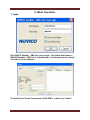
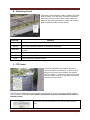
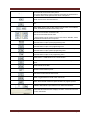
Monitoring Control consists of Caption, Stream, REC Start,
Save As, Listen, PTZ, and Close. During live monitoring,
right mouse click on a picture, these control options will
appear on the screen as illustrated. Please refer to below
table for detail information for each feature.
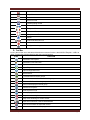
FUNCTION
Caption
Stream
REC Start
Listen
PTZ
Close
CONTROL
OSD such as camera number, DVR name, date/time, refresh rate, number of users, etc.
If a DVR’s encoding priority is set to Recording, NUVICO EasyNet – VMS Lite offers
dual- codec ,MPEG-4 or MJPEG, to optimize live monitoring.
To begin record live streaming video to PC’s HDD. The maximum duration is 10
minutes.
To begin hear audio if available
Activate/deactivate PTZ control if available
Close connection of selected camera
C. PTZ Control
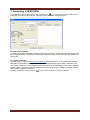
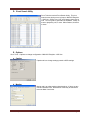
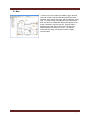
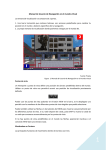
A cross hair appears in the middle of the screen,
click on the picture to Pan and Tilt. Farther the click
point from the center of the crosshair, the speed of
Pan/Tilt is faster. To zoom In/Out, use mouse scroll or
move the mouse to the left or right edge of the picture
for zoom and focus control.
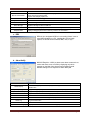
The PTZ GUI for VMS share the same button layout as the DVR. A PC mouse can be used to control a
PTZ if a mouse is not present. Some buttons and functions only works with NUVICO PTZ models in
NUVICO protocol.
DIRECTION: Also used as a directional, enter and esc button in the PTZ
menu.
NUVICO EasyNet - VMS Lite Revision 4
Page 14